
Dynamic Database Credentials:

Security Contingency Planning
Sean Chittenden
Engineering, HashiCorp
@SeanChittenden
sean@hashicorp.com
https://keybase.io/seanc
Vault
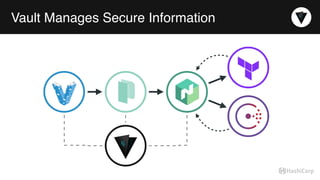
Vault Manages Secure Information
Risk Assessment
Security is an Operational Concern
Loss Aversion byproduct of Security
Real security threats often differ from theoretical security.
Practical security implies loss aversion. Against what threat?
How do you bound exposure?
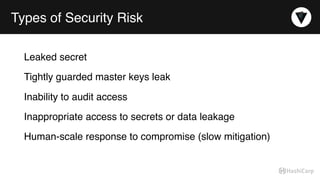
Types of Security Risk
Leaked secret
Tightly guarded master keys leak
Inability to audit access
Inappropriate access to secrets or data leakage
Human-scale response to compromise (slow mitigation)
Opportunity Assessment
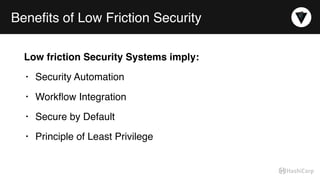
Benefits of Low Friction Security
Low friction Security Systems imply:
• Security Automation
• Workflow Integration
• Secure by Default
• Principle of Least Privilege
PostgreSQL Security
Friction
Sticking Points
Statically Managed Defense in Depth
• pg_hba.conf: network, auth, username, database, transport
• ROLE: passwords, expirations, connection limits
• Data Control Language: GRANT, RLS
Configuration Management
To The Rescue… ?
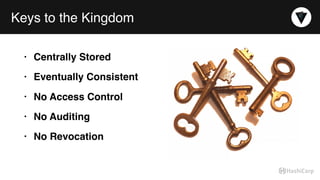
Keys to the Kingdom
• Centrally Stored
• Eventually Consistent
• No Access Control
• No Auditing
• No Revocation
Meatspace Operational Concerns
• How do applications get secrets?
• How do humans acquire secrets?
• How are secrets updated?
• How is a secret revoked?
Why not use PostgreSQL for secrets?
• Not designed for dynamic secrets
• Typically plaintext storage by default
• Limited auditing capabilities
• No revocation abilities
• Homegrown RLS access controls
What if…
Embraced Requirements
• Centralized key management
• Grant temporary leases to secured resources
• Trust memory (not disk)
• Embrace automation (and the necessary APIs)
• Assume cyphered data at rest is trustworthy
• Decoupled an HA storage backend from the secrets management
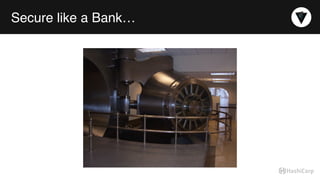
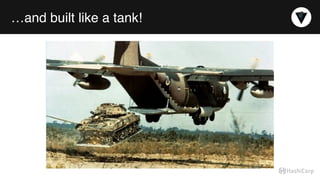
Secure like a Bank…
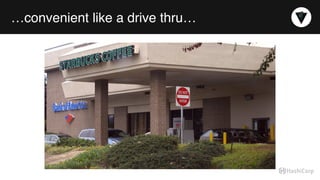
…convenient like a drive thru…
…and built like a tank!
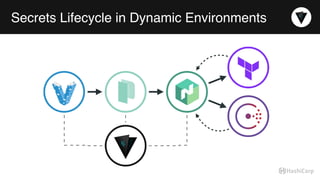
Secrets Lifecycle in Dynamic Environments
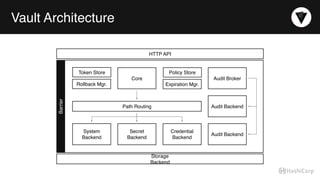
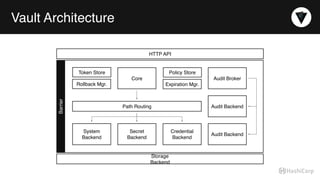
Vault Architecture
Audit Broker
Audit Backend
Audit Backend
Credential
Backend
Secret
Backend
System
Backend
Path Routing
Rollback Mgr. Expiration Mgr.
Token Store Policy Store
HTTP API
Storage
Backend
Core
Barrier
Glossary
Glossary
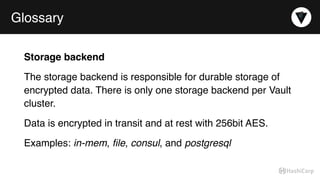
Storage backend
The storage backend is responsible for durable storage of
encrypted data. There is only one storage backend per Vault
cluster.
Data is encrypted in transit and at rest with 256bit AES.
Examples: in-mem, file, consul, and postgresql
Glossary
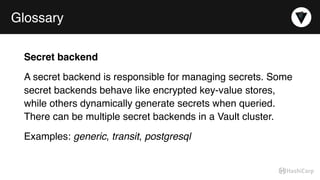
Secret backend
A secret backend is responsible for managing secrets. Some
secret backends behave like encrypted key-value stores,
while others dynamically generate secrets when queried.
There can be multiple secret backends in a Vault cluster.
Examples: generic, transit, postgresql
Glossary
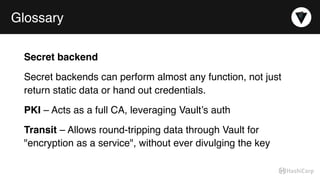
Secret backend
Secret backends can perform almost any function, not just
return static data or hand out credentials.
PKI – Acts as a full CA, leveraging Vault’s auth
Transit – Allows round-tripping data through Vault for
"encryption as a service", without ever divulging the key
Glossary
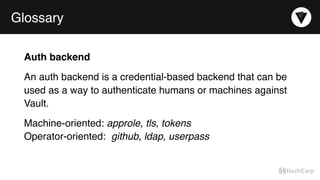
Auth backend
An auth backend is a credential-based backend that can be
used as a way to authenticate humans or machines against
Vault.
Machine-oriented: approle, tls, tokens

Operator-oriented:  github, ldap, userpass
Glossary
Vault token
A vault token is a conceptually similar to a session cookie on
a website. Once a user authenticates via an auth backend,
Vault returns a token which is to be used for future requests.
Glossary
Secret
A secret is anything stored or returned by Vault that contains
confidential material.
A secret is anything that, if acquired by an unauthorized
party, would cause political, financial, or appearance harm to
an organization.
Glossary
Server
The Vault server provides an HTTP API which clients interact
with and manages the interaction between all the backends,
ACL enforcement, and secret lease revocation.
Vault Architecture
Audit Broker
Audit Backend
Audit Backend
Credential
Backend
Secret
Backend
System
Backend
Path Routing
Rollback Mgr. Expiration Mgr.
Token Store Policy Store
HTTP API
Storage
Backend
Core
Barrier
Initializing Vault
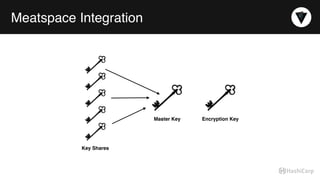
Meatspace Integration
Key Shares
Master Key Encryption Key
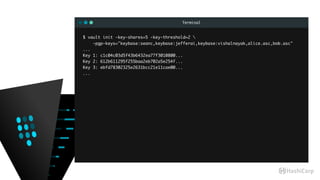
Terminal
$ vault init -key-shares=5 -key-threshold=2 
-pgp-keys="keybase:seanc,keybase:jefferai,keybase:vishalnayak,alice.asc,bob.asc"
...
Key 1: c1c04c03d5f43b6432ea77f3010800...
Key 2: 612b611295f255baa2eb702a5e254f...
Key 3: ebfd78302325e2631bcc21e11cae00...
...
Obtaining a Vault Token
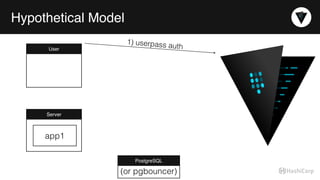
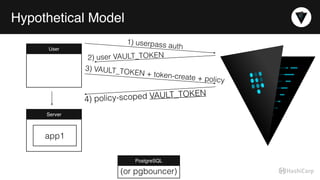
Hypothetical Model
User
1) userpass auth
Server
PostgreSQL
app1
(or pgbouncer)
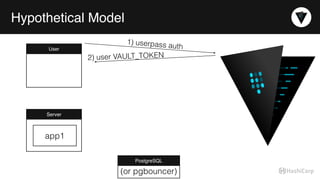
Hypothetical Model
User
1) userpass auth
2) user VAULT_TOKEN
Server
PostgreSQL
app1
(or pgbouncer)
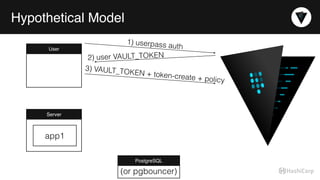
Hypothetical Model
User
1) userpass auth
2) user VAULT_TOKEN
3) VAULT_TOKEN + token-create + policy
Server
PostgreSQL
app1
(or pgbouncer)
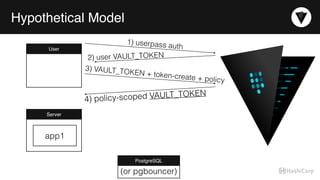
Hypothetical Model
User
1) userpass auth
2) user VAULT_TOKEN
3) VAULT_TOKEN + token-create + policy
4) policy-scoped VAULT_TOKEN
Server
PostgreSQL
app1
(or pgbouncer)
Hypothetical Model
User
1) userpass auth
2) user VAULT_TOKEN
3) VAULT_TOKEN + token-create + policy
4) policy-scoped VAULT_TOKEN
Server
PostgreSQL
app1
(or pgbouncer)
Hypothetical Model
User
1) userpass auth
2) user VAULT_TOKEN
3) VAULT_TOKEN + token-create + policy
4) policy-scoped VAULT_TOKEN
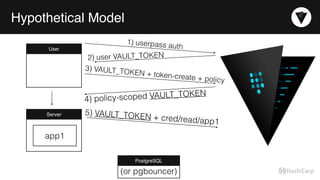
Server 5) VAULT_TOKEN + cred/read/app1
PostgreSQL
app1
(or pgbouncer)
Hypothetical Model
User
1) userpass auth
2) user VAULT_TOKEN
3) VAULT_TOKEN + token-create + policy
4) policy-scoped VAULT_TOKEN
Server 5) VAULT_TOKEN + cred/read/app1
PostgreSQL
app1
(or pgbouncer)
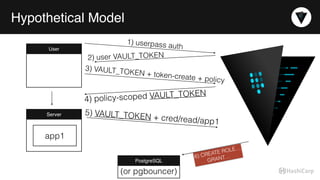
6) CREATE ROLE…

GRANT…
Hypothetical Model
User
1) userpass auth
2) user VAULT_TOKEN
3) VAULT_TOKEN + token-create + policy
4) policy-scoped VAULT_TOKEN
Server 5) VAULT_TOKEN + cred/read/app1
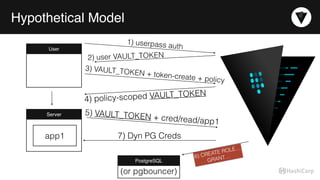
7) Dyn PG Creds
PostgreSQL
app1
(or pgbouncer)
6) CREATE ROLE…

GRANT…
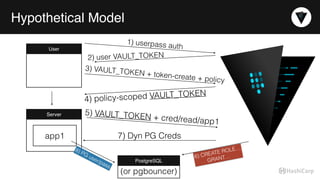
Hypothetical Model
User
1) userpass auth
2) user VAULT_TOKEN
3) VAULT_TOKEN + token-create + policy
4) policy-scoped VAULT_TOKEN
Server 5) VAULT_TOKEN + cred/read/app1
7) Dyn PG Creds
PostgreSQL
8) PG user/pass
app1
(or pgbouncer)
6) CREATE ROLE…

GRANT…
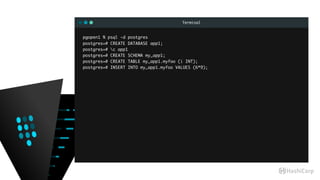
Terminal
pgopen1 % psql -d postgres
postgres=# CREATE DATABASE app1;
postgres=# c app1
postgres=# CREATE SCHEMA my_app1;
postgres=# CREATE TABLE my_app1.myfoo (i INT);
postgres=# INSERT INTO my_app1.myfoo VALUES (6*9);
Terminal
pgopen1 % vault mount postgresql
Successfully mounted 'postgresql' at 'postgresql'!
pgopen1 % vault path-help postgresql/ | head -8
## DESCRIPTION
The PostgreSQL backend dynamically generates database users.
After mounting this backend, configure it using the endpoints within
the "config/" path.
## PATHS
pgopen1 % vault path-help postgresql/ | grep /
the "config/" path.
^config/connection$
^config/lease$
^creds/(?P<name>w[w-.]+w)$
^roles/(?P<name>w[w-.]+w)$
^roles/?$
Terminal
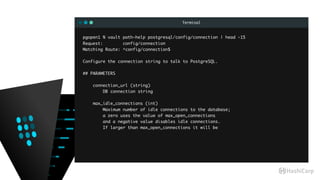
pgopen1 % vault path-help postgresql/config/connection | head -15
Request: config/connection
Matching Route: ^config/connection$
Configure the connection string to talk to PostgreSQL.
## PARAMETERS
connection_url (string)
DB connection string
max_idle_connections (int)
Maximum number of idle connections to the database;
a zero uses the value of max_open_connections
and a negative value disables idle connections.
If larger than max_open_connections it will be
Terminal
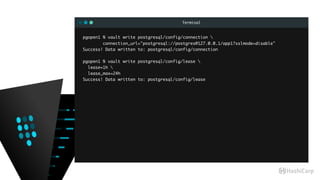
pgopen1 % vault write postgresql/config/connection 

connection_url="postgresql://postgres@127.0.0.1/app1?sslmode=disable"
Success! Data written to: postgresql/config/connection
pgopen1 % vault write postgresql/config/lease 
lease=1h 
lease_max=24h
Success! Data written to: postgresql/config/lease
Terminal
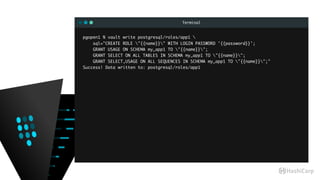
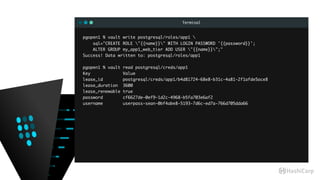
pgopen1 % vault write postgresql/roles/app1 
sql="CREATE ROLE "{{name}}" WITH LOGIN PASSWORD '{{password}}';
GRANT USAGE ON SCHEMA my_app1 TO "{{name}}";

GRANT SELECT ON ALL TABLES IN SCHEMA my_app1 TO "{{name}}";
GRANT SELECT,USAGE ON ALL SEQUENCES IN SCHEMA my_app1 TO "{{name}}";"
Success! Data written to: postgresql/roles/app1
Terminal
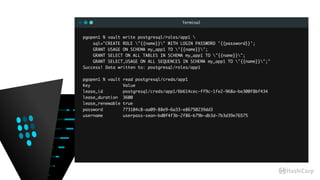
pgopen1 % vault write postgresql/roles/app1 
sql="CREATE ROLE "{{name}}" WITH LOGIN PASSWORD '{{password}}';
GRANT USAGE ON SCHEMA my_app1 TO "{{name}}";

GRANT SELECT ON ALL TABLES IN SCHEMA my_app1 TO "{{name}}";
GRANT SELECT,USAGE ON ALL SEQUENCES IN SCHEMA my_app1 TO "{{name}}";"
Success! Data written to: postgresql/roles/app1
pgopen1 % vault read postgresql/creds/app1
Key Value
lease_id postgresql/creds/app1/6b614cec-ff9c-1fe2-968a-be300f8bf434
lease_duration 3600
lease_renewable true
password 773104c8-aa09-88e9-6a33-e86750239dd3
username userpass-sean-bd0f4f3b-2f86-b79b-db3d-7b3d39e76575
Terminal
pgopen1 % vault read postgresql/creds/app1
Key Value
lease_id postgresql/creds/app1/6b614cec-ff9c-1fe2-968a-be300f8bf434
lease_duration 3600
lease_renewable true
password 773104c8-aa09-88e9-6a33-e86750239dd3
username userpass-sean-bd0f4f3b-2f86-b79b-db3d-7b3d39e76575
pgopen1 % psql -q -d app1
app1=# x
app1=# dn+
List of schemas
-[ RECORD 1 ]-----+-------------------------------------------------------------
Name | my_app1
Owner | pgsql
Access privileges | pgsql=UC/pgsql +
| "userpass-sean-bd0f4f3b-2f86-b79b-db3d-7b3d39e76575"=U/pgsql
Description |
Terminal
pgopen1 % psql -q -d app1
app1=# x
app1=# dn+
List of schemas
-[ RECORD 1 ]-----+-------------------------------------------------------------
Name | my_app1
Owner | pgsql
Access privileges | pgsql=UC/pgsql +
| "userpass-sean-bd0f4f3b-2f86-b79b-db3d-7b3d39e76575"=U/pgsql
Description |
app1=# dp+
Access privileges
-[ RECORD 1 ]-----+-------------------------------------------------------------
Schema | my_app1
Name | myfoo
Type | table
Access privileges | pgsql=arwdDxt/pgsql +
| "userpass-sean-bd0f4f3b-2f86-b79b-db3d-7b3d39e76575"=r/pgsql
Column privileges |
Policies |
Terminal
app1=# CREATE ROLE my_app1_web_tier;
app1=# GRANT USAGE ON SCHEMA my_app1 TO my_app1_web_tier;
app1=# GRANT SELECT ON ALL TABLES IN SCHEMA my_app1 TO my_app1_web_tier;
app1=# dp+
Access privileges
-[ RECORD 1 ]-----+-------------------------
Schema | my_app1
Name | myfoo
Type | table
Access privileges | pgsql=arwdDxt/pgsql +
| my_app1_web_tier=r/pgsql
Column privileges |
Policies |
Terminal
pgopen1 % vault write postgresql/roles/app1 
sql="CREATE ROLE "{{name}}" WITH LOGIN PASSWORD '{{password}}';
ALTER GROUP my_app1_web_tier ADD USER "{{name}}";"
Success! Data written to: postgresql/roles/app1
pgopen1 % vault read postgresql/creds/app1
Key Value
lease_id postgresql/creds/app1/b4d81724-68e8-b31c-4a81-2f1afde5ace8
lease_duration 3600
lease_renewable true
password cf6627de-0ef9-1d2c-4968-b5fa703e6af2
username userpass-sean-0bf4abe8-5193-7d6c-ed7a-766d705dda66
Terminal
pgopen1 % psql -q -U userpass-sean-0bf4abe8-5193-7d6c-ed7a-766d705dda66 app1
app1=> SET search_path = my_app1;
app1=> dn+
List of schemas
-[ RECORD 1 ]-----+-------------------------------------------------------------
Name | my_app1
Owner | pgsql
Access privileges | pgsql=UC/pgsql +
| "userpass-sean-bd0f4f3b-2f86-b79b-db3d-7b3d39e76575"=U/pgsql+
| my_app1_web_tier=U/pgsql
Description |
app1=> dp+
Access privileges
-[ RECORD 1 ]-----+-------------------------
Schema | my_app1
Name | myfoo
Type | table
Access privileges | pgsql=arwdDxt/pgsql +
| my_app1_web_tier=r/pgsql
Column privileges |
Policies |
Terminal
app1=> SELECT * FROM my_app1.myfoo ;
-[ RECORD 1 ]
i | 1
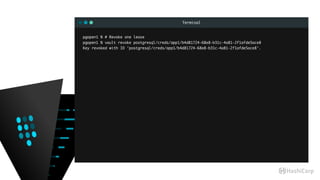
Terminal
pgopen1 % # Revoke one lease
pgopen1 % vault revoke postgresql/creds/app1/b4d81724-68e8-b31c-4a81-2f1afde5ace8
Key revoked with ID 'postgresql/creds/app1/b4d81724-68e8-b31c-4a81-2f1afde5ace8'.
Terminal
pgopen1 % # Revoke all of postgresql/ ’s leases
pgopen1 % vault revoke -prefix postgresql/creds
app1=# du
List of roles
-[ RECORD 1 ]----------------------------------------------------------
Role name | my_app1_web_tier
Attributes | Cannot login
Member of | {}
-[ RECORD 2 ]----------------------------------------------------------
Role name | pgsql
Attributes | Superuser, Create role, Create DB, Replication, Bypass RLS
Member of | {}
Terminal
pgopen1 % # Create some new creds from a child token
pgopen1 % vault token-create
Key Value
token fc20f365-4250-e840-739e-2e658dba8678
token_accessor 046f5be2-a98d-4608-4398-4c232b3afca2
token_duration 0
token_renewable true
token_policies [root]
$ env VAULT_TOKEN=fc20f365-4250-e840-739e-2e658dba8678 vault read postgresql/creds/app1
Key Value
lease_id postgresql/creds/app1/d6e01c35-ff11-365f-5bce-d78dbe9fd995
lease_duration 2592000
lease_renewable true
password 2828a500-f813-b785-5d49-0da565de2938
username token-8921e3d4-9a0a-302c-e6c2-cfb86d1107a4
$ env VAULT_TOKEN=fc20f365-4250-e840-739e-2e658dba8678 vault read postgresql/creds/app1
Key Value
lease_id postgresql/creds/app1/7532550e-e5cb-501d-a8e5-3578a71a40c3
lease_duration 2592000
lease_renewable true
password 2a9f3169-c49d-f83f-e0d7-b261c4aadcc9
username token-8ef907c8-e619-4b8f-01f4-372dbcac51ca
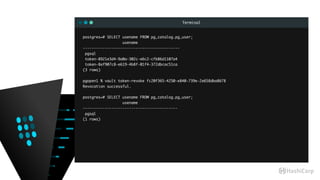
Terminal
postgres=# SELECT usename FROM pg_catalog.pg_user;
usename
--------------------------------------------
pgsql
token-8921e3d4-9a0a-302c-e6c2-cfb86d1107a4
token-8ef907c8-e619-4b8f-01f4-372dbcac51ca
(3 rows)
pgopen1 % vault token-revoke fc20f365-4250-e840-739e-2e658dba8678
Revocation successful.
postgres=# SELECT usename FROM pg_catalog.pg_user;
usename
-------------------------------------------
pgsql
(1 rows)
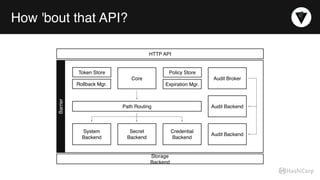
How 'bout that API?
Audit Broker
Audit Backend
Audit Backend
Credential
Backend
Secret
Backend
System
Backend
Path Routing
Rollback Mgr. Expiration Mgr.
Token Store Policy Store
HTTP API
Storage
Backend
Core
Barrier
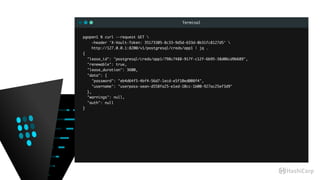
Terminal
pgopen1 % curl --request GET 

—header 'X-Vault-Token: 35173305-8c33-9d5d-633d-8b31fc8127d5' 
http://127.0.0.1:8200/v1/postgresql/creds/app1 | jq .
{
"lease_id": "postgresql/creds/app1/798c7488-917f-c12f-6b95-38d06cd9b689",
"renewable": true,
"lease_duration": 3600,
"data": {
"password": "eb4d64f5-4bf4-56d7-1ecd-e5f10ed008f4",
"username": "userpass-sean-d558fa25-e1ed-10cc-1b00-927ac25ef3d9"
},
"warnings": null,
"auth": null
}
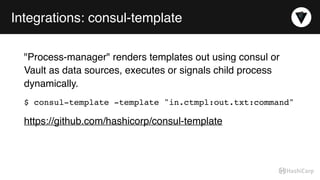
Integrations: consul-template
"Process-manager" renders templates out using consul or
Vault as data sources, executes or signals child process
dynamically.
$ consul-template -template "in.ctmpl:out.txt:command"
https://github.com/hashicorp/consul-template
Integrations: envconsul
envconsul:
See consul-template, but limited to environment variables
https://github.com/hashicorp/envconsul
Integrations: fabio
fabio:
HTTP load balancer. Uses consul service discovery, can pull
SSL certs from Vault.
TCP-SNI support experimental (hellooo pq+TLS!)
https://github.com/eBay/fabio/wiki/Certificate-Stores
Questions?
@SeanChittenden
sean@hashicorp.com
https://keybase.io/seanc
https://github.com/sean-/pgopen16-dyn-creds

Dynamic Database Credentials: Security Contingency Planning

  • 1.
  • 2.
  • 3.
  • 4.
  • 5.
  • 6.
    Security is anOperational Concern Loss Aversion byproduct of Security Real security threats often differ from theoretical security. Practical security implies loss aversion. Against what threat? How do you bound exposure?
  • 7.
    Types of SecurityRisk Leaked secret Tightly guarded master keys leak Inability to audit access Inappropriate access to secrets or data leakage Human-scale response to compromise (slow mitigation)
  • 8.
  • 9.
    Benefits of LowFriction Security Low friction Security Systems imply: • Security Automation • Workflow Integration • Secure by Default • Principle of Least Privilege
  • 10.
  • 11.
    Sticking Points Statically ManagedDefense in Depth • pg_hba.conf: network, auth, username, database, transport • ROLE: passwords, expirations, connection limits • Data Control Language: GRANT, RLS
  • 12.
  • 13.
    Keys to theKingdom • Centrally Stored • Eventually Consistent • No Access Control • No Auditing • No Revocation
  • 14.
    Meatspace Operational Concerns •How do applications get secrets? • How do humans acquire secrets? • How are secrets updated? • How is a secret revoked?
  • 15.
    Why not usePostgreSQL for secrets? • Not designed for dynamic secrets • Typically plaintext storage by default • Limited auditing capabilities • No revocation abilities • Homegrown RLS access controls
  • 16.
  • 17.
    Embraced Requirements • Centralizedkey management • Grant temporary leases to secured resources • Trust memory (not disk) • Embrace automation (and the necessary APIs) • Assume cyphered data at rest is trustworthy • Decoupled an HA storage backend from the secrets management
  • 18.
  • 19.
    …convenient like adrive thru…
  • 20.
  • 21.
    Secrets Lifecycle inDynamic Environments
  • 22.
    Vault Architecture Audit Broker AuditBackend Audit Backend Credential Backend Secret Backend System Backend Path Routing Rollback Mgr. Expiration Mgr. Token Store Policy Store HTTP API Storage Backend Core Barrier
  • 23.
  • 24.
    Glossary Storage backend The storagebackend is responsible for durable storage of encrypted data. There is only one storage backend per Vault cluster. Data is encrypted in transit and at rest with 256bit AES. Examples: in-mem, file, consul, and postgresql
  • 25.
    Glossary Secret backend A secretbackend is responsible for managing secrets. Some secret backends behave like encrypted key-value stores, while others dynamically generate secrets when queried. There can be multiple secret backends in a Vault cluster. Examples: generic, transit, postgresql
  • 26.
    Glossary Secret backend Secret backendscan perform almost any function, not just return static data or hand out credentials. PKI – Acts as a full CA, leveraging Vault’s auth Transit – Allows round-tripping data through Vault for "encryption as a service", without ever divulging the key
  • 27.
    Glossary Auth backend An authbackend is a credential-based backend that can be used as a way to authenticate humans or machines against Vault. Machine-oriented: approle, tls, tokens
 Operator-oriented:  github, ldap, userpass
  • 28.
    Glossary Vault token A vaulttoken is a conceptually similar to a session cookie on a website. Once a user authenticates via an auth backend, Vault returns a token which is to be used for future requests.
  • 29.
    Glossary Secret A secret isanything stored or returned by Vault that contains confidential material. A secret is anything that, if acquired by an unauthorized party, would cause political, financial, or appearance harm to an organization.
  • 30.
    Glossary Server The Vault serverprovides an HTTP API which clients interact with and manages the interaction between all the backends, ACL enforcement, and secret lease revocation.
  • 31.
    Vault Architecture Audit Broker AuditBackend Audit Backend Credential Backend Secret Backend System Backend Path Routing Rollback Mgr. Expiration Mgr. Token Store Policy Store HTTP API Storage Backend Core Barrier
  • 32.
  • 33.
  • 34.
    Terminal $ vault init-key-shares=5 -key-threshold=2 -pgp-keys="keybase:seanc,keybase:jefferai,keybase:vishalnayak,alice.asc,bob.asc" ... Key 1: c1c04c03d5f43b6432ea77f3010800... Key 2: 612b611295f255baa2eb702a5e254f... Key 3: ebfd78302325e2631bcc21e11cae00... ...
  • 35.
  • 36.
    Hypothetical Model User 1) userpassauth Server PostgreSQL app1 (or pgbouncer)
  • 37.
    Hypothetical Model User 1) userpassauth 2) user VAULT_TOKEN Server PostgreSQL app1 (or pgbouncer)
  • 38.
    Hypothetical Model User 1) userpassauth 2) user VAULT_TOKEN 3) VAULT_TOKEN + token-create + policy Server PostgreSQL app1 (or pgbouncer)
  • 39.
    Hypothetical Model User 1) userpassauth 2) user VAULT_TOKEN 3) VAULT_TOKEN + token-create + policy 4) policy-scoped VAULT_TOKEN Server PostgreSQL app1 (or pgbouncer)
  • 40.
    Hypothetical Model User 1) userpassauth 2) user VAULT_TOKEN 3) VAULT_TOKEN + token-create + policy 4) policy-scoped VAULT_TOKEN Server PostgreSQL app1 (or pgbouncer)
  • 41.
    Hypothetical Model User 1) userpassauth 2) user VAULT_TOKEN 3) VAULT_TOKEN + token-create + policy 4) policy-scoped VAULT_TOKEN Server 5) VAULT_TOKEN + cred/read/app1 PostgreSQL app1 (or pgbouncer)
  • 42.
    Hypothetical Model User 1) userpassauth 2) user VAULT_TOKEN 3) VAULT_TOKEN + token-create + policy 4) policy-scoped VAULT_TOKEN Server 5) VAULT_TOKEN + cred/read/app1 PostgreSQL app1 (or pgbouncer) 6) CREATE ROLE…
 GRANT…
  • 43.
    Hypothetical Model User 1) userpassauth 2) user VAULT_TOKEN 3) VAULT_TOKEN + token-create + policy 4) policy-scoped VAULT_TOKEN Server 5) VAULT_TOKEN + cred/read/app1 7) Dyn PG Creds PostgreSQL app1 (or pgbouncer) 6) CREATE ROLE…
 GRANT…
  • 44.
    Hypothetical Model User 1) userpassauth 2) user VAULT_TOKEN 3) VAULT_TOKEN + token-create + policy 4) policy-scoped VAULT_TOKEN Server 5) VAULT_TOKEN + cred/read/app1 7) Dyn PG Creds PostgreSQL 8) PG user/pass app1 (or pgbouncer) 6) CREATE ROLE…
 GRANT…
  • 45.
    Terminal pgopen1 % psql-d postgres postgres=# CREATE DATABASE app1; postgres=# c app1 postgres=# CREATE SCHEMA my_app1; postgres=# CREATE TABLE my_app1.myfoo (i INT); postgres=# INSERT INTO my_app1.myfoo VALUES (6*9);
  • 46.
    Terminal pgopen1 % vaultmount postgresql Successfully mounted 'postgresql' at 'postgresql'! pgopen1 % vault path-help postgresql/ | head -8 ## DESCRIPTION The PostgreSQL backend dynamically generates database users. After mounting this backend, configure it using the endpoints within the "config/" path. ## PATHS pgopen1 % vault path-help postgresql/ | grep / the "config/" path. ^config/connection$ ^config/lease$ ^creds/(?P<name>w[w-.]+w)$ ^roles/(?P<name>w[w-.]+w)$ ^roles/?$
  • 47.
    Terminal pgopen1 % vaultpath-help postgresql/config/connection | head -15 Request: config/connection Matching Route: ^config/connection$ Configure the connection string to talk to PostgreSQL. ## PARAMETERS connection_url (string) DB connection string max_idle_connections (int) Maximum number of idle connections to the database; a zero uses the value of max_open_connections and a negative value disables idle connections. If larger than max_open_connections it will be
  • 48.
    Terminal pgopen1 % vaultwrite postgresql/config/connection 
 connection_url="postgresql://postgres@127.0.0.1/app1?sslmode=disable" Success! Data written to: postgresql/config/connection pgopen1 % vault write postgresql/config/lease lease=1h lease_max=24h Success! Data written to: postgresql/config/lease
  • 49.
    Terminal pgopen1 % vaultwrite postgresql/roles/app1 sql="CREATE ROLE "{{name}}" WITH LOGIN PASSWORD '{{password}}'; GRANT USAGE ON SCHEMA my_app1 TO "{{name}}";
 GRANT SELECT ON ALL TABLES IN SCHEMA my_app1 TO "{{name}}"; GRANT SELECT,USAGE ON ALL SEQUENCES IN SCHEMA my_app1 TO "{{name}}";" Success! Data written to: postgresql/roles/app1
  • 50.
    Terminal pgopen1 % vaultwrite postgresql/roles/app1 sql="CREATE ROLE "{{name}}" WITH LOGIN PASSWORD '{{password}}'; GRANT USAGE ON SCHEMA my_app1 TO "{{name}}";
 GRANT SELECT ON ALL TABLES IN SCHEMA my_app1 TO "{{name}}"; GRANT SELECT,USAGE ON ALL SEQUENCES IN SCHEMA my_app1 TO "{{name}}";" Success! Data written to: postgresql/roles/app1 pgopen1 % vault read postgresql/creds/app1 Key Value lease_id postgresql/creds/app1/6b614cec-ff9c-1fe2-968a-be300f8bf434 lease_duration 3600 lease_renewable true password 773104c8-aa09-88e9-6a33-e86750239dd3 username userpass-sean-bd0f4f3b-2f86-b79b-db3d-7b3d39e76575
  • 51.
    Terminal pgopen1 % vaultread postgresql/creds/app1 Key Value lease_id postgresql/creds/app1/6b614cec-ff9c-1fe2-968a-be300f8bf434 lease_duration 3600 lease_renewable true password 773104c8-aa09-88e9-6a33-e86750239dd3 username userpass-sean-bd0f4f3b-2f86-b79b-db3d-7b3d39e76575 pgopen1 % psql -q -d app1 app1=# x app1=# dn+ List of schemas -[ RECORD 1 ]-----+------------------------------------------------------------- Name | my_app1 Owner | pgsql Access privileges | pgsql=UC/pgsql + | "userpass-sean-bd0f4f3b-2f86-b79b-db3d-7b3d39e76575"=U/pgsql Description |
  • 52.
    Terminal pgopen1 % psql-q -d app1 app1=# x app1=# dn+ List of schemas -[ RECORD 1 ]-----+------------------------------------------------------------- Name | my_app1 Owner | pgsql Access privileges | pgsql=UC/pgsql + | "userpass-sean-bd0f4f3b-2f86-b79b-db3d-7b3d39e76575"=U/pgsql Description | app1=# dp+ Access privileges -[ RECORD 1 ]-----+------------------------------------------------------------- Schema | my_app1 Name | myfoo Type | table Access privileges | pgsql=arwdDxt/pgsql + | "userpass-sean-bd0f4f3b-2f86-b79b-db3d-7b3d39e76575"=r/pgsql Column privileges | Policies |
  • 53.
    Terminal app1=# CREATE ROLEmy_app1_web_tier; app1=# GRANT USAGE ON SCHEMA my_app1 TO my_app1_web_tier; app1=# GRANT SELECT ON ALL TABLES IN SCHEMA my_app1 TO my_app1_web_tier; app1=# dp+ Access privileges -[ RECORD 1 ]-----+------------------------- Schema | my_app1 Name | myfoo Type | table Access privileges | pgsql=arwdDxt/pgsql + | my_app1_web_tier=r/pgsql Column privileges | Policies |
  • 54.
    Terminal pgopen1 % vaultwrite postgresql/roles/app1 sql="CREATE ROLE "{{name}}" WITH LOGIN PASSWORD '{{password}}'; ALTER GROUP my_app1_web_tier ADD USER "{{name}}";" Success! Data written to: postgresql/roles/app1 pgopen1 % vault read postgresql/creds/app1 Key Value lease_id postgresql/creds/app1/b4d81724-68e8-b31c-4a81-2f1afde5ace8 lease_duration 3600 lease_renewable true password cf6627de-0ef9-1d2c-4968-b5fa703e6af2 username userpass-sean-0bf4abe8-5193-7d6c-ed7a-766d705dda66
  • 55.
    Terminal pgopen1 % psql-q -U userpass-sean-0bf4abe8-5193-7d6c-ed7a-766d705dda66 app1 app1=> SET search_path = my_app1; app1=> dn+ List of schemas -[ RECORD 1 ]-----+------------------------------------------------------------- Name | my_app1 Owner | pgsql Access privileges | pgsql=UC/pgsql + | "userpass-sean-bd0f4f3b-2f86-b79b-db3d-7b3d39e76575"=U/pgsql+ | my_app1_web_tier=U/pgsql Description | app1=> dp+ Access privileges -[ RECORD 1 ]-----+------------------------- Schema | my_app1 Name | myfoo Type | table Access privileges | pgsql=arwdDxt/pgsql + | my_app1_web_tier=r/pgsql Column privileges | Policies |
  • 56.
    Terminal app1=> SELECT *FROM my_app1.myfoo ; -[ RECORD 1 ] i | 1
  • 57.
    Terminal pgopen1 % #Revoke one lease pgopen1 % vault revoke postgresql/creds/app1/b4d81724-68e8-b31c-4a81-2f1afde5ace8 Key revoked with ID 'postgresql/creds/app1/b4d81724-68e8-b31c-4a81-2f1afde5ace8'.
  • 58.
    Terminal pgopen1 % #Revoke all of postgresql/ ’s leases pgopen1 % vault revoke -prefix postgresql/creds app1=# du List of roles -[ RECORD 1 ]---------------------------------------------------------- Role name | my_app1_web_tier Attributes | Cannot login Member of | {} -[ RECORD 2 ]---------------------------------------------------------- Role name | pgsql Attributes | Superuser, Create role, Create DB, Replication, Bypass RLS Member of | {}
  • 59.
    Terminal pgopen1 % #Create some new creds from a child token pgopen1 % vault token-create Key Value token fc20f365-4250-e840-739e-2e658dba8678 token_accessor 046f5be2-a98d-4608-4398-4c232b3afca2 token_duration 0 token_renewable true token_policies [root] $ env VAULT_TOKEN=fc20f365-4250-e840-739e-2e658dba8678 vault read postgresql/creds/app1 Key Value lease_id postgresql/creds/app1/d6e01c35-ff11-365f-5bce-d78dbe9fd995 lease_duration 2592000 lease_renewable true password 2828a500-f813-b785-5d49-0da565de2938 username token-8921e3d4-9a0a-302c-e6c2-cfb86d1107a4 $ env VAULT_TOKEN=fc20f365-4250-e840-739e-2e658dba8678 vault read postgresql/creds/app1 Key Value lease_id postgresql/creds/app1/7532550e-e5cb-501d-a8e5-3578a71a40c3 lease_duration 2592000 lease_renewable true password 2a9f3169-c49d-f83f-e0d7-b261c4aadcc9 username token-8ef907c8-e619-4b8f-01f4-372dbcac51ca
  • 60.
    Terminal postgres=# SELECT usenameFROM pg_catalog.pg_user; usename -------------------------------------------- pgsql token-8921e3d4-9a0a-302c-e6c2-cfb86d1107a4 token-8ef907c8-e619-4b8f-01f4-372dbcac51ca (3 rows) pgopen1 % vault token-revoke fc20f365-4250-e840-739e-2e658dba8678 Revocation successful. postgres=# SELECT usename FROM pg_catalog.pg_user; usename ------------------------------------------- pgsql (1 rows)
  • 61.
    How 'bout thatAPI? Audit Broker Audit Backend Audit Backend Credential Backend Secret Backend System Backend Path Routing Rollback Mgr. Expiration Mgr. Token Store Policy Store HTTP API Storage Backend Core Barrier
  • 62.
    Terminal pgopen1 % curl--request GET 
 —header 'X-Vault-Token: 35173305-8c33-9d5d-633d-8b31fc8127d5' http://127.0.0.1:8200/v1/postgresql/creds/app1 | jq . { "lease_id": "postgresql/creds/app1/798c7488-917f-c12f-6b95-38d06cd9b689", "renewable": true, "lease_duration": 3600, "data": { "password": "eb4d64f5-4bf4-56d7-1ecd-e5f10ed008f4", "username": "userpass-sean-d558fa25-e1ed-10cc-1b00-927ac25ef3d9" }, "warnings": null, "auth": null }
  • 63.
    Integrations: consul-template "Process-manager" renderstemplates out using consul or Vault as data sources, executes or signals child process dynamically. $ consul-template -template "in.ctmpl:out.txt:command" https://github.com/hashicorp/consul-template
  • 64.
    Integrations: envconsul envconsul: See consul-template,but limited to environment variables https://github.com/hashicorp/envconsul
  • 65.
    Integrations: fabio fabio: HTTP loadbalancer. Uses consul service discovery, can pull SSL certs from Vault. TCP-SNI support experimental (hellooo pq+TLS!) https://github.com/eBay/fabio/wiki/Certificate-Stores
  • 66.