Network Security
Slides by Raymond Borges
Outline
•   In the NEWS (LOIS) DDoS attacks
•   Passive Network Attacks
•   Active Network Attacks
•   Designing a “Secure” Network
•   Web 2.0
•   Summary


                                      2
IN THE NEWS


              3
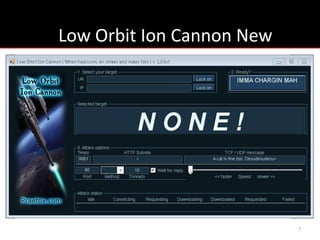
Low Orbit Ion Cannon (LOIC)
• Primary tool being used by the script kiddies
• Low Orbit Ion Cannon (LOIC) is a web app
  performance tool
• Denial of Service/testing tool
• DoS operation using HTTP/TCP/UDP requests
• DDoS voluntarily joining botnet Hive Mind


                                                  4
How does LOIC work?
While IsFlooding is True{
1. Create/Connect a TCP Socket to webserver
2. Send standard GET request to the server
3. Read the first 64 bytes returned
4. Sleep for configured Delay
}


                                              5
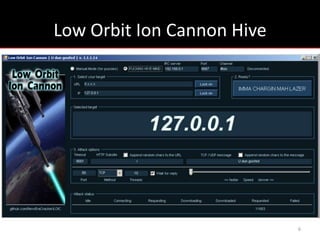
Low Orbit Ion Cannon Hive


                            6
Low Orbit Ion Cannon New


                           7
Hive Mind
• The automatic mode or Hive Mind, option to
  voluntarily join a botnet
• Using mode, all parameters of attack set up
  remotely via IRC, including target
• IRC is a network protocol designed to provide
  real-time group chat, often (miss)used to
  control botnets


                                                  8
LOIC trail
• If an anonymization network (TOR) is not used
  traceable IP address records can be logged by
  its recipient
• Logs kept by the ISP used to identify users
• Many users arrested using LOIC
• LOIC not anonymous


                                                  9
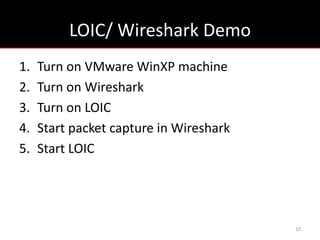
LOIC/ Wireshark Demo
1.   Turn on VMware WinXP machine
2.   Turn on Wireshark
3.   Turn on LOIC
4.   Start packet capture in Wireshark
5.   Start LOIC


                                         10
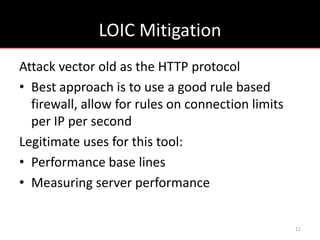
LOIC Mitigation
Attack vector old as the HTTP protocol
• Best approach is to use a good rule based
  firewall, allow for rules on connection limits
  per IP per second
Legitimate uses for this tool:
• Performance base lines
• Measuring server performance


                                                   11
PASSIVE NETWORK ATTACKS


                          12
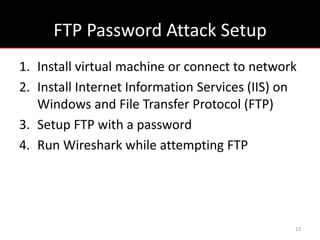
FTP Password Attack Setup
1. Install virtual machine or connect to network
2. Install Internet Information Services (IIS) on
   Windows and File Transfer Protocol (FTP)
3. Setup FTP with a password
4. Run Wireshark while attempting FTP


                                                13
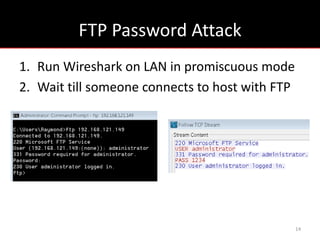
FTP Password Attack
1. Run Wireshark on LAN in promiscuous mode
2. Wait till someone connects to host with FTP


                                                 14
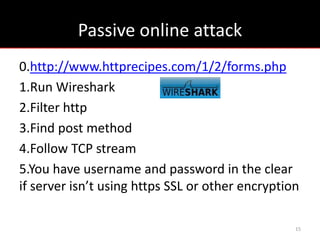
Passive online attack
0.http://www.httprecipes.com/1/2/forms.php
1.Run Wireshark
2.Filter http
3.Find post method
4.Follow TCP stream
5.You have username and password in the clear
if server isn’t using https SSL or other encryption

                                                  15
ACTIVE NETWORK ATTACKS


                         16
Replay and Man-in-the-middle
• When passwords can’t be caught in plaintext

  Man-in-the-middle
• ARP poisoning
  Replay attack
  Session hijacking


                                                17
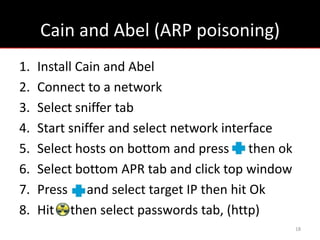
Cain and Abel (ARP poisoning)
1.   Install Cain and Abel
2.   Connect to a network
3.   Select sniffer tab
4.   Start sniffer and select network interface
5.   Select hosts on bottom and press then ok
6.   Select bottom APR tab and click top window
7.   Press and select target IP then hit Ok
8.   Hit then select passwords tab, (http)
                                                  18
NETWORK INFRASTRUCTURE


                         19
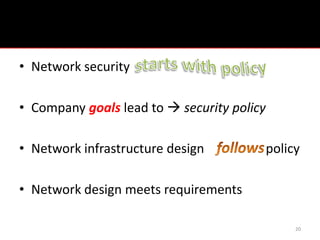
Policy
• Network security

• Company goals lead to  security policy

• Network infrastructure design             policy

• Network design meets requirements

                                                 20
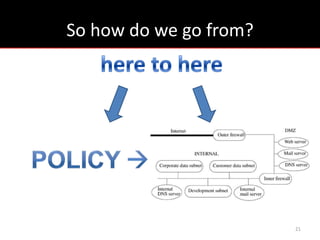
So how do we go from?


                        21
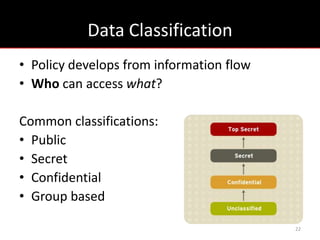
Data Classification
• Policy develops from information flow
• Who can access what?

Common classifications:
• Public
• Secret
• Confidential
• Group based

                                          22
User Classifications
• Serves same purpose as data classification
• Who can access what?

Common classifications:
• Outsiders
• Employees
• Executives
• Owners

                                               23
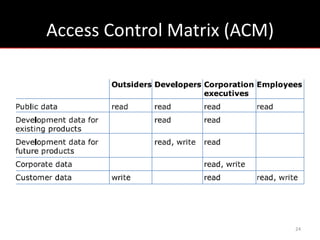
Access Control Matrix (ACM)


                              24
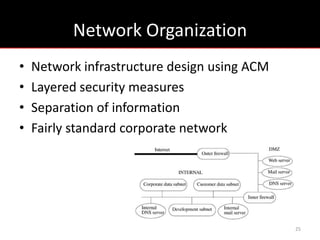
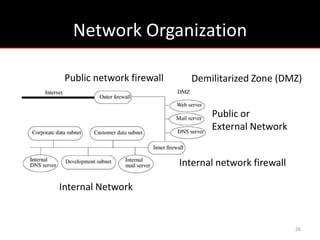
Network Organization
•   Network infrastructure design using ACM
•   Layered security measures
•   Separation of information
•   Fairly standard corporate network


                                              25
Network Organization

 Public network firewall     Demilitarized Zone (DMZ)


                                  Public or
                                  External Network


                           Internal network firewall

Internal Network


                                                       26
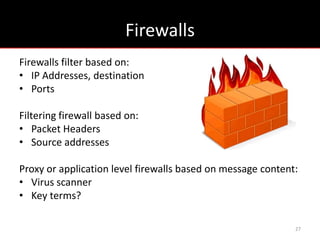
Firewalls
Firewalls filter based on:
• IP Addresses, destination
• Ports

Filtering firewall based on:
• Packet Headers
• Source addresses

Proxy or application level firewalls based on message content:
• Virus scanner
• Key terms?

                                                             27
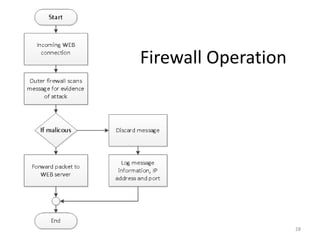
Firewall Operation


                     28
Outer Firewall
Can be used to:
1. Restrict outside access to internal network
2. Restrict internal access to internet while
   allowing access to DMZ based on Access
   Control Lists (ACL’s)
3. ACL’s bind source address/port and
   destinations address/ports to access rights


                                                 29
Outer Firewall
• Public needs Web server and mail server
  access, no other services
• Firewall interface allows connections to WWW
  services (HTTP and HTTPS) and electronic mail
  (SMTP)
• Internet sees addresses of Web and mail
  servers equal—that of the firewall, NAT


                                              30
Internal Firewall
• Sensitive data resides in internal network

• Block all traffic except authorized traffic
  (fail-safe defaults principle)

• Information comes only from DMZ, never
  directly from Internet


                                                31
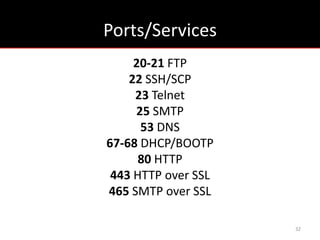
Ports/Services
     20-21 FTP
    22 SSH/SCP
     23 Telnet
     25 SMTP
      53 DNS
67-68 DHCP/BOOTP
      80 HTTP
 443 HTTP over SSL
465 SMTP over SSL

                     32
Proxies
Proxies - hosts that relay data
• Hide identity and protect privacy
• Can be used as firewalls

The Onion Routing network (TOR)
• Proxy network made of volunteer hosts


                                          33
DMZ and Servers
Demilitarized Zone or DMZ - area outside
internal firewall, some ports unblocked for
inbound internet access to servers

Servers – hosts which serve webpages or store
and process electronic mail for users

Web server and mail server contained in DMZ
                                                34
Domain Name System (DNS) Server

Knows directory name service information for:
• DMZ mail, Web, and log hosts
• Internal trusted administrative host
• Outer firewall
• Inner firewall


                                                35
DMZ Log Server
All other servers log messages by writing them to a
local file and then to the log server

• The log server also writes them to a file and then
  to write-once media

• Confined to the DMZ

• Does not initiate transfer to inner network

                                                       36
Internal Network
• Subnets may have firewall and servers, may
  filter traffic as inner firewall does

• Subnets may share servers

• Information flow constraints  arrangement

• Firewalls impose confinement at interfaces

                                               37
Firewall Attacks
Attackers have 3 methods of firewall entry
• Web server ports
 (HTTP) port proxy checks for invalid or illegal HTTP
requests and rejects them

• SMTP port
Mail proxy will detect and reject such attempts

• Bypass the low-level firewall checks by exploiting
  firewall vulnerabilities
                                                        38
Defense Practices
• Economy of mechanism (simple mechanisms)
Making hosts or devices do only their job

• Separation of privilege (divided jobs)
More than one host does a certain job

• Defense in depth (layered security defense)
Multiple defenses to bypass

                                                39
Internet Attacks
Distributed Denial of Service (DDoS)
SYN flood
• Consumes bandwidth
• Consumes memory resources

Remedies
• TCP intercept mode
• Synkill software

                                       40
Attacks
Focus on what we are most concerned about:
• Successful attacks
• Failed attacks in areas where attacks ought
  not to be launched e.g. DMZ.

Efforts into where we can obtain useful results


                                                  41
Summary
•   Security requirements  network infrastructure
•   Security goals security policy network form
•   Internal firewall limits traffic to public servers
•   Outer firewall blocks external traffic from internal
•   Public servers only provide one service
•   Application level firewalls check contents


                                                       42
RECENT RESEARCH


                  43
Quantification of Attackers Activities on
   Servers running Web 2.0 Applications

• Attackers use search-based strategies
Google

• Easiest ways to attack servers dominate

• Password cracking attacks on SSH

                                              44
Quantification of Attackers Activities on
   Servers running Web 2.0 Applications
• Blog user accounts and vulnerability scans

• Spam attacks dominate Web 2.0 applications
  such as Blogs and Wikis

• Less activity use known vulnerabilities


                                               45
Possible Questions
1. Why is privilege separation so important?
2. What is normally closed security?
3. What security model do you think Facebook
   uses?
4. How can DNS be used to censor websites?
5. Is there another means of reaching a website
   other than by URL?
6. What makes the internet impossible to bring
   down completely? (Discussion erupts…)

                                                  46
References
• Introduction to Computer Security, Matt Bishop
• Attacks by “Anonymous” WikiLeaks Proponents not Anonymous
  Pras et.al. Design and Analysis of Communication Systems Group
  University of Twente, Enschede, The Netherlands
• Quantification of Attackers Activities on Servers runningWeb 2.0
  Applications, Katerina Goseva-Popstojanova, Risto Pantev, Ana
  Dimitrijevikj, and Brandon Miller, Lane Department of CS and EE
  WVU
• https://github.com/NewEraCracker/LOIC
• http://wasntnate.com/2012/01/analysis-of-low-orbit-ion-cannon-
  loic-web-stress-tool/
• http://www.youtube.com/watch?v=F6_9i-aGAa0&feature=related

                                                                     47
Questions?

Cybersecurity cyberlab2

  • 1.
  • 2.
    Outline • In the NEWS (LOIS) DDoS attacks • Passive Network Attacks • Active Network Attacks • Designing a “Secure” Network • Web 2.0 • Summary 2
  • 3.
  • 4.
    Low Orbit IonCannon (LOIC) • Primary tool being used by the script kiddies • Low Orbit Ion Cannon (LOIC) is a web app performance tool • Denial of Service/testing tool • DoS operation using HTTP/TCP/UDP requests • DDoS voluntarily joining botnet Hive Mind 4
  • 5.
    How does LOICwork? While IsFlooding is True{ 1. Create/Connect a TCP Socket to webserver 2. Send standard GET request to the server 3. Read the first 64 bytes returned 4. Sleep for configured Delay } 5
  • 6.
    Low Orbit IonCannon Hive 6
  • 7.
    Low Orbit IonCannon New 7
  • 8.
    Hive Mind • Theautomatic mode or Hive Mind, option to voluntarily join a botnet • Using mode, all parameters of attack set up remotely via IRC, including target • IRC is a network protocol designed to provide real-time group chat, often (miss)used to control botnets 8
  • 9.
    LOIC trail • Ifan anonymization network (TOR) is not used traceable IP address records can be logged by its recipient • Logs kept by the ISP used to identify users • Many users arrested using LOIC • LOIC not anonymous 9
  • 10.
    LOIC/ Wireshark Demo 1. Turn on VMware WinXP machine 2. Turn on Wireshark 3. Turn on LOIC 4. Start packet capture in Wireshark 5. Start LOIC 10
  • 11.
    LOIC Mitigation Attack vectorold as the HTTP protocol • Best approach is to use a good rule based firewall, allow for rules on connection limits per IP per second Legitimate uses for this tool: • Performance base lines • Measuring server performance 11
  • 12.
  • 13.
    FTP Password AttackSetup 1. Install virtual machine or connect to network 2. Install Internet Information Services (IIS) on Windows and File Transfer Protocol (FTP) 3. Setup FTP with a password 4. Run Wireshark while attempting FTP 13
  • 14.
    FTP Password Attack 1.Run Wireshark on LAN in promiscuous mode 2. Wait till someone connects to host with FTP 14
  • 15.
    Passive online attack 0.http://www.httprecipes.com/1/2/forms.php 1.RunWireshark 2.Filter http 3.Find post method 4.Follow TCP stream 5.You have username and password in the clear if server isn’t using https SSL or other encryption 15
  • 16.
  • 17.
    Replay and Man-in-the-middle •When passwords can’t be caught in plaintext Man-in-the-middle • ARP poisoning Replay attack Session hijacking 17
  • 18.
    Cain and Abel(ARP poisoning) 1. Install Cain and Abel 2. Connect to a network 3. Select sniffer tab 4. Start sniffer and select network interface 5. Select hosts on bottom and press then ok 6. Select bottom APR tab and click top window 7. Press and select target IP then hit Ok 8. Hit then select passwords tab, (http) 18
  • 19.
  • 20.
    Policy • Network security •Company goals lead to  security policy • Network infrastructure design policy • Network design meets requirements 20
  • 21.
    So how dowe go from? 21
  • 22.
    Data Classification • Policydevelops from information flow • Who can access what? Common classifications: • Public • Secret • Confidential • Group based 22
  • 23.
    User Classifications • Servessame purpose as data classification • Who can access what? Common classifications: • Outsiders • Employees • Executives • Owners 23
  • 24.
  • 25.
    Network Organization • Network infrastructure design using ACM • Layered security measures • Separation of information • Fairly standard corporate network 25
  • 26.
    Network Organization Publicnetwork firewall Demilitarized Zone (DMZ) Public or External Network Internal network firewall Internal Network 26
  • 27.
    Firewalls Firewalls filter basedon: • IP Addresses, destination • Ports Filtering firewall based on: • Packet Headers • Source addresses Proxy or application level firewalls based on message content: • Virus scanner • Key terms? 27
  • 28.
  • 29.
    Outer Firewall Can beused to: 1. Restrict outside access to internal network 2. Restrict internal access to internet while allowing access to DMZ based on Access Control Lists (ACL’s) 3. ACL’s bind source address/port and destinations address/ports to access rights 29
  • 30.
    Outer Firewall • Publicneeds Web server and mail server access, no other services • Firewall interface allows connections to WWW services (HTTP and HTTPS) and electronic mail (SMTP) • Internet sees addresses of Web and mail servers equal—that of the firewall, NAT 30
  • 31.
    Internal Firewall • Sensitivedata resides in internal network • Block all traffic except authorized traffic (fail-safe defaults principle) • Information comes only from DMZ, never directly from Internet 31
  • 32.
    Ports/Services 20-21 FTP 22 SSH/SCP 23 Telnet 25 SMTP 53 DNS 67-68 DHCP/BOOTP 80 HTTP 443 HTTP over SSL 465 SMTP over SSL 32
  • 33.
    Proxies Proxies - hoststhat relay data • Hide identity and protect privacy • Can be used as firewalls The Onion Routing network (TOR) • Proxy network made of volunteer hosts 33
  • 34.
    DMZ and Servers DemilitarizedZone or DMZ - area outside internal firewall, some ports unblocked for inbound internet access to servers Servers – hosts which serve webpages or store and process electronic mail for users Web server and mail server contained in DMZ 34
  • 35.
    Domain Name System(DNS) Server Knows directory name service information for: • DMZ mail, Web, and log hosts • Internal trusted administrative host • Outer firewall • Inner firewall 35
  • 36.
    DMZ Log Server Allother servers log messages by writing them to a local file and then to the log server • The log server also writes them to a file and then to write-once media • Confined to the DMZ • Does not initiate transfer to inner network 36
  • 37.
    Internal Network • Subnetsmay have firewall and servers, may filter traffic as inner firewall does • Subnets may share servers • Information flow constraints  arrangement • Firewalls impose confinement at interfaces 37
  • 38.
    Firewall Attacks Attackers have3 methods of firewall entry • Web server ports (HTTP) port proxy checks for invalid or illegal HTTP requests and rejects them • SMTP port Mail proxy will detect and reject such attempts • Bypass the low-level firewall checks by exploiting firewall vulnerabilities 38
  • 39.
    Defense Practices • Economyof mechanism (simple mechanisms) Making hosts or devices do only their job • Separation of privilege (divided jobs) More than one host does a certain job • Defense in depth (layered security defense) Multiple defenses to bypass 39
  • 40.
    Internet Attacks Distributed Denialof Service (DDoS) SYN flood • Consumes bandwidth • Consumes memory resources Remedies • TCP intercept mode • Synkill software 40
  • 41.
    Attacks Focus on whatwe are most concerned about: • Successful attacks • Failed attacks in areas where attacks ought not to be launched e.g. DMZ. Efforts into where we can obtain useful results 41
  • 42.
    Summary • Security requirements  network infrastructure • Security goals security policy network form • Internal firewall limits traffic to public servers • Outer firewall blocks external traffic from internal • Public servers only provide one service • Application level firewalls check contents 42
  • 43.
  • 44.
    Quantification of AttackersActivities on Servers running Web 2.0 Applications • Attackers use search-based strategies Google • Easiest ways to attack servers dominate • Password cracking attacks on SSH 44
  • 45.
    Quantification of AttackersActivities on Servers running Web 2.0 Applications • Blog user accounts and vulnerability scans • Spam attacks dominate Web 2.0 applications such as Blogs and Wikis • Less activity use known vulnerabilities 45
  • 46.
    Possible Questions 1. Whyis privilege separation so important? 2. What is normally closed security? 3. What security model do you think Facebook uses? 4. How can DNS be used to censor websites? 5. Is there another means of reaching a website other than by URL? 6. What makes the internet impossible to bring down completely? (Discussion erupts…) 46
  • 47.
    References • Introduction toComputer Security, Matt Bishop • Attacks by “Anonymous” WikiLeaks Proponents not Anonymous Pras et.al. Design and Analysis of Communication Systems Group University of Twente, Enschede, The Netherlands • Quantification of Attackers Activities on Servers runningWeb 2.0 Applications, Katerina Goseva-Popstojanova, Risto Pantev, Ana Dimitrijevikj, and Brandon Miller, Lane Department of CS and EE WVU • https://github.com/NewEraCracker/LOIC • http://wasntnate.com/2012/01/analysis-of-low-orbit-ion-cannon- loic-web-stress-tool/ • http://www.youtube.com/watch?v=F6_9i-aGAa0&feature=related 47
  • 48.