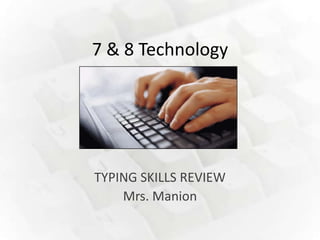
7 & 8 Technology


TYPING SKILLS REVIEW
    Mrs. Manion
Basic Typing Skills
1.Computer on table and chair at correct height.
Basic Typing Skills
1.Computer on table and chair at correct height.
2.Sit up straight with your feet flat on the floor.
Basic Typing Skills
1.Computer on table and chair at correct height.
2.Sit up straight with your feet flat on the floor.
3.Long nails are not recommended.
Basic Typing Skills
1.Computer on table and chair at correct height.
2.Sit up straight with your feet flat on the floor.
3.Long nails are not recommended.
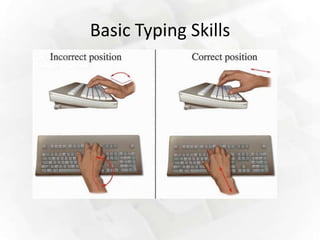
4.Hands on the keyboard being careful of wrist
  position.
  (No “Spiderman” or Dog Paws.”)
Basic Typing Skills
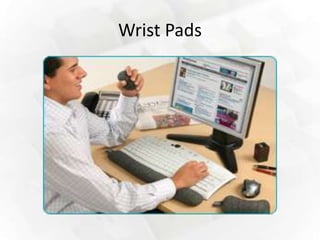
5. Cushion the wrists if necessary to avoid
   wrist injury.
Basic Typing Skills
5. Cushion the wrists if necessary to avoid
   wrist injury.
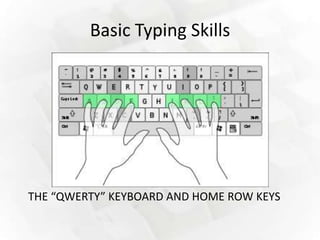
6. Hands relaxed and fingers curved over
   home row keys.
Basic Typing Skills
5. Cushion the wrists if necessary to avoid
   wrist injury.
6. Hands relaxed and fingers curved over
   home row keys.
7. Left forefinger on ”F” and right
   forefinger on “J” (feel the bumps).
Basic Typing Skills
5. Cushion the wrists if necessary to avoid
   wrist injury.
6. Hands relaxed and fingers curved over
   home row keys.
7. Left forefinger on ”F” and right
   forefinger on “J” (feel the bumps).
8. Try not to look at the keys.
Basic Typing Skills


THE “QWERTY” KEYBOARD AND HOME ROW KEYS
Basic Typing Skills


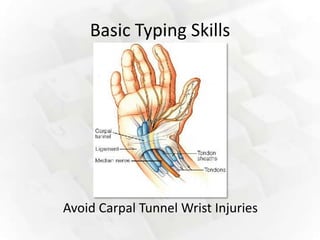
Avoid Carpal Tunnel Wrist Injuries
Basic Typing Skills
Wrist Pads
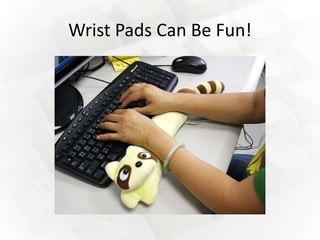
Wrist Pads Can Be Fun!
Basic Typing Skills
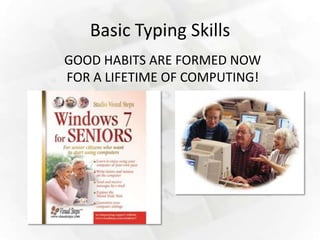
GOOD HABITS ARE FORMED NOW
FOR A LIFETIME OF COMPUTING!
Basic Typing Skills
9.Most important goal is technique.
Basic Typing Skills
9.Most important goal is technique.
10.Next is accuracy.
Basic Typing Skills
9.Most important goal is technique.
10.Next is accuracy.
11.Last is speed.
Basic Typing Skills
          ***technique***
              accuracy
                speed
Go slowly for now with proper position
    to review or retrain any mistakes
            you are making.
Basic Typing Skills
TOP TEN GOALS:
    1.   TECHNIQUE
    2.   TECHNIQUE
    3.   TECHNIQUE
    4.   TECHNIQUE
    5.   TECHNIQUE
    6.   TECHNIQUE
    7.   TECHNIQUE
    8.   TECHNIQUE
Basic Typing Skills


      LATER:

   9. ACCURACY
     10. SPEED
SUCCESS!


Two activities follow….
1. Review & Typing Practice
• Get a copy of the Typing Skills Review Sheet from the
  teacher.
• You may also go to www.mrsmanion.com and print a copy
  from the Technology section.
• Open Word.
• Type your heading including:
   – Full Name
   – Grade & Class
   – Today’s Date
• Focus on TECHNIQUE and type out a copy of the review
  sheet.
• Turn it in for credit. Keep the original & study for the Quiz.
2. Typing Time
• When instructed open Typing Time and
  continue working on your skills.
• Ask to print out your assessments and put
  your full name on them to turn in for a grade.
If you are ahead
• Ask for permission to go to the class webpage
  and explore the “Fun Links” section.

Typing skills review

  • 1.
    7 & 8Technology TYPING SKILLS REVIEW Mrs. Manion
  • 2.
    Basic Typing Skills 1.Computeron table and chair at correct height.
  • 3.
    Basic Typing Skills 1.Computeron table and chair at correct height. 2.Sit up straight with your feet flat on the floor.
  • 4.
    Basic Typing Skills 1.Computeron table and chair at correct height. 2.Sit up straight with your feet flat on the floor. 3.Long nails are not recommended.
  • 5.
    Basic Typing Skills 1.Computeron table and chair at correct height. 2.Sit up straight with your feet flat on the floor. 3.Long nails are not recommended. 4.Hands on the keyboard being careful of wrist position. (No “Spiderman” or Dog Paws.”)
  • 6.
    Basic Typing Skills 5.Cushion the wrists if necessary to avoid wrist injury.
  • 7.
    Basic Typing Skills 5.Cushion the wrists if necessary to avoid wrist injury. 6. Hands relaxed and fingers curved over home row keys.
  • 8.
    Basic Typing Skills 5.Cushion the wrists if necessary to avoid wrist injury. 6. Hands relaxed and fingers curved over home row keys. 7. Left forefinger on ”F” and right forefinger on “J” (feel the bumps).
  • 9.
    Basic Typing Skills 5.Cushion the wrists if necessary to avoid wrist injury. 6. Hands relaxed and fingers curved over home row keys. 7. Left forefinger on ”F” and right forefinger on “J” (feel the bumps). 8. Try not to look at the keys.
  • 10.
    Basic Typing Skills THE“QWERTY” KEYBOARD AND HOME ROW KEYS
  • 11.
    Basic Typing Skills AvoidCarpal Tunnel Wrist Injuries
  • 12.
  • 13.
  • 14.
  • 15.
    Basic Typing Skills GOODHABITS ARE FORMED NOW FOR A LIFETIME OF COMPUTING!
  • 16.
    Basic Typing Skills 9.Mostimportant goal is technique.
  • 17.
    Basic Typing Skills 9.Mostimportant goal is technique. 10.Next is accuracy.
  • 18.
    Basic Typing Skills 9.Mostimportant goal is technique. 10.Next is accuracy. 11.Last is speed.
  • 19.
    Basic Typing Skills ***technique*** accuracy speed Go slowly for now with proper position to review or retrain any mistakes you are making.
  • 20.
    Basic Typing Skills TOPTEN GOALS: 1. TECHNIQUE 2. TECHNIQUE 3. TECHNIQUE 4. TECHNIQUE 5. TECHNIQUE 6. TECHNIQUE 7. TECHNIQUE 8. TECHNIQUE
  • 21.
    Basic Typing Skills LATER: 9. ACCURACY 10. SPEED
  • 22.
  • 23.
    1. Review &Typing Practice • Get a copy of the Typing Skills Review Sheet from the teacher. • You may also go to www.mrsmanion.com and print a copy from the Technology section. • Open Word. • Type your heading including: – Full Name – Grade & Class – Today’s Date • Focus on TECHNIQUE and type out a copy of the review sheet. • Turn it in for credit. Keep the original & study for the Quiz.
  • 24.
    2. Typing Time •When instructed open Typing Time and continue working on your skills. • Ask to print out your assessments and put your full name on them to turn in for a grade.
  • 25.
    If you areahead • Ask for permission to go to the class webpage and explore the “Fun Links” section.