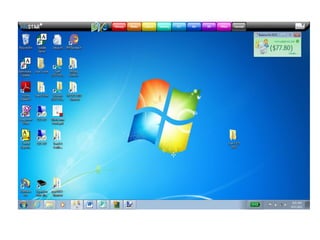
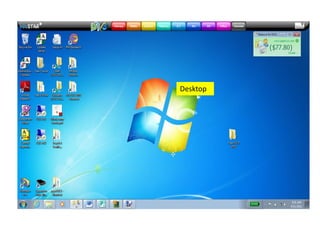
Desktop
Imagine the
          computer
          screen is the
Desktop   surface of a
          desk or table
          and you have
          everything
          laid out ready
          to use.
Desktop


     Task Bar.
Desktop


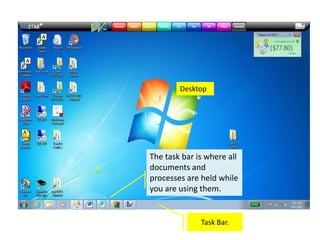
The task bar is where all
documents and
     Open
processes are held while
  Documents.
you are using them.


              Task Bar.
Desktop


                 System Tray.


     Task Bar.
Desktop


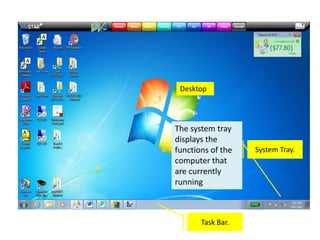
The system tray
displays the
functions of the   System Tray.
computer that
are currently
running


       Task Bar.
Desktop


                           System Tray.


Windows        Task Bar.
Button.
Desktop


                                                 System Tray.

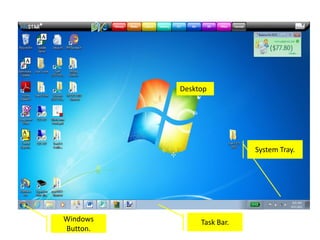
The Windows icon leads to all
programs and functions of the
computer.


          Windows                    Task Bar.
          Button.
EduStar
Menu.


          Desktop


                           System Tray.


Windows        Task Bar.
Button.
EduStar
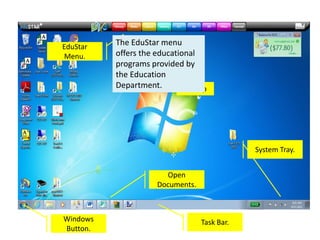
          The EduStar menu
Menu.     offers the educational
          programs provided by
          the Education
          Department.       Desktop


                                              System Tray.


                       Open
                     Documents.


Windows                           Task Bar.
Button.
EduStar
Menu.


               Desktop


                                   System Tray.


            Open
          Documents.


Windows                Task Bar.
Button.
EduStar
          Menu.


                                  Desktop


Open documents; you can
switch from one open
program or document to                                System Tray.
another by clicking on the
relevant icon.                 Open
                             Documents.


          Windows                         Task Bar.
          Button.
EduStar
Menu.


                           Desktop


          Short Cut

                                               System Tray.


                        Open
                      Documents.


Windows                            Task Bar.
Button.
EduStar
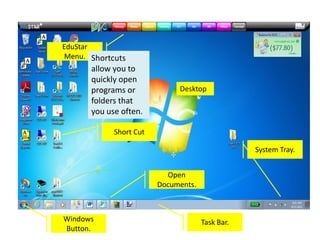
Menu. Shortcuts
      allow you to
      quickly open
      programs or            Desktop
      folders that
      you use often.

            Short Cut

                                                 System Tray.


                          Open
                        Documents.


Windows                              Task Bar.
Button.
Papercut.


EduStar
Menu.


                           Desktop


          Short Cut

                                                    System Tray.


                        Open
                      Documents.


Windows                            Task Bar.
Button.
Papercut.


EduStar
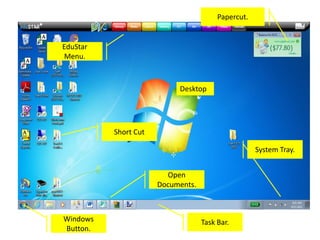
                           Papercut displays
Menu.                      your print credits
                           and allows you to
                           troubleshoot
                           printing problems.
                           Desktop


          Short Cut

                                                    System Tray.


                        Open
                      Documents.


Windows                            Task Bar.
Button.
Papercut.


EduStar
Menu.


                           Desktop


          Short Cut

                                                    System Tray.


                        Open
                      Documents.


Windows                            Task Bar.
Button.

Desktop

  • 2.
  • 3.
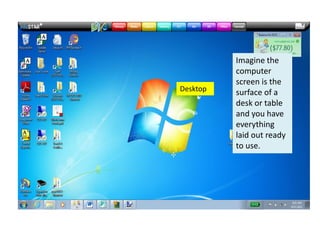
    Imagine the computer screen is the Desktop surface of a desk or table and you have everything laid out ready to use.
  • 4.
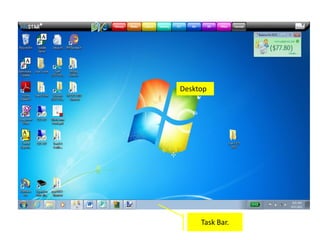
    Desktop Task Bar.
  • 5.
    Desktop The task baris where all documents and Open processes are held while Documents. you are using them. Task Bar.
  • 6.
    Desktop System Tray. Task Bar.
  • 7.
    Desktop The system tray displaysthe functions of the System Tray. computer that are currently running Task Bar.
  • 8.
    Desktop System Tray. Windows Task Bar. Button.
  • 9.
    Desktop System Tray. The Windows icon leads to all programs and functions of the computer. Windows Task Bar. Button.
  • 10.
    EduStar Menu. Desktop System Tray. Windows Task Bar. Button.
  • 11.
    EduStar The EduStar menu Menu. offers the educational programs provided by the Education Department. Desktop System Tray. Open Documents. Windows Task Bar. Button.
  • 12.
    EduStar Menu. Desktop System Tray. Open Documents. Windows Task Bar. Button.
  • 13.
    EduStar Menu. Desktop Open documents; you can switch from one open program or document to System Tray. another by clicking on the relevant icon. Open Documents. Windows Task Bar. Button.
  • 14.
    EduStar Menu. Desktop Short Cut System Tray. Open Documents. Windows Task Bar. Button.
  • 15.
    EduStar Menu. Shortcuts allow you to quickly open programs or Desktop folders that you use often. Short Cut System Tray. Open Documents. Windows Task Bar. Button.
  • 16.
    Papercut. EduStar Menu. Desktop Short Cut System Tray. Open Documents. Windows Task Bar. Button.
  • 17.
    Papercut. EduStar Papercut displays Menu. your print credits and allows you to troubleshoot printing problems. Desktop Short Cut System Tray. Open Documents. Windows Task Bar. Button.
  • 18.
    Papercut. EduStar Menu. Desktop Short Cut System Tray. Open Documents. Windows Task Bar. Button.