Starting Conversations
      with Twitter
What is Twitter?
Twitter is an information network made up of
140-character messages called Tweets.
What is Twitter?
Millions of people, organizations, and
businesses use it to discover and share new
information.
What is Twitter?
Millions of people, organizations, and
businesses use it to discover and share new
information.

It has approximately 100 million users who
send around 250,000,000 tweets per day.
Why should I use Twitter?
• Immediate connections
Why should I use Twitter?
• Immediate connections
• No apps or groups, just conversation
Why should I use Twitter?
• Immediate connections
• No apps or groups, just conversation
• No barriers to engage in relationships
Why should I use Twitter?
•   Immediate connections
•   No apps or groups, just conversation
•   No barriers to engage in relationships
•   It’s a great way to get to know people!
What can Twitter do for my
           organization?
• Provide a way to receive feedback
What can Twitter do for my
           organization?
• Provide a way to receive feedback
• Direct traffic to your project
What can Twitter do for my
           organization?
• Provide a way to receive feedback
• Direct traffic to your project
• Provide information about your work
What can Twitter do for my
           organization?
• Provide a way to receive feedback
• Direct traffic to your project
• Provide information about your work
What can Twitter do for my
             organization?
•   Provide a way to receive feedback
•   Direct traffic to your project
•   Provide information about your work
•   Connect you to your target audiences
What can Twitter do for my
             organization?
•   Provide a way to receive feedback
•   Direct traffic to your project
•   Provide information about your work
•   Connect you to your target audiences
•   Raise awareness about your campaigns
How is Twitter different than
            Facebook?
• More immediate
How is Twitter different than
            Facebook?
• More immediate
• More “newsy”
How is Twitter different than
            Facebook?
• More immediate
• More “newsy”
• More concise
How is Twitter different than
               Facebook?
•   More immediate
•   More “newsy”
•   More concise
•   Better for finding out information about you
How is Twitter different than
               Facebook?
•   More immediate
•   More “newsy”
•   More concise
•   Better for finding out information about you
•   Fewer barriers to entry
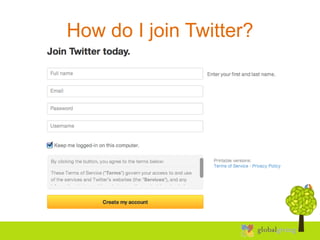
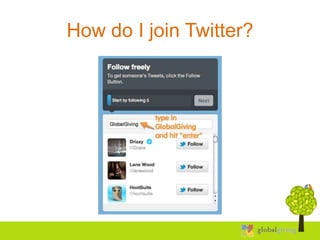
How do I join Twitter?
• Go to http://www.twitter.com/signup/
How do I join Twitter?
• Go to http://www.twitter.com/signup/
• Type in your name and email
  address, then create a username and
  password.
• Click “Create my account”
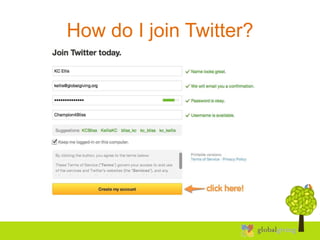
How do I join Twitter?
• Go to http://www.twitter.com/signup/
• Type in your name and email
  address, then create a username and
  password
• Click “Create my account”
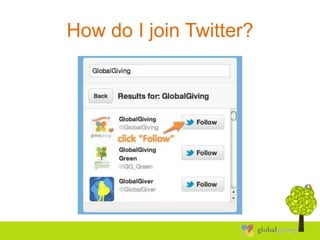
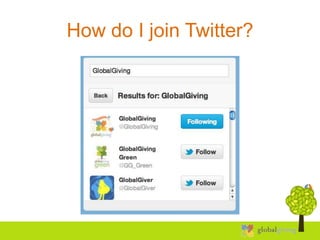
• Start following users, like @GlobalGiving!
How do I join Twitter?
• Go to http://www.twitter.com/signup/
• Type in your name and email address,
  then create a username and password
• Click “Create my account”
• Start following users, like @GlobalGiving
• Congratulations, you’ve successfully
  joined Twitter and started following
  GlobalGiving!
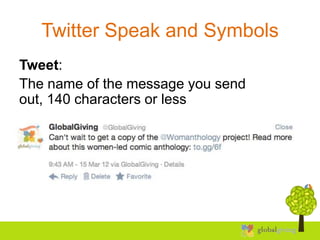
Twitter Speak and Symbols
Tweet:
The name of the message you send
out, 140 characters or less
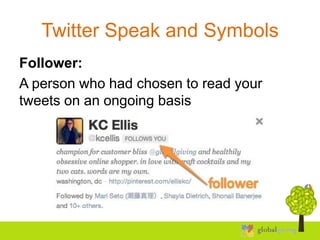
Twitter Speak and Symbols
Follower:
A person who had chosen to read your
tweets on an ongoing basis
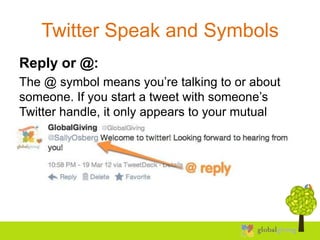
Twitter Speak and Symbols
Reply or @:
The @ symbol means you’re talking to or about
someone. If you start a tweet with someone’s
Twitter handle, it only appears to your mutual
followers.
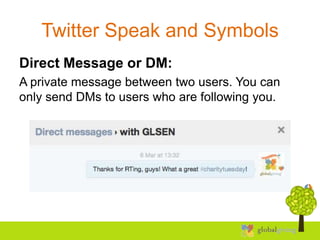
Twitter Speak and Symbols
Direct Message or DM:
A private message between two users. You can
only send DMs to users who are following you.
Twitter Speak and Symbols
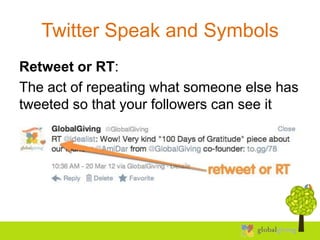
Retweet or RT:
The act of repeating what someone else has
tweeted so that your followers can see it
Twitter Speak and Symbols
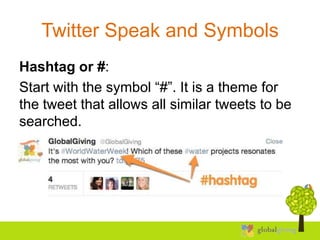
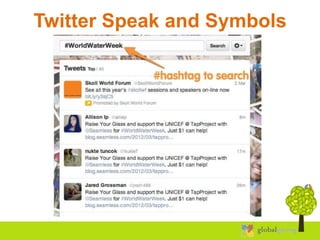
Hashtag or #:
Start with the symbol “#”. It is a theme for
the tweet that allows all similar tweets to be
searched.
Twitter Speak and Symbols
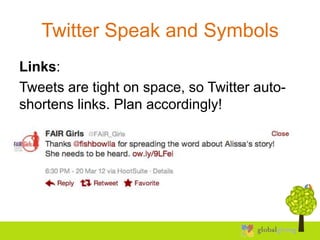
Links:
Tweets are tight on space, so Twitter auto-
shortens links. Plan accordingly!
Twitter Etiquette
• Try to keep your tweets at 120 characters or
  fewer
Twitter Etiquette
• Try to keep your tweets at 120 characters or
  fewer
• Don’t only tweet about yourself
Twitter Etiquette
• Try to keep your tweets at 120 characters or
  fewer
• Don’t only tweet about yourself
• Don’t just be in it for the numbers
Twitter Etiquette
• Try to keep your tweets at 120 characters or
  fewer
• Don’t only tweet about yourself
• Don’t just be in it for the numbers
• Be consistent and be part of the conversation
Twitter Etiquette
• Try to keep your tweets at 120 characters or
  fewer
• Don’t only tweet about yourself
• Don’t just be in it for the numbers
• Be consistent and be part of the conversation
• Be proud of yourself, but be proud of other
  people too
Twitter Etiquette
• Try to keep your tweets at 120 characters or
  fewer
• Don’t only tweet about yourself
• Don’t just be in it for the numbers
• Be consistent and be part of the conversation
• Be proud of yourself, but be proud of other
  people too
• Don’t spam your followers or other users
Twitter Etiquette
• Try to keep your tweets at 120 characters or
  fewer
• Don’t only tweet about yourself
• Don’t just be in it for the numbers
• Be consistent and be part of the conversation
• Be proud of yourself, but be proud of other
  people too
• Don’t spam your followers or other users
• Be authentic!
Best Practices
Share.
Share photos and behind the scenes info
about your business. Even better, give a
glimpse of developing projects and events.
Users come to Twitter to get and share the
latest, so give it to them!
Best Practices
Listen.
Regularly monitor the comments about your
organization, brand, and products.
Best Practices
Ask.
Ask questions of your followers to glean
valuable insights and show that you are
listening.
Best Practices
Respond.
Respond to compliments and feedback in
real time.
Best Practices
Demonstrate wider leadership and know-
how.
Reference articles and links about the bigger
picture as it relates to your organization.
Best Practices
Champion your stakeholders.
Retweet and reply publicly to great tweets
posted by your followers and customers.
Best Practices
Establish the right voice.
Twitter users prefer a direct, genuine, and of
course, a likable tone from your
organization, but think about your voice as
you Tweet.
How do you want to appear to the Twitter
community?
Encouraging Engagement
• Create a conversation
Encouraging Engagement
• Create a conversation
• Tweet things other users can retweet
Encouraging Engagement
• Create a conversation
• Tweet things other users can retweet
• Be supportive of other users
Encouraging Engagement
•   Create a conversation
•   Tweet things other users can retweet
•   Be supportive of other users
•   Reply to people when they mention you
Encouraging Engagement
•   Create a conversation
•   Tweet things other users can retweet
•   Be supportive of other users
•   Reply to people when they mention you
•   Remember to say “please” and “thank
    you”
But what about fundraising?
Being on Twitter doesn’t necessarily mean
people will donate to your project.
But what about fundraising?
Being on Twitter doesn’t necessarily mean
people will donate to your project.

But it does mean that you have a new tool to
start a relationship with potential donors.
But what about fundraising?
Twitter is as simple as having a
conversation.

First, you’ll want to listen.
But what about fundraising?
Twitter is as simple as having a
conversation.

First, you’ll want to listen. You can learn a
lot!

Then, you can jump in and respond.
But what about fundraising?
The more you authentically connect, the
more people will listen to you.

Not only will you be a part of the
conversation, you’ll be helping drive it. And
this is the part that matters.
Questions?
Let us know! We’d be happy to hear from
you.

Twitter: @GlobalGiving
Email: kellis@globalgiving.org
Phone: 202-330-4042

Twitter powerpoint - beginner

  • 1.
  • 2.
    What is Twitter? Twitteris an information network made up of 140-character messages called Tweets.
  • 3.
    What is Twitter? Millionsof people, organizations, and businesses use it to discover and share new information.
  • 4.
    What is Twitter? Millionsof people, organizations, and businesses use it to discover and share new information. It has approximately 100 million users who send around 250,000,000 tweets per day.
  • 5.
    Why should Iuse Twitter? • Immediate connections
  • 6.
    Why should Iuse Twitter? • Immediate connections • No apps or groups, just conversation
  • 7.
    Why should Iuse Twitter? • Immediate connections • No apps or groups, just conversation • No barriers to engage in relationships
  • 8.
    Why should Iuse Twitter? • Immediate connections • No apps or groups, just conversation • No barriers to engage in relationships • It’s a great way to get to know people!
  • 9.
    What can Twitterdo for my organization? • Provide a way to receive feedback
  • 10.
    What can Twitterdo for my organization? • Provide a way to receive feedback • Direct traffic to your project
  • 11.
    What can Twitterdo for my organization? • Provide a way to receive feedback • Direct traffic to your project • Provide information about your work
  • 12.
    What can Twitterdo for my organization? • Provide a way to receive feedback • Direct traffic to your project • Provide information about your work
  • 13.
    What can Twitterdo for my organization? • Provide a way to receive feedback • Direct traffic to your project • Provide information about your work • Connect you to your target audiences
  • 14.
    What can Twitterdo for my organization? • Provide a way to receive feedback • Direct traffic to your project • Provide information about your work • Connect you to your target audiences • Raise awareness about your campaigns
  • 15.
    How is Twitterdifferent than Facebook? • More immediate
  • 16.
    How is Twitterdifferent than Facebook? • More immediate • More “newsy”
  • 17.
    How is Twitterdifferent than Facebook? • More immediate • More “newsy” • More concise
  • 18.
    How is Twitterdifferent than Facebook? • More immediate • More “newsy” • More concise • Better for finding out information about you
  • 19.
    How is Twitterdifferent than Facebook? • More immediate • More “newsy” • More concise • Better for finding out information about you • Fewer barriers to entry
  • 20.
    How do Ijoin Twitter? • Go to http://www.twitter.com/signup/
  • 21.
    How do Ijoin Twitter?
  • 22.
    How do Ijoin Twitter? • Go to http://www.twitter.com/signup/ • Type in your name and email address, then create a username and password. • Click “Create my account”
  • 23.
    How do Ijoin Twitter?
  • 24.
    How do Ijoin Twitter? • Go to http://www.twitter.com/signup/ • Type in your name and email address, then create a username and password • Click “Create my account” • Start following users, like @GlobalGiving!
  • 25.
    How do Ijoin Twitter?
  • 26.
    How do Ijoin Twitter?
  • 27.
    How do Ijoin Twitter?
  • 28.
    How do Ijoin Twitter? • Go to http://www.twitter.com/signup/ • Type in your name and email address, then create a username and password • Click “Create my account” • Start following users, like @GlobalGiving • Congratulations, you’ve successfully joined Twitter and started following GlobalGiving!
  • 29.
    Twitter Speak andSymbols Tweet: The name of the message you send out, 140 characters or less
  • 30.
    Twitter Speak andSymbols Follower: A person who had chosen to read your tweets on an ongoing basis
  • 31.
    Twitter Speak andSymbols Reply or @: The @ symbol means you’re talking to or about someone. If you start a tweet with someone’s Twitter handle, it only appears to your mutual followers.
  • 32.
    Twitter Speak andSymbols Direct Message or DM: A private message between two users. You can only send DMs to users who are following you.
  • 33.
    Twitter Speak andSymbols Retweet or RT: The act of repeating what someone else has tweeted so that your followers can see it
  • 34.
    Twitter Speak andSymbols Hashtag or #: Start with the symbol “#”. It is a theme for the tweet that allows all similar tweets to be searched.
  • 35.
  • 36.
    Twitter Speak andSymbols Links: Tweets are tight on space, so Twitter auto- shortens links. Plan accordingly!
  • 37.
    Twitter Etiquette • Tryto keep your tweets at 120 characters or fewer
  • 38.
    Twitter Etiquette • Tryto keep your tweets at 120 characters or fewer • Don’t only tweet about yourself
  • 39.
    Twitter Etiquette • Tryto keep your tweets at 120 characters or fewer • Don’t only tweet about yourself • Don’t just be in it for the numbers
  • 40.
    Twitter Etiquette • Tryto keep your tweets at 120 characters or fewer • Don’t only tweet about yourself • Don’t just be in it for the numbers • Be consistent and be part of the conversation
  • 41.
    Twitter Etiquette • Tryto keep your tweets at 120 characters or fewer • Don’t only tweet about yourself • Don’t just be in it for the numbers • Be consistent and be part of the conversation • Be proud of yourself, but be proud of other people too
  • 42.
    Twitter Etiquette • Tryto keep your tweets at 120 characters or fewer • Don’t only tweet about yourself • Don’t just be in it for the numbers • Be consistent and be part of the conversation • Be proud of yourself, but be proud of other people too • Don’t spam your followers or other users
  • 43.
    Twitter Etiquette • Tryto keep your tweets at 120 characters or fewer • Don’t only tweet about yourself • Don’t just be in it for the numbers • Be consistent and be part of the conversation • Be proud of yourself, but be proud of other people too • Don’t spam your followers or other users • Be authentic!
  • 44.
    Best Practices Share. Share photosand behind the scenes info about your business. Even better, give a glimpse of developing projects and events. Users come to Twitter to get and share the latest, so give it to them!
  • 45.
    Best Practices Listen. Regularly monitorthe comments about your organization, brand, and products.
  • 46.
    Best Practices Ask. Ask questionsof your followers to glean valuable insights and show that you are listening.
  • 47.
    Best Practices Respond. Respond tocompliments and feedback in real time.
  • 48.
    Best Practices Demonstrate widerleadership and know- how. Reference articles and links about the bigger picture as it relates to your organization.
  • 49.
    Best Practices Champion yourstakeholders. Retweet and reply publicly to great tweets posted by your followers and customers.
  • 50.
    Best Practices Establish theright voice. Twitter users prefer a direct, genuine, and of course, a likable tone from your organization, but think about your voice as you Tweet. How do you want to appear to the Twitter community?
  • 51.
  • 52.
    Encouraging Engagement • Createa conversation • Tweet things other users can retweet
  • 53.
    Encouraging Engagement • Createa conversation • Tweet things other users can retweet • Be supportive of other users
  • 54.
    Encouraging Engagement • Create a conversation • Tweet things other users can retweet • Be supportive of other users • Reply to people when they mention you
  • 55.
    Encouraging Engagement • Create a conversation • Tweet things other users can retweet • Be supportive of other users • Reply to people when they mention you • Remember to say “please” and “thank you”
  • 56.
    But what aboutfundraising? Being on Twitter doesn’t necessarily mean people will donate to your project.
  • 57.
    But what aboutfundraising? Being on Twitter doesn’t necessarily mean people will donate to your project. But it does mean that you have a new tool to start a relationship with potential donors.
  • 58.
    But what aboutfundraising? Twitter is as simple as having a conversation. First, you’ll want to listen.
  • 59.
    But what aboutfundraising? Twitter is as simple as having a conversation. First, you’ll want to listen. You can learn a lot! Then, you can jump in and respond.
  • 60.
    But what aboutfundraising? The more you authentically connect, the more people will listen to you. Not only will you be a part of the conversation, you’ll be helping drive it. And this is the part that matters.
  • 61.
    Questions? Let us know!We’d be happy to hear from you. Twitter: @GlobalGiving Email: kellis@globalgiving.org Phone: 202-330-4042

Editor's Notes

  • #3 Originally launched in July 2006