How to Use Twitter  for Your Nonprofit
Why Twitter? Send 140 character updates to people who  want  them. Free, yet powerful marketing tool. Publicize blog posts, organizational news, special offers... Engage with potential donors and generate buzz for your cause. Generate feedback. Ask & answer questions. See what people are saying about you and your cause. Follow trends and act on them. 25% of Twitter users are high-earners.
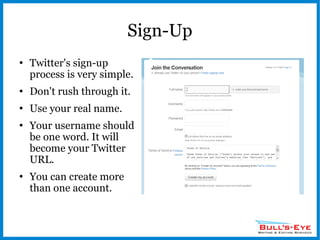
Sign-Up Twitter's sign-up process is very simple. Don't rush through it. Use your real name. Your username should be one word. It will become your Twitter URL. You can create more than one account.
Create a Profile Don't start following people until your profile is complete. Upload a picture or a logo. Don't leave the default Twitter icon. No one will see your e-mail address. For local nonprofits,  check the “Add location to Tweets” option to give you better local visibility.
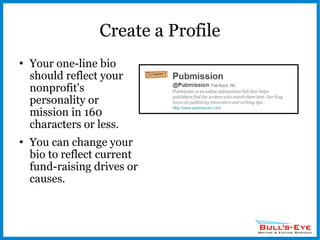
Create a Profile Your one-line bio should reflect your nonprofit's personality or mission in 160 characters or less. You can change your bio to reflect current fund-raising drives or causes.
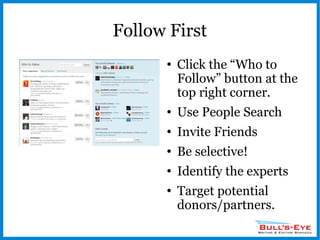
Follow First Click the “Who to Follow” button at the top right corner. Use People Search Invite Friends Be selective! Identify the experts Target potential donors/partners.
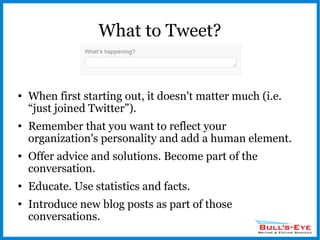
What to Tweet? When first starting out, it doesn't matter much (i.e. “just joined Twitter”). Remember that you want to reflect your organization's personality and add a human element. Offer advice and solutions. Become part of the conversation. Educate. Use statistics and facts. Introduce new blog posts as part of those conversations.
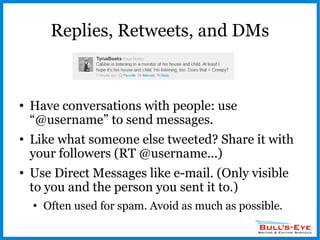
Replies, Retweets, and DMs Have conversations with people: use “@username” to send messages. Like what someone else tweeted? Share it with your followers (RT @username...) Use Direct Messages like e-mail. (Only visible to you and the person you sent it to.) Often used for spam. Avoid as much as possible.
#Hashtags Hashtag = A keyword marked with a “#” symbol. (i.e., #amwriting) Helpful for following discussions and chat sessions. Often used for breaking news. A great way to become part of a Twitter community. You can create your own hashtags.
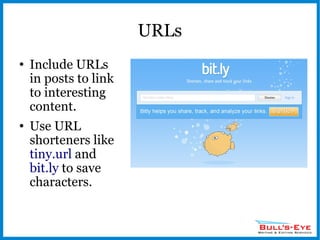
URLs Include URLs in posts to link to interesting content. Use URL shorteners like  tiny.url  and  bit.ly  to save characters.
Third-Party Tools Twellow  – a Twitter directory. TweetBeep  – get alerts whenever someone talks about you. TwitPic  – allows you to post pictures. Trendistic  – track trends on Twitter with graphs. TweetChat  – great for creating or participating in scheduled chat sessions.
HootSuite My favorite Twitter tool. Great for business. Follow trends, discussions, mentions, all in one place. Metrics. Use Hootlet (a browser plug-in) to share web pages with multiple social media sites.
Keys to Success Become part of the conversation. Don't spam or overload your tweets with selling copy. Karma: Give followers something of value – show your expertise. Use metrics to see which Tweets worked and which didn't. Respond to people who talk about you – regardless if it was positive or negative. Remember that you're ultimately representing your organization and not yourself. Don't expect thousands of followers overnight.
For More Help... Find me at: [email_address] 828.290.9314 www.bullseyewriting.com Facebook Page: Bull's-Eye Writing & Editing Services Twitter: @BullsEyeWriting

Twitter for Nonprofits

  • 1.
    How to UseTwitter for Your Nonprofit
  • 2.
    Why Twitter? Send140 character updates to people who want them. Free, yet powerful marketing tool. Publicize blog posts, organizational news, special offers... Engage with potential donors and generate buzz for your cause. Generate feedback. Ask & answer questions. See what people are saying about you and your cause. Follow trends and act on them. 25% of Twitter users are high-earners.
  • 3.
    Sign-Up Twitter's sign-upprocess is very simple. Don't rush through it. Use your real name. Your username should be one word. It will become your Twitter URL. You can create more than one account.
  • 4.
    Create a ProfileDon't start following people until your profile is complete. Upload a picture or a logo. Don't leave the default Twitter icon. No one will see your e-mail address. For local nonprofits, check the “Add location to Tweets” option to give you better local visibility.
  • 5.
    Create a ProfileYour one-line bio should reflect your nonprofit's personality or mission in 160 characters or less. You can change your bio to reflect current fund-raising drives or causes.
  • 6.
    Follow First Clickthe “Who to Follow” button at the top right corner. Use People Search Invite Friends Be selective! Identify the experts Target potential donors/partners.
  • 7.
    What to Tweet?When first starting out, it doesn't matter much (i.e. “just joined Twitter”). Remember that you want to reflect your organization's personality and add a human element. Offer advice and solutions. Become part of the conversation. Educate. Use statistics and facts. Introduce new blog posts as part of those conversations.
  • 8.
    Replies, Retweets, andDMs Have conversations with people: use “@username” to send messages. Like what someone else tweeted? Share it with your followers (RT @username...) Use Direct Messages like e-mail. (Only visible to you and the person you sent it to.) Often used for spam. Avoid as much as possible.
  • 9.
    #Hashtags Hashtag =A keyword marked with a “#” symbol. (i.e., #amwriting) Helpful for following discussions and chat sessions. Often used for breaking news. A great way to become part of a Twitter community. You can create your own hashtags.
  • 10.
    URLs Include URLsin posts to link to interesting content. Use URL shorteners like tiny.url and bit.ly to save characters.
  • 11.
    Third-Party Tools Twellow – a Twitter directory. TweetBeep – get alerts whenever someone talks about you. TwitPic – allows you to post pictures. Trendistic – track trends on Twitter with graphs. TweetChat – great for creating or participating in scheduled chat sessions.
  • 12.
    HootSuite My favoriteTwitter tool. Great for business. Follow trends, discussions, mentions, all in one place. Metrics. Use Hootlet (a browser plug-in) to share web pages with multiple social media sites.
  • 13.
    Keys to SuccessBecome part of the conversation. Don't spam or overload your tweets with selling copy. Karma: Give followers something of value – show your expertise. Use metrics to see which Tweets worked and which didn't. Respond to people who talk about you – regardless if it was positive or negative. Remember that you're ultimately representing your organization and not yourself. Don't expect thousands of followers overnight.
  • 14.
    For More Help...Find me at: [email_address] 828.290.9314 www.bullseyewriting.com Facebook Page: Bull's-Eye Writing & Editing Services Twitter: @BullsEyeWriting