• It
fdfdfdf


     What isTwitter
          Heidi Varpelaide
          SAMK
          September 2012
• It
           What is Twitter?
fdfdfdf


          It’s a microblogging
          website; a social media tool
          and one of the fastest
          growing networks.
• It
          What is a Tweet?
fdfdfdf
    A post to Twitter is called a Tweet, a
    140 (or fewer) character text message
    Tweets can include links, images and
    videos.

    A ReTweet: a post that was posted
    previously by another user
To follow and to be
• It
fdfdfdf
                followed
    You can follow any Twitter account you find
    interesting.
    People who are interested in what you
    have to say may follow you and they’ll see
    all the Tweets you share with them.
Twitter – how to start
Set up your account. Go to Twitter to
get started. Enter your name, email,
and a password.

Select a username. This is the name
by which you will be known on
Twitter.

Click on the Create my account
button.
Twitter page – my tweets
Twitter page – stream of other
           tweets
Tweetdeck
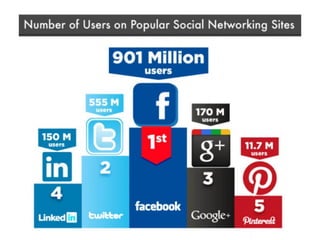
http://blog.tweetsmarter.com/social-
media/spring-2012-social-media-user-
statistics/
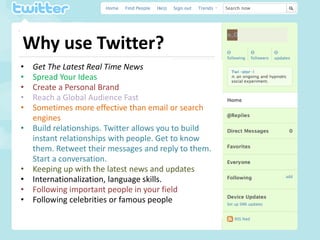
Why use Twitter?
•   Get The Latest Real Time News
•   Spread Your Ideas
•   Create a Personal Brand
•   Reach a Global Audience Fast
•   Sometimes more effective than email or search
    engines
•   Build relationships. Twitter allows you to build
    instant relationships with people. Get to know
    them. Retweet their messages and reply to them.
    Start a conversation.
•   Keeping up with the latest news and updates
•   Internationalization, language skills.
•   Following important people in your field
•   Following celebrities or famous people
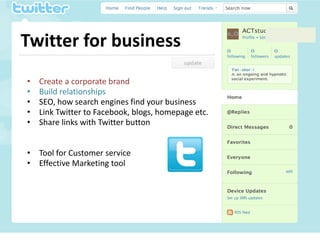
Twitter for business
•   Create a corporate brand
•   Build relationships
•   SEO, how search engines find your business
•   Link Twitter to Facebook, blogs, homepage etc.
•   Share links with Twitter button


• Tool for Customer service
• Effective Marketing tool
What you should tweet?


 Write a blog post and post it on
 Twitter. Post links to your blog posts
 on Twitter with a teaser headline.
Twitter signs

Hashtags #topic

Reply @otheruser

Retweet
RT @otheruser other tweet

DM
Direct Message
=private message to another user
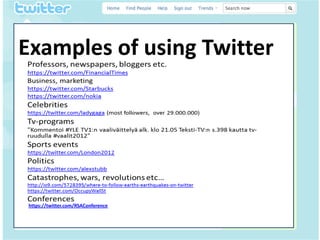
Examples of using Twitter
• It
fdfdfdf


  https://twitter.com/RSAConference
#Twitter is not technology. It’s a
conversation. And it’s happening
with or without you – Charlene Li
http://bit.ly/swg1Ix


             twitter.com/heidivar
             twitter.com/SatakunnanAMK

Twitter presentation

  • 1.
    • It fdfdfdf What isTwitter Heidi Varpelaide SAMK September 2012
  • 2.
    • It What is Twitter? fdfdfdf It’s a microblogging website; a social media tool and one of the fastest growing networks.
  • 3.
    • It What is a Tweet? fdfdfdf A post to Twitter is called a Tweet, a 140 (or fewer) character text message Tweets can include links, images and videos. A ReTweet: a post that was posted previously by another user
  • 4.
    To follow andto be • It fdfdfdf followed You can follow any Twitter account you find interesting. People who are interested in what you have to say may follow you and they’ll see all the Tweets you share with them.
  • 5.
    Twitter – howto start Set up your account. Go to Twitter to get started. Enter your name, email, and a password. Select a username. This is the name by which you will be known on Twitter. Click on the Create my account button.
  • 6.
  • 7.
    Twitter page –stream of other tweets
  • 8.
  • 9.
  • 10.
    Why use Twitter? • Get The Latest Real Time News • Spread Your Ideas • Create a Personal Brand • Reach a Global Audience Fast • Sometimes more effective than email or search engines • Build relationships. Twitter allows you to build instant relationships with people. Get to know them. Retweet their messages and reply to them. Start a conversation. • Keeping up with the latest news and updates • Internationalization, language skills. • Following important people in your field • Following celebrities or famous people
  • 11.
    Twitter for business • Create a corporate brand • Build relationships • SEO, how search engines find your business • Link Twitter to Facebook, blogs, homepage etc. • Share links with Twitter button • Tool for Customer service • Effective Marketing tool
  • 12.
    What you shouldtweet? Write a blog post and post it on Twitter. Post links to your blog posts on Twitter with a teaser headline.
  • 13.
    Twitter signs Hashtags #topic Reply@otheruser Retweet RT @otheruser other tweet DM Direct Message =private message to another user
  • 14.
    Examples of usingTwitter • It fdfdfdf https://twitter.com/RSAConference
  • 15.
    #Twitter is nottechnology. It’s a conversation. And it’s happening with or without you – Charlene Li http://bit.ly/swg1Ix twitter.com/heidivar twitter.com/SatakunnanAMK