TWITTER FOR ACADEMICS: GET BETTER CONNECTED
DR HELEN DIXON
INFORMATION SERVICES
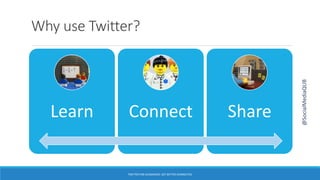
Why use Twitter?
Learn Connect Share
TWITTER FOR ACADEMICS: GET BETTER CONNECTED
@SocialMediaQUB
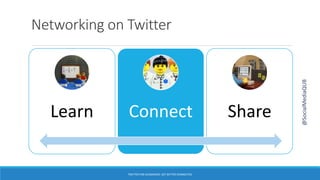
Networking on Twitter
Learn Connect Share
TWITTER FOR ACADEMICS: GET BETTER CONNECTED
@SocialMediaQUB
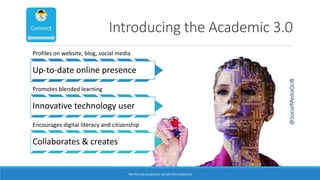
Introducing the Academic 3.0
TWITTER FOR ACADEMICS: GET BETTER CONNECTED
Profiles on website, blog, social media
Up-to-date online presence
Promotes blended learning
Innovative technology user
Encourages digital literacy and citizenship
Collaborates & creates
@SocialMediaQUB
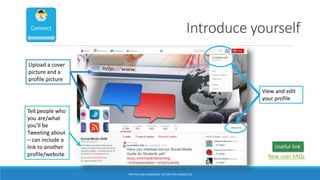
Introduce yourself
View and edit
your profile
Upload a cover
picture and a
profile picture
Tell people who
you are/what
you’ll be
Tweeting about
– can include a
link to another
profile/website
TWITTER FOR ACADEMICS: GET BETTER CONNECTED
New user FAQs
Useful link
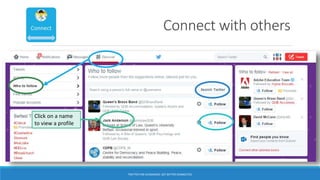
Connect with others
Click on a name
to view a profile
TWITTER FOR ACADEMICS: GET BETTER CONNECTED
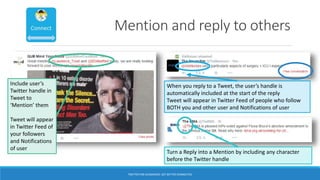
Mention and reply to others
Include user’s
Twitter handle in
Tweet to
‘Mention’ them
Tweet will appear
in Twitter Feed of
your followers
and Notifications
of user
When you reply to a Tweet, the user’s handle is
automatically included at the start of the reply
Tweet will appear in Twitter Feed of people who follow
BOTH you and other user and Notifications of user
Turn a Reply into a Mention by including any character
before the Twitter handle
TWITTER FOR ACADEMICS: GET BETTER CONNECTED
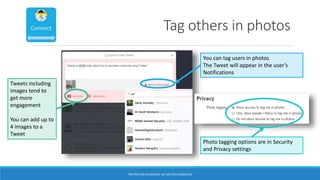
Tag others in photos
Tweets including
images tend to
get more
engagement
You can add up to
4 images to a
Tweet
You can tag users in photos
The Tweet will appear in the user’s
Notifications
Photo tagging options are in Security
and Privacy settings
TWITTER FOR ACADEMICS: GET BETTER CONNECTED
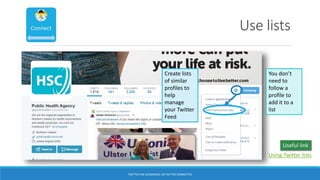
Use lists
Create lists
of similar
profiles to
help
manage
your Twitter
Feed
You don’t
need to
follow a
profile to
add it to a
list
TWITTER FOR ACADEMICS: GET BETTER CONNECTED
Using Twitter lists
Useful link
Using Twitter to acquire knowledge
Learn Connect Share
TWITTER FOR ACADEMICS: GET BETTER CONNECTED
@SocialMediaQUB
TWITTER FOR ACADEMICS: GET BETTER CONNECTED
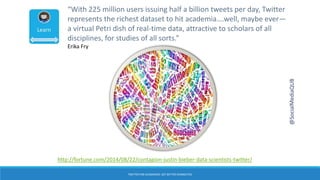
“With 225 million users issuing half a billion tweets per day, Twitter
represents the richest dataset to hit academia….well, maybe ever—
a virtual Petri dish of real-time data, attractive to scholars of all
disciplines, for studies of all sorts.”
Erika Fry
http://fortune.com/2014/08/22/contagion-justin-bieber-data-scientists-twitter/
@SocialMediaQUB
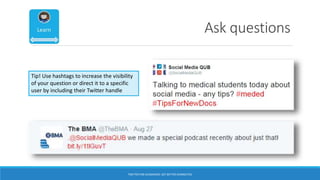
Ask questions
Tip! Use hashtags to increase the visibility
of your question or direct it to a specific
user by including their Twitter handle
TWITTER FOR ACADEMICS: GET BETTER CONNECTED
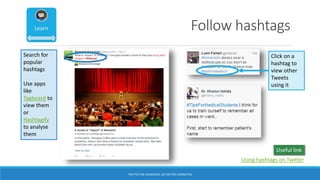
Follow hashtags
Click on a
hashtag to
view other
Tweets
using it
Search for
popular
hashtags
Use apps
like
Tagboard to
view them
or
Hashtagify
to analyse
them
Using hashtags on Twitter
Useful link
TWITTER FOR ACADEMICS: GET BETTER CONNECTED
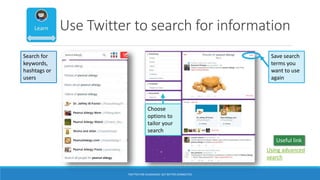
Use Twitter to search for information
Save search
terms you
want to use
again
Search for
keywords,
hashtags or
users
Choose
options to
tailor your
search
Using advanced
search
Useful link
TWITTER FOR ACADEMICS: GET BETTER CONNECTED
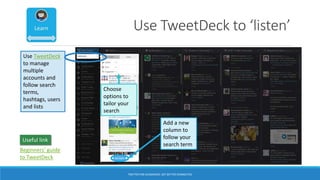
Use TweetDeck to ‘listen’
Add a new
column to
follow your
search term
Use TweetDeck
to manage
multiple
accounts and
follow search
terms,
hashtags, users
and lists
Choose
options to
tailor your
search
Beginners’ guide
to TweetDeck
Useful link
TWITTER FOR ACADEMICS: GET BETTER CONNECTED
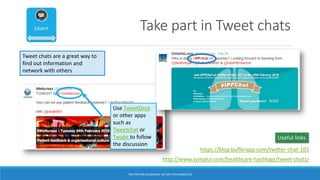
Take part in Tweet chats
Use TweetDeck
or other apps
such as
Tweetchat or
Twubs to follow
the discussion
Tweet chats are a great way to
find out information and
network with others
http://www.symplur.com/healthcare-hashtags/tweet-chats/
https://blog.bufferapp.com/twitter-chat-101
Useful links
TWITTER FOR ACADEMICS: GET BETTER CONNECTED
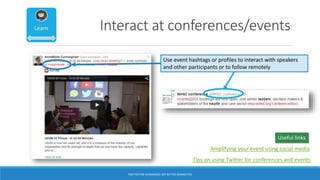
Interact at conferences/events
Use event hashtags or profiles to interact with speakers
and other participants or to follow remotely
Useful links
Amplifying your event using social media
Tips on using Twitter for conferences and events
TWITTER FOR ACADEMICS: GET BETTER CONNECTED
Using Twitter to disseminate knowledge
Learn Connect Share
TWITTER FOR ACADEMICS: GET BETTER CONNECTED
@SocialMediaQUB
TWITTER FOR ACADEMICS: GET BETTER CONNECTED
WIIFM?
As an academic you have information
and expertise to share
@SocialMediaQUB
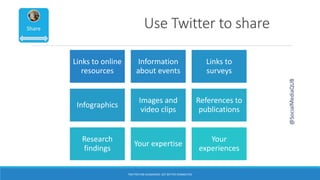
Use Twitter to share
@SocialMediaQUB
Links to online
resources
Information
about events
Links to
surveys
Infographics
Images and
video clips
References to
publications
Research
findings
Your expertise
Your
experiences
TWITTER FOR ACADEMICS: GET BETTER CONNECTED
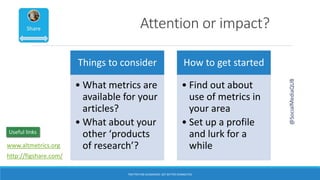
Attention or impact?
Things to consider
• What metrics are
available for your
articles?
• What about your
other ‘products
of research’?
How to get started
• Find out about
use of metrics in
your area
• Set up a profile
and lurk for a
while
http://figshare.com/
@SocialMediaQUB
www.altmetrics.org
Useful links
TWITTER FOR ACADEMICS: GET BETTER CONNECTED
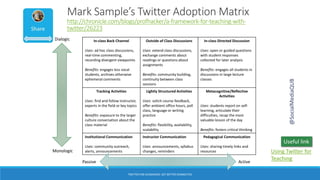
Mark Sample’s Twitter Adoption Matrix
http://chronicle.com/blogs/profhacker/a-framework-for-teaching-with-
twitter/26223
In-class Back Channel
Uses: ad hoc class discussions,
real-time commenting,
recording divergent viewpoints
Benefits: engages less vocal
students, archives otherwise
ephemeral comments
Outside of Class Discussions
Uses: extend class discussions,
exchange comments about
readings or questions about
assignments
Benefits: community building,
continuity between class
sessions
In-class Directed Discussion
Uses: open or guided questions
with student responses
collected for later analysis
Benefits: engages all students in
discussions in large lecture
classes
Tracking Activities
Uses: find and follow instructor,
experts in the field or key topics
Benefits: exposure to the larger
culture conversation about the
class material
Lightly Structured Activities
Uses: solicit course feedback,
offer ambient office hours, poll
class, language or writing
practice
Benefits: flexibility, availability,
scalability
Metacognitive/Reflective
Activities
Uses: students report on self-
learning, articulate their
difficulties, recap the most
valuable lesson of the day
Benefits: fosters critical thinking
Institutional Communication
Uses: community outreach,
alerts, announcements
Instructor Communication
Uses: announcements, syllabus
changes, reminders
Pedagogical Communication
Uses: sharing timely links and
resources
Dialogic
Monologic
Passive Active
Using Twitter for
Teaching
Useful link
@SocialMediaQUB
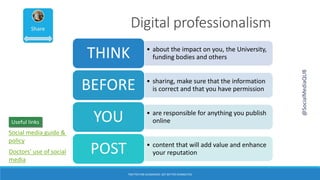
Digital professionalism
• about the impact on you, the University,
funding bodies and othersTHINK
• sharing, make sure that the information
is correct and that you have permissionBEFORE
• are responsible for anything you publish
onlineYOU
• content that will add value and enhance
your reputationPOST
@SocialMediaQUB
TWITTER FOR ACADEMICS: GET BETTER CONNECTED
Doctors’ use of social
media
Social media guide &
policy
Useful links
The rules of the game
are simple:
[1] share only what you
love or what resonates
with you;
[2] pay attention to the
feedback you receive
from the crowd and
modify your posts
accordingly;
[3] don’t stray too far
from the truth. Be
creative but don’t be
phoney.
http://philosophyforchange.wordpress
.com/2012/07/26/foucault-and-social-
media-the-call-of-the-crowd/
@SocialMediaQUB
TWITTER FOR ACADEMICS: GET BETTER CONNECTED
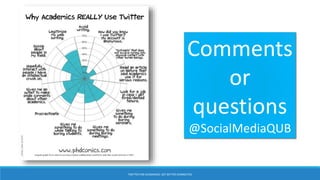
Comments
or
questions
@SocialMediaQUB
TWITTER FOR ACADEMICS: GET BETTER CONNECTED

Twitter for academics

  • 1.
    TWITTER FOR ACADEMICS:GET BETTER CONNECTED DR HELEN DIXON INFORMATION SERVICES
  • 2.
    Why use Twitter? LearnConnect Share TWITTER FOR ACADEMICS: GET BETTER CONNECTED @SocialMediaQUB
  • 3.
    Networking on Twitter LearnConnect Share TWITTER FOR ACADEMICS: GET BETTER CONNECTED @SocialMediaQUB
  • 4.
    Introducing the Academic3.0 TWITTER FOR ACADEMICS: GET BETTER CONNECTED Profiles on website, blog, social media Up-to-date online presence Promotes blended learning Innovative technology user Encourages digital literacy and citizenship Collaborates & creates @SocialMediaQUB
  • 5.
    Introduce yourself View andedit your profile Upload a cover picture and a profile picture Tell people who you are/what you’ll be Tweeting about – can include a link to another profile/website TWITTER FOR ACADEMICS: GET BETTER CONNECTED New user FAQs Useful link
  • 6.
    Connect with others Clickon a name to view a profile TWITTER FOR ACADEMICS: GET BETTER CONNECTED
  • 7.
    Mention and replyto others Include user’s Twitter handle in Tweet to ‘Mention’ them Tweet will appear in Twitter Feed of your followers and Notifications of user When you reply to a Tweet, the user’s handle is automatically included at the start of the reply Tweet will appear in Twitter Feed of people who follow BOTH you and other user and Notifications of user Turn a Reply into a Mention by including any character before the Twitter handle TWITTER FOR ACADEMICS: GET BETTER CONNECTED
  • 8.
    Tag others inphotos Tweets including images tend to get more engagement You can add up to 4 images to a Tweet You can tag users in photos The Tweet will appear in the user’s Notifications Photo tagging options are in Security and Privacy settings TWITTER FOR ACADEMICS: GET BETTER CONNECTED
  • 9.
    Use lists Create lists ofsimilar profiles to help manage your Twitter Feed You don’t need to follow a profile to add it to a list TWITTER FOR ACADEMICS: GET BETTER CONNECTED Using Twitter lists Useful link
  • 10.
    Using Twitter toacquire knowledge Learn Connect Share TWITTER FOR ACADEMICS: GET BETTER CONNECTED @SocialMediaQUB
  • 11.
    TWITTER FOR ACADEMICS:GET BETTER CONNECTED “With 225 million users issuing half a billion tweets per day, Twitter represents the richest dataset to hit academia….well, maybe ever— a virtual Petri dish of real-time data, attractive to scholars of all disciplines, for studies of all sorts.” Erika Fry http://fortune.com/2014/08/22/contagion-justin-bieber-data-scientists-twitter/ @SocialMediaQUB
  • 12.
    Ask questions Tip! Usehashtags to increase the visibility of your question or direct it to a specific user by including their Twitter handle TWITTER FOR ACADEMICS: GET BETTER CONNECTED
  • 13.
    Follow hashtags Click ona hashtag to view other Tweets using it Search for popular hashtags Use apps like Tagboard to view them or Hashtagify to analyse them Using hashtags on Twitter Useful link TWITTER FOR ACADEMICS: GET BETTER CONNECTED
  • 14.
    Use Twitter tosearch for information Save search terms you want to use again Search for keywords, hashtags or users Choose options to tailor your search Using advanced search Useful link TWITTER FOR ACADEMICS: GET BETTER CONNECTED
  • 15.
    Use TweetDeck to‘listen’ Add a new column to follow your search term Use TweetDeck to manage multiple accounts and follow search terms, hashtags, users and lists Choose options to tailor your search Beginners’ guide to TweetDeck Useful link TWITTER FOR ACADEMICS: GET BETTER CONNECTED
  • 16.
    Take part inTweet chats Use TweetDeck or other apps such as Tweetchat or Twubs to follow the discussion Tweet chats are a great way to find out information and network with others http://www.symplur.com/healthcare-hashtags/tweet-chats/ https://blog.bufferapp.com/twitter-chat-101 Useful links TWITTER FOR ACADEMICS: GET BETTER CONNECTED
  • 17.
    Interact at conferences/events Useevent hashtags or profiles to interact with speakers and other participants or to follow remotely Useful links Amplifying your event using social media Tips on using Twitter for conferences and events TWITTER FOR ACADEMICS: GET BETTER CONNECTED
  • 18.
    Using Twitter todisseminate knowledge Learn Connect Share TWITTER FOR ACADEMICS: GET BETTER CONNECTED @SocialMediaQUB
  • 19.
    TWITTER FOR ACADEMICS:GET BETTER CONNECTED WIIFM? As an academic you have information and expertise to share @SocialMediaQUB
  • 20.
    Use Twitter toshare @SocialMediaQUB Links to online resources Information about events Links to surveys Infographics Images and video clips References to publications Research findings Your expertise Your experiences TWITTER FOR ACADEMICS: GET BETTER CONNECTED
  • 21.
    Attention or impact? Thingsto consider • What metrics are available for your articles? • What about your other ‘products of research’? How to get started • Find out about use of metrics in your area • Set up a profile and lurk for a while http://figshare.com/ @SocialMediaQUB www.altmetrics.org Useful links TWITTER FOR ACADEMICS: GET BETTER CONNECTED
  • 22.
    TWITTER FOR ACADEMICS:GET BETTER CONNECTED Mark Sample’s Twitter Adoption Matrix http://chronicle.com/blogs/profhacker/a-framework-for-teaching-with- twitter/26223 In-class Back Channel Uses: ad hoc class discussions, real-time commenting, recording divergent viewpoints Benefits: engages less vocal students, archives otherwise ephemeral comments Outside of Class Discussions Uses: extend class discussions, exchange comments about readings or questions about assignments Benefits: community building, continuity between class sessions In-class Directed Discussion Uses: open or guided questions with student responses collected for later analysis Benefits: engages all students in discussions in large lecture classes Tracking Activities Uses: find and follow instructor, experts in the field or key topics Benefits: exposure to the larger culture conversation about the class material Lightly Structured Activities Uses: solicit course feedback, offer ambient office hours, poll class, language or writing practice Benefits: flexibility, availability, scalability Metacognitive/Reflective Activities Uses: students report on self- learning, articulate their difficulties, recap the most valuable lesson of the day Benefits: fosters critical thinking Institutional Communication Uses: community outreach, alerts, announcements Instructor Communication Uses: announcements, syllabus changes, reminders Pedagogical Communication Uses: sharing timely links and resources Dialogic Monologic Passive Active Using Twitter for Teaching Useful link @SocialMediaQUB
  • 23.
    Digital professionalism • aboutthe impact on you, the University, funding bodies and othersTHINK • sharing, make sure that the information is correct and that you have permissionBEFORE • are responsible for anything you publish onlineYOU • content that will add value and enhance your reputationPOST @SocialMediaQUB TWITTER FOR ACADEMICS: GET BETTER CONNECTED Doctors’ use of social media Social media guide & policy Useful links
  • 24.
    The rules ofthe game are simple: [1] share only what you love or what resonates with you; [2] pay attention to the feedback you receive from the crowd and modify your posts accordingly; [3] don’t stray too far from the truth. Be creative but don’t be phoney. http://philosophyforchange.wordpress .com/2012/07/26/foucault-and-social- media-the-call-of-the-crowd/ @SocialMediaQUB TWITTER FOR ACADEMICS: GET BETTER CONNECTED
  • 25.