Twitter for Researchers
D R H E L E N D I X O N
@ S O C I A L M E D I A Q U B
TWITTER FOR RESEARCHERS BY DR HELEN DIXON
GET BETTER CONNECTED!
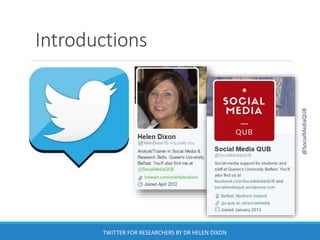
Introductions
TWITTER FOR RESEARCHERS BY DR HELEN DIXON
@SocialMediaQUB
What we will look at
What is Twitter?
Using Twitter as a Researcher
Interacting on Twitter
Searching
Lists
General Advice
Twitter Analytics and Management Tools
@SocialMediaQUB
TWITTER FOR RESEARCHERS BY DR HELEN DIXON
Tweet comments to
@SocialMediaQUB
using #QUBsocial
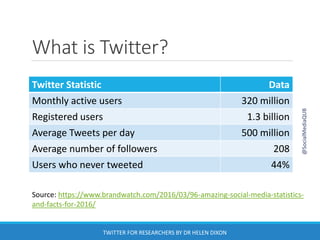
What is Twitter?
Twitter Statistic Data
Monthly active users 320 million
Registered users 1.3 billion
Average Tweets per day 500 million
Average number of followers 208
Users who never tweeted 44%
Source: https://www.brandwatch.com/2016/03/96-amazing-social-media-statistics-
and-facts-for-2016/
@SocialMediaQUB
TWITTER FOR RESEARCHERS BY DR HELEN DIXON
What is Twitter?
A continually
expanding global
database that
can be accessed
by anyone,
anywhere
@SocialMediaQUB
TWITTER FOR RESEARCHERS BY DR HELEN DIXON
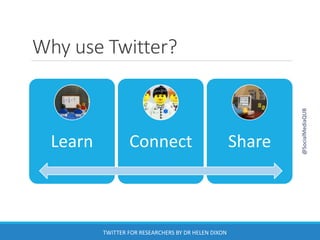
Why use Twitter?
Learn Connect Share
@SocialMediaQUB
TWITTER FOR RESEARCHERS BY DR HELEN DIXON
Twitter terminology
Tweet – 140 character message
Retweet (RT) – sharing someone else’s tweet
Modified tweet (MT) – a retweet that you have
altered slightly
Direct message (DM) – personal message to a
follower
Feed – stream of tweets made by others that you
follow that appear on your homepage
@SocialMediaQUB
TWITTER FOR RESEARCHERS BY DR HELEN DIXON
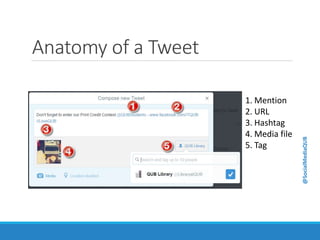
Anatomy of a Tweet
1. Mention
2. URL
3. Hashtag
4. Media file
5. Tag
@SocialMediaQUB
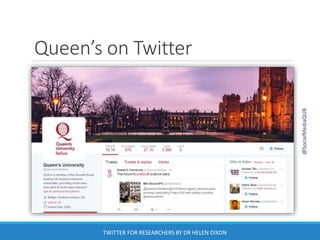
Queen’s on Twitter
@SocialMediaQUB
TWITTER FOR RESEARCHERS BY DR HELEN DIXON
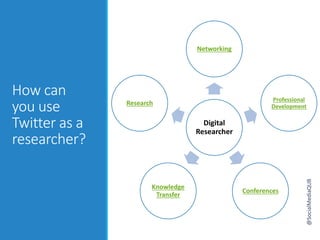
How can
you use
Twitter as a
researcher?
Digital
Researcher
Networking
Professional
Development
Conferences
Knowledge
Transfer
Research
@SocialMediaQUB
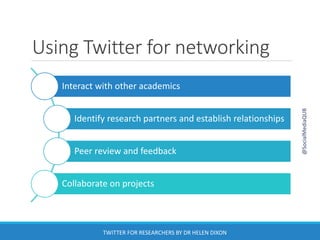
Using Twitter for networking
Interact with other academics
Identify research partners and establish relationships
Peer review and feedback
Collaborate on projects
@SocialMediaQUB
TWITTER FOR RESEARCHERS BY DR HELEN DIXON
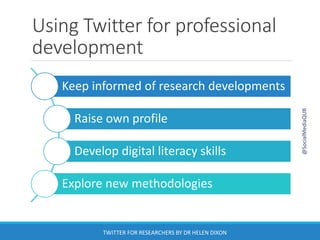
Using Twitter for professional
development
Keep informed of research developments
Raise own profile
Develop digital literacy skills
Explore new methodologies
@SocialMediaQUB
TWITTER FOR RESEARCHERS BY DR HELEN DIXON
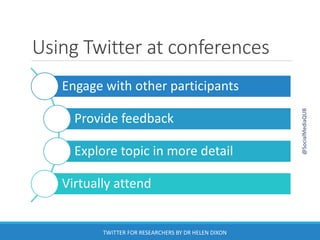
Using Twitter at conferences
Engage with other participants
Provide feedback
Explore topic in more detail
Virtually attend
@SocialMediaQUB
TWITTER FOR RESEARCHERS BY DR HELEN DIXON
Using Twitter for knowledge
transfer
Communicate expertise
Promote publications
Direct traffic to website/blog
Increase visibility and impact
@SocialMediaQUB
TWITTER FOR RESEARCHERS BY DR HELEN DIXON
Using Twitter for research
Create a poll
Keep up-to-date e.g. Twilert.com
Have a Twitter chat using hashtags
Ask the experts
@SocialMediaQUB
TWITTER FOR RESEARCHERS BY DR HELEN DIXON
Twitter as a research tool
Analyse events/social processes as they happen
Document the spread of ideas, patterns of behaviour or even
diseases
Can provide insights into how people think
◦ Evidence of beliefs and attitudes
Can provide explanations for behaviour
◦ Real-time rather than retrospectively
Crowdsourcing or ‘citizen science’
◦ Help to gather or analyse data
@SocialMediaQUB
TWITTER FOR RESEARCHERS BY DR HELEN DIXON
What Twitter can reveal
University of Rochester in New York used Twitter to follow the spread of flu
virus in New York City and predict when users would fall ill
Georgia Institute of Technology in Atlanta tracked the evolution of words –
where they originated and how they spread geographically
A sentiment analysis run by Northeastern University in Boston measured
public tweets using a psychological word-rating system to identify happy or
sad tweets.
◦ Happiness peaks each Sunday morning, then dives to an all-week low on
Thursday evening
http://www.newscientist.com/article/dn24544-five-fascinating-things-
revealed-by-twitter-data.html#.Uoo2YtLwlBl
http://digimind.com/blog/best-practices/innovative-uses-of-social-media-
data/
@SocialMediaQUB
TWITTER FOR RESEARCHERS BY DR HELEN DIXON
Getting Started
Need an email address
Choose a Twitter handle
◦ Your name will also appear beside your handle
Add some profile information
◦ Include disclaimer if necessary!
◦ Can include link to website/other profile
Don’t be an egghead!
@SocialMediaQUB
TWITTER FOR RESEARCHERS BY DR HELEN DIXON
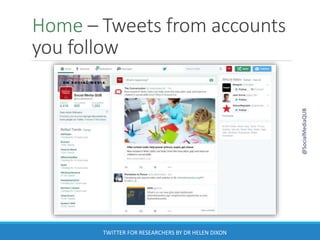
Home – Tweets from accounts
you follow
@SocialMediaQUB
TWITTER FOR RESEARCHERS BY DR HELEN DIXON
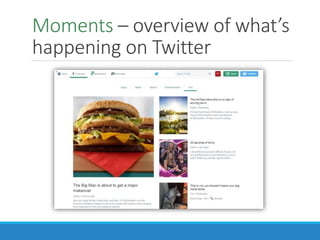
Moments – overview of what’s
happening on Twitter
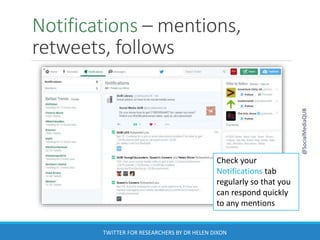
Notifications – mentions,
retweets, follows
@SocialMediaQUB
TWITTER FOR RESEARCHERS BY DR HELEN DIXON
Check your
Notifications tab
regularly so that you
can respond quickly
to any mentions
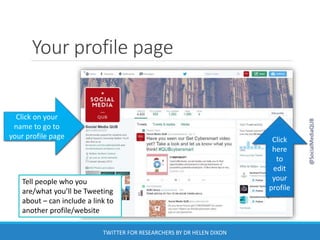
Your profile page
Click on your
name to go to
your profile page Click
here
to
edit
your
profile
@SocialMediaQUB
TWITTER FOR RESEARCHERS BY DR HELEN DIXON
Tell people who you
are/what you’ll be Tweeting
about – can include a link to
another profile/website
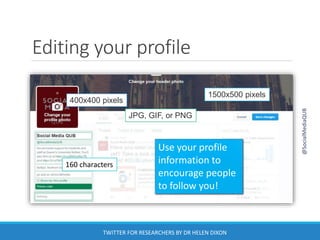
Editing your profile
Use your profile
information to
encourage people
to follow you!
1500x500 pixels
400x400 pixels
160 characters
JPG, GIF, or PNG
@SocialMediaQUB
TWITTER FOR RESEARCHERS BY DR HELEN DIXON
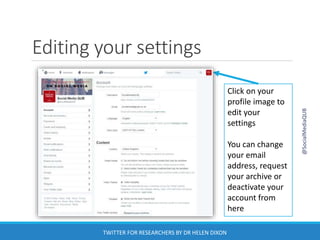
Editing your settings
Click on your
profile image to
edit your
settings
You can change
your email
address, request
your archive or
deactivate your
account from
here
@SocialMediaQUB
TWITTER FOR RESEARCHERS BY DR HELEN DIXON
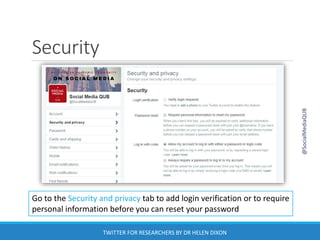
Security
Go to the Security and privacy tab to add login verification or to require
personal information before you can reset your password
@SocialMediaQUB
TWITTER FOR RESEARCHERS BY DR HELEN DIXON
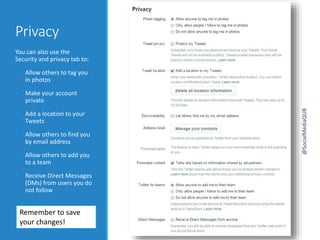
Privacy
You can also use the
Security and privacy tab to:
• Allow others to tag you
in photos
• Make your account
private
• Add a location to your
Tweets
• Allow others to find you
by email address
• Allow others to add you
to a team
• Receive Direct Messages
(DMs) from users you do
not follow
Remember to save
your changes!
@SocialMediaQUB
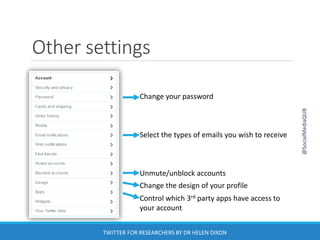
Other settings
Change your password
Select the types of emails you wish to receive
Unmute/unblock accounts
Change the design of your profile
Control which 3rd party apps have access to
your account
@SocialMediaQUB
TWITTER FOR RESEARCHERS BY DR HELEN DIXON
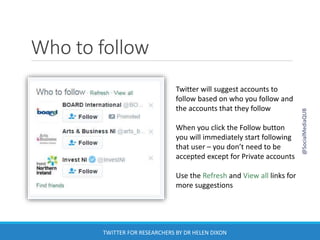
Who to follow
Twitter will suggest accounts to
follow based on who you follow and
the accounts that they follow
When you click the Follow button
you will immediately start following
that user – you don’t need to be
accepted except for Private accounts
Use the Refresh and View all links for
more suggestions
@SocialMediaQUB
TWITTER FOR RESEARCHERS BY DR HELEN DIXON
Following tips!
Find out who other researchers in your area follow
You don’t have to follow every user who follows
you
Before following someone, check to see what they
tweet about and when they last tweeted
Will following this person reflect positively on you?
Remember, it’s who you follow not who follows
you that is important!
@SocialMediaQUB
TWITTER FOR RESEARCHERS BY DR HELEN DIXON
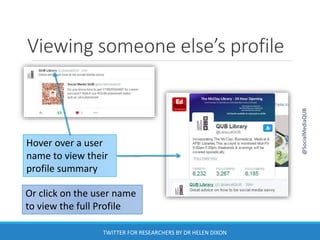
Viewing someone else’s profile
Hover over a user
name to view their
profile summary
Or click on the user name
to view the full Profile
@SocialMediaQUB
TWITTER FOR RESEARCHERS BY DR HELEN DIXON
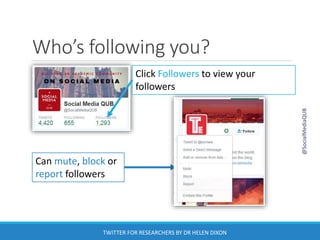
Who’s following you?
Click Followers to view your
followers
Can mute, block or
report followers
@SocialMediaQUB
TWITTER FOR RESEARCHERS BY DR HELEN DIXON
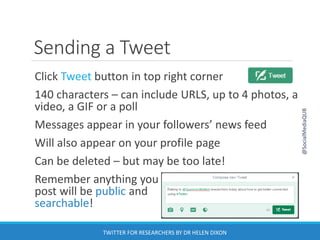
Sending a Tweet
Click Tweet button in top right corner
140 characters – can include URLS, up to 4 photos, a
video, a GIF or a poll
Messages appear in your followers’ news feed
Will also appear on your profile page
Can be deleted – but may be too late!
Remember anything you
post will be public and
searchable!
@SocialMediaQUB
TWITTER FOR RESEARCHERS BY DR HELEN DIXON
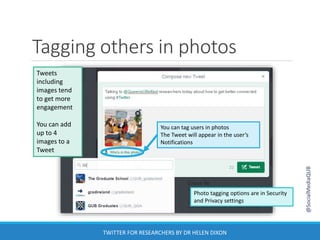
Tagging others in photos
Tweets
including
images tend
to get more
engagement
You can add
up to 4
images to a
Tweet
You can tag users in photos
The Tweet will appear in the user’s
Notifications
Photo tagging options are in Security
and Privacy settings
@SocialMediaQUB
TWITTER FOR RESEARCHERS BY DR HELEN DIXON
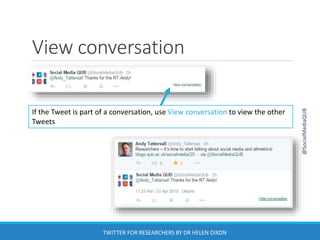
View conversation
If the Tweet is part of a conversation, use View conversation to view the other
Tweets
@SocialMediaQUB
TWITTER FOR RESEARCHERS BY DR HELEN DIXON
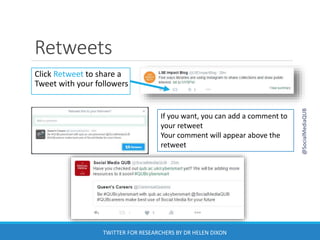
Retweets
Click Retweet to share a
Tweet with your followers
If you want, you can add a comment to
your retweet
Your comment will appear above the
retweet
@SocialMediaQUB
TWITTER FOR RESEARCHERS BY DR HELEN DIXON
Retweeting tips
Check the content of links before retweeting!
If you retweet from someone you follow it will be visible in
your Profile
If you retweet from someone you do not follow it will be
visible in your Home and Profile
Original sender will be notified that you have retweeted
their message
Can turn off retweets from a user
To undo a retweet, go to your profile and click the Retweet
icon
@SocialMediaQUB
TWITTER FOR RESEARCHERS BY DR HELEN DIXON
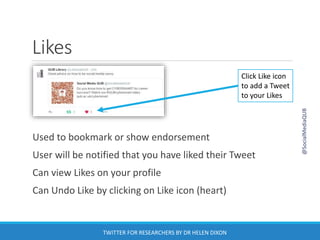
Likes
Used to bookmark or show endorsement
User will be notified that you have liked their Tweet
Can view Likes on your profile
Can Undo Like by clicking on Like icon (heart)
Click Like icon
to add a Tweet
to your Likes
@SocialMediaQUB
TWITTER FOR RESEARCHERS BY DR HELEN DIXON
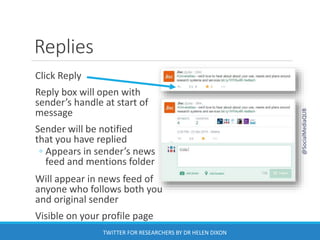
Replies
Click Reply
Reply box will open with
sender’s handle at start of
message
Sender will be notified
that you have replied
◦ Appears in sender’s news
feed and mentions folder
Will appear in news feed of
anyone who follows both you
and original sender
Visible on your profile page
@SocialMediaQUB
TWITTER FOR RESEARCHERS BY DR HELEN DIXON
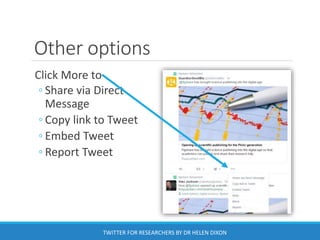
Other options
Click More to
◦ Share via Direct
Message
◦ Copy link to Tweet
◦ Embed Tweet
◦ Report Tweet
TWITTER FOR RESEARCHERS BY DR HELEN DIXON
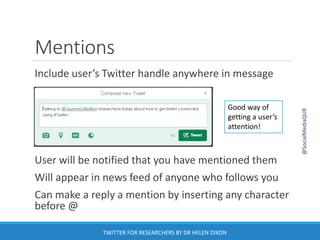
Mentions
Include user’s Twitter handle anywhere in message
User will be notified that you have mentioned them
Will appear in news feed of anyone who follows you
Can make a reply a mention by inserting any character
before @
Good way of
getting a user’s
attention!
@SocialMediaQUB
TWITTER FOR RESEARCHERS BY DR HELEN DIXON
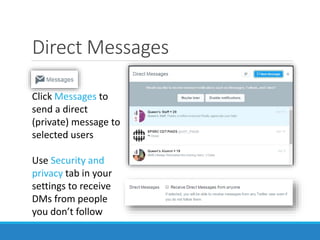
Direct Messages
Click Messages to
send a direct
(private) message to
selected users
Use Security and
privacy tab in your
settings to receive
DMs from people
you don’t follow
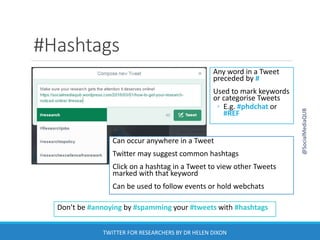
#Hashtags
Don’t be #annoying by #spamming your #tweets with #hashtags
Any word in a Tweet
preceded by #
Used to mark keywords
or categorise Tweets
◦ E.g. #phdchat or
#REF
Can occur anywhere in a Tweet
Twitter may suggest common hashtags
Click on a hashtag in a Tweet to view other Tweets
marked with that keyword
Can be used to follow events or hold webchats
@SocialMediaQUB
TWITTER FOR RESEARCHERS BY DR HELEN DIXON
Creating a Hashtag for an
event/project
Choose hashtags with care! #nowthatchersdead
Do your research! Is the hashtag already being
used?
Use the hashtag in all Tweets related to the
event/project
Publicise your hashtag
◦ Include in any written documentation
◦ Add to slides/videos/imagery
◦ Encourage colleagues/participants to use it
@SocialMediaQUB
Try these hashtag tools
Use Tagboard to view hashtags across different
platforms
Use Hashtagify.me to view popular terms, related
hashtags, top influencers and a hashtag wall
Use Twubs to follow hashtags and take part in
Tweet chats
Use Wall of Social for a dynamic Twitter wall
@SocialMediaQUB
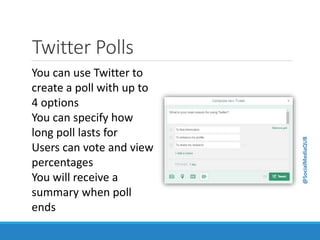
Twitter Polls
You can use Twitter to
create a poll with up to
4 options
You can specify how
long poll lasts for
Users can vote and view
percentages
You will receive a
summary when poll
ends
@SocialMediaQUB
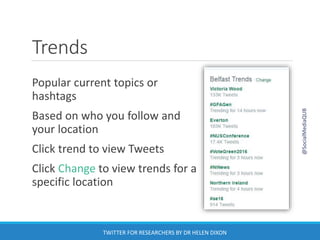
Trends
Popular current topics or
hashtags
Based on who you follow and
your location
Click trend to view Tweets
Click Change to view trends for a
specific location
@SocialMediaQUB
TWITTER FOR RESEARCHERS BY DR HELEN DIXON
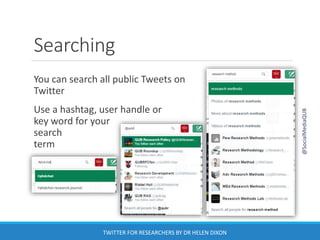
Searching
You can search all public Tweets on
Twitter
Use a hashtag, user handle or
key word for your
search
term
@SocialMediaQUB
TWITTER FOR RESEARCHERS BY DR HELEN DIXON
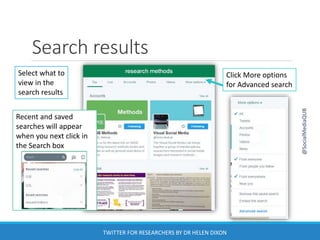
Select what to
view in the
search results
Click More options
for Advanced search
Search results
Recent and saved
searches will appear
when you next click in
the Search box
@SocialMediaQUB
TWITTER FOR RESEARCHERS BY DR HELEN DIXON
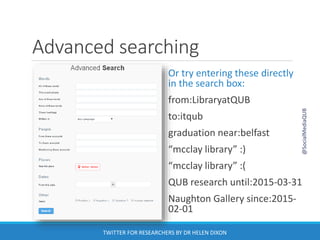
Advanced searching
Or try entering these directly
in the search box:
from:LibraryatQUB
to:itqub
graduation near:belfast
“mcclay library” :)
“mcclay library” :(
QUB research until:2015-03-31
Naughton Gallery since:2015-
02-01
@SocialMediaQUB
TWITTER FOR RESEARCHERS BY DR HELEN DIXON
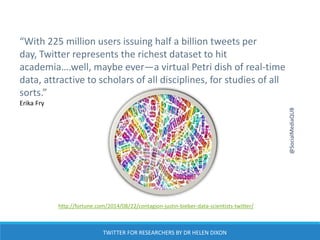
“With 225 million users issuing half a billion tweets per
day, Twitter represents the richest dataset to hit
academia….well, maybe ever—a virtual Petri dish of real-time
data, attractive to scholars of all disciplines, for studies of all
sorts.”
Erika Fry
http://fortune.com/2014/08/22/contagion-justin-bieber-data-scientists-twitter/
@SocialMediaQUB
TWITTER FOR RESEARCHERS BY DR HELEN DIXON
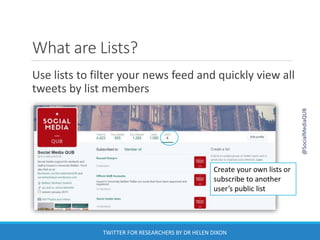
What are Lists?
Use lists to filter your news feed and quickly view all
tweets by list members
Create your own lists or
subscribe to another
user’s public list
@SocialMediaQUB
TWITTER FOR RESEARCHERS BY DR HELEN DIXON
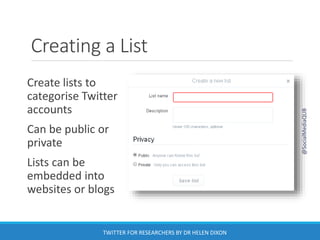
Creating a List
Create lists to
categorise Twitter
accounts
Can be public or
private
Lists can be
embedded into
websites or blogs
@SocialMediaQUB
TWITTER FOR RESEARCHERS BY DR HELEN DIXON
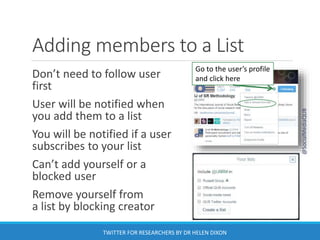
Adding members to a List
Don’t need to follow user
first
User will be notified when
you add them to a list
You will be notified if a user
subscribes to your list
Can’t add yourself or a
blocked user
Remove yourself from
a list by blocking creator
Go to the user’s profile
and click here
@SocialMediaQUB
TWITTER FOR RESEARCHERS BY DR HELEN DIXON
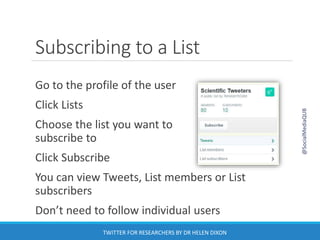
Subscribing to a List
Go to the profile of the user
Click Lists
Choose the list you want to
subscribe to
Click Subscribe
You can view Tweets, List members or List
subscribers
Don’t need to follow individual users
@SocialMediaQUB
TWITTER FOR RESEARCHERS BY DR HELEN DIXON
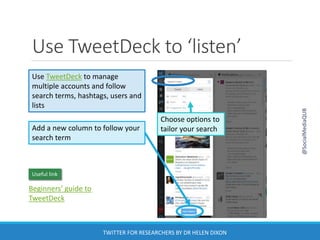
Use TweetDeck to ‘listen’
Add a new column to follow your
search term
Use TweetDeck to manage
multiple accounts and follow
search terms, hashtags, users and
lists
Choose options to
tailor your search
Beginners’ guide to
TweetDeck
Useful link
@SocialMediaQUB
TWITTER FOR RESEARCHERS BY DR HELEN DIXON
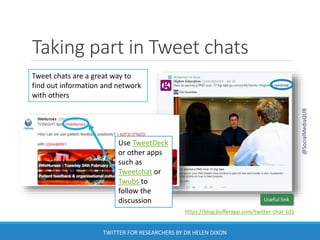
Taking part in Tweet chats
Use TweetDeck
or other apps
such as
Tweetchat or
Twubs to
follow the
discussion
Tweet chats are a great way to
find out information and network
with others
https://blog.bufferapp.com/twitter-chat-101
Useful link
@SocialMediaQUB
TWITTER FOR RESEARCHERS BY DR HELEN DIXON
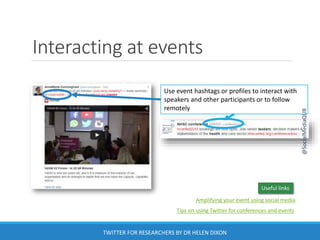
Interacting at events
Use event hashtags or profiles to interact with
speakers and other participants or to follow
remotely
Useful links
Amplifying your event using social media
Tips on using Twitter for conferences and events
@SocialMediaQUB
TWITTER FOR RESEARCHERS BY DR HELEN DIXON
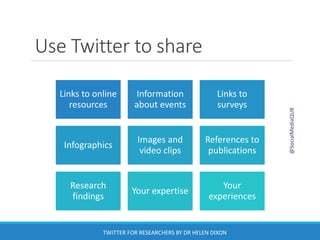
Use Twitter to share
@SocialMediaQUB
Links to online
resources
Information
about events
Links to
surveys
Infographics
Images and
video clips
References to
publications
Research
findings
Your expertise
Your
experiences
TWITTER FOR RESEARCHERS BY DR HELEN DIXON
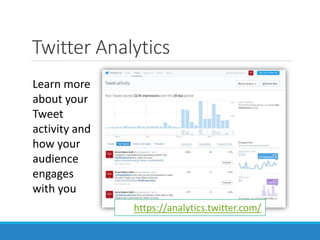
Twitter Analytics
Learn more
about your
Tweet
activity and
how your
audience
engages
with you
https://analytics.twitter.com/
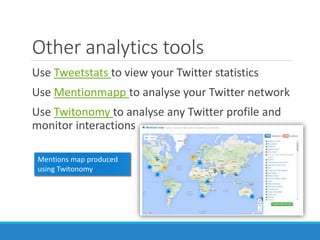
Other analytics tools
Use Tweetstats to view your Twitter statistics
Use Mentionmapp to analyse your Twitter network
Use Twitonomy to analyse any Twitter profile and
monitor interactions
Mentions map produced
using Twitonomy
Tweeting Tips!
Be conversational – avoid jargon and formality
Encourage interaction and interact with others
◦ Use tags and mentions
Use links/images/videos/hashtags to increase
engagement
Try to remain professional and positive (even if
provoked!)
Be careful about copyright/intellectual property
Always check links before retweeting!
@SocialMediaQUB
TWITTER FOR RESEARCHERS BY DR HELEN DIXON
How to get suspended!
Aggressive following/unfollowing
Repeatedly posting duplicate content or Tweets
Posting similar messages over multiple accounts
(spamming)
Large number of unsolicited replies/@mentions
Using bots or posting malware
@SocialMediaQUB
TWITTER FOR RESEARCHERS BY DR HELEN DIXON
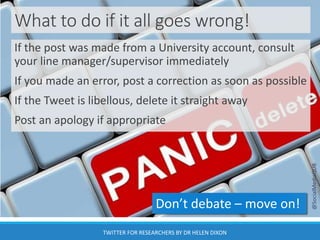
What to do if it all goes wrong!
If the post was made from a University account, consult
your line manager/supervisor immediately
If you made an error, post a correction as soon as possible
If the Tweet is libellous, delete it straight away
Post an apology if appropriate
Don’t debate – move on!
@SocialMediaQUB
TWITTER FOR RESEARCHERS BY DR HELEN DIXON
Ethical issues
Consent to collect data
Failing to reveal true identity in order to gain
access
Searchable nature of social media sites
makes it difficult to anonymise data
Risks to participants
Publicising unfinished research
@SocialMediaQUB
TWITTER FOR RESEARCHERS BY DR HELEN DIXON
Digital professionalism
TWITTER FOR RESEARCHERS BY DR HELEN DIXON
• about the impact on you, the University,
funding bodies and othersTHINK
• sharing, make sure that the information
is correct and that you have permissionBEFORE
• are responsible for anything you publish
onlineYOU
• content that will add value and enhance
your reputationPOST
@SocialMediaQUB
Social media guide & policy
Useful link
KEEP
CALM
REPORT, BLOCK AND
CARRY ON
@SocialMediaQUB
TWITTER FOR RESEARCHERS BY DR HELEN DIXON
Further information
https://support.twitter.com/
http://www.scoop.it/t/social-media-for-
researchers
http://go.qub.ac.uk/socialmedia
Follow @SocialMediaQUB
Like us at www.facebook.com/SocialMediaQUB
Email socialmedia@qub.ac.uk
@SocialMediaQUB
TWITTER FOR RESEARCHERS BY DR HELEN DIXON
Comments
or
questions
@SocialMediaQUB
TWITTER FOR RESEARCHERS BY DR HELEN DIXON

Twitter for researchers

  • 1.
    Twitter for Researchers DR H E L E N D I X O N @ S O C I A L M E D I A Q U B TWITTER FOR RESEARCHERS BY DR HELEN DIXON GET BETTER CONNECTED!
  • 2.
    Introductions TWITTER FOR RESEARCHERSBY DR HELEN DIXON @SocialMediaQUB
  • 3.
    What we willlook at What is Twitter? Using Twitter as a Researcher Interacting on Twitter Searching Lists General Advice Twitter Analytics and Management Tools @SocialMediaQUB TWITTER FOR RESEARCHERS BY DR HELEN DIXON Tweet comments to @SocialMediaQUB using #QUBsocial
  • 4.
    What is Twitter? TwitterStatistic Data Monthly active users 320 million Registered users 1.3 billion Average Tweets per day 500 million Average number of followers 208 Users who never tweeted 44% Source: https://www.brandwatch.com/2016/03/96-amazing-social-media-statistics- and-facts-for-2016/ @SocialMediaQUB TWITTER FOR RESEARCHERS BY DR HELEN DIXON
  • 5.
    What is Twitter? Acontinually expanding global database that can be accessed by anyone, anywhere @SocialMediaQUB TWITTER FOR RESEARCHERS BY DR HELEN DIXON
  • 6.
    Why use Twitter? LearnConnect Share @SocialMediaQUB TWITTER FOR RESEARCHERS BY DR HELEN DIXON
  • 7.
    Twitter terminology Tweet –140 character message Retweet (RT) – sharing someone else’s tweet Modified tweet (MT) – a retweet that you have altered slightly Direct message (DM) – personal message to a follower Feed – stream of tweets made by others that you follow that appear on your homepage @SocialMediaQUB TWITTER FOR RESEARCHERS BY DR HELEN DIXON
  • 8.
    Anatomy of aTweet 1. Mention 2. URL 3. Hashtag 4. Media file 5. Tag @SocialMediaQUB
  • 9.
    Queen’s on Twitter @SocialMediaQUB TWITTERFOR RESEARCHERS BY DR HELEN DIXON
  • 10.
    How can you use Twitteras a researcher? Digital Researcher Networking Professional Development Conferences Knowledge Transfer Research @SocialMediaQUB
  • 11.
    Using Twitter fornetworking Interact with other academics Identify research partners and establish relationships Peer review and feedback Collaborate on projects @SocialMediaQUB TWITTER FOR RESEARCHERS BY DR HELEN DIXON
  • 12.
    Using Twitter forprofessional development Keep informed of research developments Raise own profile Develop digital literacy skills Explore new methodologies @SocialMediaQUB TWITTER FOR RESEARCHERS BY DR HELEN DIXON
  • 13.
    Using Twitter atconferences Engage with other participants Provide feedback Explore topic in more detail Virtually attend @SocialMediaQUB TWITTER FOR RESEARCHERS BY DR HELEN DIXON
  • 14.
    Using Twitter forknowledge transfer Communicate expertise Promote publications Direct traffic to website/blog Increase visibility and impact @SocialMediaQUB TWITTER FOR RESEARCHERS BY DR HELEN DIXON
  • 15.
    Using Twitter forresearch Create a poll Keep up-to-date e.g. Twilert.com Have a Twitter chat using hashtags Ask the experts @SocialMediaQUB TWITTER FOR RESEARCHERS BY DR HELEN DIXON
  • 16.
    Twitter as aresearch tool Analyse events/social processes as they happen Document the spread of ideas, patterns of behaviour or even diseases Can provide insights into how people think ◦ Evidence of beliefs and attitudes Can provide explanations for behaviour ◦ Real-time rather than retrospectively Crowdsourcing or ‘citizen science’ ◦ Help to gather or analyse data @SocialMediaQUB TWITTER FOR RESEARCHERS BY DR HELEN DIXON
  • 17.
    What Twitter canreveal University of Rochester in New York used Twitter to follow the spread of flu virus in New York City and predict when users would fall ill Georgia Institute of Technology in Atlanta tracked the evolution of words – where they originated and how they spread geographically A sentiment analysis run by Northeastern University in Boston measured public tweets using a psychological word-rating system to identify happy or sad tweets. ◦ Happiness peaks each Sunday morning, then dives to an all-week low on Thursday evening http://www.newscientist.com/article/dn24544-five-fascinating-things- revealed-by-twitter-data.html#.Uoo2YtLwlBl http://digimind.com/blog/best-practices/innovative-uses-of-social-media- data/ @SocialMediaQUB TWITTER FOR RESEARCHERS BY DR HELEN DIXON
  • 18.
    Getting Started Need anemail address Choose a Twitter handle ◦ Your name will also appear beside your handle Add some profile information ◦ Include disclaimer if necessary! ◦ Can include link to website/other profile Don’t be an egghead! @SocialMediaQUB TWITTER FOR RESEARCHERS BY DR HELEN DIXON
  • 19.
    Home – Tweetsfrom accounts you follow @SocialMediaQUB TWITTER FOR RESEARCHERS BY DR HELEN DIXON
  • 20.
    Moments – overviewof what’s happening on Twitter
  • 21.
    Notifications – mentions, retweets,follows @SocialMediaQUB TWITTER FOR RESEARCHERS BY DR HELEN DIXON Check your Notifications tab regularly so that you can respond quickly to any mentions
  • 22.
    Your profile page Clickon your name to go to your profile page Click here to edit your profile @SocialMediaQUB TWITTER FOR RESEARCHERS BY DR HELEN DIXON Tell people who you are/what you’ll be Tweeting about – can include a link to another profile/website
  • 23.
    Editing your profile Useyour profile information to encourage people to follow you! 1500x500 pixels 400x400 pixels 160 characters JPG, GIF, or PNG @SocialMediaQUB TWITTER FOR RESEARCHERS BY DR HELEN DIXON
  • 24.
    Editing your settings Clickon your profile image to edit your settings You can change your email address, request your archive or deactivate your account from here @SocialMediaQUB TWITTER FOR RESEARCHERS BY DR HELEN DIXON
  • 25.
    Security Go to theSecurity and privacy tab to add login verification or to require personal information before you can reset your password @SocialMediaQUB TWITTER FOR RESEARCHERS BY DR HELEN DIXON
  • 26.
    Privacy You can alsouse the Security and privacy tab to: • Allow others to tag you in photos • Make your account private • Add a location to your Tweets • Allow others to find you by email address • Allow others to add you to a team • Receive Direct Messages (DMs) from users you do not follow Remember to save your changes! @SocialMediaQUB
  • 27.
    Other settings Change yourpassword Select the types of emails you wish to receive Unmute/unblock accounts Change the design of your profile Control which 3rd party apps have access to your account @SocialMediaQUB TWITTER FOR RESEARCHERS BY DR HELEN DIXON
  • 28.
    Who to follow Twitterwill suggest accounts to follow based on who you follow and the accounts that they follow When you click the Follow button you will immediately start following that user – you don’t need to be accepted except for Private accounts Use the Refresh and View all links for more suggestions @SocialMediaQUB TWITTER FOR RESEARCHERS BY DR HELEN DIXON
  • 29.
    Following tips! Find outwho other researchers in your area follow You don’t have to follow every user who follows you Before following someone, check to see what they tweet about and when they last tweeted Will following this person reflect positively on you? Remember, it’s who you follow not who follows you that is important! @SocialMediaQUB TWITTER FOR RESEARCHERS BY DR HELEN DIXON
  • 30.
    Viewing someone else’sprofile Hover over a user name to view their profile summary Or click on the user name to view the full Profile @SocialMediaQUB TWITTER FOR RESEARCHERS BY DR HELEN DIXON
  • 31.
    Who’s following you? ClickFollowers to view your followers Can mute, block or report followers @SocialMediaQUB TWITTER FOR RESEARCHERS BY DR HELEN DIXON
  • 32.
    Sending a Tweet ClickTweet button in top right corner 140 characters – can include URLS, up to 4 photos, a video, a GIF or a poll Messages appear in your followers’ news feed Will also appear on your profile page Can be deleted – but may be too late! Remember anything you post will be public and searchable! @SocialMediaQUB TWITTER FOR RESEARCHERS BY DR HELEN DIXON
  • 33.
    Tagging others inphotos Tweets including images tend to get more engagement You can add up to 4 images to a Tweet You can tag users in photos The Tweet will appear in the user’s Notifications Photo tagging options are in Security and Privacy settings @SocialMediaQUB TWITTER FOR RESEARCHERS BY DR HELEN DIXON
  • 34.
    View conversation If theTweet is part of a conversation, use View conversation to view the other Tweets @SocialMediaQUB TWITTER FOR RESEARCHERS BY DR HELEN DIXON
  • 35.
    Retweets Click Retweet toshare a Tweet with your followers If you want, you can add a comment to your retweet Your comment will appear above the retweet @SocialMediaQUB TWITTER FOR RESEARCHERS BY DR HELEN DIXON
  • 36.
    Retweeting tips Check thecontent of links before retweeting! If you retweet from someone you follow it will be visible in your Profile If you retweet from someone you do not follow it will be visible in your Home and Profile Original sender will be notified that you have retweeted their message Can turn off retweets from a user To undo a retweet, go to your profile and click the Retweet icon @SocialMediaQUB TWITTER FOR RESEARCHERS BY DR HELEN DIXON
  • 37.
    Likes Used to bookmarkor show endorsement User will be notified that you have liked their Tweet Can view Likes on your profile Can Undo Like by clicking on Like icon (heart) Click Like icon to add a Tweet to your Likes @SocialMediaQUB TWITTER FOR RESEARCHERS BY DR HELEN DIXON
  • 38.
    Replies Click Reply Reply boxwill open with sender’s handle at start of message Sender will be notified that you have replied ◦ Appears in sender’s news feed and mentions folder Will appear in news feed of anyone who follows both you and original sender Visible on your profile page @SocialMediaQUB TWITTER FOR RESEARCHERS BY DR HELEN DIXON
  • 39.
    Other options Click Moreto ◦ Share via Direct Message ◦ Copy link to Tweet ◦ Embed Tweet ◦ Report Tweet TWITTER FOR RESEARCHERS BY DR HELEN DIXON
  • 40.
    Mentions Include user’s Twitterhandle anywhere in message User will be notified that you have mentioned them Will appear in news feed of anyone who follows you Can make a reply a mention by inserting any character before @ Good way of getting a user’s attention! @SocialMediaQUB TWITTER FOR RESEARCHERS BY DR HELEN DIXON
  • 41.
    Direct Messages Click Messagesto send a direct (private) message to selected users Use Security and privacy tab in your settings to receive DMs from people you don’t follow
  • 42.
    #Hashtags Don’t be #annoyingby #spamming your #tweets with #hashtags Any word in a Tweet preceded by # Used to mark keywords or categorise Tweets ◦ E.g. #phdchat or #REF Can occur anywhere in a Tweet Twitter may suggest common hashtags Click on a hashtag in a Tweet to view other Tweets marked with that keyword Can be used to follow events or hold webchats @SocialMediaQUB TWITTER FOR RESEARCHERS BY DR HELEN DIXON
  • 43.
    Creating a Hashtagfor an event/project Choose hashtags with care! #nowthatchersdead Do your research! Is the hashtag already being used? Use the hashtag in all Tweets related to the event/project Publicise your hashtag ◦ Include in any written documentation ◦ Add to slides/videos/imagery ◦ Encourage colleagues/participants to use it @SocialMediaQUB
  • 44.
    Try these hashtagtools Use Tagboard to view hashtags across different platforms Use Hashtagify.me to view popular terms, related hashtags, top influencers and a hashtag wall Use Twubs to follow hashtags and take part in Tweet chats Use Wall of Social for a dynamic Twitter wall @SocialMediaQUB
  • 45.
    Twitter Polls You canuse Twitter to create a poll with up to 4 options You can specify how long poll lasts for Users can vote and view percentages You will receive a summary when poll ends @SocialMediaQUB
  • 46.
    Trends Popular current topicsor hashtags Based on who you follow and your location Click trend to view Tweets Click Change to view trends for a specific location @SocialMediaQUB TWITTER FOR RESEARCHERS BY DR HELEN DIXON
  • 47.
    Searching You can searchall public Tweets on Twitter Use a hashtag, user handle or key word for your search term @SocialMediaQUB TWITTER FOR RESEARCHERS BY DR HELEN DIXON
  • 48.
    Select what to viewin the search results Click More options for Advanced search Search results Recent and saved searches will appear when you next click in the Search box @SocialMediaQUB TWITTER FOR RESEARCHERS BY DR HELEN DIXON
  • 49.
    Advanced searching Or tryentering these directly in the search box: from:LibraryatQUB to:itqub graduation near:belfast “mcclay library” :) “mcclay library” :( QUB research until:2015-03-31 Naughton Gallery since:2015- 02-01 @SocialMediaQUB TWITTER FOR RESEARCHERS BY DR HELEN DIXON
  • 50.
    “With 225 millionusers issuing half a billion tweets per day, Twitter represents the richest dataset to hit academia….well, maybe ever—a virtual Petri dish of real-time data, attractive to scholars of all disciplines, for studies of all sorts.” Erika Fry http://fortune.com/2014/08/22/contagion-justin-bieber-data-scientists-twitter/ @SocialMediaQUB TWITTER FOR RESEARCHERS BY DR HELEN DIXON
  • 51.
    What are Lists? Uselists to filter your news feed and quickly view all tweets by list members Create your own lists or subscribe to another user’s public list @SocialMediaQUB TWITTER FOR RESEARCHERS BY DR HELEN DIXON
  • 52.
    Creating a List Createlists to categorise Twitter accounts Can be public or private Lists can be embedded into websites or blogs @SocialMediaQUB TWITTER FOR RESEARCHERS BY DR HELEN DIXON
  • 53.
    Adding members toa List Don’t need to follow user first User will be notified when you add them to a list You will be notified if a user subscribes to your list Can’t add yourself or a blocked user Remove yourself from a list by blocking creator Go to the user’s profile and click here @SocialMediaQUB TWITTER FOR RESEARCHERS BY DR HELEN DIXON
  • 54.
    Subscribing to aList Go to the profile of the user Click Lists Choose the list you want to subscribe to Click Subscribe You can view Tweets, List members or List subscribers Don’t need to follow individual users @SocialMediaQUB TWITTER FOR RESEARCHERS BY DR HELEN DIXON
  • 55.
    Use TweetDeck to‘listen’ Add a new column to follow your search term Use TweetDeck to manage multiple accounts and follow search terms, hashtags, users and lists Choose options to tailor your search Beginners’ guide to TweetDeck Useful link @SocialMediaQUB TWITTER FOR RESEARCHERS BY DR HELEN DIXON
  • 56.
    Taking part inTweet chats Use TweetDeck or other apps such as Tweetchat or Twubs to follow the discussion Tweet chats are a great way to find out information and network with others https://blog.bufferapp.com/twitter-chat-101 Useful link @SocialMediaQUB TWITTER FOR RESEARCHERS BY DR HELEN DIXON
  • 57.
    Interacting at events Useevent hashtags or profiles to interact with speakers and other participants or to follow remotely Useful links Amplifying your event using social media Tips on using Twitter for conferences and events @SocialMediaQUB TWITTER FOR RESEARCHERS BY DR HELEN DIXON
  • 58.
    Use Twitter toshare @SocialMediaQUB Links to online resources Information about events Links to surveys Infographics Images and video clips References to publications Research findings Your expertise Your experiences TWITTER FOR RESEARCHERS BY DR HELEN DIXON
  • 59.
    Twitter Analytics Learn more aboutyour Tweet activity and how your audience engages with you https://analytics.twitter.com/
  • 60.
    Other analytics tools UseTweetstats to view your Twitter statistics Use Mentionmapp to analyse your Twitter network Use Twitonomy to analyse any Twitter profile and monitor interactions Mentions map produced using Twitonomy
  • 61.
    Tweeting Tips! Be conversational– avoid jargon and formality Encourage interaction and interact with others ◦ Use tags and mentions Use links/images/videos/hashtags to increase engagement Try to remain professional and positive (even if provoked!) Be careful about copyright/intellectual property Always check links before retweeting! @SocialMediaQUB TWITTER FOR RESEARCHERS BY DR HELEN DIXON
  • 62.
    How to getsuspended! Aggressive following/unfollowing Repeatedly posting duplicate content or Tweets Posting similar messages over multiple accounts (spamming) Large number of unsolicited replies/@mentions Using bots or posting malware @SocialMediaQUB TWITTER FOR RESEARCHERS BY DR HELEN DIXON
  • 63.
    What to doif it all goes wrong! If the post was made from a University account, consult your line manager/supervisor immediately If you made an error, post a correction as soon as possible If the Tweet is libellous, delete it straight away Post an apology if appropriate Don’t debate – move on! @SocialMediaQUB TWITTER FOR RESEARCHERS BY DR HELEN DIXON
  • 64.
    Ethical issues Consent tocollect data Failing to reveal true identity in order to gain access Searchable nature of social media sites makes it difficult to anonymise data Risks to participants Publicising unfinished research @SocialMediaQUB TWITTER FOR RESEARCHERS BY DR HELEN DIXON
  • 65.
    Digital professionalism TWITTER FORRESEARCHERS BY DR HELEN DIXON • about the impact on you, the University, funding bodies and othersTHINK • sharing, make sure that the information is correct and that you have permissionBEFORE • are responsible for anything you publish onlineYOU • content that will add value and enhance your reputationPOST @SocialMediaQUB Social media guide & policy Useful link
  • 66.
    KEEP CALM REPORT, BLOCK AND CARRYON @SocialMediaQUB TWITTER FOR RESEARCHERS BY DR HELEN DIXON
  • 67.
    Further information https://support.twitter.com/ http://www.scoop.it/t/social-media-for- researchers http://go.qub.ac.uk/socialmedia Follow @SocialMediaQUB Likeus at www.facebook.com/SocialMediaQUB Email socialmedia@qub.ac.uk @SocialMediaQUB TWITTER FOR RESEARCHERS BY DR HELEN DIXON
  • 68.

Editor's Notes

  • #29 Things to consider: What do they tweet about, when did they last tweet, do you want to be associated with the account?