Twitter
Using

in Academic Teaching
#yorksocmed

Ned Potter
Academic Liaison
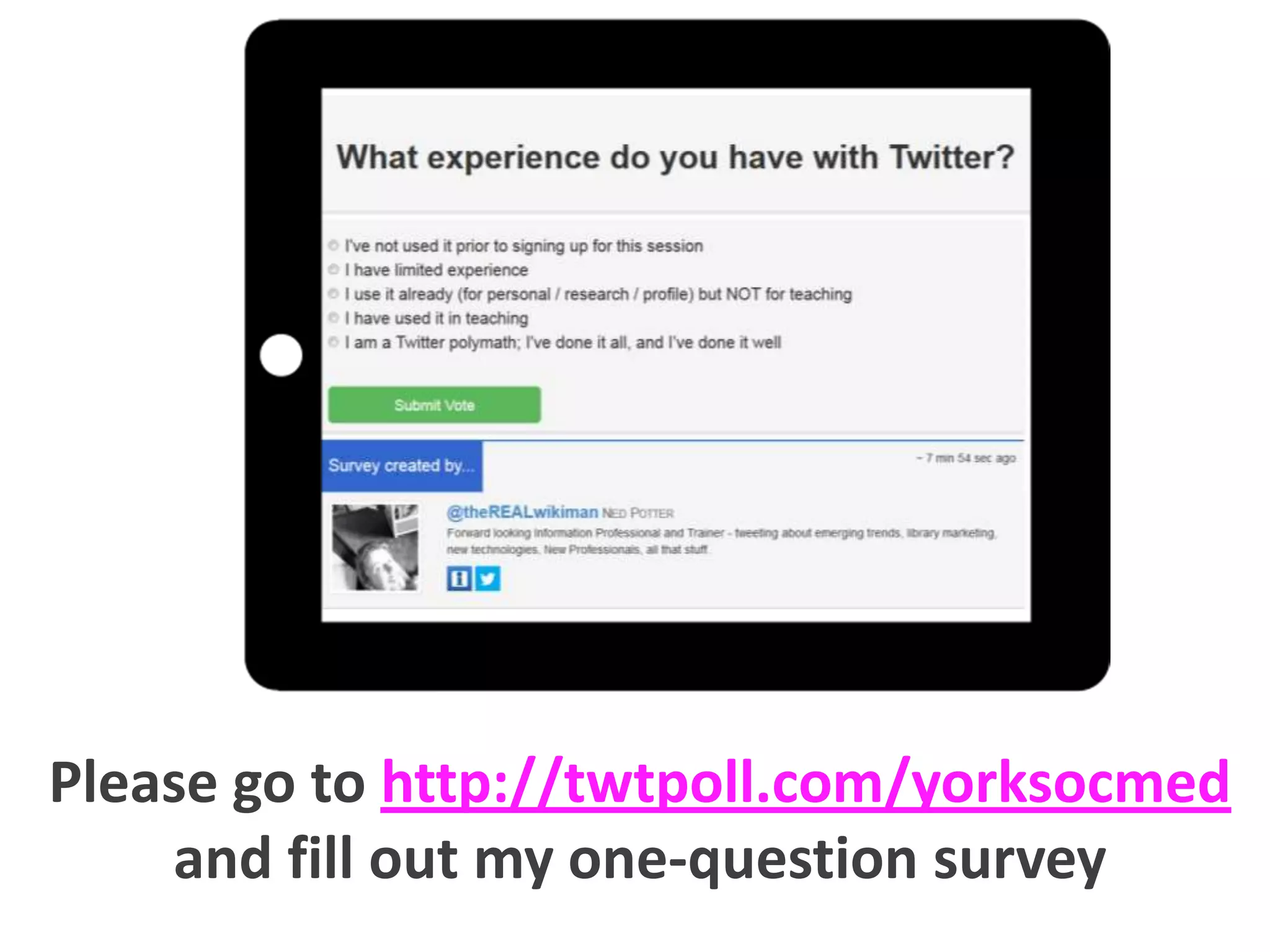
Please go to http://twtpoll.com/yorksocmed
and fill out my one-question survey
Plan for today: explore why
Twitter might be useful in the
academic environment, set up
Twitter profiles (if you don’t
already have them) and discuss
the differences between using
Twitter for teaching and for
research.
What
is Twitter?
Twitter is a social network which
allows users to exchange public
messages of 140 characters or less,
known as Tweets.
It’s easy to tweet, via:
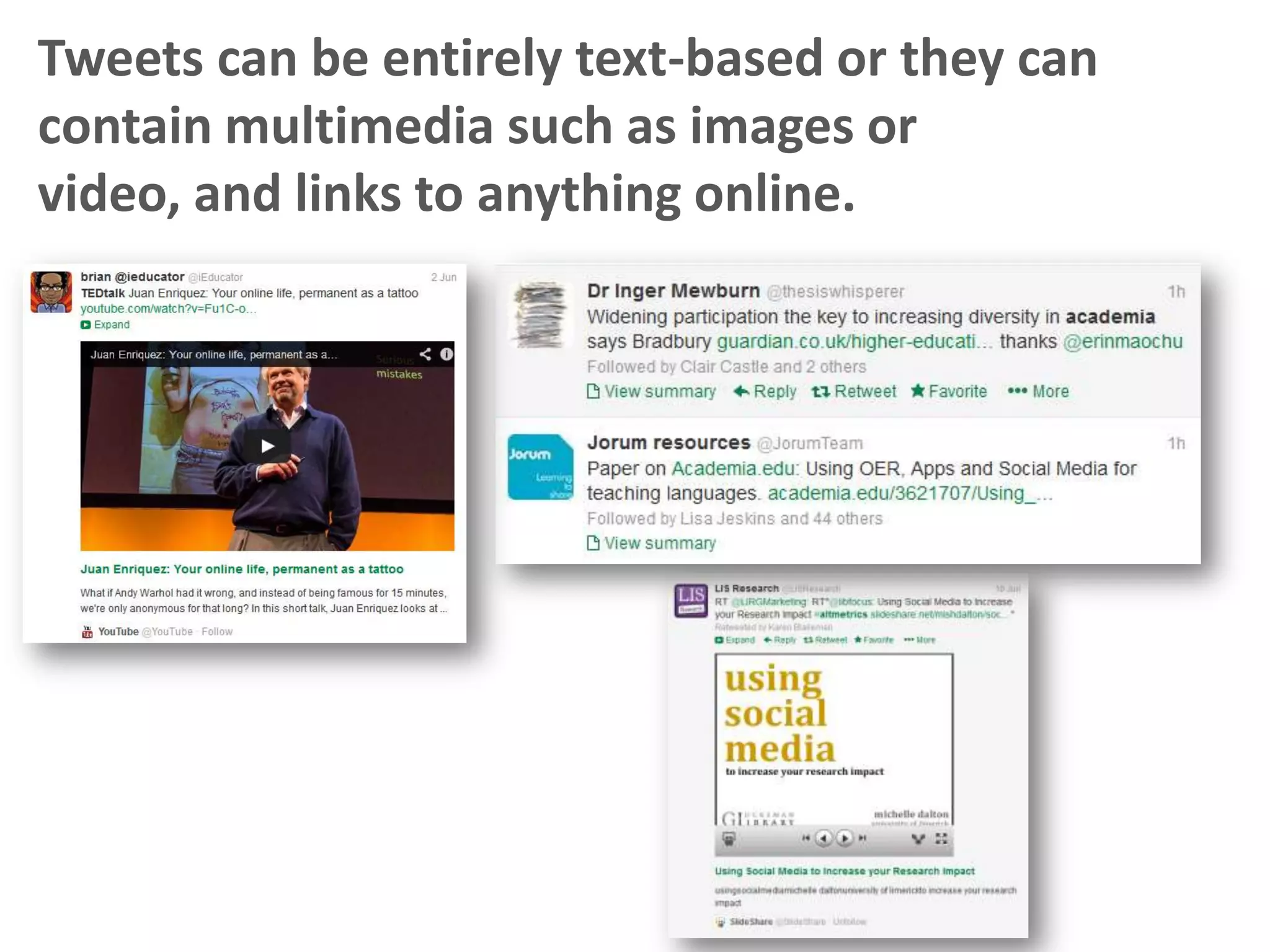
Tweets can be entirely text-based or they can
contain multimedia such as images or video,
and links to anything online.
It works like this:
Your tweets are seen by other Twitter
users who follow you; you see the
tweets of users you follow. You can
quickly build up a network of peers
with shared interests. There are around
half a billion Twitter users worldwide.
THREE
Twitter
MYTHS
1: YOU CAN’T SAY
ANYTHING IN 140
CHARACTERS.
Yes you can, because Twitter is meant to
be a conversation rather than a
broadcast. It’s easy to ask, and answer,
questions in 140 characters or less.
2: IT’S JUST PEOPLE
SAYING WHAT THEY
HAD FOR LUNCH.
No it isn’t – only celebrities really do
that, because they have so many
followers that meaningful dialogue isn’t
really possible.
For the rest of us, it’s a conversation.
3: IT’S GREAT FOR RESEARCH
AND BUILDING REPUTATION,
BUT IT CAN’T BE USED FOR
LEARING AND TEACHING..
Twitter is certainly more complicated
when it comes to teaching, but the
obstacles are not insurmountable and it
can be extremely beneficial.
Why
use Twitter?

non-teaching-reasons
Connect with your peers
Twitter is a brilliant networking tool – for
finding researchers with similar interests, for
keeping in touch after conferences , for finding
and engaging the leaders in your field.
If you follow the right people on
Twitter you’ll always know when
the latest papers are published,
when calls for papers announced,
when conferences are happening,
when developments in your field
are occurring, when new
technology emerges which is
relevant to what you do, and
what’s going on in HE.

Keeping up to date
On Twitter, the information comes
to you.
Twitter is a great way to tell
people about your research
outputs, your current projects, and
your professional activities.

Share what you’re doing
with the world
It can also be a brilliant funnel for
all your other social media
activities too – nothing is more
likely to get people reading your
blog (etc) than people tweeting
about it.
(Highly tweeted articles are 11
times more likely to be cited than
less-tweeted articles)
Eyesenbach, 2011, Can tweets predict citations?
Journal of Medical Internet Research 13 (4)
Hat-tip to Michelle Dalton – see
http://t.co/6MV8xQEujV for more stats.
Also

Twitter is FUN.
Click the pic for some more

academic perspectives

on the non-teaching aspects
Find Tweeters by discipline:

http://blogs.lse.ac.uk/impactofsocialsciences/2011/09/02/academic-tweeters-your-suggestions-in-full/
Departmental tweeters:
@uniofyork is the main account of the University
@UoYLibrary is the Library’s account
@UoYITServices is the IT services account
@RDT_York is the Researcher Development Team account
@TFTV_YORK is the TFTV account, one of the many Departments
on Twitter
@UoYEvents is the account for Events at York
@UoY_Yorkshare is the VLE team’s account

Wider HE tweeters:
@timeshighered is the Times Higher’s very active account
@lseimpactblog is the LSE Impact Blog’s account (don’t be put
off by the name, it’s relevant to all academics interested in Web
2.0 tools)
@gdnhighered is the Guardian’s Higher Education account
Key
concepts
defined
Tweet: your tweet is your message. 140
characters. Seen by a: your followers who
happen to be online at the time and b: anyone
who happens to look at your profile, and
potentially c: by the followers of anyone who
ReTweets it.

ReTweet: if you RT someone else’s tweet, it will
appear in your timeline and your followers can
see it. Being ReTweeted yourself is a really good
thing – it means your ideas are being exposed to
new networks.
@reply: you can converse directly with someone
by putting their username (beginning with @)
into your tweet – this will ensure the tweet
shows up in their ‘@ replies’.
Your tweets will be seen by anyone following
both you AND the person with whom you’re
conversing. (In other words, you don’t see every
tweet from every person you follow – Twitter
filters out the noise.)
Hashtag: a #hashtag is a way to bring together
disparate users on the same topic, without the
tweets needing to know each other already.
Hashtags can also be a way to archive conversations
on a theme, and discuss events or conferences.
You can click on any #hashtag (for example
#altmetrics) and find all recent tweets which have
included it. This is the best way to tweet around a
specific module (or academic topic).
Direct Message: a DM is a private message, within
the network, which only you and the recipient see.
Time to get started.
Go to Twitter.com and follow the
instructions EXCERCISE 1 in the
hand-out, Getting to know Twitter.

(10—15
minutes)
The handout is also available digitally at
http://www.scribd.com/doc/203096554/Using-Twitter-in-Academic-Teaching
The key issue for today:
4 ways
to use
Twitter for
teaching
1) Support the module
Using a hashtag for the module
(e.g. ##CHE2C32) provide further
reading suggestions, interesting
links to related content,
additional assignments for keen
students, reminders about
deadlines, clarifications and
answers to questions, third-party
opinions and stories.
2) Enhance the lecture / labsession / clinic
The backchannel… Allows students to ask
questions, emboldens them, allows them
to share with each other. You can (twt)poll
them during the session.
High risk, high reward.
Unlike other places we encourage
students to interact (message boards
in BlackBoard for example), with
Twitter many students are there
anyway. This means participation is
slightly more likely to take off.
3) Keep in touch
Excellent for postgrads who aren’t on
campus – but also for all students, to
have regular interaction outside the
scheduled lectures and seminars.
4) Synchronous and
asynchronous communication
Twitter allows you to post key information
to found later – as does BlackBoard – but
can also talk in real time and answer
queries on the fly.
Gary Wood at Sheffield has asked that students
direct all questions to him via Twitter (unless
sensitive) and it has significantly reduced his
time spent responding to enquries.
Replies are necessarily short and lacking in
formality, and are public so can be linked to
rather than rewritten (and may also reduce
duplicate queries).
Tweetbeam.com
Allows you to visualise tweets on a topic, in
real-time, on big screens in the lab/seminar/lecture
Go to

www.tweetbeam.com,

and type in the hashtag
for this session #yorksocmed
But surely we can’t MAKE the students
sign up for Twitter?
We cannot enforce UG
participation of any social
media platform – and all
the same information
must be also provided for
students who chose not
to participate in the
Twitter aspect of the
module.
So what’s the answer..?
We cannot enforce UG
participation of any social
media platform – and all
the same information
must be also provided for
students who chose not
to participate in the
Twitter aspect of the
module.
So what’s the answer..?
Exercise 3.
Embed the #YorkSocMed stream
(or anything else you fancy) into a
BlackBoard module – follow the
instructions on the handout.

(20 minutes)
E.g.
Academic Tweeting
Archaeology academic at York.
Uses Twitter in teaching with
Yr3 and Postgrad students (as
well as for research and other
purposes).
Year 3 students created blogs as part of
summative assessments, and used Twitter in
conjuction with this.
“In combination with running these blogs, more than half of
the students either set up their own project-specific Twitter
feeds, or tweeted about their projects through their personal
accounts. They used Twitter completely of their own volition – I
didn't require it; indeed, I'm not sure how much I encouraged it
at all – but from reading their final reflections on their projects,
my impression is that everyone thought it was meaningful:
primarily for raising the visibility of their blogs, but also for
connecting them with new audiences and contributors to their
blog content.”
Using it with Masters students has seem results
vary according to the character of the cohort.
“I've used the #yorkchm2 hashtag informally with my

Master's level students since 2012. While previous cohorts
have used it to share resources and connect with
professionals in the field, my current cohort is not active at
all. The best result was with my 2013 cohort, where one of
my students initiated a now well-established and
international debate, using #freearchaeology, about the
exploitation of archaeology/heritage specialists.”
Read more in Sara’s FORUM article:
http://www.scribd.com/doc/192487795/Learning-TeachingForum-Spring-2014
More on the horizon.
“Starting in two weeks, I am launching a new

Master's level module where I am requiring
students to join and use Twitter, identifying
their module-specific tweets with the hashtag
#yorkunimuseums. I mention this as your
workshop participants can literally, then,
follow along to monitor the uptake and use of
the hashtag – they can basically be
adjudicators of its success!”
Here's a blurb from the module description to
explain my rationale for necessitating Twitter use:
We will also explore the potential of Twitter for
sharing and debating museums issues. There is a
massive and productive museums community
tweeting about current, pressing museological
topics from around the world. It’s important that
you become familiar with this community and learn
how to filter and assess the information that it is
circulating. Before class, instructions will be shared
with you on joining Twitter, and from there we will
tweet using the hashtag #yorkunimuseums.
Tweeting

well
Generally speaking there are
three kinds of Twitter tips for HE
1

Twitter in general

2

Twitter for teaching

3

Twitter for research
Numbers 2 and 3 are, by and large,
the exact opposite of each other…
Twitter in general
Above all, remember it’s not
about broadcasting, it’s
about conversation!
Twitter for research
Consider the 1 in 4 rule*

Tweets directly
about your work
Twitter for research
Consider the 1 in 4 rule*
A ReTweet?
A reply?

Tweets directly
about your work

A link to something useful?

*actually it’s more of a guideline…
Twitter for teaching
research
4 out of 4 should relate to the module
A ReTweet?
A reminder?

Additional
assignment
or reading?

A link to something
relevant in the news?
Try not to think of it as
purely personal or purely
professional – it works
better when it’s both.

Twitter for research
Try not to think of it as
purely personal or purely
professional – it works
better when it’s both.
(For this reason I’d recommend one
account only. All work accounts get no
followers; all play accounts have no value)

Twitter for research
Teaching accounts should be
purely professional.
(For this reason I would recommend a separate
account, perhaps even one per module.)

Twitter for teaching
research
Embrace the smartphone!
(Soon there will only BE smartphones
so you may as well get started now.)

Twitter in general
Embrace the smartphone!
(Soon there will only BE smartphones
so you may as well get started now.)
Tweet from conferences
(including pictures), converse on
the train, reply in the
supermarket queue.
Twitter doesn’t have to be
something you MAKE TIME for.

Twitter in general
Look for third-party content that
related to the module’s subject
matter, for example news reports
and media analysis, other
academic output, non-scholarly
writing on the same subject, etc.

Twitter for teaching
research
Don’t just make statements,
ask questions.

Twitter in general
Twitter in general
You need to actually tell people
you’re there.
Twitter in general
You need to actually tell people
you’re there.
@username on your
business cards
on your PowerPoint
presentations
on your name-badge at
conferences
in your email signature
Any questions,
comments, ideas,
plans?
Thanks for coming!
Feel free to get in touch with follow
up questions: ned.potter@york.ac.uk
Library support for Researchers at
http://bit.ly/networkedresearch

These slides will be online at:
http://slideshare.net/UniofYorkLibrary

Absolutely every picture via www.iconfinder.com

Using Twitter in Academic Teaching

  • 1.
  • 2.
    Please go tohttp://twtpoll.com/yorksocmed and fill out my one-question survey
  • 3.
    Plan for today:explore why Twitter might be useful in the academic environment, set up Twitter profiles (if you don’t already have them) and discuss the differences between using Twitter for teaching and for research.
  • 4.
  • 5.
    Twitter is asocial network which allows users to exchange public messages of 140 characters or less, known as Tweets. It’s easy to tweet, via:
  • 6.
    Tweets can beentirely text-based or they can contain multimedia such as images or video, and links to anything online.
  • 7.
    It works likethis: Your tweets are seen by other Twitter users who follow you; you see the tweets of users you follow. You can quickly build up a network of peers with shared interests. There are around half a billion Twitter users worldwide.
  • 8.
  • 9.
    1: YOU CAN’TSAY ANYTHING IN 140 CHARACTERS. Yes you can, because Twitter is meant to be a conversation rather than a broadcast. It’s easy to ask, and answer, questions in 140 characters or less.
  • 10.
    2: IT’S JUSTPEOPLE SAYING WHAT THEY HAD FOR LUNCH. No it isn’t – only celebrities really do that, because they have so many followers that meaningful dialogue isn’t really possible. For the rest of us, it’s a conversation.
  • 11.
    3: IT’S GREATFOR RESEARCH AND BUILDING REPUTATION, BUT IT CAN’T BE USED FOR LEARING AND TEACHING.. Twitter is certainly more complicated when it comes to teaching, but the obstacles are not insurmountable and it can be extremely beneficial.
  • 12.
  • 13.
    Connect with yourpeers Twitter is a brilliant networking tool – for finding researchers with similar interests, for keeping in touch after conferences , for finding and engaging the leaders in your field.
  • 14.
    If you followthe right people on Twitter you’ll always know when the latest papers are published, when calls for papers announced, when conferences are happening, when developments in your field are occurring, when new technology emerges which is relevant to what you do, and what’s going on in HE. Keeping up to date On Twitter, the information comes to you.
  • 15.
    Twitter is agreat way to tell people about your research outputs, your current projects, and your professional activities. Share what you’re doing with the world It can also be a brilliant funnel for all your other social media activities too – nothing is more likely to get people reading your blog (etc) than people tweeting about it.
  • 16.
    (Highly tweeted articlesare 11 times more likely to be cited than less-tweeted articles) Eyesenbach, 2011, Can tweets predict citations? Journal of Medical Internet Research 13 (4) Hat-tip to Michelle Dalton – see http://t.co/6MV8xQEujV for more stats.
  • 17.
  • 18.
    Click the picfor some more academic perspectives on the non-teaching aspects
  • 19.
    Find Tweeters bydiscipline: http://blogs.lse.ac.uk/impactofsocialsciences/2011/09/02/academic-tweeters-your-suggestions-in-full/
  • 20.
    Departmental tweeters: @uniofyork isthe main account of the University @UoYLibrary is the Library’s account @UoYITServices is the IT services account @RDT_York is the Researcher Development Team account @TFTV_YORK is the TFTV account, one of the many Departments on Twitter @UoYEvents is the account for Events at York @UoY_Yorkshare is the VLE team’s account Wider HE tweeters: @timeshighered is the Times Higher’s very active account @lseimpactblog is the LSE Impact Blog’s account (don’t be put off by the name, it’s relevant to all academics interested in Web 2.0 tools) @gdnhighered is the Guardian’s Higher Education account
  • 21.
  • 22.
    Tweet: your tweetis your message. 140 characters. Seen by a: your followers who happen to be online at the time and b: anyone who happens to look at your profile, and potentially c: by the followers of anyone who ReTweets it. ReTweet: if you RT someone else’s tweet, it will appear in your timeline and your followers can see it. Being ReTweeted yourself is a really good thing – it means your ideas are being exposed to new networks.
  • 23.
    @reply: you canconverse directly with someone by putting their username (beginning with @) into your tweet – this will ensure the tweet shows up in their ‘@ replies’. Your tweets will be seen by anyone following both you AND the person with whom you’re conversing. (In other words, you don’t see every tweet from every person you follow – Twitter filters out the noise.)
  • 24.
    Hashtag: a #hashtagis a way to bring together disparate users on the same topic, without the tweets needing to know each other already. Hashtags can also be a way to archive conversations on a theme, and discuss events or conferences. You can click on any #hashtag (for example #altmetrics) and find all recent tweets which have included it. This is the best way to tweet around a specific module (or academic topic). Direct Message: a DM is a private message, within the network, which only you and the recipient see.
  • 25.
    Time to getstarted. Go to Twitter.com and follow the instructions EXCERCISE 1 in the hand-out, Getting to know Twitter. (10—15 minutes) The handout is also available digitally at http://www.scribd.com/doc/203096554/Using-Twitter-in-Academic-Teaching
  • 26.
    The key issuefor today:
  • 27.
  • 28.
    1) Support themodule Using a hashtag for the module (e.g. ##CHE2C32) provide further reading suggestions, interesting links to related content, additional assignments for keen students, reminders about deadlines, clarifications and answers to questions, third-party opinions and stories.
  • 30.
    2) Enhance thelecture / labsession / clinic The backchannel… Allows students to ask questions, emboldens them, allows them to share with each other. You can (twt)poll them during the session. High risk, high reward.
  • 31.
    Unlike other placeswe encourage students to interact (message boards in BlackBoard for example), with Twitter many students are there anyway. This means participation is slightly more likely to take off.
  • 33.
    3) Keep intouch Excellent for postgrads who aren’t on campus – but also for all students, to have regular interaction outside the scheduled lectures and seminars.
  • 35.
    4) Synchronous and asynchronouscommunication Twitter allows you to post key information to found later – as does BlackBoard – but can also talk in real time and answer queries on the fly.
  • 37.
    Gary Wood atSheffield has asked that students direct all questions to him via Twitter (unless sensitive) and it has significantly reduced his time spent responding to enquries. Replies are necessarily short and lacking in formality, and are public so can be linked to rather than rewritten (and may also reduce duplicate queries).
  • 38.
    Tweetbeam.com Allows you tovisualise tweets on a topic, in real-time, on big screens in the lab/seminar/lecture
  • 39.
    Go to www.tweetbeam.com, and typein the hashtag for this session #yorksocmed
  • 40.
    But surely wecan’t MAKE the students sign up for Twitter?
  • 41.
    We cannot enforceUG participation of any social media platform – and all the same information must be also provided for students who chose not to participate in the Twitter aspect of the module. So what’s the answer..?
  • 42.
    We cannot enforceUG participation of any social media platform – and all the same information must be also provided for students who chose not to participate in the Twitter aspect of the module. So what’s the answer..?
  • 44.
    Exercise 3. Embed the#YorkSocMed stream (or anything else you fancy) into a BlackBoard module – follow the instructions on the handout. (20 minutes)
  • 45.
  • 46.
    Archaeology academic atYork. Uses Twitter in teaching with Yr3 and Postgrad students (as well as for research and other purposes).
  • 47.
    Year 3 studentscreated blogs as part of summative assessments, and used Twitter in conjuction with this. “In combination with running these blogs, more than half of the students either set up their own project-specific Twitter feeds, or tweeted about their projects through their personal accounts. They used Twitter completely of their own volition – I didn't require it; indeed, I'm not sure how much I encouraged it at all – but from reading their final reflections on their projects, my impression is that everyone thought it was meaningful: primarily for raising the visibility of their blogs, but also for connecting them with new audiences and contributors to their blog content.”
  • 48.
    Using it withMasters students has seem results vary according to the character of the cohort. “I've used the #yorkchm2 hashtag informally with my Master's level students since 2012. While previous cohorts have used it to share resources and connect with professionals in the field, my current cohort is not active at all. The best result was with my 2013 cohort, where one of my students initiated a now well-established and international debate, using #freearchaeology, about the exploitation of archaeology/heritage specialists.” Read more in Sara’s FORUM article: http://www.scribd.com/doc/192487795/Learning-TeachingForum-Spring-2014
  • 49.
    More on thehorizon. “Starting in two weeks, I am launching a new Master's level module where I am requiring students to join and use Twitter, identifying their module-specific tweets with the hashtag #yorkunimuseums. I mention this as your workshop participants can literally, then, follow along to monitor the uptake and use of the hashtag – they can basically be adjudicators of its success!”
  • 50.
    Here's a blurbfrom the module description to explain my rationale for necessitating Twitter use: We will also explore the potential of Twitter for sharing and debating museums issues. There is a massive and productive museums community tweeting about current, pressing museological topics from around the world. It’s important that you become familiar with this community and learn how to filter and assess the information that it is circulating. Before class, instructions will be shared with you on joining Twitter, and from there we will tweet using the hashtag #yorkunimuseums.
  • 51.
  • 52.
    Generally speaking thereare three kinds of Twitter tips for HE 1 Twitter in general 2 Twitter for teaching 3 Twitter for research Numbers 2 and 3 are, by and large, the exact opposite of each other…
  • 53.
    Twitter in general Aboveall, remember it’s not about broadcasting, it’s about conversation!
  • 54.
    Twitter for research Considerthe 1 in 4 rule* Tweets directly about your work
  • 55.
    Twitter for research Considerthe 1 in 4 rule* A ReTweet? A reply? Tweets directly about your work A link to something useful? *actually it’s more of a guideline…
  • 56.
    Twitter for teaching research 4out of 4 should relate to the module A ReTweet? A reminder? Additional assignment or reading? A link to something relevant in the news?
  • 57.
    Try not tothink of it as purely personal or purely professional – it works better when it’s both. Twitter for research
  • 58.
    Try not tothink of it as purely personal or purely professional – it works better when it’s both. (For this reason I’d recommend one account only. All work accounts get no followers; all play accounts have no value) Twitter for research
  • 59.
    Teaching accounts shouldbe purely professional. (For this reason I would recommend a separate account, perhaps even one per module.) Twitter for teaching research
  • 60.
    Embrace the smartphone! (Soonthere will only BE smartphones so you may as well get started now.) Twitter in general
  • 61.
    Embrace the smartphone! (Soonthere will only BE smartphones so you may as well get started now.) Tweet from conferences (including pictures), converse on the train, reply in the supermarket queue. Twitter doesn’t have to be something you MAKE TIME for. Twitter in general
  • 62.
    Look for third-partycontent that related to the module’s subject matter, for example news reports and media analysis, other academic output, non-scholarly writing on the same subject, etc. Twitter for teaching research
  • 63.
    Don’t just makestatements, ask questions. Twitter in general
  • 64.
    Twitter in general Youneed to actually tell people you’re there.
  • 65.
    Twitter in general Youneed to actually tell people you’re there. @username on your business cards on your PowerPoint presentations on your name-badge at conferences in your email signature
  • 66.
  • 67.
    Thanks for coming! Feelfree to get in touch with follow up questions: ned.potter@york.ac.uk Library support for Researchers at http://bit.ly/networkedresearch These slides will be online at: http://slideshare.net/UniofYorkLibrary Absolutely every picture via www.iconfinder.com