Screencasting and Video Conferencing at No Cost Richard A. Smith Clinical Associate Professor Instructional Technology & Caroline M. Crawford Associate Professor Instructional Technology School of Education University of Houston – Clear Lake October 27, 2011
Jing Free SWF video  5-minutes of screen recording  Mark-up tools for images  Screencast.com Free Account Go to,  http://www.techsmith.com/jing.html
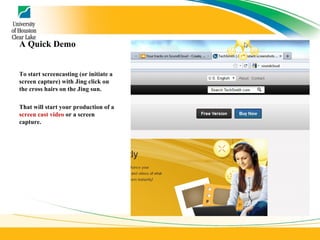
A Quick Demo To start screencasting (or initiate a screen capture) with Jing click on the cross hairs on the Jing sun. That will start your production of a  screen cast video  or a screen capture.
Jing Basic Overview Let’s take a look at how to use Jing. First,  let’s do a screen capture  (quick and simple) The captured screen Next,  we can do a screencast
Screencast-o-Matic 15 minutes of video Records as .mpeg Save videos to your computer Free hosting (15 min per upload) Upload to YouTube HD Export to MP4, AVI, FLV movie Record web camera
Screencast-o-Matic Screencast-o-Matic Demo Let’s try out  Screencast-o-Matic
Livestream Procaster Actually an online tool for creating live 24/7 streaming online television channel Mix live webcams, YouTube videos and add graphics using the tools provided by the site You can also use it to create slick instructional videos
Livestream Procaster Create videos in Livestream Studio, a full-featured video editing application designed for creating live content Allows multiple people in different geographic areas to contribute content to the channel
Livestream Procaster Let’s take a look at  Livestream Procaster For a really slick demo,  click here Don’t want those advertisements?  Click here
BigMarker – Video Conferencing http://www.bigmarker.com/ Participants:  are the people attending the conference.  Presenter:  is the person leading the conference.  Moderator:  is the administrator of the conference.
Participants Listening and sharing your voice Share your webcam and see each other Raise your hand Use public and private chat Instant Translation Presenter Share any PDF or Microsoft Office documents  Grab everyone’s attention Share your Desktop
Moderator See all participants Mute or unmute any participants Make a presenter
http://www.bigmarker.com/
Google Hangout  A new Google Feature A quick overview
end

screencasting and video conferencing at no cost - Region IV

  • 1.
    Screencasting and VideoConferencing at No Cost Richard A. Smith Clinical Associate Professor Instructional Technology & Caroline M. Crawford Associate Professor Instructional Technology School of Education University of Houston – Clear Lake October 27, 2011
  • 2.
    Jing Free SWFvideo 5-minutes of screen recording Mark-up tools for images Screencast.com Free Account Go to, http://www.techsmith.com/jing.html
  • 3.
    A Quick DemoTo start screencasting (or initiate a screen capture) with Jing click on the cross hairs on the Jing sun. That will start your production of a screen cast video or a screen capture.
  • 4.
    Jing Basic OverviewLet’s take a look at how to use Jing. First, let’s do a screen capture (quick and simple) The captured screen Next, we can do a screencast
  • 5.
    Screencast-o-Matic 15 minutesof video Records as .mpeg Save videos to your computer Free hosting (15 min per upload) Upload to YouTube HD Export to MP4, AVI, FLV movie Record web camera
  • 6.
    Screencast-o-Matic Screencast-o-Matic DemoLet’s try out Screencast-o-Matic
  • 7.
    Livestream Procaster Actuallyan online tool for creating live 24/7 streaming online television channel Mix live webcams, YouTube videos and add graphics using the tools provided by the site You can also use it to create slick instructional videos
  • 8.
    Livestream Procaster Createvideos in Livestream Studio, a full-featured video editing application designed for creating live content Allows multiple people in different geographic areas to contribute content to the channel
  • 9.
    Livestream Procaster Let’stake a look at Livestream Procaster For a really slick demo, click here Don’t want those advertisements? Click here
  • 10.
    BigMarker – VideoConferencing http://www.bigmarker.com/ Participants: are the people attending the conference. Presenter: is the person leading the conference. Moderator: is the administrator of the conference.
  • 11.
    Participants Listening andsharing your voice Share your webcam and see each other Raise your hand Use public and private chat Instant Translation Presenter Share any PDF or Microsoft Office documents Grab everyone’s attention Share your Desktop
  • 12.
    Moderator See allparticipants Mute or unmute any participants Make a presenter
  • 13.
  • 14.
    Google Hangout A new Google Feature A quick overview
  • 15.