Capture it!  Screencasting in Library InstructionDana DeFebboLOEX of the WestJune 12, 2010
Keys to Successful ScreencastsOutline your topic and cuesWrite out a script, even for a 30 second videoKnow what key toggles you need to use to pause and restart your recording.  Include those with your cuesDo a test runDon’t just end it, make sure your recording is wrapped up neatlyRemember the 80/20 Rule80% Preparation20% Recording
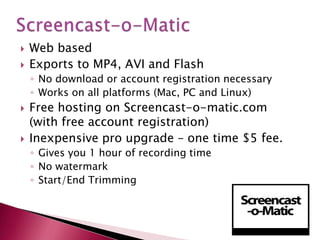
Screencast-o-MaticWeb basedExports to MP4, AVI and FlashNo download or account registration necessaryWorks on all platforms (Mac, PC and Linux)Free hosting on Screencast-o-matic.com (with free account registration)Inexpensive pro upgrade – one time $5 fee.Gives you 1 hour of recording timeNo watermark Start/End Trimming
Web basedExports to MOV, SWF and supports direct upload to YouTube and Screentoaster.comBuilt in subtitling and post recording audioNo limit on recording timeWebcam recording Panning not availableScreenToaster
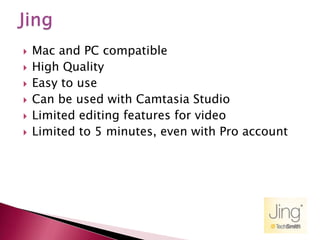
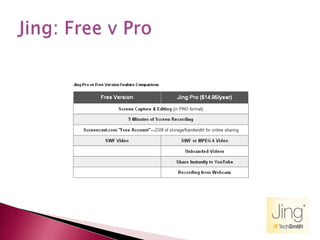
JingMac and PC compatibleHigh QualityEasy to useCan be used with Camtasia StudioLimited editing features for videoLimited to 5 minutes, even with Pro account
Jing: Free v Pro
Installation neededOnly available for WindowsBuilt in annotation features (only free option that has this feature)Built in auto-pan featureRecords audio from microphone or speakersCan add audio later, rather than at recording timeCamStudio
Lots of versatilityNot for the noviceRequires some skill or lots of patience to learn on your ownCamStudio
Screencasting is not meant to replace YOU.Use screencasts to prepare students before you have an instruction session with them Use it as a refresher resource after a sessionUse it to cover a particularly difficult conceptCitationsPeer reviewFull text searching (SFX, Webbridge, 360 Link)Ways to use screencasting
Your own serversYouTubeScreencast.comVimeoViddlerGoogle VideoBlip.tv (if it is generic enough, consider posting on the Animated Tutorial Sharing Project)Hosting Options
Requires no class time (biggest selling feature)Requires little to no effort on faculty partAssign watchingvideosfor pre or post instruction homework.  Takes little of student time, but extends your exposure to themGreat resource for faculty members themselves.Getting faculty buy-in
Reduces re-teaching at the reference desk“Set it and forget it” – larger time commitment up front, but can be reused for multiple classes in multiple disciplines.Lets you focus on specific skills in the limited class time you have.  Why you should do it

Capture It!

  • 1.
    Capture it! Screencasting in Library InstructionDana DeFebboLOEX of the WestJune 12, 2010
  • 2.
    Keys to SuccessfulScreencastsOutline your topic and cuesWrite out a script, even for a 30 second videoKnow what key toggles you need to use to pause and restart your recording. Include those with your cuesDo a test runDon’t just end it, make sure your recording is wrapped up neatlyRemember the 80/20 Rule80% Preparation20% Recording
  • 3.
    Screencast-o-MaticWeb basedExports toMP4, AVI and FlashNo download or account registration necessaryWorks on all platforms (Mac, PC and Linux)Free hosting on Screencast-o-matic.com (with free account registration)Inexpensive pro upgrade – one time $5 fee.Gives you 1 hour of recording timeNo watermark Start/End Trimming
  • 4.
    Web basedExports toMOV, SWF and supports direct upload to YouTube and Screentoaster.comBuilt in subtitling and post recording audioNo limit on recording timeWebcam recording Panning not availableScreenToaster
  • 5.
    JingMac and PCcompatibleHigh QualityEasy to useCan be used with Camtasia StudioLimited editing features for videoLimited to 5 minutes, even with Pro account
  • 6.
  • 7.
    Installation neededOnly availablefor WindowsBuilt in annotation features (only free option that has this feature)Built in auto-pan featureRecords audio from microphone or speakersCan add audio later, rather than at recording timeCamStudio
  • 8.
    Lots of versatilityNotfor the noviceRequires some skill or lots of patience to learn on your ownCamStudio
  • 9.
    Screencasting is notmeant to replace YOU.Use screencasts to prepare students before you have an instruction session with them Use it as a refresher resource after a sessionUse it to cover a particularly difficult conceptCitationsPeer reviewFull text searching (SFX, Webbridge, 360 Link)Ways to use screencasting
  • 10.
    Your own serversYouTubeScreencast.comVimeoViddlerGoogleVideoBlip.tv (if it is generic enough, consider posting on the Animated Tutorial Sharing Project)Hosting Options
  • 11.
    Requires no classtime (biggest selling feature)Requires little to no effort on faculty partAssign watchingvideosfor pre or post instruction homework. Takes little of student time, but extends your exposure to themGreat resource for faculty members themselves.Getting faculty buy-in
  • 12.
    Reduces re-teaching atthe reference desk“Set it and forget it” – larger time commitment up front, but can be reused for multiple classes in multiple disciplines.Lets you focus on specific skills in the limited class time you have. Why you should do it