Tips for Producing Video for the Web
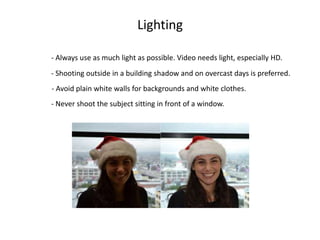
- Always use as much light as possible. Video needs light, especially HD.
- Never shoot the subject sitting in front of a window.
- Shooting outside in a building shadow and on overcast days is preferred.
Lighting
- Avoid plain white walls for backgrounds and white clothes.
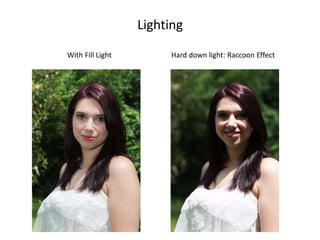
Lighting
Hard down light: Raccoon EffectWith Fill Light
Sound
- To get good sound, you MUST use an external lavaliere microphone
with a compatible connector.
- If you can’t use an external microphone, get within four feet of your subject.
- Find a quiet location to conduct your interview.
Tripod
- Use a tripod whenever possible. A stable shot is less distracting.
- If you don’t have a tripod, resting the camera on a surface is better
than handheld.
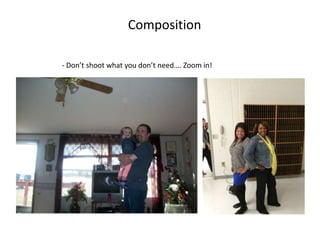
Composition
- Don’t shoot what you don’t need…. Zoom in!
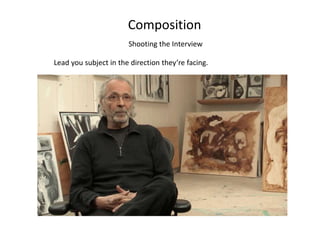
Composition
Shooting the Interview
Lead you subject in the direction they’re facing.
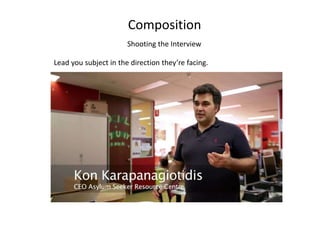
Composition
Shooting the Interview
Lead you subject in the direction they’re facing.
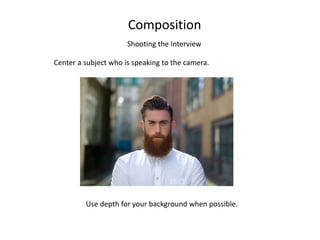
Composition
Shooting the Interview
Center a subject who is speaking to the camera.
Use depth for your background when possible.
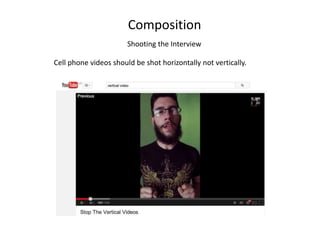
Composition
Shooting the Interview
Cell phone videos should be shot horizontally not vertically.
Post Production
Video Editing Software
PC: Windows Movie Maker Mac: iMovie (iMovie is in the Learning Commons)
Free Editing Software:
- Virtual Dub
- Wax
iMovie (app for iPhone and iPad)
AndroVid ($1.99)
I would not recommend editing on a device as small as a cell phone.
Need processing power, space and control.
Production Workflow: make sure your editor is compatible with your camera. And
that your editor creates files that are compatible with your online hosting solution.
Free Copyright Free Music
- Youtube now offers free copy right music for use on youtube.
Archiving Video
Long Term Challenges
Video formats change constantly
Computer Operating System
Transfer Format
Stability of long term Cloud storage
Armstrong’s time capsule

Video for the web

  • 1.
    Tips for ProducingVideo for the Web
  • 2.
    - Always useas much light as possible. Video needs light, especially HD. - Never shoot the subject sitting in front of a window. - Shooting outside in a building shadow and on overcast days is preferred. Lighting - Avoid plain white walls for backgrounds and white clothes.
  • 3.
    Lighting Hard down light:Raccoon EffectWith Fill Light
  • 4.
    Sound - To getgood sound, you MUST use an external lavaliere microphone with a compatible connector. - If you can’t use an external microphone, get within four feet of your subject. - Find a quiet location to conduct your interview. Tripod - Use a tripod whenever possible. A stable shot is less distracting. - If you don’t have a tripod, resting the camera on a surface is better than handheld.
  • 5.
    Composition - Don’t shootwhat you don’t need…. Zoom in!
  • 6.
    Composition Shooting the Interview Leadyou subject in the direction they’re facing.
  • 7.
    Composition Shooting the Interview Leadyou subject in the direction they’re facing.
  • 8.
    Composition Shooting the Interview Centera subject who is speaking to the camera. Use depth for your background when possible.
  • 9.
    Composition Shooting the Interview Cellphone videos should be shot horizontally not vertically.
  • 10.
    Post Production Video EditingSoftware PC: Windows Movie Maker Mac: iMovie (iMovie is in the Learning Commons) Free Editing Software: - Virtual Dub - Wax iMovie (app for iPhone and iPad) AndroVid ($1.99) I would not recommend editing on a device as small as a cell phone. Need processing power, space and control. Production Workflow: make sure your editor is compatible with your camera. And that your editor creates files that are compatible with your online hosting solution. Free Copyright Free Music - Youtube now offers free copy right music for use on youtube.
  • 11.
    Archiving Video Long TermChallenges Video formats change constantly Computer Operating System Transfer Format Stability of long term Cloud storage Armstrong’s time capsule