October 4, 2016
Santa Clara Convention Center
Mission City Ballroom
Pedestrian Dead-Reckoning (PDR)
for Indoor Positioning
MEMS Sensor Solutions Software Team
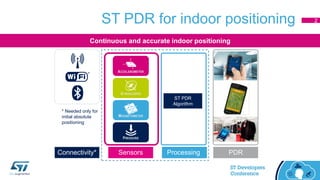
ST PDR for indoor positioning
Continuous and accurate indoor positioning
Connectivity* Sensors Processing PDR
ST PDR
Algorithm
* Needed only for
initial absolute
positioning
2
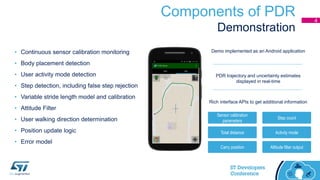
Components of PDR
Demonstration
Sensor calibration
parameters
Altitude filter outputCarry position
Activity modeTotal distance
Step count
Rich interface APIs to get additional information
Demo implemented as an Android application
PDR trajectory and uncertainty estimates
displayed in real-time
• Continuous sensor calibration monitoring
• Body placement detection
• User activity mode detection
• Step detection, including false step rejection
• Variable stride length model and calibration
• Attitude Filter
• User walking direction determination
• Position update logic
• Error model
4
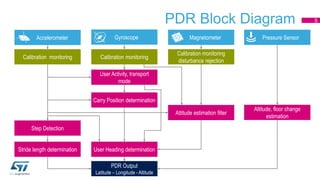
PDR Block Diagram
Accelerometer Gyroscope Magnetometer Pressure Sensor
Calibration monitoring Calibration monitoring
Calibration monitoring
disturbance rejection
Step Detection
Stride length determination
Attitude estimation filter
Carry Position determination
User Heading determination
Altitude, floor change
estimation
PDR Output
Latitude – Longitude - Altitude
User Activity, transport
mode
5
PDR Mathematical Process
• Velocity and heading are assumed to be constant during the interval when a
step is taken.
• Navigation equation rewritten as a difference equation with piece-wise linear
approximation.
1],1[1
1],1[1
cosˆ
sinˆ




ttttt
ttttt
sNN
sEE


[Nt, Et] = Current position at time t
[Nt-1, Et-1] = Last position at time t-1
𝑠[t-1, t] = Stride length
ψt-1 = User heading
6
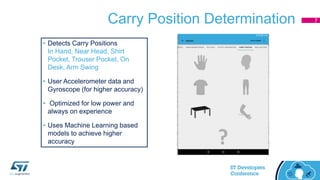
Carry Position Determination
• Detects Carry Positions
In Hand, Near Head, Shirt
Pocket, Trouser Pocket, On
Desk, Arm Swing
• User Accelerometer data and
Gyroscope (for higher accuracy)
• Optimized for low power and
always on experience
• Uses Machine Learning based
models to achieve higher
accuracy
7
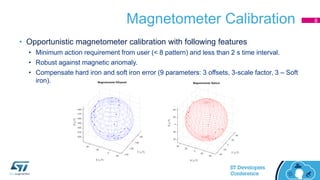
Magnetometer Calibration
• Opportunistic magnetometer calibration with following features
• Minimum action requirement from user (< 8 pattern) and less than 2 s time interval.
• Robust against magnetic anomaly.
• Compensate hard iron and soft iron error (9 parameters: 3 offsets, 3-scale factor, 3 – Soft
iron).
8
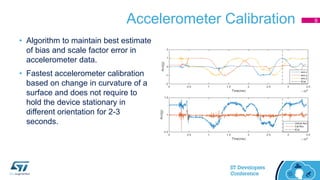
Accelerometer Calibration
• Algorithm to maintain best estimate
of bias and scale factor error in
accelerometer data.
• Fastest accelerometer calibration
based on change in curvature of a
surface and does not require to
hold the device stationary in
different orientation for 2-3
seconds.
9
Run-time Gyro Bias Calibration
• Driven by accelerometer and gyroscope data.
• Gyro bias is estimated with device stationary condition.
• Fast calibration process. Requires very small amount of data (less than 60
samples) at 50 Hz rate.
[deg.]
-1
0
1
2
3
4
5
6
0.24
0.49
0.74
0.99
1.24
1.49
1.74
1.99
2.24
2.49
2.74
2.99
3.24
3.49
3.74
3.99
4.24
4.49
4.74
4.99
5.24
5.49
5.74
5.99
6.24
6.49
6.74
6.99
7.24
7.49
7.74
7.99
8.24
8.49
8.74
8.99
9.24
9.49
9.74
9.99
10.24
10.49
10.74
10.99
11.24
11.49
11.74
11.99
12.24
12.49
12.74
12.99
13.24
13.49
Gbias estimation library output
Gyro Gbias
[sec.]
10
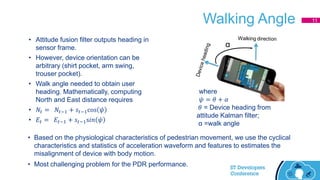
Walking Angle
• Attitude fusion filter outputs heading in
sensor frame.
• However, device orientation can be
arbitrary (shirt pocket, arm swing,
trouser pocket).
• Walk angle needed to obtain user
heading. Mathematically, computing
North and East distance requires
• 𝑁𝑡 = 𝑁𝑡−1 + 𝑠𝑡−1cos 𝜓
• 𝐸𝑡 = 𝐸𝑡−1 + 𝑠𝑡−1s𝑖𝑛 𝜓
where
𝜓 = 𝜃 + 𝛼
𝜃 = Device heading from
attitude Kalman filter;
α =walk angle
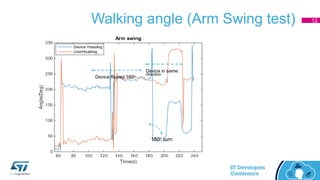
• Based on the physiological characteristics of pedestrian movement, we use the cyclical
characteristics and statistics of acceleration waveform and features to estimates the
misalignment of device with body motion.
• Most challenging problem for the PDR performance.
α
11
Walking angle (Arm Swing test)
Device flipped 180o
Device in same
direction
180o turn
12
Configurability of PDR
• Input data: Raw / or calibrated data with minimum sample rate of [50, 50, 25,10] Hz
for Accelerometer, gyroscope, magnetometer, pressure sensor.
• Selection of Raw or Calibrated at time of initialization.
• Modularity: Most of algorithm modules are independent and can run with required
inputs (in terms of sensor data and other inputs such as user Heading need attitude
filter data).
• PDR library can be used to run only a specific algorithm, such as step detection, sensor
calibration, attitude filter. Library can be configured to turn modules ON / off during runtime.
• Scheduling: Each module is responsible for its own scheduling and running
condition.
• Individual module can be disabled /enabled at run time. An algorithm / module execution is not
blocked by other modules. Independent of sensor data acquisition and platform.
13
PDR Output
• PDR output
• Displacement in ENU coordinate system
• corresponding confidence/error,
• total distance and number of steps.
• Error is computed by the individual error in different components (step detection,
stride length, user heading) of PDR. Each module outputs results with
corresponding error.
• PDR is able to serve multiple clients (such as integration with other position
technologies, relative harvesting) and doesn’t need to be in sync with PDR
processing cycle.
• PDR will provide the best possible output at the time of request using tag interface.
14
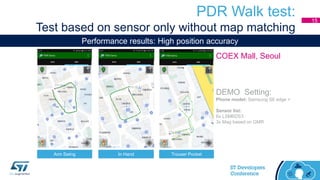
PDR Walk test:
Test based on sensor only without map matching
Arm Swing
DEMO Setting:
Phone model: Samsung S6 edge +
Sensor list:
6x LSM6DS3
3x Mag based on GMR
In Hand Trouser Pocket
COEX Mall, Seoul
Performance results: High position accuracy
15
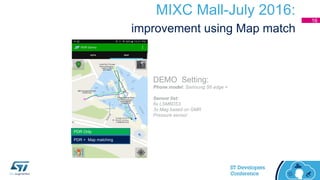
MIXC Mall-July 2016:
improvement using Map match
PDR Only
PDR + Map matching
DEMO Setting:
Phone model: Samsung S6 edge +
Sensor list:
6x LSM6DS3
3x Mag based on GMR
Pressure sensor
16
Absolute Altitude determination,
Vertical Context Determination
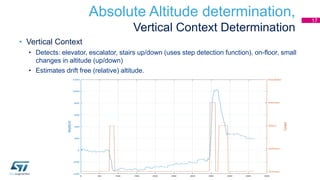
• Vertical Context
• Detects: elevator, escalator, stairs up/down (uses step detection function), on-floor, small
changes in altitude (up/down)
• Estimates drift free (relative) altitude.
17
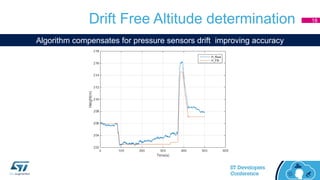
Drift Free Altitude determination
Algorithm compensates for pressure sensors drift improving accuracy
18
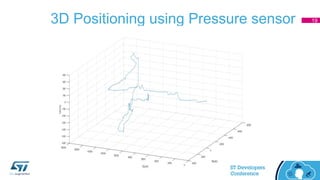
3D Positioning using Pressure sensor 19
PDR Output: APIs
• Rich interface APIs are available to get additional information as per
application requirements
• sensor calibration parameters,
• step count,
• total distance,
• activity mode
• carry position
• attitude filter output
• Integration in Context Hub Runtime Environment (CHRE) Framework.
20
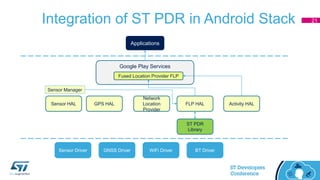
Integration of ST PDR in Android Stack
Sensor Driver GNSS Driver WiFi Driver BT Driver
Sensor HAL GPS HAL
Network
Location
Provider
FLP HAL Activity HAL
ST PDR
Library
Google Play Services
Fused Location Provider FLP
Applications
Sensor Manager
21
Thanks

Track 4 session 3 - st dev con 2016 - pedestrian dead reckoning

  • 1.
    October 4, 2016 SantaClara Convention Center Mission City Ballroom Pedestrian Dead-Reckoning (PDR) for Indoor Positioning MEMS Sensor Solutions Software Team
  • 2.
    ST PDR forindoor positioning Continuous and accurate indoor positioning Connectivity* Sensors Processing PDR ST PDR Algorithm * Needed only for initial absolute positioning 2
  • 3.
    Components of PDR Demonstration Sensorcalibration parameters Altitude filter outputCarry position Activity modeTotal distance Step count Rich interface APIs to get additional information Demo implemented as an Android application PDR trajectory and uncertainty estimates displayed in real-time • Continuous sensor calibration monitoring • Body placement detection • User activity mode detection • Step detection, including false step rejection • Variable stride length model and calibration • Attitude Filter • User walking direction determination • Position update logic • Error model 4
  • 4.
    PDR Block Diagram AccelerometerGyroscope Magnetometer Pressure Sensor Calibration monitoring Calibration monitoring Calibration monitoring disturbance rejection Step Detection Stride length determination Attitude estimation filter Carry Position determination User Heading determination Altitude, floor change estimation PDR Output Latitude – Longitude - Altitude User Activity, transport mode 5
  • 5.
    PDR Mathematical Process •Velocity and heading are assumed to be constant during the interval when a step is taken. • Navigation equation rewritten as a difference equation with piece-wise linear approximation. 1],1[1 1],1[1 cosˆ sinˆ     ttttt ttttt sNN sEE   [Nt, Et] = Current position at time t [Nt-1, Et-1] = Last position at time t-1 𝑠[t-1, t] = Stride length ψt-1 = User heading 6
  • 6.
    Carry Position Determination •Detects Carry Positions In Hand, Near Head, Shirt Pocket, Trouser Pocket, On Desk, Arm Swing • User Accelerometer data and Gyroscope (for higher accuracy) • Optimized for low power and always on experience • Uses Machine Learning based models to achieve higher accuracy 7
  • 7.
    Magnetometer Calibration • Opportunisticmagnetometer calibration with following features • Minimum action requirement from user (< 8 pattern) and less than 2 s time interval. • Robust against magnetic anomaly. • Compensate hard iron and soft iron error (9 parameters: 3 offsets, 3-scale factor, 3 – Soft iron). 8
  • 8.
    Accelerometer Calibration • Algorithmto maintain best estimate of bias and scale factor error in accelerometer data. • Fastest accelerometer calibration based on change in curvature of a surface and does not require to hold the device stationary in different orientation for 2-3 seconds. 9
  • 9.
    Run-time Gyro BiasCalibration • Driven by accelerometer and gyroscope data. • Gyro bias is estimated with device stationary condition. • Fast calibration process. Requires very small amount of data (less than 60 samples) at 50 Hz rate. [deg.] -1 0 1 2 3 4 5 6 0.24 0.49 0.74 0.99 1.24 1.49 1.74 1.99 2.24 2.49 2.74 2.99 3.24 3.49 3.74 3.99 4.24 4.49 4.74 4.99 5.24 5.49 5.74 5.99 6.24 6.49 6.74 6.99 7.24 7.49 7.74 7.99 8.24 8.49 8.74 8.99 9.24 9.49 9.74 9.99 10.24 10.49 10.74 10.99 11.24 11.49 11.74 11.99 12.24 12.49 12.74 12.99 13.24 13.49 Gbias estimation library output Gyro Gbias [sec.] 10
  • 10.
    Walking Angle • Attitudefusion filter outputs heading in sensor frame. • However, device orientation can be arbitrary (shirt pocket, arm swing, trouser pocket). • Walk angle needed to obtain user heading. Mathematically, computing North and East distance requires • 𝑁𝑡 = 𝑁𝑡−1 + 𝑠𝑡−1cos 𝜓 • 𝐸𝑡 = 𝐸𝑡−1 + 𝑠𝑡−1s𝑖𝑛 𝜓 where 𝜓 = 𝜃 + 𝛼 𝜃 = Device heading from attitude Kalman filter; α =walk angle • Based on the physiological characteristics of pedestrian movement, we use the cyclical characteristics and statistics of acceleration waveform and features to estimates the misalignment of device with body motion. • Most challenging problem for the PDR performance. α 11
  • 11.
    Walking angle (ArmSwing test) Device flipped 180o Device in same direction 180o turn 12
  • 12.
    Configurability of PDR •Input data: Raw / or calibrated data with minimum sample rate of [50, 50, 25,10] Hz for Accelerometer, gyroscope, magnetometer, pressure sensor. • Selection of Raw or Calibrated at time of initialization. • Modularity: Most of algorithm modules are independent and can run with required inputs (in terms of sensor data and other inputs such as user Heading need attitude filter data). • PDR library can be used to run only a specific algorithm, such as step detection, sensor calibration, attitude filter. Library can be configured to turn modules ON / off during runtime. • Scheduling: Each module is responsible for its own scheduling and running condition. • Individual module can be disabled /enabled at run time. An algorithm / module execution is not blocked by other modules. Independent of sensor data acquisition and platform. 13
  • 13.
    PDR Output • PDRoutput • Displacement in ENU coordinate system • corresponding confidence/error, • total distance and number of steps. • Error is computed by the individual error in different components (step detection, stride length, user heading) of PDR. Each module outputs results with corresponding error. • PDR is able to serve multiple clients (such as integration with other position technologies, relative harvesting) and doesn’t need to be in sync with PDR processing cycle. • PDR will provide the best possible output at the time of request using tag interface. 14
  • 14.
    PDR Walk test: Testbased on sensor only without map matching Arm Swing DEMO Setting: Phone model: Samsung S6 edge + Sensor list: 6x LSM6DS3 3x Mag based on GMR In Hand Trouser Pocket COEX Mall, Seoul Performance results: High position accuracy 15
  • 15.
    MIXC Mall-July 2016: improvementusing Map match PDR Only PDR + Map matching DEMO Setting: Phone model: Samsung S6 edge + Sensor list: 6x LSM6DS3 3x Mag based on GMR Pressure sensor 16
  • 16.
    Absolute Altitude determination, VerticalContext Determination • Vertical Context • Detects: elevator, escalator, stairs up/down (uses step detection function), on-floor, small changes in altitude (up/down) • Estimates drift free (relative) altitude. 17
  • 17.
    Drift Free Altitudedetermination Algorithm compensates for pressure sensors drift improving accuracy 18
  • 18.
    3D Positioning usingPressure sensor 19
  • 19.
    PDR Output: APIs •Rich interface APIs are available to get additional information as per application requirements • sensor calibration parameters, • step count, • total distance, • activity mode • carry position • attitude filter output • Integration in Context Hub Runtime Environment (CHRE) Framework. 20
  • 20.
    Integration of STPDR in Android Stack Sensor Driver GNSS Driver WiFi Driver BT Driver Sensor HAL GPS HAL Network Location Provider FLP HAL Activity HAL ST PDR Library Google Play Services Fused Location Provider FLP Applications Sensor Manager 21
  • 21.