FileCatalyst – Partner Spotlight 
Telestream 
Twitter feed: 
FileCatalystWebinars
Introduction 
Elton Carneiro 
Partner Integration Manager 
FileCatalyst 
2 | © Copyright FileCatalyst, 2013 
Bill Harris 
Product Manager 
Telestream
Agenda 
• Welcome / Introduction 
• FileCatalyst Technology Intro 
• FileCatalyst ISV Partner Ecosystem 
• Telestream Introduction 
• Overview of FileCatalyst Direct 
• FileCatalyst Integration in Vantage 
• FileCatalyst & Telestream value proposition 
• Conclusion 
• Q&A 
• Next Steps… 
3 | © Copyright FileCatalyst, 2013
Solving Latency Issues 
4 
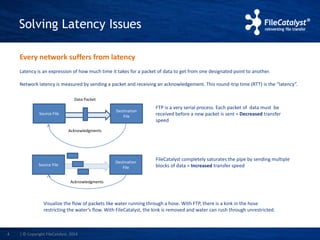
Every network suffers from latency 
Latency is an expression of how much time it takes for a packet of data to get from one designated point to another. 
Network latency is measured by sending a packet and receiving an acknowledgement. This round-trip time (RTT) is the “latency”. 
FTP is a very serial process. Each packet of data must be 
received before a new packet is sent = Decreased transfer 
speed 
FileCatalyst completely saturates the pipe by sending multiple 
blocks of data = Increased transfer speed 
Source File 
Destination 
File 
Data Packet 
Acknowledgments 
Source File 
Destination 
File 
Acknowledgments 
Visualize the flow of packets like water running through a hose. With FTP, there is a kink in the hose 
restricting the water’s flow. With FileCatalyst, the kink is removed and water can rush through unrestricted. 
| © Copyright FileCatalyst, 2014
Efficient Transport Protocol 
FileCatalyst transfers files at full link speed: 
• UDP with proprietary retransmission and congestion control 
• Patent pending algorithm built from the ground up in-house 
• Transfer rates up to 10 Gbps (with encryption) using commodity hardware 
• Not affected by latency and speed degrades, linearly with packet loss 
• Ability to fully leverage multi-core CPU architecture 
5 | © Copyright FileCatalyst, 2014
Congestion Control 
Network congestion occurs when a link is carrying so much data that its quality of 
service deteriorates 
FileCatalyst traffic plays nicely with other traffic on the link: 
• Congestion control will immediately detect server receive rate and react 
• Aggression (how much link capacity FileCatalyst tries to continuously recover) can be tuned 
6 
to suit your network 
• Shares bandwidth with concurrent TCP streams 
• Releases bandwidth very quickly when congestion is detected 
• Quick ramp up to reclaim un-used bandwidth 
• Zero tuning required for links between 1Mbps up-to 1Gbps 
| © Copyright FileCatalyst, 2014
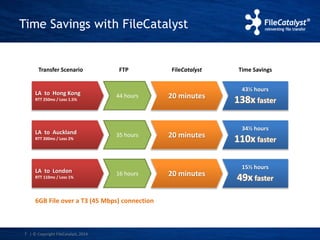
Time Savings with FileCatalyst 
7 
Transfer Scenario Time Savings 
LA to Hong Kong 
RTT 250ms / Loss 1.5% 
FTP 
44 hours 20 minutes 
43½ hours 
138x faster 
LA to Auckland 
RTT 200ms / Loss 2% 35 hours 20 minutes 
34½ hours 
110x faster 
LA to London 
RTT 110ms / Loss 1% 16 hours 20 minutes 
15½ hours 
49x faster 
6GB File over a T3 (45 Mbps) connection 
FileCatalyst 
| © Copyright FileCatalyst, 2014
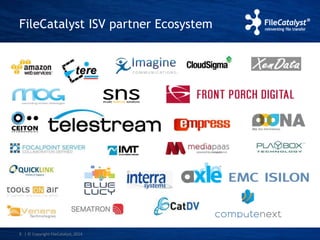
FileCatalyst ISV partner Ecosystem 
8 | © Copyright FileCatalyst, 2014
Telestream Introduction 
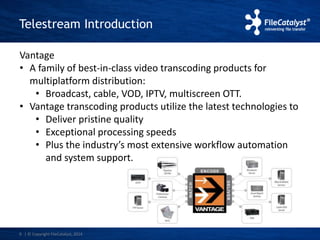
Vantage 
• A family of best-in-class video transcoding products for 
multiplatform distribution: 
• Broadcast, cable, VOD, IPTV, multiscreen OTT. 
• Vantage transcoding products utilize the latest technologies to 
• Deliver pristine quality 
• Exceptional processing speeds 
• Plus the industry’s most extensive workflow automation 
and system support. 
9 | © Copyright FileCatalyst, 2014
FileCatalyst Direct 
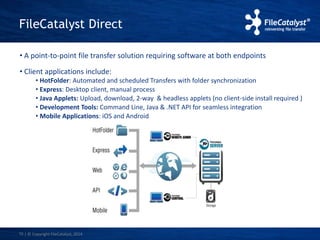
• A point-to-point file transfer solution requiring software at both endpoints 
• Client applications include: 
10 
• HotFolder: Automated and scheduled Transfers with folder synchronization 
• Express: Desktop client, manual process 
• Java Applets: Upload, download, 2-way & headless applets (no client-side install required ) 
• Development Tools: Command Line, Java & .NET API for seamless integration 
• Mobile Applications: iOS and Android 
| © Copyright FileCatalyst, 2014
FileCatalyst Integration in Vantage 
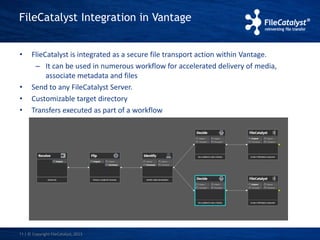
• FlieCatalyst is integrated as a secure file transport action within Vantage. 
– It can be used in numerous workflow for accelerated delivery of media, 
associate metadata and files 
• Send to any FileCatalyst Server. 
• Customizable target directory 
• Transfers executed as part of a workflow 
11 | © Copyright FileCatalyst, 2013
Why should you use FileCatalyst 
technology within a Vantage worflow? 
• FlieCatalyst can be used in any workflow that requires secure, 
reliable accelerated file delivery through the world. 
– For instance: 
• News workflows requiring rapid deployment of stories 
and associated description info to affiliated located 
around the globe 
• Sports highlights being delivered to agencies 
• Movie production – delivery of dailies 
• Post Product – Delivery of ad spots with accompanying 
metadata 
. 
12 | © Copyright FileCatalyst, 2013
Scenarios 
• FileCatalyst can accelerate the movement of files in a number 
of Vantage Workflows. 
Here are some workflows: 
1. Ingest from content creators/post production house, 
transcode and deliver to post production house/ 
broadcasters. 
2. Deliver transcoded files to broadcaster running FileCatalyst 
Server 
3. Ingest files for transcode and store of Amazon S3 for web 
playout. 
4. Ingest from S3 and deliver to Post Production house. 
13 | © Copyright FileCatalyst, 2013
Scenario 1 (Push to Vantage) 
• Ingest from content creators/post production house, transcode and deliver to 
post production house/ broadcasters. 
Components: 
FileCatalyst Client at Content Creator/Post production house 
FileCatalyst Server running alongside Vantage 
Vantage Watch Folder Component 
FileCatalyst Delivery Component in Vantage. 
Set up: 
1. FileCatalyst Client uploads file(s) to FileCatalyst Server into users home directory or 
folder within users home directory. Using temporary file names 
2. Vantage Watch folder watches for media files and associated metadata. Workflow 
executes. 
3. Vantage passes completed file to FileCatalyst Delivery Plugin. Delivery plugin 
configured to point to FileCatalyst Server. 
14 | © Copyright FileCatalyst, 2013
Scenario 1 (Pull from Vantage) 
• Ingest from content creators/post production house, transcode and deliver to 
post production house/ broadcasters. 
Components: 
FileCatalyst Server at Content Creator/Post production house 
FileCatalyst HotFolder running alongside Vantage 
Vantage Watch Folder Component 
FileCatalyst Delivery Component in Vantage. 
Set up: 
1. FileCatalyst HotFolder downloads a file(s) from a FileCatalyst Server from users 
home directory or folder within users home directory to a local folder on the same 
machine as Vantage. Using temporary file names 
2. Vantage Watch folder watches for media file and associated metadata. Workflow 
executes. 
3. Vantage passes completed file to FileCatalyst Delivery Plugin. Delivery plugin 
configured to point to FileCatalyst Server. 
15 | © Copyright FileCatalyst, 2013
Scenario 2 
• Deliver transcoded files to broadcaster running FileCatalyst Server 
Components: 
Vantage Watch Folder Component 
FileCatalyst Delivery Component in Vantage. 
Set up: 
1. Vantage Watch folder watches for media file and associated metadata. 
Workflow executes. 
2. Vantage passes completed file to FileCatalyst Delivery Plugin. Delivery plugin 
configured to point to FileCatalyst Server. 
16 | © Copyright FileCatalyst, 2013
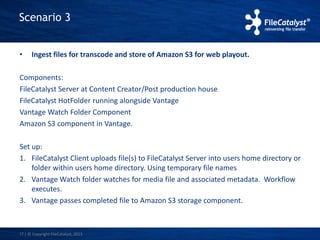
Scenario 3 
• Ingest files for transcode and store of Amazon S3 for web playout. 
Components: 
FileCatalyst Server at Content Creator/Post production house 
FileCatalyst HotFolder running alongside Vantage 
Vantage Watch Folder Component 
Amazon S3 component in Vantage. 
Set up: 
1. FileCatalyst Client uploads file(s) to FileCatalyst Server into users home directory or 
folder within users home directory. Using temporary file names 
2. Vantage Watch folder watches for media file and associated metadata. Workflow 
executes. 
3. Vantage passes completed file to Amazon S3 storage component. 
17 | © Copyright FileCatalyst, 2013
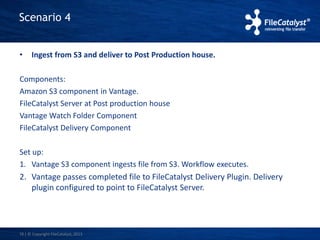
Scenario 4 
• Ingest from S3 and deliver to Post Production house. 
Components: 
Amazon S3 component in Vantage. 
FileCatalyst Server at Post production house 
Vantage Watch Folder Component 
FileCatalyst Delivery Component 
Set up: 
1. Vantage S3 component ingests file from S3. Workflow executes. 
2. Vantage passes completed file to FileCatalyst Delivery Plugin. Delivery 
plugin configured to point to FileCatalyst Server. 
18 | © Copyright FileCatalyst, 2013
Q&A 
19 | © Copyright FileCatalyst, 2013
Thank you

Partner spotlight: Telestream

  • 1.
    FileCatalyst – PartnerSpotlight Telestream Twitter feed: FileCatalystWebinars
  • 2.
    Introduction Elton Carneiro Partner Integration Manager FileCatalyst 2 | © Copyright FileCatalyst, 2013 Bill Harris Product Manager Telestream
  • 3.
    Agenda • Welcome/ Introduction • FileCatalyst Technology Intro • FileCatalyst ISV Partner Ecosystem • Telestream Introduction • Overview of FileCatalyst Direct • FileCatalyst Integration in Vantage • FileCatalyst & Telestream value proposition • Conclusion • Q&A • Next Steps… 3 | © Copyright FileCatalyst, 2013
  • 4.
    Solving Latency Issues 4 Every network suffers from latency Latency is an expression of how much time it takes for a packet of data to get from one designated point to another. Network latency is measured by sending a packet and receiving an acknowledgement. This round-trip time (RTT) is the “latency”. FTP is a very serial process. Each packet of data must be received before a new packet is sent = Decreased transfer speed FileCatalyst completely saturates the pipe by sending multiple blocks of data = Increased transfer speed Source File Destination File Data Packet Acknowledgments Source File Destination File Acknowledgments Visualize the flow of packets like water running through a hose. With FTP, there is a kink in the hose restricting the water’s flow. With FileCatalyst, the kink is removed and water can rush through unrestricted. | © Copyright FileCatalyst, 2014
  • 5.
    Efficient Transport Protocol FileCatalyst transfers files at full link speed: • UDP with proprietary retransmission and congestion control • Patent pending algorithm built from the ground up in-house • Transfer rates up to 10 Gbps (with encryption) using commodity hardware • Not affected by latency and speed degrades, linearly with packet loss • Ability to fully leverage multi-core CPU architecture 5 | © Copyright FileCatalyst, 2014
  • 6.
    Congestion Control Networkcongestion occurs when a link is carrying so much data that its quality of service deteriorates FileCatalyst traffic plays nicely with other traffic on the link: • Congestion control will immediately detect server receive rate and react • Aggression (how much link capacity FileCatalyst tries to continuously recover) can be tuned 6 to suit your network • Shares bandwidth with concurrent TCP streams • Releases bandwidth very quickly when congestion is detected • Quick ramp up to reclaim un-used bandwidth • Zero tuning required for links between 1Mbps up-to 1Gbps | © Copyright FileCatalyst, 2014
  • 7.
    Time Savings withFileCatalyst 7 Transfer Scenario Time Savings LA to Hong Kong RTT 250ms / Loss 1.5% FTP 44 hours 20 minutes 43½ hours 138x faster LA to Auckland RTT 200ms / Loss 2% 35 hours 20 minutes 34½ hours 110x faster LA to London RTT 110ms / Loss 1% 16 hours 20 minutes 15½ hours 49x faster 6GB File over a T3 (45 Mbps) connection FileCatalyst | © Copyright FileCatalyst, 2014
  • 8.
    FileCatalyst ISV partnerEcosystem 8 | © Copyright FileCatalyst, 2014
  • 9.
    Telestream Introduction Vantage • A family of best-in-class video transcoding products for multiplatform distribution: • Broadcast, cable, VOD, IPTV, multiscreen OTT. • Vantage transcoding products utilize the latest technologies to • Deliver pristine quality • Exceptional processing speeds • Plus the industry’s most extensive workflow automation and system support. 9 | © Copyright FileCatalyst, 2014
  • 10.
    FileCatalyst Direct •A point-to-point file transfer solution requiring software at both endpoints • Client applications include: 10 • HotFolder: Automated and scheduled Transfers with folder synchronization • Express: Desktop client, manual process • Java Applets: Upload, download, 2-way & headless applets (no client-side install required ) • Development Tools: Command Line, Java & .NET API for seamless integration • Mobile Applications: iOS and Android | © Copyright FileCatalyst, 2014
  • 11.
    FileCatalyst Integration inVantage • FlieCatalyst is integrated as a secure file transport action within Vantage. – It can be used in numerous workflow for accelerated delivery of media, associate metadata and files • Send to any FileCatalyst Server. • Customizable target directory • Transfers executed as part of a workflow 11 | © Copyright FileCatalyst, 2013
  • 12.
    Why should youuse FileCatalyst technology within a Vantage worflow? • FlieCatalyst can be used in any workflow that requires secure, reliable accelerated file delivery through the world. – For instance: • News workflows requiring rapid deployment of stories and associated description info to affiliated located around the globe • Sports highlights being delivered to agencies • Movie production – delivery of dailies • Post Product – Delivery of ad spots with accompanying metadata . 12 | © Copyright FileCatalyst, 2013
  • 13.
    Scenarios • FileCatalystcan accelerate the movement of files in a number of Vantage Workflows. Here are some workflows: 1. Ingest from content creators/post production house, transcode and deliver to post production house/ broadcasters. 2. Deliver transcoded files to broadcaster running FileCatalyst Server 3. Ingest files for transcode and store of Amazon S3 for web playout. 4. Ingest from S3 and deliver to Post Production house. 13 | © Copyright FileCatalyst, 2013
  • 14.
    Scenario 1 (Pushto Vantage) • Ingest from content creators/post production house, transcode and deliver to post production house/ broadcasters. Components: FileCatalyst Client at Content Creator/Post production house FileCatalyst Server running alongside Vantage Vantage Watch Folder Component FileCatalyst Delivery Component in Vantage. Set up: 1. FileCatalyst Client uploads file(s) to FileCatalyst Server into users home directory or folder within users home directory. Using temporary file names 2. Vantage Watch folder watches for media files and associated metadata. Workflow executes. 3. Vantage passes completed file to FileCatalyst Delivery Plugin. Delivery plugin configured to point to FileCatalyst Server. 14 | © Copyright FileCatalyst, 2013
  • 15.
    Scenario 1 (Pullfrom Vantage) • Ingest from content creators/post production house, transcode and deliver to post production house/ broadcasters. Components: FileCatalyst Server at Content Creator/Post production house FileCatalyst HotFolder running alongside Vantage Vantage Watch Folder Component FileCatalyst Delivery Component in Vantage. Set up: 1. FileCatalyst HotFolder downloads a file(s) from a FileCatalyst Server from users home directory or folder within users home directory to a local folder on the same machine as Vantage. Using temporary file names 2. Vantage Watch folder watches for media file and associated metadata. Workflow executes. 3. Vantage passes completed file to FileCatalyst Delivery Plugin. Delivery plugin configured to point to FileCatalyst Server. 15 | © Copyright FileCatalyst, 2013
  • 16.
    Scenario 2 •Deliver transcoded files to broadcaster running FileCatalyst Server Components: Vantage Watch Folder Component FileCatalyst Delivery Component in Vantage. Set up: 1. Vantage Watch folder watches for media file and associated metadata. Workflow executes. 2. Vantage passes completed file to FileCatalyst Delivery Plugin. Delivery plugin configured to point to FileCatalyst Server. 16 | © Copyright FileCatalyst, 2013
  • 17.
    Scenario 3 •Ingest files for transcode and store of Amazon S3 for web playout. Components: FileCatalyst Server at Content Creator/Post production house FileCatalyst HotFolder running alongside Vantage Vantage Watch Folder Component Amazon S3 component in Vantage. Set up: 1. FileCatalyst Client uploads file(s) to FileCatalyst Server into users home directory or folder within users home directory. Using temporary file names 2. Vantage Watch folder watches for media file and associated metadata. Workflow executes. 3. Vantage passes completed file to Amazon S3 storage component. 17 | © Copyright FileCatalyst, 2013
  • 18.
    Scenario 4 •Ingest from S3 and deliver to Post Production house. Components: Amazon S3 component in Vantage. FileCatalyst Server at Post production house Vantage Watch Folder Component FileCatalyst Delivery Component Set up: 1. Vantage S3 component ingests file from S3. Workflow executes. 2. Vantage passes completed file to FileCatalyst Delivery Plugin. Delivery plugin configured to point to FileCatalyst Server. 18 | © Copyright FileCatalyst, 2013
  • 19.
    Q&A 19 |© Copyright FileCatalyst, 2013
  • 20.

Editor's Notes

  • #11 2 min Thank you Bill. So lets take a look at FileCatalyst Direct. This is the product that has been integrated into Vantage. What is FileCatalyst Direct – it is a point-to-point file transfer solution requiring software at both endpoints. Hence a server – client model. The client applications include The HotFolder – which allows you to perform automated and scheduled transfers with folder synchronization. Expess is a desktop client which allows for ad-hoc manual file transfers. Java applets can be embedded in any web page to offer either upload only capabilities, download only or two way. We also have headless applets that you can use to build your own interface on top off however still leverage the acceleration technology. As mentioned, we have a strong suite of APIs that can be used for integration. And lastly we have our mobile clients for iOS and Android.
  • #13  2 minutes Bill talks about this slide