© Cloudera, Inc. All rights reserved.
Apache NiFi SDLC Improvements
Bryan Bende / @bbende
November 2019
© Cloudera, Inc. All rights reserved. 2© Cloudera, Inc. All rights reserved.
OUTLINE
• NiFi 1.10.0
• Parameterized Flows
• Force commit
• Auto-select external controller services
• Track enabled/disabled state
• Change version with nested versioning
• NiFi Registry 0.5.0
• Granular proxy permissions
• Public buckets
• Versioned Extension Bundles
© Cloudera, Inc. All rights reserved. 3© Cloudera, Inc. All rights reserved.
PARAMETERIZED FLOWS
© Cloudera, Inc. All rights reserved. 4© Cloudera, Inc. All rights reserved.
PROBLEMS
• Variables are referenced through expression language (EL)…
• Some properties don’t support EL and can’t be parameterized
• Can’t apply access control because references are ambiguous
• Ex: ${foo} could be a flow file attribute, variable, system property, or environment variable
• Without access control, can’t have sensitive variables
• Without sensitive variables, can’t parameterize sensitive properties!
© Cloudera, Inc. All rights reserved. 5© Cloudera, Inc. All rights reserved.
SOLUTION – INTRODUCE PARAMETER CONTEXTS
• Parameter contexts created outside of the flow
• Context has a name, description, and one or more parameters
• Parameter has a name, description, and sensitivity flag
• Process group can be bound to one parameter context
• Components in the process group can reference parameters in the bound context
• New syntax for referencing parameters in properties: #{param-name}
• All properties support parameters regardless of expression language
• Sensitive properties can only reference sensitive parameters (vice versa)
• Integration with NiFi registry when migrating flow between environments
© Cloudera, Inc. All rights reserved. 6© Cloudera, Inc. All rights reserved.
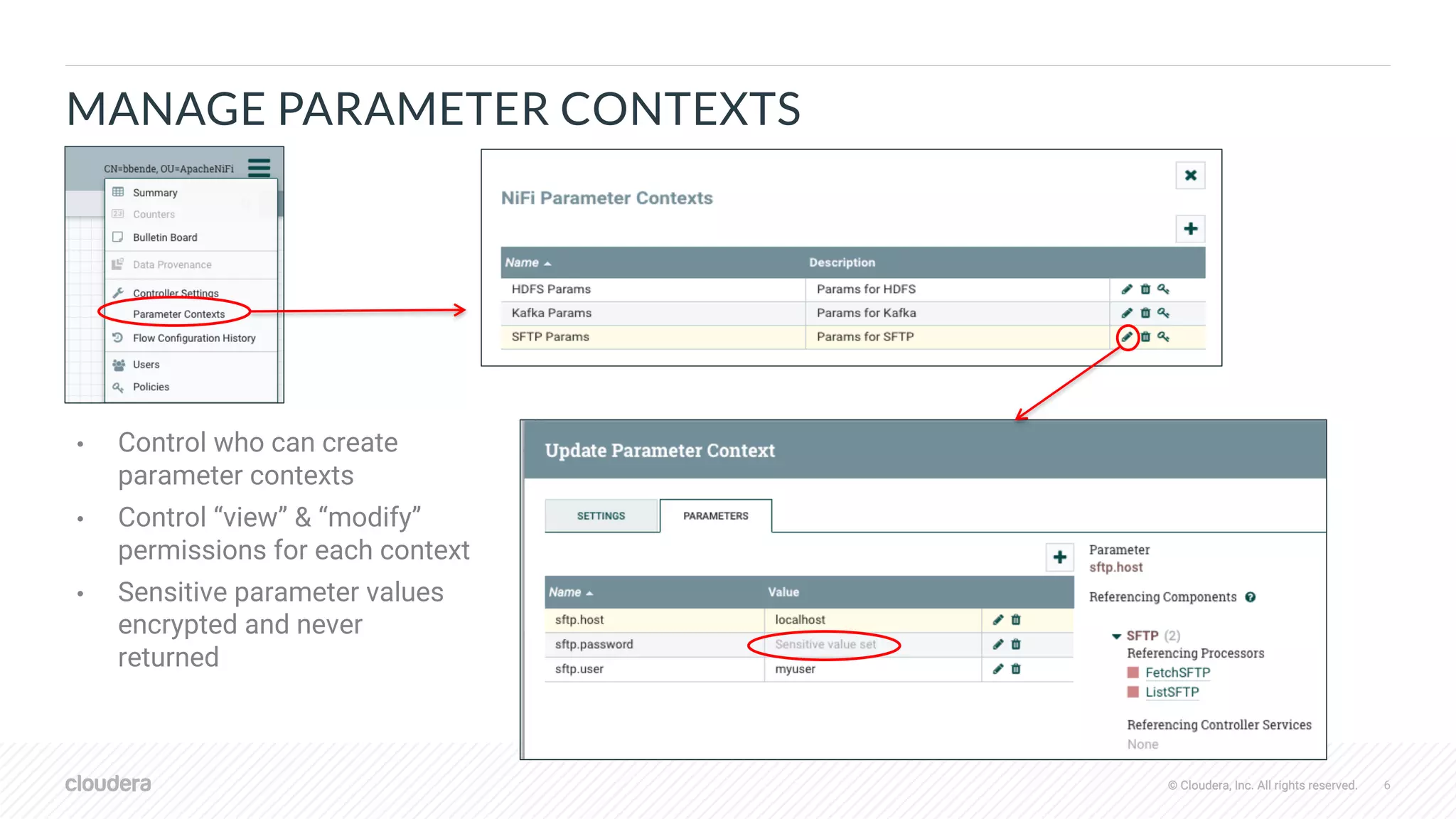
MANAGE PARAMETER CONTEXTS
• Control who can create
parameter contexts
• Control “view” & “modify”
permissions for each context
• Sensitive parameter values
encrypted and never
returned
© Cloudera, Inc. All rights reserved. 7© Cloudera, Inc. All rights reserved.
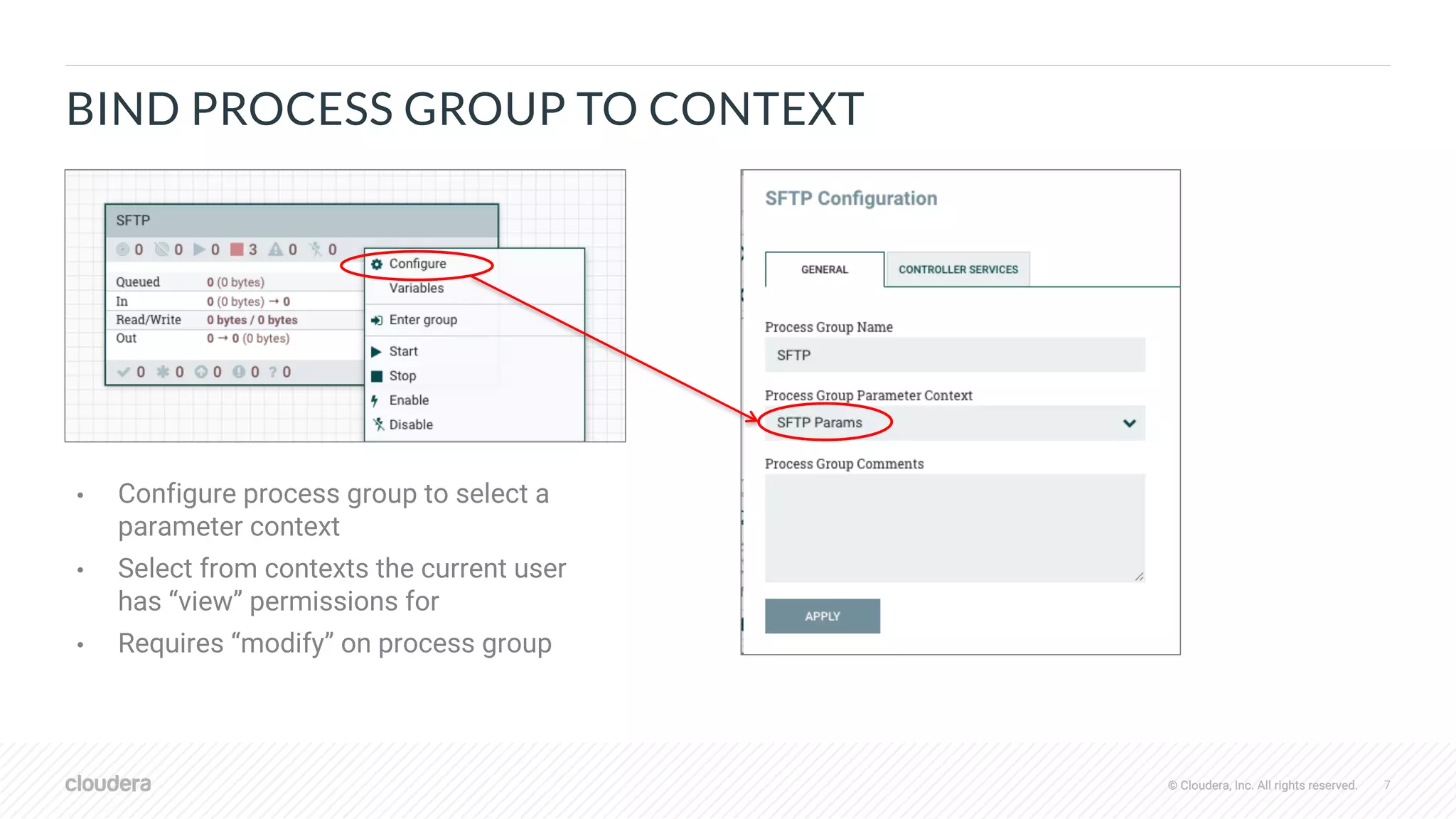
BIND PROCESS GROUP TO CONTEXT
• Configure process group to select a
parameter context
• Select from contexts the current user
has “view” permissions for
• Requires “modify” on process group
© Cloudera, Inc. All rights reserved. 8© Cloudera, Inc. All rights reserved.
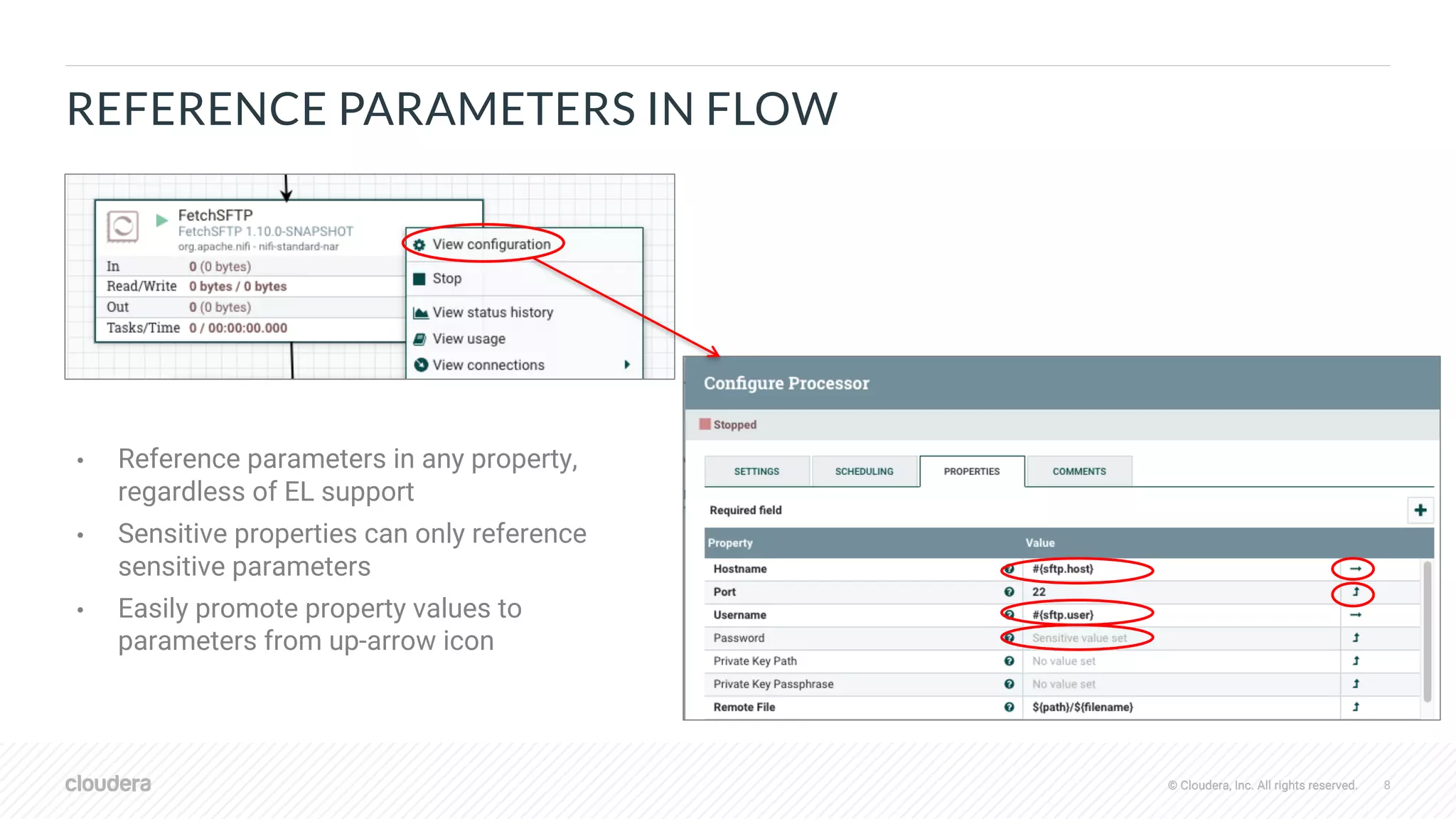
REFERENCE PARAMETERS IN FLOW
• Reference parameters in any property,
regardless of EL support
• Sensitive properties can only reference
sensitive parameters
• Easily promote property values to
parameters from up-arrow icon
© Cloudera, Inc. All rights reserved. 9© Cloudera, Inc. All rights reserved.
VERSION CONTROL FLOW WITH PARAMETERS
"parameterContexts" : {
"SFTP Params" : {
"name" : "SFTP Params",
"parameters" : [
{
"name" : "sftp.password",
"sensitive" : true
}, {
"name" : "sftp.host",
"sensitive" : false,
"value" : "localhost"
}, {
"name" : "sftp.user",
"sensitive" : false,
"value" : "myuser"
}
]
}
• Saved to registry with snapshots of referenced
parameter contexts
• Values of sensitive parameters scrubbed, set
once after importing to target environment
• Sensitive properties in versioned flow retain
parameter references like #{password}
© Cloudera, Inc. All rights reserved. 10© Cloudera, Inc. All rights reserved.
IMPORT/UPGRADE VERSION CONTROLLED FLOW
• For each parameter context in incoming versioned flow…
• If no existing context with same name, create new context using initial values from versioned flow
• Requires permissions to create a new context
• If existing context with same name, add new parameters not already in existing context
• Requires “view” & "modify” permissions to the existing context
• After import/upgrade, set sensitive parameter values in given contexts
© Cloudera, Inc. All rights reserved. 11© Cloudera, Inc. All rights reserved.
MANAGE PARAMETERS WITH NIFI CLI
• CLI commands for…
• create-param-context
• list-param-contexts
• get-param-context
• set-param
• delete-param
• pg-set-param-context
• export-param-context
• import-param-context
• merge-param-context
© Cloudera, Inc. All rights reserved. 12© Cloudera, Inc. All rights reserved.
GENERAL NIFI SDLC IMPROVEMENTS
© Cloudera, Inc. All rights reserved. 13© Cloudera, Inc. All rights reserved.
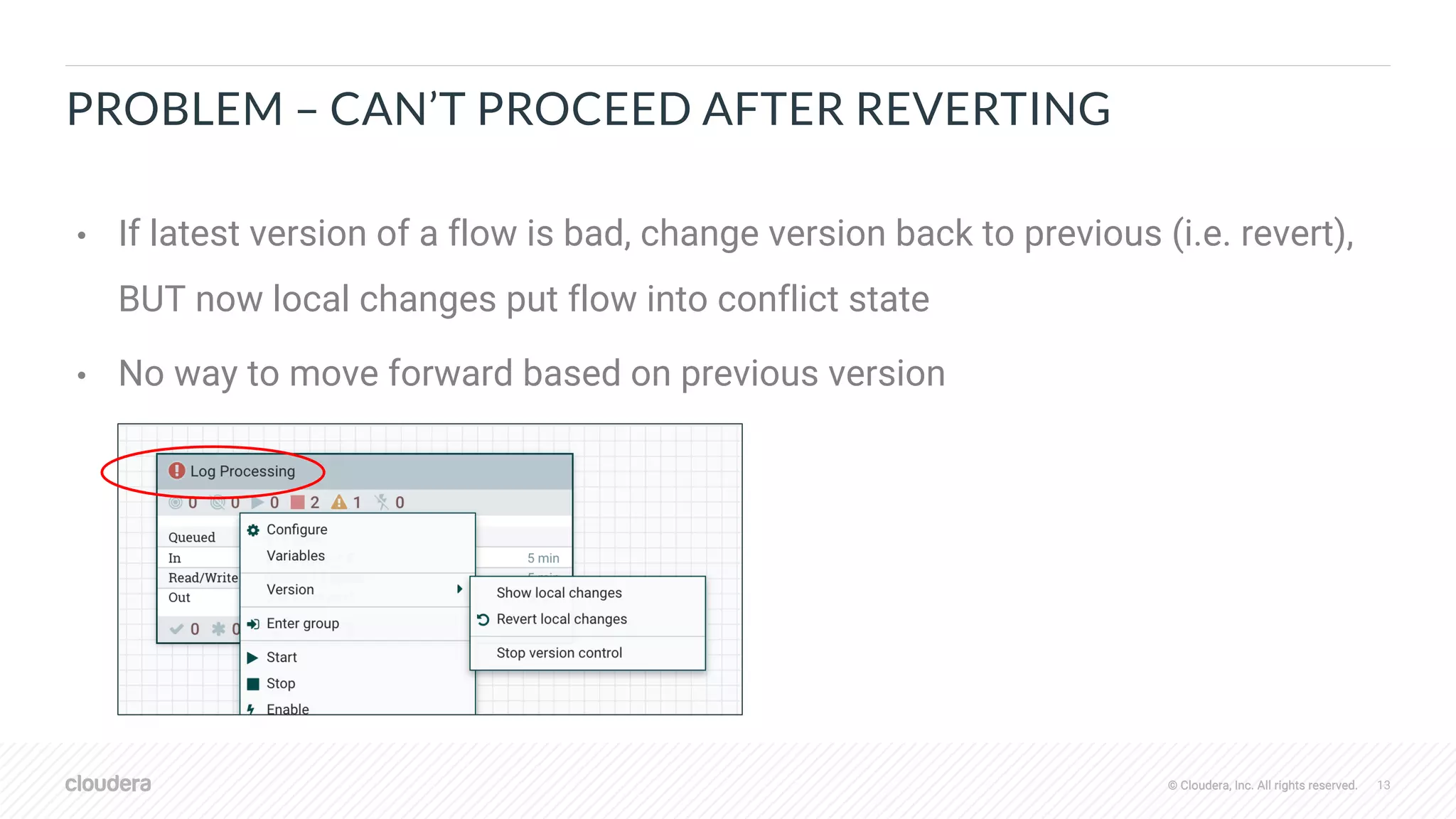
PROBLEM – CAN’T PROCEED AFTER REVERTING
• If latest version of a flow is bad, change version back to previous (i.e. revert),
BUT now local changes put flow into conflict state
• No way to move forward based on previous version
© Cloudera, Inc. All rights reserved. 14© Cloudera, Inc. All rights reserved.
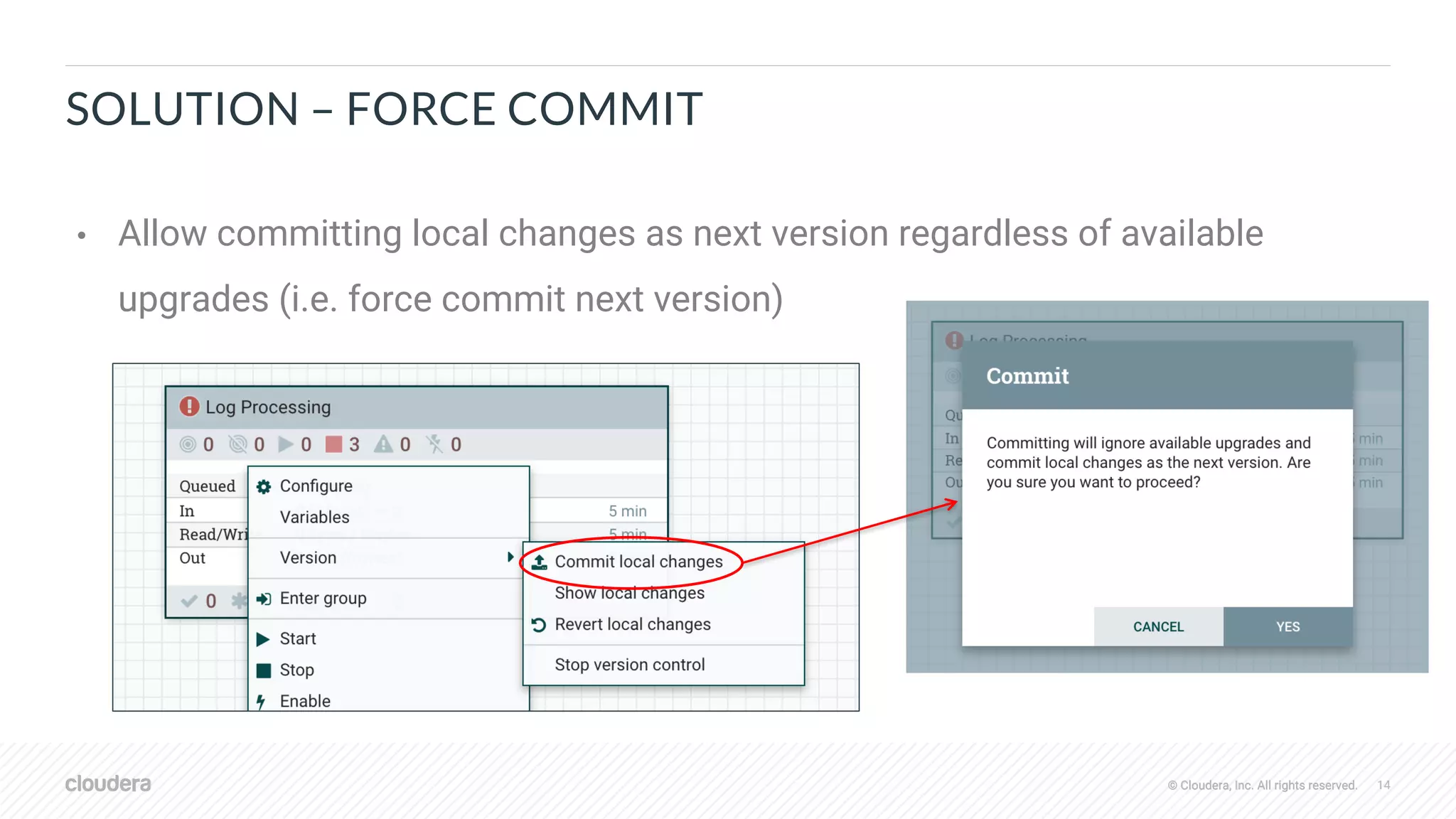
SOLUTION – FORCE COMMIT
• Allow committing local changes as next version regardless of available
upgrades (i.e. force commit next version)
© Cloudera, Inc. All rights reserved. 15© Cloudera, Inc. All rights reserved.
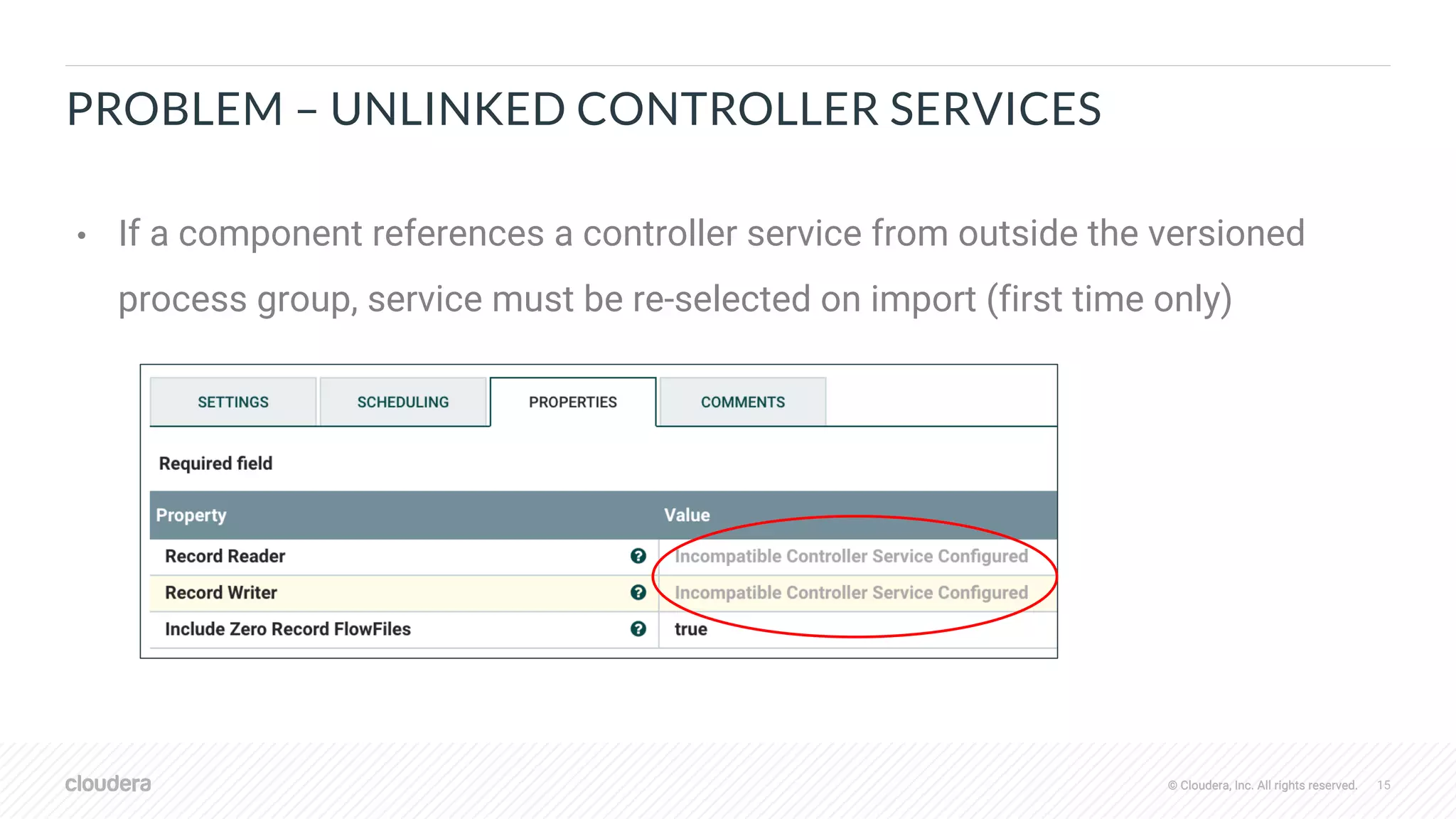
PROBLEM – UNLINKED CONTROLLER SERVICES
• If a component references a controller service from outside the versioned
process group, service must be re-selected on import (first time only)
© Cloudera, Inc. All rights reserved. 16© Cloudera, Inc. All rights reserved.
SOLUTION – AUTO-SLECET CONTROLLER SERVICES BY NAME
• Track names of external controller services referenced by versioned flow
• During import, find all services from parent groups…
• If only one service matching the desired type with same name, auto-select
• If multiple services matching desired type with same name, require user to select
• Example:
• Dev – service named ‘DBCPConnectionPool’ in root group
• Prod - service name ‘DBCPConnectionPool’ in root group
• Import flow from dev environment to prod environment
• Processors referencing ‘DBCPConnectionPool’ get correctly linked to prod service by name
© Cloudera, Inc. All rights reserved. 17© Cloudera, Inc. All rights reserved.
OTHER IMPROVEMENTS…
• Store enabled/disabled state of components in registry
• Retain appropriate state on import of versioned flow
• https://issues.apache.org/jira/browse/NIFI-6025
• Recursively change version on nested versioned process groups when
changing version on a parent
• https://issues.apache.org/jira/browse/NIFI-6314
• Ignore changes in local flow caused by new properties with default values
• https://issues.apache.org/jira/browse/NIFI-6028
© Cloudera, Inc. All rights reserved. 18© Cloudera, Inc. All rights reserved.
NIFI REGISTRY IMPROVEMENTS
© Cloudera, Inc. All rights reserved. 19© Cloudera, Inc. All rights reserved.
PROBLEM – PROD SHOULDN’T BE ABLE MODIFY REGISTRY
• Many teams want to enforce a development workflow
• Dev -> Staging -> Prod
• If a problem is found in staging or prod, start back in dev
• Previously no way to enforce that a NiFi instance can’t write to a registry
© Cloudera, Inc. All rights reserved. 20© Cloudera, Inc. All rights reserved.
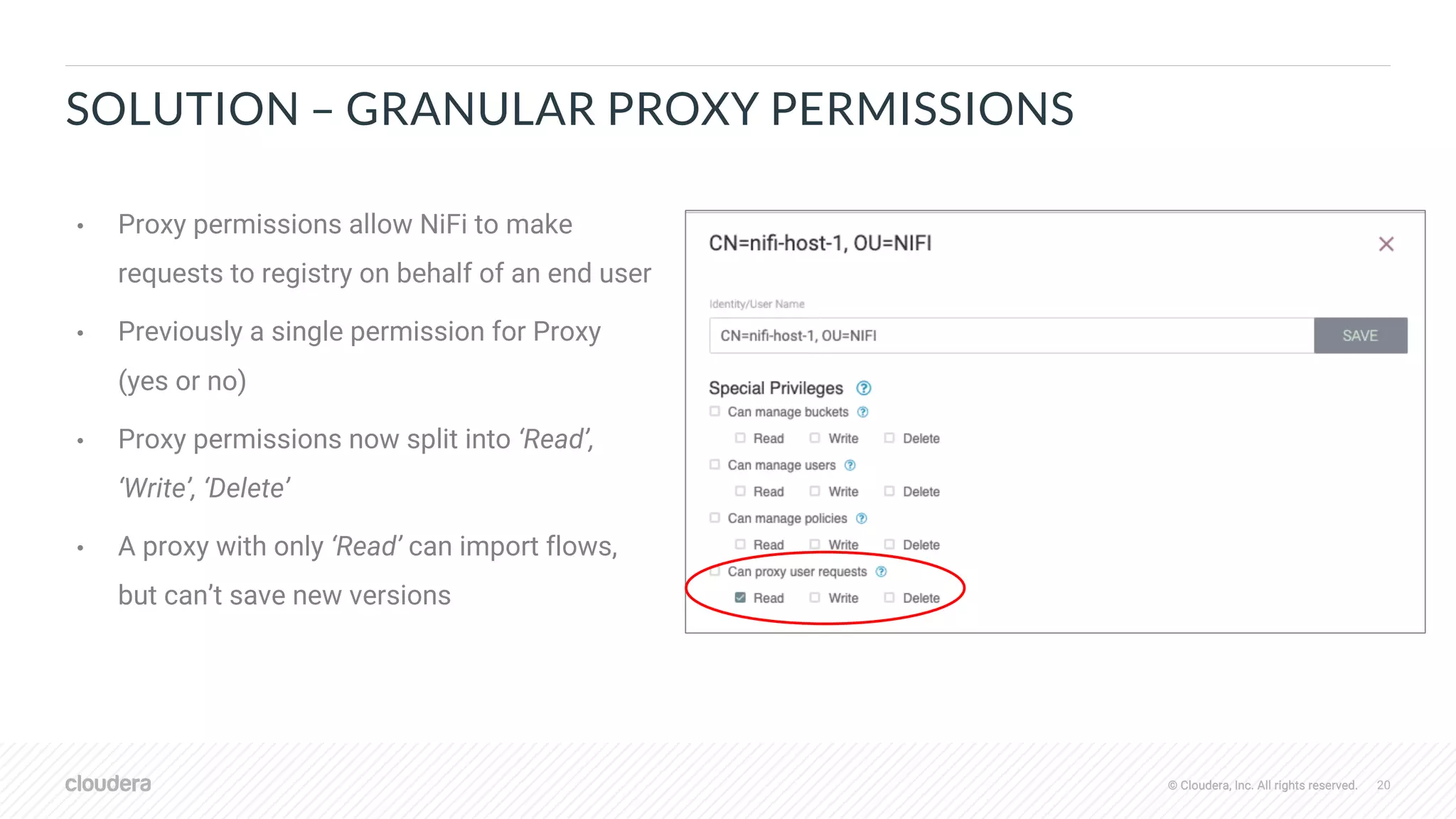
SOLUTION – GRANULAR PROXY PERMISSIONS
• Proxy permissions allow NiFi to make
requests to registry on behalf of an end user
• Previously a single permission for Proxy
(yes or no)
• Proxy permissions now split into ‘Read’,
‘Write’, ‘Delete’
• A proxy with only ‘Read’ can import flows,
but can’t save new versions
© Cloudera, Inc. All rights reserved. 21© Cloudera, Inc. All rights reserved.
PROBLEM – ANONYMOUS ACCESS TO SOME BUCKETS
• Secured registry requires all access to come from authenticated users
• No way to make some items public so that anyone can retrieve them
• Requires all users to have accounts
© Cloudera, Inc. All rights reserved. 22© Cloudera, Inc. All rights reserved.
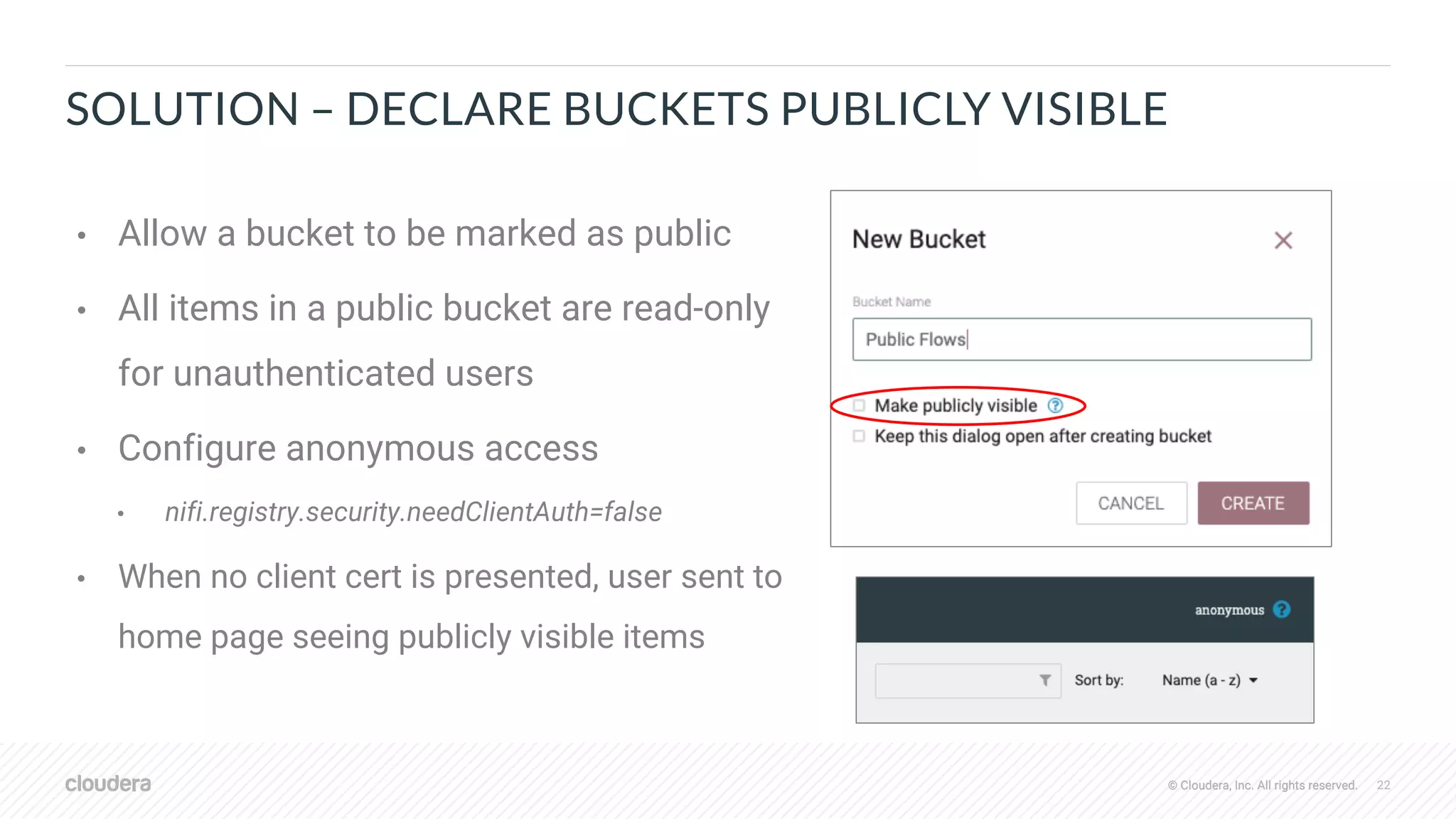
SOLUTION – DECLARE BUCKETS PUBLICLY VISIBLE
• Allow a bucket to be marked as public
• All items in a public bucket are read-only
for unauthenticated users
• Configure anonymous access
• nifi.registry.security.needClientAuth=false
• When no client cert is presented, user sent to
home page seeing publicly visible items
© Cloudera, Inc. All rights reserved. 23© Cloudera, Inc. All rights reserved.
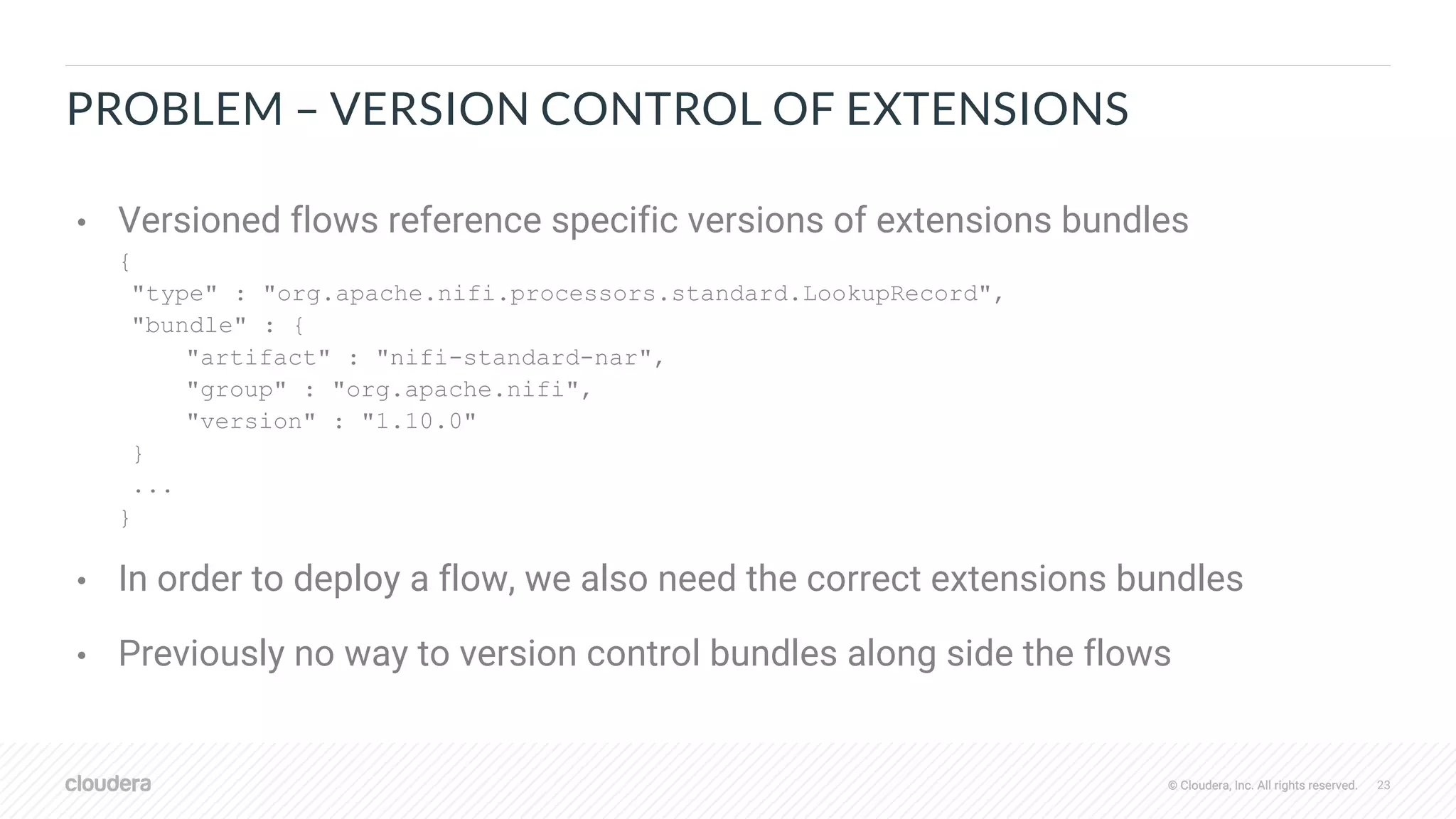
PROBLEM – VERSION CONTROL OF EXTENSIONS
• Versioned flows reference specific versions of extensions bundles
{
"type" : "org.apache.nifi.processors.standard.LookupRecord",
"bundle" : {
"artifact" : "nifi-standard-nar",
"group" : "org.apache.nifi",
"version" : "1.10.0"
}
...
}
• In order to deploy a flow, we also need the correct extensions bundles
• Previously no way to version control bundles along side the flows
© Cloudera, Inc. All rights reserved. 24© Cloudera, Inc. All rights reserved.
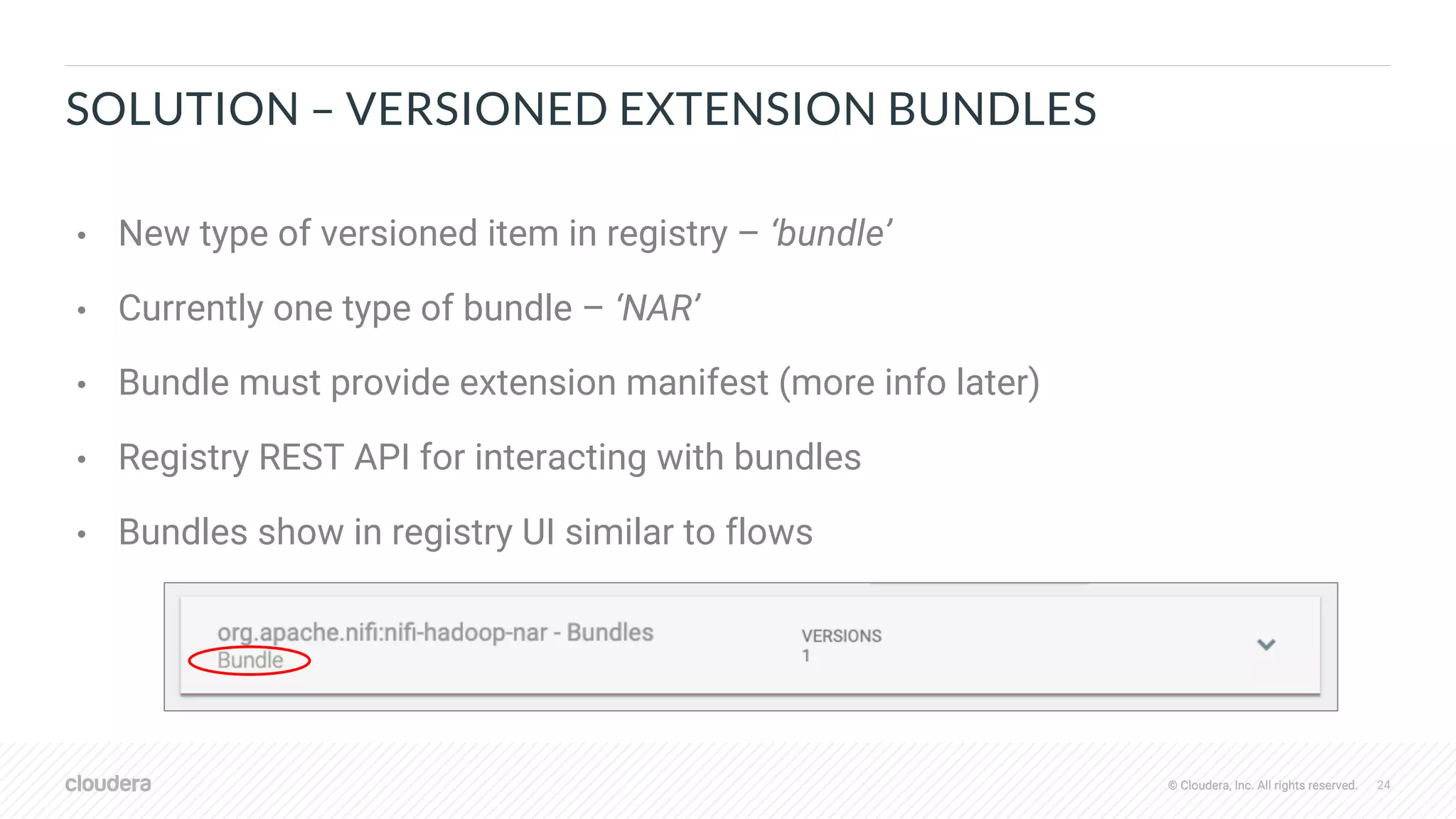
SOLUTION – VERSIONED EXTENSION BUNDLES
• New type of versioned item in registry – ‘bundle’
• Currently one type of bundle – ‘NAR’
• Bundle must provide extension manifest (more info later)
• Registry REST API for interacting with bundles
• Bundles show in registry UI similar to flows
© Cloudera, Inc. All rights reserved. 25© Cloudera, Inc. All rights reserved.
VERSIONED BUNDLES - DEEPER DIVE
© Cloudera, Inc. All rights reserved. 26© Cloudera, Inc. All rights reserved.
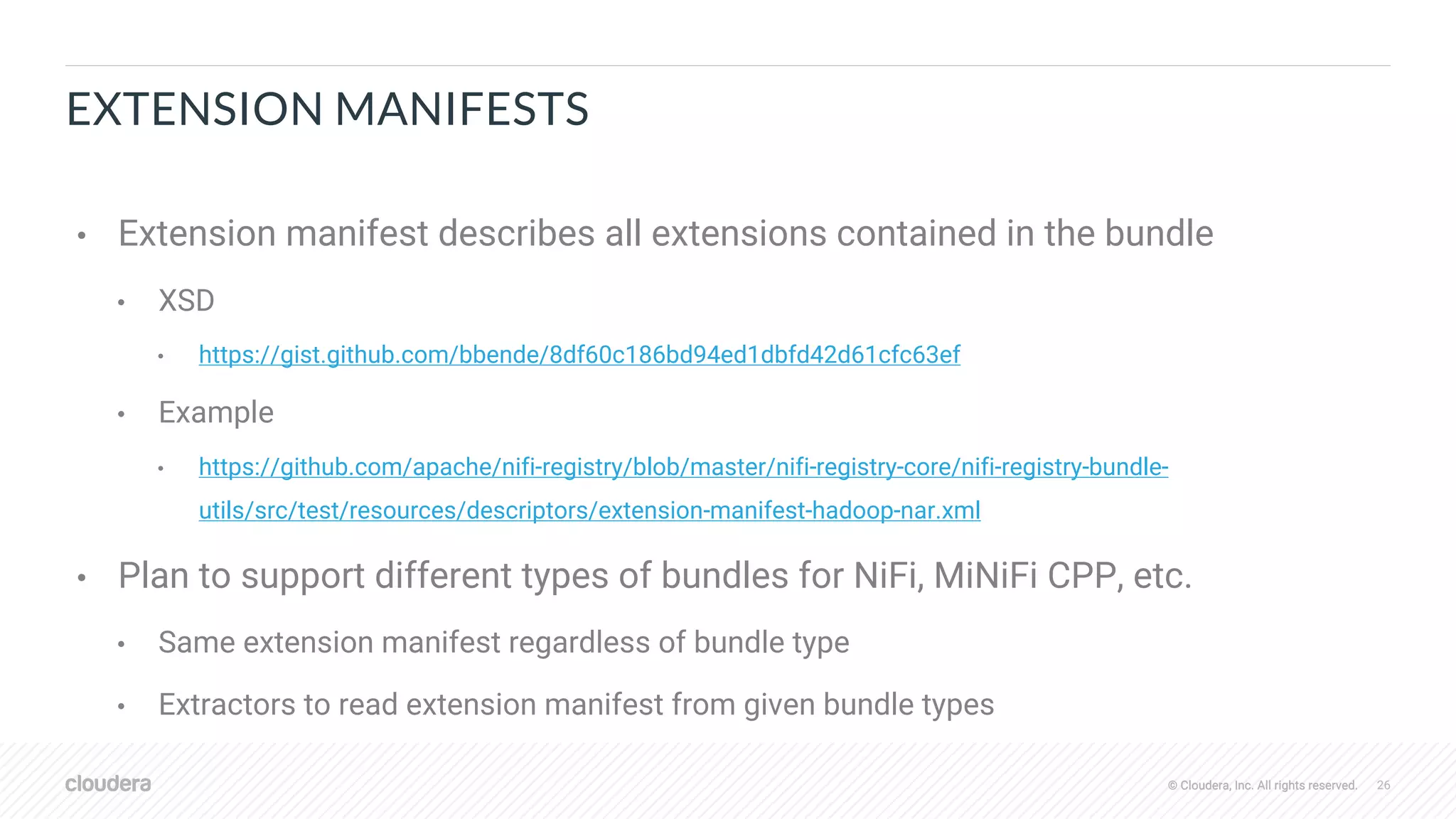
EXTENSION MANIFESTS
• Extension manifest describes all extensions contained in the bundle
• XSD
• https://gist.github.com/bbende/8df60c186bd94ed1dbfd42d61cfc63ef
• Example
• https://github.com/apache/nifi-registry/blob/master/nifi-registry-core/nifi-registry-bundle-
utils/src/test/resources/descriptors/extension-manifest-hadoop-nar.xml
• Plan to support different types of bundles for NiFi, MiNiFi CPP, etc.
• Same extension manifest regardless of bundle type
• Extractors to read extension manifest from given bundle types
© Cloudera, Inc. All rights reserved. 27© Cloudera, Inc. All rights reserved.
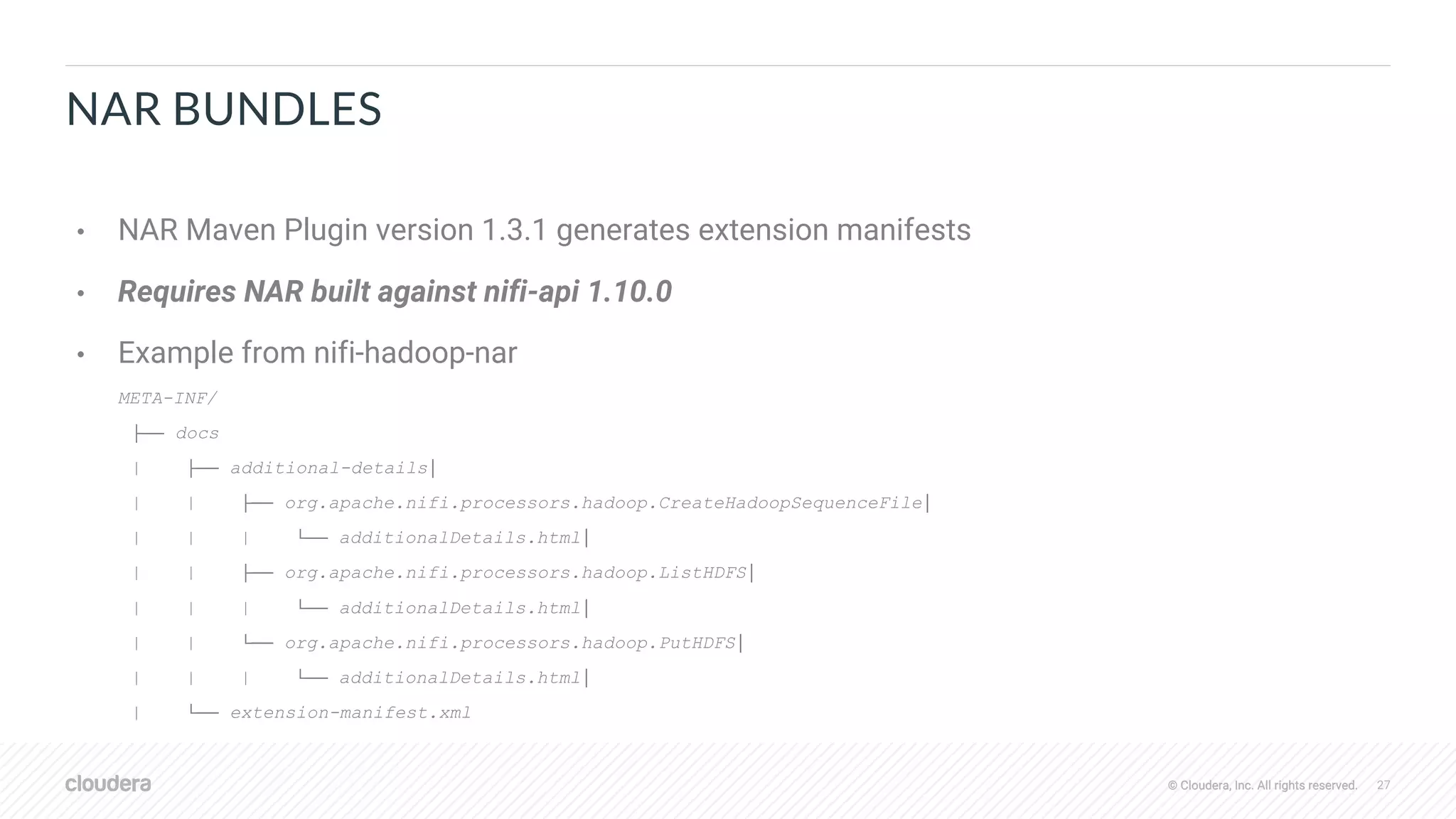
NAR BUNDLES
• NAR Maven Plugin version 1.3.1 generates extension manifests
• Requires NAR built against nifi-api 1.10.0
• Example from nifi-hadoop-nar
META-INF/
├── docs
| ├── additional-details│
| | ├── org.apache.nifi.processors.hadoop.CreateHadoopSequenceFile│
| | | └── additionalDetails.html│
| | ├── org.apache.nifi.processors.hadoop.ListHDFS│
| | | └── additionalDetails.html│
| | └── org.apache.nifi.processors.hadoop.PutHDFS│
| | | └── additionalDetails.html│
| └── extension-manifest.xml
© Cloudera, Inc. All rights reserved. 28© Cloudera, Inc. All rights reserved.
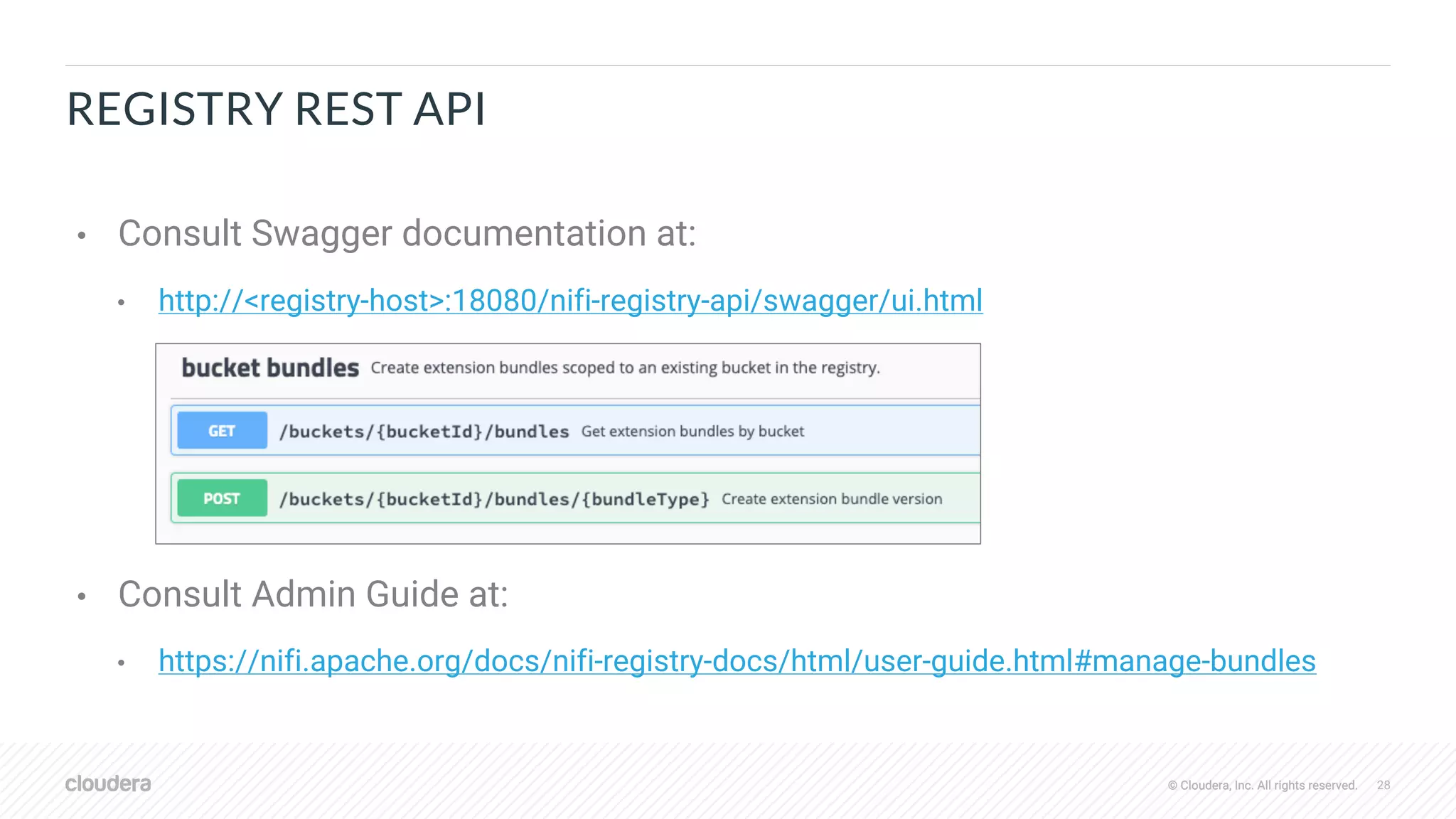
REGISTRY REST API
• Consult Swagger documentation at:
• http://<registry-host>:18080/nifi-registry-api/swagger/ui.html
• Consult Admin Guide at:
• https://nifi.apache.org/docs/nifi-registry-docs/html/user-guide.html#manage-bundles
© Cloudera, Inc. All rights reserved. 29© Cloudera, Inc. All rights reserved.
NIFI CLI
• Commands to make working with registry REST API easier…
• upload-bundle
• upload-bundles
• download-bundle
• list-bundle-groups
• list-bundle-artifacts
• list-bundle-versions
• list-extensions
• list-extension-tags
© Cloudera, Inc. All rights reserved. 30© Cloudera, Inc. All rights reserved.
EXAMPLE – GENERATE AND BUILD NAR
mvn archetype:generate 
-DarchetypeGroupId=org.apache.nifi 
-DarchetypeArtifactId=nifi-processor-bundle-archetype 
-DarchetypeVersion=1.10.0 
-DnifiVersion=1.10.0
Define value for property 'groupId': org.apache.nifi
Define value for property 'artifactId': nifi-test-bundle
Define value for property 'version' 1.0-SNAPSHOT: : 1.0.0
Define value for property 'artifactBaseName': test
Define value for property 'package' org.apache.nifi.processors.test: :
cd nifi-test-bundle
mvn clean package
[1] https://cwiki.apache.org/confluence/display/NIFI/Maven+Projects+for+Extensions
© Cloudera, Inc. All rights reserved. 31© Cloudera, Inc. All rights reserved.
EXAMPLE – UPLOAD BUNDLE
• Download nifi-toolkit-1.10.0-bin.tar.gz from
https://nifi.apache.org/download.html
• Launch CLI from nifi-toolkit-1.10.0/bin/cli.sh
• Execute upload-bundle command:
• registry upload-bundle -u http://localhost:18080 -b 1005e90f-5751-4f10-8ae5-
69e0961fc02f -ebf /path/to/nifi-test-nar-1.0.0.nar -ebt nifi-nar
© Cloudera, Inc. All rights reserved. 32© Cloudera, Inc. All rights reserved.
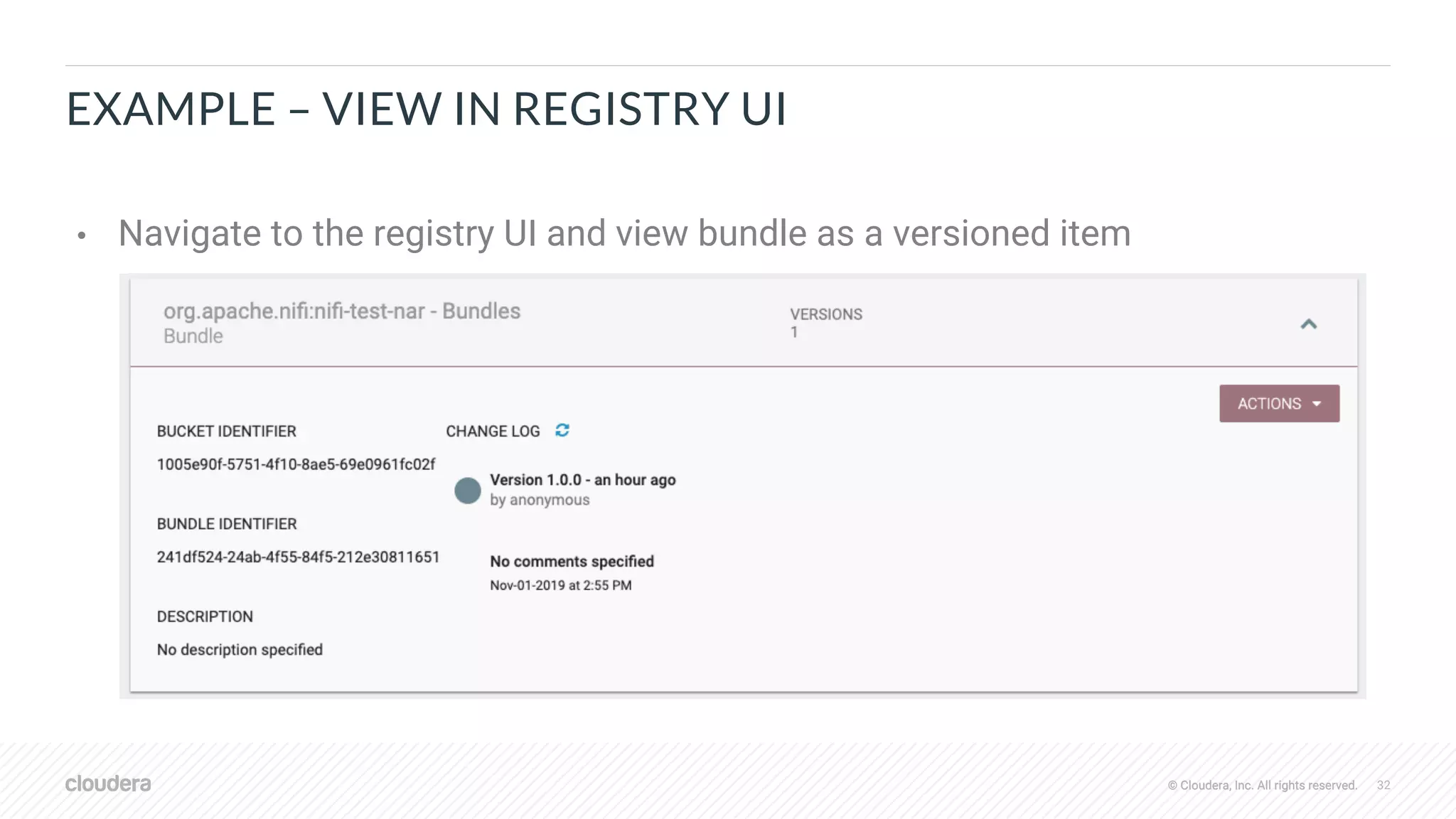
EXAMPLE – VIEW IN REGISTRY UI
• Navigate to the registry UI and view bundle as a versioned item
© Cloudera, Inc. All rights reserved. 33© Cloudera, Inc. All rights reserved.
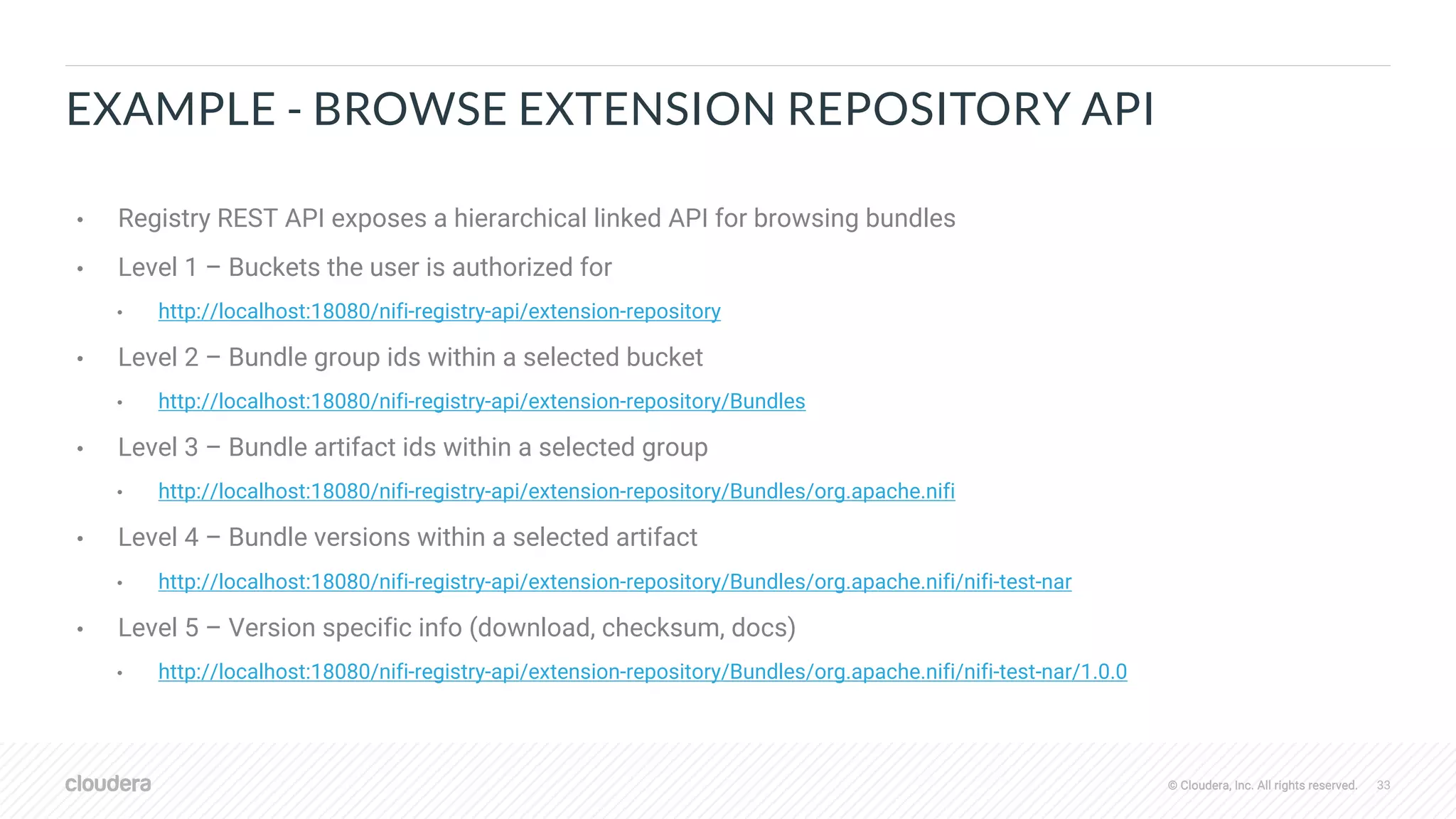
EXAMPLE - BROWSE EXTENSION REPOSITORY API
• Registry REST API exposes a hierarchical linked API for browsing bundles
• Level 1 – Buckets the user is authorized for
• http://localhost:18080/nifi-registry-api/extension-repository
• Level 2 – Bundle group ids within a selected bucket
• http://localhost:18080/nifi-registry-api/extension-repository/Bundles
• Level 3 – Bundle artifact ids within a selected group
• http://localhost:18080/nifi-registry-api/extension-repository/Bundles/org.apache.nifi
• Level 4 – Bundle versions within a selected artifact
• http://localhost:18080/nifi-registry-api/extension-repository/Bundles/org.apache.nifi/nifi-test-nar
• Level 5 – Version specific info (download, checksum, docs)
• http://localhost:18080/nifi-registry-api/extension-repository/Bundles/org.apache.nifi/nifi-test-nar/1.0.0
© Cloudera, Inc. All rights reserved. 34© Cloudera, Inc. All rights reserved.
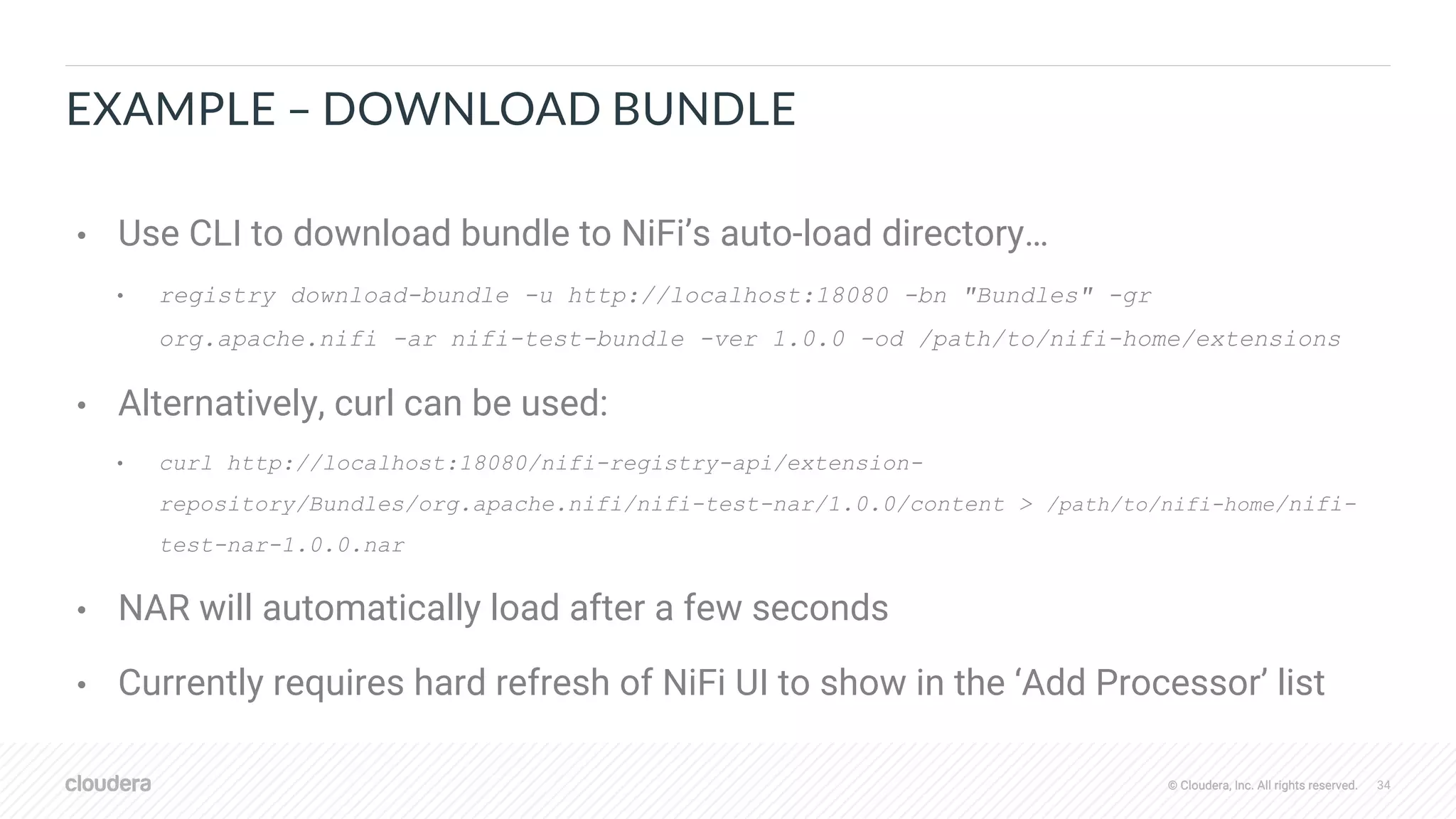
EXAMPLE – DOWNLOAD BUNDLE
• Use CLI to download bundle to NiFi’s auto-load directory…
• registry download-bundle -u http://localhost:18080 -bn "Bundles" -gr
org.apache.nifi -ar nifi-test-bundle -ver 1.0.0 -od /path/to/nifi-home/extensions
• Alternatively, curl can be used:
• curl http://localhost:18080/nifi-registry-api/extension-
repository/Bundles/org.apache.nifi/nifi-test-nar/1.0.0/content > /path/to/nifi-home/nifi-
test-nar-1.0.0.nar
• NAR will automatically load after a few seconds
• Currently requires hard refresh of NiFi UI to show in the ‘Add Processor’ list
© Cloudera, Inc. All rights reserved.
THANK YOU

Apache NiFi SDLC Improvements

  • 1.
    © Cloudera, Inc.All rights reserved. Apache NiFi SDLC Improvements Bryan Bende / @bbende November 2019
  • 2.
    © Cloudera, Inc.All rights reserved. 2© Cloudera, Inc. All rights reserved. OUTLINE • NiFi 1.10.0 • Parameterized Flows • Force commit • Auto-select external controller services • Track enabled/disabled state • Change version with nested versioning • NiFi Registry 0.5.0 • Granular proxy permissions • Public buckets • Versioned Extension Bundles
  • 3.
    © Cloudera, Inc.All rights reserved. 3© Cloudera, Inc. All rights reserved. PARAMETERIZED FLOWS
  • 4.
    © Cloudera, Inc.All rights reserved. 4© Cloudera, Inc. All rights reserved. PROBLEMS • Variables are referenced through expression language (EL)… • Some properties don’t support EL and can’t be parameterized • Can’t apply access control because references are ambiguous • Ex: ${foo} could be a flow file attribute, variable, system property, or environment variable • Without access control, can’t have sensitive variables • Without sensitive variables, can’t parameterize sensitive properties!
  • 5.
    © Cloudera, Inc.All rights reserved. 5© Cloudera, Inc. All rights reserved. SOLUTION – INTRODUCE PARAMETER CONTEXTS • Parameter contexts created outside of the flow • Context has a name, description, and one or more parameters • Parameter has a name, description, and sensitivity flag • Process group can be bound to one parameter context • Components in the process group can reference parameters in the bound context • New syntax for referencing parameters in properties: #{param-name} • All properties support parameters regardless of expression language • Sensitive properties can only reference sensitive parameters (vice versa) • Integration with NiFi registry when migrating flow between environments
  • 6.
    © Cloudera, Inc.All rights reserved. 6© Cloudera, Inc. All rights reserved. MANAGE PARAMETER CONTEXTS • Control who can create parameter contexts • Control “view” & “modify” permissions for each context • Sensitive parameter values encrypted and never returned
  • 7.
    © Cloudera, Inc.All rights reserved. 7© Cloudera, Inc. All rights reserved. BIND PROCESS GROUP TO CONTEXT • Configure process group to select a parameter context • Select from contexts the current user has “view” permissions for • Requires “modify” on process group
  • 8.
    © Cloudera, Inc.All rights reserved. 8© Cloudera, Inc. All rights reserved. REFERENCE PARAMETERS IN FLOW • Reference parameters in any property, regardless of EL support • Sensitive properties can only reference sensitive parameters • Easily promote property values to parameters from up-arrow icon
  • 9.
    © Cloudera, Inc.All rights reserved. 9© Cloudera, Inc. All rights reserved. VERSION CONTROL FLOW WITH PARAMETERS "parameterContexts" : { "SFTP Params" : { "name" : "SFTP Params", "parameters" : [ { "name" : "sftp.password", "sensitive" : true }, { "name" : "sftp.host", "sensitive" : false, "value" : "localhost" }, { "name" : "sftp.user", "sensitive" : false, "value" : "myuser" } ] } • Saved to registry with snapshots of referenced parameter contexts • Values of sensitive parameters scrubbed, set once after importing to target environment • Sensitive properties in versioned flow retain parameter references like #{password}
  • 10.
    © Cloudera, Inc.All rights reserved. 10© Cloudera, Inc. All rights reserved. IMPORT/UPGRADE VERSION CONTROLLED FLOW • For each parameter context in incoming versioned flow… • If no existing context with same name, create new context using initial values from versioned flow • Requires permissions to create a new context • If existing context with same name, add new parameters not already in existing context • Requires “view” & "modify” permissions to the existing context • After import/upgrade, set sensitive parameter values in given contexts
  • 11.
    © Cloudera, Inc.All rights reserved. 11© Cloudera, Inc. All rights reserved. MANAGE PARAMETERS WITH NIFI CLI • CLI commands for… • create-param-context • list-param-contexts • get-param-context • set-param • delete-param • pg-set-param-context • export-param-context • import-param-context • merge-param-context
  • 12.
    © Cloudera, Inc.All rights reserved. 12© Cloudera, Inc. All rights reserved. GENERAL NIFI SDLC IMPROVEMENTS
  • 13.
    © Cloudera, Inc.All rights reserved. 13© Cloudera, Inc. All rights reserved. PROBLEM – CAN’T PROCEED AFTER REVERTING • If latest version of a flow is bad, change version back to previous (i.e. revert), BUT now local changes put flow into conflict state • No way to move forward based on previous version
  • 14.
    © Cloudera, Inc.All rights reserved. 14© Cloudera, Inc. All rights reserved. SOLUTION – FORCE COMMIT • Allow committing local changes as next version regardless of available upgrades (i.e. force commit next version)
  • 15.
    © Cloudera, Inc.All rights reserved. 15© Cloudera, Inc. All rights reserved. PROBLEM – UNLINKED CONTROLLER SERVICES • If a component references a controller service from outside the versioned process group, service must be re-selected on import (first time only)
  • 16.
    © Cloudera, Inc.All rights reserved. 16© Cloudera, Inc. All rights reserved. SOLUTION – AUTO-SLECET CONTROLLER SERVICES BY NAME • Track names of external controller services referenced by versioned flow • During import, find all services from parent groups… • If only one service matching the desired type with same name, auto-select • If multiple services matching desired type with same name, require user to select • Example: • Dev – service named ‘DBCPConnectionPool’ in root group • Prod - service name ‘DBCPConnectionPool’ in root group • Import flow from dev environment to prod environment • Processors referencing ‘DBCPConnectionPool’ get correctly linked to prod service by name
  • 17.
    © Cloudera, Inc.All rights reserved. 17© Cloudera, Inc. All rights reserved. OTHER IMPROVEMENTS… • Store enabled/disabled state of components in registry • Retain appropriate state on import of versioned flow • https://issues.apache.org/jira/browse/NIFI-6025 • Recursively change version on nested versioned process groups when changing version on a parent • https://issues.apache.org/jira/browse/NIFI-6314 • Ignore changes in local flow caused by new properties with default values • https://issues.apache.org/jira/browse/NIFI-6028
  • 18.
    © Cloudera, Inc.All rights reserved. 18© Cloudera, Inc. All rights reserved. NIFI REGISTRY IMPROVEMENTS
  • 19.
    © Cloudera, Inc.All rights reserved. 19© Cloudera, Inc. All rights reserved. PROBLEM – PROD SHOULDN’T BE ABLE MODIFY REGISTRY • Many teams want to enforce a development workflow • Dev -> Staging -> Prod • If a problem is found in staging or prod, start back in dev • Previously no way to enforce that a NiFi instance can’t write to a registry
  • 20.
    © Cloudera, Inc.All rights reserved. 20© Cloudera, Inc. All rights reserved. SOLUTION – GRANULAR PROXY PERMISSIONS • Proxy permissions allow NiFi to make requests to registry on behalf of an end user • Previously a single permission for Proxy (yes or no) • Proxy permissions now split into ‘Read’, ‘Write’, ‘Delete’ • A proxy with only ‘Read’ can import flows, but can’t save new versions
  • 21.
    © Cloudera, Inc.All rights reserved. 21© Cloudera, Inc. All rights reserved. PROBLEM – ANONYMOUS ACCESS TO SOME BUCKETS • Secured registry requires all access to come from authenticated users • No way to make some items public so that anyone can retrieve them • Requires all users to have accounts
  • 22.
    © Cloudera, Inc.All rights reserved. 22© Cloudera, Inc. All rights reserved. SOLUTION – DECLARE BUCKETS PUBLICLY VISIBLE • Allow a bucket to be marked as public • All items in a public bucket are read-only for unauthenticated users • Configure anonymous access • nifi.registry.security.needClientAuth=false • When no client cert is presented, user sent to home page seeing publicly visible items
  • 23.
    © Cloudera, Inc.All rights reserved. 23© Cloudera, Inc. All rights reserved. PROBLEM – VERSION CONTROL OF EXTENSIONS • Versioned flows reference specific versions of extensions bundles { "type" : "org.apache.nifi.processors.standard.LookupRecord", "bundle" : { "artifact" : "nifi-standard-nar", "group" : "org.apache.nifi", "version" : "1.10.0" } ... } • In order to deploy a flow, we also need the correct extensions bundles • Previously no way to version control bundles along side the flows
  • 24.
    © Cloudera, Inc.All rights reserved. 24© Cloudera, Inc. All rights reserved. SOLUTION – VERSIONED EXTENSION BUNDLES • New type of versioned item in registry – ‘bundle’ • Currently one type of bundle – ‘NAR’ • Bundle must provide extension manifest (more info later) • Registry REST API for interacting with bundles • Bundles show in registry UI similar to flows
  • 25.
    © Cloudera, Inc.All rights reserved. 25© Cloudera, Inc. All rights reserved. VERSIONED BUNDLES - DEEPER DIVE
  • 26.
    © Cloudera, Inc.All rights reserved. 26© Cloudera, Inc. All rights reserved. EXTENSION MANIFESTS • Extension manifest describes all extensions contained in the bundle • XSD • https://gist.github.com/bbende/8df60c186bd94ed1dbfd42d61cfc63ef • Example • https://github.com/apache/nifi-registry/blob/master/nifi-registry-core/nifi-registry-bundle- utils/src/test/resources/descriptors/extension-manifest-hadoop-nar.xml • Plan to support different types of bundles for NiFi, MiNiFi CPP, etc. • Same extension manifest regardless of bundle type • Extractors to read extension manifest from given bundle types
  • 27.
    © Cloudera, Inc.All rights reserved. 27© Cloudera, Inc. All rights reserved. NAR BUNDLES • NAR Maven Plugin version 1.3.1 generates extension manifests • Requires NAR built against nifi-api 1.10.0 • Example from nifi-hadoop-nar META-INF/ ├── docs | ├── additional-details│ | | ├── org.apache.nifi.processors.hadoop.CreateHadoopSequenceFile│ | | | └── additionalDetails.html│ | | ├── org.apache.nifi.processors.hadoop.ListHDFS│ | | | └── additionalDetails.html│ | | └── org.apache.nifi.processors.hadoop.PutHDFS│ | | | └── additionalDetails.html│ | └── extension-manifest.xml
  • 28.
    © Cloudera, Inc.All rights reserved. 28© Cloudera, Inc. All rights reserved. REGISTRY REST API • Consult Swagger documentation at: • http://<registry-host>:18080/nifi-registry-api/swagger/ui.html • Consult Admin Guide at: • https://nifi.apache.org/docs/nifi-registry-docs/html/user-guide.html#manage-bundles
  • 29.
    © Cloudera, Inc.All rights reserved. 29© Cloudera, Inc. All rights reserved. NIFI CLI • Commands to make working with registry REST API easier… • upload-bundle • upload-bundles • download-bundle • list-bundle-groups • list-bundle-artifacts • list-bundle-versions • list-extensions • list-extension-tags
  • 30.
    © Cloudera, Inc.All rights reserved. 30© Cloudera, Inc. All rights reserved. EXAMPLE – GENERATE AND BUILD NAR mvn archetype:generate -DarchetypeGroupId=org.apache.nifi -DarchetypeArtifactId=nifi-processor-bundle-archetype -DarchetypeVersion=1.10.0 -DnifiVersion=1.10.0 Define value for property 'groupId': org.apache.nifi Define value for property 'artifactId': nifi-test-bundle Define value for property 'version' 1.0-SNAPSHOT: : 1.0.0 Define value for property 'artifactBaseName': test Define value for property 'package' org.apache.nifi.processors.test: : cd nifi-test-bundle mvn clean package [1] https://cwiki.apache.org/confluence/display/NIFI/Maven+Projects+for+Extensions
  • 31.
    © Cloudera, Inc.All rights reserved. 31© Cloudera, Inc. All rights reserved. EXAMPLE – UPLOAD BUNDLE • Download nifi-toolkit-1.10.0-bin.tar.gz from https://nifi.apache.org/download.html • Launch CLI from nifi-toolkit-1.10.0/bin/cli.sh • Execute upload-bundle command: • registry upload-bundle -u http://localhost:18080 -b 1005e90f-5751-4f10-8ae5- 69e0961fc02f -ebf /path/to/nifi-test-nar-1.0.0.nar -ebt nifi-nar
  • 32.
    © Cloudera, Inc.All rights reserved. 32© Cloudera, Inc. All rights reserved. EXAMPLE – VIEW IN REGISTRY UI • Navigate to the registry UI and view bundle as a versioned item
  • 33.
    © Cloudera, Inc.All rights reserved. 33© Cloudera, Inc. All rights reserved. EXAMPLE - BROWSE EXTENSION REPOSITORY API • Registry REST API exposes a hierarchical linked API for browsing bundles • Level 1 – Buckets the user is authorized for • http://localhost:18080/nifi-registry-api/extension-repository • Level 2 – Bundle group ids within a selected bucket • http://localhost:18080/nifi-registry-api/extension-repository/Bundles • Level 3 – Bundle artifact ids within a selected group • http://localhost:18080/nifi-registry-api/extension-repository/Bundles/org.apache.nifi • Level 4 – Bundle versions within a selected artifact • http://localhost:18080/nifi-registry-api/extension-repository/Bundles/org.apache.nifi/nifi-test-nar • Level 5 – Version specific info (download, checksum, docs) • http://localhost:18080/nifi-registry-api/extension-repository/Bundles/org.apache.nifi/nifi-test-nar/1.0.0
  • 34.
    © Cloudera, Inc.All rights reserved. 34© Cloudera, Inc. All rights reserved. EXAMPLE – DOWNLOAD BUNDLE • Use CLI to download bundle to NiFi’s auto-load directory… • registry download-bundle -u http://localhost:18080 -bn "Bundles" -gr org.apache.nifi -ar nifi-test-bundle -ver 1.0.0 -od /path/to/nifi-home/extensions • Alternatively, curl can be used: • curl http://localhost:18080/nifi-registry-api/extension- repository/Bundles/org.apache.nifi/nifi-test-nar/1.0.0/content > /path/to/nifi-home/nifi- test-nar-1.0.0.nar • NAR will automatically load after a few seconds • Currently requires hard refresh of NiFi UI to show in the ‘Add Processor’ list
  • 35.
    © Cloudera, Inc.All rights reserved. THANK YOU