Webinar: Accelerated File Transfer in Live Sports 
Production
Introduction 
• John Tkaczewski, President and Co-Founder 
john@filecatalyst.com 
• Christian Charette, Director of Software Development 
christian@filecatalyst.com 
| © Copyright 2 FileCatalyst, 2013
Overview 
• Challenges of Live Sports Production 
• Accelerated File Transfer Introduction 
• Accelerated File Transfer as a Solution 
• Live Sports Production Specific File Transfer Features 
• Demo 
| © Copyright 3 FileCatalyst, 2013
Challenges of Live Sports Production 
• Video files tend to be very large in size, up to 100 GB for a full 
resolution video file making file transfers lengthy 
• Geographical distances when editing from remote locations further 
slow file transfers 
• Non-standard MXF (Material Exchange Format) files are extremely 
difficult and unreliable to transfer using traditional file transfer 
methods 
• Large sporting events often require multiple files to be transferred 
simultaneously 
• Transferring dynamic file sets (transferring video files as they are 
still being recorded) 
| © Copyright 4 FileCatalyst, 2013
Accelerated File Transfer Software as a Solution 
• MXF issues encountered: 
– File is growing for long periods, and needs to be followed during 
growth so that it arrives soon as it finishes writing to disk on source. 
• Transfer using “progressive” feature. After every transfer, transfer checks 
for growth and restarts transfer until file does not change. 
– Multiple growth files in progress. Don’t stop transfers while tailing a 
specific growth file. 
• Multi-client transfers allow tailing of multiple concurrent files while still 
allowing static contents to go through. 
– Proxy file (low res) are slow to grow compared to network 
throughput, meaning growth file may be interpreted as static file. 
• Provide a file filter (ie: for all *.mxf files) and a pause duration, where a 
transfer will wait to see if the file grows before considering the file to be 
static and complete. 
| © Copyright 5 FileCatalyst, 2013
Accelerated File Transfer Software as a Solution 
• MXF issues encountered: 
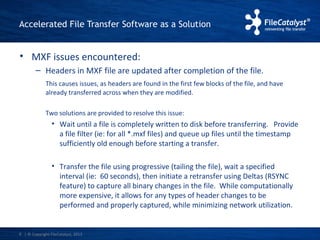
– Headers in MXF file are updated after completion of the file. 
This causes issues, as headers are found in the first few blocks of the file, and have 
already transferred across when they are modified. 
Two solutions are provided to resolve this issue: 
• Wait until a file is completely written to disk before transferring. Provide 
a file filter (ie: for all *.mxf files) and queue up files until the timestamp 
sufficiently old enough before starting a transfer. 
• Transfer the file using progressive (tailing the file), wait a specified 
interval (ie: 60 seconds), then initiate a retransfer using Deltas (RSYNC 
feature) to capture all binary changes in the file. While computationally 
more expensive, it allows for any types of header changes to be 
performed and properly captured, while minimizing network utilization. 
| © Copyright 6 FileCatalyst, 2013
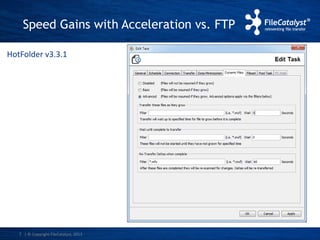
Speed Gains with Acceleration vs. FTP 
HotFolder v3.3.1 
| © Copyright 7 FileCatalyst, 2013
What is File Transfer Acceleration? 
• File transfer acceleration technology allows large files, or “big data” 
to be sent quick and in many cases over large geographical 
distances without being impeded by network impairments such as 
latency and packet loss 
• This is accomplished by transferring files using the UDP protocol 
instead of the TCP protocol, the protocol used for FTP 
• The main difference between UDP and TCP is that UDP wastes no 
time communicating about the receipt of a block of data so 
that regardless of network latency, data transmission remains 
constant, thus overcoming the peak and valley effect that occurs 
with TCP based protocols on links with high latency 
• Application layer protocol can be added to UDP to add a layer of 
reliability and rate control while not sacrificing its the other 
desirable properties 
| © Copyright 8 FileCatalyst, 2013
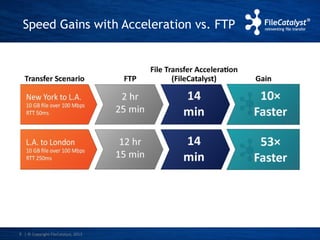
Speed Gains with Acceleration vs. FTP 
| © Copyright 9 FileCatalyst, 2013
Accelerated File Transfer Software as a Solution 
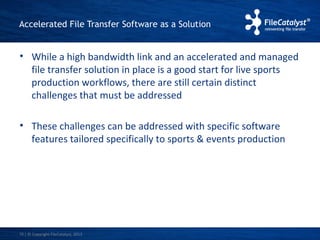
• While a high bandwidth link and an accelerated and managed 
file transfer solution in place is a good start for live sports 
production workflows, there are still certain distinct 
challenges that must be addressed 
• These challenges can be addressed with specific software 
features tailored specifically to sports & events production 
| © Copyright 10 FileCatalyst, 2013
Accelerated File Transfer Software as a Solution 
Challenge Solution 
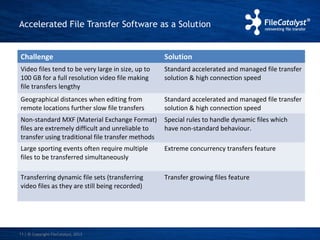
Video files tend to be very large in size, up to 
100 GB for a full resolution video file making 
file transfers lengthy 
| © Copyright 11 FileCatalyst, 2013 
Standard accelerated and managed file transfer 
solution & high connection speed 
Geographical distances when editing from 
remote locations further slow file transfers 
Standard accelerated and managed file transfer 
solution & high connection speed 
Non-standard MXF (Material Exchange Format) 
files are extremely difficult and unreliable to 
transfer using traditional file transfer methods 
Special rules to handle dynamic files which 
have non-standard behaviour. 
Large sporting events often require multiple 
files to be transferred simultaneously 
Extreme concurrency transfers feature 
Transferring dynamic file sets (transferring 
video files as they are still being recorded) 
Transfer growing files feature
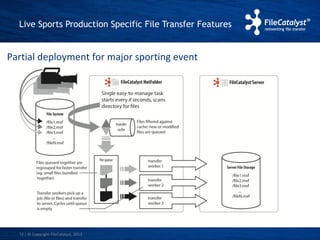
Live Sports Production Specific File Transfer Features 
Partial deployment for major sporting event 
| © Copyright 12 FileCatalyst, 2013
Demo
About FileCatalyst 
FileCatalyst technology is developed by Unlimi-Tech Software Inc., a world 
leader in file transfer solutions. Founded in 2000, the company has more 
than 1000 clients with a user base of over 1 million. FileCatalyst provides 
software-based solutions designed to accelerate and optimize file transfers 
across global networks. Being immune to packet loss and latency, FileCatalyst 
can send files much faster than methods such as FTP, HTTP or CIFS, while 
adding security and reliability. 
To learn more visit www.filecatalyst.com 
| © Copyright 14 FileCatalyst, 2013
Thank you! 
Questions?

Accelerated file transfer in live sports production

  • 1.
    Webinar: Accelerated FileTransfer in Live Sports Production
  • 2.
    Introduction • JohnTkaczewski, President and Co-Founder john@filecatalyst.com • Christian Charette, Director of Software Development christian@filecatalyst.com | © Copyright 2 FileCatalyst, 2013
  • 3.
    Overview • Challengesof Live Sports Production • Accelerated File Transfer Introduction • Accelerated File Transfer as a Solution • Live Sports Production Specific File Transfer Features • Demo | © Copyright 3 FileCatalyst, 2013
  • 4.
    Challenges of LiveSports Production • Video files tend to be very large in size, up to 100 GB for a full resolution video file making file transfers lengthy • Geographical distances when editing from remote locations further slow file transfers • Non-standard MXF (Material Exchange Format) files are extremely difficult and unreliable to transfer using traditional file transfer methods • Large sporting events often require multiple files to be transferred simultaneously • Transferring dynamic file sets (transferring video files as they are still being recorded) | © Copyright 4 FileCatalyst, 2013
  • 5.
    Accelerated File TransferSoftware as a Solution • MXF issues encountered: – File is growing for long periods, and needs to be followed during growth so that it arrives soon as it finishes writing to disk on source. • Transfer using “progressive” feature. After every transfer, transfer checks for growth and restarts transfer until file does not change. – Multiple growth files in progress. Don’t stop transfers while tailing a specific growth file. • Multi-client transfers allow tailing of multiple concurrent files while still allowing static contents to go through. – Proxy file (low res) are slow to grow compared to network throughput, meaning growth file may be interpreted as static file. • Provide a file filter (ie: for all *.mxf files) and a pause duration, where a transfer will wait to see if the file grows before considering the file to be static and complete. | © Copyright 5 FileCatalyst, 2013
  • 6.
    Accelerated File TransferSoftware as a Solution • MXF issues encountered: – Headers in MXF file are updated after completion of the file. This causes issues, as headers are found in the first few blocks of the file, and have already transferred across when they are modified. Two solutions are provided to resolve this issue: • Wait until a file is completely written to disk before transferring. Provide a file filter (ie: for all *.mxf files) and queue up files until the timestamp sufficiently old enough before starting a transfer. • Transfer the file using progressive (tailing the file), wait a specified interval (ie: 60 seconds), then initiate a retransfer using Deltas (RSYNC feature) to capture all binary changes in the file. While computationally more expensive, it allows for any types of header changes to be performed and properly captured, while minimizing network utilization. | © Copyright 6 FileCatalyst, 2013
  • 7.
    Speed Gains withAcceleration vs. FTP HotFolder v3.3.1 | © Copyright 7 FileCatalyst, 2013
  • 8.
    What is FileTransfer Acceleration? • File transfer acceleration technology allows large files, or “big data” to be sent quick and in many cases over large geographical distances without being impeded by network impairments such as latency and packet loss • This is accomplished by transferring files using the UDP protocol instead of the TCP protocol, the protocol used for FTP • The main difference between UDP and TCP is that UDP wastes no time communicating about the receipt of a block of data so that regardless of network latency, data transmission remains constant, thus overcoming the peak and valley effect that occurs with TCP based protocols on links with high latency • Application layer protocol can be added to UDP to add a layer of reliability and rate control while not sacrificing its the other desirable properties | © Copyright 8 FileCatalyst, 2013
  • 9.
    Speed Gains withAcceleration vs. FTP | © Copyright 9 FileCatalyst, 2013
  • 10.
    Accelerated File TransferSoftware as a Solution • While a high bandwidth link and an accelerated and managed file transfer solution in place is a good start for live sports production workflows, there are still certain distinct challenges that must be addressed • These challenges can be addressed with specific software features tailored specifically to sports & events production | © Copyright 10 FileCatalyst, 2013
  • 11.
    Accelerated File TransferSoftware as a Solution Challenge Solution Video files tend to be very large in size, up to 100 GB for a full resolution video file making file transfers lengthy | © Copyright 11 FileCatalyst, 2013 Standard accelerated and managed file transfer solution & high connection speed Geographical distances when editing from remote locations further slow file transfers Standard accelerated and managed file transfer solution & high connection speed Non-standard MXF (Material Exchange Format) files are extremely difficult and unreliable to transfer using traditional file transfer methods Special rules to handle dynamic files which have non-standard behaviour. Large sporting events often require multiple files to be transferred simultaneously Extreme concurrency transfers feature Transferring dynamic file sets (transferring video files as they are still being recorded) Transfer growing files feature
  • 12.
    Live Sports ProductionSpecific File Transfer Features Partial deployment for major sporting event | © Copyright 12 FileCatalyst, 2013
  • 13.
  • 14.
    About FileCatalyst FileCatalysttechnology is developed by Unlimi-Tech Software Inc., a world leader in file transfer solutions. Founded in 2000, the company has more than 1000 clients with a user base of over 1 million. FileCatalyst provides software-based solutions designed to accelerate and optimize file transfers across global networks. Being immune to packet loss and latency, FileCatalyst can send files much faster than methods such as FTP, HTTP or CIFS, while adding security and reliability. To learn more visit www.filecatalyst.com | © Copyright 14 FileCatalyst, 2013
  • 15.

Editor's Notes

  • #5 Producing a live sporting event is, at the best of times, a challenging proposition for broadcasters.  With multiple cameras producing massive high resolution video files, moving the video files for in-studio editing can be a daunting task.  Even with a high bandwidth link and an accelerated and managed file transfer solution in place, there are sometimes other distinct obstacles which must be addressed.  In addition, in today’s digital age it is expected that content (i.e. highlights, mash-ups) will be made available in near real time via all mediums including live broadcast, the web, and mobile devices.