Beyond FTP & hard drives: Accelerating LAN file transfers
Agenda 
 Corporate Overview 
 TCP Overview 
 File Transfer Issues with TCP 
 Acceleration with FileCatalyst 
 TCP on LAN vs. FileCatalyst on LAN 
 Demo of FileCatalyst Direct 
 UDP File Transfer Considerations 
 Questions 
2 | © Copyright FileCatalyst, 2013
Corporate Overview 
What we do? 
• Provide Enterprise Grade Software solutions for moving large data around the world 
• Patent pending accelerated file transfers via our unique UDP based approach 
• Simplify complicated large file transfers for the enterprise end user. 
• Provide all the tools for fast integration into existing enterprise infrastructure 
• Provide all the management, security and monitoring tools required to move large data 
across corporate networks 
• Provide integration solutions with all major cloud vendors, including, Amazon, OpenStack 
and Windows Azure 
3 | © Copyright FileCatalyst, 2012
TCP Overview 
• Provides reliability, error checking, ordered packets in a 
stream 
• Congestion control built in 
• Internet could not survive without it 
• Works well for most internet traffic, email, web browsing 
small ad-hoc transfers (HTTP, FTP, SFTP, SMTP etc) 
4 | © Copyright FileCatalyst, 2013
Efficient Transport Protocol 
FileCatalyst transfers files at full link speed: 
• UDP with proprietary retransmission and congestion control 
• Patent pending algorithm built from the ground up in-house 
• Transfer rates up to 10 Gbps (with encryption) using commodity hardware 
• Not affected by latency and speed degrades, linearly with packet loss 
• Ability to fully leverage multi-core CPU architecture 
5 | © Copyright FileCatalyst, 2012
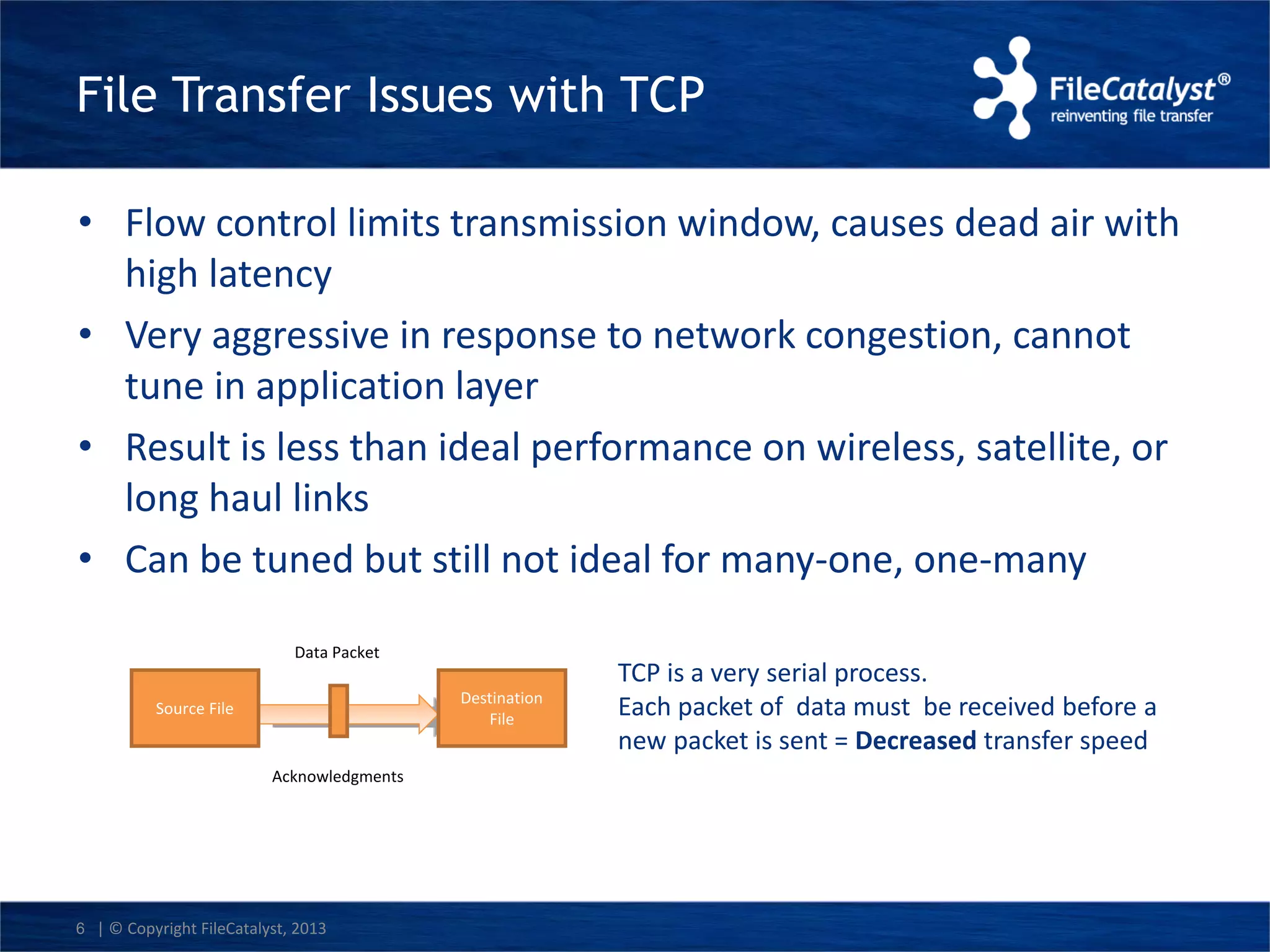
File Transfer Issues with TCP 
• Flow control limits transmission window, causes dead air with 
high latency 
• Very aggressive in response to network congestion, cannot 
tune in application layer 
• Result is less than ideal performance on wireless, satellite, or 
long haul links 
• Can be tuned but still not ideal for many-one, one-many 
Data Packet 
6 | © Copyright FileCatalyst, 2013 
TCP is a very serial process. 
Each packet of data must be received before a 
new packet is sent = Decreased transfer speed 
Source File 
Destination 
File 
Acknowledgments
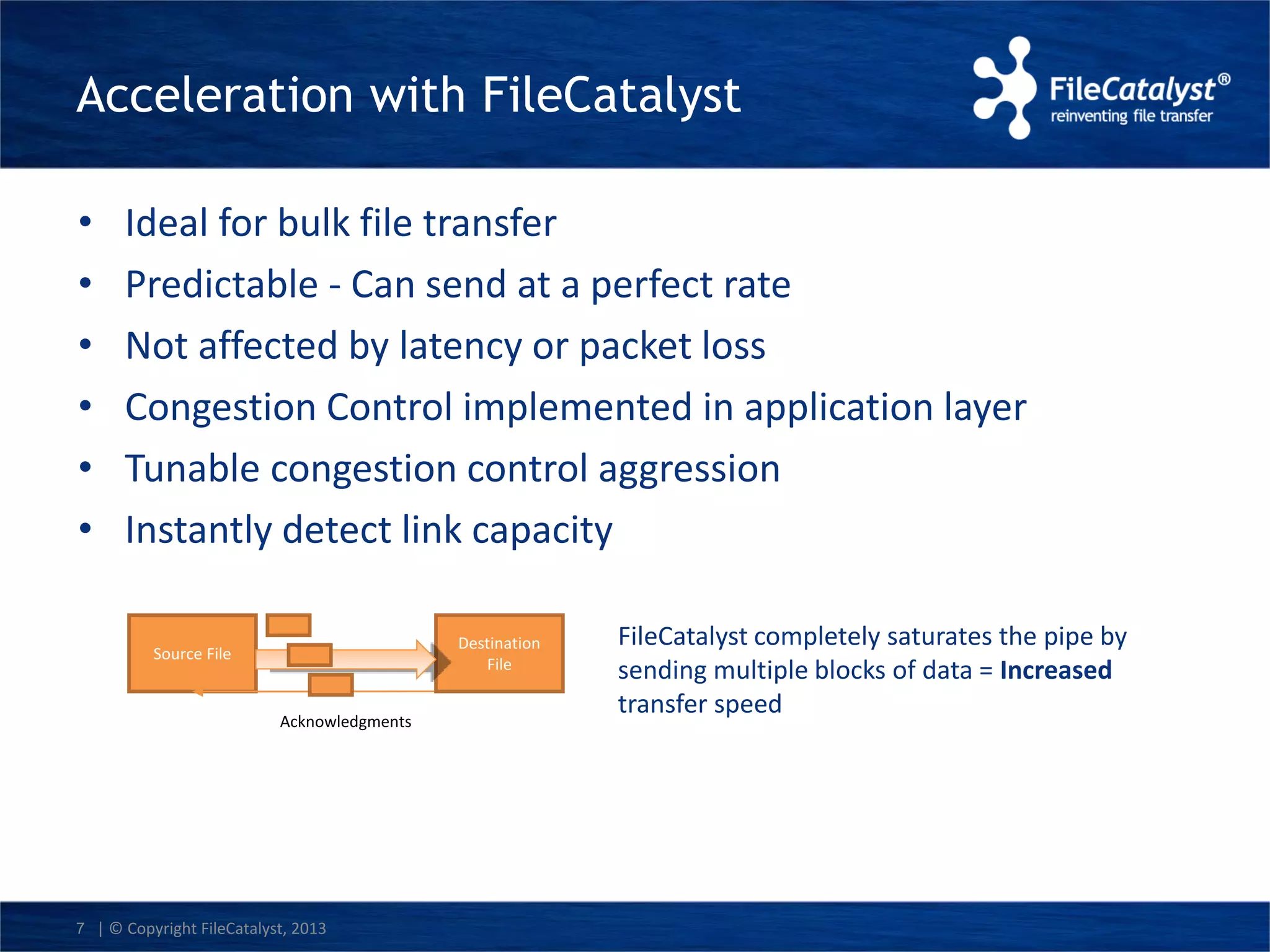
Acceleration with FileCatalyst 
• Ideal for bulk file transfer 
• Predictable - Can send at a perfect rate 
• Not affected by latency or packet loss 
• Congestion Control implemented in application layer 
• Tunable congestion control aggression 
• Instantly detect link capacity 
Source File 
7 | © Copyright FileCatalyst, 2013 
Destination 
File 
Acknowledgments 
FileCatalyst completely saturates the pipe by 
sending multiple blocks of data = Increased 
transfer speed
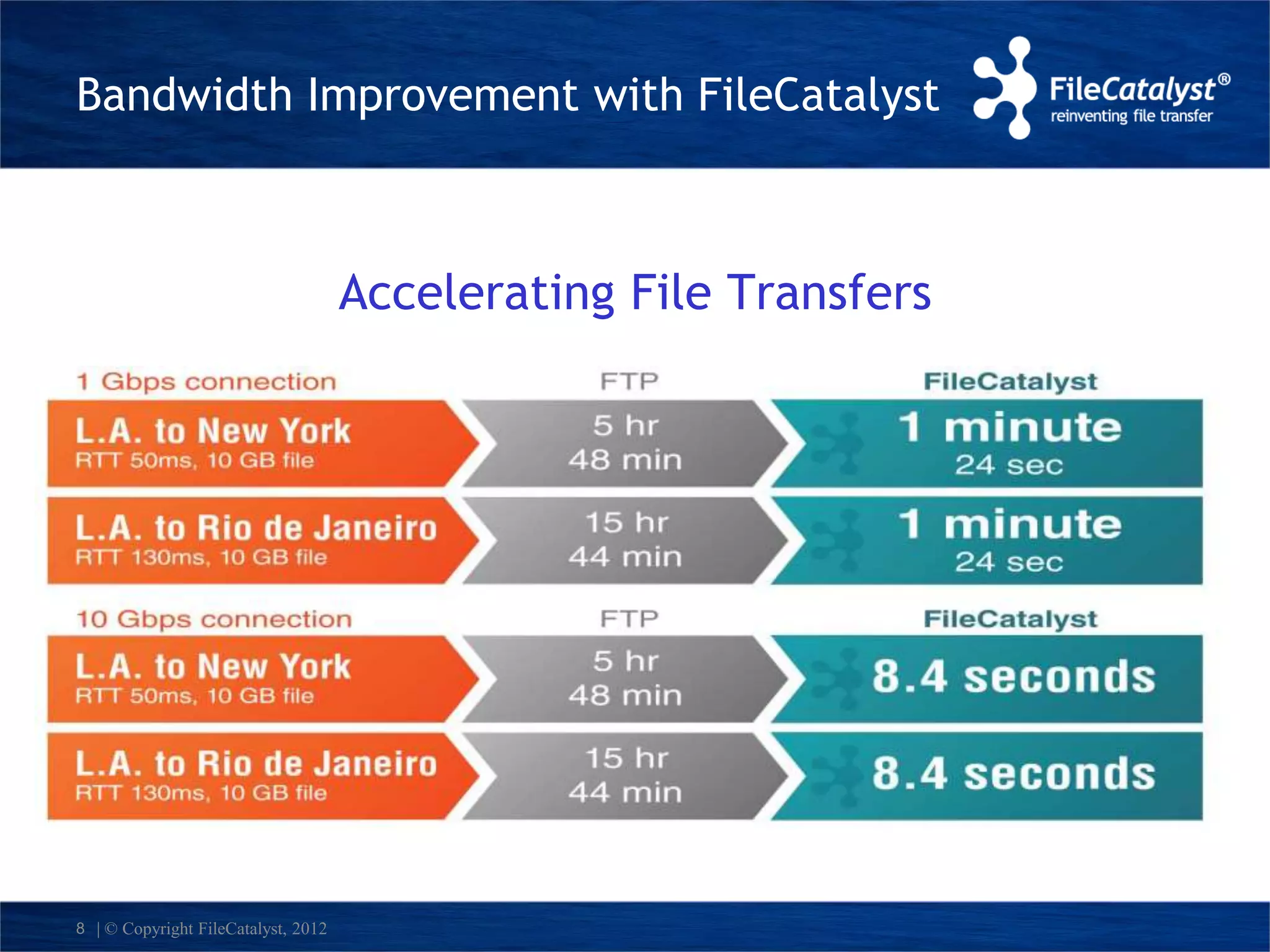
Bandwidth Improvement with FileCatalyst 
*NA = North America 
8 | © Copyright FileCatalyst, 2012 
Accelerating File Transfers
Demo of FileCatalyst 
Server and HotFolder
UDP File Transfer Considerations 
• Plays fair with other traffic on network 
• 10 Gbps file transfer, single stream. Found by 
independent study to be only solution to maintain 10 Gbps 
with high latency and packet loss. 
• High performance for many small files 
• Security, reliability, automatic resume 
• Automation tools, SDK, central management 
10 | © Copyright FileCatalyst, 2013
Our Clients 
11 | © Copyright FileCatalyst, 2012
Questions?

Beyond FTP & hard drives: Accelerating LAN file transfers

  • 1.
    Beyond FTP &hard drives: Accelerating LAN file transfers
  • 2.
    Agenda  CorporateOverview  TCP Overview  File Transfer Issues with TCP  Acceleration with FileCatalyst  TCP on LAN vs. FileCatalyst on LAN  Demo of FileCatalyst Direct  UDP File Transfer Considerations  Questions 2 | © Copyright FileCatalyst, 2013
  • 3.
    Corporate Overview Whatwe do? • Provide Enterprise Grade Software solutions for moving large data around the world • Patent pending accelerated file transfers via our unique UDP based approach • Simplify complicated large file transfers for the enterprise end user. • Provide all the tools for fast integration into existing enterprise infrastructure • Provide all the management, security and monitoring tools required to move large data across corporate networks • Provide integration solutions with all major cloud vendors, including, Amazon, OpenStack and Windows Azure 3 | © Copyright FileCatalyst, 2012
  • 4.
    TCP Overview •Provides reliability, error checking, ordered packets in a stream • Congestion control built in • Internet could not survive without it • Works well for most internet traffic, email, web browsing small ad-hoc transfers (HTTP, FTP, SFTP, SMTP etc) 4 | © Copyright FileCatalyst, 2013
  • 5.
    Efficient Transport Protocol FileCatalyst transfers files at full link speed: • UDP with proprietary retransmission and congestion control • Patent pending algorithm built from the ground up in-house • Transfer rates up to 10 Gbps (with encryption) using commodity hardware • Not affected by latency and speed degrades, linearly with packet loss • Ability to fully leverage multi-core CPU architecture 5 | © Copyright FileCatalyst, 2012
  • 6.
    File Transfer Issueswith TCP • Flow control limits transmission window, causes dead air with high latency • Very aggressive in response to network congestion, cannot tune in application layer • Result is less than ideal performance on wireless, satellite, or long haul links • Can be tuned but still not ideal for many-one, one-many Data Packet 6 | © Copyright FileCatalyst, 2013 TCP is a very serial process. Each packet of data must be received before a new packet is sent = Decreased transfer speed Source File Destination File Acknowledgments
  • 7.
    Acceleration with FileCatalyst • Ideal for bulk file transfer • Predictable - Can send at a perfect rate • Not affected by latency or packet loss • Congestion Control implemented in application layer • Tunable congestion control aggression • Instantly detect link capacity Source File 7 | © Copyright FileCatalyst, 2013 Destination File Acknowledgments FileCatalyst completely saturates the pipe by sending multiple blocks of data = Increased transfer speed
  • 8.
    Bandwidth Improvement withFileCatalyst *NA = North America 8 | © Copyright FileCatalyst, 2012 Accelerating File Transfers
  • 9.
    Demo of FileCatalyst Server and HotFolder
  • 10.
    UDP File TransferConsiderations • Plays fair with other traffic on network • 10 Gbps file transfer, single stream. Found by independent study to be only solution to maintain 10 Gbps with high latency and packet loss. • High performance for many small files • Security, reliability, automatic resume • Automation tools, SDK, central management 10 | © Copyright FileCatalyst, 2013
  • 11.
    Our Clients 11| © Copyright FileCatalyst, 2012
  • 12.