1 © Hortonworks Inc. 2011 – 2016. All Rights Reserved
Apache Ambari
Past, Present and Future
October 2016
2 © Hortonworks Inc. 2011 – 2016. All Rights Reserved
Who Am I
Jeff Sposetti
Product Management, Cloud & Operations @ Hortonworks
Apache Ambari Committer
https://www.linkedin.com/in/jsposetti
@jsposetti
3 © Hortonworks Inc. 2011 – 2016. All Rights Reserved
Agenda
 Background, Release History and Demo
 Ambari Alerts and Metrics
 Ambari Blueprints
 Security Setup (Kerberos, RBAC)
 Log Search (Technical Preview)
 Automated Cluster Upgrade
 Extensibility: Stacks and Views
 What’s New and Next
4 © Hortonworks Inc. 2011 – 2016. All Rights Reserved
What is Apache Ambari?
A completely open source
management platform for
provisioning, managing,
monitoring and securing
Apache Hadoop clusters.
Apache Ambari takes the
guesswork out of operating
Hadoop.
5 © Hortonworks Inc. 2011 – 2016. All Rights Reserved
Ambari Recent Releases
Ambari 2.2.0
Dec 2015
Ambari 2.2.2
Apr 2016
Ambari 2.4.0 GA
Aug 2016
6 © Hortonworks Inc. 2011 – 2016. All Rights Reserved
Ambari Alerts
7 © Hortonworks Inc. 2011 – 2016. All Rights Reserved
Full Visibility into Cluster Health
• Centralized management of Health Alerts
• Pre-defined alerts, configured by default on cluster install
8 © Hortonworks Inc. 2011 – 2016. All Rights Reserved
Customizing Alerts
• Control thresholds, check intervals and response text
9 © Hortonworks Inc. 2011 – 2016. All Rights Reserved
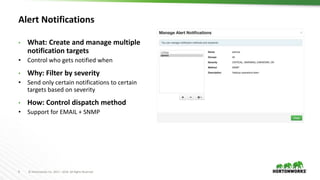
Alert Notifications
• What: Create and manage multiple
notification targets
• Control who gets notified when
• Why: Filter by severity
• Send only certain notifications to certain
targets based on severity
• How: Control dispatch method
• Support for EMAIL + SNMP
10 © Hortonworks Inc. 2011 – 2016. All Rights Reserved
Alert Groups
• Create and manage groups of alerts
• Group alerts further controls what alerts
are dispatched which notifications
• Assign group to notifications
• Only dispatch to interested parties
11 © Hortonworks Inc. 2011 – 2016. All Rights Reserved
Alert Check Counts
 Customize the number of times an alert is checked before dispatching a notification
 Avoid dispatching an alert notification (email, snmp) in case of transient issues
12 © Hortonworks Inc. 2011 – 2016. All Rights Reserved
Configuring the Check Count
 Set globally for all alerts, or override for a specific alert
Global Setting
Alert Override
13 © Hortonworks Inc. 2011 – 2016. All Rights Reserved
State Change Types
 SOFT state changes do not perform a dispatch
 HARD state changes (to non-OK) perform dispatch
 Regardless of change:
– The Ambari Web UI will show the current state (OK/WARN/CRIT)
– The state change is written to ambari-alerts.log
2016-05-31 13:20:52,294 [CRITICAL] [SOFT] [AMBARI_METRICS]
[grafana_webui] (Grafana Web UI) Connection failed to
http://c6401.ambari.apache.org:3000 (<urlopen error [Errno
111] Connection refused>)
2016-05-31 13:22:52,290 [CRITICAL] [HARD] [AMBARI_METRICS]
[grafana_webui] (Grafana Web UI) Connection failed to
http://c6401.ambari.apache.org:3000 (<urlopen error [Errno
111] Connection refused>)
Note: check counts are not configurable for AGGREGATE alert types. All state changes are considered HARD.
14 © Hortonworks Inc. 2011 – 2016. All Rights Reserved
Example: Check Count = 3
Check 1/3
State: OK
Change: n/a
Check 1/3
State: OK
Change: n/a
Check 1/3
State: CRIT
Change: SOFT
Check 2/3
State: CRIT
Change: n/a
Check 3/3
State: CRIT
Change: HARD
Check 1/3
State: OK
Change: HARD
DISPATCH
Check Interval Check Interval Check Interval Check Interval Check Interval
no state change
state changes to CRIT
performing multiple checks
back to OK
15 © Hortonworks Inc. 2011 – 2016. All Rights Reserved
Other Items
 Alerts Log (AMBARI-10249)
• Alert state changes are written to /var/log/ambari-server/ambari-alerts.log
 Script-based Alert Notifications (AMBARI-9919)
• Define a custom script-based notification dispatcher
• Executed on alert state changes
2015-07-13 14:58:03,744 [OK] [ZOOKEEPER] [zookeeper_server_process] (ZooKeeper Server
Process) TCP OK - 0.000s response on port 2181
2015-07-13 14:58:03,768 [OK] [HDFS] [datanode_process_percent] (Percent DataNodes Available)
affected: [0], total: [1]
16 © Hortonworks Inc. 2011 – 2016. All Rights Reserved
Ambari Alerting System
1. User creates or modifies cluster
2. Ambari reads alert definitions from
Stack
3. Ambari sends alert definitions to
Agents and Agent schedules instance
checks
4. Agents reports alert instance status in
the heartbeat
5. Ambari responds to alert instance
status changes and dispatches
notifications (if applicable)
Ambari
Server
1
2
4
Stack definition
alerts.json
5
Ambari
Agent(s)
3
email
snmp
17 © Hortonworks Inc. 2011 – 2016. All Rights Reserved
Alert REST APIs
REST Endpoint Description
/api/v1/clusters/:clusterName/alert_definitions The list of alert definitions for the cluster.
/api/v1/clusters/:clusterName/alerts The list of alert instances for the cluster. Use partial response syntax to filter.
Example: find all alert instances that are CRITITAL
/api/v1/clusters/c1/alerts?Alert/state.in(CRITICAL)
Example: find all alert instances for “ZooKeeper Process” alert def
/api/v1/clusters/c1/alerts?Alert/definition_name=zookeeper_server_pr
ocess
/api/v1/clusters/:clusterName/alert_groups The list of alert groups.
/api/v1/clusters/:clusterName/alert_history The list of alert instance status changes.
/api/v1/alert_targets/ The list of configured alert notification targets for Ambari.
18 © Hortonworks Inc. 2011 – 2016. All Rights Reserved
Ambari Metrics
19 © Hortonworks Inc. 2011 – 2016. All Rights Reserved
Ambari Metrics
 Built using Hadoop technologies
 Three components: Metrics Collector, Metrics Monitors, Grafana
Local Filesystem or HDFS
HBase
ATS
Phoenix
20 © Hortonworks Inc. 2011 – 2016. All Rights Reserved
Metrics Collection
1. Metric Monitors send system-level
metrics to Collector
2. Sinks send Hadoop-level metrics to
Collector
3. Metrics Collector service stores and
aggregates metrics
4. Ambari exposes REST API for metrics
retrieval
Ambari
Server
Metrics
Monitor
Metrics
Collector
Host1
Sink(s)
3
Metrics
Monitor
Host1
Sink(s)Metrics
Monitor
Hosts
Sink(s)
1 2
4
21 © Hortonworks Inc. 2011 – 2016. All Rights Reserved
Ambari Metrics + Grafana: Introduced with Ambari 2.2
 Including Grafana as a “Native UI” for
Ambari Metrics
 Including pre-build Dashboards
 Supports configuring for HTTPS
 System Home, Servers
 HDFS Home, NameNodes, DataNodes
 YARN Home, Applications, Job History
Server
 HBase Home, Performance, Misc
Highlights List of Dashboards
22 © Hortonworks Inc. 2011 – 2016. All Rights Reserved
Grafana includes pre-built dashboards for
visualizing the most important cluster metrics.
23 © Hortonworks Inc. 2011 – 2016. All Rights Reserved
Ambari Blueprints
24 © Hortonworks Inc. 2011 – 2016. All Rights Reserved
Ambari Blueprints
 Two primary goals of Ambari Blueprints:
• Provide API-driven deployments based on self-contained cluster description
• Ability to export a complete cluster description of a running cluster
 Blueprints contain cluster topology and configuration information
 Enables interesting use cases between physical and virtual environments
25 © Hortonworks Inc. 2011 – 2016. All Rights Reserved
Ambari Stacks + Blueprints Together
Stack Definition
Component
Layout &
Configuration
BLUEPRINT
BLUEPRINT INSTANTIATE CLUSTERHOSTS
26 © Hortonworks Inc. 2011 – 2016. All Rights Reserved
Blueprints API
BLUEPRINT POST /blueprints/my-blueprint
POST /clusters/MyCluster
1
2
CLUSTER
CREATION
TEMPLATE
27 © Hortonworks Inc. 2011 – 2016. All Rights Reserved
Example: Single-Node Cluster
{
"configurations" : [
{
”hdfs-site" : {
"dfs.namenode.name.dir" : ”/hadoop/nn"
}
}
],
"host_groups" : [
{
"name" : ”uber-host",
"components" : [
{ "name" : "NAMENODE” },
{ "name" : "SECONDARY_NAMENODE” },
{ "name" : "DATANODE” },
{ "name" : "HDFS_CLIENT” },
{ "name" : "RESOURCEMANAGER” },
{ "name" : "NODEMANAGER” },
{ "name" : "YARN_CLIENT” },
{ "name" : "HISTORYSERVER” },
{ "name" : "MAPREDUCE2_CLIENT” }
],
"cardinality" : "1"
}
],
"Blueprints" : {
"blueprint_name" : "single-node-hdfs-yarn",
"stack_name" : "HDP",
"stack_version" : "2.2"
}
}
{
"blueprint" : "single-node-hdfs-yarn",
"host_groups" :[
{
"name" : ”uber-host",
"hosts" : [
{
"fqdn" : "c6401.ambari.apache.org”
}
]
}
]
}
BLUEPRINT
CLUSTER CREATION TEMPLATE
Description
• Single-node cluster
• Use HDP 2.2 Stack
• HDFS + YARN + MR2
• Everything on c6401
28 © Hortonworks Inc. 2011 – 2016. All Rights Reserved
Blueprints Add Host
• Add hosts to a cluster based on a
host group from a Blueprint
• Add one or more hosts with a
single call
POST /api/v1/clusters/MyCluster/hosts
{
"blueprint" : "myblueprint",
"host_group" : "workers",
"host_name" : "c6403.ambari.apache.org"
}
POST /api/v1/clusters/MyCluster/hosts
[
{
"blueprint" : "myblueprint",
"host_group" : "workers",
"host_name" : "c6403.ambari.apache.org"
},
{
"blueprint" : "myblueprint",
"host_group" : ”edge",
"host_name" : "c6404.ambari.apache.org"
}
]
https://issues.apache.org/jira/browse/AMBARI-8458
29 © Hortonworks Inc. 2011 – 2016. All Rights Reserved
Blueprints Host Discovery (AMBARI-10750)
Ambari
POST /api/v1/clusters/MyCluster/hosts
[
{
"blueprint" : "single-node-hdfs-test2",
"host_groups" :[
{
"host_group" : "slave",
"host_count" : 3,
"host_predicate" : "Hosts/cpu_count>1”
}
]
}
]
30 © Hortonworks Inc. 2011 – 2016. All Rights Reserved
Where Can I Learn More About Blueprints?
 https://cwiki.apache.org/confluence/display/AMBARI/Blueprints
31 © Hortonworks Inc. 2011 – 2016. All Rights Reserved
Kerberos Setup
32 © Hortonworks Inc. 2011 – 2016. All Rights Reserved
Background: Hadoop + Kerberos
 Strongly authenticating and establishing a user’s identity is the basis for secure access in
Hadoop. Users need to be able to reliably “identify” themselves and then have that
identity propagated throughout the Hadoop cluster.
 Once this is done, those users can access resources (such as files or directories) or
interact with the cluster (like running MapReduce jobs).
 Besides users, Hadoop cluster resources themselves (such as Hosts and Services) need
to authenticate with each other to avoid potential malicious systems or daemon’s
“posing as” trusted components of the cluster to gain access to data.
33 © Hortonworks Inc. 2011 – 2016. All Rights Reserved
Background: Hadoop + Kerberos
Service
Component
A
Service
Component
B
Hadoop Cluster
KDC
keytabkeytab
Service
Component
C
keytab
Service
Component
D
keytab
Service
Component
X
Service
Component
X
keytabkeytab
Service
Component
X
keytab
Service
Component
X
keytab
Kerberos is used to
secure the
Components in the
cluster. Kerberos
identities are
managed via
“keytabs” on the
Component hosts.
Principals
for the
cluster are
managed in
the KDC.
34 © Hortonworks Inc. 2011 – 2016. All Rights Reserved
Automated Kerberos Security Setup
Wizard Driven
Simplify the experience of enabling and managing
Kerberos security
Automated and Manual Options
Critical for today’s enterprise
Works with Existing Kerberos Infrastructure
Such as Active Directory and MIT KDC
35 © Hortonworks Inc. 2011 – 2016. All Rights Reserved
Automated vs. Manual Kerberos Options
Automated Manual
KDC Infrastructure MIT, Active Directory MIT, Active Directory, FreeIPA
Requires KDC administrative credentials Yes No
Installation of Kerberos clients Yes, optional No
Management of Kerberos client krb5.conf Yes, optional No
Creation of principals Yes No
Creation of keytabs Yes No
Distribution of keytabs Yes No
Cluster configuration Yes Yes
36 © Hortonworks Inc. 2011 – 2016. All Rights Reserved
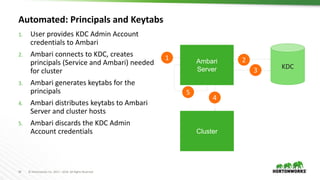
Automated: Principals and Keytabs
1. User provides KDC Admin Account
credentials to Ambari
2. Ambari connects to KDC, creates
principals (Service and Ambari) needed
for cluster
3. Ambari generates keytabs for the
principals
4. Ambari distributes keytabs to Ambari
Server and cluster hosts
5. Ambari discards the KDC Admin
Account credentials
Ambari
Server KDC
1 2
4
3
5
Cluster
37 © Hortonworks Inc. 2011 – 2016. All Rights Reserved
Automated: Customizable Principal Attributes
• Customize the directory principal attributes for your environment
• Particularly useful when using Active Directory for Kerberos
38 © Hortonworks Inc. 2011 – 2016. All Rights Reserved
Automated: Kerberos Clients
• Option to manage krb5.conf
• Option to install clients
OS Client
RHEL/CentOS/OEL krb5-workstation
SLES 11 krb5-client
Ubuntu 12 krb5-user, krb5-
config
39 © Hortonworks Inc. 2011 – 2016. All Rights Reserved
Automated: Kerberos Operations
 Once enabled, Ambari works directly with the Kerberos infrastructure to automate
these common tasks, removing the burden from the operator:
• Add/Delete Host
• Add Service
• Add/Delete Component
• Regenerate Keytabs
• Disable Kerberos
40 © Hortonworks Inc. 2011 – 2016. All Rights Reserved
Manual: Specify Realm, Client Utilities Path
41 © Hortonworks Inc. 2011 – 2016. All Rights Reserved
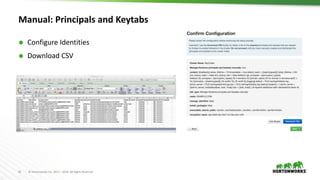
Manual: Principals and Keytabs
 Configure Identities
 Download CSV
42 © Hortonworks Inc. 2011 – 2016. All Rights Reserved
Role-Based Access Control
43 © Hortonworks Inc. 2011 – 2016. All Rights Reserved
Role-Based Access Control
 Use “roles” for more granular division of control for cluster operations
Old Permission New Role Notable Permissions
Operator Cluster Administrator
Full operational control, including upgrades. Ambari Admins are
implicitly granted this Role.
Cluster Operator Adding and removing hosts.
Service Administrator Manage configurations, move components.
Service Operator
Service stop and start and service-specific operations such as HDFS
Rebalance.
Read-Only Cluster User View cluster service and host information.
Note: Users flagged as “Ambari Admins” are implicitly granted Cluster Administrator permission.
44 © Hortonworks Inc. 2011 – 2016. All Rights Reserved
Managing Cluster Roles
Assign roles to
users or groups
Manage roles in
Block or List View
layouts
45 © Hortonworks Inc. 2011 – 2016. All Rights Reserved
Managing Cluster Roles
View users or
groups
Change current
role assignment
46 © Hortonworks Inc. 2011 – 2016. All Rights Reserved
Log Search
TECH PREVIEW
47 © Hortonworks Inc. 2011 – 2016. All Rights Reserved
Log Search
Solr
A M B A R I
Log
Search
Search cluster Component Logs from within Ambari!
Goal: When issues arise, be able to quickly find issues
across all cluster components
⬢ Capabilities
– Rapid Search of all cluster component logs
– Search across time ranges, log levels, and for keywords
⬢ Core Technologies:
– Apache Ambari
– Apache Solr
– Apache Ambari Log Search
48 © Hortonworks Inc. 2011 – 2016. All Rights Reserved
Log Search Architecture
A M B A R I
L O G
F E E D E R
L O G
F E E D E R
L O G
F E E D E R
L O G
F E E D E R
L O G
F E E D E R
L O G
F E E D E R
WO R K E R
N O D E
WO R K E R
N O D E
WO R K E R
N O D E
WO R K E R
N O D E
WO R K E R
N O D E
WO R K E R
N O D E
Solr
LO G
S E A R C H
U I
49 © Hortonworks Inc. 2011 – 2016. All Rights Reserved
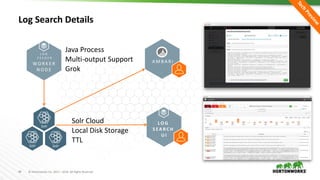
Log Search Details
WO R K E R
N O D E
L O G
F E E D E R
Solr
LO G
S E A R C H
U I
Solr
Solr
A M B A R I
Java Process
Multi-output Support
Grok
Solr Cloud
Local Disk Storage
TTL
50 © Hortonworks Inc. 2011 – 2016. All Rights Reserved
Automated Cluster Upgrade
51 © Hortonworks Inc. 2011 – 2016. All Rights Reserved
Automated Cluster Upgrade Terminology
Rolling Upgrade
Orchestrates the cluster upgrade in an order that is meant to preserve
cluster operation and minimize service impact. The tradeoff is more
stringent prerequisites and a longer upgrade time.
Express Upgrade
Orchestrates the cluster upgrade in an order that will incur cluster
downtime. This method has less stringent prerequisites but completes in a
faster upgrade time.
52 © Hortonworks Inc. 2011 – 2016. All Rights Reserved
Automated Upgrade: Rolling or Express Choice
Check
Prerequisites
Prepare
Register +
Install
Perform
Upgrade
Perform the upgrade.
The steps depend on
upgrade method:
Rolling or Express.
Finalize
Finalize the upgrade,
making the target
version the current
version.
Perform the
preparation steps,
which include making
backups of critical
cluster metadata.
Review the
prerequisites to
confirm your cluster
configuration is ready
for upgrade
Register the software
repository and install
the target version on
the cluster.
53 © Hortonworks Inc. 2011 – 2016. All Rights Reserved
Automated Upgrade Choice: Rolling or Express
54 © Hortonworks Inc. 2011 – 2016. All Rights Reserved
Automated Upgrade: High-Level Process
Register Install
Perform
Upgrade
Finalize
55 © Hortonworks Inc. 2011 – 2016. All Rights Reserved
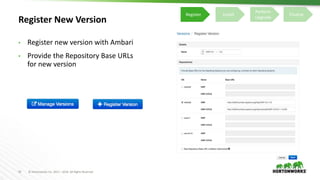
Register New Version
• Register new version with Ambari
• Provide the Repository Base URLs
for new version
Register Install
Perform
Upgrade
Finalize
56 © Hortonworks Inc. 2011 – 2016. All Rights Reserved
Install Packages
 Click “Install Packages” to start the install of the version across hosts
Register Install
Perform
Upgrade
Finalize
57 © Hortonworks Inc. 2011 – 2016. All Rights Reserved
Upgrade Choice
 Upgrade Options dialog gives you a choice of method: Rolling or Express
Register Install
Perform
Upgrade
Finalize
58 © Hortonworks Inc. 2011 – 2016. All Rights Reserved
Upgrade Choice: Rolling or Express
Checks indicate if an
option is available
Register Install
Perform
Upgrade
Finalize
59 © Hortonworks Inc. 2011 – 2016. All Rights Reserved
Upgrade Choice: Rolling or Express
New options to
handle failures
Register Install
Perform
Upgrade
Finalize
60 © Hortonworks Inc. 2011 – 2016. All Rights Reserved
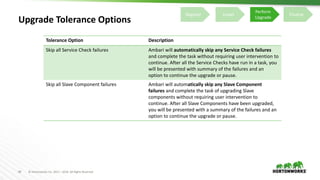
Upgrade Tolerance Options
Tolerance Option Description
Skip all Service Check failures Ambari will automatically skip any Service Check failures
and complete the task without requiring user intervention to
continue. After all the Service Checks have run in a task, you
will be presented with summary of the failures and an
option to continue the upgrade or pause.
Skip all Slave Component failures Ambari will automatically skip any Slave Component
failures and complete the task of upgrading Slave
components without requiring user intervention to
continue. After all Slave Components have been upgraded,
you will be presented with a summary of the failures and an
option to continue the upgrade or pause.
Register Install
Perform
Upgrade
Finalize
61 © Hortonworks Inc. 2011 – 2016. All Rights Reserved
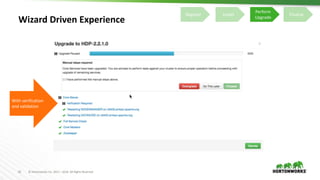
Wizard Driven Experience
With verification
and validation
Register Install
Perform
Upgrade
Finalize
62 © Hortonworks Inc. 2011 – 2016. All Rights Reserved
Rolling Upgrade – Success!
Register Install
Perform
Upgrade
Finalize
63 © Hortonworks Inc. 2011 – 2016. All Rights Reserved
Ambari Extensibility
64 © Hortonworks Inc. 2011 – 2016. All Rights Reserved
Extensibility Features
• To add new Services (ISV or otherwise) beyond Stack
• To customize a Stack for customer specific environments
• To extend and customize the Ambari Web UI
• Add new capabilities, customize existing capabilities
Stacks
Views
65 © Hortonworks Inc. 2011 – 2016. All Rights Reserved
Anatomy of Ambari Extension Points
Ambari
Server
Ambari
AgentAmbari
AgentAmbari
Agent
Ambari
Web
Stacks
Stacks
Stacks
javajs python
Ambari Views Ambari Stacks
66 © Hortonworks Inc. 2011 – 2016. All Rights Reserved
Ambari Stacks
67 © Hortonworks Inc. 2011 – 2016. All Rights Reserved
Ambari Stacks
 Defines a consistent Stack lifecycle interface that can be extended
 Encapsulates Stack Versions, Services, Components, Dependencies, Cardinality,
Configurations, Commands
 Dynamically add Stack + Service definitions
AMBARI
{rest}
<ambari-web>
Stacks
HDFS YARN MR2
Hive
Pig
OozieHBase
StormFalcon
68 © Hortonworks Inc. 2011 – 2016. All Rights Reserved
Stack Terminology
Term Definition Examples
STACK
Defines a set of Services, where to obtain the software
packages and how to manage the lifecycle.
HDP-2.4, HDP-2.5
SERVICE Defines the Components that make-up the Service. HDFS, YARN, HIVE, SPARK
COMPONENT
The building-blocks of a Service, that adhere to a certain
lifecycle.
NAMENODE, DATANODE, OOZIE_SERVER
CATEGORY The category of Component. MASTER, SLAVE, CLIENT
69 © Hortonworks Inc. 2011 – 2016. All Rights Reserved
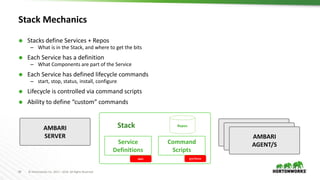
Stack Mechanics
 Stacks define Services + Repos
– What is in the Stack, and where to get the bits
 Each Service has a definition
– What Components are part of the Service
 Each Service has defined lifecycle commands
– start, stop, status, install, configure
 Lifecycle is controlled via command scripts
 Ability to define “custom” commands
AMBARI
SERVER
Stack
Command
Scripts
Service
Definitions
AMBARI
AGENT/S
AMBARI
AGENT/S
AMBARI
AGENT/S
pythonxml
Repos
70 © Hortonworks Inc. 2011 – 2016. All Rights Reserved
Stacks Support Inheritance
HDP 2.0 Stack
HDP 2.4 Stack
• Defines a set of Service definitions
• Default service configurations and command scripts
• Overrides any Service definitions, commands and
configurations
• Adds new Services specific to this Stack
71 © Hortonworks Inc. 2011 – 2016. All Rights Reserved
Where Can I Learn More About Stacks?
 https://cwiki.apache.org/confluence/pages/viewpage.action?pageId=38571133
 https://github.com/apache/ambari/tree/trunk/ambari-
server/src/main/resources/stacks/HDP/
72 © Hortonworks Inc. 2011 – 2016. All Rights Reserved
Guided Configs
73 © Hortonworks Inc. 2011 – 2016. All Rights Reserved
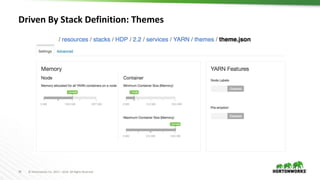
Guided Configurations
 Take the guesswork out of cluster configuration
 Intuitive layout and grouping of configurations
 Smart UI controls to make it easier to set values
 Recommendations and cross-service
dependency checks
 Take the guesswork out of cluster configuration
 Driven by Stack definition
74 © Hortonworks Inc. 2011 – 2016. All Rights Reserved
Layout and Grouping
75 © Hortonworks Inc. 2011 – 2016. All Rights Reserved
UI Controls
Recommended
Bounds
Recommended
Value
Set
Recommended
Escape
Hatch
76 © Hortonworks Inc. 2011 – 2016. All Rights Reserved
Control “Escape Hatch”
77 © Hortonworks Inc. 2011 – 2016. All Rights Reserved
Dependency Checking
78 © Hortonworks Inc. 2011 – 2016. All Rights Reserved
Driven By Stack Definition: Themes
79 © Hortonworks Inc. 2011 – 2016. All Rights Reserved
Tabs
Tab1 Tab2
80 © Hortonworks Inc. 2011 – 2016. All Rights Reserved
Sections
Section1 Section2
81 © Hortonworks Inc. 2011 – 2016. All Rights Reserved
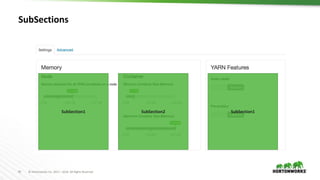
SubSections
SubSection1 SubSection2 SubSection1
82 © Hortonworks Inc. 2011 – 2016. All Rights Reserved
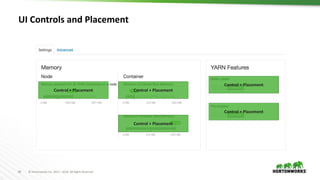
UI Controls and Placement
Control + Placement
Control + Placement
Control + Placement Control + Placement
Control + Placement
83 © Hortonworks Inc. 2011 – 2016. All Rights Reserved
Ambari Views
84 © Hortonworks Inc. 2011 – 2016. All Rights Reserved
Ambari Views Framework
 Developers can extend the Ambari Web interface
• Views expose custom UI features for Hadoop Services
 Ambari Admins can entitle Views to Ambari Web users
• Entitlements framework for controlling access to Views
85 © Hortonworks Inc. 2011 – 2016. All Rights Reserved
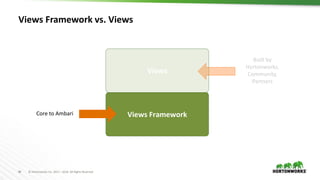
Views Framework
Views Framework vs. Views
Views
Core to Ambari
Built by
Hortonworks,
Community,
Partners
86 © Hortonworks Inc. 2011 – 2016. All Rights Reserved
Views Framework
Views Framework vs. Views
Views
Core to Ambari
Built by
Hortonworks,
Community,
Partners
87 © Hortonworks Inc. 2011 – 2016. All Rights Reserved
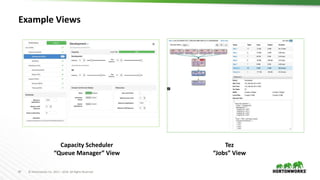
Example Views
Capacity Scheduler
“Queue Manager” View
Tez
“Jobs” View
88 © Hortonworks Inc. 2011 – 2016. All Rights Reserved
View Components
 Serve client-side assets (such as HTML + JavaScript)
 Expose server-side resources (such as REST endpoints)
VIEW
Client-side
assets
(.js, html)
AMBARI WEB
VIEW
Server-side
resources
(java)
AMBARI SERVER
{rest}
Hadoop
and
other
systems
89 © Hortonworks Inc. 2011 – 2016. All Rights Reserved
View Delivery
1. Develop the View (just like you would for a Web App)
2. Package as a View (basically a WAR)
3. Deploy the View into Ambari
4. Ambari Admins create + configuration view instance(s) and give access to users +
groups
Develop DeployPackage
Create
Instance(s
)
90 © Hortonworks Inc. 2011 – 2016. All Rights Reserved
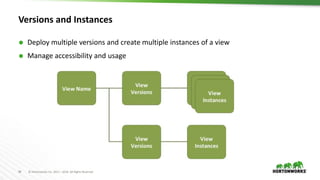
Versions and Instances
 Deploy multiple versions and create multiple instances of a view
 Manage accessibility and usage
91 © Hortonworks Inc. 2011 – 2016. All Rights Reserved
Choice of Deployment Model
 For Hadoop Operators:
– Deploy Views in an Ambari Server that is managing a Hadoop cluster
 For Data Workers:
– Run Views in a “standalone” Ambari Server
Ambari
Server
HADOOP
Store & Process
Ambari
Server
Operators
manage the
cluster, may
have Views
deployed
Data Workers
use the cluster
and use a
“standalone
” Ambari
Server for
Views
92 © Hortonworks Inc. 2011 – 2016. All Rights Reserved
Where Can I Learn More about Views?
 https://cwiki.apache.org/confluence/display/AMBARI/Views
 https://github.com/apache/ambari/blob/trunk/ambari-views/docs/index.md
 https://github.com/apache/ambari/tree/trunk/ambari-views/examples
 https://github.com/apache/ambari/tree/trunk/contrib/views
93 © Hortonworks Inc. 2011 – 2016. All Rights Reserved
What’s New and Next
94 © Hortonworks Inc. 2011 – 2016. All Rights Reserved
What’s New in Ambari 2.4
 Alerts: Retry tolerance (AMBARI-15686)
 Alerts: Customizable SCRIPT Parameters (AMBARI-14898)
 Alerts: New HDFS Alerts (AMBARI-14800)
 New Host Page Filtering (AMBARI-15210)
 Remove Service (AMBARI-14759)
 Support for SLES 12 Technical Preview (AMBARI-16007)
 Stability: Database Consistency Checking (AMBARI-16258)
 Customizable Ambari Log + PID Dirs (AMBARI-15300)
 New Version Registration Experience (AMBARI-15724)
 Log Search Technical Preview (AMBARI-14927)
 Operational Audit Logging (AMBARI-15241)
 Role-Based Access Control (AMBARI-13977)
 Automated Setup of Ambari Kerberos (AMBARI-15561)
 Automated Setup of Ambari Proxy User (AMBARI-15561)
 Customizable Host Reg. SSH Port (AMBARI-13450)
Core Features Security Features
 View URLs (AMBARI-15821), View Refresh (AMBARI-15682)
 Inherit Cluster Permissions (AMBARI-16177)
 Remote Cluster Registration (AMBARI-16274)
Views Framework Features
95 © Hortonworks Inc. 2011 – 2016. All Rights Reserved
What’s Next
 Log Search GA (AMBARI-14927)
 Service and Component “auto-start” (AMBARI-2330)
 Ambari Server HA (Active-Passive + Load Balancer) (AMBARI-17126)
 Multi-service instances & versions (AMBARI-14714)
96 © Hortonworks Inc. 2011 – 2016. All Rights Reserved
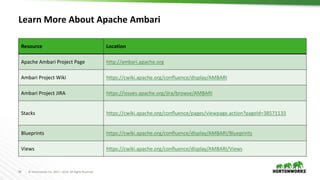
Learn More About Apache Ambari
Resource Location
Apache Ambari Project Page http://ambari.apache.org
Ambari Project Wiki https://cwiki.apache.org/confluence/display/AMBARI
Ambari Project JIRA https://issues.apache.org/jira/browse/AMBARI
Stacks https://cwiki.apache.org/confluence/pages/viewpage.action?pageId=38571133
Blueprints https://cwiki.apache.org/confluence/display/AMBARI/Blueprints
Views https://cwiki.apache.org/confluence/display/AMBARI/Views
97 © Hortonworks Inc. 2011 – 2016. All Rights Reserved
Thank You

Apache Ambari: Past, Present, Future

  • 1.
    1 © HortonworksInc. 2011 – 2016. All Rights Reserved Apache Ambari Past, Present and Future October 2016
  • 2.
    2 © HortonworksInc. 2011 – 2016. All Rights Reserved Who Am I Jeff Sposetti Product Management, Cloud & Operations @ Hortonworks Apache Ambari Committer https://www.linkedin.com/in/jsposetti @jsposetti
  • 3.
    3 © HortonworksInc. 2011 – 2016. All Rights Reserved Agenda  Background, Release History and Demo  Ambari Alerts and Metrics  Ambari Blueprints  Security Setup (Kerberos, RBAC)  Log Search (Technical Preview)  Automated Cluster Upgrade  Extensibility: Stacks and Views  What’s New and Next
  • 4.
    4 © HortonworksInc. 2011 – 2016. All Rights Reserved What is Apache Ambari? A completely open source management platform for provisioning, managing, monitoring and securing Apache Hadoop clusters. Apache Ambari takes the guesswork out of operating Hadoop.
  • 5.
    5 © HortonworksInc. 2011 – 2016. All Rights Reserved Ambari Recent Releases Ambari 2.2.0 Dec 2015 Ambari 2.2.2 Apr 2016 Ambari 2.4.0 GA Aug 2016
  • 6.
    6 © HortonworksInc. 2011 – 2016. All Rights Reserved Ambari Alerts
  • 7.
    7 © HortonworksInc. 2011 – 2016. All Rights Reserved Full Visibility into Cluster Health • Centralized management of Health Alerts • Pre-defined alerts, configured by default on cluster install
  • 8.
    8 © HortonworksInc. 2011 – 2016. All Rights Reserved Customizing Alerts • Control thresholds, check intervals and response text
  • 9.
    9 © HortonworksInc. 2011 – 2016. All Rights Reserved Alert Notifications • What: Create and manage multiple notification targets • Control who gets notified when • Why: Filter by severity • Send only certain notifications to certain targets based on severity • How: Control dispatch method • Support for EMAIL + SNMP
  • 10.
    10 © HortonworksInc. 2011 – 2016. All Rights Reserved Alert Groups • Create and manage groups of alerts • Group alerts further controls what alerts are dispatched which notifications • Assign group to notifications • Only dispatch to interested parties
  • 11.
    11 © HortonworksInc. 2011 – 2016. All Rights Reserved Alert Check Counts  Customize the number of times an alert is checked before dispatching a notification  Avoid dispatching an alert notification (email, snmp) in case of transient issues
  • 12.
    12 © HortonworksInc. 2011 – 2016. All Rights Reserved Configuring the Check Count  Set globally for all alerts, or override for a specific alert Global Setting Alert Override
  • 13.
    13 © HortonworksInc. 2011 – 2016. All Rights Reserved State Change Types  SOFT state changes do not perform a dispatch  HARD state changes (to non-OK) perform dispatch  Regardless of change: – The Ambari Web UI will show the current state (OK/WARN/CRIT) – The state change is written to ambari-alerts.log 2016-05-31 13:20:52,294 [CRITICAL] [SOFT] [AMBARI_METRICS] [grafana_webui] (Grafana Web UI) Connection failed to http://c6401.ambari.apache.org:3000 (<urlopen error [Errno 111] Connection refused>) 2016-05-31 13:22:52,290 [CRITICAL] [HARD] [AMBARI_METRICS] [grafana_webui] (Grafana Web UI) Connection failed to http://c6401.ambari.apache.org:3000 (<urlopen error [Errno 111] Connection refused>) Note: check counts are not configurable for AGGREGATE alert types. All state changes are considered HARD.
  • 14.
    14 © HortonworksInc. 2011 – 2016. All Rights Reserved Example: Check Count = 3 Check 1/3 State: OK Change: n/a Check 1/3 State: OK Change: n/a Check 1/3 State: CRIT Change: SOFT Check 2/3 State: CRIT Change: n/a Check 3/3 State: CRIT Change: HARD Check 1/3 State: OK Change: HARD DISPATCH Check Interval Check Interval Check Interval Check Interval Check Interval no state change state changes to CRIT performing multiple checks back to OK
  • 15.
    15 © HortonworksInc. 2011 – 2016. All Rights Reserved Other Items  Alerts Log (AMBARI-10249) • Alert state changes are written to /var/log/ambari-server/ambari-alerts.log  Script-based Alert Notifications (AMBARI-9919) • Define a custom script-based notification dispatcher • Executed on alert state changes 2015-07-13 14:58:03,744 [OK] [ZOOKEEPER] [zookeeper_server_process] (ZooKeeper Server Process) TCP OK - 0.000s response on port 2181 2015-07-13 14:58:03,768 [OK] [HDFS] [datanode_process_percent] (Percent DataNodes Available) affected: [0], total: [1]
  • 16.
    16 © HortonworksInc. 2011 – 2016. All Rights Reserved Ambari Alerting System 1. User creates or modifies cluster 2. Ambari reads alert definitions from Stack 3. Ambari sends alert definitions to Agents and Agent schedules instance checks 4. Agents reports alert instance status in the heartbeat 5. Ambari responds to alert instance status changes and dispatches notifications (if applicable) Ambari Server 1 2 4 Stack definition alerts.json 5 Ambari Agent(s) 3 email snmp
  • 17.
    17 © HortonworksInc. 2011 – 2016. All Rights Reserved Alert REST APIs REST Endpoint Description /api/v1/clusters/:clusterName/alert_definitions The list of alert definitions for the cluster. /api/v1/clusters/:clusterName/alerts The list of alert instances for the cluster. Use partial response syntax to filter. Example: find all alert instances that are CRITITAL /api/v1/clusters/c1/alerts?Alert/state.in(CRITICAL) Example: find all alert instances for “ZooKeeper Process” alert def /api/v1/clusters/c1/alerts?Alert/definition_name=zookeeper_server_pr ocess /api/v1/clusters/:clusterName/alert_groups The list of alert groups. /api/v1/clusters/:clusterName/alert_history The list of alert instance status changes. /api/v1/alert_targets/ The list of configured alert notification targets for Ambari.
  • 18.
    18 © HortonworksInc. 2011 – 2016. All Rights Reserved Ambari Metrics
  • 19.
    19 © HortonworksInc. 2011 – 2016. All Rights Reserved Ambari Metrics  Built using Hadoop technologies  Three components: Metrics Collector, Metrics Monitors, Grafana Local Filesystem or HDFS HBase ATS Phoenix
  • 20.
    20 © HortonworksInc. 2011 – 2016. All Rights Reserved Metrics Collection 1. Metric Monitors send system-level metrics to Collector 2. Sinks send Hadoop-level metrics to Collector 3. Metrics Collector service stores and aggregates metrics 4. Ambari exposes REST API for metrics retrieval Ambari Server Metrics Monitor Metrics Collector Host1 Sink(s) 3 Metrics Monitor Host1 Sink(s)Metrics Monitor Hosts Sink(s) 1 2 4
  • 21.
    21 © HortonworksInc. 2011 – 2016. All Rights Reserved Ambari Metrics + Grafana: Introduced with Ambari 2.2  Including Grafana as a “Native UI” for Ambari Metrics  Including pre-build Dashboards  Supports configuring for HTTPS  System Home, Servers  HDFS Home, NameNodes, DataNodes  YARN Home, Applications, Job History Server  HBase Home, Performance, Misc Highlights List of Dashboards
  • 22.
    22 © HortonworksInc. 2011 – 2016. All Rights Reserved Grafana includes pre-built dashboards for visualizing the most important cluster metrics.
  • 23.
    23 © HortonworksInc. 2011 – 2016. All Rights Reserved Ambari Blueprints
  • 24.
    24 © HortonworksInc. 2011 – 2016. All Rights Reserved Ambari Blueprints  Two primary goals of Ambari Blueprints: • Provide API-driven deployments based on self-contained cluster description • Ability to export a complete cluster description of a running cluster  Blueprints contain cluster topology and configuration information  Enables interesting use cases between physical and virtual environments
  • 25.
    25 © HortonworksInc. 2011 – 2016. All Rights Reserved Ambari Stacks + Blueprints Together Stack Definition Component Layout & Configuration BLUEPRINT BLUEPRINT INSTANTIATE CLUSTERHOSTS
  • 26.
    26 © HortonworksInc. 2011 – 2016. All Rights Reserved Blueprints API BLUEPRINT POST /blueprints/my-blueprint POST /clusters/MyCluster 1 2 CLUSTER CREATION TEMPLATE
  • 27.
    27 © HortonworksInc. 2011 – 2016. All Rights Reserved Example: Single-Node Cluster { "configurations" : [ { ”hdfs-site" : { "dfs.namenode.name.dir" : ”/hadoop/nn" } } ], "host_groups" : [ { "name" : ”uber-host", "components" : [ { "name" : "NAMENODE” }, { "name" : "SECONDARY_NAMENODE” }, { "name" : "DATANODE” }, { "name" : "HDFS_CLIENT” }, { "name" : "RESOURCEMANAGER” }, { "name" : "NODEMANAGER” }, { "name" : "YARN_CLIENT” }, { "name" : "HISTORYSERVER” }, { "name" : "MAPREDUCE2_CLIENT” } ], "cardinality" : "1" } ], "Blueprints" : { "blueprint_name" : "single-node-hdfs-yarn", "stack_name" : "HDP", "stack_version" : "2.2" } } { "blueprint" : "single-node-hdfs-yarn", "host_groups" :[ { "name" : ”uber-host", "hosts" : [ { "fqdn" : "c6401.ambari.apache.org” } ] } ] } BLUEPRINT CLUSTER CREATION TEMPLATE Description • Single-node cluster • Use HDP 2.2 Stack • HDFS + YARN + MR2 • Everything on c6401
  • 28.
    28 © HortonworksInc. 2011 – 2016. All Rights Reserved Blueprints Add Host • Add hosts to a cluster based on a host group from a Blueprint • Add one or more hosts with a single call POST /api/v1/clusters/MyCluster/hosts { "blueprint" : "myblueprint", "host_group" : "workers", "host_name" : "c6403.ambari.apache.org" } POST /api/v1/clusters/MyCluster/hosts [ { "blueprint" : "myblueprint", "host_group" : "workers", "host_name" : "c6403.ambari.apache.org" }, { "blueprint" : "myblueprint", "host_group" : ”edge", "host_name" : "c6404.ambari.apache.org" } ] https://issues.apache.org/jira/browse/AMBARI-8458
  • 29.
    29 © HortonworksInc. 2011 – 2016. All Rights Reserved Blueprints Host Discovery (AMBARI-10750) Ambari POST /api/v1/clusters/MyCluster/hosts [ { "blueprint" : "single-node-hdfs-test2", "host_groups" :[ { "host_group" : "slave", "host_count" : 3, "host_predicate" : "Hosts/cpu_count>1” } ] } ]
  • 30.
    30 © HortonworksInc. 2011 – 2016. All Rights Reserved Where Can I Learn More About Blueprints?  https://cwiki.apache.org/confluence/display/AMBARI/Blueprints
  • 31.
    31 © HortonworksInc. 2011 – 2016. All Rights Reserved Kerberos Setup
  • 32.
    32 © HortonworksInc. 2011 – 2016. All Rights Reserved Background: Hadoop + Kerberos  Strongly authenticating and establishing a user’s identity is the basis for secure access in Hadoop. Users need to be able to reliably “identify” themselves and then have that identity propagated throughout the Hadoop cluster.  Once this is done, those users can access resources (such as files or directories) or interact with the cluster (like running MapReduce jobs).  Besides users, Hadoop cluster resources themselves (such as Hosts and Services) need to authenticate with each other to avoid potential malicious systems or daemon’s “posing as” trusted components of the cluster to gain access to data.
  • 33.
    33 © HortonworksInc. 2011 – 2016. All Rights Reserved Background: Hadoop + Kerberos Service Component A Service Component B Hadoop Cluster KDC keytabkeytab Service Component C keytab Service Component D keytab Service Component X Service Component X keytabkeytab Service Component X keytab Service Component X keytab Kerberos is used to secure the Components in the cluster. Kerberos identities are managed via “keytabs” on the Component hosts. Principals for the cluster are managed in the KDC.
  • 34.
    34 © HortonworksInc. 2011 – 2016. All Rights Reserved Automated Kerberos Security Setup Wizard Driven Simplify the experience of enabling and managing Kerberos security Automated and Manual Options Critical for today’s enterprise Works with Existing Kerberos Infrastructure Such as Active Directory and MIT KDC
  • 35.
    35 © HortonworksInc. 2011 – 2016. All Rights Reserved Automated vs. Manual Kerberos Options Automated Manual KDC Infrastructure MIT, Active Directory MIT, Active Directory, FreeIPA Requires KDC administrative credentials Yes No Installation of Kerberos clients Yes, optional No Management of Kerberos client krb5.conf Yes, optional No Creation of principals Yes No Creation of keytabs Yes No Distribution of keytabs Yes No Cluster configuration Yes Yes
  • 36.
    36 © HortonworksInc. 2011 – 2016. All Rights Reserved Automated: Principals and Keytabs 1. User provides KDC Admin Account credentials to Ambari 2. Ambari connects to KDC, creates principals (Service and Ambari) needed for cluster 3. Ambari generates keytabs for the principals 4. Ambari distributes keytabs to Ambari Server and cluster hosts 5. Ambari discards the KDC Admin Account credentials Ambari Server KDC 1 2 4 3 5 Cluster
  • 37.
    37 © HortonworksInc. 2011 – 2016. All Rights Reserved Automated: Customizable Principal Attributes • Customize the directory principal attributes for your environment • Particularly useful when using Active Directory for Kerberos
  • 38.
    38 © HortonworksInc. 2011 – 2016. All Rights Reserved Automated: Kerberos Clients • Option to manage krb5.conf • Option to install clients OS Client RHEL/CentOS/OEL krb5-workstation SLES 11 krb5-client Ubuntu 12 krb5-user, krb5- config
  • 39.
    39 © HortonworksInc. 2011 – 2016. All Rights Reserved Automated: Kerberos Operations  Once enabled, Ambari works directly with the Kerberos infrastructure to automate these common tasks, removing the burden from the operator: • Add/Delete Host • Add Service • Add/Delete Component • Regenerate Keytabs • Disable Kerberos
  • 40.
    40 © HortonworksInc. 2011 – 2016. All Rights Reserved Manual: Specify Realm, Client Utilities Path
  • 41.
    41 © HortonworksInc. 2011 – 2016. All Rights Reserved Manual: Principals and Keytabs  Configure Identities  Download CSV
  • 42.
    42 © HortonworksInc. 2011 – 2016. All Rights Reserved Role-Based Access Control
  • 43.
    43 © HortonworksInc. 2011 – 2016. All Rights Reserved Role-Based Access Control  Use “roles” for more granular division of control for cluster operations Old Permission New Role Notable Permissions Operator Cluster Administrator Full operational control, including upgrades. Ambari Admins are implicitly granted this Role. Cluster Operator Adding and removing hosts. Service Administrator Manage configurations, move components. Service Operator Service stop and start and service-specific operations such as HDFS Rebalance. Read-Only Cluster User View cluster service and host information. Note: Users flagged as “Ambari Admins” are implicitly granted Cluster Administrator permission.
  • 44.
    44 © HortonworksInc. 2011 – 2016. All Rights Reserved Managing Cluster Roles Assign roles to users or groups Manage roles in Block or List View layouts
  • 45.
    45 © HortonworksInc. 2011 – 2016. All Rights Reserved Managing Cluster Roles View users or groups Change current role assignment
  • 46.
    46 © HortonworksInc. 2011 – 2016. All Rights Reserved Log Search TECH PREVIEW
  • 47.
    47 © HortonworksInc. 2011 – 2016. All Rights Reserved Log Search Solr A M B A R I Log Search Search cluster Component Logs from within Ambari! Goal: When issues arise, be able to quickly find issues across all cluster components ⬢ Capabilities – Rapid Search of all cluster component logs – Search across time ranges, log levels, and for keywords ⬢ Core Technologies: – Apache Ambari – Apache Solr – Apache Ambari Log Search
  • 48.
    48 © HortonworksInc. 2011 – 2016. All Rights Reserved Log Search Architecture A M B A R I L O G F E E D E R L O G F E E D E R L O G F E E D E R L O G F E E D E R L O G F E E D E R L O G F E E D E R WO R K E R N O D E WO R K E R N O D E WO R K E R N O D E WO R K E R N O D E WO R K E R N O D E WO R K E R N O D E Solr LO G S E A R C H U I
  • 49.
    49 © HortonworksInc. 2011 – 2016. All Rights Reserved Log Search Details WO R K E R N O D E L O G F E E D E R Solr LO G S E A R C H U I Solr Solr A M B A R I Java Process Multi-output Support Grok Solr Cloud Local Disk Storage TTL
  • 50.
    50 © HortonworksInc. 2011 – 2016. All Rights Reserved Automated Cluster Upgrade
  • 51.
    51 © HortonworksInc. 2011 – 2016. All Rights Reserved Automated Cluster Upgrade Terminology Rolling Upgrade Orchestrates the cluster upgrade in an order that is meant to preserve cluster operation and minimize service impact. The tradeoff is more stringent prerequisites and a longer upgrade time. Express Upgrade Orchestrates the cluster upgrade in an order that will incur cluster downtime. This method has less stringent prerequisites but completes in a faster upgrade time.
  • 52.
    52 © HortonworksInc. 2011 – 2016. All Rights Reserved Automated Upgrade: Rolling or Express Choice Check Prerequisites Prepare Register + Install Perform Upgrade Perform the upgrade. The steps depend on upgrade method: Rolling or Express. Finalize Finalize the upgrade, making the target version the current version. Perform the preparation steps, which include making backups of critical cluster metadata. Review the prerequisites to confirm your cluster configuration is ready for upgrade Register the software repository and install the target version on the cluster.
  • 53.
    53 © HortonworksInc. 2011 – 2016. All Rights Reserved Automated Upgrade Choice: Rolling or Express
  • 54.
    54 © HortonworksInc. 2011 – 2016. All Rights Reserved Automated Upgrade: High-Level Process Register Install Perform Upgrade Finalize
  • 55.
    55 © HortonworksInc. 2011 – 2016. All Rights Reserved Register New Version • Register new version with Ambari • Provide the Repository Base URLs for new version Register Install Perform Upgrade Finalize
  • 56.
    56 © HortonworksInc. 2011 – 2016. All Rights Reserved Install Packages  Click “Install Packages” to start the install of the version across hosts Register Install Perform Upgrade Finalize
  • 57.
    57 © HortonworksInc. 2011 – 2016. All Rights Reserved Upgrade Choice  Upgrade Options dialog gives you a choice of method: Rolling or Express Register Install Perform Upgrade Finalize
  • 58.
    58 © HortonworksInc. 2011 – 2016. All Rights Reserved Upgrade Choice: Rolling or Express Checks indicate if an option is available Register Install Perform Upgrade Finalize
  • 59.
    59 © HortonworksInc. 2011 – 2016. All Rights Reserved Upgrade Choice: Rolling or Express New options to handle failures Register Install Perform Upgrade Finalize
  • 60.
    60 © HortonworksInc. 2011 – 2016. All Rights Reserved Upgrade Tolerance Options Tolerance Option Description Skip all Service Check failures Ambari will automatically skip any Service Check failures and complete the task without requiring user intervention to continue. After all the Service Checks have run in a task, you will be presented with summary of the failures and an option to continue the upgrade or pause. Skip all Slave Component failures Ambari will automatically skip any Slave Component failures and complete the task of upgrading Slave components without requiring user intervention to continue. After all Slave Components have been upgraded, you will be presented with a summary of the failures and an option to continue the upgrade or pause. Register Install Perform Upgrade Finalize
  • 61.
    61 © HortonworksInc. 2011 – 2016. All Rights Reserved Wizard Driven Experience With verification and validation Register Install Perform Upgrade Finalize
  • 62.
    62 © HortonworksInc. 2011 – 2016. All Rights Reserved Rolling Upgrade – Success! Register Install Perform Upgrade Finalize
  • 63.
    63 © HortonworksInc. 2011 – 2016. All Rights Reserved Ambari Extensibility
  • 64.
    64 © HortonworksInc. 2011 – 2016. All Rights Reserved Extensibility Features • To add new Services (ISV or otherwise) beyond Stack • To customize a Stack for customer specific environments • To extend and customize the Ambari Web UI • Add new capabilities, customize existing capabilities Stacks Views
  • 65.
    65 © HortonworksInc. 2011 – 2016. All Rights Reserved Anatomy of Ambari Extension Points Ambari Server Ambari AgentAmbari AgentAmbari Agent Ambari Web Stacks Stacks Stacks javajs python Ambari Views Ambari Stacks
  • 66.
    66 © HortonworksInc. 2011 – 2016. All Rights Reserved Ambari Stacks
  • 67.
    67 © HortonworksInc. 2011 – 2016. All Rights Reserved Ambari Stacks  Defines a consistent Stack lifecycle interface that can be extended  Encapsulates Stack Versions, Services, Components, Dependencies, Cardinality, Configurations, Commands  Dynamically add Stack + Service definitions AMBARI {rest} <ambari-web> Stacks HDFS YARN MR2 Hive Pig OozieHBase StormFalcon
  • 68.
    68 © HortonworksInc. 2011 – 2016. All Rights Reserved Stack Terminology Term Definition Examples STACK Defines a set of Services, where to obtain the software packages and how to manage the lifecycle. HDP-2.4, HDP-2.5 SERVICE Defines the Components that make-up the Service. HDFS, YARN, HIVE, SPARK COMPONENT The building-blocks of a Service, that adhere to a certain lifecycle. NAMENODE, DATANODE, OOZIE_SERVER CATEGORY The category of Component. MASTER, SLAVE, CLIENT
  • 69.
    69 © HortonworksInc. 2011 – 2016. All Rights Reserved Stack Mechanics  Stacks define Services + Repos – What is in the Stack, and where to get the bits  Each Service has a definition – What Components are part of the Service  Each Service has defined lifecycle commands – start, stop, status, install, configure  Lifecycle is controlled via command scripts  Ability to define “custom” commands AMBARI SERVER Stack Command Scripts Service Definitions AMBARI AGENT/S AMBARI AGENT/S AMBARI AGENT/S pythonxml Repos
  • 70.
    70 © HortonworksInc. 2011 – 2016. All Rights Reserved Stacks Support Inheritance HDP 2.0 Stack HDP 2.4 Stack • Defines a set of Service definitions • Default service configurations and command scripts • Overrides any Service definitions, commands and configurations • Adds new Services specific to this Stack
  • 71.
    71 © HortonworksInc. 2011 – 2016. All Rights Reserved Where Can I Learn More About Stacks?  https://cwiki.apache.org/confluence/pages/viewpage.action?pageId=38571133  https://github.com/apache/ambari/tree/trunk/ambari- server/src/main/resources/stacks/HDP/
  • 72.
    72 © HortonworksInc. 2011 – 2016. All Rights Reserved Guided Configs
  • 73.
    73 © HortonworksInc. 2011 – 2016. All Rights Reserved Guided Configurations  Take the guesswork out of cluster configuration  Intuitive layout and grouping of configurations  Smart UI controls to make it easier to set values  Recommendations and cross-service dependency checks  Take the guesswork out of cluster configuration  Driven by Stack definition
  • 74.
    74 © HortonworksInc. 2011 – 2016. All Rights Reserved Layout and Grouping
  • 75.
    75 © HortonworksInc. 2011 – 2016. All Rights Reserved UI Controls Recommended Bounds Recommended Value Set Recommended Escape Hatch
  • 76.
    76 © HortonworksInc. 2011 – 2016. All Rights Reserved Control “Escape Hatch”
  • 77.
    77 © HortonworksInc. 2011 – 2016. All Rights Reserved Dependency Checking
  • 78.
    78 © HortonworksInc. 2011 – 2016. All Rights Reserved Driven By Stack Definition: Themes
  • 79.
    79 © HortonworksInc. 2011 – 2016. All Rights Reserved Tabs Tab1 Tab2
  • 80.
    80 © HortonworksInc. 2011 – 2016. All Rights Reserved Sections Section1 Section2
  • 81.
    81 © HortonworksInc. 2011 – 2016. All Rights Reserved SubSections SubSection1 SubSection2 SubSection1
  • 82.
    82 © HortonworksInc. 2011 – 2016. All Rights Reserved UI Controls and Placement Control + Placement Control + Placement Control + Placement Control + Placement Control + Placement
  • 83.
    83 © HortonworksInc. 2011 – 2016. All Rights Reserved Ambari Views
  • 84.
    84 © HortonworksInc. 2011 – 2016. All Rights Reserved Ambari Views Framework  Developers can extend the Ambari Web interface • Views expose custom UI features for Hadoop Services  Ambari Admins can entitle Views to Ambari Web users • Entitlements framework for controlling access to Views
  • 85.
    85 © HortonworksInc. 2011 – 2016. All Rights Reserved Views Framework Views Framework vs. Views Views Core to Ambari Built by Hortonworks, Community, Partners
  • 86.
    86 © HortonworksInc. 2011 – 2016. All Rights Reserved Views Framework Views Framework vs. Views Views Core to Ambari Built by Hortonworks, Community, Partners
  • 87.
    87 © HortonworksInc. 2011 – 2016. All Rights Reserved Example Views Capacity Scheduler “Queue Manager” View Tez “Jobs” View
  • 88.
    88 © HortonworksInc. 2011 – 2016. All Rights Reserved View Components  Serve client-side assets (such as HTML + JavaScript)  Expose server-side resources (such as REST endpoints) VIEW Client-side assets (.js, html) AMBARI WEB VIEW Server-side resources (java) AMBARI SERVER {rest} Hadoop and other systems
  • 89.
    89 © HortonworksInc. 2011 – 2016. All Rights Reserved View Delivery 1. Develop the View (just like you would for a Web App) 2. Package as a View (basically a WAR) 3. Deploy the View into Ambari 4. Ambari Admins create + configuration view instance(s) and give access to users + groups Develop DeployPackage Create Instance(s )
  • 90.
    90 © HortonworksInc. 2011 – 2016. All Rights Reserved Versions and Instances  Deploy multiple versions and create multiple instances of a view  Manage accessibility and usage
  • 91.
    91 © HortonworksInc. 2011 – 2016. All Rights Reserved Choice of Deployment Model  For Hadoop Operators: – Deploy Views in an Ambari Server that is managing a Hadoop cluster  For Data Workers: – Run Views in a “standalone” Ambari Server Ambari Server HADOOP Store & Process Ambari Server Operators manage the cluster, may have Views deployed Data Workers use the cluster and use a “standalone ” Ambari Server for Views
  • 92.
    92 © HortonworksInc. 2011 – 2016. All Rights Reserved Where Can I Learn More about Views?  https://cwiki.apache.org/confluence/display/AMBARI/Views  https://github.com/apache/ambari/blob/trunk/ambari-views/docs/index.md  https://github.com/apache/ambari/tree/trunk/ambari-views/examples  https://github.com/apache/ambari/tree/trunk/contrib/views
  • 93.
    93 © HortonworksInc. 2011 – 2016. All Rights Reserved What’s New and Next
  • 94.
    94 © HortonworksInc. 2011 – 2016. All Rights Reserved What’s New in Ambari 2.4  Alerts: Retry tolerance (AMBARI-15686)  Alerts: Customizable SCRIPT Parameters (AMBARI-14898)  Alerts: New HDFS Alerts (AMBARI-14800)  New Host Page Filtering (AMBARI-15210)  Remove Service (AMBARI-14759)  Support for SLES 12 Technical Preview (AMBARI-16007)  Stability: Database Consistency Checking (AMBARI-16258)  Customizable Ambari Log + PID Dirs (AMBARI-15300)  New Version Registration Experience (AMBARI-15724)  Log Search Technical Preview (AMBARI-14927)  Operational Audit Logging (AMBARI-15241)  Role-Based Access Control (AMBARI-13977)  Automated Setup of Ambari Kerberos (AMBARI-15561)  Automated Setup of Ambari Proxy User (AMBARI-15561)  Customizable Host Reg. SSH Port (AMBARI-13450) Core Features Security Features  View URLs (AMBARI-15821), View Refresh (AMBARI-15682)  Inherit Cluster Permissions (AMBARI-16177)  Remote Cluster Registration (AMBARI-16274) Views Framework Features
  • 95.
    95 © HortonworksInc. 2011 – 2016. All Rights Reserved What’s Next  Log Search GA (AMBARI-14927)  Service and Component “auto-start” (AMBARI-2330)  Ambari Server HA (Active-Passive + Load Balancer) (AMBARI-17126)  Multi-service instances & versions (AMBARI-14714)
  • 96.
    96 © HortonworksInc. 2011 – 2016. All Rights Reserved Learn More About Apache Ambari Resource Location Apache Ambari Project Page http://ambari.apache.org Ambari Project Wiki https://cwiki.apache.org/confluence/display/AMBARI Ambari Project JIRA https://issues.apache.org/jira/browse/AMBARI Stacks https://cwiki.apache.org/confluence/pages/viewpage.action?pageId=38571133 Blueprints https://cwiki.apache.org/confluence/display/AMBARI/Blueprints Views https://cwiki.apache.org/confluence/display/AMBARI/Views
  • 97.
    97 © HortonworksInc. 2011 – 2016. All Rights Reserved Thank You

Editor's Notes