Webinar: An Introduction to FileCatalyst Direct v3.6
Nov 19, 2015 at 11:00AM Eastern Time
© Copyright FileCatalyst, 2015
Presenter
John Tkaczewski, President and Co-Founder
FileCatalyst / Unlimi-Tech
© Copyright FileCatalyst, 2015
Agenda
• What is FileCatalyst?
• File Transfer Issues with TCP
• Acceleration with FileCatalyst
• Speed Improvements with FileCatalyst
• Welcome to FileCatalyst Direct v3.6
• Major new features
• Demo
• Review Release Notes
• Questions
© Copyright FileCatalyst, 2015
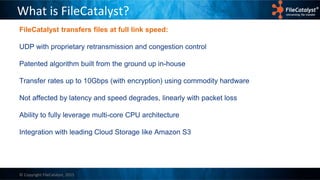
What is FileCatalyst?
FileCatalyst transfers files at full link speed:
UDP with proprietary retransmission and congestion control
Patented algorithm built from the ground up in-house
Transfer rates up to 10Gbps (with encryption) using commodity hardware
Not affected by latency and speed degrades, linearly with packet loss
Ability to fully leverage multi-core CPU architecture
Integration with leading Cloud Storage like Amazon S3
© Copyright FileCatalyst, 2015
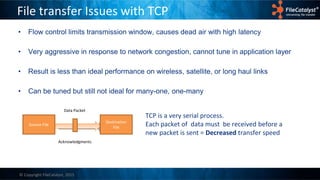
File transfer Issues with TCP
• Flow control limits transmission window, causes dead air with high latency
• Very aggressive in response to network congestion, cannot tune in application layer
• Result is less than ideal performance on wireless, satellite, or long haul links
• Can be tuned but still not ideal for many-one, one-many
TCP is a very serial process.
Each packet of data must be received before a
new packet is sent = Decreased transfer speed
Source File
Destination
File
Acknowledgments
Data Packet
© Copyright FileCatalyst, 2015
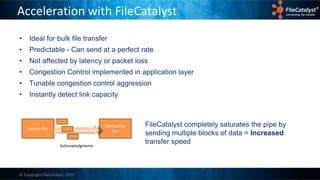
Acceleration with FileCatalyst
• Ideal for bulk file transfer
• Predictable - Can send at a perfect rate
• Not affected by latency or packet loss
• Congestion Control implemented in application layer
• Tunable congestion control aggression
• Instantly detect link capacity
Source File
Destination
File
Acknowledgments
FileCatalyst completely saturates the pipe by
sending multiple blocks of data = Increased
transfer speed
© Copyright FileCatalyst, 2015
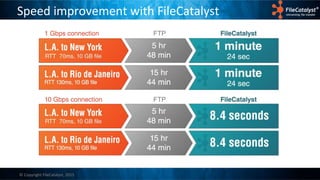
Speed improvement with FileCatalyst
© Copyright FileCatalyst, 2015
FileCatalyst Direct v3.6
© Copyright FileCatalyst, 2015
FileCatalyst Direct v3.6
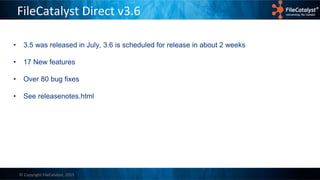
• 3.5 was released in July, 3.6 is scheduled for release in about 2 weeks
• 17 New features
• Over 80 bug fixes
• See releasenotes.html
© Copyright FileCatalyst, 2015
FileCatalyst Direct v3.6
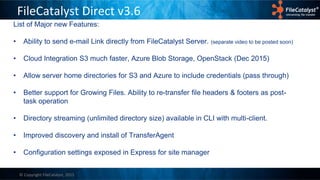
List of Major new Features:
• Ability to send e-mail Link directly from FileCatalyst Server. (separate video to be posted soon)
• Cloud Integration S3 much faster, Azure Blob Storage, OpenStack (Dec 2015)
• Allow server home directories for S3 and Azure to include credentials (pass through)
• Better support for Growing Files. Ability to re-transfer file headers & footers as post-
task operation
• Directory streaming (unlimited directory size) available in CLI with multi-client.
• Improved discovery and install of TransferAgent
• Configuration settings exposed in Express for site manager
© Copyright FileCatalyst, 2015
Demo
© Copyright FileCatalyst, 2015
Questions?

Nov 2015 Webinar: Introduction to FileCatalyst v3.6

  • 1.
    Webinar: An Introductionto FileCatalyst Direct v3.6 Nov 19, 2015 at 11:00AM Eastern Time
  • 2.
    © Copyright FileCatalyst,2015 Presenter John Tkaczewski, President and Co-Founder FileCatalyst / Unlimi-Tech
  • 3.
    © Copyright FileCatalyst,2015 Agenda • What is FileCatalyst? • File Transfer Issues with TCP • Acceleration with FileCatalyst • Speed Improvements with FileCatalyst • Welcome to FileCatalyst Direct v3.6 • Major new features • Demo • Review Release Notes • Questions
  • 4.
    © Copyright FileCatalyst,2015 What is FileCatalyst? FileCatalyst transfers files at full link speed: UDP with proprietary retransmission and congestion control Patented algorithm built from the ground up in-house Transfer rates up to 10Gbps (with encryption) using commodity hardware Not affected by latency and speed degrades, linearly with packet loss Ability to fully leverage multi-core CPU architecture Integration with leading Cloud Storage like Amazon S3
  • 5.
    © Copyright FileCatalyst,2015 File transfer Issues with TCP • Flow control limits transmission window, causes dead air with high latency • Very aggressive in response to network congestion, cannot tune in application layer • Result is less than ideal performance on wireless, satellite, or long haul links • Can be tuned but still not ideal for many-one, one-many TCP is a very serial process. Each packet of data must be received before a new packet is sent = Decreased transfer speed Source File Destination File Acknowledgments Data Packet
  • 6.
    © Copyright FileCatalyst,2015 Acceleration with FileCatalyst • Ideal for bulk file transfer • Predictable - Can send at a perfect rate • Not affected by latency or packet loss • Congestion Control implemented in application layer • Tunable congestion control aggression • Instantly detect link capacity Source File Destination File Acknowledgments FileCatalyst completely saturates the pipe by sending multiple blocks of data = Increased transfer speed
  • 7.
    © Copyright FileCatalyst,2015 Speed improvement with FileCatalyst
  • 8.
    © Copyright FileCatalyst,2015 FileCatalyst Direct v3.6
  • 9.
    © Copyright FileCatalyst,2015 FileCatalyst Direct v3.6 • 3.5 was released in July, 3.6 is scheduled for release in about 2 weeks • 17 New features • Over 80 bug fixes • See releasenotes.html
  • 10.
    © Copyright FileCatalyst,2015 FileCatalyst Direct v3.6 List of Major new Features: • Ability to send e-mail Link directly from FileCatalyst Server. (separate video to be posted soon) • Cloud Integration S3 much faster, Azure Blob Storage, OpenStack (Dec 2015) • Allow server home directories for S3 and Azure to include credentials (pass through) • Better support for Growing Files. Ability to re-transfer file headers & footers as post- task operation • Directory streaming (unlimited directory size) available in CLI with multi-client. • Improved discovery and install of TransferAgent • Configuration settings exposed in Express for site manager
  • 11.
  • 12.