https://microsoft365pro.co.uk/teamsfest/
TeamsFest: Spring Sessions 2020
1st April 2020
https://euroteamsug.com/Room3
 Based in London, UK with over 20 years in IT
 Delivery Lead, IT Pro, Solution Architect, Trainer
 Enjoy working with Office 365, SharePoint, Microsoft
Teams, Power Platform
 Deployment & Consultancy Services, Upgrades &
Migration, Solution Development and Service Adoption
 Trusted Associate for Microsoft Gold Partners
Technology Consultant
Chirag Patel
30+
Conference Sessions
20+
Recommendations
10+
Charity Rides
@techChirag
CLD267x: Enabling Teamwork with Microsoft Teams
CLD277x: Microsoft Service Adoption Specialist
Speaker
Chirag Patel
@techChirag
UK 2011-2014 #spsuk
EMEA 2011 #spsemea
India 2012 #spsindia
Belgium 2016, 2017 #spsbe
Cambridge 2017 #spscambs
Paris 2015 #spsparis
Madrid 2016 #spsmad
Barcelona 2017 #spsbcn
London 2015-2017, 2019 #spslondon
Leicester 2019 #spsleicester
slideshare.net/techChirag
@techChirag #TeamsFest
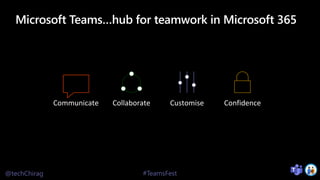
Microsoft Teams…hub for teamwork in Microsoft 365
Communicate Collaborate Customise Confidence
@techChirag #TeamsFest
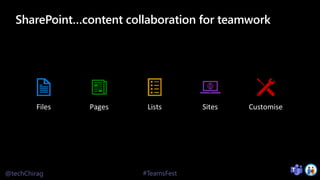
SharePoint…content collaboration for teamwork
Files Pages Lists Sites Customise
@techChirag #TeamsFest
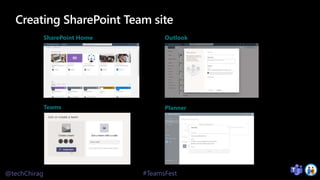
Creating SharePoint Team site
SharePoint Home Outlook
Teams Planner
@techChirag #TeamsFest
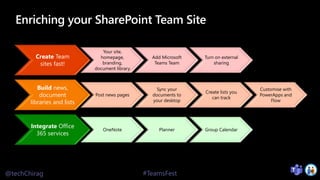
Enriching your SharePoint Team Site
Create Team
sites fast!
Your site,
homepage,
branding,
document library
Add Microsoft
Teams Team
Turn on external
sharing
Build news,
document
libraries and lists
Post news pages
Sync your
documents to
your desktop
Create lists you
can track
Customise with
PowerApps and
Flow
Integrate Office
365 services
OneNote Planner Group Calendar
@techChirag #TeamsFest
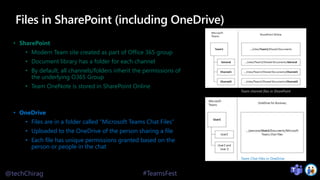
Files in SharePoint (including OneDrive)
• SharePoint
• Modern Team site created as part of Office 365 group
• Document library has a folder for each channel
• By default, all channels/folders inherit the permissions of
the underlying O365 Group
• Team OneNote is stored in SharePoint Online
• OneDrive
• Files are in a folder called “Microsoft Teams Chat Files”
• Uploaded to the OneDrive of the person sharing a file
• Each file has unique permissions granted based on the
person or people in the chat
Team channel files in SharePoint
Team Chat Files in OneDrive
@techChirag #TeamsFest
SharePoint & Microsoft Teams Demo
@techChirag #TeamsFest
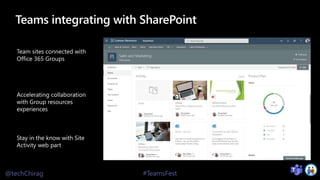
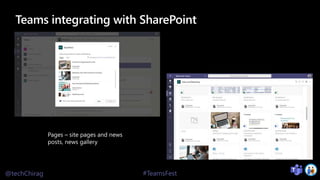
Teams integrating with SharePoint
@techChirag #TeamsFest
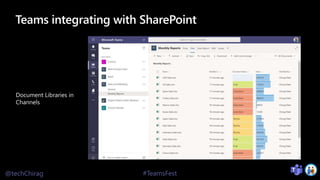
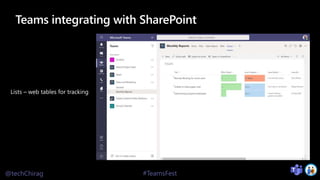
Teams integrating with SharePoint
@techChirag #TeamsFest
Teams integrating with SharePoint
@techChirag #TeamsFest
Teams integrating with SharePoint
@techChirag #TeamsFest
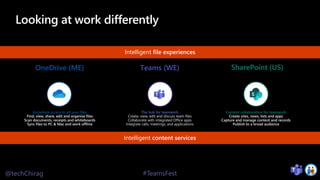
Looking at work differently
Anywhere access to all your files
Find, view, share, edit and organise files
Scan documents, receipts and whiteboards
Sync files to PC & Mac and work offline
The hub for teamwork
Create, view, edit and discuss team files
Collaborate with integrated Office apps
Integrate calls, meetings, and applications
Content collaboration for teamwork
Create sites, news, lists and apps
Capture and manage content and records
Publish to a broad audience
Intelligent content services
Intelligent file experiences
Teams (WE)
@techChirag #TeamsFest
Rate my session & calls to action
https://bit.ly/2VHqfzG
1Rate the session
2Attend more
sessions and join
our keynotes at
17.00 GMT
3Show your love for
our event on
Twitter using
#TeamsFest

TeamsFest 2020 - Deep Dive Microsoft Teams integration with SharePoint

  • 1.
    https://microsoft365pro.co.uk/teamsfest/ TeamsFest: Spring Sessions2020 1st April 2020 https://euroteamsug.com/Room3
  • 2.
     Based inLondon, UK with over 20 years in IT  Delivery Lead, IT Pro, Solution Architect, Trainer  Enjoy working with Office 365, SharePoint, Microsoft Teams, Power Platform  Deployment & Consultancy Services, Upgrades & Migration, Solution Development and Service Adoption  Trusted Associate for Microsoft Gold Partners Technology Consultant Chirag Patel 30+ Conference Sessions 20+ Recommendations 10+ Charity Rides @techChirag CLD267x: Enabling Teamwork with Microsoft Teams CLD277x: Microsoft Service Adoption Specialist
  • 3.
    Speaker Chirag Patel @techChirag UK 2011-2014#spsuk EMEA 2011 #spsemea India 2012 #spsindia Belgium 2016, 2017 #spsbe Cambridge 2017 #spscambs Paris 2015 #spsparis Madrid 2016 #spsmad Barcelona 2017 #spsbcn London 2015-2017, 2019 #spslondon Leicester 2019 #spsleicester slideshare.net/techChirag
  • 4.
    @techChirag #TeamsFest Microsoft Teams…hubfor teamwork in Microsoft 365 Communicate Collaborate Customise Confidence
  • 5.
    @techChirag #TeamsFest SharePoint…content collaborationfor teamwork Files Pages Lists Sites Customise
  • 6.
    @techChirag #TeamsFest Creating SharePointTeam site SharePoint Home Outlook Teams Planner
  • 7.
    @techChirag #TeamsFest Enriching yourSharePoint Team Site Create Team sites fast! Your site, homepage, branding, document library Add Microsoft Teams Team Turn on external sharing Build news, document libraries and lists Post news pages Sync your documents to your desktop Create lists you can track Customise with PowerApps and Flow Integrate Office 365 services OneNote Planner Group Calendar
  • 8.
    @techChirag #TeamsFest Files inSharePoint (including OneDrive) • SharePoint • Modern Team site created as part of Office 365 group • Document library has a folder for each channel • By default, all channels/folders inherit the permissions of the underlying O365 Group • Team OneNote is stored in SharePoint Online • OneDrive • Files are in a folder called “Microsoft Teams Chat Files” • Uploaded to the OneDrive of the person sharing a file • Each file has unique permissions granted based on the person or people in the chat Team channel files in SharePoint Team Chat Files in OneDrive
  • 9.
  • 10.
  • 11.
  • 12.
  • 13.
  • 14.
    @techChirag #TeamsFest Looking atwork differently Anywhere access to all your files Find, view, share, edit and organise files Scan documents, receipts and whiteboards Sync files to PC & Mac and work offline The hub for teamwork Create, view, edit and discuss team files Collaborate with integrated Office apps Integrate calls, meetings, and applications Content collaboration for teamwork Create sites, news, lists and apps Capture and manage content and records Publish to a broad audience Intelligent content services Intelligent file experiences Teams (WE)
  • 15.
    @techChirag #TeamsFest Rate mysession & calls to action https://bit.ly/2VHqfzG 1Rate the session 2Attend more sessions and join our keynotes at 17.00 GMT 3Show your love for our event on Twitter using #TeamsFest

Editor's Notes

  • #3 https://techchirag.com https://twitter.com/techchirag https://www.linkedin.com/in/techchirag https://www.slideshare.net/techchirag
  • #4 https://techchirag.com https://twitter.com/techchirag https://www.linkedin.com/in/techchirag https://www.slideshare.net/techchirag
  • #10 Demo Teams (its iFrames in Teams! - only modern lists and pages are supported also menu navs are removed for better screen estate.) Workspace with channels (eq. folders in sharepoint libraries) Files Tab - sharepoint toolbars, views, filters and custom columns with colour, share dialog Conversations - In addition to chats, SharePoint News pages appear here Add Tabs SP Document Library SP - pages (and news), lists