April, 26. – 28. 2021
MICROSOFT 365 VIRTUAL MARATHON 2021
m365virtualmarathon.com #M365VM
Working with Security and Compliance in
Microsoft Teams
CHIRAG PATEL MVP, MCT
@techChirag
Microsoft 365 Consultant
April, 27 @ 12pm BST (4am PDT)
MICROSOFT 365 VIRTUAL MARATHON 2021 SPONSORS
m365virtualmarathon.com #M365VM
@techChirag
AGENDA
 Teams part of Microsoft 365 and its dependencies
 Responsibilities (business functions & users) and policy controls
 State of your data (activity & content explorer, scores & improvement actions)
 Deep dive classifications containers, sensitivity labels, DLPs
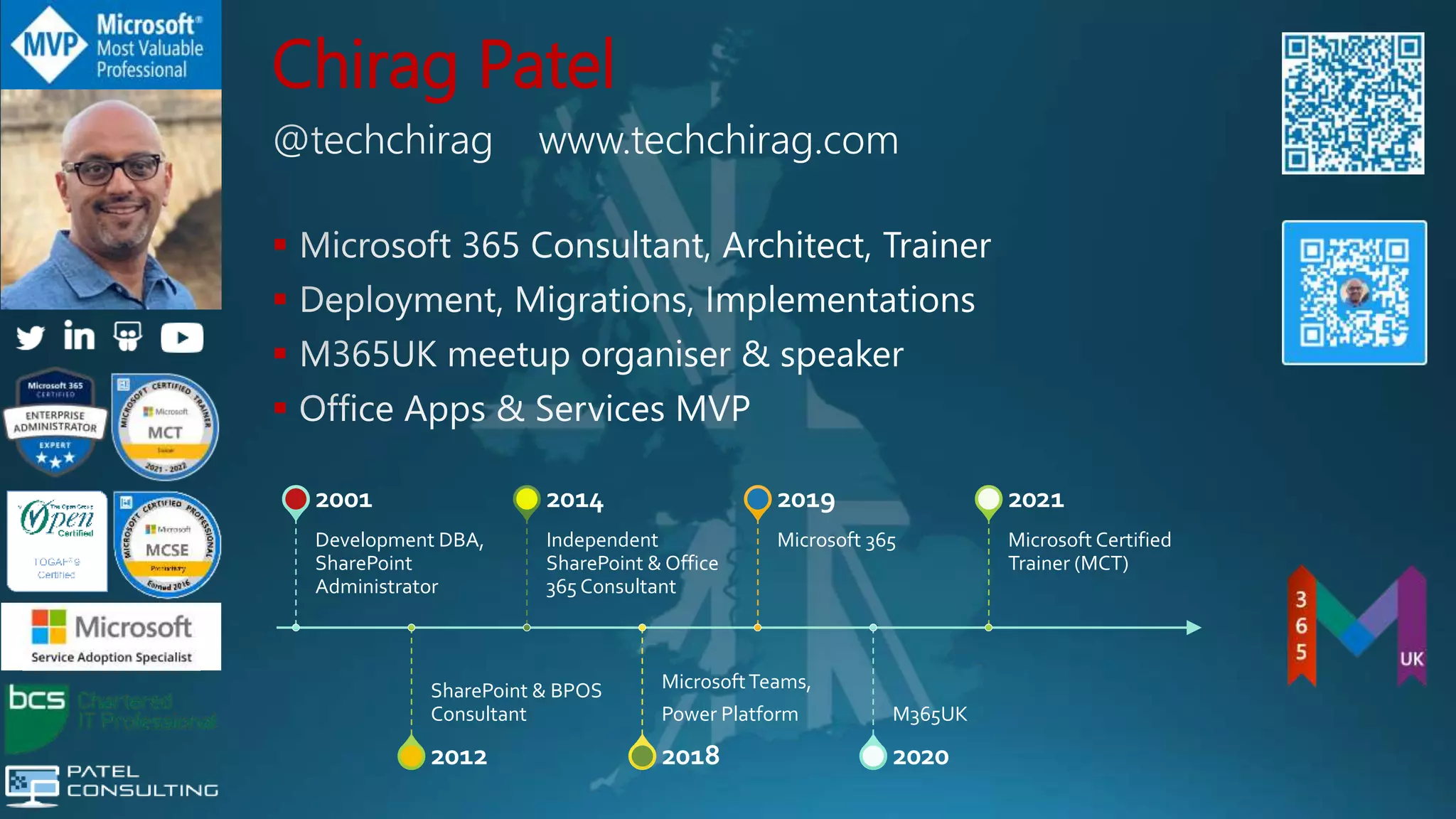
Chirag Patel




Development DBA,
SharePoint
Administrator
2001
SharePoint & BPOS
Consultant
2012
Independent
SharePoint & Office
365 Consultant
2014
MicrosoftTeams,
Power Platform
2018
Microsoft 365
2019
M365UK
2020
Microsoft Certified
Trainer (MCT)
2021
Community Speaker
Chirag Patel
@techChirag
UK 2011-2014 #spsuk
EMEA 2011 #spsemea
India 2012 #spsindia
Belgium 2016-2017 #spsbe
Cambridge 2017 #spscambs
Paris 2015 #spsparis
Madrid 2016 #spsmad
Barcelona 2017 #spsbcn
London 2015-2017, 2019 #spslondon
Leicester 2019 #spsleicester
Ahmedabad 2020 #M365Ahmedabad
Bangalore 2020 #M365BLR
www.techChirag.com
m365virtualmarathon.com #M365VM
@techChirag
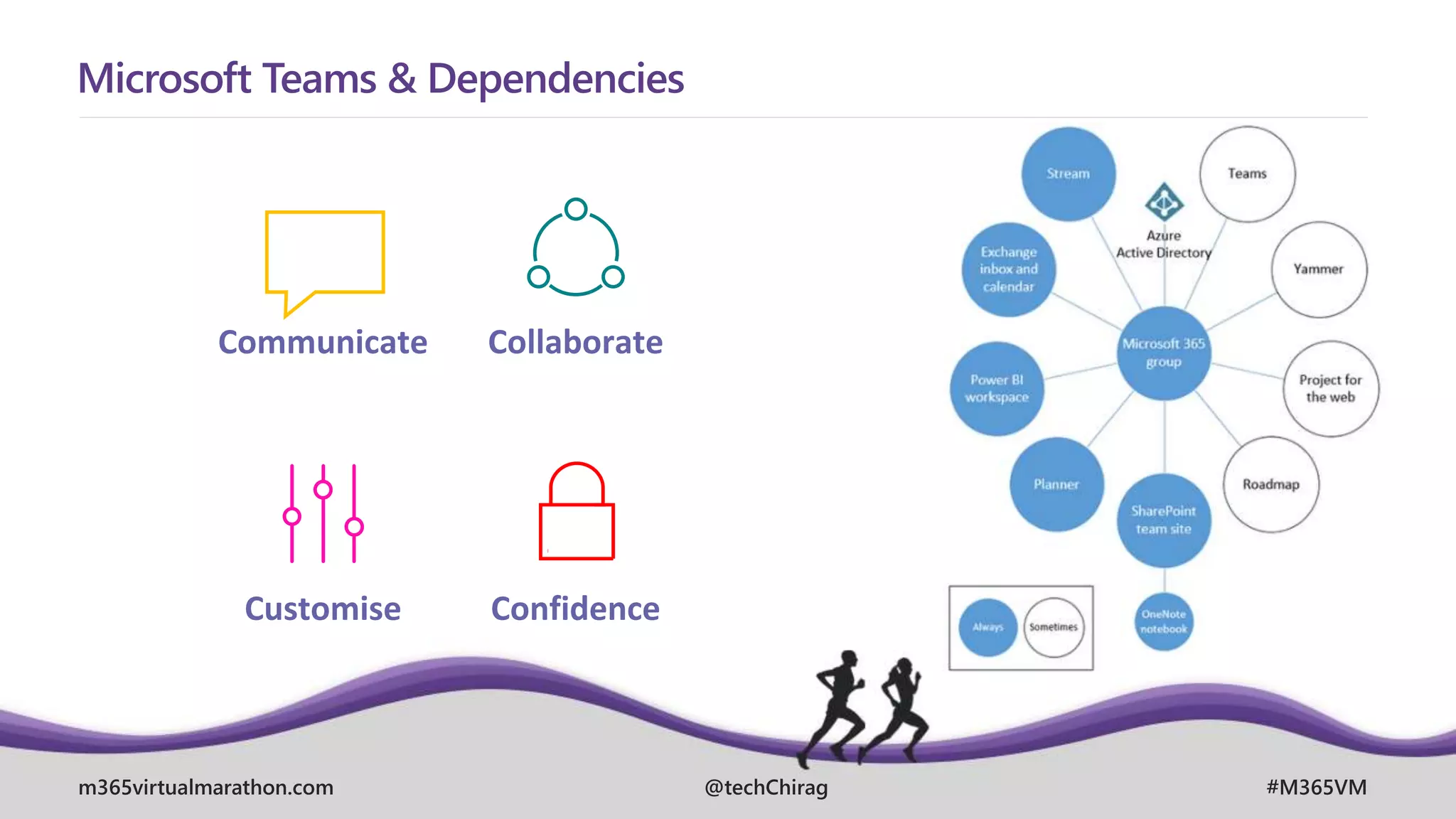
Microsoft Teams & Dependencies
Communicate Collaborate
Customise Confidence
m365virtualmarathon.com #M365VM
@techChirag
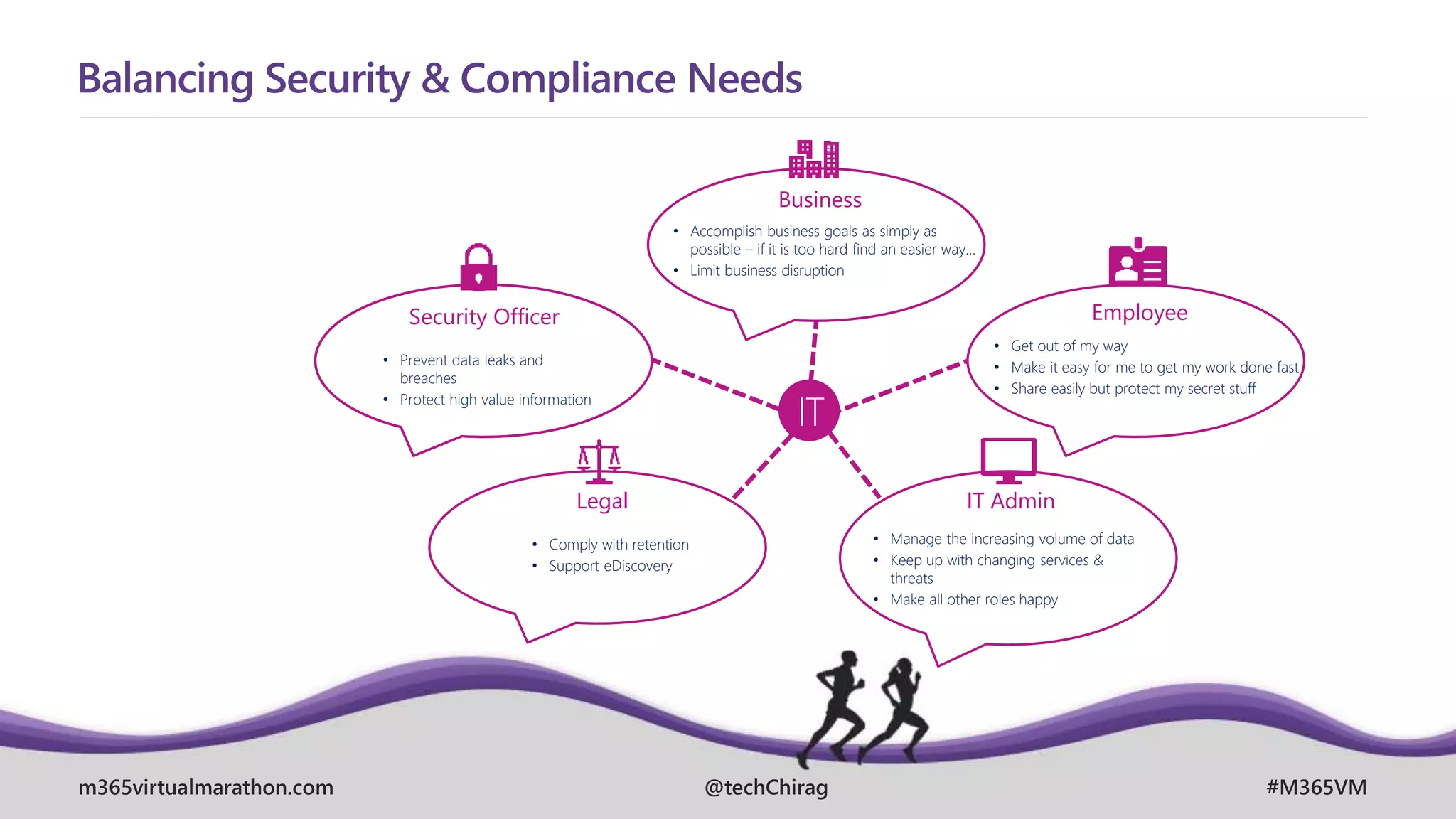
Balancing Security & Compliance Needs
IT
Business
Employee
Security Officer
Legal IT Admin
• Prevent data leaks and
breaches
• Protect high value information
• Accomplish business goals as simply as
possible – if it is too hard find an easier way…
• Limit business disruption
• Get out of my way
• Make it easy for me to get my work done fast
• Share easily but protect my secret stuff
• Manage the increasing volume of data
• Keep up with changing services &
threats
• Make all other roles happy
• Comply with retention
• Support eDiscovery
m365virtualmarathon.com #M365VM
@techChirag
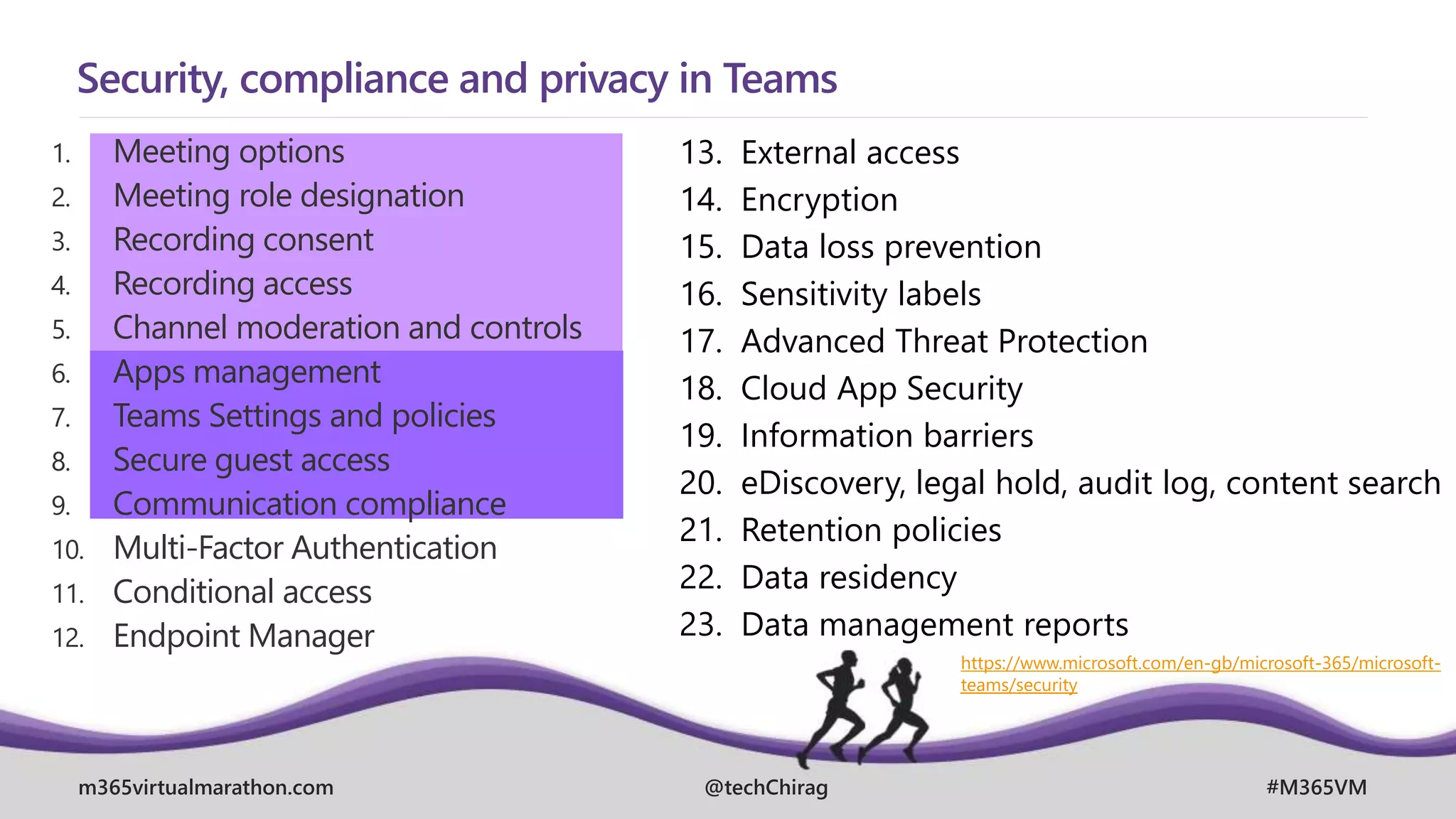
Security, compliance and privacy in Teams
1. Meeting options
2. Meeting role designation
3. Recording consent
4. Recording access
5. Channel moderation and controls
6. Apps management
7. Teams Settings and policies
8. Secure guest access
9. Communication compliance
10. Multi-Factor Authentication
11. Conditional access
12. Endpoint Manager
13. External access
14. Encryption
15. Data loss prevention
16. Sensitivity labels
17. Advanced Threat Protection
18. Cloud App Security
19. Information barriers
20. eDiscovery, legal hold, audit log, content search
21. Retention policies
22. Data residency
23. Data management reports
https://www.microsoft.com/en-gb/microsoft-365/microsoft-
teams/security
m365virtualmarathon.com #M365VM
@techChirag
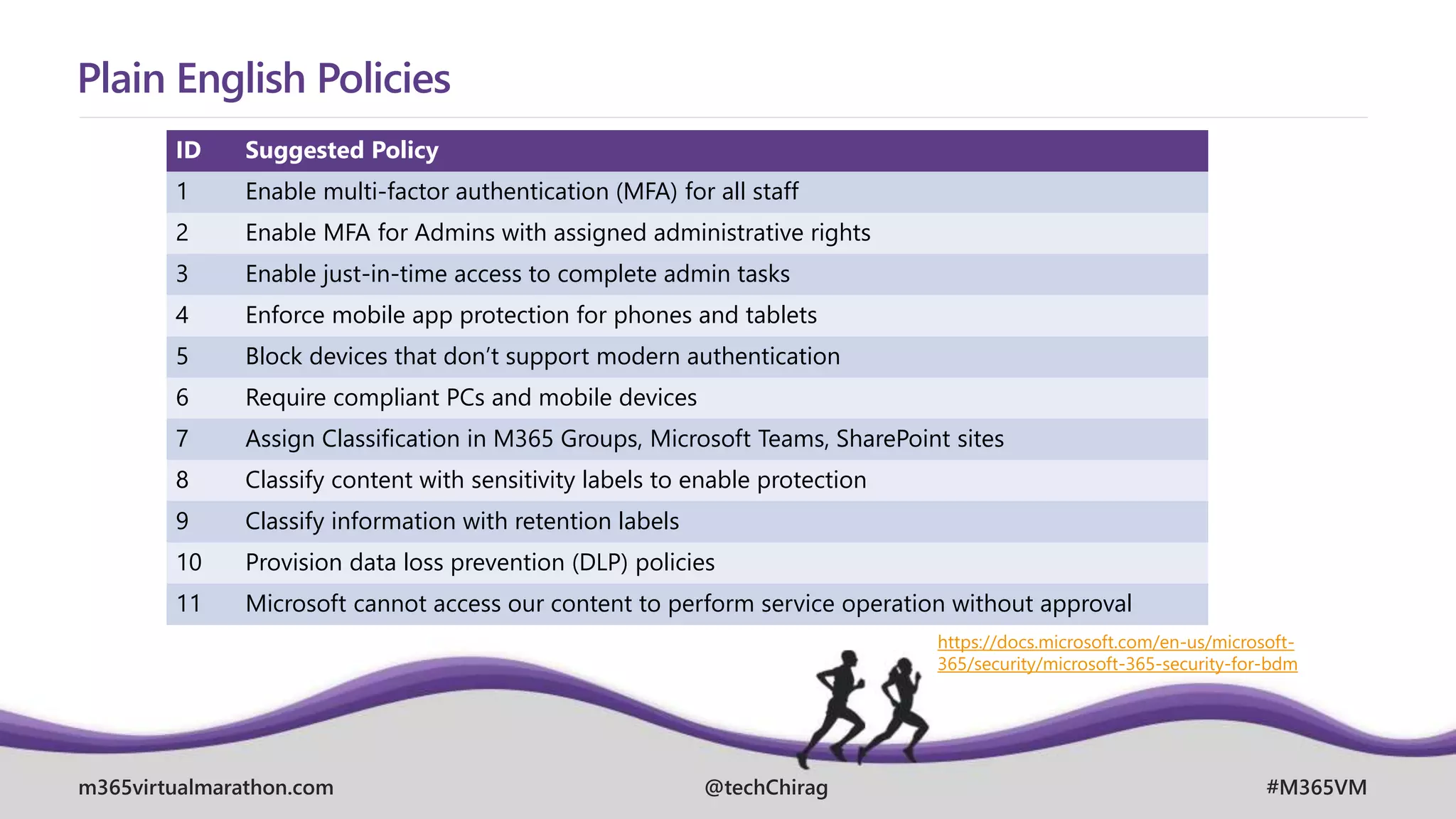
Plain English Policies
ID Suggested Policy
1 Enable multi-factor authentication (MFA) for all staff
2 Enable MFA for Admins with assigned administrative rights
3 Enable just-in-time access to complete admin tasks
4 Enforce mobile app protection for phones and tablets
5 Block devices that don’t support modern authentication
6 Require compliant PCs and mobile devices
7 Assign Classification in M365 Groups, Microsoft Teams, SharePoint sites
8 Classify content with sensitivity labels to enable protection
9 Classify information with retention labels
10 Provision data loss prevention (DLP) policies
11 Microsoft cannot access our content to perform service operation without approval
https://docs.microsoft.com/en-us/microsoft-
365/security/microsoft-365-security-for-bdm
m365virtualmarathon.com #M365VM
@techChirag
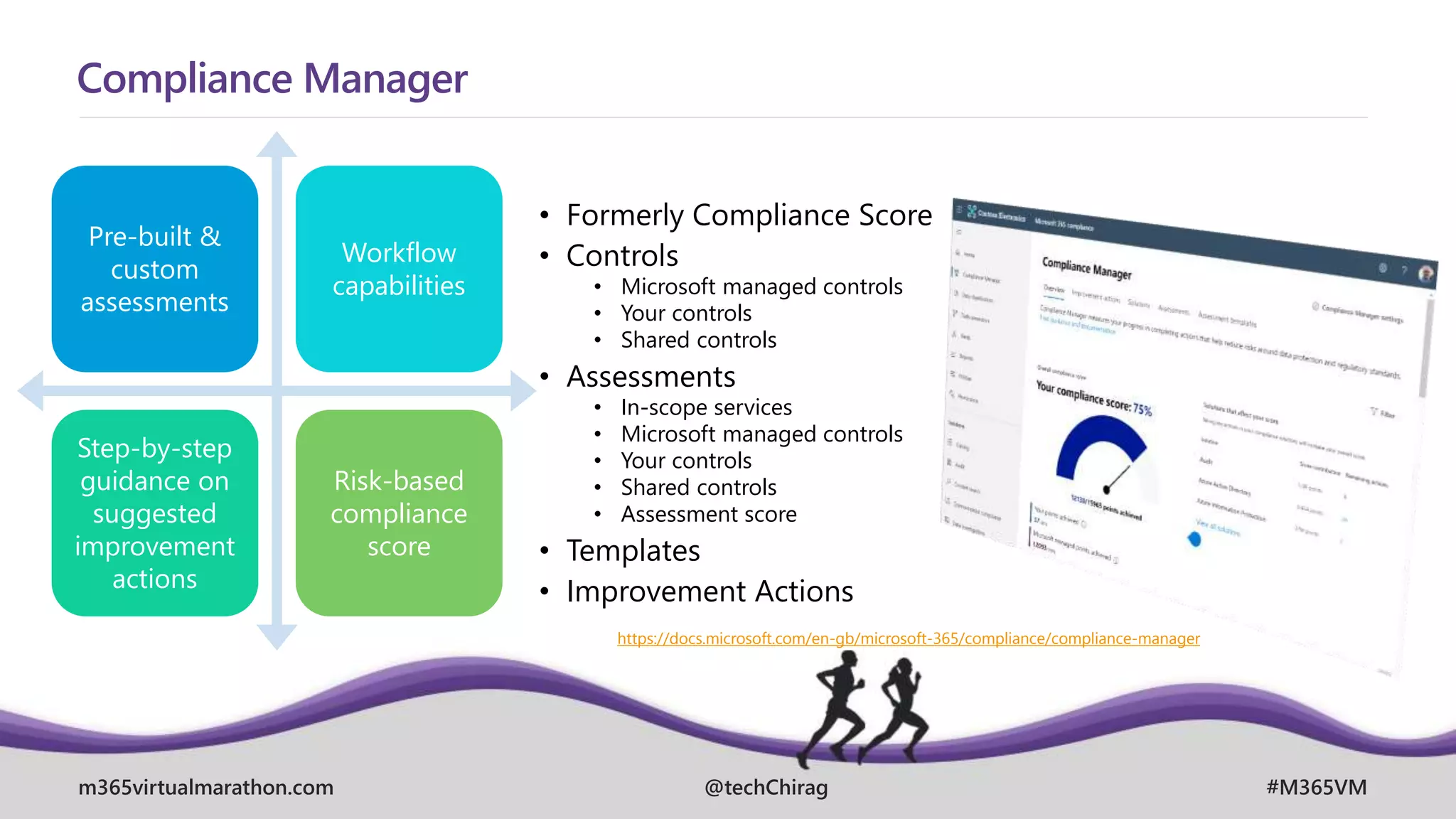
Compliance Manager
Pre-built &
custom
assessments
Workflow
capabilities
Step-by-step
guidance on
suggested
improvement
actions
Risk-based
compliance
score
• Formerly Compliance Score
• Controls
• Microsoft managed controls
• Your controls
• Shared controls
• Assessments
• In-scope services
• Microsoft managed controls
• Your controls
• Shared controls
• Assessment score
• Templates
• Improvement Actions
https://docs.microsoft.com/en-gb/microsoft-365/compliance/compliance-manager
m365virtualmarathon.com #M365VM
@techChirag
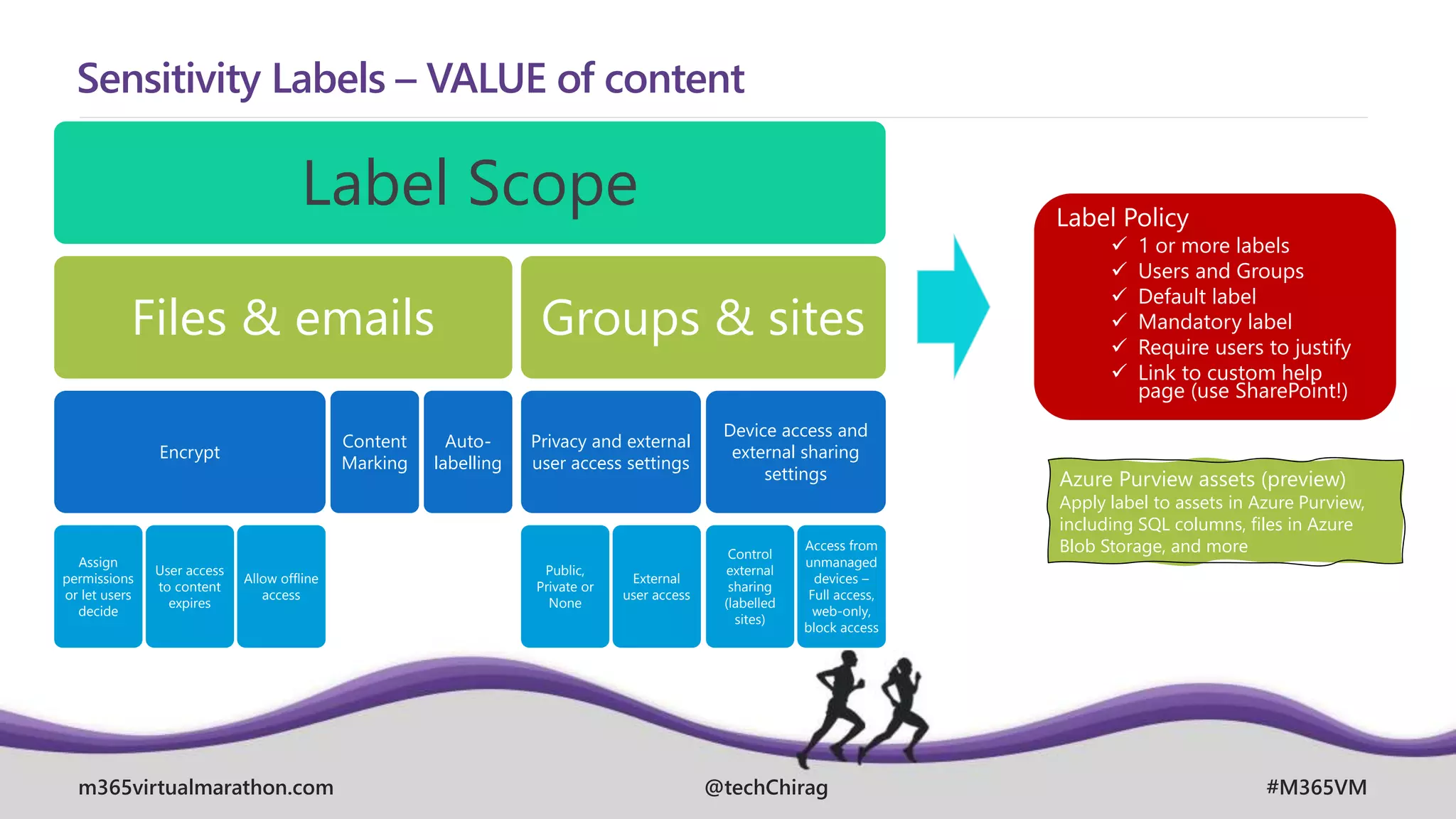
Sensitivity Labels – VALUE of content
Label Scope
Files & emails
Encrypt
Assign
permissions
or let users
decide
User access
to content
expires
Allow offline
access
Content
Marking
Auto-
labelling
Groups & sites
Privacy and external
user access settings
Public,
Private or
None
External
user access
Device access and
external sharing
settings
Control
external
sharing
(labelled
sites)
Access from
unmanaged
devices –
Full access,
web-only,
block access
Label Policy
 1 or more labels
 Users and Groups
 Default label
 Mandatory label
 Require users to justify
 Link to custom help
page (use SharePoint!)
Azure Purview assets (preview)
Apply label to assets in Azure Purview,
including SQL columns, files in Azure
Blob Storage, and more
m365virtualmarathon.com #M365VM
@techChirag
Enable sensitivity labels for containers and synchronise labels
Import-Module AzureADPreview
Connect-AzureAD
$TemplateId = (Get-AzureADDirectorySettingTemplate | where { $_.DisplayName -eq "Group.Unified" }).Id
$Template = Get-AzureADDirectorySettingTemplate | where -Property Id -Value $TemplateId -EQ
$Setting = $Template.CreateDirectorySetting()
$Setting["UsageGuidelinesUrl"] = "https://guideline.example.com"
New-AzureADDirectorySetting -DirectorySetting $Setting
$Setting = Get-AzureADDirectorySetting -Id (Get-AzureADDirectorySetting | where -Property DisplayName -
Value "Group.Unified" -EQ).id
$Setting.Values
$Setting["EnableMIPLabels"] = "True"
Set-AzureADDirectorySetting -Id $Setting.Id -DirectorySetting $Setting
Import-Module ExchangeOnlineManagement
Connect-IPPSSession -UserPrincipalName admin@M365x011743.onmicrosoft.com
Execute-AzureAdLabelSync
https://docs.microsoft.com/en-us/microsoft-365/compliance/sensitivity-labels-teams-groups-sites
m365virtualmarathon.com #M365VM
@techChirag
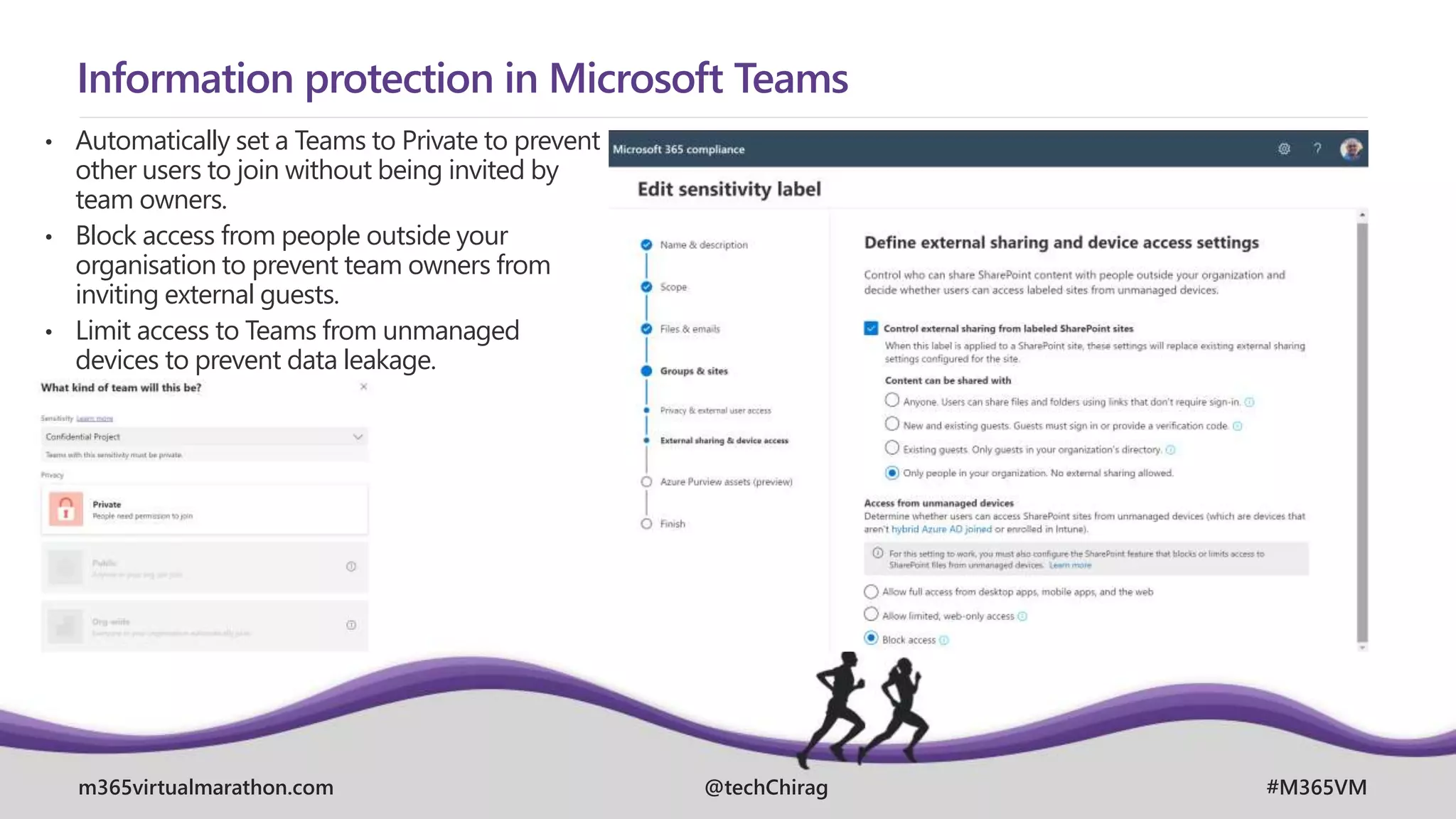
Information protection in Microsoft Teams
• Automatically set a Teams to Private to prevent
other users to join without being invited by
team owners.
• Block access from people outside your
organisation to prevent team owners from
inviting external guests.
• Limit access to Teams from unmanaged
devices to prevent data leakage.
m365virtualmarathon.com #M365VM
@techChirag
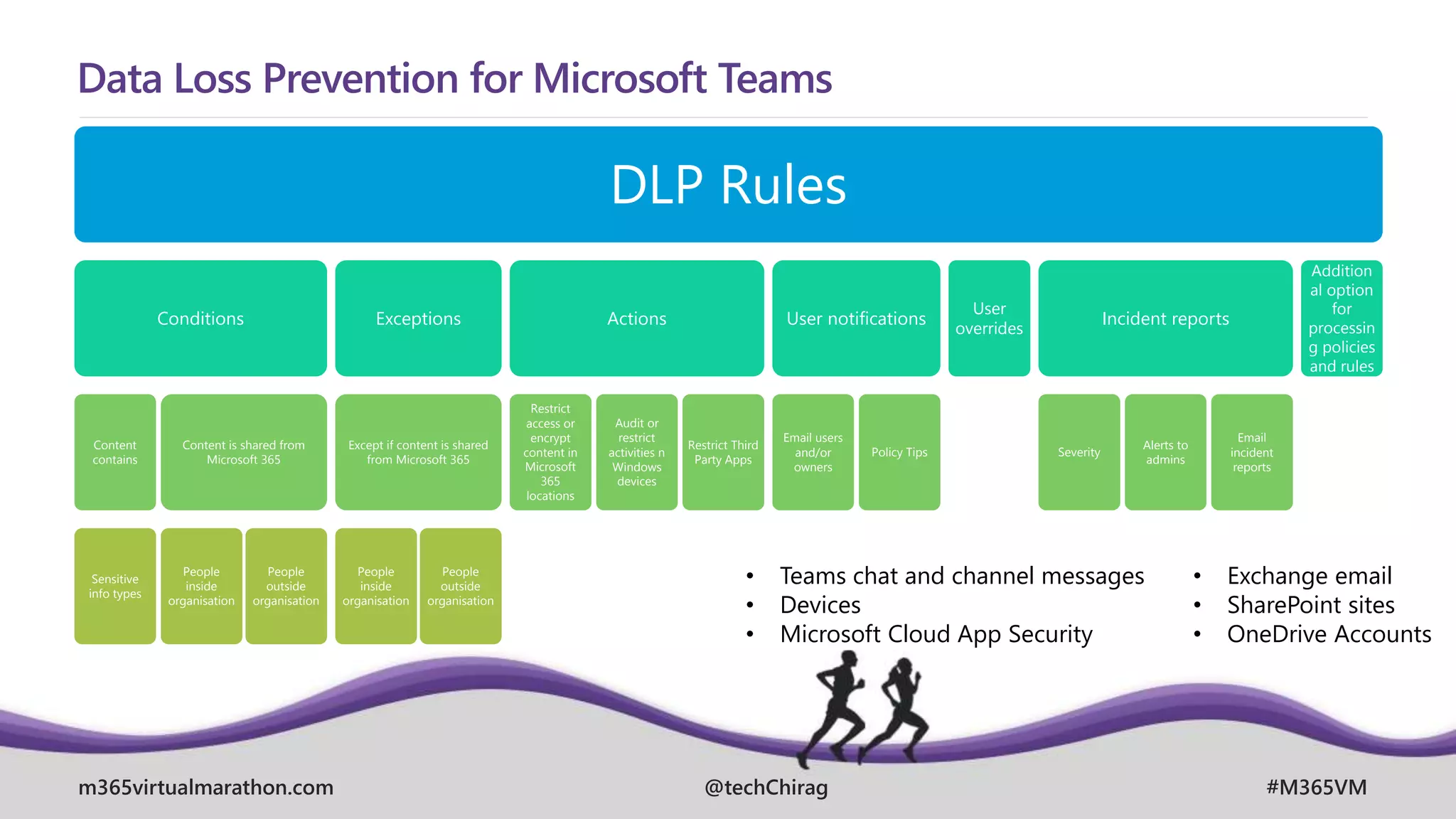
Data Loss Prevention for Microsoft Teams
DLP Rules
Conditions
Content
contains
Sensitive
info types
Content is shared from
Microsoft 365
People
inside
organisation
People
outside
organisation
Exceptions
Except if content is shared
from Microsoft 365
People
inside
organisation
People
outside
organisation
Actions
Restrict
access or
encrypt
content in
Microsoft
365
locations
Audit or
restrict
activities n
Windows
devices
Restrict Third
Party Apps
User notifications
Email users
and/or
owners
Policy Tips
User
overrides
Incident reports
Severity
Alerts to
admins
Email
incident
reports
Addition
al option
for
processin
g policies
and rules
• Exchange email
• SharePoint sites
• OneDrive Accounts
• Teams chat and channel messages
• Devices
• Microsoft Cloud App Security
m365virtualmarathon.com #M365VM
@techChirag
Data Loss Prevention for Microsoft Teams
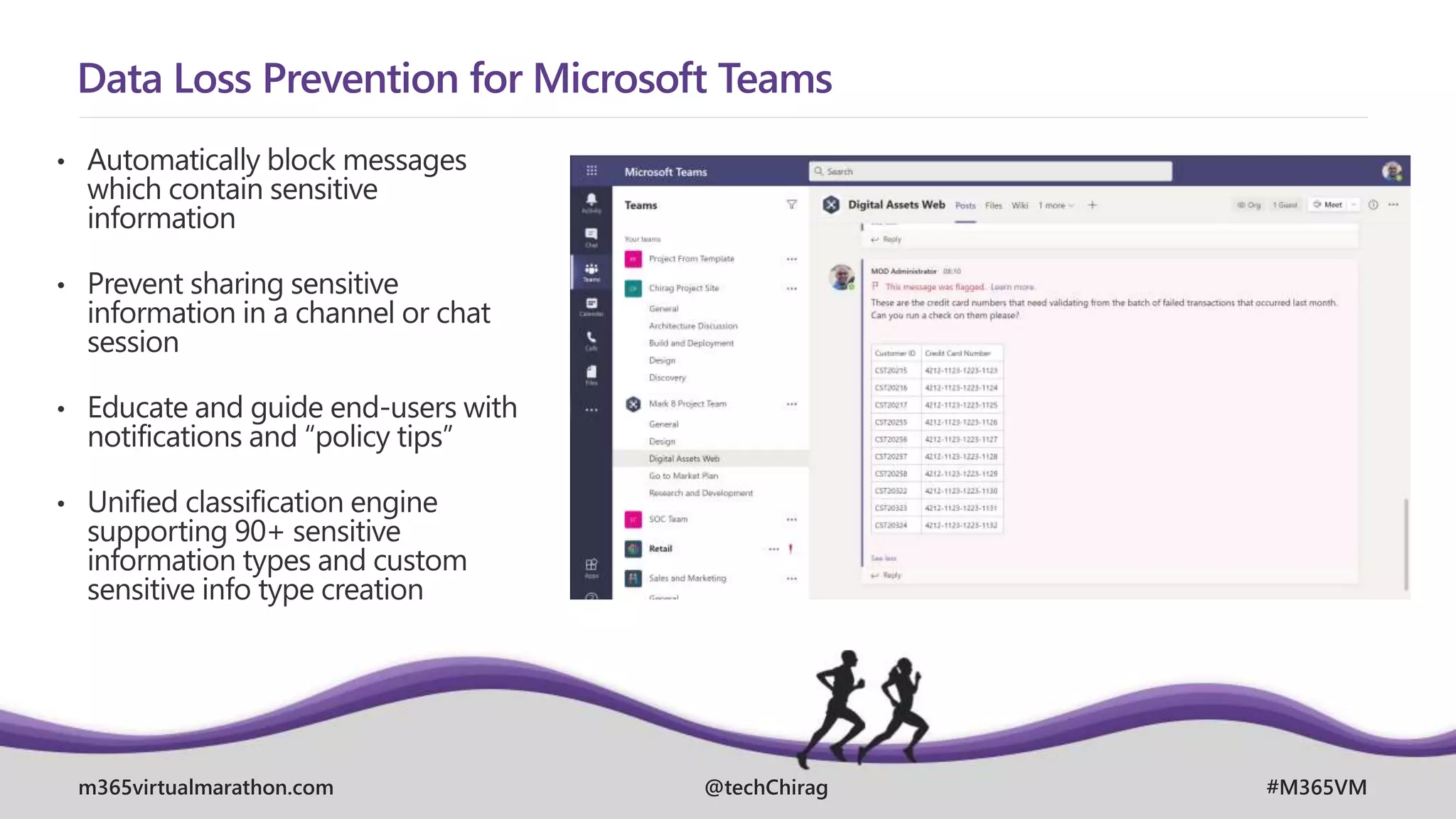
• Automatically block messages
which contain sensitive
information
• Prevent sharing sensitive
information in a channel or chat
session
• Educate and guide end-users with
notifications and “policy tips”
• Unified classification engine
supporting 90+ sensitive
information types and custom
sensitive info type creation
m365virtualmarathon.com #M365VM
@techChirag
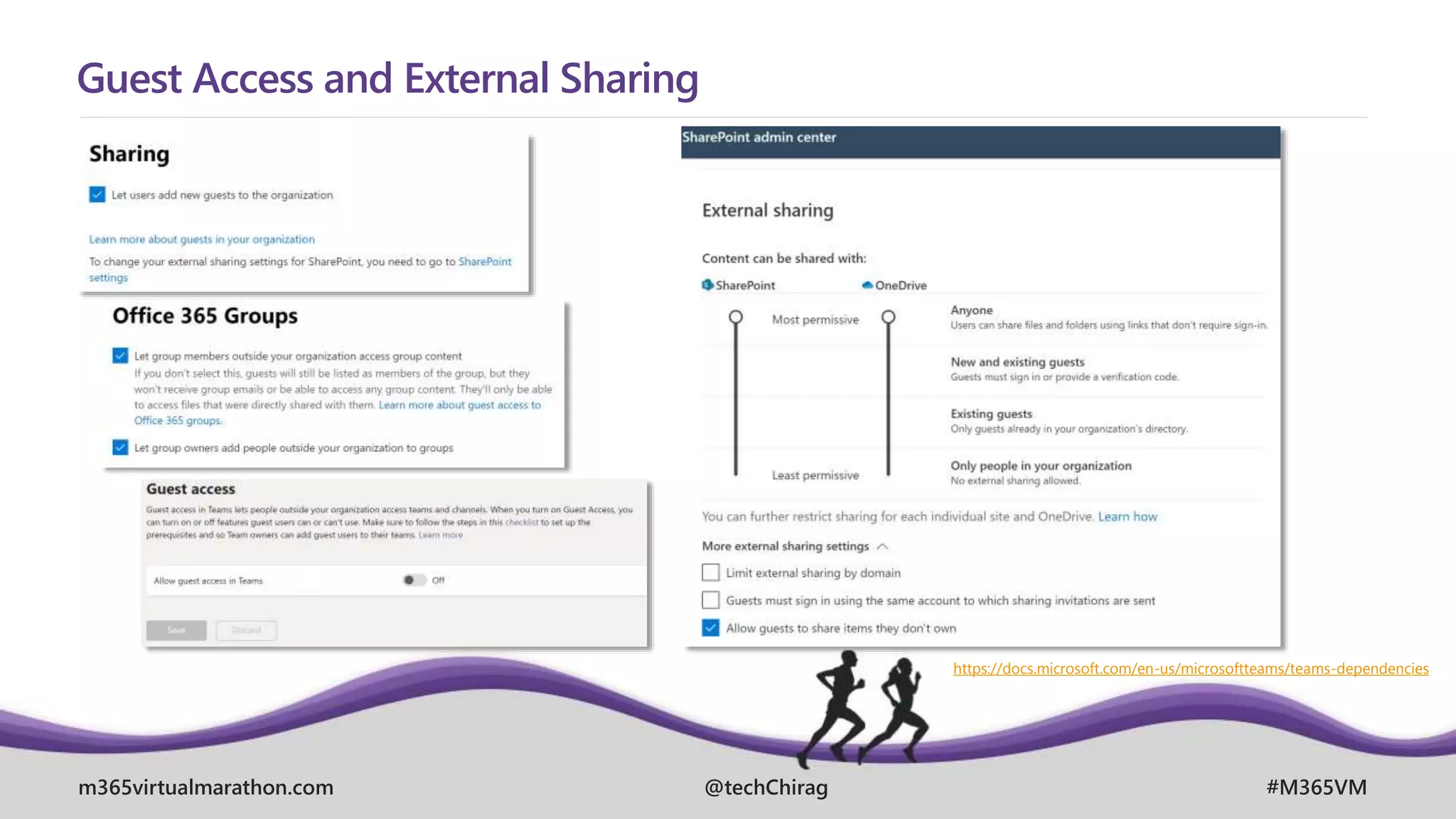
Guest Access and External Sharing
https://docs.microsoft.com/en-us/microsoftteams/teams-dependencies
m365virtualmarathon.com #M365VM
@techChirag
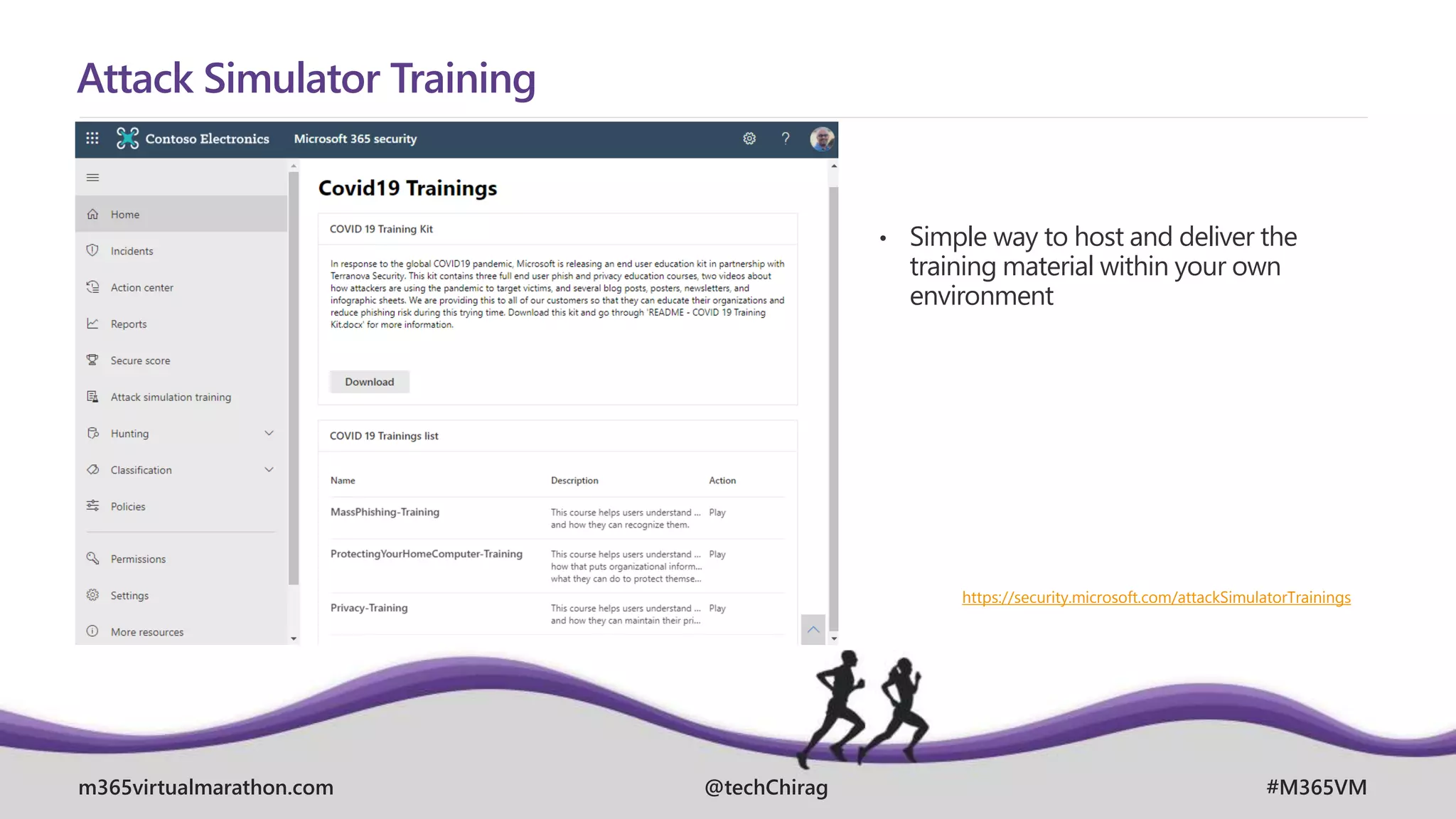
Attack Simulator Training
• Simple way to host and deliver the
training material within your own
environment
https://security.microsoft.com/attackSimulatorTrainings
m365virtualmarathon.com #M365VM
@techChirag
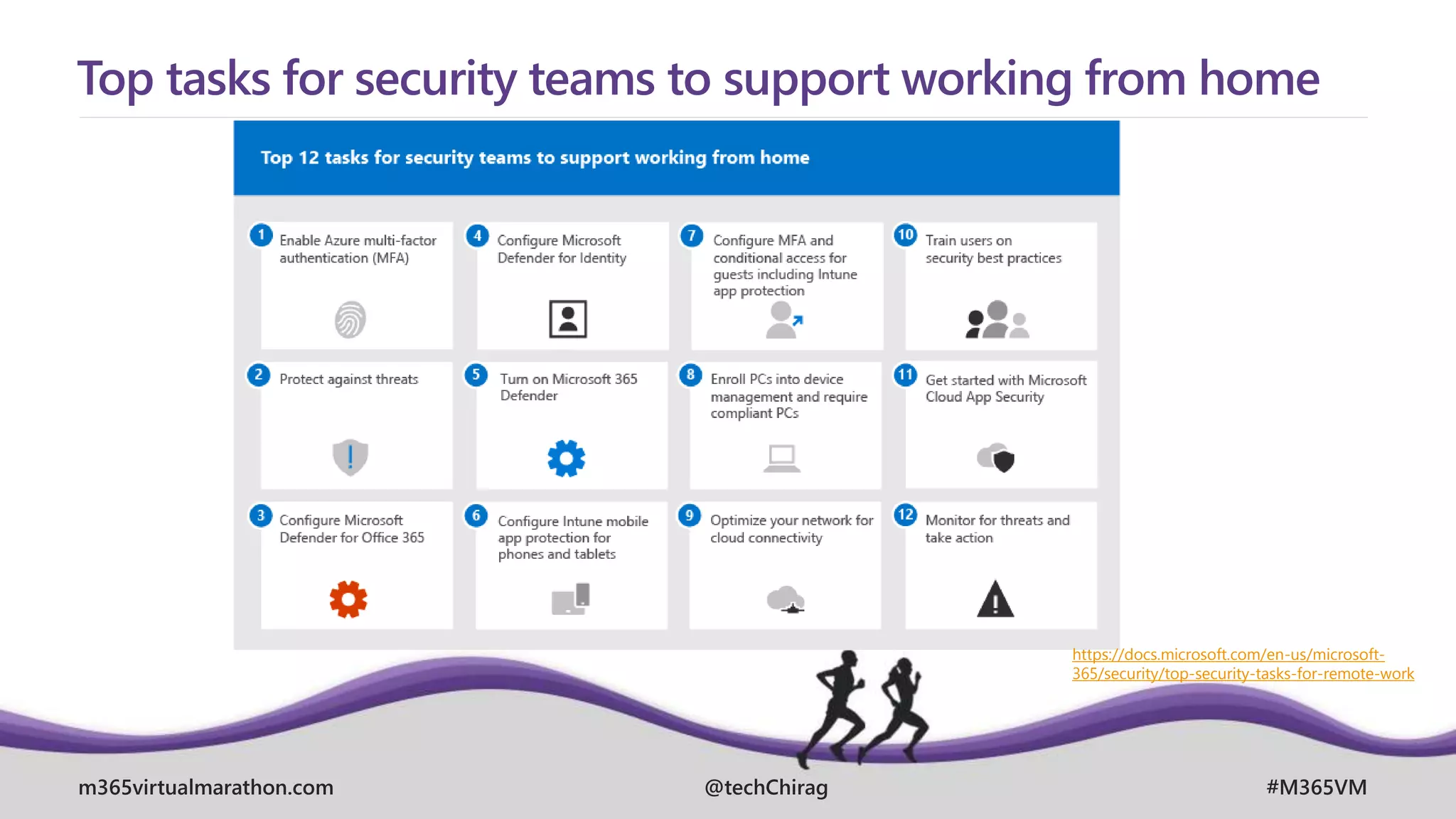
Top tasks for security teams to support working from home
https://docs.microsoft.com/en-us/microsoft-
365/security/top-security-tasks-for-remote-work
m365virtualmarathon.com #M365VM
@techChirag
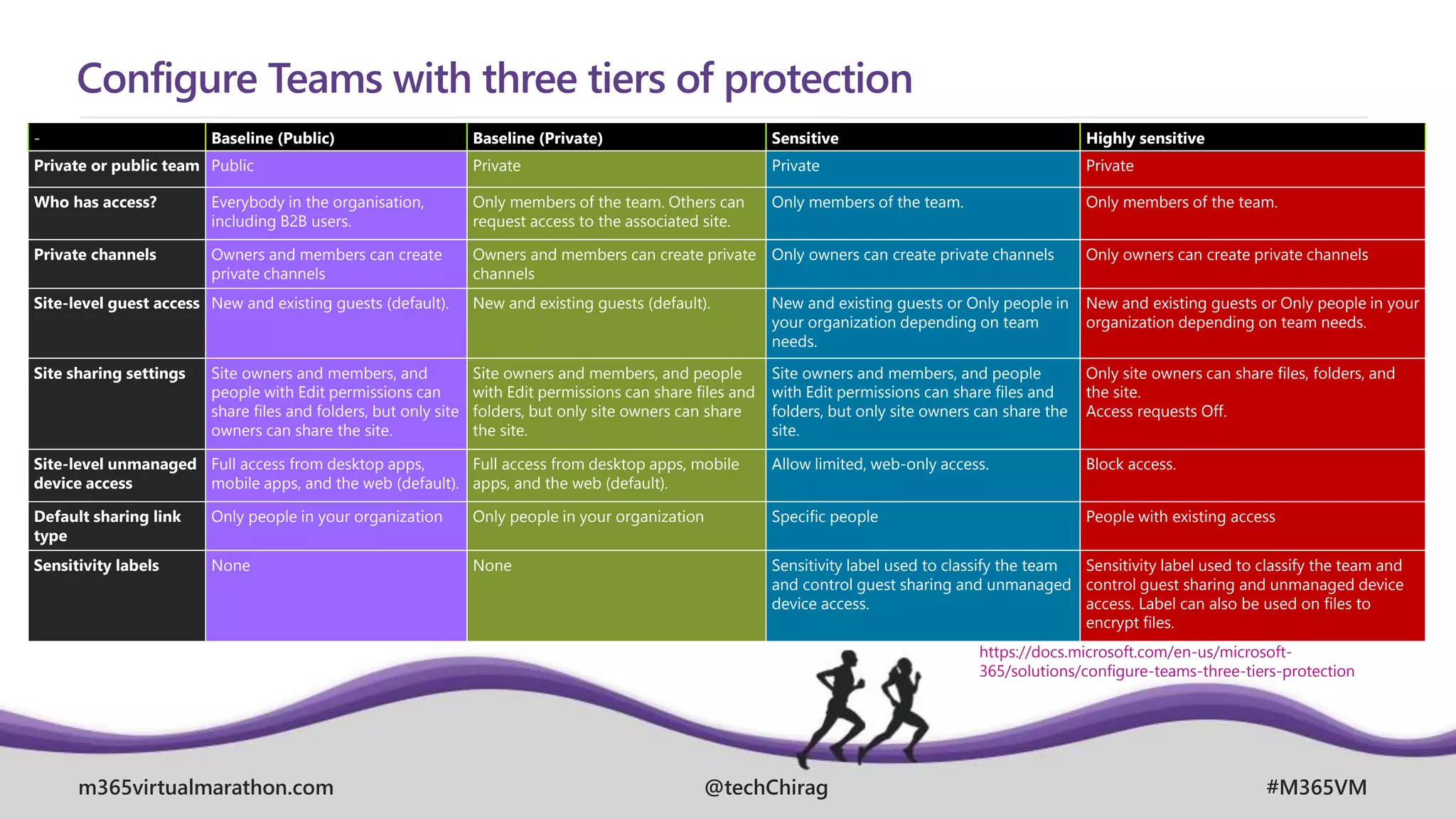
Configure Teams with three tiers of protection
- Baseline (Public) Baseline (Private) Sensitive Highly sensitive
Private or public team Public Private Private Private
Who has access? Everybody in the organisation,
including B2B users.
Only members of the team. Others can
request access to the associated site.
Only members of the team. Only members of the team.
Private channels Owners and members can create
private channels
Owners and members can create private
channels
Only owners can create private channels Only owners can create private channels
Site-level guest access New and existing guests (default). New and existing guests (default). New and existing guests or Only people in
your organization depending on team
needs.
New and existing guests or Only people in your
organization depending on team needs.
Site sharing settings Site owners and members, and
people with Edit permissions can
share files and folders, but only site
owners can share the site.
Site owners and members, and people
with Edit permissions can share files and
folders, but only site owners can share
the site.
Site owners and members, and people
with Edit permissions can share files and
folders, but only site owners can share the
site.
Only site owners can share files, folders, and
the site.
Access requests Off.
Site-level unmanaged
device access
Full access from desktop apps,
mobile apps, and the web (default).
Full access from desktop apps, mobile
apps, and the web (default).
Allow limited, web-only access. Block access.
Default sharing link
type
Only people in your organization Only people in your organization Specific people People with existing access
Sensitivity labels None None Sensitivity label used to classify the team
and control guest sharing and unmanaged
device access.
Sensitivity label used to classify the team and
control guest sharing and unmanaged device
access. Label can also be used on files to
encrypt files.
https://docs.microsoft.com/en-us/microsoft-
365/solutions/configure-teams-three-tiers-protection
m365virtualmarathon.com #M365VM
@techChirag
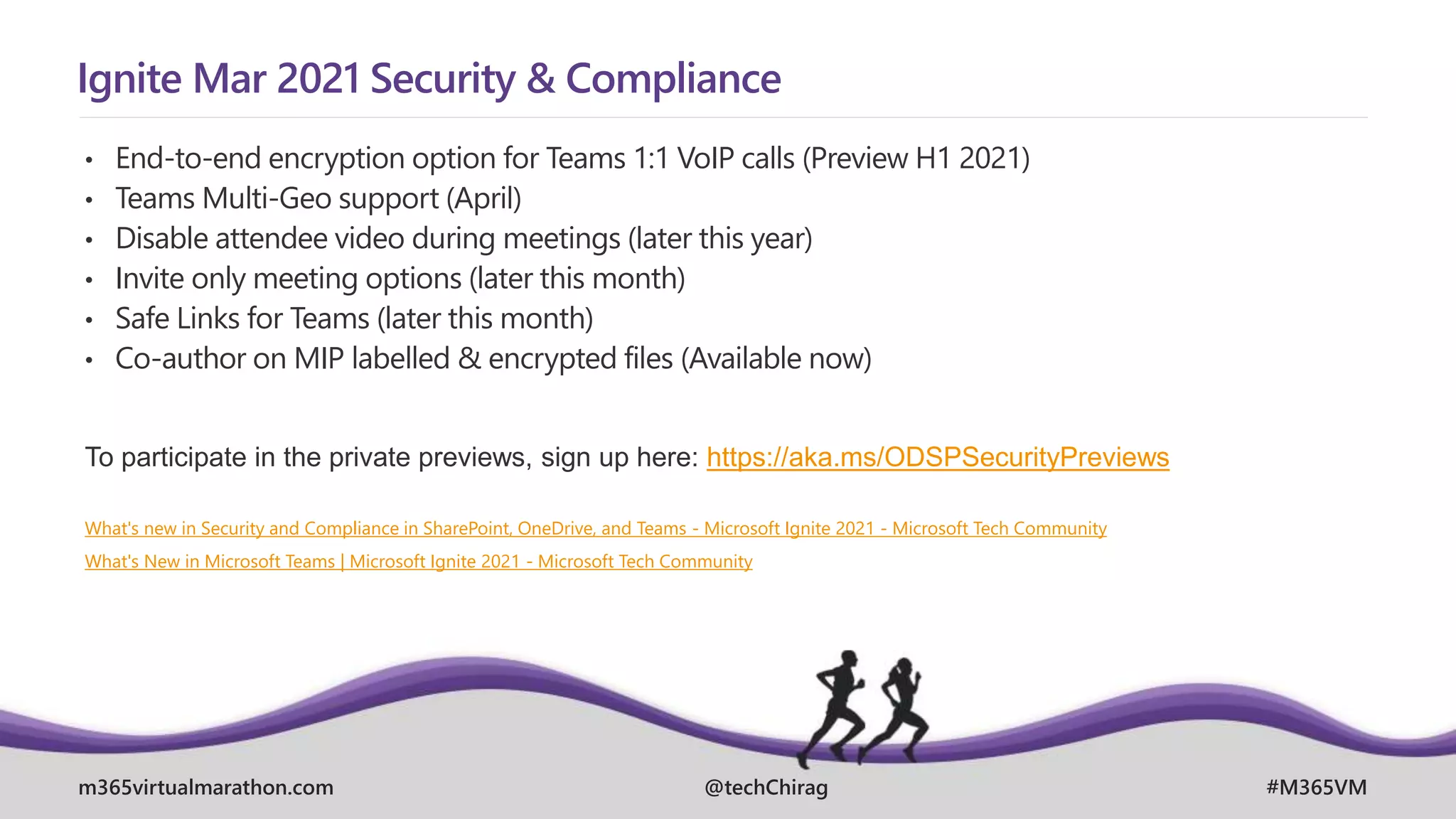
Ignite Mar 2021 Security & Compliance
• End-to-end encryption option for Teams 1:1 VoIP calls (Preview H1 2021)
• Teams Multi-Geo support (April)
• Disable attendee video during meetings (later this year)
• Invite only meeting options (later this month)
• Safe Links for Teams (later this month)
• Co-author on MIP labelled & encrypted files (Available now)
To participate in the private previews, sign up here: https://aka.ms/ODSPSecurityPreviews
What's new in Security and Compliance in SharePoint, OneDrive, and Teams - Microsoft Ignite 2021 - Microsoft Tech Community
What's New in Microsoft Teams | Microsoft Ignite 2021 - Microsoft Tech Community
m365virtualmarathon.com #M365VM
@techChirag
Further resources
• Microsoft 365 licensing guidance for security & compliance
• Download the Detailed Microsoft 365 Compliance Licensing Comparison
• Microsoft 365 Roadmap
• Manage information protection and governance – Learning Path
• Microsoft Security and Compliance - Microsoft Tech Community
• Microsoft Teams Blog - Microsoft Tech Community
• Joanne C Klein – SharePoint, Microsoft 365 and Azure Things
m365virtualmarathon.com #M365VM
CHIRAG PATEL
SPEAKER AND EVENT FEEDBACK
http://bit.ly/M365VM21Feedback
techchirag.com

Working with Security and Compliance in Microsoft Teams - Microsoft 365 Virtual Marathon

  • 1.
    April, 26. –28. 2021 MICROSOFT 365 VIRTUAL MARATHON 2021 m365virtualmarathon.com #M365VM Working with Security and Compliance in Microsoft Teams CHIRAG PATEL MVP, MCT @techChirag Microsoft 365 Consultant April, 27 @ 12pm BST (4am PDT)
  • 2.
    MICROSOFT 365 VIRTUALMARATHON 2021 SPONSORS
  • 3.
    m365virtualmarathon.com #M365VM @techChirag AGENDA  Teamspart of Microsoft 365 and its dependencies  Responsibilities (business functions & users) and policy controls  State of your data (activity & content explorer, scores & improvement actions)  Deep dive classifications containers, sensitivity labels, DLPs
  • 4.
    Chirag Patel     Development DBA, SharePoint Administrator 2001 SharePoint& BPOS Consultant 2012 Independent SharePoint & Office 365 Consultant 2014 MicrosoftTeams, Power Platform 2018 Microsoft 365 2019 M365UK 2020 Microsoft Certified Trainer (MCT) 2021
  • 5.
    Community Speaker Chirag Patel @techChirag UK2011-2014 #spsuk EMEA 2011 #spsemea India 2012 #spsindia Belgium 2016-2017 #spsbe Cambridge 2017 #spscambs Paris 2015 #spsparis Madrid 2016 #spsmad Barcelona 2017 #spsbcn London 2015-2017, 2019 #spslondon Leicester 2019 #spsleicester Ahmedabad 2020 #M365Ahmedabad Bangalore 2020 #M365BLR www.techChirag.com
  • 6.
    m365virtualmarathon.com #M365VM @techChirag Microsoft Teams& Dependencies Communicate Collaborate Customise Confidence
  • 7.
    m365virtualmarathon.com #M365VM @techChirag Balancing Security& Compliance Needs IT Business Employee Security Officer Legal IT Admin • Prevent data leaks and breaches • Protect high value information • Accomplish business goals as simply as possible – if it is too hard find an easier way… • Limit business disruption • Get out of my way • Make it easy for me to get my work done fast • Share easily but protect my secret stuff • Manage the increasing volume of data • Keep up with changing services & threats • Make all other roles happy • Comply with retention • Support eDiscovery
  • 8.
    m365virtualmarathon.com #M365VM @techChirag Security, complianceand privacy in Teams 1. Meeting options 2. Meeting role designation 3. Recording consent 4. Recording access 5. Channel moderation and controls 6. Apps management 7. Teams Settings and policies 8. Secure guest access 9. Communication compliance 10. Multi-Factor Authentication 11. Conditional access 12. Endpoint Manager 13. External access 14. Encryption 15. Data loss prevention 16. Sensitivity labels 17. Advanced Threat Protection 18. Cloud App Security 19. Information barriers 20. eDiscovery, legal hold, audit log, content search 21. Retention policies 22. Data residency 23. Data management reports https://www.microsoft.com/en-gb/microsoft-365/microsoft- teams/security
  • 9.
    m365virtualmarathon.com #M365VM @techChirag Plain EnglishPolicies ID Suggested Policy 1 Enable multi-factor authentication (MFA) for all staff 2 Enable MFA for Admins with assigned administrative rights 3 Enable just-in-time access to complete admin tasks 4 Enforce mobile app protection for phones and tablets 5 Block devices that don’t support modern authentication 6 Require compliant PCs and mobile devices 7 Assign Classification in M365 Groups, Microsoft Teams, SharePoint sites 8 Classify content with sensitivity labels to enable protection 9 Classify information with retention labels 10 Provision data loss prevention (DLP) policies 11 Microsoft cannot access our content to perform service operation without approval https://docs.microsoft.com/en-us/microsoft- 365/security/microsoft-365-security-for-bdm
  • 10.
    m365virtualmarathon.com #M365VM @techChirag Compliance Manager Pre-built& custom assessments Workflow capabilities Step-by-step guidance on suggested improvement actions Risk-based compliance score • Formerly Compliance Score • Controls • Microsoft managed controls • Your controls • Shared controls • Assessments • In-scope services • Microsoft managed controls • Your controls • Shared controls • Assessment score • Templates • Improvement Actions https://docs.microsoft.com/en-gb/microsoft-365/compliance/compliance-manager
  • 11.
    m365virtualmarathon.com #M365VM @techChirag Sensitivity Labels– VALUE of content Label Scope Files & emails Encrypt Assign permissions or let users decide User access to content expires Allow offline access Content Marking Auto- labelling Groups & sites Privacy and external user access settings Public, Private or None External user access Device access and external sharing settings Control external sharing (labelled sites) Access from unmanaged devices – Full access, web-only, block access Label Policy  1 or more labels  Users and Groups  Default label  Mandatory label  Require users to justify  Link to custom help page (use SharePoint!) Azure Purview assets (preview) Apply label to assets in Azure Purview, including SQL columns, files in Azure Blob Storage, and more
  • 12.
    m365virtualmarathon.com #M365VM @techChirag Enable sensitivitylabels for containers and synchronise labels Import-Module AzureADPreview Connect-AzureAD $TemplateId = (Get-AzureADDirectorySettingTemplate | where { $_.DisplayName -eq "Group.Unified" }).Id $Template = Get-AzureADDirectorySettingTemplate | where -Property Id -Value $TemplateId -EQ $Setting = $Template.CreateDirectorySetting() $Setting["UsageGuidelinesUrl"] = "https://guideline.example.com" New-AzureADDirectorySetting -DirectorySetting $Setting $Setting = Get-AzureADDirectorySetting -Id (Get-AzureADDirectorySetting | where -Property DisplayName - Value "Group.Unified" -EQ).id $Setting.Values $Setting["EnableMIPLabels"] = "True" Set-AzureADDirectorySetting -Id $Setting.Id -DirectorySetting $Setting Import-Module ExchangeOnlineManagement Connect-IPPSSession -UserPrincipalName admin@M365x011743.onmicrosoft.com Execute-AzureAdLabelSync https://docs.microsoft.com/en-us/microsoft-365/compliance/sensitivity-labels-teams-groups-sites
  • 13.
    m365virtualmarathon.com #M365VM @techChirag Information protectionin Microsoft Teams • Automatically set a Teams to Private to prevent other users to join without being invited by team owners. • Block access from people outside your organisation to prevent team owners from inviting external guests. • Limit access to Teams from unmanaged devices to prevent data leakage.
  • 14.
    m365virtualmarathon.com #M365VM @techChirag Data LossPrevention for Microsoft Teams DLP Rules Conditions Content contains Sensitive info types Content is shared from Microsoft 365 People inside organisation People outside organisation Exceptions Except if content is shared from Microsoft 365 People inside organisation People outside organisation Actions Restrict access or encrypt content in Microsoft 365 locations Audit or restrict activities n Windows devices Restrict Third Party Apps User notifications Email users and/or owners Policy Tips User overrides Incident reports Severity Alerts to admins Email incident reports Addition al option for processin g policies and rules • Exchange email • SharePoint sites • OneDrive Accounts • Teams chat and channel messages • Devices • Microsoft Cloud App Security
  • 15.
    m365virtualmarathon.com #M365VM @techChirag Data LossPrevention for Microsoft Teams • Automatically block messages which contain sensitive information • Prevent sharing sensitive information in a channel or chat session • Educate and guide end-users with notifications and “policy tips” • Unified classification engine supporting 90+ sensitive information types and custom sensitive info type creation
  • 16.
    m365virtualmarathon.com #M365VM @techChirag Guest Accessand External Sharing https://docs.microsoft.com/en-us/microsoftteams/teams-dependencies
  • 17.
    m365virtualmarathon.com #M365VM @techChirag Attack SimulatorTraining • Simple way to host and deliver the training material within your own environment https://security.microsoft.com/attackSimulatorTrainings
  • 18.
    m365virtualmarathon.com #M365VM @techChirag Top tasksfor security teams to support working from home https://docs.microsoft.com/en-us/microsoft- 365/security/top-security-tasks-for-remote-work
  • 19.
    m365virtualmarathon.com #M365VM @techChirag Configure Teamswith three tiers of protection - Baseline (Public) Baseline (Private) Sensitive Highly sensitive Private or public team Public Private Private Private Who has access? Everybody in the organisation, including B2B users. Only members of the team. Others can request access to the associated site. Only members of the team. Only members of the team. Private channels Owners and members can create private channels Owners and members can create private channels Only owners can create private channels Only owners can create private channels Site-level guest access New and existing guests (default). New and existing guests (default). New and existing guests or Only people in your organization depending on team needs. New and existing guests or Only people in your organization depending on team needs. Site sharing settings Site owners and members, and people with Edit permissions can share files and folders, but only site owners can share the site. Site owners and members, and people with Edit permissions can share files and folders, but only site owners can share the site. Site owners and members, and people with Edit permissions can share files and folders, but only site owners can share the site. Only site owners can share files, folders, and the site. Access requests Off. Site-level unmanaged device access Full access from desktop apps, mobile apps, and the web (default). Full access from desktop apps, mobile apps, and the web (default). Allow limited, web-only access. Block access. Default sharing link type Only people in your organization Only people in your organization Specific people People with existing access Sensitivity labels None None Sensitivity label used to classify the team and control guest sharing and unmanaged device access. Sensitivity label used to classify the team and control guest sharing and unmanaged device access. Label can also be used on files to encrypt files. https://docs.microsoft.com/en-us/microsoft- 365/solutions/configure-teams-three-tiers-protection
  • 20.
    m365virtualmarathon.com #M365VM @techChirag Ignite Mar2021 Security & Compliance • End-to-end encryption option for Teams 1:1 VoIP calls (Preview H1 2021) • Teams Multi-Geo support (April) • Disable attendee video during meetings (later this year) • Invite only meeting options (later this month) • Safe Links for Teams (later this month) • Co-author on MIP labelled & encrypted files (Available now) To participate in the private previews, sign up here: https://aka.ms/ODSPSecurityPreviews What's new in Security and Compliance in SharePoint, OneDrive, and Teams - Microsoft Ignite 2021 - Microsoft Tech Community What's New in Microsoft Teams | Microsoft Ignite 2021 - Microsoft Tech Community
  • 21.
    m365virtualmarathon.com #M365VM @techChirag Further resources •Microsoft 365 licensing guidance for security & compliance • Download the Detailed Microsoft 365 Compliance Licensing Comparison • Microsoft 365 Roadmap • Manage information protection and governance – Learning Path • Microsoft Security and Compliance - Microsoft Tech Community • Microsoft Teams Blog - Microsoft Tech Community • Joanne C Klein – SharePoint, Microsoft 365 and Azure Things
  • 22.
    m365virtualmarathon.com #M365VM CHIRAG PATEL SPEAKERAND EVENT FEEDBACK http://bit.ly/M365VM21Feedback techchirag.com

Editor's Notes

  • #6 https://techchirag.com https://twitter.com/techchirag https://www.linkedin.com/in/techchirag https://www.slideshare.net/techchirag https://www.youtube.com/playlist?list=PLJeDQGE0NCWDSoVssBLcJY9paIFgDb-A8
  • #11 Compliance Manager gives you an initial score based on the Microsoft 365 data protection baseline. A control is a requirement of a regulation, standard, or policy. It defines how you assess and manage system configuration, organizational process, and people responsible for meeting a specific requirement of a regulation, standard, or policy. An assessment is grouping of controls from a specific regulation, standard, or policy. Completing the actions within an assessment help you meet the requirements of a standard, regulation, or law
  • #19 1: Enable Azure AD Multi-Factor Authentication (MFA) 2: Protect against threats 3: Configure Microsoft Defender for Office 365 4: Configure Microsoft Defender for Identity 5: Turn on Microsoft 365 Defender 6: Configure Intune mobile app protection for phones and tablets 7: Configure MFA and conditional access for guests, including Intune mobile app protection 8: Enroll PCs into device management and require compliant PCs 9: Optimise your network for cloud connectivity 10: Train users 11: Get started with Microsoft Cloud App Security 12: Monitor for threats and take action