#Teams10X
TEAMS 10X
VIRTUAL SUMMIT
UNLEASH THE POWER OF TEAMS
September 28-29, 2022
#Teams10X
How to use Advanced eDiscovery with Microsoft
Teams
Microsoft 365 Architect, Avanade
Vignesh Ganesan, Microsoft MVP & MCT
#Teams10X
Vignesh Ganesan | MCSE ,MCSA ,MCP, MCT & ITIL V3
viganes@vigneshganesan.com
https://www.linkedin.com/in/vig
nesh-ganesan-9246384a/
@cloudvignesh
 Microsoft MVP & MCT | Enterprise Cloud Architect &
Technology Strategist
 Modern Workplace Architect at Avanade Germany
primarily focusing on Merger, Acquisition and Divestiture
related projects.
 Blogger on Vignesh’s SharePoint Thoughts ,
European SharePoint Community , C Sharp Corner,
Collab 365 & HubFly Blog site
 Spoken on plethora of Webinars, User groups and
Conferences across the globe
 Written more than 500+ technical articles
 Ambassador for aMS Community
 Completed 20+ MS Certifications
 Avid Traveller ( Been to 15+ countries so far across 3 diff
continents )
 Founder & Chief organizer -Microsoft 365, Power
#Teams10X
SPONSORS
#Teams10X
Agenda
 What is eDiscovery in Microsoft 365 and why should you care
 Different eDiscovery solutions in Microsoft Purview
 eDiscovery permission model
 Using Advanced eDiscovery for Microsoft Teams
 Demo
 Licensing
 Q&A
#Teams10X
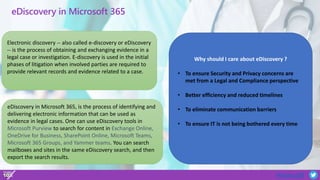
eDiscovery in Microsoft 365
Electronic discovery -- also called e-discovery or eDiscovery
-- is the process of obtaining and exchanging evidence in a
legal case or investigation. E-discovery is used in the initial
phases of litigation when involved parties are required to
provide relevant records and evidence related to a case.
eDiscovery in Microsoft 365, is the process of identifying and
delivering electronic information that can be used as
evidence in legal cases. One can use eDiscovery tools in
Microsoft Purview to search for content in Exchange Online,
OneDrive for Business, SharePoint Online, Microsoft Teams,
Microsoft 365 Groups, and Yammer teams. You can search
mailboxes and sites in the same eDiscovery search, and then
export the search results.
Why should I care about eDiscovery ?
• To ensure Security and Privacy concerns are
met from a Legal and Compliance perspective
• Better efficiency and reduced timelines
• To eliminate communication barriers
• To ensure IT is not being bothered every time
#Teams10X
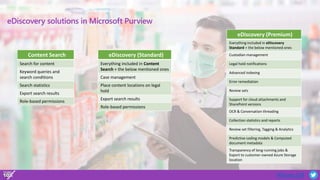
eDiscovery solutions in Microsoft Purview
Content Search
Search for content
Keyword queries and
search conditions
Search statistics
Export search results
Role-based permissions
eDiscovery (Standard)
Everything included in Content
Search + the below mentioned ones
Case management
Place content locations on legal
hold
Export search results
Role-based permissions
eDiscovery (Premium)
Everything included in eDiscovery
Standard + the below mentioned ones
Custodian management
Legal hold notifications
Advanced indexing
Error remediation
Review sets
Support for cloud attachments and
SharePoint versions
OCR & Conversation threading
Collection statistics and reports
Review set filtering, Tagging & Analytics
Predictive coding models & Computed
document metadata
Transparency of long-running jobs &
Export to customer-owned Azure Storage
location
#Teams10X
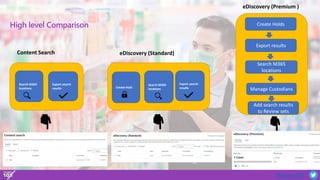
High level Comparison
Search M365
locations
Export search
results
Content Search
Search M365
locations
Export search
results
Create Hold
Create Holds
Export results
Search M365
locations
Manage Custodians
Add search results
to Review sets
eDiscovery (Standard)
eDiscovery (Premium )
#Teams10X
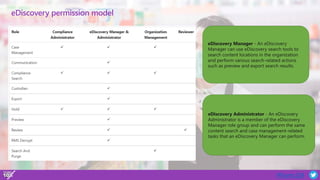
eDiscovery permission model
eDiscovery Manager - An eDiscovery
Manager can use eDiscovery search tools to
search content locations in the organization
and perform various search-related actions
such as preview and export search results.
eDiscovery Administrator - An eDiscovery
Administrator is a member of the eDiscovery
Manager role group and can perform the same
content search and case management-related
tasks that an eDiscovery Manager can perform.
#Teams10X
Demo
Advanced eDiscovery for Microsoft
Teams
#Teams10X
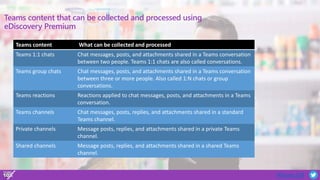
Teams content that can be collected and processed using
eDiscovery Premium
Teams content What can be collected and processed
Teams 1:1 chats Chat messages, posts, and attachments shared in a Teams conversation
between two people. Teams 1:1 chats are also called conversations.
Teams group chats Chat messages, posts, and attachments shared in a Teams conversation
between three or more people. Also called 1:N chats or group
conversations.
Teams reactions Reactions applied to chat messages, posts, and attachments in a Teams
conversation.
Teams channels Chat messages, posts, replies, and attachments shared in a standard
Teams channel.
Private channels Message posts, replies, and attachments shared in a private Teams
channel.
Shared channels Message posts, replies, and attachments shared in a shared Teams
channel.
#Teams10X
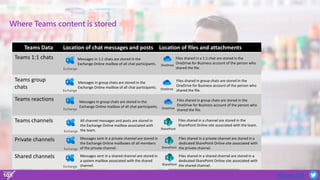
Where Teams content is stored
Teams Data Location of chat messages and posts Location of files and attachments
Teams 1:1 chats
Teams group
chats
Teams reactions
Teams channels
Private channels
Shared channels
Exchange
Messages in 1:1 chats are stored in the
Exchange Online mailbox of all chat participants. OneDrive
Files shared in a 1:1 chat are stored in the
OneDrive for Business account of the person who
shared the file.
Exchange
Messages in group chats are stored in the
Exchange Online mailbox of all chat participants. OneDrive
Files shared in group chats are stored in the
OneDrive for Business account of the person who
shared the file.
Exchange
Messages in group chats are stored in the
Exchange Online mailbox of all chat participants. OneDrive
Files shared in group chats are stored in the
OneDrive for Business account of the person who
shared the file.
Exchange
All channel messages and posts are stored in
the Exchange Online mailbox associated with
the team. SharePoint
Files shared in a channel are stored in the
SharePoint Online site associated with the team.
Exchange
Messages sent in a private channel are stored in
the Exchange Online mailboxes of all members
of the private channel. SharePoint
Files shared in a private channel are stored in a
dedicated SharePoint Online site associated with
the private channel.
Exchange
Messages sent in a shared channel are stored in
a system mailbox associated with the shared
channel. SharePoint
Files shared in a shared channel are stored in a
dedicated SharePoint Online site associated with
the shared channel.
#Teams10X
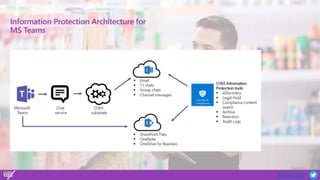
Information Protection Architecture for
MS Teams
#Teams10X
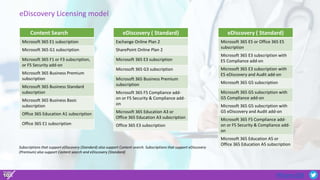
eDiscovery Licensing model
Content Search
Microsoft 365 E1 subscription
Microsoft 365 G1 subscription
Microsoft 365 F1 or F3 subscription,
or F5 Security add-on
Microsoft 365 Business Premium
subscription
Microsoft 365 Business Standard
subscription
Microsoft 365 Business Basic
subscription
Office 365 Education A1 subscription
Office 365 E1 subscription
eDiscovery ( Standard)
Exchange Online Plan 2
SharePoint Online Plan 2
Microsoft 365 E3 subscription
Microsoft 365 G3 subscription
Microsoft 365 Business Premium
subscription
Microsoft 365 F5 Compliance add-
on or F5 Security & Compliance add-
on
Microsoft 365 Education A3 or
Office 365 Education A3 subscription
Office 365 E3 subscription
eDiscovery ( Standard)
Microsoft 365 E5 or Office 365 E5
subscription
Microsoft 365 E3 subscription with
E5 Compliance add-on
Microsoft 365 E3 subscription with
E5 eDiscovery and Audit add-on
Microsoft 365 G5 subscription
Microsoft 365 G5 subscription with
G5 Compliance add-on
Microsoft 365 G5 subscription with
G5 eDiscovery and Audit add-on
Microsoft 365 F5 Compliance add-
on or F5 Security & Compliance add-
on
Microsoft 365 Education A5 or
Office 365 Education A5 subscription
Subscriptions that support eDiscovery (Standard) also support Content search. Subscriptions that support eDiscovery
(Premium) also support Content search and eDiscovery (Standard)
#Teams10X
Key Takeaways
Questions ?
#Teams10X
Your feedback is valued!
Event Feedback Speaker/Session Feedback
https://forms.office.com/r/DFncvHgAcK https://forms.office.com/r/Era74EGMJR
#Teams10X
Thank You

Advanced eDiscovery with Microsoft Teams

  • 1.
    #Teams10X TEAMS 10X VIRTUAL SUMMIT UNLEASHTHE POWER OF TEAMS September 28-29, 2022
  • 2.
    #Teams10X How to useAdvanced eDiscovery with Microsoft Teams Microsoft 365 Architect, Avanade Vignesh Ganesan, Microsoft MVP & MCT
  • 3.
    #Teams10X Vignesh Ganesan |MCSE ,MCSA ,MCP, MCT & ITIL V3 viganes@vigneshganesan.com https://www.linkedin.com/in/vig nesh-ganesan-9246384a/ @cloudvignesh  Microsoft MVP & MCT | Enterprise Cloud Architect & Technology Strategist  Modern Workplace Architect at Avanade Germany primarily focusing on Merger, Acquisition and Divestiture related projects.  Blogger on Vignesh’s SharePoint Thoughts , European SharePoint Community , C Sharp Corner, Collab 365 & HubFly Blog site  Spoken on plethora of Webinars, User groups and Conferences across the globe  Written more than 500+ technical articles  Ambassador for aMS Community  Completed 20+ MS Certifications  Avid Traveller ( Been to 15+ countries so far across 3 diff continents )  Founder & Chief organizer -Microsoft 365, Power
  • 4.
  • 5.
    #Teams10X Agenda  What iseDiscovery in Microsoft 365 and why should you care  Different eDiscovery solutions in Microsoft Purview  eDiscovery permission model  Using Advanced eDiscovery for Microsoft Teams  Demo  Licensing  Q&A
  • 6.
    #Teams10X eDiscovery in Microsoft365 Electronic discovery -- also called e-discovery or eDiscovery -- is the process of obtaining and exchanging evidence in a legal case or investigation. E-discovery is used in the initial phases of litigation when involved parties are required to provide relevant records and evidence related to a case. eDiscovery in Microsoft 365, is the process of identifying and delivering electronic information that can be used as evidence in legal cases. One can use eDiscovery tools in Microsoft Purview to search for content in Exchange Online, OneDrive for Business, SharePoint Online, Microsoft Teams, Microsoft 365 Groups, and Yammer teams. You can search mailboxes and sites in the same eDiscovery search, and then export the search results. Why should I care about eDiscovery ? • To ensure Security and Privacy concerns are met from a Legal and Compliance perspective • Better efficiency and reduced timelines • To eliminate communication barriers • To ensure IT is not being bothered every time
  • 7.
    #Teams10X eDiscovery solutions inMicrosoft Purview Content Search Search for content Keyword queries and search conditions Search statistics Export search results Role-based permissions eDiscovery (Standard) Everything included in Content Search + the below mentioned ones Case management Place content locations on legal hold Export search results Role-based permissions eDiscovery (Premium) Everything included in eDiscovery Standard + the below mentioned ones Custodian management Legal hold notifications Advanced indexing Error remediation Review sets Support for cloud attachments and SharePoint versions OCR & Conversation threading Collection statistics and reports Review set filtering, Tagging & Analytics Predictive coding models & Computed document metadata Transparency of long-running jobs & Export to customer-owned Azure Storage location
  • 8.
    #Teams10X High level Comparison SearchM365 locations Export search results Content Search Search M365 locations Export search results Create Hold Create Holds Export results Search M365 locations Manage Custodians Add search results to Review sets eDiscovery (Standard) eDiscovery (Premium )
  • 9.
    #Teams10X eDiscovery permission model eDiscoveryManager - An eDiscovery Manager can use eDiscovery search tools to search content locations in the organization and perform various search-related actions such as preview and export search results. eDiscovery Administrator - An eDiscovery Administrator is a member of the eDiscovery Manager role group and can perform the same content search and case management-related tasks that an eDiscovery Manager can perform.
  • 10.
  • 11.
    #Teams10X Teams content thatcan be collected and processed using eDiscovery Premium Teams content What can be collected and processed Teams 1:1 chats Chat messages, posts, and attachments shared in a Teams conversation between two people. Teams 1:1 chats are also called conversations. Teams group chats Chat messages, posts, and attachments shared in a Teams conversation between three or more people. Also called 1:N chats or group conversations. Teams reactions Reactions applied to chat messages, posts, and attachments in a Teams conversation. Teams channels Chat messages, posts, replies, and attachments shared in a standard Teams channel. Private channels Message posts, replies, and attachments shared in a private Teams channel. Shared channels Message posts, replies, and attachments shared in a shared Teams channel.
  • 12.
    #Teams10X Where Teams contentis stored Teams Data Location of chat messages and posts Location of files and attachments Teams 1:1 chats Teams group chats Teams reactions Teams channels Private channels Shared channels Exchange Messages in 1:1 chats are stored in the Exchange Online mailbox of all chat participants. OneDrive Files shared in a 1:1 chat are stored in the OneDrive for Business account of the person who shared the file. Exchange Messages in group chats are stored in the Exchange Online mailbox of all chat participants. OneDrive Files shared in group chats are stored in the OneDrive for Business account of the person who shared the file. Exchange Messages in group chats are stored in the Exchange Online mailbox of all chat participants. OneDrive Files shared in group chats are stored in the OneDrive for Business account of the person who shared the file. Exchange All channel messages and posts are stored in the Exchange Online mailbox associated with the team. SharePoint Files shared in a channel are stored in the SharePoint Online site associated with the team. Exchange Messages sent in a private channel are stored in the Exchange Online mailboxes of all members of the private channel. SharePoint Files shared in a private channel are stored in a dedicated SharePoint Online site associated with the private channel. Exchange Messages sent in a shared channel are stored in a system mailbox associated with the shared channel. SharePoint Files shared in a shared channel are stored in a dedicated SharePoint Online site associated with the shared channel.
  • 13.
  • 14.
    #Teams10X eDiscovery Licensing model ContentSearch Microsoft 365 E1 subscription Microsoft 365 G1 subscription Microsoft 365 F1 or F3 subscription, or F5 Security add-on Microsoft 365 Business Premium subscription Microsoft 365 Business Standard subscription Microsoft 365 Business Basic subscription Office 365 Education A1 subscription Office 365 E1 subscription eDiscovery ( Standard) Exchange Online Plan 2 SharePoint Online Plan 2 Microsoft 365 E3 subscription Microsoft 365 G3 subscription Microsoft 365 Business Premium subscription Microsoft 365 F5 Compliance add- on or F5 Security & Compliance add- on Microsoft 365 Education A3 or Office 365 Education A3 subscription Office 365 E3 subscription eDiscovery ( Standard) Microsoft 365 E5 or Office 365 E5 subscription Microsoft 365 E3 subscription with E5 Compliance add-on Microsoft 365 E3 subscription with E5 eDiscovery and Audit add-on Microsoft 365 G5 subscription Microsoft 365 G5 subscription with G5 Compliance add-on Microsoft 365 G5 subscription with G5 eDiscovery and Audit add-on Microsoft 365 F5 Compliance add- on or F5 Security & Compliance add- on Microsoft 365 Education A5 or Office 365 Education A5 subscription Subscriptions that support eDiscovery (Standard) also support Content search. Subscriptions that support eDiscovery (Premium) also support Content search and eDiscovery (Standard)
  • 15.
  • 16.
    #Teams10X Your feedback isvalued! Event Feedback Speaker/Session Feedback https://forms.office.com/r/DFncvHgAcK https://forms.office.com/r/Era74EGMJR
  • 17.

Editor's Notes

  • #4 Hyperlinks in PowerPoint are active for the attendees if you use PowerPoint Live sharing in Teams.