#ScottishSummit2021
C h i r a g P a t e l
A d m i n i s t r a t o r s g u i d e t o m a n a g i n g M i c r o s o f t 3 6 5 a n d
c o l l a b o r a t i o n w o r k l o a d s
H U M B I E - 2 7 F e b r u a r y 2 0 2 1 - 2 p m
Our Sponsors
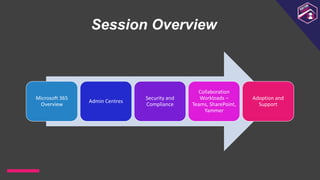
Session Overview
Microsoft 365
Overview
Admin Centres
Security and
Compliance
Collaboration
Workloads –
Teams, SharePoint,
Yammer
Adoption and
Support
M
i
c
r
o
s
o
f
t
M
V
P
(
O
f
f
i
c
e
A
p
p
s
&
S
e
r
v
i
c
e
s
)
20 years with SharePoint, SQL Server, Office 365
Microsoft 365 Consultant, Architect, Trainer
Deployment, Migrations, Implementations
M365UK meetup organiser & speaker
Patel Consulting
Founder,PrincipalConsultant
@techChirag
Chirag
Patel
techchirag.com
UK 2011-2014 #spsuk
EMEA 2011 #spsemea
India 2012 #spsindia
Belgium 2016-2017 #spsbe
Cambridge 2017 #spscambs
Paris 2015 #spsparis
Madrid 2016 #spsmad
Barcelona 2017 #spsbcn
London 2015-2017, 2019 #spslondon
Leicester 2019 #spsleicester
Ahmedabad 2020 #M365Ahmedabad
Bangalore 2020 #M365BLR
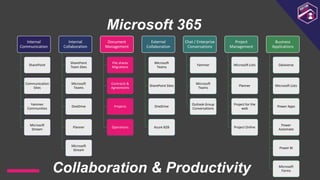
Microsoft 365
Internal
Communication
SharePoint
Communication
Sites
Yammer
Communities
Microsoft
Stream
Internal
Collaboration
SharePoint
Team Sites
Microsoft
Teams
OneDrive
Planner
Microsoft
Stream
Document
Management
File shares
Migrations
Contracts &
Agreements
Projects
Operations
External
Collaboration
Microsoft
Teams
SharePoint Sites
OneDrive
Azure B2B
Chat / Enterprise
Conversations
Yammer
Microsoft
Teams
Outlook Group
Conversations
Project
Management
Microsoft Lists
Planner
Project for the
web
Project Online
Business
Applications
Dataverse
Microsoft Lists
Power Apps
Power
Automate
Power BI
Microsoft
Forms
Collaboration & Productivity
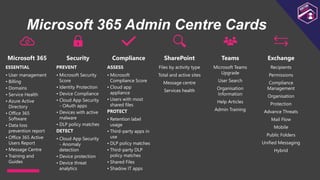
Microsoft 365 Admin Centre Cards
Microsoft 365
ESSENTIAL
• User management
• Billing
• Domains
• Service Health
• Azure Active
Directory
• Office 365
Software
• Data loss
prevention report
• Office 365 Active
Users Report
• Message Centre
• Training and
Guides
Security
PREVENT
• Microsoft Security
Score
• Identity Protection
• Device Compliance
• Cloud App Security
- OAuth apps
• Devices with active
malware
• DLP policy matches
DETECT
• Cloud App Security
- Anomaly
detection
• Device protection
• Device threat
analytics
Compliance
ASSESS
• Microsoft
Compliance Score
• Cloud app
appliance
• Users with most
shared files
PROTECT
• Retention label
usage
• Third-party apps in
use
• DLP policy matches
• Third-party DLP
policy matches
• Shared Files
• Shadow IT apps
SharePoint
Files by activity type
Total and active sites
Message centre
Services health
Teams
Microsoft Teams
Upgrade
User Search
Organisation
Information
Help Articles
Admin Training
Exchange
Recipients
Permissions
Compliance
Management
Organisation
Protection
Advance Threats
Mail Flow
Mobile
Public Folders
Unified Messaging
Hybrid
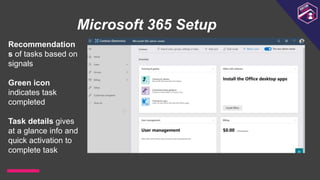
Microsoft 365 Setup
Recommendation
s of tasks based on
signals
Green icon
indicates task
completed
Task details gives
at a glance info and
quick activation to
complete task
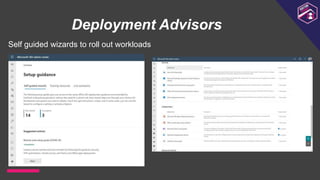
Deployment Advisors
Self guided wizards to roll out workloads
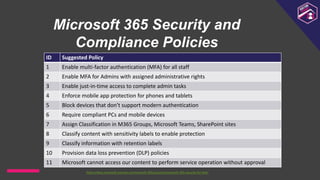
Microsoft 365 Security and
Compliance Policies
ID Suggested Policy
1 Enable multi-factor authentication (MFA) for all staff
2 Enable MFA for Admins with assigned administrative rights
3 Enable just-in-time access to complete admin tasks
4 Enforce mobile app protection for phones and tablets
5 Block devices that don’t support modern authentication
6 Require compliant PCs and mobile devices
7 Assign Classification in M365 Groups, Microsoft Teams, SharePoint sites
8 Classify content with sensitivity labels to enable protection
9 Classify information with retention labels
10 Provision data loss prevention (DLP) policies
11 Microsoft cannot access our content to perform service operation without approval
https://docs.microsoft.com/en-us/microsoft-365/security/microsoft-365-security-for-bdm
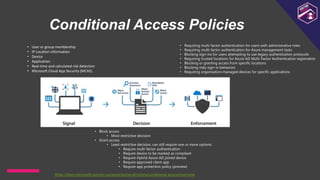
Conditional Access Policies
https://docs.microsoft.com/en-us/azure/active-directory/conditional-access/overview
• User or group membership
• IP Location information
• Device
• Application
• Real-time and calculated risk detection
• Microsoft Cloud App Security (MCAS)
• Block access
• Most restrictive decision
• Grant access
• Least restrictive decision, can still require one or more options:
• Require multi-factor authentication
• Require device to be marked as compliant
• Require Hybrid Azure AD joined device
• Require approved client app
• Require app protection policy (preview)
• Requiring multi-factor authentication for users with administrative roles
• Requiring multi-factor authentication for Azure management tasks
• Blocking sign-ins for users attempting to use legacy authentication protocols
• Requiring trusted locations for Azure AD Multi-Factor Authentication registration
• Blocking or granting access from specific locations
• Blocking risky sign-in behaviors
• Requiring organisation-managed devices for specific applications
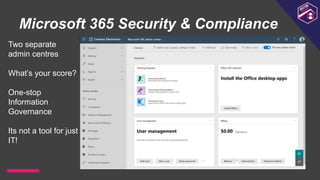
Microsoft 365 Security & Compliance
Two separate
admin centres
What’s your score?
One-stop
Information
Governance
Its not a tool for just
IT!
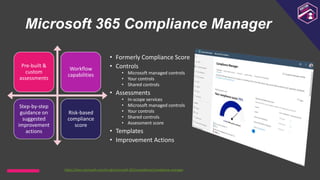
Microsoft 365 Compliance Manager
Pre-built &
custom
assessments
Workflow
capabilities
Step-by-step
guidance on
suggested
improvement
actions
Risk-based
compliance
score
• Formerly Compliance Score
• Controls
• Microsoft managed controls
• Your controls
• Shared controls
• Assessments
• In-scope services
• Microsoft managed controls
• Your controls
• Shared controls
• Assessment score
• Templates
• Improvement Actions
https://docs.microsoft.com/en-gb/microsoft-365/compliance/compliance-manager
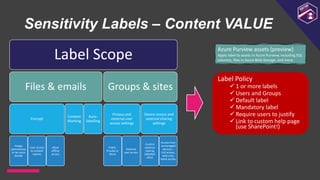
Sensitivity Labels – Content VALUE
Label Scope
Files & emails
Encrypt
Assign
permissions
or let users
decide
User access
to content
expires
Allow
offline
access
Content
Marking
Auto-
labelling
Groups & sites
Privacy and
external user
access settings
Public,
Private or
None
External
user access
Device access and
external sharing
settings
Control
external
sharing
(labelled
sites)
Access from
unmanaged
devices –
Full access,
web-only,
block access
Label Policy
 1 or more labels
 Users and Groups
 Default label
 Mandatory label
 Require users to justify
 Link to custom help page
(use SharePoint!)
Azure Purview assets (preview)
Apply label to assets in Azure Purview, including SQL
columns, files in Azure Blob Storage, and more
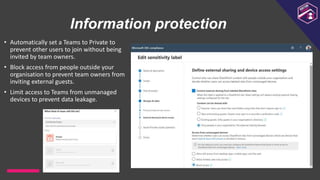
Information protection
• Automatically set a Teams to Private to
prevent other users to join without being
invited by team owners.
• Block access from people outside your
organisation to prevent team owners from
inviting external guests.
• Limit access to Teams from unmanaged
devices to prevent data leakage.
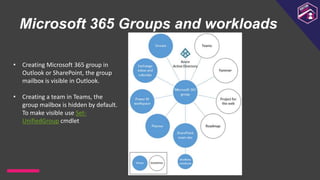
Microsoft 365 Groups and workloads
• Creating Microsoft 365 group in
Outlook or SharePoint, the group
mailbox is visible in Outlook.
• Creating a team in Teams, the
group mailbox is hidden by default.
To make visible use Set-
UnifiedGroup cmdlet
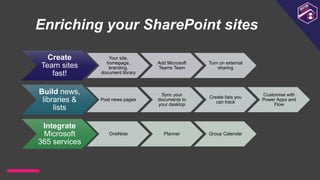
Enriching your SharePoint sites
Create
Team sites
fast!
Your site,
homepage,
branding,
document library
Add Microsoft
Teams Team
Turn on external
sharing
Build news,
libraries &
lists
Post news pages
Sync your
documents to
your desktop
Create lists you
can track
Customise with
Power Apps and
Flow
Integrate
Microsoft
365 services
OneNote Planner Group Calendar
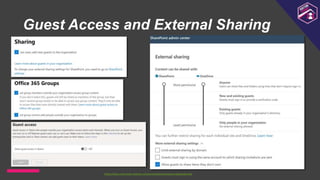
Guest Access and External Sharing
https://docs.microsoft.com/en-us/microsoftteams/teams-dependencies
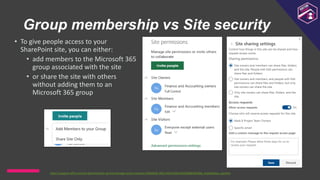
Group membership vs Site security
• To give people access to your
SharePoint site, you can either:
• add members to the Microsoft 365
group associated with the site
• or share the site with others
without adding them to an
Microsoft 365 group
https://support.office.com/en-gb/article/set-up-and-manage-access-requests-94b26e0b-2822-49d4-929a-8455698654b3#bk_enableallow_sponline
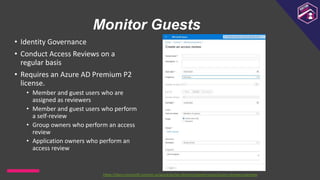
Monitor Guests
• Identity Governance
• Conduct Access Reviews on a
regular basis
• Requires an Azure AD Premium P2
license.
• Member and guest users who are
assigned as reviewers
• Member and guest users who perform
a self-review
• Group owners who perform an access
review
• Application owners who perform an
access review
https://docs.microsoft.com/en-us/azure/active-directory/governance/access-reviews-overview
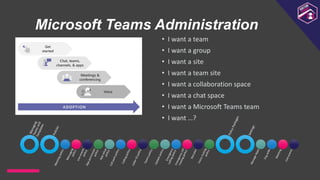
Microsoft Teams Administration
• I want a team
• I want a group
• I want a site
• I want a team site
• I want a collaboration space
• I want a chat space
• I want a Microsoft Teams team
• I want …?
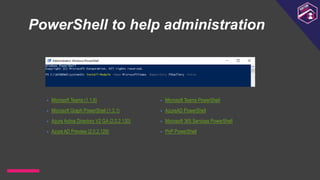
PowerShell to help administration
• Microsoft Teams (1.1.6)
• Microsoft Graph PowerShell (1.3.1)
• Azure Active Directory V2 GA (2.0.2.130)
• Azure AD Preview (2.0.2.129)
• Microsoft Teams PowerShell
• AzureAD PowerShell
• Microsoft 365 Services PowerShell
• PnP PowerShell
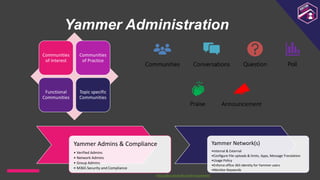
Yammer Administration
Yammer Admins & Compliance
• Verified Admins
• Network Admins
• Group Admins
• M365 Security and Compliance
Yammer Network(s)
•Internal & External
•Configure File uploads & limits, Apps, Message Translation
•Usage Policy
•Enforce office 365 identity for Yammer users
•Monitor Keywords
Communities
of Interest
Communities
of Practice
Functional
Communities
Topic specific
Communities
https://docs.microsoft.com/en-us/yammer/
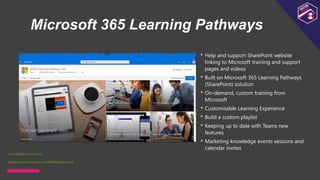
Microsoft 365 Learning Pathways
• Help and support SharePoint website
linking to Microsoft training and support
pages and videos
• Built on Microsoft 365 Learning Pathways
(SharePoint) solution
• On-demand, custom training from
Microsoft
• Customisable Learning Experience
• Build a custom playlist
• Keeping up to date with Teams new
features
• Marketing knowledge events sessions and
calendar invites
https://docs.microsoft.com/en-us/office365/customlearning
https://adoption.microsoft.com
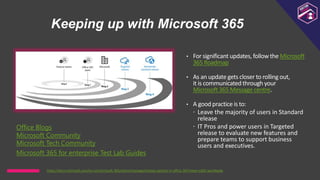
Keeping up with Microsoft 365
• For significant updates, follow the Microsoft
365 Roadmap
• As an update gets closer to rolling out,
it is communicated through your
Microsoft 365 Message centre.
• A good practice is to:
 Leave the majority of users in Standard
release
 IT Pros and power users in Targeted
release to evaluate new features and
prepare teams to support business
users and executives.
Office Blogs
Microsoft Community
Microsoft Tech Community
https://docs.microsoft.com/en-us/microsoft-365/admin/manage/release-options-in-office-365?view=o365-worldwide
Microsoft 365 for enterprise Test Lab Guides
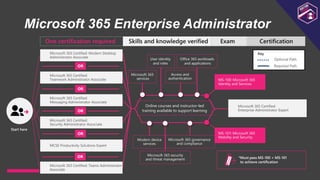
Microsoft 365 Enterprise Administrator
Key
Optional Path
Required Path
Skills and knowledge verified Certification
Exam
One certification required
Start here
Microsoft 365 Certified: Modern Desktop
Administrator Associate
OR
Microsoft 365 Certified:
Teamwork Administrator Associate
OR
Microsoft 365 Certified:
Messaging Administrator Associate
OR
Microsoft 365 Certified:
Security Administrator Associate
OR
MCSE Productivity Solutions Expert
Online courses and instructor-led
training available to support learning
Microsoft 365
services
User identity
and roles
Access and
authentication
Office 365 workloads
and applications
MS-100: Microsoft 365
Identity and Services
Modern device
services
Microsoft 365 security
and threat management
Microsoft 365 governance
and compliance
MS-101: Microsoft 365
Mobility and Security
Microsoft 365 Certified:
Enterprise Administrator Expert
*Must pass MS-100 + MS-101
to achieve certification
Microsoft 365 Certified: Teams Administrator
Associate
OR
#ScottishSummit2021
Thank You

Administrators guide to managing Microsoft 365 and collaboration workloads - Scottish Summit 2021

  • 1.
    #ScottishSummit2021 C h ir a g P a t e l A d m i n i s t r a t o r s g u i d e t o m a n a g i n g M i c r o s o f t 3 6 5 a n d c o l l a b o r a t i o n w o r k l o a d s H U M B I E - 2 7 F e b r u a r y 2 0 2 1 - 2 p m
  • 2.
  • 3.
    Session Overview Microsoft 365 Overview AdminCentres Security and Compliance Collaboration Workloads – Teams, SharePoint, Yammer Adoption and Support
  • 4.
    M i c r o s o f t M V P ( O f f i c e A p p s & S e r v i c e s ) 20 years withSharePoint, SQL Server, Office 365 Microsoft 365 Consultant, Architect, Trainer Deployment, Migrations, Implementations M365UK meetup organiser & speaker Patel Consulting Founder,PrincipalConsultant @techChirag Chirag Patel
  • 5.
    techchirag.com UK 2011-2014 #spsuk EMEA2011 #spsemea India 2012 #spsindia Belgium 2016-2017 #spsbe Cambridge 2017 #spscambs Paris 2015 #spsparis Madrid 2016 #spsmad Barcelona 2017 #spsbcn London 2015-2017, 2019 #spslondon Leicester 2019 #spsleicester Ahmedabad 2020 #M365Ahmedabad Bangalore 2020 #M365BLR
  • 6.
    Microsoft 365 Internal Communication SharePoint Communication Sites Yammer Communities Microsoft Stream Internal Collaboration SharePoint Team Sites Microsoft Teams OneDrive Planner Microsoft Stream Document Management Fileshares Migrations Contracts & Agreements Projects Operations External Collaboration Microsoft Teams SharePoint Sites OneDrive Azure B2B Chat / Enterprise Conversations Yammer Microsoft Teams Outlook Group Conversations Project Management Microsoft Lists Planner Project for the web Project Online Business Applications Dataverse Microsoft Lists Power Apps Power Automate Power BI Microsoft Forms Collaboration & Productivity
  • 7.
    Microsoft 365 AdminCentre Cards Microsoft 365 ESSENTIAL • User management • Billing • Domains • Service Health • Azure Active Directory • Office 365 Software • Data loss prevention report • Office 365 Active Users Report • Message Centre • Training and Guides Security PREVENT • Microsoft Security Score • Identity Protection • Device Compliance • Cloud App Security - OAuth apps • Devices with active malware • DLP policy matches DETECT • Cloud App Security - Anomaly detection • Device protection • Device threat analytics Compliance ASSESS • Microsoft Compliance Score • Cloud app appliance • Users with most shared files PROTECT • Retention label usage • Third-party apps in use • DLP policy matches • Third-party DLP policy matches • Shared Files • Shadow IT apps SharePoint Files by activity type Total and active sites Message centre Services health Teams Microsoft Teams Upgrade User Search Organisation Information Help Articles Admin Training Exchange Recipients Permissions Compliance Management Organisation Protection Advance Threats Mail Flow Mobile Public Folders Unified Messaging Hybrid
  • 8.
    Microsoft 365 Setup Recommendation sof tasks based on signals Green icon indicates task completed Task details gives at a glance info and quick activation to complete task
  • 9.
    Deployment Advisors Self guidedwizards to roll out workloads
  • 10.
    Microsoft 365 Securityand Compliance Policies ID Suggested Policy 1 Enable multi-factor authentication (MFA) for all staff 2 Enable MFA for Admins with assigned administrative rights 3 Enable just-in-time access to complete admin tasks 4 Enforce mobile app protection for phones and tablets 5 Block devices that don’t support modern authentication 6 Require compliant PCs and mobile devices 7 Assign Classification in M365 Groups, Microsoft Teams, SharePoint sites 8 Classify content with sensitivity labels to enable protection 9 Classify information with retention labels 10 Provision data loss prevention (DLP) policies 11 Microsoft cannot access our content to perform service operation without approval https://docs.microsoft.com/en-us/microsoft-365/security/microsoft-365-security-for-bdm
  • 11.
    Conditional Access Policies https://docs.microsoft.com/en-us/azure/active-directory/conditional-access/overview •User or group membership • IP Location information • Device • Application • Real-time and calculated risk detection • Microsoft Cloud App Security (MCAS) • Block access • Most restrictive decision • Grant access • Least restrictive decision, can still require one or more options: • Require multi-factor authentication • Require device to be marked as compliant • Require Hybrid Azure AD joined device • Require approved client app • Require app protection policy (preview) • Requiring multi-factor authentication for users with administrative roles • Requiring multi-factor authentication for Azure management tasks • Blocking sign-ins for users attempting to use legacy authentication protocols • Requiring trusted locations for Azure AD Multi-Factor Authentication registration • Blocking or granting access from specific locations • Blocking risky sign-in behaviors • Requiring organisation-managed devices for specific applications
  • 12.
    Microsoft 365 Security& Compliance Two separate admin centres What’s your score? One-stop Information Governance Its not a tool for just IT!
  • 13.
    Microsoft 365 ComplianceManager Pre-built & custom assessments Workflow capabilities Step-by-step guidance on suggested improvement actions Risk-based compliance score • Formerly Compliance Score • Controls • Microsoft managed controls • Your controls • Shared controls • Assessments • In-scope services • Microsoft managed controls • Your controls • Shared controls • Assessment score • Templates • Improvement Actions https://docs.microsoft.com/en-gb/microsoft-365/compliance/compliance-manager
  • 14.
    Sensitivity Labels –Content VALUE Label Scope Files & emails Encrypt Assign permissions or let users decide User access to content expires Allow offline access Content Marking Auto- labelling Groups & sites Privacy and external user access settings Public, Private or None External user access Device access and external sharing settings Control external sharing (labelled sites) Access from unmanaged devices – Full access, web-only, block access Label Policy  1 or more labels  Users and Groups  Default label  Mandatory label  Require users to justify  Link to custom help page (use SharePoint!) Azure Purview assets (preview) Apply label to assets in Azure Purview, including SQL columns, files in Azure Blob Storage, and more
  • 15.
    Information protection • Automaticallyset a Teams to Private to prevent other users to join without being invited by team owners. • Block access from people outside your organisation to prevent team owners from inviting external guests. • Limit access to Teams from unmanaged devices to prevent data leakage.
  • 16.
    Microsoft 365 Groupsand workloads • Creating Microsoft 365 group in Outlook or SharePoint, the group mailbox is visible in Outlook. • Creating a team in Teams, the group mailbox is hidden by default. To make visible use Set- UnifiedGroup cmdlet
  • 17.
    Enriching your SharePointsites Create Team sites fast! Your site, homepage, branding, document library Add Microsoft Teams Team Turn on external sharing Build news, libraries & lists Post news pages Sync your documents to your desktop Create lists you can track Customise with Power Apps and Flow Integrate Microsoft 365 services OneNote Planner Group Calendar
  • 18.
    Guest Access andExternal Sharing https://docs.microsoft.com/en-us/microsoftteams/teams-dependencies
  • 19.
    Group membership vsSite security • To give people access to your SharePoint site, you can either: • add members to the Microsoft 365 group associated with the site • or share the site with others without adding them to an Microsoft 365 group https://support.office.com/en-gb/article/set-up-and-manage-access-requests-94b26e0b-2822-49d4-929a-8455698654b3#bk_enableallow_sponline
  • 20.
    Monitor Guests • IdentityGovernance • Conduct Access Reviews on a regular basis • Requires an Azure AD Premium P2 license. • Member and guest users who are assigned as reviewers • Member and guest users who perform a self-review • Group owners who perform an access review • Application owners who perform an access review https://docs.microsoft.com/en-us/azure/active-directory/governance/access-reviews-overview
  • 21.
    Microsoft Teams Administration •I want a team • I want a group • I want a site • I want a team site • I want a collaboration space • I want a chat space • I want a Microsoft Teams team • I want …?
  • 22.
    PowerShell to helpadministration • Microsoft Teams (1.1.6) • Microsoft Graph PowerShell (1.3.1) • Azure Active Directory V2 GA (2.0.2.130) • Azure AD Preview (2.0.2.129) • Microsoft Teams PowerShell • AzureAD PowerShell • Microsoft 365 Services PowerShell • PnP PowerShell
  • 23.
    Yammer Administration Yammer Admins& Compliance • Verified Admins • Network Admins • Group Admins • M365 Security and Compliance Yammer Network(s) •Internal & External •Configure File uploads & limits, Apps, Message Translation •Usage Policy •Enforce office 365 identity for Yammer users •Monitor Keywords Communities of Interest Communities of Practice Functional Communities Topic specific Communities https://docs.microsoft.com/en-us/yammer/
  • 24.
    Microsoft 365 LearningPathways • Help and support SharePoint website linking to Microsoft training and support pages and videos • Built on Microsoft 365 Learning Pathways (SharePoint) solution • On-demand, custom training from Microsoft • Customisable Learning Experience • Build a custom playlist • Keeping up to date with Teams new features • Marketing knowledge events sessions and calendar invites https://docs.microsoft.com/en-us/office365/customlearning https://adoption.microsoft.com
  • 25.
    Keeping up withMicrosoft 365 • For significant updates, follow the Microsoft 365 Roadmap • As an update gets closer to rolling out, it is communicated through your Microsoft 365 Message centre. • A good practice is to:  Leave the majority of users in Standard release  IT Pros and power users in Targeted release to evaluate new features and prepare teams to support business users and executives. Office Blogs Microsoft Community Microsoft Tech Community https://docs.microsoft.com/en-us/microsoft-365/admin/manage/release-options-in-office-365?view=o365-worldwide Microsoft 365 for enterprise Test Lab Guides
  • 26.
    Microsoft 365 EnterpriseAdministrator Key Optional Path Required Path Skills and knowledge verified Certification Exam One certification required Start here Microsoft 365 Certified: Modern Desktop Administrator Associate OR Microsoft 365 Certified: Teamwork Administrator Associate OR Microsoft 365 Certified: Messaging Administrator Associate OR Microsoft 365 Certified: Security Administrator Associate OR MCSE Productivity Solutions Expert Online courses and instructor-led training available to support learning Microsoft 365 services User identity and roles Access and authentication Office 365 workloads and applications MS-100: Microsoft 365 Identity and Services Modern device services Microsoft 365 security and threat management Microsoft 365 governance and compliance MS-101: Microsoft 365 Mobility and Security Microsoft 365 Certified: Enterprise Administrator Expert *Must pass MS-100 + MS-101 to achieve certification Microsoft 365 Certified: Teams Administrator Associate OR
  • 27.

Editor's Notes

  • #4 It’s tough managing various workloads within your Microsoft 365 tenant if your organisation has limited IT staff and resources. Here you will learn how to navigate your way to successfully manage and configure various collaboration and information management requirements through Microsoft Teams, SharePoint, Yammer services and Microsoft Stream. During this demo rich session you will get informed with help and advice to best manage your Microsoft 365 Tenant.
  • #6 https://techchirag.com https://twitter.com/techchirag https://www.linkedin.com/in/techchirag https://www.slideshare.net/techchirag https://www.youtube.com/playlist?list=PLJeDQGE0NCWDSoVssBLcJY9paIFgDb-A8
  • #7 Why do you use M365? Know your services perspective
  • #8 Focused Admin with actionable cards Recommendations based on your data