Q-Track
Stay Ahead of the Curve
About C E TA S
CETAS is a Team Of Seasoned IT Professionals with a 100 Plus Years of total
experience in the Enterprise Software Application Space ..
“Organizations that provide executive visibility tend to have less
troubled projects.”
- How to spot a failing project,
CIO Magazine
Ever wondered how some people manage to be so organized !!!
Fed up managing stuff with repetitive email correspondence ???
Ever lost track of what you or a colleague was supposed to be doing
next ???
Looking to increase your company's productivity ???
Then –
“CERTAINLY for YOU”
Q-Track : Is it for Me?!
Q - Tra c k
It a complete task Management suite for …..
PLAN
Execute
Success Q - Tr a c k
O n e A p p l i c a t i o n - M a ny U s e s
• An effective and efficient task management solution including
principles from ‘Getting Things Done’ by David Allen
• Built upon JIRA, a JAVA based product by Atlassian, an
Australian Company
• Highly configurable workflow
• Can work with any database
• Can be deployed in-house OR used on a SaaS model
Curious about Q-TRACK
Dashboards
 Custom / personalized dashboards
 Multiple dashboards
 Flexible Layouts
 Share dashboards within your team
Features – Dashboard
Features – Task creation via email
Task Creation
 Simple & Easy
 No more transcription of tasks from email to Excel
 Task creation directly from email to a pre-configured email id
 Customizable Task types
Reports
 Real time, relevant information
 Convenient formats
 Visibility across roles and groups
Features – Reports
Notifications
 Email notifications @ various transitions of a task
 Email alerts – configurable
 Reminder emails on ‘Overdue’ tasks
 Subscription to reports on issue status – weekly/ monthly
Features – Notifications
Search
 Quick & flexible Search facility
 Precise search results in seconds
 Search results – Configurable
 Search results can be converted to charts for reporting
 Search criteria saved as filters for reuse
 Supports searching of custom fields
Features – Smart Search
Security – Control who sees what & keep your list of to
do's private to your self
 Project level security
 Task level security
 Anonymous access - only if permitted
Features – Security
Task Tracking
 Keeps track of all activities, changes and work logged against tasks
Features – Task Tracking
Time Tracking
 Inbuilt time tracking to record the initial estimate, actual time spent and
the estimated remaining time for your tasks.
 Specify work estimates for each issue and log work as you go
 Track how long tasks have been in flight taking into account office hours
and weekends
 Range of time tracking reports
 User Workload Report – To see how much work an employee has been
allocated, and how long it should take
Features – Time Tracking
• Extensible
 Over 100 plug-ins that enale you extend to fit any special scenario
• Announcement Banner
 Configure an announcement across the top of every page
• Low maintenance
 Low maintenance system with straight forward administration capability
 Has options to integrate with SMS or mobile applications
Features – Others
"One worthwhile task carried to a successful conclusion
is worth half-a-hundred half-finished tasks.”
Malcolm S. Forbes,
Publisher of Forbes Magazine
Say ‘HELLO’ to Productivity
Get introduced to how Q – Track is tailored to work the
way you do, with a sample project:
HOW Q-Track Works ???
Corp.
Task Manager
About ABC Corp.
This presentation is based on a fictitious company called ABC
Corporation, which has Manufacturing, Retail Operations with
Internal IT team.
The workflows covered are:
1. Quality Compliance Tracking in Manufacturing
2. Task Management in Retail Operations (Ad-hoc, Repetitive and Project-
Driven)
3. Internal IT Support workflow
Is this Your Current Dashboard ???
Say ‘No’ to Paper-Lists, Mirror notes or Sticky notes
Say ‘HELLO’ to Productivity
Ad hoc Task Workflow
Create task
Dashboard that provides an at-a-glance overview of your appointments for the day, tasks
currently due or past-due, and any new inbox items or other notification
Integrated Dashboard
Work Flows
 Task Management in Retail Operations (Ad-hoc, Repetitive and Project-Driven)
 Quality Compliance Tracking in Manufacturing
 Internal IT Support workflow
Ad hoc Task Workflow
The Ad Hoc model illustrates ad hoc workflow in
which a generic task, such as an order or an
instruction, is assigned to multiple reviewers for
review and approval. In addition, reviews can be
assigned serially, in which the review task proceeds
from one user to the next until it is complete, or in
parallel, in which case all reviewers are assigned and
carry out their tasks simultaneously.
The workflow model provides the parameters for the
routing, but each process initiator has the ability to
choose the participants and routing method for each
individual instance of the workflow
The business benefits from this Ad Model include:
Flexible user-defined ad-hoc workflow that can be applied to numerous situations
Enables real time tracking of a task’s status
Provides audit trail for compliance purposes
Assignee gets an email alert (or SMS if they’ve opted for); Logs in to view dashboard;
The newly created task is shown in the INBOX (Assigned to me)
Ad hoc Task Workflow
View issue
Ad hoc Task Workflow
Assignee adds comments and logs work against the task
Ad hoc Task Workflow
Assignee creates sub-task and assigns to a Manager in the department
Ad hoc Task Workflow
Sub task assignee logs in and initiates work on Sub task
Ad hoc Task Workflow
Sub task Assignee completes work on sub task
Ad hoc Task Workflow
Meanwhile, the task originator can log in to monitor task progress
Ad hoc Task Workflow
Sub task originator (reporter) reviews and closes sub task, only after which the
original task can be closed.
Ad hoc Task Workflow
Assignee completes task and submits the same to reporter for closing
Ad hoc Task Workflow
Reporter of the task can Review and Close the same or reject it for re-
work
Ad hoc Task Workflow
Internal IT Work Flow
• For tasks
 allocated across departments and
 getting resolved after a final quality check
Quality Compliance Work Flow
• For Manufacturing industries having
stringent quality control measures
• 8D Problem Solving and Root CauseAnalysis
techniques may be included as part of work
flow
• Correction forms may be added as
attachments or as part of workflow
transitions
Quality Compliance Work Flow
QC Work Flow
Non – Conformance issue created
QC Work Flow
Work initiated on issue
QC Work Flow
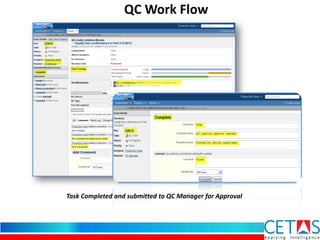
Task Completed and submitted to QC Manager for Approval
QC Work Flow
Work done by the production team approved by Quality manager
Quality Team Head reviews and closes the issue
QC Work Flow
Comments, Change History & Activity stream for the issue shown
Comments, History & Activities
Time Tracking Report
Time tracking report generated - Project-wise
Better insight into Tasks
 Gain real-time access to a common set of accurate business information,
and help your business operate more efficiently.
 Deliver the critical information needed by executives and staff for
effective decision-making.
 Have a better control over operational management
 Give employees quick insight into predefined views of data tailored to
their roles.
 Integration with source code repositories such as CVS, Subversion,
Perforce available.
CETAS Information Technology Pvt. Ltd
Phase 2, Plot No 21,22, 9th Cross Street,
Wood Creek County
St. Thomas Mount, Chennai -600 016
+91 44 4285 0231 / +91 44 2233 1496
sales@cetastech.com
www.cetastech.com
Contact us

Task Management Software

  • 1.
  • 2.
    About C ETA S CETAS is a Team Of Seasoned IT Professionals with a 100 Plus Years of total experience in the Enterprise Software Application Space ..
  • 3.
    “Organizations that provideexecutive visibility tend to have less troubled projects.” - How to spot a failing project, CIO Magazine
  • 4.
    Ever wondered howsome people manage to be so organized !!! Fed up managing stuff with repetitive email correspondence ??? Ever lost track of what you or a colleague was supposed to be doing next ??? Looking to increase your company's productivity ??? Then – “CERTAINLY for YOU” Q-Track : Is it for Me?!
  • 5.
    Q - Trac k It a complete task Management suite for ….. PLAN Execute Success Q - Tr a c k
  • 6.
    O n eA p p l i c a t i o n - M a ny U s e s
  • 7.
    • An effectiveand efficient task management solution including principles from ‘Getting Things Done’ by David Allen • Built upon JIRA, a JAVA based product by Atlassian, an Australian Company • Highly configurable workflow • Can work with any database • Can be deployed in-house OR used on a SaaS model Curious about Q-TRACK
  • 8.
    Dashboards  Custom /personalized dashboards  Multiple dashboards  Flexible Layouts  Share dashboards within your team Features – Dashboard
  • 9.
    Features – Taskcreation via email Task Creation  Simple & Easy  No more transcription of tasks from email to Excel  Task creation directly from email to a pre-configured email id  Customizable Task types
  • 10.
    Reports  Real time,relevant information  Convenient formats  Visibility across roles and groups Features – Reports
  • 11.
    Notifications  Email notifications@ various transitions of a task  Email alerts – configurable  Reminder emails on ‘Overdue’ tasks  Subscription to reports on issue status – weekly/ monthly Features – Notifications
  • 12.
    Search  Quick &flexible Search facility  Precise search results in seconds  Search results – Configurable  Search results can be converted to charts for reporting  Search criteria saved as filters for reuse  Supports searching of custom fields Features – Smart Search
  • 13.
    Security – Controlwho sees what & keep your list of to do's private to your self  Project level security  Task level security  Anonymous access - only if permitted Features – Security
  • 14.
    Task Tracking  Keepstrack of all activities, changes and work logged against tasks Features – Task Tracking
  • 15.
    Time Tracking  Inbuilttime tracking to record the initial estimate, actual time spent and the estimated remaining time for your tasks.  Specify work estimates for each issue and log work as you go  Track how long tasks have been in flight taking into account office hours and weekends  Range of time tracking reports  User Workload Report – To see how much work an employee has been allocated, and how long it should take Features – Time Tracking
  • 16.
    • Extensible  Over100 plug-ins that enale you extend to fit any special scenario • Announcement Banner  Configure an announcement across the top of every page • Low maintenance  Low maintenance system with straight forward administration capability  Has options to integrate with SMS or mobile applications Features – Others
  • 17.
    "One worthwhile taskcarried to a successful conclusion is worth half-a-hundred half-finished tasks.” Malcolm S. Forbes, Publisher of Forbes Magazine Say ‘HELLO’ to Productivity
  • 18.
    Get introduced tohow Q – Track is tailored to work the way you do, with a sample project: HOW Q-Track Works ??? Corp. Task Manager
  • 19.
    About ABC Corp. Thispresentation is based on a fictitious company called ABC Corporation, which has Manufacturing, Retail Operations with Internal IT team. The workflows covered are: 1. Quality Compliance Tracking in Manufacturing 2. Task Management in Retail Operations (Ad-hoc, Repetitive and Project- Driven) 3. Internal IT Support workflow
  • 20.
    Is this YourCurrent Dashboard ??? Say ‘No’ to Paper-Lists, Mirror notes or Sticky notes Say ‘HELLO’ to Productivity
  • 21.
    Ad hoc TaskWorkflow Create task
  • 22.
    Dashboard that providesan at-a-glance overview of your appointments for the day, tasks currently due or past-due, and any new inbox items or other notification Integrated Dashboard
  • 23.
    Work Flows  TaskManagement in Retail Operations (Ad-hoc, Repetitive and Project-Driven)  Quality Compliance Tracking in Manufacturing  Internal IT Support workflow
  • 24.
    Ad hoc TaskWorkflow The Ad Hoc model illustrates ad hoc workflow in which a generic task, such as an order or an instruction, is assigned to multiple reviewers for review and approval. In addition, reviews can be assigned serially, in which the review task proceeds from one user to the next until it is complete, or in parallel, in which case all reviewers are assigned and carry out their tasks simultaneously. The workflow model provides the parameters for the routing, but each process initiator has the ability to choose the participants and routing method for each individual instance of the workflow The business benefits from this Ad Model include: Flexible user-defined ad-hoc workflow that can be applied to numerous situations Enables real time tracking of a task’s status Provides audit trail for compliance purposes
  • 25.
    Assignee gets anemail alert (or SMS if they’ve opted for); Logs in to view dashboard; The newly created task is shown in the INBOX (Assigned to me) Ad hoc Task Workflow
  • 26.
    View issue Ad hocTask Workflow
  • 27.
    Assignee adds commentsand logs work against the task Ad hoc Task Workflow
  • 28.
    Assignee creates sub-taskand assigns to a Manager in the department Ad hoc Task Workflow
  • 29.
    Sub task assigneelogs in and initiates work on Sub task Ad hoc Task Workflow
  • 30.
    Sub task Assigneecompletes work on sub task Ad hoc Task Workflow
  • 31.
    Meanwhile, the taskoriginator can log in to monitor task progress Ad hoc Task Workflow
  • 32.
    Sub task originator(reporter) reviews and closes sub task, only after which the original task can be closed. Ad hoc Task Workflow
  • 33.
    Assignee completes taskand submits the same to reporter for closing Ad hoc Task Workflow
  • 34.
    Reporter of thetask can Review and Close the same or reject it for re- work Ad hoc Task Workflow
  • 35.
    Internal IT WorkFlow • For tasks  allocated across departments and  getting resolved after a final quality check
  • 36.
    Quality Compliance WorkFlow • For Manufacturing industries having stringent quality control measures • 8D Problem Solving and Root CauseAnalysis techniques may be included as part of work flow • Correction forms may be added as attachments or as part of workflow transitions
  • 37.
  • 38.
    QC Work Flow Non– Conformance issue created
  • 39.
    QC Work Flow Workinitiated on issue
  • 40.
    QC Work Flow TaskCompleted and submitted to QC Manager for Approval
  • 41.
    QC Work Flow Workdone by the production team approved by Quality manager
  • 42.
    Quality Team Headreviews and closes the issue QC Work Flow
  • 43.
    Comments, Change History& Activity stream for the issue shown Comments, History & Activities
  • 44.
    Time Tracking Report Timetracking report generated - Project-wise
  • 45.
    Better insight intoTasks  Gain real-time access to a common set of accurate business information, and help your business operate more efficiently.  Deliver the critical information needed by executives and staff for effective decision-making.  Have a better control over operational management  Give employees quick insight into predefined views of data tailored to their roles.  Integration with source code repositories such as CVS, Subversion, Perforce available.
  • 46.
    CETAS Information TechnologyPvt. Ltd Phase 2, Plot No 21,22, 9th Cross Street, Wood Creek County St. Thomas Mount, Chennai -600 016 +91 44 4285 0231 / +91 44 2233 1496 sales@cetastech.com www.cetastech.com Contact us