
USER STORIES Martin Lapointe, PMP, CSM
June 2014
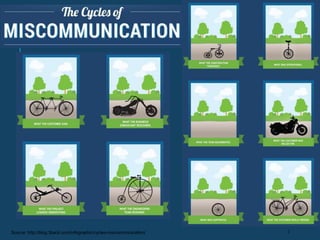
2Source: http://blog.3back.com/infographic/cycles-miscommunication/
AGILE MANIFESTO -
VALUES
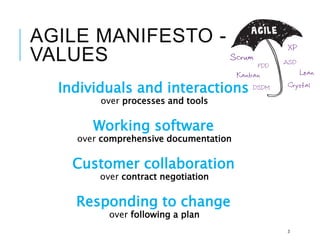
Individuals and interactions
over processes and tools
Working software
over comprehensive documentation
Customer collaboration
over contract negotiation
Responding to change
over following a plan
3
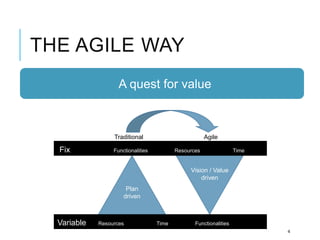
THE AGILE WAY
4
Plan
driven
Variable Resources Time Functionalities
Fix Functionalities Resources Time
Vision / Value
driven
Traditional Agile
A quest for value
THE AGILE WAY
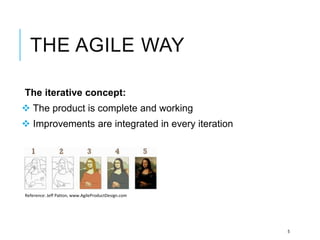
The iterative concept:
 The product is complete and working
 Improvements are integrated in every iteration
5
Reference: Jeff Patton, www.AgileProductDesign.com
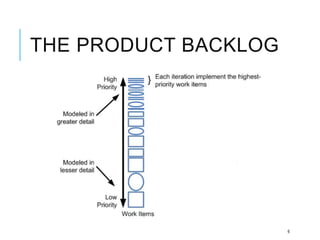
THE PRODUCT BACKLOG
6
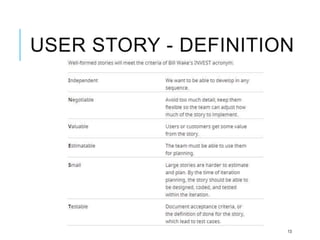
USER STORY - DEFINITION
User Story Background
The term “User Story” was first used
Kent Beck in 1996, and became popular
through its inclusion in the first Extreme
Programming Project.
7
USER STORY - DEFINITION
Ron Jeffries wrote about the Three C’s of the
user story:
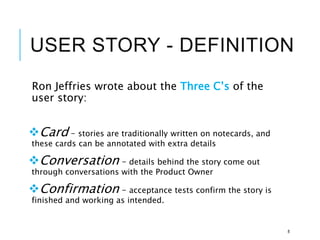
Card – stories are traditionally written on notecards, and
these cards can be annotated with extra details
Conversation – details behind the story come out
through conversations with the Product Owner
Confirmation – acceptance tests confirm the story is
finished and working as intended.
8
USER STORY - DEFINITION
1. Short
User Story statement (Who, What, Why) on a Post-it
2. Define expected scope
Detailed with acceptance criteria
3. Element for discussion
The details are used to discuss and understand the scope within the team
4. Input for the Tests
Acceptance criteria should be used for defining the tests
5. A piece of working software
A functionality that goes through all the technical application layers
USER STORY - DEFINITION
Why use user stories?
Keep yourself expressing business value
Right amount of details for the present need
Avoid the appearance of false completeness and
clarity
Get to small enough chunks that invite negotiation
10
WHO’S RESPONSIBLE?
The Product Owner
The Product Owner is the best person to represent the
client, and having the product vision.
The Product Owner can prioritize with the business value.
USER STORIES must be written in the business language
and avoid technical jargon.
USER STORY - DEFINITION
What size should a user story
be?
Should be small enough to be
coded and tested within an iteration /
Sprint
12
USER STORY - DEFINITION
13
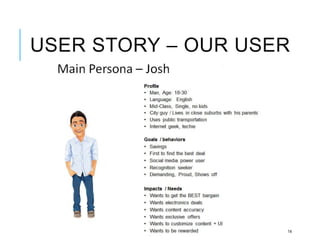
USER STORY – OUR USER
14
USER STORY STATEMENT
AS A …
< USER ROLE>
I NEED…
< Goal, what the user needs>
IN ORDER TO …
< Justification, Why>
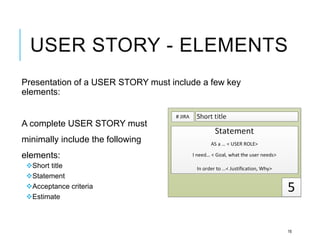
USER STORY - ELEMENTS
Presentation of a USER STORY must include a few key
elements:
A complete USER STORY must
minimally include the following
elements:
Short title
Statement
Acceptance criteria
Estimate
16
USER STORY – SIMPLICITY
Focus on one idea per USER STORY
Avoid:
 Conjunctions « AND »
 Limitations « unless »
« except under… »
Simplicity = Easy to understand by the team
USER STORY -
RESPONSIBILITIES
The Product Owner must focus on the WHATand leave the
solution to the team.
The HOWwill be handled by the team with tasks relating to
acceptance criteria.
ACCEPTANCE CRITERIA
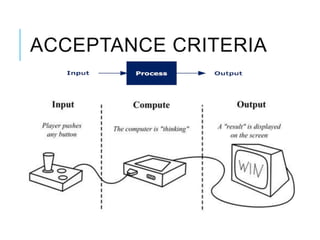
Acceptance criteria define the
boundaries of a user story, and are
used to confirm when a story is
completed and working as intended.
ACCEPTANCE CRITERIA
Several benefits:
Team to think through the user’s specific needs
Remove ambiguity from requirements
Form the tests that will confirm feature
ACCEPTANCE CRITERIA
What are good acceptance criteria?
State an intent not a solution
(e.g. “The user can choose an account” rather than
“The user can select the account from a drop-down”)
Are independent of implementation
(ideally the phrasing would be the same regardless
whether this feature would be implemented on web,
mobile or a voice activated system)
Are relatively high level
(not every detail needs to be in writing)
ACCEPTANCE CRITERIA
Example:
As a conference attendee, I want to be able to register
online,
so I can register quickly and cut down on paperwork
The acceptance criteria could include:
A user cannot submit a form without completing all the mandatory fields
Information from the form is stored in the registrations database
Protection against spam is working
Payment can be made via credit card
An acknowledgment email is sent to the user after submitting the form.
ACCEPTANCE CRITERIA
ACCEPTANCE CRITERIA
Where do the details go?
The details normally come up in the
conversation about the story with the
Product owner.
This would be at the sprint planning
meeting or when the team starts coding
this particular story.
ACCEPTANCE CRITERIA
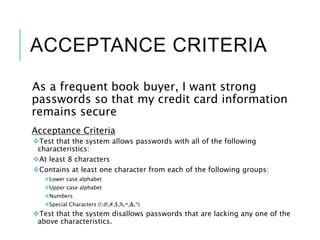
As a frequent book buyer, I want strong
passwords so that my credit card information
remains secure
Acceptance Criteria
Test that the system allows passwords with all of the following
characteristics:
At least 8 characters
Contains at least one character from each of the following groups:
Lower case alphabet
Upper case alphabet
Numbers
Special Characters (!,@,#,$,%,^,&,*)
Test that the system disallows passwords that are lacking any one of the
above characteristics.
ACCEPTANCE CRITERIA
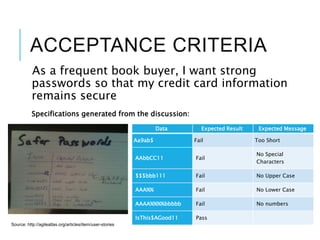
As a frequent book buyer, I want strong
passwords so that my credit card information
remains secure
Specifications generated from the discussion:
Data Expected Result Expected Message
Aa9ab$ Fail Too Short
AAbbCC11 Fail
No Special
Characters
$$$bbb111 Fail No Upper Case
AAA%% Fail No Lower Case
AAAA%%%%bbbbb Fail No numbers
IsThis$AGood11 Pass
Source: http://agileatlas.org/articles/item/user-stories
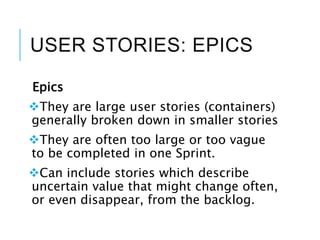
USER STORIES: EPICS
Epics
They are large user stories (containers)
generally broken down in smaller stories
They are often too large or too vague
to be completed in one Sprint.
Can include stories which describe
uncertain value that might change often,
or even disappear, from the backlog.
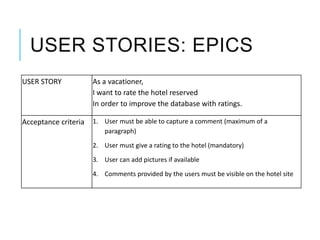
USER STORIES: EPICS
USER STORY As a vacationer,
I want to rate the hotel reserved
In order to improve the database with ratings.
Acceptance criteria 1. User must be able to capture a comment (maximum of a
paragraph)
2. User must give a rating to the hotel (mandatory)
3. User can add pictures if available
4. Comments provided by the users must be visible on the hotel site
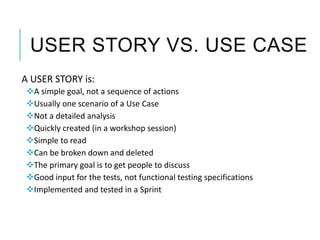
USER STORY VS. USE CASE
A USER STORY is:
A simple goal, not a sequence of actions
Usually one scenario of a Use Case
Not a detailed analysis
Quickly created (in a workshop session)
Simple to read
Can be broken down and deleted
The primary goal is to get people to discuss
Good input for the tests, not functional testing specifications
Implemented and tested in a Sprint
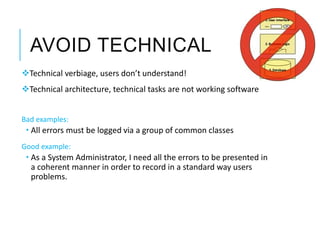
AVOID TECHNICAL
Technical verbiage, users don’t understand!
Technical architecture, technical tasks are not working software
Bad examples:
 All errors must be logged via a group of common classes
Good example:
 As a System Administrator, I need all the errors to be presented in
a coherent manner in order to record in a standard way users
problems.
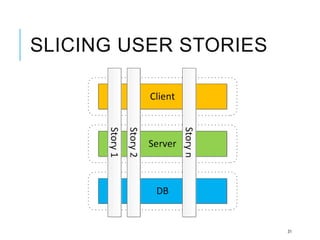
SLICING USER STORIES
31
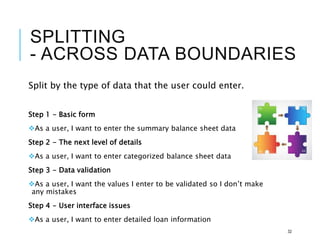
SPLITTING
- ACROSS DATA BOUNDARIES
Split by the type of data that the user could enter.
Step 1 - Basic form
As a user, I want to enter the summary balance sheet data
Step 2 - The next level of details
As a user, I want to enter categorized balance sheet data
Step 3 - Data validation
As a user, I want the values I enter to be validated so I don’t make
any mistakes
Step 4 - User interface issues
As a user, I want to enter detailed loan information
32
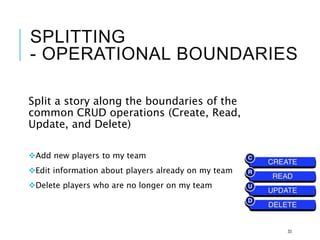
SPLITTING
- OPERATIONAL BOUNDARIES
Split a story along the boundaries of the
common CRUD operations (Create, Read,
Update, and Delete)
Add new players to my team
Edit information about players already on my team
Delete players who are no longer on my team
33
SPLITTING
- CROSS-CUTTING CONCERNS
(Security, error-handling, and logging, etc.)
Many applications contain screens that behave
differently depending on the privileges of the
current user.
1. Develop screens in one iteration
2. Support for user specific privileges in a later iteration.
34
SPLITTING
- PERFORMANCE CONSTRAINTS
Make it work, the make it faster!
Splitting large stories by separating the
functional and non-functional aspects into
separate stories.
35
SPLITTING
- MIXED PRIORITIES
Separate into smaller stories if different priorities
The story can be split by looking for low priority
elements. First support the core login requirement.
Large story = As a user, I am required to log into the system
Acceptance Criteria:
If the user enters a valid username and password, he is granted access.
If the user enters an invalid password three times in a row, he is denied access
until he calls customer service.
If the user is denied access, he is sent an email stating that an attempt was made
to use her account.
36
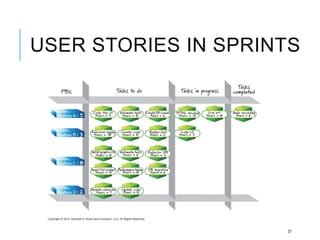
USER STORIES IN SPRINTS
37
QUESTIONS
38

User Stories explained

  • 1.
    USER STORIES MartinLapointe, PMP, CSM June 2014
  • 2.
  • 3.
    AGILE MANIFESTO - VALUES Individualsand interactions over processes and tools Working software over comprehensive documentation Customer collaboration over contract negotiation Responding to change over following a plan 3
  • 4.
    THE AGILE WAY 4 Plan driven VariableResources Time Functionalities Fix Functionalities Resources Time Vision / Value driven Traditional Agile A quest for value
  • 5.
    THE AGILE WAY Theiterative concept:  The product is complete and working  Improvements are integrated in every iteration 5 Reference: Jeff Patton, www.AgileProductDesign.com
  • 6.
  • 7.
    USER STORY -DEFINITION User Story Background The term “User Story” was first used Kent Beck in 1996, and became popular through its inclusion in the first Extreme Programming Project. 7
  • 8.
    USER STORY -DEFINITION Ron Jeffries wrote about the Three C’s of the user story: Card – stories are traditionally written on notecards, and these cards can be annotated with extra details Conversation – details behind the story come out through conversations with the Product Owner Confirmation – acceptance tests confirm the story is finished and working as intended. 8
  • 9.
    USER STORY -DEFINITION 1. Short User Story statement (Who, What, Why) on a Post-it 2. Define expected scope Detailed with acceptance criteria 3. Element for discussion The details are used to discuss and understand the scope within the team 4. Input for the Tests Acceptance criteria should be used for defining the tests 5. A piece of working software A functionality that goes through all the technical application layers
  • 10.
    USER STORY -DEFINITION Why use user stories? Keep yourself expressing business value Right amount of details for the present need Avoid the appearance of false completeness and clarity Get to small enough chunks that invite negotiation 10
  • 11.
    WHO’S RESPONSIBLE? The ProductOwner The Product Owner is the best person to represent the client, and having the product vision. The Product Owner can prioritize with the business value. USER STORIES must be written in the business language and avoid technical jargon.
  • 12.
    USER STORY -DEFINITION What size should a user story be? Should be small enough to be coded and tested within an iteration / Sprint 12
  • 13.
    USER STORY -DEFINITION 13
  • 14.
    USER STORY –OUR USER 14
  • 15.
    USER STORY STATEMENT ASA … < USER ROLE> I NEED… < Goal, what the user needs> IN ORDER TO … < Justification, Why>
  • 16.
    USER STORY -ELEMENTS Presentation of a USER STORY must include a few key elements: A complete USER STORY must minimally include the following elements: Short title Statement Acceptance criteria Estimate 16
  • 17.
    USER STORY –SIMPLICITY Focus on one idea per USER STORY Avoid:  Conjunctions « AND »  Limitations « unless » « except under… » Simplicity = Easy to understand by the team
  • 18.
    USER STORY - RESPONSIBILITIES TheProduct Owner must focus on the WHATand leave the solution to the team. The HOWwill be handled by the team with tasks relating to acceptance criteria.
  • 19.
    ACCEPTANCE CRITERIA Acceptance criteriadefine the boundaries of a user story, and are used to confirm when a story is completed and working as intended.
  • 20.
    ACCEPTANCE CRITERIA Several benefits: Teamto think through the user’s specific needs Remove ambiguity from requirements Form the tests that will confirm feature
  • 21.
    ACCEPTANCE CRITERIA What aregood acceptance criteria? State an intent not a solution (e.g. “The user can choose an account” rather than “The user can select the account from a drop-down”) Are independent of implementation (ideally the phrasing would be the same regardless whether this feature would be implemented on web, mobile or a voice activated system) Are relatively high level (not every detail needs to be in writing)
  • 22.
    ACCEPTANCE CRITERIA Example: As aconference attendee, I want to be able to register online, so I can register quickly and cut down on paperwork The acceptance criteria could include: A user cannot submit a form without completing all the mandatory fields Information from the form is stored in the registrations database Protection against spam is working Payment can be made via credit card An acknowledgment email is sent to the user after submitting the form.
  • 23.
  • 24.
    ACCEPTANCE CRITERIA Where dothe details go? The details normally come up in the conversation about the story with the Product owner. This would be at the sprint planning meeting or when the team starts coding this particular story.
  • 25.
    ACCEPTANCE CRITERIA As afrequent book buyer, I want strong passwords so that my credit card information remains secure Acceptance Criteria Test that the system allows passwords with all of the following characteristics: At least 8 characters Contains at least one character from each of the following groups: Lower case alphabet Upper case alphabet Numbers Special Characters (!,@,#,$,%,^,&,*) Test that the system disallows passwords that are lacking any one of the above characteristics.
  • 26.
    ACCEPTANCE CRITERIA As afrequent book buyer, I want strong passwords so that my credit card information remains secure Specifications generated from the discussion: Data Expected Result Expected Message Aa9ab$ Fail Too Short AAbbCC11 Fail No Special Characters $$$bbb111 Fail No Upper Case AAA%% Fail No Lower Case AAAA%%%%bbbbb Fail No numbers IsThis$AGood11 Pass Source: http://agileatlas.org/articles/item/user-stories
  • 27.
    USER STORIES: EPICS Epics Theyare large user stories (containers) generally broken down in smaller stories They are often too large or too vague to be completed in one Sprint. Can include stories which describe uncertain value that might change often, or even disappear, from the backlog.
  • 28.
    USER STORIES: EPICS USERSTORY As a vacationer, I want to rate the hotel reserved In order to improve the database with ratings. Acceptance criteria 1. User must be able to capture a comment (maximum of a paragraph) 2. User must give a rating to the hotel (mandatory) 3. User can add pictures if available 4. Comments provided by the users must be visible on the hotel site
  • 29.
    USER STORY VS.USE CASE A USER STORY is: A simple goal, not a sequence of actions Usually one scenario of a Use Case Not a detailed analysis Quickly created (in a workshop session) Simple to read Can be broken down and deleted The primary goal is to get people to discuss Good input for the tests, not functional testing specifications Implemented and tested in a Sprint
  • 30.
    AVOID TECHNICAL Technical verbiage,users don’t understand! Technical architecture, technical tasks are not working software Bad examples:  All errors must be logged via a group of common classes Good example:  As a System Administrator, I need all the errors to be presented in a coherent manner in order to record in a standard way users problems.
  • 31.
  • 32.
    SPLITTING - ACROSS DATABOUNDARIES Split by the type of data that the user could enter. Step 1 - Basic form As a user, I want to enter the summary balance sheet data Step 2 - The next level of details As a user, I want to enter categorized balance sheet data Step 3 - Data validation As a user, I want the values I enter to be validated so I don’t make any mistakes Step 4 - User interface issues As a user, I want to enter detailed loan information 32
  • 33.
    SPLITTING - OPERATIONAL BOUNDARIES Splita story along the boundaries of the common CRUD operations (Create, Read, Update, and Delete) Add new players to my team Edit information about players already on my team Delete players who are no longer on my team 33
  • 34.
    SPLITTING - CROSS-CUTTING CONCERNS (Security,error-handling, and logging, etc.) Many applications contain screens that behave differently depending on the privileges of the current user. 1. Develop screens in one iteration 2. Support for user specific privileges in a later iteration. 34
  • 35.
    SPLITTING - PERFORMANCE CONSTRAINTS Makeit work, the make it faster! Splitting large stories by separating the functional and non-functional aspects into separate stories. 35
  • 36.
    SPLITTING - MIXED PRIORITIES Separateinto smaller stories if different priorities The story can be split by looking for low priority elements. First support the core login requirement. Large story = As a user, I am required to log into the system Acceptance Criteria: If the user enters a valid username and password, he is granted access. If the user enters an invalid password three times in a row, he is denied access until he calls customer service. If the user is denied access, he is sent an email stating that an attempt was made to use her account. 36
  • 37.
    USER STORIES INSPRINTS 37
  • 38.

Editor's Notes

  • #13 —ideally just a few days. When a story is too large, it is called an epic.
  • #19 Write USER STORIES centered on the needs, and after the team will do the rest.
  • #31 With a non-technical shape, benefits become clear for the clients.