TASK TRACKING SYSTEM
BY
DUDHAT ANKIT
KHUNTI BALU
MOMIN MAYSAMALI
THAKER MAULIK

4KM07CS011
4KM08CS035
4KM08CS043
4KM08CS088

Internal Guide
Mr. JATINDRA NATH DAS(Asst. Professor)
INTRODUCTION
 “Task Tracking System” is a window based web

application. A simple but one of the most promising
applications that will work as a interface between the
user & Admin.
 Effective management and technical support are
required for the success of large-scale projects. Many
tasks must still be performed by a human
being, including activity plan generation, construction
of activity networks, and project monitoring. These
project monitoring capabilities are realized using
diagnostic and dealing heuristics.
ABSTRACT
Now a days you will notice that many people are not able to
remember their tasks so the advantage of this application is remind
their tasks to user and give the track report about their project/task.
This application gives the capability to distribute the work among
the user for the particular project purpose of good, efficient and
effective work.
 It provides best team Productivity, decreases expenses and
increases profits, facilitates team communication. It is easy to work
with this application.
OBJECTIVE
 User Objectives, Values and Concerns. In establishing the run-

time qualities for a system, it is important to identify all the
categories of user (including other systems) that will interact with
the system, and understand what quality attributes they care
about.
 A quality attribute such as performance may surface for one user

as a concern, and another as a value, so it is useful to direct
elicitation of both values and concerns for any (group of) user(s).
It is important to focus on creating just what ADMIN want, with
the qualities they care.
LITERATURE SURVEY
1. Goal of Project:
In the world of globalization, performing task is being the
backbone of

industries. Every companies competing among

them with Existing technologies to save their time and paper

work.
2.Improves Team Productivity
3.Decreases Expenses and Increases Profits

4.Facilitates Team Communication
5.Unlimited projects
HARDWARE REQUIREMENT
HARDWARE
The specification of the system is as follows.
SYSTEM
Intel/Pentium/500 MHz Processor
RAM
256 MB
STORAGE
500 MB Hard Disk
OPERATING SYSTEM
Microsoft Windows XP Onwards
SOFTWARE REQUIREMENT
SOFTWARE
The specification of the system is as follows.
 FRAMEWORK
PHP, MySQL
 LANGUAGE
PHP,HTML,JAVASCRIPT

 DOCUMENTATION
MS-Word 2007
CONTINUED…
 FRONT END
PHP,HTML,CSS
 MIDDLE WARE
JAVASCRIPT

 BACK END
MySQL SERVER
IMPLEMENTATION
 Task Tracking system "adapt" to the users tasks, project status
update and new tasks entry to improve accuracy. A system that has
had time enough to adapt to an individual project tasks.
The tracking can adapt to the users tasks and various subtasks of
projects. First, it can gradually adapt the codebook vectors used to

calculate the acoustic feature number. Second, it can adapt the
probability that a feature number will appear.
ADMIN MODULE
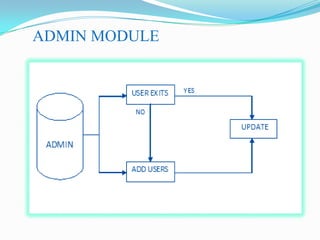
 The above figure shows how the admin activity is
divided into sub-activity (processes), each of which
deals with one or more of the data flows and provide
all of the functionality of the system as a whole.
It also identifies internal data stores that must be
present in order for the system to do its job, and shows
the flow of data between the various parts of the
application.
Admin can add user and also edit a data of user
which are require.
USER MODULE
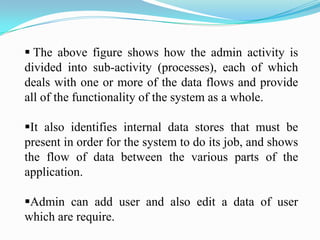
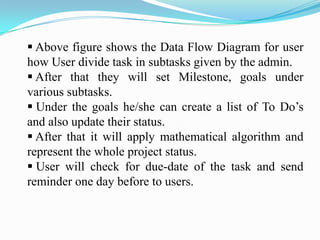
 Above figure shows the Data Flow Diagram for user
how User divide task in subtasks given by the admin.
 After that they will set Milestone, goals under
various subtasks.
 Under the goals he/she can create a list of To Do’s
and also update their status.
 After that it will apply mathematical algorithm and
represent the whole project status.
 User will check for due-date of the task and send
reminder one day before to users.
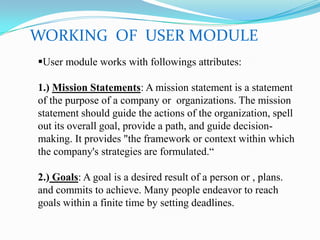
WORKING OF USER MODULE
User module works with followings attributes:
1.) Mission Statements: A mission statement is a statement
of the purpose of a company or organizations. The mission
statement should guide the actions of the organization, spell
out its overall goal, provide a path, and guide decisionmaking. It provides "the framework or context within which
the company's strategies are formulated.“
2.) Goals: A goal is a desired result of a person or , plans.
and commits to achieve. Many people endeavor to reach
goals within a finite time by setting deadlines.
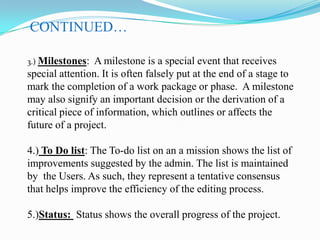
CONTINUED…
3.) Milestones:

A milestone is a special event that receives
special attention. It is often falsely put at the end of a stage to
mark the completion of a work package or phase. A milestone
may also signify an important decision or the derivation of a
critical piece of information, which outlines or affects the
future of a project.
4.) To Do list: The To-do list on an a mission shows the list of
improvements suggested by the admin. The list is maintained
by the Users. As such, they represent a tentative consensus
that helps improve the efficiency of the editing process.
5.)Status: Status shows the overall progress of the project.
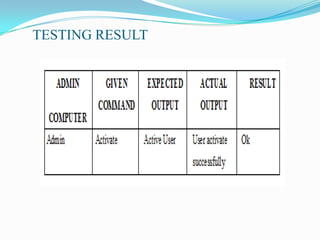
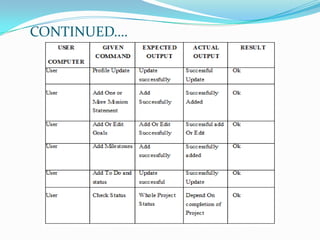
TESTING RESULT
CONTINUED….
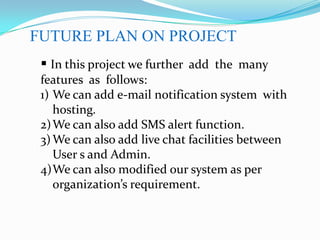
FUTURE PLAN ON PROJECT
 In this project we further add the many
features as follows:
1) We can add e-mail notification system with
hosting.
2) We can also add SMS alert function.
3) We can also add live chat facilities between
User s and Admin.
4)We can also modified our system as per
organization’s requirement.
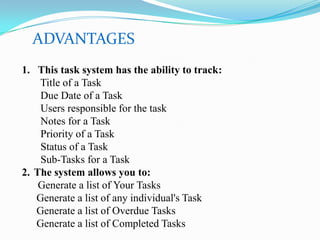
ADVANTAGES
1. This task system has the ability to track:
Title of a Task
Due Date of a Task
Users responsible for the task
Notes for a Task
Priority of a Task
Status of a Task
Sub-Tasks for a Task
2. The system allows you to:
Generate a list of Your Tasks
Generate a list of any individual's Task
Generate a list of Overdue Tasks
Generate a list of Completed Tasks
CONCLUSION
 Task tracking is the primary means of communication
between users of same projects or work they are performing
together.
 Invocation through project or tasks perform by user is
simple but one of the most promising applications that will
work as a interface between the user & admin.
 An application that will allow one to control his/her
computer by login into a system and update the project
detail and task detail in the system so it is easy to get
information about the project status and description about
the project and it will save time and no need of paperwork.
REFERENCE
 BOOKS

[1].
[2].
[3].

FOLLOWED
PHP 6 & My SQL 5,2ND edition By, W. Jason Gilmore
Beginning PHP, Apache, MySQL By Michel K. Glass
Pro Javascript Techniques, By John Resig

 WEB REFERENCES
[1].
http://www.javascriptsource.com
[2].
http://www.php.net
[3].
http://www.codeproject.com
[4].
http://www.w3schools.com
THANK YOU

Task tracking system

  • 2.
    TASK TRACKING SYSTEM BY DUDHATANKIT KHUNTI BALU MOMIN MAYSAMALI THAKER MAULIK 4KM07CS011 4KM08CS035 4KM08CS043 4KM08CS088 Internal Guide Mr. JATINDRA NATH DAS(Asst. Professor)
  • 3.
    INTRODUCTION  “Task TrackingSystem” is a window based web application. A simple but one of the most promising applications that will work as a interface between the user & Admin.  Effective management and technical support are required for the success of large-scale projects. Many tasks must still be performed by a human being, including activity plan generation, construction of activity networks, and project monitoring. These project monitoring capabilities are realized using diagnostic and dealing heuristics.
  • 4.
    ABSTRACT Now a daysyou will notice that many people are not able to remember their tasks so the advantage of this application is remind their tasks to user and give the track report about their project/task. This application gives the capability to distribute the work among the user for the particular project purpose of good, efficient and effective work.  It provides best team Productivity, decreases expenses and increases profits, facilitates team communication. It is easy to work with this application.
  • 5.
    OBJECTIVE  User Objectives,Values and Concerns. In establishing the run- time qualities for a system, it is important to identify all the categories of user (including other systems) that will interact with the system, and understand what quality attributes they care about.  A quality attribute such as performance may surface for one user as a concern, and another as a value, so it is useful to direct elicitation of both values and concerns for any (group of) user(s). It is important to focus on creating just what ADMIN want, with the qualities they care.
  • 6.
    LITERATURE SURVEY 1. Goalof Project: In the world of globalization, performing task is being the backbone of industries. Every companies competing among them with Existing technologies to save their time and paper work. 2.Improves Team Productivity 3.Decreases Expenses and Increases Profits 4.Facilitates Team Communication 5.Unlimited projects
  • 7.
    HARDWARE REQUIREMENT HARDWARE The specificationof the system is as follows. SYSTEM Intel/Pentium/500 MHz Processor RAM 256 MB STORAGE 500 MB Hard Disk OPERATING SYSTEM Microsoft Windows XP Onwards
  • 8.
    SOFTWARE REQUIREMENT SOFTWARE The specificationof the system is as follows.  FRAMEWORK PHP, MySQL  LANGUAGE PHP,HTML,JAVASCRIPT  DOCUMENTATION MS-Word 2007
  • 9.
    CONTINUED…  FRONT END PHP,HTML,CSS MIDDLE WARE JAVASCRIPT  BACK END MySQL SERVER
  • 10.
    IMPLEMENTATION  Task Trackingsystem "adapt" to the users tasks, project status update and new tasks entry to improve accuracy. A system that has had time enough to adapt to an individual project tasks. The tracking can adapt to the users tasks and various subtasks of projects. First, it can gradually adapt the codebook vectors used to calculate the acoustic feature number. Second, it can adapt the probability that a feature number will appear.
  • 11.
  • 12.
     The abovefigure shows how the admin activity is divided into sub-activity (processes), each of which deals with one or more of the data flows and provide all of the functionality of the system as a whole. It also identifies internal data stores that must be present in order for the system to do its job, and shows the flow of data between the various parts of the application. Admin can add user and also edit a data of user which are require.
  • 13.
  • 14.
     Above figureshows the Data Flow Diagram for user how User divide task in subtasks given by the admin.  After that they will set Milestone, goals under various subtasks.  Under the goals he/she can create a list of To Do’s and also update their status.  After that it will apply mathematical algorithm and represent the whole project status.  User will check for due-date of the task and send reminder one day before to users.
  • 15.
    WORKING OF USERMODULE User module works with followings attributes: 1.) Mission Statements: A mission statement is a statement of the purpose of a company or organizations. The mission statement should guide the actions of the organization, spell out its overall goal, provide a path, and guide decisionmaking. It provides "the framework or context within which the company's strategies are formulated.“ 2.) Goals: A goal is a desired result of a person or , plans. and commits to achieve. Many people endeavor to reach goals within a finite time by setting deadlines.
  • 16.
    CONTINUED… 3.) Milestones: A milestoneis a special event that receives special attention. It is often falsely put at the end of a stage to mark the completion of a work package or phase. A milestone may also signify an important decision or the derivation of a critical piece of information, which outlines or affects the future of a project. 4.) To Do list: The To-do list on an a mission shows the list of improvements suggested by the admin. The list is maintained by the Users. As such, they represent a tentative consensus that helps improve the efficiency of the editing process. 5.)Status: Status shows the overall progress of the project.
  • 17.
  • 18.
  • 19.
    FUTURE PLAN ONPROJECT  In this project we further add the many features as follows: 1) We can add e-mail notification system with hosting. 2) We can also add SMS alert function. 3) We can also add live chat facilities between User s and Admin. 4)We can also modified our system as per organization’s requirement.
  • 20.
    ADVANTAGES 1. This tasksystem has the ability to track: Title of a Task Due Date of a Task Users responsible for the task Notes for a Task Priority of a Task Status of a Task Sub-Tasks for a Task 2. The system allows you to: Generate a list of Your Tasks Generate a list of any individual's Task Generate a list of Overdue Tasks Generate a list of Completed Tasks
  • 21.
    CONCLUSION  Task trackingis the primary means of communication between users of same projects or work they are performing together.  Invocation through project or tasks perform by user is simple but one of the most promising applications that will work as a interface between the user & admin.  An application that will allow one to control his/her computer by login into a system and update the project detail and task detail in the system so it is easy to get information about the project status and description about the project and it will save time and no need of paperwork.
  • 22.
    REFERENCE  BOOKS [1]. [2]. [3]. FOLLOWED PHP 6& My SQL 5,2ND edition By, W. Jason Gilmore Beginning PHP, Apache, MySQL By Michel K. Glass Pro Javascript Techniques, By John Resig  WEB REFERENCES [1]. http://www.javascriptsource.com [2]. http://www.php.net [3]. http://www.codeproject.com [4]. http://www.w3schools.com
  • 23.