Power App Types
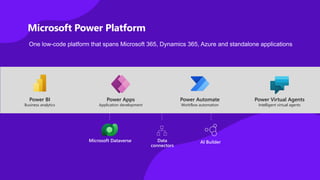
Microsoft Power Platform
One low-code platform that spans Microsoft 365, Dynamics 365, Azure and standalone applications
Power BI
Business analytics
Microsoft Dataverse Data
connectors
AI Builder
Power Virtual Agents
Intelligent virtual agents
Power Apps
Application development
Power Automate
Workflow automation
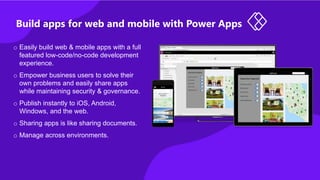
Build apps for web and mobile with Power Apps
o Easily build web & mobile apps with a full
featured low-code/no-code development
experience.
o Empower business users to solve their
own problems and easily share apps
while maintaining security & governance.
o Publish instantly to iOS, Android,
Windows, and the web.
o Sharing apps is like sharing documents.
o Manage across environments.
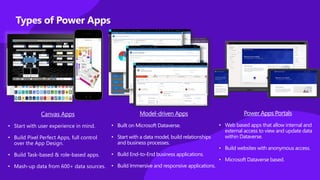
Types of Power Apps
Model-driven Apps
• Built on Microsoft Dataverse.
• Start with a data model, build relationships
and business processes.
• Build End-to-End business applications.
• Build Immersive and responsive applications.
Canvas Apps
• Start with user experience in mind.
• Build Pixel Perfect Apps, full control
over the App Design.
• Build Task-based & role-based apps.
• Mash-up data from 600+ data sources.
Power Apps Portals
• Web based apps that allow internal and
external access to view and update data
within Dataverse.
• Build websites with anonymous access.
• Microsoft Dataverse based.
Canvas Apps
Canvas Apps
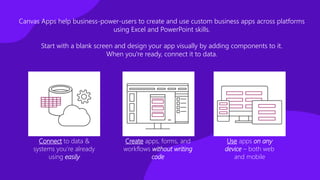
Canvas Apps help business-power-users to create and use custom business apps across platforms
using Excel and PowerPoint skills.
Start with a blank screen and design your app visually by adding components to it.
When you're ready, connect it to data.
Connect to data &
systems you’re already
using easily
Create apps, forms, and
workflows without writing
code
Use apps on any
device – both web
and mobile
Connectors
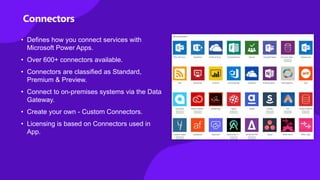
• Defines how you connect services with
Microsoft Power Apps.
• Over 600+ connectors available.
• Connectors are classified as Standard,
Premium & Preview.
• Connect to on-premises systems via the Data
Gateway.
• Create your own - Custom Connectors.
• Licensing is based on Connectors used in
App.
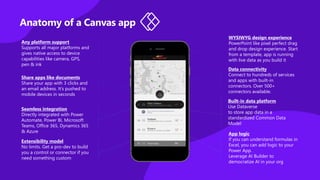
Anatomy of a Canvas app
Any platform support
Supports all major platforms and
gives native access to device
capabilities like camera, GPS,
pen & ink
Share apps like documents
Share your app with 3 clicks and
an email address. It’s pushed to
mobile devices in seconds
Seamless integration
Directly integrated with Power
Automate, Power BI, Microsoft
Teams, Office 365, Dynamics 365
& Azure
Extensibility model
No limits. Get a pro-dev to build
you a control or connector if you
need something custom
WYSIWYG design experience
PowerPoint like pixel perfect drag
and drop design experience. Start
from a template, app is running
with live data as you build it
Data connectivity
Connect to hundreds of services
and apps with built-in
connectors. Over 500+
connectors available.
Built-in data platform
Use Dataverse
to store app data in a
standardized Common Data
Model
App logic
If you can understand formulas in
Excel, you can add logic to your
Power App.
Leverage AI Builder to
democratize AI in your org
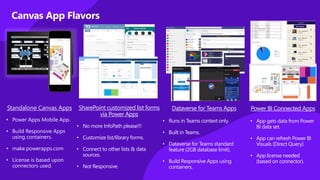
Canvas App Flavors
SharePoint customized list forms
via Power Apps
• No more InfoPath please!!!
• Customize list/library forms.
• Connect to other lists & data
sources.
• Not Responsive.
Standalone Canvas Apps
• Power Apps Mobile App.
• Build Responsive Apps
using containers.
• make.powerapps.com
• License is based upon
connectors used.
Power BI Connected Apps
• App gets data from Power
BI data set.
• App can refresh Power BI
Visuals (Direct Query)
• App license needed
(based on connector).
Dataverse for Teams Apps
• Runs in Teams context only.
• Built in Teams.
• Dataverse for Teams standard
feature (2GB database limit).
• Build Responsive Apps using
containers.
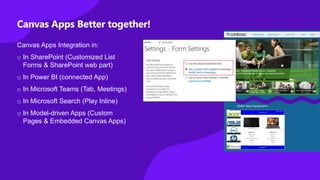
Canvas Apps Better together!
Canvas Apps Integration in:
o In SharePoint (Customized List
Forms & SharePoint web part)
o In Power BI (connected App)
o In Microsoft Teams (Tab, Meetings)
o In Microsoft Search (Play Inline)
o In Model-driven Apps (Custom
Pages & Embedded Canvas Apps)
When to start with Canvas Apps
o Low Code (Excel & PowerPoint Skills)
o Build Pixel Perfect Apps, full control over the App Design.
o Build Task-based & role-based apps.
o Mix & Mash-up data from 600+ data sources (integrate with data sources).
o Rich integration features (SharePoint, SQL, Power Automate, Power BI, etc.)
o Native Mobile Capabilities (Camera, Location etc.)
o Licensing (If standard connectors are used)
o Data source is not Dataverse. (If you are already invested in other data sources e.g.
SharePoint, SQL)
Demo – Canvas Apps
Model-driven Apps
Model-driven Apps
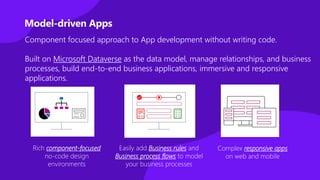
Complex responsive apps
on web and mobile
Easily add Business rules and
Business process flows to model
your business processes
Rich component-focused
no-code design
environments
Component focused approach to App development without writing code.
Built on Microsoft Dataverse as the data model, manage relationships, and business
processes, build end-to-end business applications, immersive and responsive
applications.
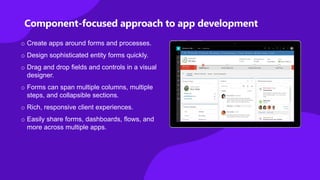
Component-focused approach to app development
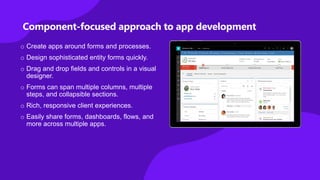
o Create apps around forms and processes.
o Design sophisticated entity forms quickly.
o Drag and drop fields and controls in a visual
designer.
o Forms can span multiple columns, multiple
steps, and collapsible sections.
o Rich, responsive client experiences.
o Easily share forms, dashboards, flows, and
more across multiple apps.
o Create apps around forms and processes.
o Design sophisticated entity forms quickly.
o Drag and drop fields and controls in a visual
designer.
o Forms can span multiple columns, multiple
steps, and collapsible sections.
o Rich, responsive client experiences.
o Easily share forms, dashboards, flows, and
more across multiple apps.
Component-focused approach to app development
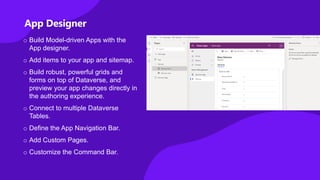
App Designer
o Build Model-driven Apps with the
App designer.
o Add items to your app and sitemap.
o Build robust, powerful grids and
forms on top of Dataverse, and
preview your app changes directly in
the authoring experience.
o Connect to multiple Dataverse
Tables.
o Define the App Navigation Bar.
o Add Custom Pages.
o Customize the Command Bar.
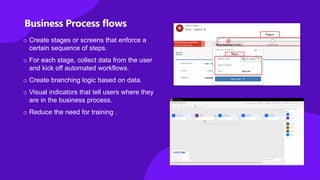
o Create stages or screens that enforce a
certain sequence of steps.
o For each stage, collect data from the user
and kick off automated workflows.
o Create branching logic based on data.
o Visual indicators that tell users where they
are in the business process.
o Reduce the need for training .
Business Process flows
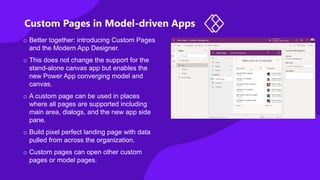
Custom Pages in Model-driven Apps
o Better together: introducing Custom Pages
and the Modern App Designer.
o This does not change the support for the
stand-alone canvas app but enables the
new Power App converging model and
canvas.
o A custom page can be used in places
where all pages are supported including
main area, dialogs, and the new app side
pane.
o Build pixel perfect landing page with data
pulled from across the organization.
o Custom pages can open other custom
pages or model pages.
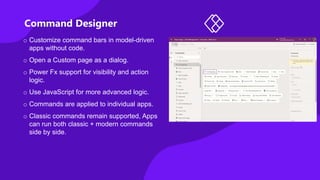
Command Designer
o Customize command bars in model-driven
apps without code.
o Open a Custom page as a dialog.
o Power Fx support for visibility and action
logic.
o Use JavaScript for more advanced logic.
o Commands are applied to individual apps.
o Classic commands remain supported, Apps
can run both classic + modern commands
side by side.
When to start with Model-Driven Apps
o No-Code
o Leverages Dataverse - Same database that Dynamics 365 is built on.
o Component focused approach with Relationship driven architecture.
o Focus on the data model.
o Responsive by design.
o App adapts to changes in data model & security.
o Leverage Business Process flows, Business Rules, Forms , Views, Charts etc.
o Common user tooling functionality (import, export, sort, filter etc.).
o Native Offline Capabilities.
o Delegation challenges averted.
o Invested in Premium License or Dynamics 365.
Demo – Model-driven Apps
Portals
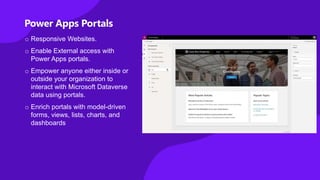
Power Apps Portals
o Responsive Websites.
o Enable External access with
Power Apps portals.
o Empower anyone either inside or
outside your organization to
interact with Microsoft Dataverse
data using portals.
o Enrich portals with model-driven
forms, views, lists, charts, and
dashboards
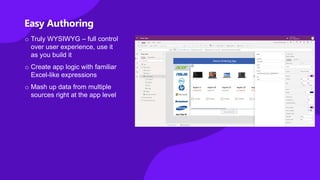
Easy Authoring
o Truly WYSIWYG – full control
over user experience, use it
as you build it
o Create app logic with familiar
Excel-like expressions
o Mash up data from multiple
sources right at the app level
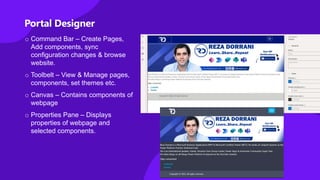
Portal Designer
o Command Bar – Create Pages,
Add components, sync
configuration changes & browse
website.
o Toolbelt – View & Manage pages,
components, set themes etc.
o Canvas – Contains components of
webpage
o Properties Pane – Displays
properties of webpage and
selected components.
When to use Portals
o Responsive Websites
o Anonymous & External access to website backed by Microsoft Dataverse
o Leverage Dataverse features – Relational Database
o Easy to build.
o UI Control.
Demo – Portals
Feature Comparison
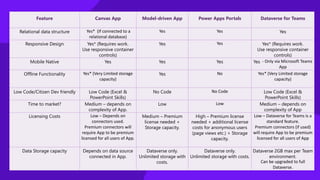
Feature Canvas App Model-driven App Power Apps Portals Dataverse for Teams
Relational data structure Yes* (If connected to a
relational database)
Yes Yes Yes
Responsive Design Yes* (Requires work.
Use responsive container
controls)
Yes Yes Yes* (Requires work.
Use responsive container
controls)
Mobile Native Yes Yes Yes Yes - Only via Microsoft Teams
App
Offline Functionality Yes* (Very Limited storage
capacity)
Yes No Yes* (Very Limited storage
capacity)
Low Code/Citizen Dev friendly Low Code (Excel &
PowerPoint Skills)
No Code No Code Low Code (Excel &
PowerPoint Skills)
Time to market? Medium – depends on
complexity of App.
Low Low Medium – depends on
complexity of App
Licensing Costs Low – Depends on
connectors used.
Premium connectors will
require App to be premium
licensed for all users of App.
Medium – Premium
license needed +
Storage capacity.
High – Premium license
needed + additional license
costs for anonymous users
(page views etc.) + Storage
capacity.
Low – Dataverse for Teams is a
standard feature.
Premium connectors (if used)
will require App to be premium
licensed for all users of App
Data Storage capacity Depends on data source
connected in App.
Dataverse only.
Unlimited storage with
costs.
Dataverse only.
Unlimited storage with costs.
Dataverse 2GB max per Team
environment.
Can be upgraded to full
Dataverse.
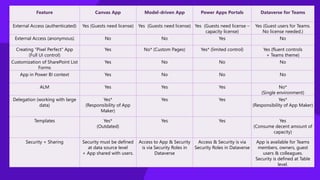
Feature Canvas App Model-driven App Power Apps Portals Dataverse for Teams
External Access (authenticated) Yes (Guests need license) Yes (Guests need license) Yes (Guests need license –
capacity license)
Yes (Guest users for Teams.
No license needed.)
External Access (anonymous) No No Yes No
Creating "Pixel Perfect" App
(Full UI control)
Yes No* (Custom Pages) Yes* (limited control) Yes (fluent controls
+ Teams theme)
Customization of SharePoint List
Forms
Yes No No No
App in Power BI context Yes No No No
ALM Yes Yes Yes No*
(Single environment)
Delegation (working with large
data)
Yes*
(Responsibility of App
Maker)
Yes Yes Yes*
(Responsibility of App Maker)
Templates Yes*
(Outdated)
Yes Yes Yes
(Consume decent amount of
capacity)
Security + Sharing Security must be defined
at data source level
+ App shared with users.
Access to App & Security
is via Security Roles in
Dataverse
Access & Security is via
Security Roles in Dataverse
App is available for Teams
members, owners, guest
users & colleagues.
Security is defined at Table
level.
Thank You

Introduction to power apps

  • 1.
  • 2.
    Microsoft Power Platform Onelow-code platform that spans Microsoft 365, Dynamics 365, Azure and standalone applications Power BI Business analytics Microsoft Dataverse Data connectors AI Builder Power Virtual Agents Intelligent virtual agents Power Apps Application development Power Automate Workflow automation
  • 3.
    Build apps forweb and mobile with Power Apps o Easily build web & mobile apps with a full featured low-code/no-code development experience. o Empower business users to solve their own problems and easily share apps while maintaining security & governance. o Publish instantly to iOS, Android, Windows, and the web. o Sharing apps is like sharing documents. o Manage across environments.
  • 4.
    Types of PowerApps Model-driven Apps • Built on Microsoft Dataverse. • Start with a data model, build relationships and business processes. • Build End-to-End business applications. • Build Immersive and responsive applications. Canvas Apps • Start with user experience in mind. • Build Pixel Perfect Apps, full control over the App Design. • Build Task-based & role-based apps. • Mash-up data from 600+ data sources. Power Apps Portals • Web based apps that allow internal and external access to view and update data within Dataverse. • Build websites with anonymous access. • Microsoft Dataverse based.
  • 5.
  • 6.
    Canvas Apps helpbusiness-power-users to create and use custom business apps across platforms using Excel and PowerPoint skills. Start with a blank screen and design your app visually by adding components to it. When you're ready, connect it to data. Connect to data & systems you’re already using easily Create apps, forms, and workflows without writing code Use apps on any device – both web and mobile
  • 7.
    Connectors • Defines howyou connect services with Microsoft Power Apps. • Over 600+ connectors available. • Connectors are classified as Standard, Premium & Preview. • Connect to on-premises systems via the Data Gateway. • Create your own - Custom Connectors. • Licensing is based on Connectors used in App.
  • 8.
    Anatomy of aCanvas app Any platform support Supports all major platforms and gives native access to device capabilities like camera, GPS, pen & ink Share apps like documents Share your app with 3 clicks and an email address. It’s pushed to mobile devices in seconds Seamless integration Directly integrated with Power Automate, Power BI, Microsoft Teams, Office 365, Dynamics 365 & Azure Extensibility model No limits. Get a pro-dev to build you a control or connector if you need something custom WYSIWYG design experience PowerPoint like pixel perfect drag and drop design experience. Start from a template, app is running with live data as you build it Data connectivity Connect to hundreds of services and apps with built-in connectors. Over 500+ connectors available. Built-in data platform Use Dataverse to store app data in a standardized Common Data Model App logic If you can understand formulas in Excel, you can add logic to your Power App. Leverage AI Builder to democratize AI in your org
  • 9.
    Canvas App Flavors SharePointcustomized list forms via Power Apps • No more InfoPath please!!! • Customize list/library forms. • Connect to other lists & data sources. • Not Responsive. Standalone Canvas Apps • Power Apps Mobile App. • Build Responsive Apps using containers. • make.powerapps.com • License is based upon connectors used. Power BI Connected Apps • App gets data from Power BI data set. • App can refresh Power BI Visuals (Direct Query) • App license needed (based on connector). Dataverse for Teams Apps • Runs in Teams context only. • Built in Teams. • Dataverse for Teams standard feature (2GB database limit). • Build Responsive Apps using containers.
  • 10.
    Canvas Apps Bettertogether! Canvas Apps Integration in: o In SharePoint (Customized List Forms & SharePoint web part) o In Power BI (connected App) o In Microsoft Teams (Tab, Meetings) o In Microsoft Search (Play Inline) o In Model-driven Apps (Custom Pages & Embedded Canvas Apps)
  • 11.
    When to startwith Canvas Apps o Low Code (Excel & PowerPoint Skills) o Build Pixel Perfect Apps, full control over the App Design. o Build Task-based & role-based apps. o Mix & Mash-up data from 600+ data sources (integrate with data sources). o Rich integration features (SharePoint, SQL, Power Automate, Power BI, etc.) o Native Mobile Capabilities (Camera, Location etc.) o Licensing (If standard connectors are used) o Data source is not Dataverse. (If you are already invested in other data sources e.g. SharePoint, SQL)
  • 12.
  • 13.
  • 14.
    Model-driven Apps Complex responsiveapps on web and mobile Easily add Business rules and Business process flows to model your business processes Rich component-focused no-code design environments Component focused approach to App development without writing code. Built on Microsoft Dataverse as the data model, manage relationships, and business processes, build end-to-end business applications, immersive and responsive applications.
  • 15.
    Component-focused approach toapp development o Create apps around forms and processes. o Design sophisticated entity forms quickly. o Drag and drop fields and controls in a visual designer. o Forms can span multiple columns, multiple steps, and collapsible sections. o Rich, responsive client experiences. o Easily share forms, dashboards, flows, and more across multiple apps.
  • 16.
    o Create appsaround forms and processes. o Design sophisticated entity forms quickly. o Drag and drop fields and controls in a visual designer. o Forms can span multiple columns, multiple steps, and collapsible sections. o Rich, responsive client experiences. o Easily share forms, dashboards, flows, and more across multiple apps. Component-focused approach to app development
  • 17.
    App Designer o BuildModel-driven Apps with the App designer. o Add items to your app and sitemap. o Build robust, powerful grids and forms on top of Dataverse, and preview your app changes directly in the authoring experience. o Connect to multiple Dataverse Tables. o Define the App Navigation Bar. o Add Custom Pages. o Customize the Command Bar.
  • 18.
    o Create stagesor screens that enforce a certain sequence of steps. o For each stage, collect data from the user and kick off automated workflows. o Create branching logic based on data. o Visual indicators that tell users where they are in the business process. o Reduce the need for training . Business Process flows
  • 19.
    Custom Pages inModel-driven Apps o Better together: introducing Custom Pages and the Modern App Designer. o This does not change the support for the stand-alone canvas app but enables the new Power App converging model and canvas. o A custom page can be used in places where all pages are supported including main area, dialogs, and the new app side pane. o Build pixel perfect landing page with data pulled from across the organization. o Custom pages can open other custom pages or model pages.
  • 20.
    Command Designer o Customizecommand bars in model-driven apps without code. o Open a Custom page as a dialog. o Power Fx support for visibility and action logic. o Use JavaScript for more advanced logic. o Commands are applied to individual apps. o Classic commands remain supported, Apps can run both classic + modern commands side by side.
  • 21.
    When to startwith Model-Driven Apps o No-Code o Leverages Dataverse - Same database that Dynamics 365 is built on. o Component focused approach with Relationship driven architecture. o Focus on the data model. o Responsive by design. o App adapts to changes in data model & security. o Leverage Business Process flows, Business Rules, Forms , Views, Charts etc. o Common user tooling functionality (import, export, sort, filter etc.). o Native Offline Capabilities. o Delegation challenges averted. o Invested in Premium License or Dynamics 365.
  • 22.
  • 23.
  • 24.
    Power Apps Portals oResponsive Websites. o Enable External access with Power Apps portals. o Empower anyone either inside or outside your organization to interact with Microsoft Dataverse data using portals. o Enrich portals with model-driven forms, views, lists, charts, and dashboards
  • 25.
    Easy Authoring o TrulyWYSIWYG – full control over user experience, use it as you build it o Create app logic with familiar Excel-like expressions o Mash up data from multiple sources right at the app level
  • 26.
    Portal Designer o CommandBar – Create Pages, Add components, sync configuration changes & browse website. o Toolbelt – View & Manage pages, components, set themes etc. o Canvas – Contains components of webpage o Properties Pane – Displays properties of webpage and selected components.
  • 27.
    When to usePortals o Responsive Websites o Anonymous & External access to website backed by Microsoft Dataverse o Leverage Dataverse features – Relational Database o Easy to build. o UI Control.
  • 28.
  • 29.
  • 30.
    Feature Canvas AppModel-driven App Power Apps Portals Dataverse for Teams Relational data structure Yes* (If connected to a relational database) Yes Yes Yes Responsive Design Yes* (Requires work. Use responsive container controls) Yes Yes Yes* (Requires work. Use responsive container controls) Mobile Native Yes Yes Yes Yes - Only via Microsoft Teams App Offline Functionality Yes* (Very Limited storage capacity) Yes No Yes* (Very Limited storage capacity) Low Code/Citizen Dev friendly Low Code (Excel & PowerPoint Skills) No Code No Code Low Code (Excel & PowerPoint Skills) Time to market? Medium – depends on complexity of App. Low Low Medium – depends on complexity of App Licensing Costs Low – Depends on connectors used. Premium connectors will require App to be premium licensed for all users of App. Medium – Premium license needed + Storage capacity. High – Premium license needed + additional license costs for anonymous users (page views etc.) + Storage capacity. Low – Dataverse for Teams is a standard feature. Premium connectors (if used) will require App to be premium licensed for all users of App Data Storage capacity Depends on data source connected in App. Dataverse only. Unlimited storage with costs. Dataverse only. Unlimited storage with costs. Dataverse 2GB max per Team environment. Can be upgraded to full Dataverse.
  • 31.
    Feature Canvas AppModel-driven App Power Apps Portals Dataverse for Teams External Access (authenticated) Yes (Guests need license) Yes (Guests need license) Yes (Guests need license – capacity license) Yes (Guest users for Teams. No license needed.) External Access (anonymous) No No Yes No Creating "Pixel Perfect" App (Full UI control) Yes No* (Custom Pages) Yes* (limited control) Yes (fluent controls + Teams theme) Customization of SharePoint List Forms Yes No No No App in Power BI context Yes No No No ALM Yes Yes Yes No* (Single environment) Delegation (working with large data) Yes* (Responsibility of App Maker) Yes Yes Yes* (Responsibility of App Maker) Templates Yes* (Outdated) Yes Yes Yes (Consume decent amount of capacity) Security + Sharing Security must be defined at data source level + App shared with users. Access to App & Security is via Security Roles in Dataverse Access & Security is via Security Roles in Dataverse App is available for Teams members, owners, guest users & colleagues. Security is defined at Table level.
  • 32.

Editor's Notes

  • #19 Examples: Onboarding and training new employees Nurturing sales leads and closing the loop on opportunities