OPERATING SYSTEM DESIGN
AND IMPLEMENTATION
• We consider the design goals, mechanisms
and policy and how the system is
implemented.
• Design goals:
Two groups :
1. User goals
2. System goals
User’s goals:
1. Easy to learn
2. Easy to use
3. System should be reliable and safe
4. Execution speed is fast
A similar set of requirements can be defined by
those people who must design, create, maintain,
and operate the system.
There is, in short, no unique solution to the problem
of defining the requirements for an operating
system
System’ goals:
• Mechanisms determine how to do
something; policies determine what will be
done. For example, the timer construct is a
mechanism for ensuring CPU protection, but
deciding how long the timer is to be set for a
particular user is a policy decision.
Hardware protection :
 Programmer has the complete control over the
system.
 When new operating systems developed with
some additional features, the system control will
transfer from programmer to the operating
system.
 Before the operating system, programmer is
responsible for the controls of input-output device
operations.
Implementation
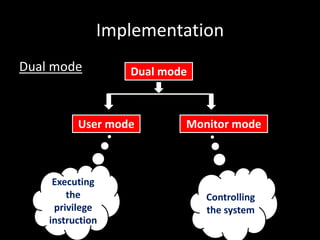
Dual mode Dual mode
User mode Monitor mode
Executing
the
privilege
instruction
Controlling
the system
Dual mode operation
Monitor
mode
User
mode
Interrupt/fault
Set user mode
• At the booting time, the hardware starts in the
monitor mode, then operating system is
loaded.
• The hardware switches from user mode to
monitor mode when interrupts occur.
• When the operating system gains control of
the system, it is in monitor mode.
• In short, dual mode operation provides the
protection to the operating system from
unauthorised users
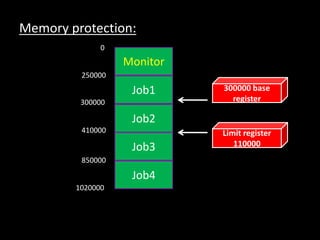
Memory protection:
Monitor
Job1
Job2
Job3
Job4
300000 base
register
Limit register
110000
0
250000
300000
410000
850000
1020000
• Memory protection varies from one operating
system to another operating system.
• It is implemented in several ways.
1. It shows the memory protection using base
register and limit register
2. Every programme requires the memory address
for storing and executing.
3. Base register : It holds the smallest legal physical
memory address.
4. Limit register : It contains the size of the range
• Base and limit registers can be loaded only by
the operating system.
• It uses a special privileged instructions
• These instructions are executed only in the
monitor mode and the operating system
executes in monitor mode .
• Operating system prevents the user
programmes from changing the content of the
registers.
I/O protection :
 A user programme may disrupt the normal
operation of the system by issuing illegal I/O
instructions.
 To prevent users from performing illegal I/O,
we define all I/O instructions to be privileged
instructions.
 Users cannot issue I/O instruction directly.
 Through operating system, user can
issue the privilleged instructions
• CPU protection
 Operating system must maintain the control
over the system.
 Otherwise user programme will go to the
infinite loop and never return the control to the
operating system.
 Using timer, we can protect from this type of
situation.
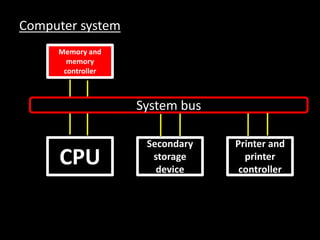
Computer system
Memory and
memory
controller
CPU
Secondary
storage
device
Printer and
printer
controller
System bus

System design

  • 1.
  • 2.
    • We considerthe design goals, mechanisms and policy and how the system is implemented. • Design goals: Two groups : 1. User goals 2. System goals
  • 3.
    User’s goals: 1. Easyto learn 2. Easy to use 3. System should be reliable and safe 4. Execution speed is fast A similar set of requirements can be defined by those people who must design, create, maintain, and operate the system. There is, in short, no unique solution to the problem of defining the requirements for an operating system
  • 4.
    System’ goals: • Mechanismsdetermine how to do something; policies determine what will be done. For example, the timer construct is a mechanism for ensuring CPU protection, but deciding how long the timer is to be set for a particular user is a policy decision.
  • 5.
    Hardware protection : Programmer has the complete control over the system.  When new operating systems developed with some additional features, the system control will transfer from programmer to the operating system.  Before the operating system, programmer is responsible for the controls of input-output device operations.
  • 6.
    Implementation Dual mode Dualmode User mode Monitor mode Executing the privilege instruction Controlling the system
  • 7.
  • 8.
    • At thebooting time, the hardware starts in the monitor mode, then operating system is loaded. • The hardware switches from user mode to monitor mode when interrupts occur. • When the operating system gains control of the system, it is in monitor mode. • In short, dual mode operation provides the protection to the operating system from unauthorised users
  • 9.
    Memory protection: Monitor Job1 Job2 Job3 Job4 300000 base register Limitregister 110000 0 250000 300000 410000 850000 1020000
  • 10.
    • Memory protectionvaries from one operating system to another operating system. • It is implemented in several ways. 1. It shows the memory protection using base register and limit register 2. Every programme requires the memory address for storing and executing. 3. Base register : It holds the smallest legal physical memory address. 4. Limit register : It contains the size of the range
  • 11.
    • Base andlimit registers can be loaded only by the operating system. • It uses a special privileged instructions • These instructions are executed only in the monitor mode and the operating system executes in monitor mode . • Operating system prevents the user programmes from changing the content of the registers.
  • 12.
    I/O protection : A user programme may disrupt the normal operation of the system by issuing illegal I/O instructions.  To prevent users from performing illegal I/O, we define all I/O instructions to be privileged instructions.  Users cannot issue I/O instruction directly.  Through operating system, user can issue the privilleged instructions
  • 13.
    • CPU protection Operating system must maintain the control over the system.  Otherwise user programme will go to the infinite loop and never return the control to the operating system.  Using timer, we can protect from this type of situation.
  • 14.