SYSTEM STRUCTURE
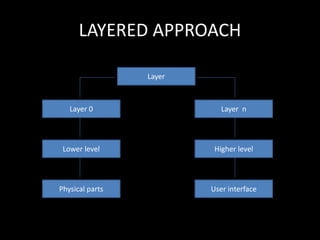
LAYERED APPROACH
Layer
Layer 0 Layer n
Lower level Higher level
Physical parts User interface
OPERATION
• The modularisation of a system may be done in many
ways. One method of the modularisation is layered
approach.
• Layer : To reduce their design complexity, most
networks are organised as a series of layers or levels,
each one built upon the one below it.
• Between each pair of adjacent layers there is an
interface.
Cont…
• An operating-system layer is an
implementation of an abstract object made up
of data and the operations that can
manipulate those data.
• A typical operating-system layer, that is, layer
N—consists of data structures and a set of
routines that can be invoked by higher-level
layers. Layer N, in turn, can invoke operations
on lower-level layers.
Cont..
• According to the layers, a layer needs not
know how the given operations are
implemented. On the contrast, it needs to
know only that what the operations do.
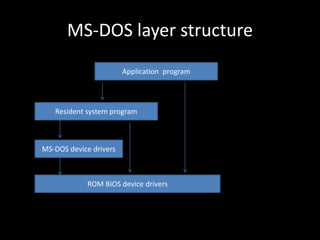
MS-DOS layer structure
Application program
Resident system program
MS-DOS device drivers
ROM BIOS device drivers
KERNEL
• It is the heart of the operating system.
• It is a part of an operating system.
• It resides in main memory at all times.
• It performs the most essential tasks, such as
managing memory and handling disk input and
output.
• It encapsulates the hardware.
• It is the innermost layer of the operating system
close to the hardware, and controlling the actual
hardware.
Cont…
• The kernel provides the file system, CPU
scheduling, memory management and other
operating system functions through system
calls.
• The kernel is in between the actual hardware
and a variety of utilities in UNIX such as shell
or vi editor.
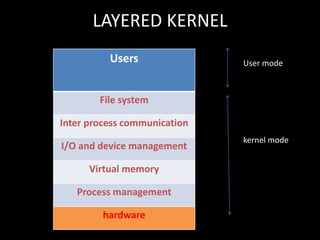
LAYERED KERNEL
User mode
kernel mode
Users
File system
Inter process communication
I/O and device management
Virtual memory
Process management
hardware
• It provides good modularity. Each layer of the
operating system forms a module with a clearly
defined functionality and interface with the rest of
the operating system.
• This approach simplifies debugging and system
verification.
• It also provides facility of information hiding.
MICRO KERNEL ARCHITECTURE
----------------
Hardware
Clientprocess
Microkernel
Devicedrivers
Fileserver
Processserver
Virtualmemory
• Micro kernel is a small operating system core
that provides the foundation for modular
extensions.
• It assigns only a few essential function to the
kernel, including address space, interprocess
communication and basic scheduling.
• Main function : It is to provide a communication
facility between the client program and the various
services that are also running in user space.
BENEFITS OF MICROKERNEL
1. Micro kernel allows the addition of new
services.
2. Micro kernel design imposes a uniform
interface on requests made by a process.
3. It is flexible because features can be
subtracted to produce a smaller and more
efficient architecture.
4. Modular design helps enhance reliability.
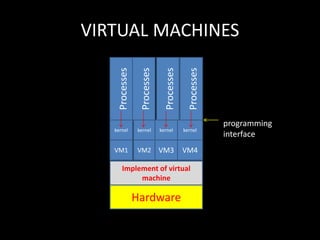
VIRTUAL MACHINES
programming
interface
Processes
Processes
Processes
Processes
kernel kernel kernel kernel
VM1 VM2 VM3 VM4
Implement of virtual
machine
Hardware
• A design concept in which the programming
model is implemented by the operating system
rather than by underlying physical hardware. That
is the operating system provides a simulation of
hardware for the programmer’s use.
• Multiple interactive sessions are implemented by
a set of virtual machines, one for each user.
• Each user directs the virtual machine to perform
different commands. These commands are then
executed on the physical machine in a
multiprogramming environment.
• Two modes: (i) user mode (ii) kernel mode
• The virtual machine software can run in
monitor mode but virtual machine itself
executes in only user mode.
• Virtual user mode and a virtual monitor mode both
are in the physical user mode.
• Usage: It is more reliable than other system. Virtual
machine allows system development to be done
without disrupting normal system operation.
• A virtual machine provides an interface
identical to the underlying bare hardware.
• It takes the layered approach to its logical
conclusion.
• A virtual machine based operating system
creates the illusion that processes are each
executing on their own private processor
with their private memory.
Benefits of virtual machine
1. It provides good security.
2. Virtual machine supports the research and
development of operating system.
3. It solves system compatibility problems.
4. It solves the problem of system development
time.

System structure

  • 1.
  • 2.
    LAYERED APPROACH Layer Layer 0Layer n Lower level Higher level Physical parts User interface
  • 3.
    OPERATION • The modularisationof a system may be done in many ways. One method of the modularisation is layered approach. • Layer : To reduce their design complexity, most networks are organised as a series of layers or levels, each one built upon the one below it. • Between each pair of adjacent layers there is an interface.
  • 4.
    Cont… • An operating-systemlayer is an implementation of an abstract object made up of data and the operations that can manipulate those data. • A typical operating-system layer, that is, layer N—consists of data structures and a set of routines that can be invoked by higher-level layers. Layer N, in turn, can invoke operations on lower-level layers.
  • 5.
    Cont.. • According tothe layers, a layer needs not know how the given operations are implemented. On the contrast, it needs to know only that what the operations do.
  • 6.
    MS-DOS layer structure Applicationprogram Resident system program MS-DOS device drivers ROM BIOS device drivers
  • 7.
    KERNEL • It isthe heart of the operating system. • It is a part of an operating system. • It resides in main memory at all times. • It performs the most essential tasks, such as managing memory and handling disk input and output. • It encapsulates the hardware. • It is the innermost layer of the operating system close to the hardware, and controlling the actual hardware.
  • 8.
    Cont… • The kernelprovides the file system, CPU scheduling, memory management and other operating system functions through system calls. • The kernel is in between the actual hardware and a variety of utilities in UNIX such as shell or vi editor.
  • 9.
    LAYERED KERNEL User mode kernelmode Users File system Inter process communication I/O and device management Virtual memory Process management hardware
  • 10.
    • It providesgood modularity. Each layer of the operating system forms a module with a clearly defined functionality and interface with the rest of the operating system. • This approach simplifies debugging and system verification. • It also provides facility of information hiding.
  • 11.
  • 12.
    • Micro kernelis a small operating system core that provides the foundation for modular extensions. • It assigns only a few essential function to the kernel, including address space, interprocess communication and basic scheduling. • Main function : It is to provide a communication facility between the client program and the various services that are also running in user space.
  • 13.
    BENEFITS OF MICROKERNEL 1.Micro kernel allows the addition of new services. 2. Micro kernel design imposes a uniform interface on requests made by a process. 3. It is flexible because features can be subtracted to produce a smaller and more efficient architecture. 4. Modular design helps enhance reliability.
  • 14.
    VIRTUAL MACHINES programming interface Processes Processes Processes Processes kernel kernelkernel kernel VM1 VM2 VM3 VM4 Implement of virtual machine Hardware
  • 15.
    • A designconcept in which the programming model is implemented by the operating system rather than by underlying physical hardware. That is the operating system provides a simulation of hardware for the programmer’s use. • Multiple interactive sessions are implemented by a set of virtual machines, one for each user. • Each user directs the virtual machine to perform different commands. These commands are then executed on the physical machine in a multiprogramming environment.
  • 16.
    • Two modes:(i) user mode (ii) kernel mode • The virtual machine software can run in monitor mode but virtual machine itself executes in only user mode. • Virtual user mode and a virtual monitor mode both are in the physical user mode. • Usage: It is more reliable than other system. Virtual machine allows system development to be done without disrupting normal system operation.
  • 17.
    • A virtualmachine provides an interface identical to the underlying bare hardware. • It takes the layered approach to its logical conclusion. • A virtual machine based operating system creates the illusion that processes are each executing on their own private processor with their private memory.
  • 18.
    Benefits of virtualmachine 1. It provides good security. 2. Virtual machine supports the research and development of operating system. 3. It solves system compatibility problems. 4. It solves the problem of system development time.