Operating Systems
Course Code: BCS303
Module 1
Introduction to Operating Systems
By
Praveenkumar Mandoli
Asst. Professor
Dept of AI & ML
Introduction to operating systems:
 What operating systems do?
 Computer System organization
 Computer System architecture
 Operating System structure
 Operating System operations
 Process management
 Memory management
 Storage management
 Protection and Security
 Distributed system
 Special-purpose systems
 Computing environments.
Operating-System Structures:
 Operating System Services
 User - Operating System interface
 System calls
 Types of system calls
 System programs
 Operating system design and implementation
 Operating System structure
 Virtual machines
 Operating System generation
 System boot.
What is an Operating System?
 An operating system is system software that acts as an intermediary between a
user of a computer and the computer hardware.
 It is software that manages the computer hardware and allows the user to
execute programs in a convenient and efficient manner.
Operating system goals:
 Make the computer system convenient to use. It hides the difficulty in
managing the hardware.
 Use the computer hardware in an efficient manner
 Provide and environment in which user can easily interface with computer.
 It is a resource allocator
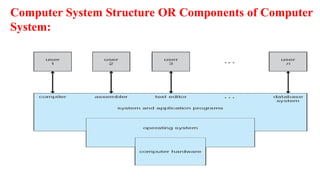
Computer System Structure OR Components of Computer
System:
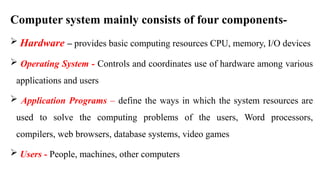
Computer system mainly consists of four components-
 Hardware – provides basic computing resources CPU, memory, I/O devices
 Operating System - Controls and coordinates use of hardware among various
applications and users
 Application Programs – define the ways in which the system resources are
used to solve the computing problems of the users, Word processors,
compilers, web browsers, database systems, video games
 Users - People, machines, other computers
Operating System can be viewed from two viewpoints– User views &
System views
1. User Views: -The user’s view of the operating system depends on the type of
user.
 If the user is using standalone system, then OS is designed for ease of use and
high performances. Here resource utilization is not given importance.
 If the users are at different terminals connected to a mainframe or
minicomputers, by sharing information and resources, then the OS is designed to
maximize resource utilization.
 OS is designed such that the CPU time, memory and i/o are used efficiently and
no single user takes more than the resource allotted to them.
 If the users are in workstations, connected to networks and servers, then the user
have a system unit of their own and shares resources and files with other systems.
 Here the OS is designed for both ease of use and resource availability (files).
 Other systems like embedded systems used in home device (like washing m/c) &
automobiles do not have any user interaction. There are some LEDs to show the
status of its work
 Users of hand-held systems, expects the OS to be designed for ease of use and
performance per amount of battery life.
2. System Views: - Operating system can be viewed as a resource allocator and
control program.
 Resource allocator – The OS acts as a manager of hardware and software
resources.
CPU time, memory space, file-storage space, I/O devices, shared files etc. are the
different resources required during execution of a program. There can be
conflicting request for these resources by different programs running in same
system. The OS assigns the resources to the requesting program depending on the
priority.
 Control Program – The OS is a control program and manage the execution of
user program to prevent errors and improper use of the computer.
Computer System Organization
Computer System Operation:
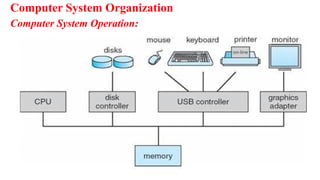
One or more CPUs, device controllers connect through common bus providing
access to shared memory. Each device controller is in-charge of a specific type
of device.
To ensure orderly access to the shared memory, a memory controller is
provided whose function is to synchronize access to the memory.
The CPU and other devices execute concurrently competing for memory
cycles. Concurrent execution of CPUs and devices competing for memory
cycles.
When system is switched on, ‘Bootstrap’ program is executed. It is the
initial program to run in the system. This program is stored in read-only
memory (ROM) or in electrically erasable programmable read-only memory
(EEPROM).
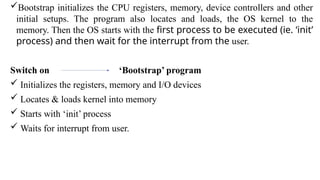
Bootstrap initializes the CPU registers, memory, device controllers and other
initial setups. The program also locates and loads, the OS kernel to the
memory. Then the OS starts with the first process to be executed (ie. ‘init’
process) and then wait for the interrupt from the user.
Switch on ‘Bootstrap’ program
 Initializes the registers, memory and I/O devices
 Locates & loads kernel into memory
 Starts with ‘init’ process
 Waits for interrupt from user.
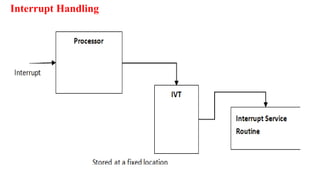
Interrupt Handling
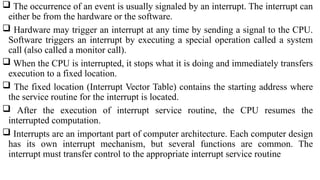
 The occurrence of an event is usually signaled by an interrupt. The interrupt can
either be from the hardware or the software.
 Hardware may trigger an interrupt at any time by sending a signal to the CPU.
Software triggers an interrupt by executing a special operation called a system
call (also called a monitor call).
 When the CPU is interrupted, it stops what it is doing and immediately transfers
execution to a fixed location.
 The fixed location (Interrupt Vector Table) contains the starting address where
the service routine for the interrupt is located.
 After the execution of interrupt service routine, the CPU resumes the
interrupted computation.
 Interrupts are an important part of computer architecture. Each computer design
has its own interrupt mechanism, but several functions are common. The
interrupt must transfer control to the appropriate interrupt service routine
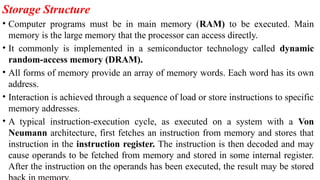
Storage Structure
• Computer programs must be in main memory (RAM) to be executed. Main
memory is the large memory that the processor can access directly.
• It commonly is implemented in a semiconductor technology called dynamic
random-access memory (DRAM).
• All forms of memory provide an array of memory words. Each word has its own
address.
• Interaction is achieved through a sequence of load or store instructions to specific
memory addresses.
• A typical instruction-execution cycle, as executed on a system with a Von
Neumann architecture, first fetches an instruction from memory and stores that
instruction in the instruction register. The instruction is then decoded and may
cause operands to be fetched from memory and stored in some internal register.
After the instruction on the operands has been executed, the result may be stored
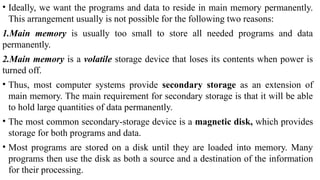
• Ideally, we want the programs and data to reside in main memory permanently.
This arrangement usually is not possible for the following two reasons:
1.Main memory is usually too small to store all needed programs and data
permanently.
2.Main memory is a volatile storage device that loses its contents when power is
turned off.
• Thus, most computer systems provide secondary storage as an extension of
main memory. The main requirement for secondary storage is that it will be able
to hold large quantities of data permanently.
• The most common secondary-storage device is a magnetic disk, which provides
storage for both programs and data.
• Most programs are stored on a disk until they are loaded into memory. Many
programs then use the disk as both a source and a destination of the information
for their processing.
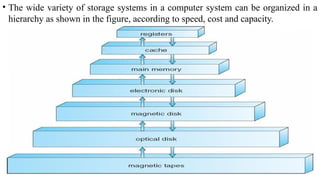
• The wide variety of storage systems in a computer system can be organized in a
hierarchy as shown in the figure, according to speed, cost and capacity.
• The higher levels are expensive, but they are fast. As we move down the
hierarchy, the cost per bit generally decreases, whereas the access time and the
capacity of storage generally increases.
• Volatile storage loses its contents when the power to the device is removed. In
the absence of expensive battery and generator backup systems,
• data must be written to nonvolatile storage for safekeeping. In the hierarchy
shown in figure, the storage systems above the electronic disk are volatile,
whereas those below are nonvolatile.
• An electronic disk can be designed to be either volatile or nonvolatile. During
normal operation, the electronic disk stores data in a large DRAM array, which is
volatile. But many electronic-disk devices contain a hidden magnetic hard disk
and a battery for backup power. If external power is interrupted, the electronic-
disk controller copies the data from RAM to the magnetic disk. Another form of
electronic disk is flash memory.
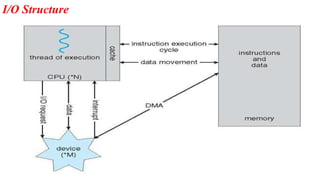
I/O Structure
 A large portion of operating system code is dedicated to managing I/O, both
because of its importance to the reliability and performance of a system and
because of the varying nature of the devices.
 Every device has a device controller, maintains some local buffer and a set of
special- purpose registers.
The device controller is responsible for moving the data between the peripheral
devices. The operating systems have a device driver for each device controller.
The device driver understands the device controller and presents a uniform
interface to the device to the rest of the operating system.
To start an I/O operation, the device driver loads the appropriate registers within
the device controller.
The device controller, in turn, examines the contents of these registers to
determine what action to take.
The controller starts the transfer of data from the device to its local buffer.
Once the transfer of data is complete, the device controller informs the device
driver via an interrupt that it has finished its operation.
The device driver then returns control to the operating system.
 This form of Interrupt-driven I/O is well suited for moving small amounts of
data but can produce high overhead when used for bulk data movement such as
disk I/O. To solve this problem, direct memory access (DMA) is used.
 After setting up buffers, pointers, and counters for the I/O device, the device
controller transfers an entire block of data directly to or from its own buffer
storage to memory, with no intervention by the CPU.
Only one interrupt is generated per block, to tell the device driver that the
operation has completed.
While the device controller is performing these operations, the CPU is available
to accomplish other works.
Computer System Architecture
Categorized roughly according to the number of general-purpose processors used
processors used.
1. Single-Processor Systems
2. Multi-Processor Systems
2.1 Asymmetric Multiprocessing
2.2 Symmetric Multiprocessing
3. Clustered Systems
3.1 Asymmetric Clustering
3.2 Symmetric Clustering
1. Single-Processor Systems:
The variety of single-processor systems range from PDAs through mainframes.
On a single processor system, there is one main CPU capable of executing
instructions from user processes.
It contains special-purpose processors, in the form of device-specific processors,
for devices such as disk, keyboard, and graphics controllers.
All special-purpose processors run limited instructions and do not run user
processes. These are managed by the operating system; the operating system sends
them information about their next task and monitors their status.
 For example, a disk-controller processor, implements its own disk queue and
scheduling algorithm, thus reducing the task of main CPU. Special processors in
the keyboard, converts the keystrokes into codes to be sent to the CPU.
The use of special-purpose microprocessors is common and does not turn a
single- processor system into a multiprocessor. If there is only one general-
purpose CPU, then the system is a single-processor system.
2.Multi-Processor Systems (Parallel Systems or tightly
coupled systems):
Systems that have two or more processors in close communication, sharing the
computer bus, the clock, memory and peripheral devices are multiprocessor
systems.
Advantages:
1.Increased throughput: In multiprocessor system, as there are multiple processors
execution of different programs take place simultaneously. Even if the number of
processors is increased the performance cannot be simultaneously increased.
This is due to the overhead incurred in keeping all the parts working correctly and
also due to the competition for the shared resources.
The speed-up ratio with N processors is not N, rather, it is less than N. Thus the
speed of the system is not has expected.
2. Economy of Scale: Multiprocessor systems can cost less than equivalent number
of many single-processor systems. As the multiprocessor systems share peripherals,
mass storage, and power supplies, the cost of implementing this system is
economical.
 If several processes are working on the same data, the data can also be shared
among them.
3. Increased Reliability- In multiprocessor systems functions are shared among
several processors. If one processor fails, the system is not halted, it only slows
down.
The job of the failed processor is taken up, by other processors.
Two techniques to maintain ‘Increased Reliability’ - graceful degradation &
fault tolerant
a. Graceful degradation – As there are multiple processors when one processor
fails other process will take up its work and the system go down slowly.
b. Fault tolerant – When one processor fails, its operations are stopped, the system
Types of Multiprocessor Systems:
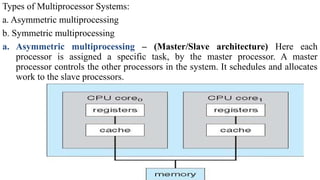
a. Asymmetric multiprocessing
b. Symmetric multiprocessing
a. Asymmetric multiprocessing – (Master/Slave architecture) Here each
processor is assigned a specific task, by the master processor. A master
processor controls the other processors in the system. It schedules and allocates
work to the slave processors.
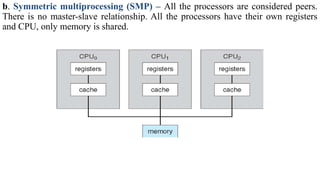
b. Symmetric multiprocessing (SMP) – All the processors are considered peers.
There is no master-slave relationship. All the processors have their own registers
and CPU, only memory is shared.
3. Clustered Systems
 Clustered systems are two or more individual systems connected together via a
network and sharing software resources. Clustering provides high availability of
resources and services.
 The service will continue even if one or more systems in the cluster fail. High
availability is generally obtained by storing a copy of files (s/w resources) in the
system.
There are two types of Clustered systems – asymmetric and symmetric
1. Asymmetric clustering – one system is in hot-standby mode while the others
are running the applications. The hot-standby host machine does nothing but
monitor the active server. If that server fails, the hot-standby host becomes the
active server.
2. Symmetric clustering – two or more systems are running applications, and are
monitoring each other. This mode is more efficient, as it uses all of the available
hardware. If any system fails, its job is taken up by the monitoring system.
• Operating System Structure
1. Multiprogramming
• One of the most important aspects of operating systems is the ability to
multiprogram.
• A single user cannot keep either the CPU or the I/O devices busy at all times.
Multiprogramming increases CPU utilization by organizing jobs, so that the
CPU always has one to execute.
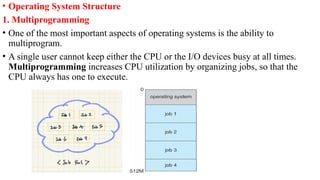
• The operating system keeps several jobs in memory simultaneously as shown in
figure. This set of jobs is a subset of the jobs kept in the job pool. Since the
number of jobs that can be kept simultaneously in memory is usually smaller than
the number of jobs that can be kept in the job pool (in secondary memory).
• The operating system picks and begins to execute one of the jobs in memory.
Eventually, the job may have to wait for some tasks, such as an I/O operation, to
complete. In a non-multiprogram system, the CPU would sit idle.
• In a multiprogrammed system, the operating system simply switches to, and
executes, another job. When that job needs to wait, the CPU is switched to
another job, and so on.
• Eventually, the first job finishes waiting and gets the CPU back. Thus, the CPU is
never idle.
• Multiprogrammed systems provide an environment in which the various system
resources (for example, CPU, memory, and peripheral devices) are utilized
effectively, but they do not provide for user interaction with the computer system.
Multitasking systems
 In Time sharing (or multitasking) systems, a single CPU executes multiple
jobs by switching among them, but the switches occur so frequently that the users
can interact with each program while it is running.
The user feels that all the programs are being executed at the same time.
 Time sharing requires an interactive (or hands-on) computer system, which
provides direct communication between the user and the system.
The user gives instructions to the operating system or to a program directly, using
a input device such as a keyboard or a mouse, and waits for immediate results on
an output device. Accordingly, the response time should be short—typically less
than one second.
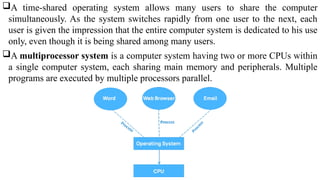
A time-shared operating system allows many users to share the computer
simultaneously. As the system switches rapidly from one user to the next, each
user is given the impression that the entire computer system is dedicated to his use
only, even though it is being shared among many users.
A multiprocessor system is a computer system having two or more CPUs within
a single computer system, each sharing main memory and peripherals. Multiple
programs are executed by multiple processors parallel.
Operating System Operations
Modern operating systems are interrupt driven. If there are no processes to
execute, no I/O devices to service, and no users to whom to respond, an operating
system will sit quietly, waiting for something to happen.
Events are signaled by the occurrence of an interrupt or a trap. A trap (or an
exception) is a software-generated interrupt. For each type of interrupt, separate
segments of code in the operating system determine what action should be taken.
An interrupt service routine is provided that is responsible for dealing with the
interrupt.
Dual-Mode Operation
Since the operating system and the user programs share the hardware and
software resources of the computer system, it has to be made sure that an error in a
user program cannot cause problems to other programs and the Operating System
running in the system.
The approach taken is to use a hardware support that allows us to differentiate
among various modes of execution.
The system can be assumed to work in two separate modes of operation:
1. User mode
2. Kernel mode (superviser mode, system mode, or privileged mode).
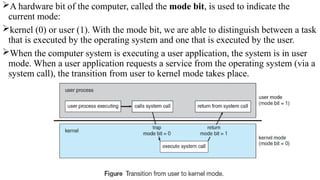
A hardware bit of the computer, called the mode bit, is used to indicate the
current mode:
kernel (0) or user (1). With the mode bit, we are able to distinguish between a task
that is executed by the operating system and one that is executed by the user.
When the computer system is executing a user application, the system is in user
mode. When a user application requests a service from the operating system (via a
system call), the transition from user to kernel mode takes place.
At system boot time, the hardware starts in kernel mode. The operating system is
then loaded and starts user applications in user mode. Whenever a trap or interrupt
occurs, the hardware switches from user mode to kernel mode (that is, changes the
mode bit from 1 to 0).
The dual mode of operation provides us with the means for protecting the
operating system from errant users—and errant users from one another.
The hardware allows privileged instructions to be executed only in kernel mode.
If an attempt is made to execute a privileged instruction in user mode, the
hardware does not execute the instruction but rather treats it as illegal and traps it
to the operating system.
The instruction to switch to user mode is an example of a privileged instruction.
Initial control is within the operating system, where instructions are executed in
kernel mode. When control is given to a user application, the mode is set to user
mode. Eventually, control is switched back to the operating system via an
Process Management
A program under execution is a process. A process needs resources like CPU
time, memory, files, and I/O devices for its execution. These resources are given
to the process when it is created or at run time.
When the process terminates, the operating system reclaims the resources.
The program stored on a disk is a passive entity and the program under execution
is an active entity.
A single-threaded process has one program counter specifying the next
instruction to execute. The CPU executes one instruction of the process after
another, until the process completes. A multithreaded process has multiple
program counters, each pointing to the next instruction to execute for a given
thread.
The operating system is responsible for the following activities in connection with
process management:
 Scheduling process and threads on the CPU
 Creating and deleting both user and system processes
 Suspending and resuming processes
 Providing mechanisms for process synchronization
 Providing mechanisms for process communication
Memory Management
Main memory is a large array of words or bytes. Each word or byte has its own
address.
Main memory is the storage device which can be easily and directly accessed by
the CPU. As the program executes, the central processor reads instructions and
also reads and writes data from main memory.
To improve both the utilization of the CPU and the speed of the computer's
response to its users, general-purpose computers must keep several programs in
memory, creating a need for memory management.
The operating system is responsible for the following activities in connection with
memory management:
• Keeping track of which parts of memory are currently being used by user.
• Deciding which processes and data to move into and out of memory.
• Allocating and deallocating memory space as needed.
Storage Management
There are three types of storage management
i) File system management
ii) Mass-storage management
iii) Cache management.
File-System Management
 File management is one of the most visible components of an operating system.
Computers can store information on several different types of physical media.
Magnetic disk, optical disk, and magnetic tape are the most common.
 Each of these media has its own characteristics and physical organization. Each
medium is controlled by a device, such as a disk drive or tape drive, that also has
its own unique characteristics.
 A file is a collection of related information defined by its creator. Commonly, files
represent programs and data. Data files may be numeric, alphabetic, alphanumeric,
or binary.
 Files may be free-form (for example, text files), or they may be formatted rigidly
(for example, fixed fields).
 The operating system implements the abstract concept of a file by managing mass
storage media. Files are normally organized into directories to make them easier to
use. When multiple users have access to files, it may be desirable to control by
whom and in what ways (read, write, execute) files may be accessed.
The operating system is responsible for the following activities in connection with
file management:
 Creating and deleting files
 Creating and deleting directories to organize files
 Supporting primitives for manipulating files and directories
 Mapping files onto secondary storage
 Backing up files on stable (nonvolatile) storage media
Mass-Storage Management
• As the main memory is too small to accommodate all data and programs, and as
the data that it holds are erased when power is lost, the computer system must
provide secondary storage to back up main memory. Most modern computer
systems use disks as the storage medium for both programs and data.
• Most programs—including compilers, assemblers, word processors, editors, and
formatters— are stored on a disk until loaded into memory and then use the disk as
both the source and destination of their processing. Hence, the proper management
of disk storage is of central importance to a computer system.
• The operating system is responsible for the following activities in connection with
disk management:
• Free-space management
• Storage allocation
• Disk scheduling
Caching:
• Caching is an important principle of computer systems. Information is normally
kept in some storage system (such as main memory). As it is used, it is copied into
a faster storage system— the cache—as temporary data.
• When a particular piece of information is required, first we check whether it is in
the cache. If it is, we use the information directly from the cache; if it is not in
cache, we use the information from the source, putting a copy in the cache under
the assumption that we will need it again soon.
• The movement of information between levels of a storage hierarchy may be either
explicit or implicit, depending on the hardware design and the controlling
operating-system software. For instance, data transfer from cache to CPU and
registers is usually a hardware function, with no operating-system intervention. In
contrast, transfer of data from disk to memory is usually controlled by the operating
system.
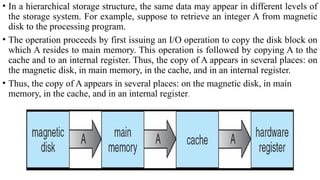
• In a hierarchical storage structure, the same data may appear in different levels of
the storage system. For example, suppose to retrieve an integer A from magnetic
disk to the processing program.
• The operation proceeds by first issuing an I/O operation to copy the disk block on
which A resides to main memory. This operation is followed by copying A to the
cache and to an internal register. Thus, the copy of A appears in several places: on
the magnetic disk, in main memory, in the cache, and in an internal register.
• Thus, the copy of A appears in several places: on the magnetic disk, in main
memory, in the cache, and in an internal register.
I/O Systems
 One of the purposes of an operating system is to hide the peculiarities of specific
hardware devices from the user. The I/O subsystem consists of several
components:
 A memory-management component that includes buffering, caching, and
spooling
 A general device-driver interface
 Drivers for specific hardware devices
 Only the device driver knows the peculiarities of the specific device to which it
is assigned.
Protection and Security
• Protection is a mechanism for controlling the access of processes or users to the
resources defined by a computer system.
• This mechanism must provide means for specification of the controls to be
imposed and means for enforcement.
• Protection improves reliability. A protection-oriented system provides a means to
distinguish between authorized and unauthorized usage. A system can have
adequate protection but still be prone to failure and allow inappropriate access.
• Protection and security require the system to be able to distinguish among all its
users. Most operating systems maintain a list of user names and associated user
identifiers (user IDs).
• When a user logs in to the system, the authentication stage determines the
appropriate user ID for the user.
Distributed Systems
A distributed system is a collection of systems that are networked to provide the
users with access to the various resources in the network. Access to a shared
resource increases computation speed, functionality, data availability, and
reliability.
A network is a communication path between two or more systems. Networks
vary by the protocols used(TCP/IP,UDP,FTP etc.), the distances between nodes,
and the transport media(copper wires, fiber-optic, wireless).
TCP/IP is the most common network protocol. The operating systems support of
protocols also varies. Most operating systems support TCP/IP, including the
Windows and UNIX operating systems.
Networks are characterized based on the distances between their nodes. A local-
area network (LAN) connects computers within a room, a floor, or a building. A
wide-area network (WAN) usually links buildings, cities, or countries. A global
company may have a WAN to connect its offices worldwide. These networks may
run one protocol or several protocols.
A metropolitan-area network (MAN) connects buildings within a city.
BlueTooth and 802.11 devices use wireless technology to communicate over a
distance of several feet, in essence creating a small-area network such as might
be found in a home.
The transportation media to carry networks are also varied. They include copper
wires, fiber strands, and wireless transmissions between satellites, microwave
dishes, and radios. When computing devices are connected to cellular phones, they
create a network.
Special Purpose Systems
1. Multimedia Systems
 Multimedia data consist of audio and video files as well as conventional files.
These data differ from conventional data in that multimedia data—such as frames
of video—must be delivered (streamed) according to certain time restrictions (for
example, 30 frames per second).
 Multimedia describes a wide range of applications like audio files - MP3, DVD
movies, video conferencing, and short video clips of movie previews or news.
Multimedia applications may also include live webcasts of speeches or sporting
events and even live webcams.
 Multimedia applications can be either audio or video or combination of both. For
example, a movie may consist of separate audio and video tracks.
2. Handheld Systems
Handheld systems include personal digital assistants (PDAs), such as Palm and
Pocket-PCs, and cellular telephones. Developers of these systems face many
challenges, due to the limited memory, slow processors and small screens in such
devices.
The amount of physical memory in a handheld depends upon the device, the
operating system and applications must manage memory efficiently. This includes
returning all allocated memory back to the memory manager when the memory is
not being used. A second issue of concern to developers of handheld devices is the
speed of the processor used in the devices.
Processors for most handheld devices run at faster speed than the processor in a
PC. Faster processors require more power and so, a larger battery is required.
Another issue is the usage of I/O devices.
Computing Environments
1. Traditional Computing
• The current trend is toward providing more ways to access these computing
environments. Web technologies are stretching the boundaries of traditional
computing.
• Companies establish portals, which provide web accessibility to their internal
servers. Network computers are essentially terminals that understand web-based
computing.
• Handheld computers can synchronize with PCs to allow very portable use of
company information. Handheld PDAs can also connect to wireless networks to
use the company's web portal.
• The fast data connections are allowing home computers to serve up web pages and
to use networks. Some homes even have firewalls to protect their networks.
• Today, traditional time-sharing systems are used everywhere. The same scheduling
technique is still in use on workstations and servers, but frequently the processes
are all owned by the same user (or a single user and the operating system).
• User processes, and system processes that provide services to the user, are
managed so that each frequently gets a slice of computer time.
2. Client-Server Computing
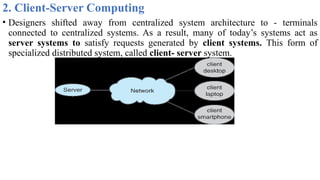
• Designers shifted away from centralized system architecture to - terminals
connected to centralized systems. As a result, many of today’s systems act as
server systems to satisfy requests generated by client systems. This form of
specialized distributed system, called client- server system.
Server systems can be broadly categorized as compute servers and file servers:
 The compute-server system provides an interface to which a client can send a
request to perform an action (for example, read data); in response, the server
executes the action and sends back results to the client. A server running a
database that responds to client requests for data is an example of such a system.
 The file-server system provides a file-system interface where clients can create,
update, read, and delete files. An example of such a system is a web server that
delivers files to clients running the web browsers
3. Peer-to-Peer Computing
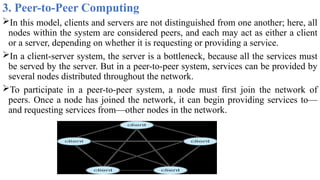
In this model, clients and servers are not distinguished from one another; here, all
nodes within the system are considered peers, and each may act as either a client
or a server, depending on whether it is requesting or providing a service.
In a client-server system, the server is a bottleneck, because all the services must
be served by the server. But in a peer-to-peer system, services can be provided by
several nodes distributed throughout the network.
To participate in a peer-to-peer system, a node must first join the network of
peers. Once a node has joined the network, it can begin providing services to—
and requesting services from—other nodes in the network.
4. Web-Based Computing
Web computing has increased the importance on networking. Devices that were
not previously networked now include wired or wireless access. Devices that were
networked now have faster network connectivity.
The implementation of web-based computing has given rise to new categories of
devices, such as load balancers, which distribute network connections among a
pool of similar servers.
Operating systems like Windows 95, which acted as web clients, have evolved
into Linux and Windows XP, which can act as web servers as well as clients.
Generally, the Web has increased the complexity of devices, because their users
require them to be web-enabled.
Chapter-2
OPERATING SYSTEM SERVICES
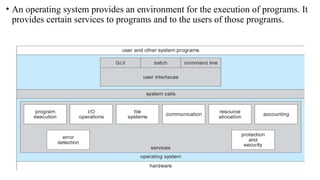
• An operating system provides an environment for the execution of programs. It
provides certain services to programs and to the users of those programs.
OS provide services for the users of the system,including:
User Interface: Means by which users can issue commands to the system.
Depending on the operating system, these may be a command-line interface
( e.g. sh, csh, ksh, tcsh, etc.), a Graphical User Interface (e.g. Windows, X-
Windows, KDE, Gnome, etc.), or a batch command systems.
In Command Line Interface (CLI)- commands are given to the system.
In Batch interface – commands and directives to control these commands are
put in a file and then the file is executed.
In GUI systems- windows with pointing device to get inputs and keyboard to
enter the text.
Program Execution - The OS must be able to load a program into RAM, run
the program, and terminate the program, either normally or abnormally.
I/O Operations - The OS is responsible for transferring data to and from I/O
devices, including keyboards, terminals, printers, and files. For specific devices,
special functions are provided (device drivers) by OS.
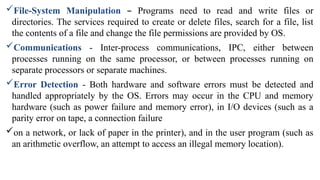
File-System Manipulation – Programs need to read and write files or
directories. The services required to create or delete files, search for a file, list
the contents of a file and change the file permissions are provided by OS.
Communications - Inter-process communications, IPC, either between
processes running on the same processor, or between processes running on
separate processors or separate machines.
Error Detection - Both hardware and software errors must be detected and
handled appropriately by the OS. Errors may occur in the CPU and memory
hardware (such as power failure and memory error), in I/O devices (such as a
parity error on tape, a connection failure
on a network, or lack of paper in the printer), and in the user program (such as
an arithmetic overflow, an attempt to access an illegal memory location).
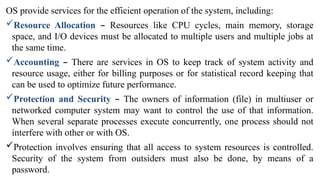
OS provide services for the efficient operation of the system, including:
Resource Allocation – Resources like CPU cycles, main memory, storage
space, and I/O devices must be allocated to multiple users and multiple jobs at
the same time.
Accounting – There are services in OS to keep track of system activity and
resource usage, either for billing purposes or for statistical record keeping that
can be used to optimize future performance.
Protection and Security – The owners of information (file) in multiuser or
networked computer system may want to control the use of that information.
When several separate processes execute concurrently, one process should not
interfere with other or with OS.
Protection involves ensuring that all access to system resources is controlled.
Security of the system from outsiders must also be done, by means of a
password.
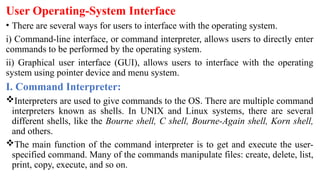
User Operating-System Interface
• There are several ways for users to interface with the operating system.
i) Command-line interface, or command interpreter, allows users to directly enter
commands to be performed by the operating system.
ii) Graphical user interface (GUI), allows users to interface with the operating
system using pointer device and menu system.
I. Command Interpreter:
Interpreters are used to give commands to the OS. There are multiple command
interpreters known as shells. In UNIX and Linux systems, there are several
different shells, like the Bourne shell, C shell, Bourne-Again shell, Korn shell,
and others.
The main function of the command interpreter is to get and execute the user-
specified command. Many of the commands manipulate files: create, delete, list,
print, copy, execute, and so on.
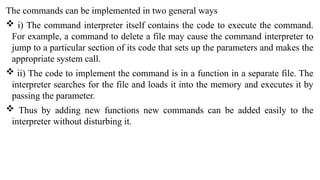
The commands can be implemented in two general ways
 i) The command interpreter itself contains the code to execute the command.
For example, a command to delete a file may cause the command interpreter to
jump to a particular section of its code that sets up the parameters and makes the
appropriate system call.
 ii) The code to implement the command is in a function in a separate file. The
interpreter searches for the file and loads it into the memory and executes it by
passing the parameter.
 Thus by adding new functions new commands can be added easily to the
interpreter without disturbing it.
II . Graphical User Interfaces
• A second strategy for interfacing with the operating system is through a user
friendly graphical user interface or GUI. Rather than having users directly enter
commands via a command-line interface, a GUI allows provides a mouse-based
window-and-menu system as an interface.
• A GUI provides a desktop metaphor where the mouse is moved to position its
pointer on images, or icons, on the screen (the desktop) that represent programs,
files, directories, and system functions.
• Depending on the mouse pointer's location, clicking a button on the mouse can
invoke a program, select a file or directory—known as a folder— or pull down
a menu that contains commands.
System Calls
System calls provides an interface to the services of the operating system. These
are generally written in C or C++, although some are written in assembly for
optimal performance.
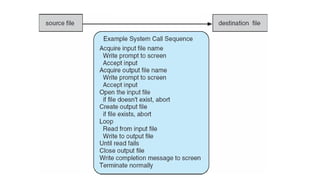
The figure illustrates the sequence of system calls required to copy a file
content from one file (input file) to another file (output file)
An example to illustrate how system calls are used: writing a simple program to
read data from one file and copy them to another file
There are number of system calls used to finish this task. The first system call is
to write a message on the screen (monitor). Then to accept the input filename.
Then another system call to write message on the screen, then to accept the
output filename.
When the program tries to open the input file, it may find that there is no file of
that name or that the file is protected against access. In these cases, the program
should print a message on the console (another system call) and then terminate
abnormally (another system call) and create a new one (another system call).
Now that both the files are opened, we enter a loop that reads from the input file
(another system call) and writes to output file (another system call).
Finally, after the entire file is copied, the program may close both files (another
system call), write a message to the console or window (system call), and finally
terminate normally (final system call).
Most programmers do not use the low-level system calls directly, but instead use
an "Application Programming Interface", API.
Instead of direct system calls provides for greater program portability between
different systems. The API then makes the appropriate system calls through the
system call interface, using a system call table to access specific numbered system
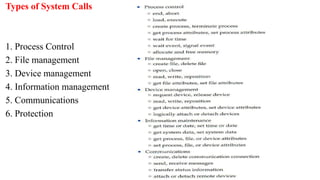
Types of System Calls
1. Process Control
2. File management
3. Device management
4. Information management
5. Communications
6. Protection
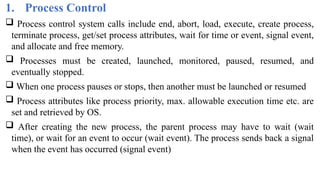
1. Process Control
 Process control system calls include end, abort, load, execute, create process,
terminate process, get/set process attributes, wait for time or event, signal event,
and allocate and free memory.
 Processes must be created, launched, monitored, paused, resumed, and
eventually stopped.
 When one process pauses or stops, then another must be launched or resumed
 Process attributes like process priority, max. allowable execution time etc. are
set and retrieved by OS.
 After creating the new process, the parent process may have to wait (wait
time), or wait for an event to occur (wait event). The process sends back a signal
when the event has occurred (signal event)
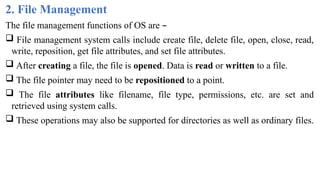
2. File Management
The file management functions of OS are –
 File management system calls include create file, delete file, open, close, read,
write, reposition, get file attributes, and set file attributes.
 After creating a file, the file is opened. Data is read or written to a file.
 The file pointer may need to be repositioned to a point.
 The file attributes like filename, file type, permissions, etc. are set and
retrieved using system calls.
 These operations may also be supported for directories as well as ordinary files.
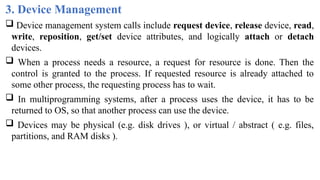
3. Device Management
 Device management system calls include request device, release device, read,
write, reposition, get/set device attributes, and logically attach or detach
devices.
 When a process needs a resource, a request for resource is done. Then the
control is granted to the process. If requested resource is already attached to
some other process, the requesting process has to wait.
 In multiprogramming systems, after a process uses the device, it has to be
returned to OS, so that another process can use the device.
 Devices may be physical (e.g. disk drives ), or virtual / abstract ( e.g. files,
partitions, and RAM disks ).
4. Information Maintenance
• Information maintenance system calls include calls to get/set the time, date,
system data, and process, file, or device attributes.
• These system calls care used to transfer the information between user and the
OS. Information like current time & date, no. of current users, version no. of OS,
amount of free memory, disk space etc. are passed from OS to the user.
5. Communication
• Communication system calls create/delete communication connection,
send/receive messages, transfer status information, and attach/detach remote
devices.
The message passing model must support calls to:
o Identify a remote process and/or host with which to communicate.
o Establish a connection between the two processes.
o Open and close the connection as needed.
o Transmit messages along the connection.
o Wait for incoming messages, in either a blocking or non-blocking state.
o Delete the connection when no longer needed.
• The shared memory model must support calls to:
o Create and access memory that is shared amongst processes (and threads. )
o Free up shared memory and/or dynamically allocate it as needed.
 Message passing is simpler and easier, (particularly for inter-computer
communications), and is generally appropriate for small amounts of data. It is
easy to implement, but there are system calls for each read and write process.
 Shared memory is faster, and is generally the better approach where large
amounts of data are to be shared. This model is difficult to implement, and it
consists of only few system calls.
6. Protection
 Protection provides mechanisms for controlling which users / processes have
access to which system resources.
 System calls allow the access mechanisms to be adjusted as needed, and for
non- privileged users to be granted elevated access permissions under carefully
controlled temporary circumstances.
System Programs
A collection of programs that provide a convenient environment for program
development and execution (other than OS) are called system programs or system
utilities.
• System programs may be divided into five categories:
1. File management - programs to create, delete, copy, rename, print, list, and
generally manipulate files and directories.
2. Status information - Utilities to check on the date, time, number of users,
processes running, data logging, etc. System registries are used to store and recall
configuration information for particular applications.
3. File modification - e.g. text editors and other tools which can change file
contents.
4. Programming-language support - E.g. Compilers, linkers, debuggers,
profilers, assemblers, library archive management, interpreters for common
languages, and support for make.
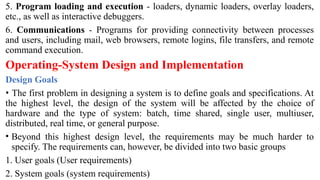
5. Program loading and execution - loaders, dynamic loaders, overlay loaders,
etc., as well as interactive debuggers.
6. Communications - Programs for providing connectivity between processes
and users, including mail, web browsers, remote logins, file transfers, and remote
command execution.
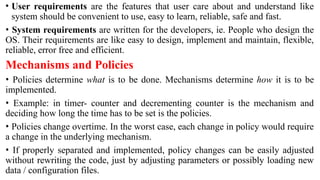
Operating-System Design and Implementation
Design Goals
• The first problem in designing a system is to define goals and specifications. At
the highest level, the design of the system will be affected by the choice of
hardware and the type of system: batch, time shared, single user, multiuser,
distributed, real time, or general purpose.
• Beyond this highest design level, the requirements may be much harder to
specify. The requirements can, however, be divided into two basic groups
1. User goals (User requirements)
2. System goals (system requirements)
• User requirements are the features that user care about and understand like
system should be convenient to use, easy to learn, reliable, safe and fast.
• System requirements are written for the developers, ie. People who design the
OS. Their requirements are like easy to design, implement and maintain, flexible,
reliable, error free and efficient.
Mechanisms and Policies
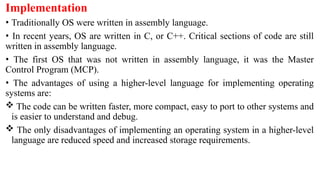
• Policies determine what is to be done. Mechanisms determine how it is to be
implemented.
• Example: in timer- counter and decrementing counter is the mechanism and
deciding how long the time has to be set is the policies.
• Policies change overtime. In the worst case, each change in policy would require
a change in the underlying mechanism.
• If properly separated and implemented, policy changes can be easily adjusted
without rewriting the code, just by adjusting parameters or possibly loading new
data / configuration files.
Implementation
• Traditionally OS were written in assembly language.
• In recent years, OS are written in C, or C++. Critical sections of code are still
written in assembly language.
• The first OS that was not written in assembly language, it was the Master
Control Program (MCP).
• The advantages of using a higher-level language for implementing operating
systems are:
 The code can be written faster, more compact, easy to port to other systems and
is easier to understand and debug.
 The only disadvantages of implementing an operating system in a higher-level
language are reduced speed and increased storage requirements.
Operating-System Structure
Simple Structure
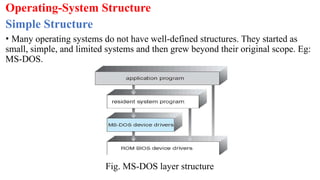
• Many operating systems do not have well-defined structures. They started as
small, simple, and limited systems and then grew beyond their original scope. Eg:
MS-DOS.
Fig. MS-DOS layer structure
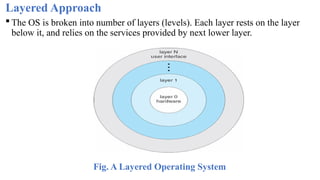
Layered Approach
 The OS is broken into number of layers (levels). Each layer rests on the layer
below it, and relies on the services provided by next lower layer.
Fig. A Layered Operating System
 Bottom layer (layer 0) is the hardware and the topmost layer is the user
interface.
 A typical layer, consists of data structure and routines that can be invoked by
higher-level layer.
Advantages:
• The layers are selected so that each uses functions and services of only lower-
level layers. So simplifies debugging and system verification.
• The layers are debugged one by one from the lowest and if any layer
doesn’t work, then error is due to that layer only, as the lower layers
are already debugged. Thus, the design and implementation are simplified.
• A layer need not know how its lower-level layers are implemented. Thus hides
the operations from higher layers.
Disadvantages :
• The various layers must be appropriately defined, as a layer can use only lower-
level layers.
• Less efficient than other types, because any interaction with layer 0 required
from top layer. The system call should pass through all the layers and finally to
layer 0. This is an overhead.
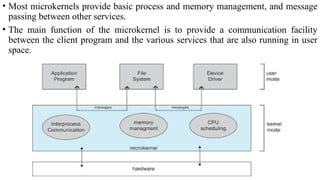
Microkernels
• This method structures the operating system by removing all nonessential
components from the kernel and implementing them as system and user-level
programs thus making the kernel as small and efficient as possible.
• The removed services are implemented as system applications.
• Most microkernels provide basic process and memory management, and message
passing between other services.
• The main function of the microkernel is to provide a communication facility
between the client program and the various services that are also running in user
space.
Advantages
• System expansion can also be easier, because it only involves adding more
system applications, not rebuilding a new kernel.
• Mach was the first and most widely known microkernel, and now forms a major
component of Mac OSX.
Disadvantages
• Performance overhead of user space to kernel space communication
Modules
• Modern OS development is object-oriented, with a relatively small core kernel
and a set of modules which can be linked in dynamically.
• Modules are similar to layers in that each subsystem has clearly defined tasks
and interfaces, but any module is free to contact any other module, eliminating
the problems of going through multiple intermediary layers.
• The kernel is relatively small in this architecture, similar to microkernels, but
the kernel does not have to implement message passing since modules are free
to contact each other directly.
• Eg: Solaris, Linux and MacOSX.
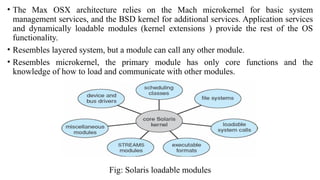
• The Max OSX architecture relies on the Mach microkernel for basic system
management services, and the BSD kernel for additional services. Application services
and dynamically loadable modules (kernel extensions ) provide the rest of the OS
functionality.
• Resembles layered system, but a module can call any other module.
• Resembles microkernel, the primary module has only core functions and the
knowledge of how to load and communicate with other modules.
Fig: Solaris loadable modules
Virtual Machines
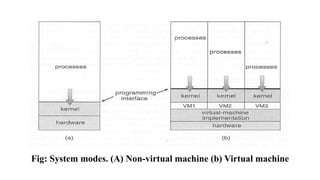
• The fundamental idea behind a virtual machine is to abstract the hardware of a
single computer (the CPU, memory, disk drives, network interface cards, and so
forth) into several different execution environments, thereby creating the
illusion that each separate execution environment is running its own private
computer.
• Creates an illusion that a process has its own processor with its own memory.
• Host OS is the main OS installed in system and the other OS installed in the
system are called guest OS.
Fig: System modes. (A) Non-virtual machine (b) Virtual machine
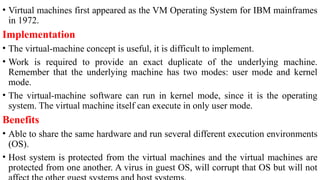
• Virtual machines first appeared as the VM Operating System for IBM mainframes
in 1972.
Implementation
• The virtual-machine concept is useful, it is difficult to implement.
• Work is required to provide an exact duplicate of the underlying machine.
Remember that the underlying machine has two modes: user mode and kernel
mode.
• The virtual-machine software can run in kernel mode, since it is the operating
system. The virtual machine itself can execute in only user mode.
Benefits
• Able to share the same hardware and run several different execution environments
(OS).
• Host system is protected from the virtual machines and the virtual machines are
protected from one another. A virus in guest OS, will corrupt that OS but will not
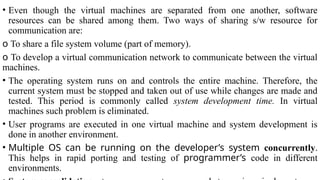
• Even though the virtual machines are separated from one another, software
resources can be shared among them. Two ways of sharing s/w resource for
communication are:
o To share a file system volume (part of memory).
o To develop a virtual communication network to communicate between the virtual
machines.
• The operating system runs on and controls the entire machine. Therefore, the
current system must be stopped and taken out of use while changes are made and
tested. This period is commonly called system development time. In virtual
machines such problem is eliminated.
• User programs are executed in one virtual machine and system development is
done in another environment.
• Multiple OS can be running on the developer’s system concurrently.
This helps in rapid porting and testing of programmer’s code in different
environments.
Examples:
VMware:
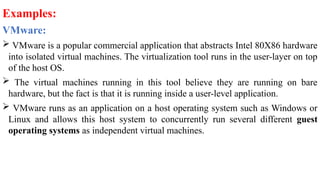
 VMware is a popular commercial application that abstracts Intel 80X86 hardware
into isolated virtual machines. The virtualization tool runs in the user-layer on top
of the host OS.
 The virtual machines running in this tool believe they are running on bare
hardware, but the fact is that it is running inside a user-level application.
 VMware runs as an application on a host operating system such as Windows or
Linux and allows this host system to concurrently run several different guest
operating systems as independent virtual machines.
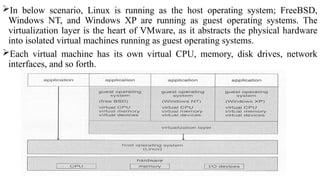
In below scenario, Linux is running as the host operating system; FreeBSD,
Windows NT, and Windows XP are running as guest operating systems. The
virtualization layer is the heart of VMware, as it abstracts the physical hardware
into isolated virtual machines running as guest operating systems.
Each virtual machine has its own virtual CPU, memory, disk drives, network
interfaces, and so forth.
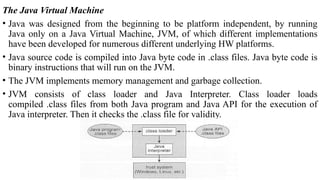
The Java Virtual Machine
• Java was designed from the beginning to be platform independent, by running
Java only on a Java Virtual Machine, JVM, of which different implementations
have been developed for numerous different underlying HW platforms.
• Java source code is compiled into Java byte code in .class files. Java byte code is
binary instructions that will run on the JVM.
• The JVM implements memory management and garbage collection.
• JVM consists of class loader and Java Interpreter. Class loader loads
compiled .class files from both Java program and Java API for the execution of
Java interpreter. Then it checks the .class file for validity.
Operating System Generation
• Operating systems are designed to run on any of a class of machines; the system
must be configured for each specific computer site.
• SYSGEN program obtains information concerning the specific configuration of
the hardware system.
• Booting – starting a computer by loading the kernel.
• Bootstrap program – code stored in ROM that is able to locate the kernel, load it
into memory, and start its execution.
System Boot
• Operating system must be made available to hardware so hardware can start it.
• Small piece of code – bootstrap loader, locates the kernel, loads it into memory,
and starts it Sometimes two-step process where boot block at fixed location loads
bootstrap loader.
• When power initialized on system, execution starts at a fixed memory location
Firmware used to hold initial boot code
OperatingSystem_Module-1 3rd semester.pptx

  • 1.
    Operating Systems Course Code:BCS303 Module 1 Introduction to Operating Systems By Praveenkumar Mandoli Asst. Professor Dept of AI & ML
  • 2.
    Introduction to operatingsystems:  What operating systems do?  Computer System organization  Computer System architecture  Operating System structure  Operating System operations  Process management  Memory management  Storage management  Protection and Security  Distributed system  Special-purpose systems  Computing environments.
  • 3.
    Operating-System Structures:  OperatingSystem Services  User - Operating System interface  System calls  Types of system calls  System programs  Operating system design and implementation  Operating System structure  Virtual machines  Operating System generation  System boot.
  • 4.
    What is anOperating System?  An operating system is system software that acts as an intermediary between a user of a computer and the computer hardware.  It is software that manages the computer hardware and allows the user to execute programs in a convenient and efficient manner. Operating system goals:  Make the computer system convenient to use. It hides the difficulty in managing the hardware.  Use the computer hardware in an efficient manner  Provide and environment in which user can easily interface with computer.  It is a resource allocator
  • 5.
    Computer System StructureOR Components of Computer System:
  • 6.
    Computer system mainlyconsists of four components-  Hardware – provides basic computing resources CPU, memory, I/O devices  Operating System - Controls and coordinates use of hardware among various applications and users  Application Programs – define the ways in which the system resources are used to solve the computing problems of the users, Word processors, compilers, web browsers, database systems, video games  Users - People, machines, other computers
  • 7.
    Operating System canbe viewed from two viewpoints– User views & System views 1. User Views: -The user’s view of the operating system depends on the type of user.  If the user is using standalone system, then OS is designed for ease of use and high performances. Here resource utilization is not given importance.  If the users are at different terminals connected to a mainframe or minicomputers, by sharing information and resources, then the OS is designed to maximize resource utilization.  OS is designed such that the CPU time, memory and i/o are used efficiently and no single user takes more than the resource allotted to them.  If the users are in workstations, connected to networks and servers, then the user have a system unit of their own and shares resources and files with other systems.  Here the OS is designed for both ease of use and resource availability (files).
  • 8.
     Other systemslike embedded systems used in home device (like washing m/c) & automobiles do not have any user interaction. There are some LEDs to show the status of its work  Users of hand-held systems, expects the OS to be designed for ease of use and performance per amount of battery life. 2. System Views: - Operating system can be viewed as a resource allocator and control program.  Resource allocator – The OS acts as a manager of hardware and software resources. CPU time, memory space, file-storage space, I/O devices, shared files etc. are the different resources required during execution of a program. There can be conflicting request for these resources by different programs running in same system. The OS assigns the resources to the requesting program depending on the priority.  Control Program – The OS is a control program and manage the execution of user program to prevent errors and improper use of the computer.
  • 9.
  • 10.
    One or moreCPUs, device controllers connect through common bus providing access to shared memory. Each device controller is in-charge of a specific type of device. To ensure orderly access to the shared memory, a memory controller is provided whose function is to synchronize access to the memory. The CPU and other devices execute concurrently competing for memory cycles. Concurrent execution of CPUs and devices competing for memory cycles. When system is switched on, ‘Bootstrap’ program is executed. It is the initial program to run in the system. This program is stored in read-only memory (ROM) or in electrically erasable programmable read-only memory (EEPROM).
  • 11.
    Bootstrap initializes theCPU registers, memory, device controllers and other initial setups. The program also locates and loads, the OS kernel to the memory. Then the OS starts with the first process to be executed (ie. ‘init’ process) and then wait for the interrupt from the user. Switch on ‘Bootstrap’ program  Initializes the registers, memory and I/O devices  Locates & loads kernel into memory  Starts with ‘init’ process  Waits for interrupt from user.
  • 12.
  • 13.
     The occurrenceof an event is usually signaled by an interrupt. The interrupt can either be from the hardware or the software.  Hardware may trigger an interrupt at any time by sending a signal to the CPU. Software triggers an interrupt by executing a special operation called a system call (also called a monitor call).  When the CPU is interrupted, it stops what it is doing and immediately transfers execution to a fixed location.  The fixed location (Interrupt Vector Table) contains the starting address where the service routine for the interrupt is located.  After the execution of interrupt service routine, the CPU resumes the interrupted computation.  Interrupts are an important part of computer architecture. Each computer design has its own interrupt mechanism, but several functions are common. The interrupt must transfer control to the appropriate interrupt service routine
  • 14.
    Storage Structure • Computerprograms must be in main memory (RAM) to be executed. Main memory is the large memory that the processor can access directly. • It commonly is implemented in a semiconductor technology called dynamic random-access memory (DRAM). • All forms of memory provide an array of memory words. Each word has its own address. • Interaction is achieved through a sequence of load or store instructions to specific memory addresses. • A typical instruction-execution cycle, as executed on a system with a Von Neumann architecture, first fetches an instruction from memory and stores that instruction in the instruction register. The instruction is then decoded and may cause operands to be fetched from memory and stored in some internal register. After the instruction on the operands has been executed, the result may be stored
  • 15.
    • Ideally, wewant the programs and data to reside in main memory permanently. This arrangement usually is not possible for the following two reasons: 1.Main memory is usually too small to store all needed programs and data permanently. 2.Main memory is a volatile storage device that loses its contents when power is turned off. • Thus, most computer systems provide secondary storage as an extension of main memory. The main requirement for secondary storage is that it will be able to hold large quantities of data permanently. • The most common secondary-storage device is a magnetic disk, which provides storage for both programs and data. • Most programs are stored on a disk until they are loaded into memory. Many programs then use the disk as both a source and a destination of the information for their processing.
  • 16.
    • The widevariety of storage systems in a computer system can be organized in a hierarchy as shown in the figure, according to speed, cost and capacity.
  • 17.
    • The higherlevels are expensive, but they are fast. As we move down the hierarchy, the cost per bit generally decreases, whereas the access time and the capacity of storage generally increases. • Volatile storage loses its contents when the power to the device is removed. In the absence of expensive battery and generator backup systems, • data must be written to nonvolatile storage for safekeeping. In the hierarchy shown in figure, the storage systems above the electronic disk are volatile, whereas those below are nonvolatile. • An electronic disk can be designed to be either volatile or nonvolatile. During normal operation, the electronic disk stores data in a large DRAM array, which is volatile. But many electronic-disk devices contain a hidden magnetic hard disk and a battery for backup power. If external power is interrupted, the electronic- disk controller copies the data from RAM to the magnetic disk. Another form of electronic disk is flash memory.
  • 18.
  • 19.
     A largeportion of operating system code is dedicated to managing I/O, both because of its importance to the reliability and performance of a system and because of the varying nature of the devices.  Every device has a device controller, maintains some local buffer and a set of special- purpose registers. The device controller is responsible for moving the data between the peripheral devices. The operating systems have a device driver for each device controller. The device driver understands the device controller and presents a uniform interface to the device to the rest of the operating system. To start an I/O operation, the device driver loads the appropriate registers within the device controller. The device controller, in turn, examines the contents of these registers to determine what action to take.
  • 20.
    The controller startsthe transfer of data from the device to its local buffer. Once the transfer of data is complete, the device controller informs the device driver via an interrupt that it has finished its operation. The device driver then returns control to the operating system.  This form of Interrupt-driven I/O is well suited for moving small amounts of data but can produce high overhead when used for bulk data movement such as disk I/O. To solve this problem, direct memory access (DMA) is used.  After setting up buffers, pointers, and counters for the I/O device, the device controller transfers an entire block of data directly to or from its own buffer storage to memory, with no intervention by the CPU. Only one interrupt is generated per block, to tell the device driver that the operation has completed. While the device controller is performing these operations, the CPU is available to accomplish other works.
  • 21.
    Computer System Architecture Categorizedroughly according to the number of general-purpose processors used processors used. 1. Single-Processor Systems 2. Multi-Processor Systems 2.1 Asymmetric Multiprocessing 2.2 Symmetric Multiprocessing 3. Clustered Systems 3.1 Asymmetric Clustering 3.2 Symmetric Clustering
  • 22.
    1. Single-Processor Systems: Thevariety of single-processor systems range from PDAs through mainframes. On a single processor system, there is one main CPU capable of executing instructions from user processes. It contains special-purpose processors, in the form of device-specific processors, for devices such as disk, keyboard, and graphics controllers. All special-purpose processors run limited instructions and do not run user processes. These are managed by the operating system; the operating system sends them information about their next task and monitors their status.  For example, a disk-controller processor, implements its own disk queue and scheduling algorithm, thus reducing the task of main CPU. Special processors in the keyboard, converts the keystrokes into codes to be sent to the CPU. The use of special-purpose microprocessors is common and does not turn a single- processor system into a multiprocessor. If there is only one general- purpose CPU, then the system is a single-processor system.
  • 23.
    2.Multi-Processor Systems (ParallelSystems or tightly coupled systems): Systems that have two or more processors in close communication, sharing the computer bus, the clock, memory and peripheral devices are multiprocessor systems. Advantages: 1.Increased throughput: In multiprocessor system, as there are multiple processors execution of different programs take place simultaneously. Even if the number of processors is increased the performance cannot be simultaneously increased. This is due to the overhead incurred in keeping all the parts working correctly and also due to the competition for the shared resources. The speed-up ratio with N processors is not N, rather, it is less than N. Thus the speed of the system is not has expected.
  • 24.
    2. Economy ofScale: Multiprocessor systems can cost less than equivalent number of many single-processor systems. As the multiprocessor systems share peripherals, mass storage, and power supplies, the cost of implementing this system is economical.  If several processes are working on the same data, the data can also be shared among them. 3. Increased Reliability- In multiprocessor systems functions are shared among several processors. If one processor fails, the system is not halted, it only slows down. The job of the failed processor is taken up, by other processors. Two techniques to maintain ‘Increased Reliability’ - graceful degradation & fault tolerant a. Graceful degradation – As there are multiple processors when one processor fails other process will take up its work and the system go down slowly. b. Fault tolerant – When one processor fails, its operations are stopped, the system
  • 25.
    Types of MultiprocessorSystems: a. Asymmetric multiprocessing b. Symmetric multiprocessing a. Asymmetric multiprocessing – (Master/Slave architecture) Here each processor is assigned a specific task, by the master processor. A master processor controls the other processors in the system. It schedules and allocates work to the slave processors.
  • 26.
    b. Symmetric multiprocessing(SMP) – All the processors are considered peers. There is no master-slave relationship. All the processors have their own registers and CPU, only memory is shared.
  • 27.
    3. Clustered Systems Clustered systems are two or more individual systems connected together via a network and sharing software resources. Clustering provides high availability of resources and services.  The service will continue even if one or more systems in the cluster fail. High availability is generally obtained by storing a copy of files (s/w resources) in the system. There are two types of Clustered systems – asymmetric and symmetric 1. Asymmetric clustering – one system is in hot-standby mode while the others are running the applications. The hot-standby host machine does nothing but monitor the active server. If that server fails, the hot-standby host becomes the active server. 2. Symmetric clustering – two or more systems are running applications, and are monitoring each other. This mode is more efficient, as it uses all of the available hardware. If any system fails, its job is taken up by the monitoring system.
  • 28.
    • Operating SystemStructure 1. Multiprogramming • One of the most important aspects of operating systems is the ability to multiprogram. • A single user cannot keep either the CPU or the I/O devices busy at all times. Multiprogramming increases CPU utilization by organizing jobs, so that the CPU always has one to execute.
  • 29.
    • The operatingsystem keeps several jobs in memory simultaneously as shown in figure. This set of jobs is a subset of the jobs kept in the job pool. Since the number of jobs that can be kept simultaneously in memory is usually smaller than the number of jobs that can be kept in the job pool (in secondary memory). • The operating system picks and begins to execute one of the jobs in memory. Eventually, the job may have to wait for some tasks, such as an I/O operation, to complete. In a non-multiprogram system, the CPU would sit idle. • In a multiprogrammed system, the operating system simply switches to, and executes, another job. When that job needs to wait, the CPU is switched to another job, and so on. • Eventually, the first job finishes waiting and gets the CPU back. Thus, the CPU is never idle. • Multiprogrammed systems provide an environment in which the various system resources (for example, CPU, memory, and peripheral devices) are utilized effectively, but they do not provide for user interaction with the computer system.
  • 30.
    Multitasking systems  InTime sharing (or multitasking) systems, a single CPU executes multiple jobs by switching among them, but the switches occur so frequently that the users can interact with each program while it is running. The user feels that all the programs are being executed at the same time.  Time sharing requires an interactive (or hands-on) computer system, which provides direct communication between the user and the system. The user gives instructions to the operating system or to a program directly, using a input device such as a keyboard or a mouse, and waits for immediate results on an output device. Accordingly, the response time should be short—typically less than one second.
  • 31.
    A time-shared operatingsystem allows many users to share the computer simultaneously. As the system switches rapidly from one user to the next, each user is given the impression that the entire computer system is dedicated to his use only, even though it is being shared among many users. A multiprocessor system is a computer system having two or more CPUs within a single computer system, each sharing main memory and peripherals. Multiple programs are executed by multiple processors parallel.
  • 32.
    Operating System Operations Modernoperating systems are interrupt driven. If there are no processes to execute, no I/O devices to service, and no users to whom to respond, an operating system will sit quietly, waiting for something to happen. Events are signaled by the occurrence of an interrupt or a trap. A trap (or an exception) is a software-generated interrupt. For each type of interrupt, separate segments of code in the operating system determine what action should be taken. An interrupt service routine is provided that is responsible for dealing with the interrupt.
  • 33.
    Dual-Mode Operation Since theoperating system and the user programs share the hardware and software resources of the computer system, it has to be made sure that an error in a user program cannot cause problems to other programs and the Operating System running in the system. The approach taken is to use a hardware support that allows us to differentiate among various modes of execution. The system can be assumed to work in two separate modes of operation: 1. User mode 2. Kernel mode (superviser mode, system mode, or privileged mode).
  • 34.
    A hardware bitof the computer, called the mode bit, is used to indicate the current mode: kernel (0) or user (1). With the mode bit, we are able to distinguish between a task that is executed by the operating system and one that is executed by the user. When the computer system is executing a user application, the system is in user mode. When a user application requests a service from the operating system (via a system call), the transition from user to kernel mode takes place.
  • 35.
    At system boottime, the hardware starts in kernel mode. The operating system is then loaded and starts user applications in user mode. Whenever a trap or interrupt occurs, the hardware switches from user mode to kernel mode (that is, changes the mode bit from 1 to 0). The dual mode of operation provides us with the means for protecting the operating system from errant users—and errant users from one another. The hardware allows privileged instructions to be executed only in kernel mode. If an attempt is made to execute a privileged instruction in user mode, the hardware does not execute the instruction but rather treats it as illegal and traps it to the operating system. The instruction to switch to user mode is an example of a privileged instruction. Initial control is within the operating system, where instructions are executed in kernel mode. When control is given to a user application, the mode is set to user mode. Eventually, control is switched back to the operating system via an
  • 36.
    Process Management A programunder execution is a process. A process needs resources like CPU time, memory, files, and I/O devices for its execution. These resources are given to the process when it is created or at run time. When the process terminates, the operating system reclaims the resources. The program stored on a disk is a passive entity and the program under execution is an active entity. A single-threaded process has one program counter specifying the next instruction to execute. The CPU executes one instruction of the process after another, until the process completes. A multithreaded process has multiple program counters, each pointing to the next instruction to execute for a given thread.
  • 37.
    The operating systemis responsible for the following activities in connection with process management:  Scheduling process and threads on the CPU  Creating and deleting both user and system processes  Suspending and resuming processes  Providing mechanisms for process synchronization  Providing mechanisms for process communication
  • 38.
    Memory Management Main memoryis a large array of words or bytes. Each word or byte has its own address. Main memory is the storage device which can be easily and directly accessed by the CPU. As the program executes, the central processor reads instructions and also reads and writes data from main memory. To improve both the utilization of the CPU and the speed of the computer's response to its users, general-purpose computers must keep several programs in memory, creating a need for memory management. The operating system is responsible for the following activities in connection with memory management: • Keeping track of which parts of memory are currently being used by user. • Deciding which processes and data to move into and out of memory. • Allocating and deallocating memory space as needed.
  • 39.
    Storage Management There arethree types of storage management i) File system management ii) Mass-storage management iii) Cache management. File-System Management  File management is one of the most visible components of an operating system. Computers can store information on several different types of physical media. Magnetic disk, optical disk, and magnetic tape are the most common.  Each of these media has its own characteristics and physical organization. Each medium is controlled by a device, such as a disk drive or tape drive, that also has its own unique characteristics.
  • 40.
     A fileis a collection of related information defined by its creator. Commonly, files represent programs and data. Data files may be numeric, alphabetic, alphanumeric, or binary.  Files may be free-form (for example, text files), or they may be formatted rigidly (for example, fixed fields).  The operating system implements the abstract concept of a file by managing mass storage media. Files are normally organized into directories to make them easier to use. When multiple users have access to files, it may be desirable to control by whom and in what ways (read, write, execute) files may be accessed.
  • 41.
    The operating systemis responsible for the following activities in connection with file management:  Creating and deleting files  Creating and deleting directories to organize files  Supporting primitives for manipulating files and directories  Mapping files onto secondary storage  Backing up files on stable (nonvolatile) storage media
  • 42.
    Mass-Storage Management • Asthe main memory is too small to accommodate all data and programs, and as the data that it holds are erased when power is lost, the computer system must provide secondary storage to back up main memory. Most modern computer systems use disks as the storage medium for both programs and data. • Most programs—including compilers, assemblers, word processors, editors, and formatters— are stored on a disk until loaded into memory and then use the disk as both the source and destination of their processing. Hence, the proper management of disk storage is of central importance to a computer system. • The operating system is responsible for the following activities in connection with disk management: • Free-space management • Storage allocation • Disk scheduling
  • 43.
    Caching: • Caching isan important principle of computer systems. Information is normally kept in some storage system (such as main memory). As it is used, it is copied into a faster storage system— the cache—as temporary data. • When a particular piece of information is required, first we check whether it is in the cache. If it is, we use the information directly from the cache; if it is not in cache, we use the information from the source, putting a copy in the cache under the assumption that we will need it again soon. • The movement of information between levels of a storage hierarchy may be either explicit or implicit, depending on the hardware design and the controlling operating-system software. For instance, data transfer from cache to CPU and registers is usually a hardware function, with no operating-system intervention. In contrast, transfer of data from disk to memory is usually controlled by the operating system.
  • 44.
    • In ahierarchical storage structure, the same data may appear in different levels of the storage system. For example, suppose to retrieve an integer A from magnetic disk to the processing program. • The operation proceeds by first issuing an I/O operation to copy the disk block on which A resides to main memory. This operation is followed by copying A to the cache and to an internal register. Thus, the copy of A appears in several places: on the magnetic disk, in main memory, in the cache, and in an internal register. • Thus, the copy of A appears in several places: on the magnetic disk, in main memory, in the cache, and in an internal register.
  • 45.
    I/O Systems  Oneof the purposes of an operating system is to hide the peculiarities of specific hardware devices from the user. The I/O subsystem consists of several components:  A memory-management component that includes buffering, caching, and spooling  A general device-driver interface  Drivers for specific hardware devices  Only the device driver knows the peculiarities of the specific device to which it is assigned.
  • 46.
    Protection and Security •Protection is a mechanism for controlling the access of processes or users to the resources defined by a computer system. • This mechanism must provide means for specification of the controls to be imposed and means for enforcement. • Protection improves reliability. A protection-oriented system provides a means to distinguish between authorized and unauthorized usage. A system can have adequate protection but still be prone to failure and allow inappropriate access. • Protection and security require the system to be able to distinguish among all its users. Most operating systems maintain a list of user names and associated user identifiers (user IDs). • When a user logs in to the system, the authentication stage determines the appropriate user ID for the user.
  • 47.
    Distributed Systems A distributedsystem is a collection of systems that are networked to provide the users with access to the various resources in the network. Access to a shared resource increases computation speed, functionality, data availability, and reliability. A network is a communication path between two or more systems. Networks vary by the protocols used(TCP/IP,UDP,FTP etc.), the distances between nodes, and the transport media(copper wires, fiber-optic, wireless). TCP/IP is the most common network protocol. The operating systems support of protocols also varies. Most operating systems support TCP/IP, including the Windows and UNIX operating systems.
  • 48.
    Networks are characterizedbased on the distances between their nodes. A local- area network (LAN) connects computers within a room, a floor, or a building. A wide-area network (WAN) usually links buildings, cities, or countries. A global company may have a WAN to connect its offices worldwide. These networks may run one protocol or several protocols. A metropolitan-area network (MAN) connects buildings within a city. BlueTooth and 802.11 devices use wireless technology to communicate over a distance of several feet, in essence creating a small-area network such as might be found in a home. The transportation media to carry networks are also varied. They include copper wires, fiber strands, and wireless transmissions between satellites, microwave dishes, and radios. When computing devices are connected to cellular phones, they create a network.
  • 49.
    Special Purpose Systems 1.Multimedia Systems  Multimedia data consist of audio and video files as well as conventional files. These data differ from conventional data in that multimedia data—such as frames of video—must be delivered (streamed) according to certain time restrictions (for example, 30 frames per second).  Multimedia describes a wide range of applications like audio files - MP3, DVD movies, video conferencing, and short video clips of movie previews or news. Multimedia applications may also include live webcasts of speeches or sporting events and even live webcams.  Multimedia applications can be either audio or video or combination of both. For example, a movie may consist of separate audio and video tracks.
  • 50.
    2. Handheld Systems Handheldsystems include personal digital assistants (PDAs), such as Palm and Pocket-PCs, and cellular telephones. Developers of these systems face many challenges, due to the limited memory, slow processors and small screens in such devices. The amount of physical memory in a handheld depends upon the device, the operating system and applications must manage memory efficiently. This includes returning all allocated memory back to the memory manager when the memory is not being used. A second issue of concern to developers of handheld devices is the speed of the processor used in the devices. Processors for most handheld devices run at faster speed than the processor in a PC. Faster processors require more power and so, a larger battery is required. Another issue is the usage of I/O devices.
  • 51.
    Computing Environments 1. TraditionalComputing • The current trend is toward providing more ways to access these computing environments. Web technologies are stretching the boundaries of traditional computing. • Companies establish portals, which provide web accessibility to their internal servers. Network computers are essentially terminals that understand web-based computing. • Handheld computers can synchronize with PCs to allow very portable use of company information. Handheld PDAs can also connect to wireless networks to use the company's web portal.
  • 52.
    • The fastdata connections are allowing home computers to serve up web pages and to use networks. Some homes even have firewalls to protect their networks. • Today, traditional time-sharing systems are used everywhere. The same scheduling technique is still in use on workstations and servers, but frequently the processes are all owned by the same user (or a single user and the operating system). • User processes, and system processes that provide services to the user, are managed so that each frequently gets a slice of computer time.
  • 53.
    2. Client-Server Computing •Designers shifted away from centralized system architecture to - terminals connected to centralized systems. As a result, many of today’s systems act as server systems to satisfy requests generated by client systems. This form of specialized distributed system, called client- server system.
  • 54.
    Server systems canbe broadly categorized as compute servers and file servers:  The compute-server system provides an interface to which a client can send a request to perform an action (for example, read data); in response, the server executes the action and sends back results to the client. A server running a database that responds to client requests for data is an example of such a system.  The file-server system provides a file-system interface where clients can create, update, read, and delete files. An example of such a system is a web server that delivers files to clients running the web browsers
  • 55.
    3. Peer-to-Peer Computing Inthis model, clients and servers are not distinguished from one another; here, all nodes within the system are considered peers, and each may act as either a client or a server, depending on whether it is requesting or providing a service. In a client-server system, the server is a bottleneck, because all the services must be served by the server. But in a peer-to-peer system, services can be provided by several nodes distributed throughout the network. To participate in a peer-to-peer system, a node must first join the network of peers. Once a node has joined the network, it can begin providing services to— and requesting services from—other nodes in the network.
  • 56.
    4. Web-Based Computing Webcomputing has increased the importance on networking. Devices that were not previously networked now include wired or wireless access. Devices that were networked now have faster network connectivity. The implementation of web-based computing has given rise to new categories of devices, such as load balancers, which distribute network connections among a pool of similar servers. Operating systems like Windows 95, which acted as web clients, have evolved into Linux and Windows XP, which can act as web servers as well as clients. Generally, the Web has increased the complexity of devices, because their users require them to be web-enabled.
  • 57.
  • 58.
    • An operatingsystem provides an environment for the execution of programs. It provides certain services to programs and to the users of those programs.
  • 59.
    OS provide servicesfor the users of the system,including: User Interface: Means by which users can issue commands to the system. Depending on the operating system, these may be a command-line interface ( e.g. sh, csh, ksh, tcsh, etc.), a Graphical User Interface (e.g. Windows, X- Windows, KDE, Gnome, etc.), or a batch command systems. In Command Line Interface (CLI)- commands are given to the system. In Batch interface – commands and directives to control these commands are put in a file and then the file is executed. In GUI systems- windows with pointing device to get inputs and keyboard to enter the text. Program Execution - The OS must be able to load a program into RAM, run the program, and terminate the program, either normally or abnormally. I/O Operations - The OS is responsible for transferring data to and from I/O devices, including keyboards, terminals, printers, and files. For specific devices, special functions are provided (device drivers) by OS.
  • 60.
    File-System Manipulation –Programs need to read and write files or directories. The services required to create or delete files, search for a file, list the contents of a file and change the file permissions are provided by OS. Communications - Inter-process communications, IPC, either between processes running on the same processor, or between processes running on separate processors or separate machines. Error Detection - Both hardware and software errors must be detected and handled appropriately by the OS. Errors may occur in the CPU and memory hardware (such as power failure and memory error), in I/O devices (such as a parity error on tape, a connection failure on a network, or lack of paper in the printer), and in the user program (such as an arithmetic overflow, an attempt to access an illegal memory location).
  • 61.
    OS provide servicesfor the efficient operation of the system, including: Resource Allocation – Resources like CPU cycles, main memory, storage space, and I/O devices must be allocated to multiple users and multiple jobs at the same time. Accounting – There are services in OS to keep track of system activity and resource usage, either for billing purposes or for statistical record keeping that can be used to optimize future performance. Protection and Security – The owners of information (file) in multiuser or networked computer system may want to control the use of that information. When several separate processes execute concurrently, one process should not interfere with other or with OS. Protection involves ensuring that all access to system resources is controlled. Security of the system from outsiders must also be done, by means of a password.
  • 62.
    User Operating-System Interface •There are several ways for users to interface with the operating system. i) Command-line interface, or command interpreter, allows users to directly enter commands to be performed by the operating system. ii) Graphical user interface (GUI), allows users to interface with the operating system using pointer device and menu system. I. Command Interpreter: Interpreters are used to give commands to the OS. There are multiple command interpreters known as shells. In UNIX and Linux systems, there are several different shells, like the Bourne shell, C shell, Bourne-Again shell, Korn shell, and others. The main function of the command interpreter is to get and execute the user- specified command. Many of the commands manipulate files: create, delete, list, print, copy, execute, and so on.
  • 63.
    The commands canbe implemented in two general ways  i) The command interpreter itself contains the code to execute the command. For example, a command to delete a file may cause the command interpreter to jump to a particular section of its code that sets up the parameters and makes the appropriate system call.  ii) The code to implement the command is in a function in a separate file. The interpreter searches for the file and loads it into the memory and executes it by passing the parameter.  Thus by adding new functions new commands can be added easily to the interpreter without disturbing it.
  • 64.
    II . GraphicalUser Interfaces • A second strategy for interfacing with the operating system is through a user friendly graphical user interface or GUI. Rather than having users directly enter commands via a command-line interface, a GUI allows provides a mouse-based window-and-menu system as an interface. • A GUI provides a desktop metaphor where the mouse is moved to position its pointer on images, or icons, on the screen (the desktop) that represent programs, files, directories, and system functions. • Depending on the mouse pointer's location, clicking a button on the mouse can invoke a program, select a file or directory—known as a folder— or pull down a menu that contains commands.
  • 65.
    System Calls System callsprovides an interface to the services of the operating system. These are generally written in C or C++, although some are written in assembly for optimal performance. The figure illustrates the sequence of system calls required to copy a file content from one file (input file) to another file (output file) An example to illustrate how system calls are used: writing a simple program to read data from one file and copy them to another file There are number of system calls used to finish this task. The first system call is to write a message on the screen (monitor). Then to accept the input filename. Then another system call to write message on the screen, then to accept the output filename.
  • 67.
    When the programtries to open the input file, it may find that there is no file of that name or that the file is protected against access. In these cases, the program should print a message on the console (another system call) and then terminate abnormally (another system call) and create a new one (another system call). Now that both the files are opened, we enter a loop that reads from the input file (another system call) and writes to output file (another system call). Finally, after the entire file is copied, the program may close both files (another system call), write a message to the console or window (system call), and finally terminate normally (final system call). Most programmers do not use the low-level system calls directly, but instead use an "Application Programming Interface", API. Instead of direct system calls provides for greater program portability between different systems. The API then makes the appropriate system calls through the system call interface, using a system call table to access specific numbered system
  • 68.
    Types of SystemCalls 1. Process Control 2. File management 3. Device management 4. Information management 5. Communications 6. Protection
  • 69.
    1. Process Control Process control system calls include end, abort, load, execute, create process, terminate process, get/set process attributes, wait for time or event, signal event, and allocate and free memory.  Processes must be created, launched, monitored, paused, resumed, and eventually stopped.  When one process pauses or stops, then another must be launched or resumed  Process attributes like process priority, max. allowable execution time etc. are set and retrieved by OS.  After creating the new process, the parent process may have to wait (wait time), or wait for an event to occur (wait event). The process sends back a signal when the event has occurred (signal event)
  • 70.
    2. File Management Thefile management functions of OS are –  File management system calls include create file, delete file, open, close, read, write, reposition, get file attributes, and set file attributes.  After creating a file, the file is opened. Data is read or written to a file.  The file pointer may need to be repositioned to a point.  The file attributes like filename, file type, permissions, etc. are set and retrieved using system calls.  These operations may also be supported for directories as well as ordinary files.
  • 71.
    3. Device Management Device management system calls include request device, release device, read, write, reposition, get/set device attributes, and logically attach or detach devices.  When a process needs a resource, a request for resource is done. Then the control is granted to the process. If requested resource is already attached to some other process, the requesting process has to wait.  In multiprogramming systems, after a process uses the device, it has to be returned to OS, so that another process can use the device.  Devices may be physical (e.g. disk drives ), or virtual / abstract ( e.g. files, partitions, and RAM disks ).
  • 72.
    4. Information Maintenance •Information maintenance system calls include calls to get/set the time, date, system data, and process, file, or device attributes. • These system calls care used to transfer the information between user and the OS. Information like current time & date, no. of current users, version no. of OS, amount of free memory, disk space etc. are passed from OS to the user. 5. Communication • Communication system calls create/delete communication connection, send/receive messages, transfer status information, and attach/detach remote devices.
  • 73.
    The message passingmodel must support calls to: o Identify a remote process and/or host with which to communicate. o Establish a connection between the two processes. o Open and close the connection as needed. o Transmit messages along the connection. o Wait for incoming messages, in either a blocking or non-blocking state. o Delete the connection when no longer needed. • The shared memory model must support calls to: o Create and access memory that is shared amongst processes (and threads. ) o Free up shared memory and/or dynamically allocate it as needed.
  • 74.
     Message passingis simpler and easier, (particularly for inter-computer communications), and is generally appropriate for small amounts of data. It is easy to implement, but there are system calls for each read and write process.  Shared memory is faster, and is generally the better approach where large amounts of data are to be shared. This model is difficult to implement, and it consists of only few system calls. 6. Protection  Protection provides mechanisms for controlling which users / processes have access to which system resources.  System calls allow the access mechanisms to be adjusted as needed, and for non- privileged users to be granted elevated access permissions under carefully controlled temporary circumstances.
  • 75.
    System Programs A collectionof programs that provide a convenient environment for program development and execution (other than OS) are called system programs or system utilities. • System programs may be divided into five categories: 1. File management - programs to create, delete, copy, rename, print, list, and generally manipulate files and directories. 2. Status information - Utilities to check on the date, time, number of users, processes running, data logging, etc. System registries are used to store and recall configuration information for particular applications. 3. File modification - e.g. text editors and other tools which can change file contents. 4. Programming-language support - E.g. Compilers, linkers, debuggers, profilers, assemblers, library archive management, interpreters for common languages, and support for make.
  • 76.
    5. Program loadingand execution - loaders, dynamic loaders, overlay loaders, etc., as well as interactive debuggers. 6. Communications - Programs for providing connectivity between processes and users, including mail, web browsers, remote logins, file transfers, and remote command execution. Operating-System Design and Implementation Design Goals • The first problem in designing a system is to define goals and specifications. At the highest level, the design of the system will be affected by the choice of hardware and the type of system: batch, time shared, single user, multiuser, distributed, real time, or general purpose. • Beyond this highest design level, the requirements may be much harder to specify. The requirements can, however, be divided into two basic groups 1. User goals (User requirements) 2. System goals (system requirements)
  • 77.
    • User requirementsare the features that user care about and understand like system should be convenient to use, easy to learn, reliable, safe and fast. • System requirements are written for the developers, ie. People who design the OS. Their requirements are like easy to design, implement and maintain, flexible, reliable, error free and efficient. Mechanisms and Policies • Policies determine what is to be done. Mechanisms determine how it is to be implemented. • Example: in timer- counter and decrementing counter is the mechanism and deciding how long the time has to be set is the policies. • Policies change overtime. In the worst case, each change in policy would require a change in the underlying mechanism. • If properly separated and implemented, policy changes can be easily adjusted without rewriting the code, just by adjusting parameters or possibly loading new data / configuration files.
  • 78.
    Implementation • Traditionally OSwere written in assembly language. • In recent years, OS are written in C, or C++. Critical sections of code are still written in assembly language. • The first OS that was not written in assembly language, it was the Master Control Program (MCP). • The advantages of using a higher-level language for implementing operating systems are:  The code can be written faster, more compact, easy to port to other systems and is easier to understand and debug.  The only disadvantages of implementing an operating system in a higher-level language are reduced speed and increased storage requirements.
  • 79.
    Operating-System Structure Simple Structure •Many operating systems do not have well-defined structures. They started as small, simple, and limited systems and then grew beyond their original scope. Eg: MS-DOS. Fig. MS-DOS layer structure
  • 80.
    Layered Approach  TheOS is broken into number of layers (levels). Each layer rests on the layer below it, and relies on the services provided by next lower layer. Fig. A Layered Operating System
  • 81.
     Bottom layer(layer 0) is the hardware and the topmost layer is the user interface.  A typical layer, consists of data structure and routines that can be invoked by higher-level layer. Advantages: • The layers are selected so that each uses functions and services of only lower- level layers. So simplifies debugging and system verification. • The layers are debugged one by one from the lowest and if any layer doesn’t work, then error is due to that layer only, as the lower layers are already debugged. Thus, the design and implementation are simplified. • A layer need not know how its lower-level layers are implemented. Thus hides the operations from higher layers.
  • 82.
    Disadvantages : • Thevarious layers must be appropriately defined, as a layer can use only lower- level layers. • Less efficient than other types, because any interaction with layer 0 required from top layer. The system call should pass through all the layers and finally to layer 0. This is an overhead. Microkernels • This method structures the operating system by removing all nonessential components from the kernel and implementing them as system and user-level programs thus making the kernel as small and efficient as possible. • The removed services are implemented as system applications.
  • 83.
    • Most microkernelsprovide basic process and memory management, and message passing between other services. • The main function of the microkernel is to provide a communication facility between the client program and the various services that are also running in user space.
  • 84.
    Advantages • System expansioncan also be easier, because it only involves adding more system applications, not rebuilding a new kernel. • Mach was the first and most widely known microkernel, and now forms a major component of Mac OSX. Disadvantages • Performance overhead of user space to kernel space communication
  • 85.
    Modules • Modern OSdevelopment is object-oriented, with a relatively small core kernel and a set of modules which can be linked in dynamically. • Modules are similar to layers in that each subsystem has clearly defined tasks and interfaces, but any module is free to contact any other module, eliminating the problems of going through multiple intermediary layers. • The kernel is relatively small in this architecture, similar to microkernels, but the kernel does not have to implement message passing since modules are free to contact each other directly. • Eg: Solaris, Linux and MacOSX.
  • 86.
    • The MaxOSX architecture relies on the Mach microkernel for basic system management services, and the BSD kernel for additional services. Application services and dynamically loadable modules (kernel extensions ) provide the rest of the OS functionality. • Resembles layered system, but a module can call any other module. • Resembles microkernel, the primary module has only core functions and the knowledge of how to load and communicate with other modules. Fig: Solaris loadable modules
  • 87.
    Virtual Machines • Thefundamental idea behind a virtual machine is to abstract the hardware of a single computer (the CPU, memory, disk drives, network interface cards, and so forth) into several different execution environments, thereby creating the illusion that each separate execution environment is running its own private computer. • Creates an illusion that a process has its own processor with its own memory. • Host OS is the main OS installed in system and the other OS installed in the system are called guest OS.
  • 88.
    Fig: System modes.(A) Non-virtual machine (b) Virtual machine
  • 89.
    • Virtual machinesfirst appeared as the VM Operating System for IBM mainframes in 1972. Implementation • The virtual-machine concept is useful, it is difficult to implement. • Work is required to provide an exact duplicate of the underlying machine. Remember that the underlying machine has two modes: user mode and kernel mode. • The virtual-machine software can run in kernel mode, since it is the operating system. The virtual machine itself can execute in only user mode. Benefits • Able to share the same hardware and run several different execution environments (OS). • Host system is protected from the virtual machines and the virtual machines are protected from one another. A virus in guest OS, will corrupt that OS but will not
  • 90.
    • Even thoughthe virtual machines are separated from one another, software resources can be shared among them. Two ways of sharing s/w resource for communication are: o To share a file system volume (part of memory). o To develop a virtual communication network to communicate between the virtual machines. • The operating system runs on and controls the entire machine. Therefore, the current system must be stopped and taken out of use while changes are made and tested. This period is commonly called system development time. In virtual machines such problem is eliminated. • User programs are executed in one virtual machine and system development is done in another environment. • Multiple OS can be running on the developer’s system concurrently. This helps in rapid porting and testing of programmer’s code in different environments.
  • 91.
    Examples: VMware:  VMware isa popular commercial application that abstracts Intel 80X86 hardware into isolated virtual machines. The virtualization tool runs in the user-layer on top of the host OS.  The virtual machines running in this tool believe they are running on bare hardware, but the fact is that it is running inside a user-level application.  VMware runs as an application on a host operating system such as Windows or Linux and allows this host system to concurrently run several different guest operating systems as independent virtual machines.
  • 92.
    In below scenario,Linux is running as the host operating system; FreeBSD, Windows NT, and Windows XP are running as guest operating systems. The virtualization layer is the heart of VMware, as it abstracts the physical hardware into isolated virtual machines running as guest operating systems. Each virtual machine has its own virtual CPU, memory, disk drives, network interfaces, and so forth.
  • 93.
    The Java VirtualMachine • Java was designed from the beginning to be platform independent, by running Java only on a Java Virtual Machine, JVM, of which different implementations have been developed for numerous different underlying HW platforms. • Java source code is compiled into Java byte code in .class files. Java byte code is binary instructions that will run on the JVM. • The JVM implements memory management and garbage collection. • JVM consists of class loader and Java Interpreter. Class loader loads compiled .class files from both Java program and Java API for the execution of Java interpreter. Then it checks the .class file for validity.
  • 94.
    Operating System Generation •Operating systems are designed to run on any of a class of machines; the system must be configured for each specific computer site. • SYSGEN program obtains information concerning the specific configuration of the hardware system. • Booting – starting a computer by loading the kernel. • Bootstrap program – code stored in ROM that is able to locate the kernel, load it into memory, and start its execution. System Boot • Operating system must be made available to hardware so hardware can start it. • Small piece of code – bootstrap loader, locates the kernel, loads it into memory, and starts it Sometimes two-step process where boot block at fixed location loads bootstrap loader. • When power initialized on system, execution starts at a fixed memory location Firmware used to hold initial boot code