Computer-System Architecture
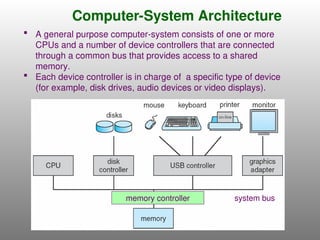
memory controllersystem bus
A general purpose computer-system consists of one or more
CPUs and a number of device controllers that are connected
through a common bus that provides access to a shared
memory.
Each device controller is in charge of a specific type of device
(for example, disk drives, audio devices or video displays).
3.
Computer-System Operation
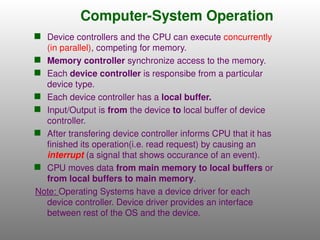
Devicecontrollers and the CPU can execute concurrently
(in parallel), competing for memory.
Memory controller synchronize access to the memory.
Each device controller is responsibe from a particular
device type.
Each device controller has a local buffer.
Input/Output is from the device to local buffer of device
controller.
After transfering device controller informs CPU that it has
finished its operation(i.e. read request) by causing an
interrupt (a signal that shows occurance of an event).
CPU moves data from main memory to local buffers or
from local buffers to main memory.
Note: Operating Systems have a device driver for each
device controller. Device driver provides an interface
between rest of the OS and the device.
4.
Common Functions ofInterrupts
Interrupt, transfers control to the appropriate interrupt
service routine (responsible for dealing with the interrupt),
through the interrupt vector, which contains the starting
addresses of all the service routines for the various
devices.
Interrupt architecture must save the address of the
interrupted instruction (loaded into the program counter).
Incoming interrupts are disabled while another interrupt is
being processed to prevent a lost interrupt, so any incoming
interrupts are delayed until operating system is done with
the current one; then, interrupts are enabled.
A trap or exception is a software-generated interrupt
caused either by an error in the program or a request from
a user program.
An operating system is managed by interrupts (interrupt
driven).
5.
Common Functions ofInterrupts(cont.)
Interrupt driven (hardware and software)
Hardware interrupt by one of the devices
Software interrupt (exception or trap):
Software error (e.g., division by zero)
Invalid memory access
Request for operating system service (using system
calls)
Other process problems include infinite loop,
processes modifying each other or the operating
system
6.
Interrupt Handling
Whenan interrupt (or trap) occurs, the hardware transfers control
to the operating system.
The operating system preserves the state of the CPU by storing
registers and the program counter.
Then OS determines which type of interrupt has occured.
Separate segments of code (in the OS) determine what action
should be taken for each type of interrupt.
An interrupt service routine is provided to deal with the interrupt
and control is passed to the corresponding interrupt service
routine.
Note: Operating system waits for some events to occur. The
occurrence of an event is usually signaled by an interrupt from
either the hardware or the software.
When the CPU is interrupted, it stops what it is doing and
immediately transfers execution to a fixed location(contains the
starting address of interrupt service routine). Then interrupt
service routine executes; on completion, the CPU is resuming the
interrupted computation.
7.
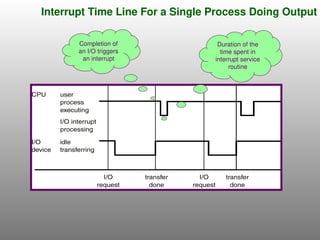
Interrupt Time LineFor a Single Process Doing Output
Completion of
an I/O triggers
an interrupt
Duration of the
time spent in
interrupt service
routine
8.
Storage Definitions andNotation Review
The basic unit of computer storage is the bit. A bit can contain one of two values, 0 and 1. All other
storage in a computer is based on collections of bits. Given enough bits, it is amazing how many
things a computer can represent: numbers, letters, images, movies, sounds, documents, and
programs, to name a few.
A byte is 8 bits, and on most computers it is the smallest convenient chunk of storage. For example,
most computers don’t have an instruction to move a bit but do have one to move a byte.
A less common term is word, which is a given computer architecture’s native unit of data. A word is
made up of one or more bytes. For example, a computer that has 64-bit registers and 64-bit memory
addressing typically has 64-bit (8-byte) words. A computer executes many operations in its native
word size rather than a byte at a time.
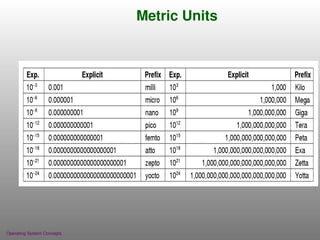
Computer storage, along with most computer throughput, is generally measured and manipulated in
bytes and collections of bytes.
A kilobyte, or KB, is 1,024 bytes
a megabyte, or MB, is 1,0242
bytes
a gigabyte, or GB, is 1,0243
bytes
a terabyte, or TB, is 1,0244
bytes
a petabyte, or PB, is 1,0245
bytes
Computer manufacturers often round off these numbers and say that a megabyte is 1 million bytes
and a gigabyte is 1 billion bytes. Networking measurements are an exception to this general rule; they
are given in bits (because networks move data a bit at a time).
Storage Structure
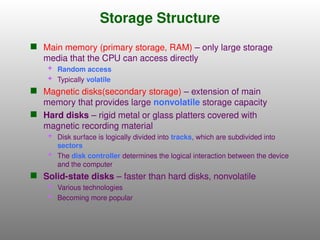
Mainmemory (primary storage, RAM) – only large storage
media that the CPU can access directly
Random access
Typically volatile
Magnetic disks(secondary storage) – extension of main
memory that provides large nonvolatile storage capacity
Hard disks – rigid metal or glass platters covered with
magnetic recording material
Disk surface is logically divided into tracks, which are subdivided into
sectors
The disk controller determines the logical interaction between the device
and the computer
Solid-state disks – faster than hard disks, nonvolatile
Various technologies
Becoming more popular
11.
Storage Structure(cont.)
Notes:
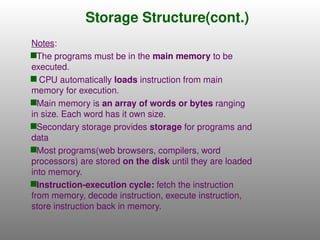
The programsmust be in the main memory to be
executed.
CPU automatically loads instruction from main
memory for execution.
Main memory is an array of words or bytes ranging
in size. Each word has it own size.
Secondary storage provides storage for programs and
data
Most programs(web browsers, compilers, word
processors) are stored on the disk until they are loaded
into memory.
Instruction-execution cycle: fetch the instruction
from memory, decode instruction, execute instruction,
store instruction back in memory.
12.
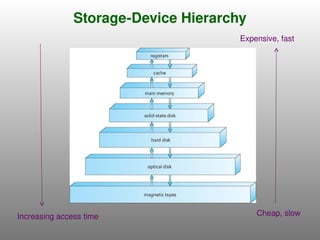
Storage Hierarchy
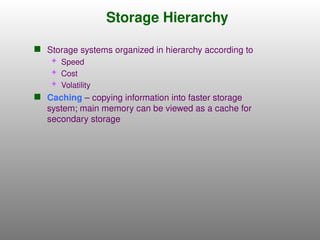
Storagesystems organized in hierarchy according to
Speed
Cost
Volatility
Caching – copying information into faster storage
system; main memory can be viewed as a cache for
secondary storage
Caching
Important principle,performed at many levels in a
computer (in hardware, operating system, software)
Use of high-speed memory to hold recently-accessed
data.
Information in use copied from slower to faster storage
temporarily
Faster storage (cache) checked first to determine if
information is there
If it is, information used directly from the cache (fast)
If not, data copied to cache and used there
Requires a cache management policy, since caches have
limited memory size.
Caching introduces another level in storage hierarchy.
This requires data that is simultaneously stored in more
than one level to be consistent.
Ex: Value of a variable can be different in register and in the
various storage systems.
15.
Direct Memory Access(DMA)
Structure
Used for high-speed I/O devices, able to transmit
information at close to memory speeds.
Device controller transfers blocks of data to or from
its local buffer directly to main memory without CPU
intervention.
Only one interrupt is generated per block by DMA
controller, rather than an interrupt per byte.
16.
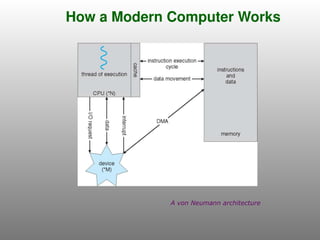
How a ModernComputer Works
A von Neumann architecture
17.
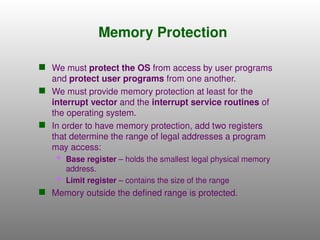
Memory Protection
Wemust protect the OS from access by user programs
and protect user programs from one another.
We must provide memory protection at least for the
interrupt vector and the interrupt service routines of
the operating system.
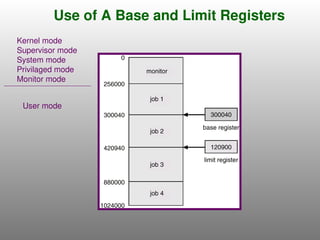
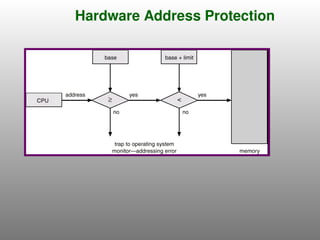
In order to have memory protection, add two registers
that determine the range of legal addresses a program
may access:
Base register – holds the smallest legal physical memory
address.
Limit register – contains the size of the range
Memory outside the defined range is protected.
18.
Use of ABase and Limit Registers
User mode
Kernel mode
Supervisor mode
System mode
Privilaged mode
Monitor mode
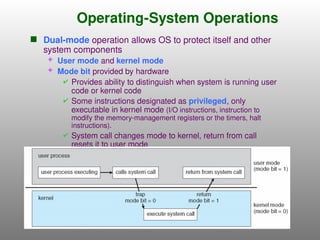
Operating-System Operations
Dual-modeoperation allows OS to protect itself and other
system components
User mode and kernel mode
Mode bit provided by hardware
Provides ability to distinguish when system is running user
code or kernel code
Some instructions designated as privileged, only
executable in kernel mode (I/O instructions, instruction to
modify the memory-management registers or the timers, halt
instructions).
System call changes mode to kernel, return from call
resets it to user mode