Overview of Computer System Structure
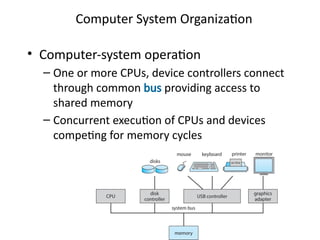
Computer System Organization
• Computer-system operation
– One or more CPUs, device controllers connect
through common bus providing access to
shared memory
– Concurrent execution of CPUs and devices
competing for memory cycles
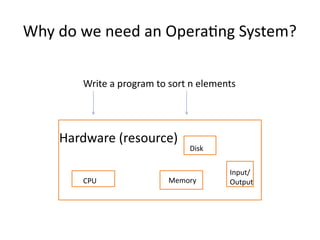
Why do we need an Operating System?
Hardware (resource)
CPU Memory
Disk
Input/
Output
Write a program to sort n elements
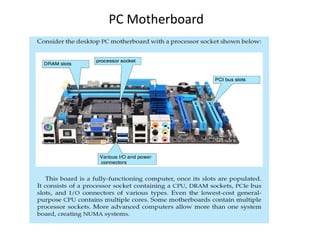
PC Motherboard
Computer-System Operation
• I/O devices and the CPU can execute concurrently
• Each device controller is in charge of a particular device
type
• Each device controller has a local buffer
• Each device controller type has an operating system
device driver to manage it
• CPU moves data from/to main memory to/from local
buffers
• I/O is from the device to local buffer of controller
• Device controller informs CPU that it has finished its
operation by causing an interrupt
What is an Operating System?
(User’s view)
– A program that acts as an intermediary between a
user of a computer and the computer hardware
– Defines an interface for the user to use services
provided by the system
– Creates an environment for the user
• Abstract Machine
– Hides complex details of the underlying hardware
– Provides common API to applications and services
– Simplifies application writing
• Command Interpreter
– Part of a OS that understands and executes
commands that are entered interactively by a
human being or from a program
– Shell
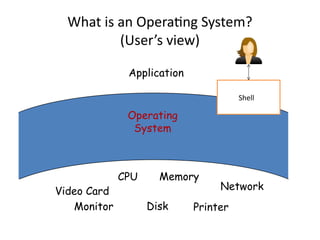
What is an Operating System?
(User’s view)
Operating
System
Video Card
CPU
Monitor Printer
Disk
Memory
Network
Application
Shell
What is an Operating System?
(User’s view)
Why is abstraction important?
• Without OSs and abstract interfaces, application writers must
program all device access directly
– load device command codes into device registers
– understand physical characteristics of the devices
• Applications suffer!
– very complicated maintenance and upgrading
– no portability
What Operating Systems Do
(User’s view)
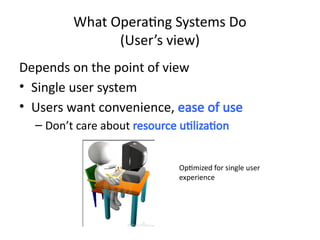
Depends on the point of view
• Single user system
• Users want convenience, ease of use
– Don’t care about resource utilization
Optimized for single user
experience
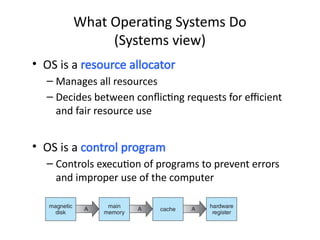
• OS is a resource allocator
– Manages all resources
– Decides between conflicting requests for efficient
and fair resource use
• OS is a control program
– Controls execution of programs to prevent errors
and improper use of the computer
What Operating Systems Do
(Systems view)
Concept of Process
• Process
– Program loaded in memory and in execution
• Program is a passive entity
• Process is an active entity
12
Types of Systems
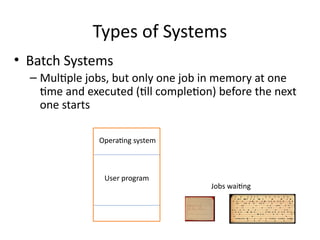
• Batch Systems
– Multiple jobs, but only one job in memory at one
time and executed (till completion) before the next
one starts
Operating system
User program
Jobs waiting
Types of Systems
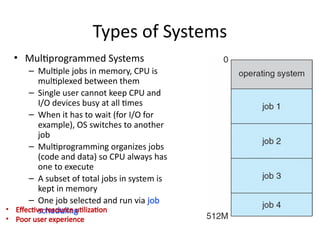
• Multiprogrammed Systems
– Multiple jobs in memory, CPU is
multiplexed between them
– Single user cannot keep CPU and
I/O devices busy at all times
– When it has to wait (for I/O for
example), OS switches to another
job
– Multiprogramming organizes jobs
(code and data) so CPU always has
one to execute
– A subset of total jobs in system is
kept in memory
– One job selected and run via job
scheduling
• Effective resource utilization
• Poor user experience
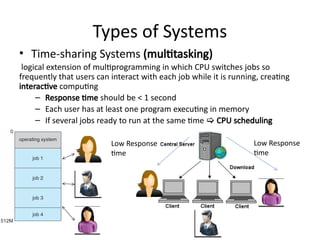
• Time-sharing Systems (multitasking)
logical extension of multiprogramming in which CPU switches jobs so
frequently that users can interact with each job while it is running, creating
interactive computing
– Response time should be < 1 second
– Each user has at least one program executing in memory
– If several jobs ready to run at the same time  CPU scheduling
Types of Systems
Low Response
time
Low Response
time
• OS is a resource allocator
– Manages all resources
– Decides between conflicting requests for efficient
and fair resource use
• OS is a control program
– Controls execution of programs to prevent errors
and improper use of the computer
What Operating Systems Do
(Systems view)
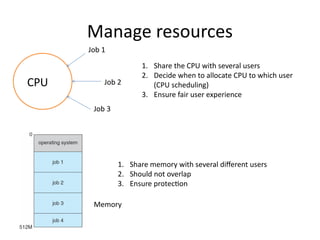
Manage resources
CPU
1. Share the CPU with several users
2. Decide when to allocate CPU to which user
(CPU scheduling)
3. Ensure fair user experience
Job 1
Job 2
Job 3
1. Share memory with several different users
2. Should not overlap
3. Ensure protection
Memory
Role of Operating system
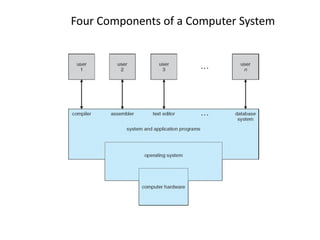
• Computer system can be divided into four components:
– Hardware – provides basic computing resources
• CPU, memory, I/O devices
– Application programs – define the ways in which the system
resources are used to solve the computing problems of the users
• Word processors, compilers, web browsers, database systems, video
games
– Users
• People, machines, other computers
– Operating system
• Controls and coordinates use of hardware among various applications
and users
Four Components of a Computer System
Execution of OS
• Interrupt driven
• Until an interrupt comes, OS remains Idle
• Interrupt/trap
– Possibility 1---- error
– Possibility 2
• User program invokes OS code by generating Interrupt,
system call
• To perform some task reserved for OS
• Accessing I/O devices (read, write files)
Common Functions of Interrupts
• Interrupt transfers control to the interrupt
service routine generally, through the interrupt
vector, which contains the addresses of all the
service routines
• Interrupt architecture must save the address of
the interrupted instruction
• A trap or exception is a software-generated
interrupt caused either by an error or a user
request
• An operating system is interrupt driven
Interrupt Handling
• The operating system preserves the
state of the CPU by storing the
registers and the program counter
• Determines which type of interrupt
has occurred:
• Separate segments of code
determine what action should be
taken for each type of interrupt
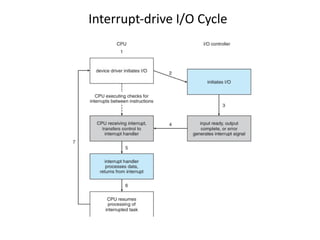
Interrupt-drive I/O Cycle
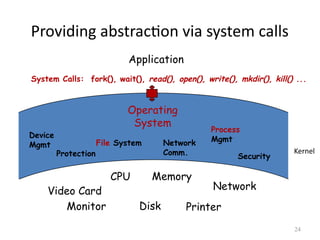
Providing abstraction via system calls
Operating
System
Video Card
CPU
Monitor Printer
Disk
Memory
Network
Application
System Calls: fork(), wait(), read(), open(), write(), mkdir(), kill() ...
Device
Mgmt File System Network
Comm.
Process
Mgmt
Protection Security
24
Kernel
Execution of OS
• Interrupt driven
• Until an interrupt comes, OS remains Idle
• User program invokes OS code by generating
Interrupt, system call
– To perform some task reserved for OS
– Accessing I/O devices (read, write files)
• Any difference in execution between user and
OS program?
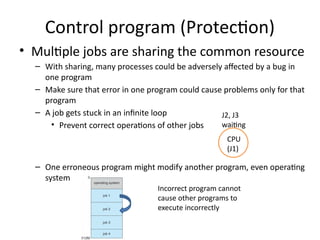
Control program (Protection)
• Multiple jobs are sharing the common resource
– With sharing, many processes could be adversely affected by a bug in
one program
– Make sure that error in one program could cause problems only for that
program
– A job gets stuck in an infinite loop
• Prevent correct operations of other jobs
– One erroneous program might modify another program, even operating
system
CPU
(J1)
J2, J3
waiting
Incorrect program cannot
cause other programs to
execute incorrectly
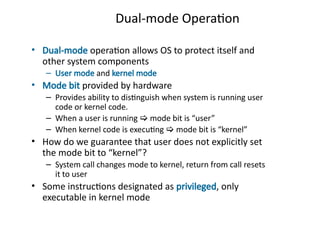
Dual-mode Operation
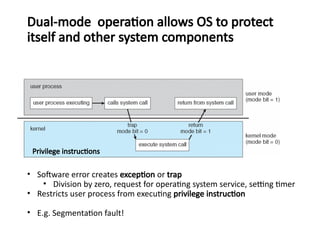
• Dual-mode operation allows OS to protect itself and
other system components
– User mode and kernel mode
• Mode bit provided by hardware
– Provides ability to distinguish when system is running user
code or kernel code.
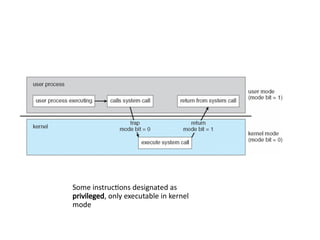
– When a user is running  mode bit is “user”
– When kernel code is executing  mode bit is “kernel”
• How do we guarantee that user does not explicitly set
the mode bit to “kernel”?
– System call changes mode to kernel, return from call resets
it to user
• Some instructions designated as privileged, only
executable in kernel mode
Some instructions designated as
privileged, only executable in kernel
mode
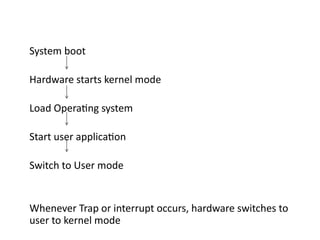
System boot
Hardware starts kernel mode
Load Operating system
Start user application
Switch to User mode
Whenever Trap or interrupt occurs, hardware switches to
user to kernel mode
• Software error creates exception or trap
• Division by zero, request for operating system service, setting timer
• Restricts user process from executing privilege instruction
Dual-mode operation allows OS to protect
itself and other system components
Privilege instructions
• E.g. Segmentation fault!
A1
A2
computation I/O computation
Time
U (A1)
Mode K
Initiates
I/O
Schedules A2
U (A2)
computation
K
Schedules A1
K U (A1)
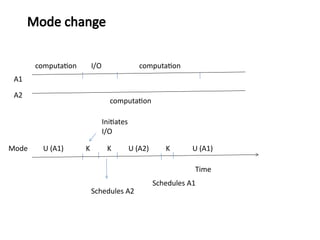
Mode change
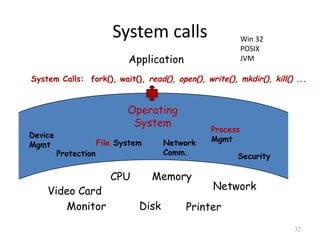
System calls
Operating
System
Video Card
CPU
Monitor Printer
Disk
Memory
Network
Application
System Calls: fork(), wait(), read(), open(), write(), mkdir(), kill() ...
Device
Mgmt File System Network
Comm.
Process
Mgmt
Protection Security
32
Win 32
POSIX
JVM
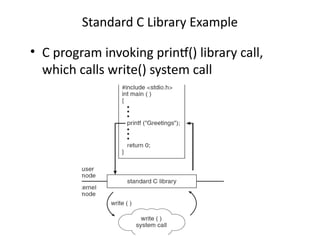
Standard C Library Example
• C program invoking printf() library call,
which calls write() system call
Resources Managed by OS
• Physical
– CPU, Memory, Disk, I/O Devices like keyboard,
monitor, printer
• Logical
– Process, File, …
Hence we have
1. Process management
2. Memory management
3. File management
4. I/O management
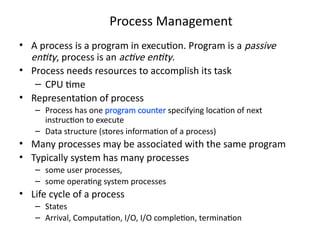
Process Management
• A process is a program in execution. Program is a passive
entity, process is an active entity.
• Process needs resources to accomplish its task
– CPU time
• Representation of process
– Process has one program counter specifying location of next
instruction to execute
– Data structure (stores information of a process)
• Many processes may be associated with the same program
• Typically system has many processes
– some user processes,
– some operating system processes
• Life cycle of a process
– States
– Arrival, Computation, I/O, I/O completion, termination
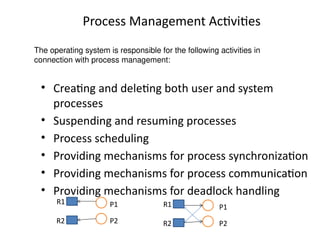
Process Management Activities
• Creating and deleting both user and system
processes
• Suspending and resuming processes
• Process scheduling
• Providing mechanisms for process synchronization
• Providing mechanisms for process communication
• Providing mechanisms for deadlock handling
The operating system is responsible for the following activities in
connection with process management:
P1
P2
R1
R2
R1
R2
P1
P2
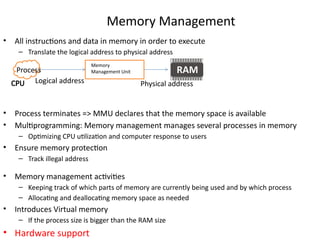
Memory Management
• All instructions and data in memory in order to execute
– Translate the logical address to physical address
• Process terminates => MMU declares that the memory space is available
• Multiprogramming: Memory management manages several processes in memory
– Optimizing CPU utilization and computer response to users
• Ensure memory protection
– Track illegal address
• Memory management activities
– Keeping track of which parts of memory are currently being used and by which process
– Allocating and deallocating memory space as needed
• Introduces Virtual memory
– If the process size is bigger than the RAM size
• Hardware support
Process
Memory
Management Unit
Logical address Physical address
CPU
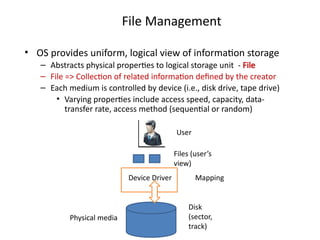
File Management
• OS provides uniform, logical view of information storage
– Abstracts physical properties to logical storage unit - File
– File => Collection of related information defined by the creator
– Each medium is controlled by device (i.e., disk drive, tape drive)
• Varying properties include access speed, capacity, data-
transfer rate, access method (sequential or random)
User
Files (user’s
view)
Disk
(sector,
track)
Device Driver
Physical media
Mapping
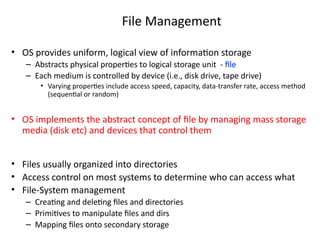
File Management
• OS provides uniform, logical view of information storage
– Abstracts physical properties to logical storage unit - file
– Each medium is controlled by device (i.e., disk drive, tape drive)
• Varying properties include access speed, capacity, data-transfer rate, access method
(sequential or random)
• OS implements the abstract concept of file by managing mass storage
media (disk etc) and devices that control them
• Files usually organized into directories
• Access control on most systems to determine who can access what
• File-System management
– Creating and deleting files and directories
– Primitives to manipulate files and dirs
– Mapping files onto secondary storage
• Usually disks used to store data that does not fit in
main memory or data that must be kept for a “long”
period of time
– Most of the programs are stored on disk
• Proper management is of central importance
• Entire speed of computer operation depends on
disk subsystem and its algorithms
• OS activities
– Storage allocation (logical blocks)
– Free-space management
– Disk scheduling
Disk Management
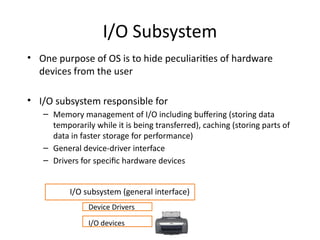
I/O Subsystem
• One purpose of OS is to hide peculiarities of hardware
devices from the user
• I/O subsystem responsible for
– Memory management of I/O including buffering (storing data
temporarily while it is being transferred), caching (storing parts of
data in faster storage for performance)
– General device-driver interface
– Drivers for specific hardware devices
I/O devices
Device Drivers
I/O subsystem (general interface)
OS design and structure
• Large complex system
– Designed carefully
• if it is to function properly
• Modified easily
• Common approach
– Partition the tasks into small
components/modules
– Each module must accomplish some specified task
Design and Implementation
• Design and Implementation of OS is not “solvable”, but
some approaches have proven successful
• Internal structure of different Operating Systems can vary
widely
• Start the design by defining goals and specifications
• Affected by choice of hardware, type of system
• User goals and System goals
– User goals – operating system should be convenient to use, easy
to learn, reliable, safe, and fast
– System goals – operating system should be easy to design,
implement, and maintain, as well as flexible, reliable, error-free,
and efficient
• Specifying and designing an OS is highly creative task of
software engineering
Policy and Mechanism
• Policy: What needs to be done?
– Example: Interrupt after every 100 seconds
• Mechanism: How to do something?
– Example: timer
• Important principle: separate policy from
mechanism
• The separation of policy from mechanism is a
very important principle, it allows maximum
flexibility if policy decisions are to be changed
later.
– Example: change 100 to 200
Implementation
• Much variation
– Early OSes in assembly language
– Then system programming languages like Algol, PL/1
– Now C, C++
• Actually usually a mix of languages
– Lowest levels in assembly
– Main body in C
– Systems programs in C, C++, scripting languages like PERL, Python,
shell scripts
• More high-level language easier to port to other hardware
– But slower
• Emulation can allow an OS to run on non-native hardware
Operating System Structure
• General-purpose OS is very large
program
• Various ways to structure ones
– Simple structure – MS-DOS
– More complex – UNIX
– Layered – an abstraction
– Microkernel – Mach
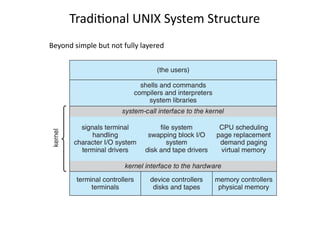
Monolithic Structure – Original UNIX
• UNIX – limited by hardware functionality, the original
UNIX operating system had limited structuring.
• The UNIX OS consists of two separable parts
– Systems programs
– The kernel
• Consists of everything below the system-call interface and
above the physical hardware
• Provides the file system, CPU scheduling, memory management,
and other operating-system functions; a large number of
functions for one level
Traditional UNIX System Structure
Beyond simple but not fully layered
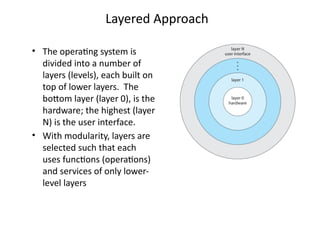
Layered Approach
• The operating system is
divided into a number of
layers (levels), each built on
top of lower layers. The
bottom layer (layer 0), is the
hardware; the highest (layer
N) is the user interface.
• With modularity, layers are
selected such that each
uses functions (operations)
and services of only lower-
level layers
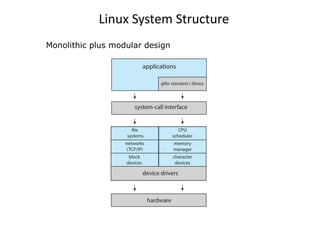
Linux System Structure
Monolithic plus modular design
Microkernels
• Moves as much from the kernel into user space
• Mach is an example of microkernel
– Mac OS X kernel (Darwin) partly based on Mach
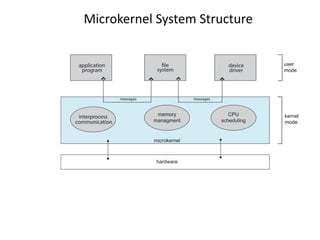
• Communication takes place between user modules using
message passing
• Benefits:
– Easier to extend a microkernel
– Easier to port the operating system to new architectures
– More reliable (less code is running in kernel mode)
– More secure
• Detriments:
– Performance overhead of user space to kernel space
communication
Microkernel System Structure
Modules
• Many modern operating systems
implement loadable kernel modules (LKMs)
– Uses object-oriented approach
– Each core component is separate
– Each talks to the others over known interfaces
– Each is loadable as needed within the kernel
• Overall, similar to layers but with more
flexible
– Linux, Solaris, etc.
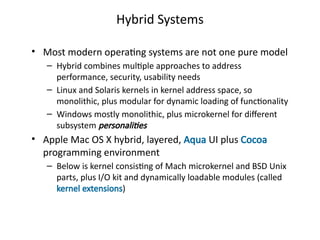
Hybrid Systems
• Most modern operating systems are not one pure model
– Hybrid combines multiple approaches to address
performance, security, usability needs
– Linux and Solaris kernels in kernel address space, so
monolithic, plus modular for dynamic loading of functionality
– Windows mostly monolithic, plus microkernel for different
subsystem personalities
• Apple Mac OS X hybrid, layered, Aqua UI plus Cocoa
programming environment
– Below is kernel consisting of Mach microkernel and BSD Unix
parts, plus I/O kit and dynamically loadable modules (called
kernel extensions)
Computer System Architecture
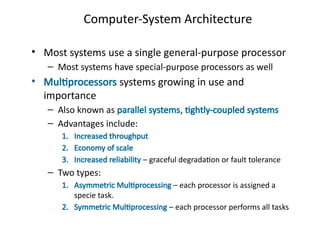
Computer-System Architecture
• Most systems use a single general-purpose processor
– Most systems have special-purpose processors as well
• Multiprocessors systems growing in use and
importance
– Also known as parallel systems, tightly-coupled systems
– Advantages include:
1. Increased throughput
2. Economy of scale
3. Increased reliability – graceful degradation or fault tolerance
– Two types:
1. Asymmetric Multiprocessing – each processor is assigned a
specie task.
2. Symmetric Multiprocessing – each processor performs all tasks
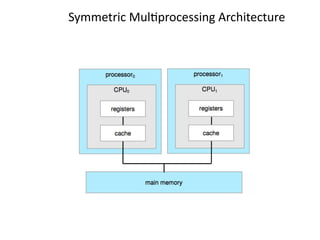
Symmetric Multiprocessing Architecture
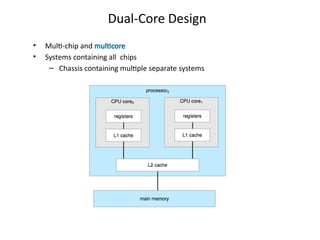
Dual-Core Design
• Multi-chip and multicore
• Systems containing all chips
– Chassis containing multiple separate systems
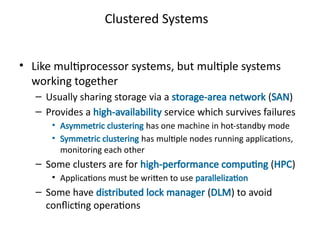
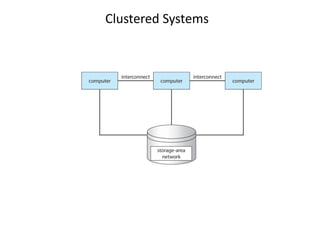
Clustered Systems
• Like multiprocessor systems, but multiple systems
working together
– Usually sharing storage via a storage-area network (SAN)
– Provides a high-availability service which survives failures
• Asymmetric clustering has one machine in hot-standby mode
• Symmetric clustering has multiple nodes running applications,
monitoring each other
– Some clusters are for high-performance computing (HPC)
• Applications must be written to use parallelization
– Some have distributed lock manager (DLM) to avoid
conflicting operations
Clustered Systems

Introduction _to_ OperatingSystem_1.pptx

  • 1.
    Overview of ComputerSystem Structure
  • 2.
    Computer System Organization •Computer-system operation – One or more CPUs, device controllers connect through common bus providing access to shared memory – Concurrent execution of CPUs and devices competing for memory cycles
  • 3.
    Why do weneed an Operating System? Hardware (resource) CPU Memory Disk Input/ Output Write a program to sort n elements
  • 4.
  • 5.
    Computer-System Operation • I/Odevices and the CPU can execute concurrently • Each device controller is in charge of a particular device type • Each device controller has a local buffer • Each device controller type has an operating system device driver to manage it • CPU moves data from/to main memory to/from local buffers • I/O is from the device to local buffer of controller • Device controller informs CPU that it has finished its operation by causing an interrupt
  • 6.
    What is anOperating System? (User’s view) – A program that acts as an intermediary between a user of a computer and the computer hardware – Defines an interface for the user to use services provided by the system – Creates an environment for the user
  • 7.
    • Abstract Machine –Hides complex details of the underlying hardware – Provides common API to applications and services – Simplifies application writing • Command Interpreter – Part of a OS that understands and executes commands that are entered interactively by a human being or from a program – Shell What is an Operating System? (User’s view)
  • 8.
  • 9.
    Why is abstractionimportant? • Without OSs and abstract interfaces, application writers must program all device access directly – load device command codes into device registers – understand physical characteristics of the devices • Applications suffer! – very complicated maintenance and upgrading – no portability
  • 10.
    What Operating SystemsDo (User’s view) Depends on the point of view • Single user system • Users want convenience, ease of use – Don’t care about resource utilization Optimized for single user experience
  • 11.
    • OS isa resource allocator – Manages all resources – Decides between conflicting requests for efficient and fair resource use • OS is a control program – Controls execution of programs to prevent errors and improper use of the computer What Operating Systems Do (Systems view)
  • 12.
    Concept of Process •Process – Program loaded in memory and in execution • Program is a passive entity • Process is an active entity 12
  • 13.
    Types of Systems •Batch Systems – Multiple jobs, but only one job in memory at one time and executed (till completion) before the next one starts Operating system User program Jobs waiting
  • 14.
    Types of Systems •Multiprogrammed Systems – Multiple jobs in memory, CPU is multiplexed between them – Single user cannot keep CPU and I/O devices busy at all times – When it has to wait (for I/O for example), OS switches to another job – Multiprogramming organizes jobs (code and data) so CPU always has one to execute – A subset of total jobs in system is kept in memory – One job selected and run via job scheduling • Effective resource utilization • Poor user experience
  • 15.
    • Time-sharing Systems(multitasking) logical extension of multiprogramming in which CPU switches jobs so frequently that users can interact with each job while it is running, creating interactive computing – Response time should be < 1 second – Each user has at least one program executing in memory – If several jobs ready to run at the same time  CPU scheduling Types of Systems Low Response time Low Response time
  • 16.
    • OS isa resource allocator – Manages all resources – Decides between conflicting requests for efficient and fair resource use • OS is a control program – Controls execution of programs to prevent errors and improper use of the computer What Operating Systems Do (Systems view)
  • 17.
    Manage resources CPU 1. Sharethe CPU with several users 2. Decide when to allocate CPU to which user (CPU scheduling) 3. Ensure fair user experience Job 1 Job 2 Job 3 1. Share memory with several different users 2. Should not overlap 3. Ensure protection Memory
  • 18.
    Role of Operatingsystem • Computer system can be divided into four components: – Hardware – provides basic computing resources • CPU, memory, I/O devices – Application programs – define the ways in which the system resources are used to solve the computing problems of the users • Word processors, compilers, web browsers, database systems, video games – Users • People, machines, other computers – Operating system • Controls and coordinates use of hardware among various applications and users
  • 19.
    Four Components ofa Computer System
  • 20.
    Execution of OS •Interrupt driven • Until an interrupt comes, OS remains Idle • Interrupt/trap – Possibility 1---- error – Possibility 2 • User program invokes OS code by generating Interrupt, system call • To perform some task reserved for OS • Accessing I/O devices (read, write files)
  • 21.
    Common Functions ofInterrupts • Interrupt transfers control to the interrupt service routine generally, through the interrupt vector, which contains the addresses of all the service routines • Interrupt architecture must save the address of the interrupted instruction • A trap or exception is a software-generated interrupt caused either by an error or a user request • An operating system is interrupt driven
  • 22.
    Interrupt Handling • Theoperating system preserves the state of the CPU by storing the registers and the program counter • Determines which type of interrupt has occurred: • Separate segments of code determine what action should be taken for each type of interrupt
  • 23.
  • 24.
    Providing abstraction viasystem calls Operating System Video Card CPU Monitor Printer Disk Memory Network Application System Calls: fork(), wait(), read(), open(), write(), mkdir(), kill() ... Device Mgmt File System Network Comm. Process Mgmt Protection Security 24 Kernel
  • 25.
    Execution of OS •Interrupt driven • Until an interrupt comes, OS remains Idle • User program invokes OS code by generating Interrupt, system call – To perform some task reserved for OS – Accessing I/O devices (read, write files) • Any difference in execution between user and OS program?
  • 26.
    Control program (Protection) •Multiple jobs are sharing the common resource – With sharing, many processes could be adversely affected by a bug in one program – Make sure that error in one program could cause problems only for that program – A job gets stuck in an infinite loop • Prevent correct operations of other jobs – One erroneous program might modify another program, even operating system CPU (J1) J2, J3 waiting Incorrect program cannot cause other programs to execute incorrectly
  • 27.
    Dual-mode Operation • Dual-modeoperation allows OS to protect itself and other system components – User mode and kernel mode • Mode bit provided by hardware – Provides ability to distinguish when system is running user code or kernel code. – When a user is running  mode bit is “user” – When kernel code is executing  mode bit is “kernel” • How do we guarantee that user does not explicitly set the mode bit to “kernel”? – System call changes mode to kernel, return from call resets it to user • Some instructions designated as privileged, only executable in kernel mode
  • 28.
    Some instructions designatedas privileged, only executable in kernel mode
  • 29.
    System boot Hardware startskernel mode Load Operating system Start user application Switch to User mode Whenever Trap or interrupt occurs, hardware switches to user to kernel mode
  • 30.
    • Software errorcreates exception or trap • Division by zero, request for operating system service, setting timer • Restricts user process from executing privilege instruction Dual-mode operation allows OS to protect itself and other system components Privilege instructions • E.g. Segmentation fault!
  • 31.
    A1 A2 computation I/O computation Time U(A1) Mode K Initiates I/O Schedules A2 U (A2) computation K Schedules A1 K U (A1) Mode change
  • 32.
    System calls Operating System Video Card CPU MonitorPrinter Disk Memory Network Application System Calls: fork(), wait(), read(), open(), write(), mkdir(), kill() ... Device Mgmt File System Network Comm. Process Mgmt Protection Security 32 Win 32 POSIX JVM
  • 33.
    Standard C LibraryExample • C program invoking printf() library call, which calls write() system call
  • 34.
    Resources Managed byOS • Physical – CPU, Memory, Disk, I/O Devices like keyboard, monitor, printer • Logical – Process, File, … Hence we have 1. Process management 2. Memory management 3. File management 4. I/O management
  • 35.
    Process Management • Aprocess is a program in execution. Program is a passive entity, process is an active entity. • Process needs resources to accomplish its task – CPU time • Representation of process – Process has one program counter specifying location of next instruction to execute – Data structure (stores information of a process) • Many processes may be associated with the same program • Typically system has many processes – some user processes, – some operating system processes • Life cycle of a process – States – Arrival, Computation, I/O, I/O completion, termination
  • 36.
    Process Management Activities •Creating and deleting both user and system processes • Suspending and resuming processes • Process scheduling • Providing mechanisms for process synchronization • Providing mechanisms for process communication • Providing mechanisms for deadlock handling The operating system is responsible for the following activities in connection with process management: P1 P2 R1 R2 R1 R2 P1 P2
  • 37.
    Memory Management • Allinstructions and data in memory in order to execute – Translate the logical address to physical address • Process terminates => MMU declares that the memory space is available • Multiprogramming: Memory management manages several processes in memory – Optimizing CPU utilization and computer response to users • Ensure memory protection – Track illegal address • Memory management activities – Keeping track of which parts of memory are currently being used and by which process – Allocating and deallocating memory space as needed • Introduces Virtual memory – If the process size is bigger than the RAM size • Hardware support Process Memory Management Unit Logical address Physical address CPU
  • 38.
    File Management • OSprovides uniform, logical view of information storage – Abstracts physical properties to logical storage unit - File – File => Collection of related information defined by the creator – Each medium is controlled by device (i.e., disk drive, tape drive) • Varying properties include access speed, capacity, data- transfer rate, access method (sequential or random) User Files (user’s view) Disk (sector, track) Device Driver Physical media Mapping
  • 39.
    File Management • OSprovides uniform, logical view of information storage – Abstracts physical properties to logical storage unit - file – Each medium is controlled by device (i.e., disk drive, tape drive) • Varying properties include access speed, capacity, data-transfer rate, access method (sequential or random) • OS implements the abstract concept of file by managing mass storage media (disk etc) and devices that control them • Files usually organized into directories • Access control on most systems to determine who can access what • File-System management – Creating and deleting files and directories – Primitives to manipulate files and dirs – Mapping files onto secondary storage
  • 40.
    • Usually disksused to store data that does not fit in main memory or data that must be kept for a “long” period of time – Most of the programs are stored on disk • Proper management is of central importance • Entire speed of computer operation depends on disk subsystem and its algorithms • OS activities – Storage allocation (logical blocks) – Free-space management – Disk scheduling Disk Management
  • 41.
    I/O Subsystem • Onepurpose of OS is to hide peculiarities of hardware devices from the user • I/O subsystem responsible for – Memory management of I/O including buffering (storing data temporarily while it is being transferred), caching (storing parts of data in faster storage for performance) – General device-driver interface – Drivers for specific hardware devices I/O devices Device Drivers I/O subsystem (general interface)
  • 42.
    OS design andstructure • Large complex system – Designed carefully • if it is to function properly • Modified easily • Common approach – Partition the tasks into small components/modules – Each module must accomplish some specified task
  • 43.
    Design and Implementation •Design and Implementation of OS is not “solvable”, but some approaches have proven successful • Internal structure of different Operating Systems can vary widely • Start the design by defining goals and specifications • Affected by choice of hardware, type of system • User goals and System goals – User goals – operating system should be convenient to use, easy to learn, reliable, safe, and fast – System goals – operating system should be easy to design, implement, and maintain, as well as flexible, reliable, error-free, and efficient • Specifying and designing an OS is highly creative task of software engineering
  • 44.
    Policy and Mechanism •Policy: What needs to be done? – Example: Interrupt after every 100 seconds • Mechanism: How to do something? – Example: timer • Important principle: separate policy from mechanism • The separation of policy from mechanism is a very important principle, it allows maximum flexibility if policy decisions are to be changed later. – Example: change 100 to 200
  • 45.
    Implementation • Much variation –Early OSes in assembly language – Then system programming languages like Algol, PL/1 – Now C, C++ • Actually usually a mix of languages – Lowest levels in assembly – Main body in C – Systems programs in C, C++, scripting languages like PERL, Python, shell scripts • More high-level language easier to port to other hardware – But slower • Emulation can allow an OS to run on non-native hardware
  • 46.
    Operating System Structure •General-purpose OS is very large program • Various ways to structure ones – Simple structure – MS-DOS – More complex – UNIX – Layered – an abstraction – Microkernel – Mach
  • 47.
    Monolithic Structure –Original UNIX • UNIX – limited by hardware functionality, the original UNIX operating system had limited structuring. • The UNIX OS consists of two separable parts – Systems programs – The kernel • Consists of everything below the system-call interface and above the physical hardware • Provides the file system, CPU scheduling, memory management, and other operating-system functions; a large number of functions for one level
  • 48.
    Traditional UNIX SystemStructure Beyond simple but not fully layered
  • 49.
    Layered Approach • Theoperating system is divided into a number of layers (levels), each built on top of lower layers. The bottom layer (layer 0), is the hardware; the highest (layer N) is the user interface. • With modularity, layers are selected such that each uses functions (operations) and services of only lower- level layers
  • 50.
  • 51.
    Microkernels • Moves asmuch from the kernel into user space • Mach is an example of microkernel – Mac OS X kernel (Darwin) partly based on Mach • Communication takes place between user modules using message passing • Benefits: – Easier to extend a microkernel – Easier to port the operating system to new architectures – More reliable (less code is running in kernel mode) – More secure • Detriments: – Performance overhead of user space to kernel space communication
  • 52.
  • 53.
    Modules • Many modernoperating systems implement loadable kernel modules (LKMs) – Uses object-oriented approach – Each core component is separate – Each talks to the others over known interfaces – Each is loadable as needed within the kernel • Overall, similar to layers but with more flexible – Linux, Solaris, etc.
  • 54.
    Hybrid Systems • Mostmodern operating systems are not one pure model – Hybrid combines multiple approaches to address performance, security, usability needs – Linux and Solaris kernels in kernel address space, so monolithic, plus modular for dynamic loading of functionality – Windows mostly monolithic, plus microkernel for different subsystem personalities • Apple Mac OS X hybrid, layered, Aqua UI plus Cocoa programming environment – Below is kernel consisting of Mach microkernel and BSD Unix parts, plus I/O kit and dynamically loadable modules (called kernel extensions)
  • 55.
  • 56.
    Computer-System Architecture • Mostsystems use a single general-purpose processor – Most systems have special-purpose processors as well • Multiprocessors systems growing in use and importance – Also known as parallel systems, tightly-coupled systems – Advantages include: 1. Increased throughput 2. Economy of scale 3. Increased reliability – graceful degradation or fault tolerance – Two types: 1. Asymmetric Multiprocessing – each processor is assigned a specie task. 2. Symmetric Multiprocessing – each processor performs all tasks
  • 57.
  • 58.
    Dual-Core Design • Multi-chipand multicore • Systems containing all chips – Chassis containing multiple separate systems
  • 59.
    Clustered Systems • Likemultiprocessor systems, but multiple systems working together – Usually sharing storage via a storage-area network (SAN) – Provides a high-availability service which survives failures • Asymmetric clustering has one machine in hot-standby mode • Symmetric clustering has multiple nodes running applications, monitoring each other – Some clusters are for high-performance computing (HPC) • Applications must be written to use parallelization – Some have distributed lock manager (DLM) to avoid conflicting operations
  • 60.