Faculty of Computers andFaculty of Computers and
InformationInformation
Second Year (Second Semester)Second Year (Second Semester)
____________________________________________________________
Operating Systems IOperating Systems I
( )( )
____________________________________________________________
Dr. Ashraf ElsisiDr. Ashraf Elsisi
____________________________________________________
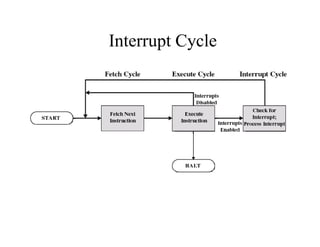
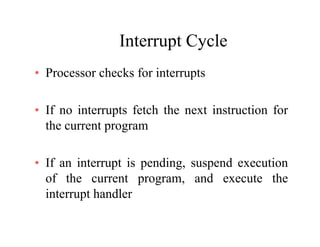
Interrupt CycleInterrupt Cycle
• Processor checks for interruptsProcessor checks for interrupts
If i t t f t h th t i t ti f• If no interrupts fetch the next instruction for
the current program
• If an interrupt is pending, suspend execution
of the current program, and execute the
interrupt handler
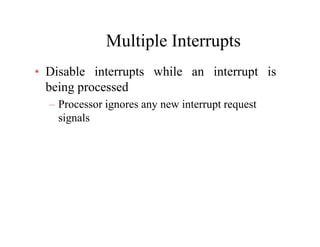
Multiple InterruptsMultiple Interrupts
• Disable interrupts while an interrupt isp p
being processed
– Processor ignores any new interrupt requestocesso g o es a y ew e up eques
signals
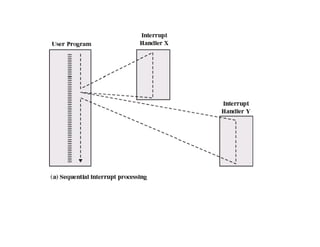
Multiple Interrupts Sequential OrderMultiple Interrupts Sequential Order
• Disable interrupts so processor can
l t t kcomplete task
• Interrupts remain pending until the
processor enables interrupts
• After interrupt handler routine
completes, the processor checks for
additional interrupts
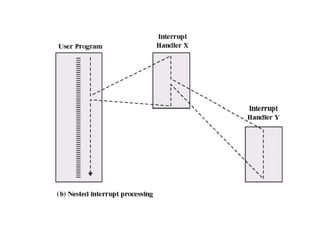
Multiple Interrupts PrioritiesMultiple Interrupts Priorities
• Higher priority interrupts cause lower-Higher priority interrupts cause lower
priority interrupts to wait
• Causes a lower-priority interrupt handler• Causes a lower-priority interrupt handler
to be interrupted
MultiprogrammingMultiprogramming
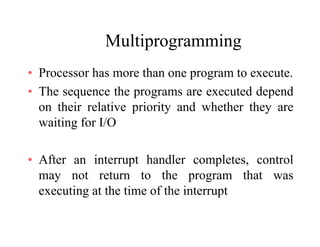
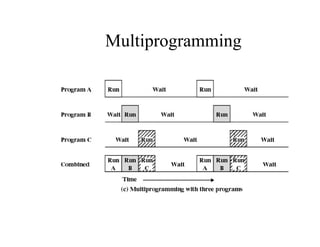
• Processor has more than one program to execute.Processor has more than one program to execute.
• The sequence the programs are executed depend
on their relative priority and whether they areon their relative priority and whether they are
waiting for I/O
• After an interrupt handler completes, control
may not return to the program that was
executing at the time of the interrupt
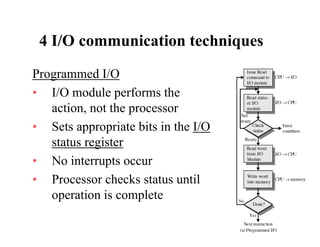
4 I/O communication techniques4 I/O communication techniques
Programmed I/OProgrammed I/O
• I/O module performs the
action not the processoraction, not the processor
• Sets appropriate bits in the I/O
t t i tstatus register
• No interrupts occur
• Processor checks status until
operation is completep p
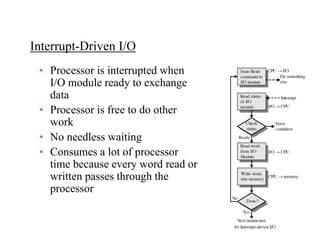
Interrupt Driven I/OInterrupt-Driven I/O
• Processor is interrupted when
I/O module ready to exchange
data
P i f t d th• Processor is free to do other
work
• No needless waitingNo needless waiting
• Consumes a lot of processor
time because every word read or
written passes through the
processor
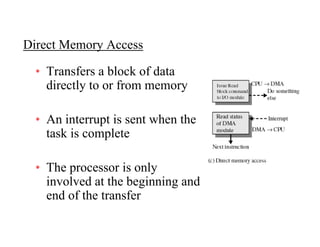
Direct Memory AccessDirect Memory Access
• Transfers a block of data
directly to or from memory
• An interrupt is sent when the
task is completep
• The processor is onlyThe processor is only
involved at the beginning and
end of the transfer
Direct Memory Access (DMA)Direct Memory Access (DMA)
• I/O exchanges occur directly with memoryg y y
• Processor grants I/O module authority to read fromocesso g a ts /O odu e aut o ty to ead o
or write to memory
• Relieves the processor responsibility for the
exchange
• Processor is free to do other thingsg
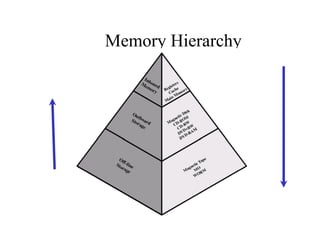
Memory HierarchyMemory Hierarchy
Going Down the HierarchyGoing Down the Hierarchy
• Decreasing cost per bitDecreasing cost per bit
I i it• Increasing capacity
• Increasing access time
• Decreasing frequency of access of the
memory by the processormemory by the processor
Disk CacheDisk Cache
• A portion of main memory used as a buffer to
temporarily to hold data for the disktemporarily to hold data for the disk
• Disk writes are clustered
• Some data written out may be referenced again.
The data are retrieved rapidly from the softwareThe data are retrieved rapidly from the software
cache instead of slowly from disk
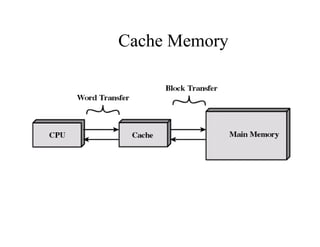
Cache MemoryCache Memory
• Invisible to operating systemInvisible to operating system
I th d f• Increase the speed of memory
• Processor speed is faster than memory
speed
Cache MemoryCache Memory
• Contains a portion of main memoryContains a portion of main memory
P fi t h k h• Processor first checks cache
• If not found in cache, the block of memory
containing the needed information is moved to
the cache
Operating System OverviewOperating System Overview
Chapter 2
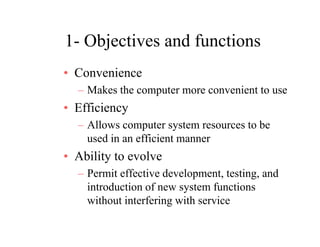
1- Objectives and functions1 Objectives and functions
• ConvenienceConvenience
– Makes the computer more convenient to use
• Efficiency• Efficiency
– Allows computer system resources to be
used in an efficient mannerused in an efficient manner
• Ability to evolve
P i ff i d l i d– Permit effective development, testing, and
introduction of new system functions
without interfering with servicewithout interfering with service
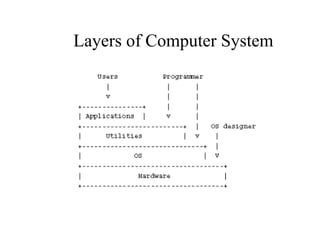
Layers of Computer SystemLayers of Computer System
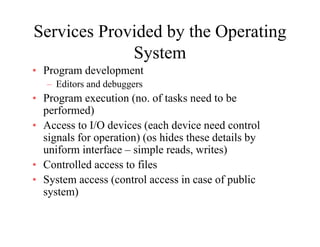
Services Provided by the Operating
System
• Program development
– Editors and debuggers
• Program execution (no. of tasks need to be
f d)performed)
• Access to I/O devices (each device need control
signals for operation) (os hides these details bysignals for operation) (os hides these details by
uniform interface – simple reads, writes)
• Controlled access to files
• System access (control access in case of public
system)
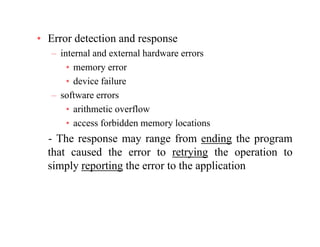
• Error detection and response
– internal and external hardware errors
• memory error
• device failure
– software errors
• arithmetic overflow• arithmetic overflow
• access forbidden memory locations
The response may range from ending the program- The response may range from ending the program
that caused the error to retrying the operation to
simply reporting the error to the applicationp y p g pp
A ti• Accounting
– collect statistics
– monitor performance
– used to future enhancements and tuning the
system to improve the performance
Operating SystemOperating System
• Functions same way as ordinary computerFunctions same way as ordinary computer
software
– It is program that is executedIt is program that is executed
• Operating system frequently relinquishes• Operating system frequently relinquishes
control of the processor to execute other
programsprograms
KernelKernel
• Portion of operating system that is inPortion of operating system that is in
main memory
• Contains most-frequently used functions• Contains most-frequently used functions
• Also called the nucleus
Ease Evolution of an Operating
SSystem
• Hardware upgrades and new types ofHardware upgrades and new types of
hardware
• New services• New services
Evolution of Operating Systems (key
i f OS)requirements for OS)
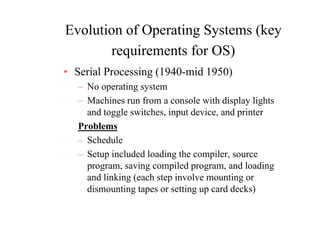
• Serial Processing (1940-mid 1950)g ( )
– No operating system
– Machines run from a console with display lights
and toggle switches, input device, and printer
Problems
Schedule– Schedule
– Setup included loading the compiler, source
program, saving compiled program, and loadingp g , g p p g , g
and linking (each step involve mounting or
dismounting tapes or setting up card decks)
Evolution of Operating
SSystems
• Simple Batch SystemsSimple Batch Systems
– Used Monitors
• Software that controls the running programsSo twa e t at co t o s t e u g p og a s
• Batch jobs together (by computer operator for monitor program)
• Program branches back to monitor when
finished
• Resident monitor is in main memory and
available for executionavailable for execution
• Need special language JCL
Job Control Language (JCL)Job Control Language (JCL)
• Special type of programming languageSpecial type of programming language
• Provides instruction to the monitor
what compiler to use– what compiler to use
– what data to use
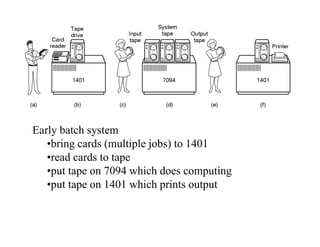
Early batch system
•bring cards (multiple jobs) to 1401
•read cards to tape
•put tape on 7094 which does computing•put tape on 7094 which does computing
•put tape on 1401 which prints output
Hardware FeaturesHardware Features
• Memory protectionMemory protection
– do not allow the memory area containing
the monitor to be altered
• Timer
prevents a job from monopolizing the– prevents a job from monopolizing the
system
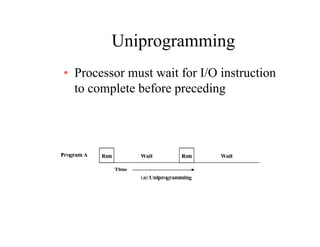
UniprogrammingUniprogramming
• Processor must wait for I/O instructionProcessor must wait for I/O instruction
to complete before preceding
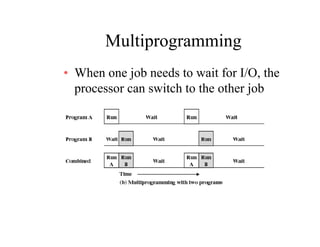
MultiprogrammingMultiprogramming
• When one job needs to wait for I/O, theWhen one job needs to wait for I/O, the
processor can switch to the other job
MultiprogrammingMultiprogramming
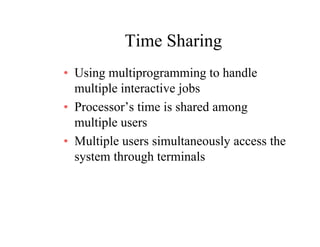
Time SharingTime Sharing
• Using multiprogramming to handleUsing multiprogramming to handle
multiple interactive jobs
• Processor’s time is shared among• Processor s time is shared among
multiple users
M lti l i lt l th• Multiple users simultaneously access the
system through terminals
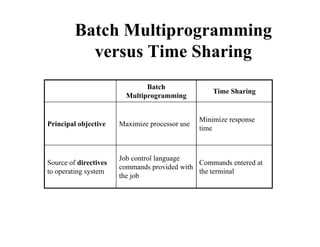
Batch Multiprogramming
Ti Sh iversus Time Sharing
Batch
Multiprogramming
Time Sharing
Principal objective Maximize processor use
Minimize response
time
Source of directives
t ti t
Job control language
commands provided with
Commands entered at
th t i lto operating system
p
the job
the terminal
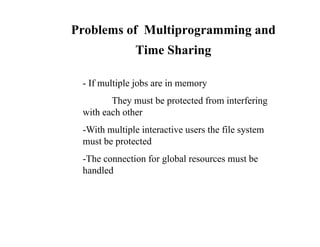
Problems of Multiprogramming and
i S iTime Sharing
- If multiple jobs are in memory
They must be protected from interfering
with each other
-With multiple interactive users the file system
t b t t dmust be protected
-The connection for global resources must be
handledhandled
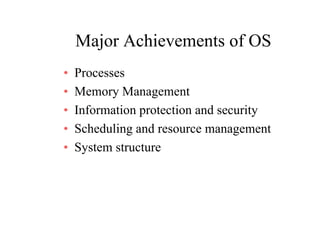
Major Achievements of OSMajor Achievements of OS
• ProcessesProcesses
• Memory Management
I f ti t ti d it• Information protection and security
• Scheduling and resource management
• System structure
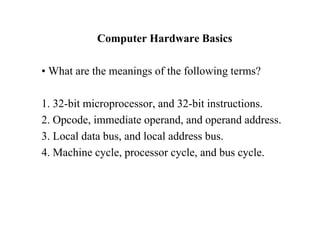
Computer Hardware Basics
• What are the meanings of the following terms?g g
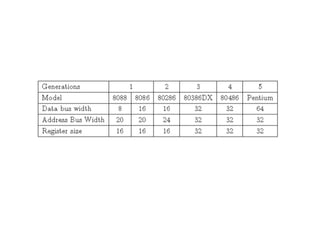
1. 32-bit microprocessor, and 32-bit instructions.p ,
2. Opcode, immediate operand, and operand address.
3. Local data bus, and local address bus.3. Local data bus, and local address bus.
4. Machine cycle, processor cycle, and bus cycle.
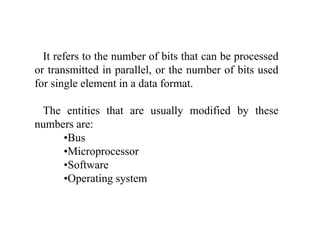
It refers to the number of bits that can be processed
or transmitted in parallel, or the number of bits used
for single element in a data format.
Th titi th t ll difi d b thThe entities that are usually modified by these
numbers are:
•BusBus
•Microprocessor
•Software
•Operating system
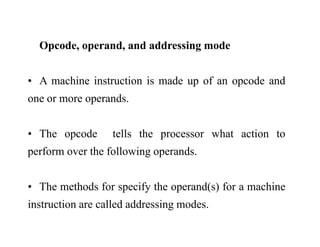
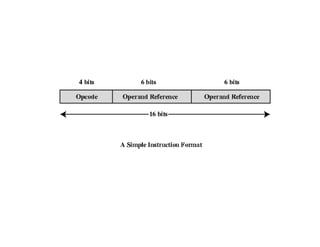
Opcode operand and addressing modeOpcode, operand, and addressing mode
A hi i i i d f d d• A machine instruction is made up of an opcode and
one or more operands.
• The opcode tells the processor what action top p
perform over the following operands.
• The methods for specify the operand(s) for a machine
i t ti ll d dd i dinstruction are called addressing modes.
Bus
A bus is a collection of wires through which data
is transmitted from one part of a computer to
thanother.
According to the type of data transmitted through theg yp g
bus, we have:
b h b d l d• Data bus: The bus used to carry actual data.
•Address bus: The bus transferring information
about where the data should goabout where the data should go.
•Control bus: The physical connections that carry
control information between the CPU and other
devices within the computer.
According to the location of buses, or what kinds of
components they connect, we have:p y ,
Local bus:Local bus:
Another name of system bus, which connects the
microprocessor main memory and all kinds of I/Omicroprocessor, main memory, and all kinds of I/O
modules.
A local bus is also called frontside bus, memory bus, or, y ,
host bus.
Backside bus:
A microprocessor bus that connects the CPU to a Level 2
cache.
Typically, a backside bus runs at a faster clock speed than
the frontside
External bus:
A bus that connects a computer to peripheral devices.
S dSpeeds
• System clock
There are so many circuits inside a computerThere are so many circuits inside a computer.
To perform a specific action, it is necessary forp p y
some sort of synchronization to occur so that
different parts function and cooperate as expected.
The”conductor” of the PC is the system clock,
which brings synchronizationwhich brings synchronization.
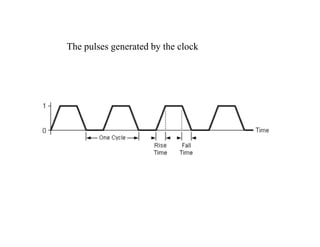
A clock is just a signal that alternates between zeroj g
and one, back and forth.
The pulses generated by the clockThe pulses generated by the clock
Memory Access time:
also known as response time or latency refers to how
quickly the memory can respond to a read or write
trequest.
•Memory cycle:Memory cycle:
refers to the minimum period between two successive
requests. For various reasons the time separating twoq p g
successive requests is not always 0, i.e a memory with
a response time of 80 ns cannot satisfy a request every
8080 ns.
Machine cycle:Machine cycle:
also called instruction cycle, the four steps which the
CPU i t f h hi lCPU carries out for each machine language
instruction: fetch, decode, execute, and store.
CachesCaches
Level 1 (Primary) Cache:
•The fastest memory on the PC.y
•It is in fact, built directly into the processor itself.
•This cache is very small, generally from 8 KB to 64
KB, but it is extremely fast; it runs at the same speed as
the processor.
If the processor requests information and can find it in
the level 1 cache, that is the best case, because thethe level 1 cache, that is the best case, because the
information is there immediately and the system does
not have to wait.
Level 2 (Secondary) Cache:Level 2 (Secondary) Cache:
The level 2 cache is a secondary cache to the level 1
h d i l d li htl lcache, and is larger and slightly slower.
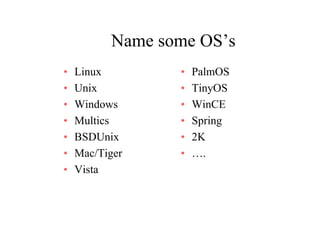
Name some OS’sName some OS s
• Linux • PalmOS
• Unix
• Windows
• TinyOS
• WinCEW dows
• Multics
• BSDUnix
W C
• Spring
• 2KBSDUnix
• Mac/Tiger
• Vista
2K
• ….
• Vista

Lec 2

  • 1.
    Faculty of ComputersandFaculty of Computers and InformationInformation Second Year (Second Semester)Second Year (Second Semester) ____________________________________________________________ Operating Systems IOperating Systems I ( )( ) ____________________________________________________________ Dr. Ashraf ElsisiDr. Ashraf Elsisi ____________________________________________________
  • 2.
  • 3.
    Interrupt CycleInterrupt Cycle •Processor checks for interruptsProcessor checks for interrupts If i t t f t h th t i t ti f• If no interrupts fetch the next instruction for the current program • If an interrupt is pending, suspend execution of the current program, and execute the interrupt handler
  • 4.
    Multiple InterruptsMultiple Interrupts •Disable interrupts while an interrupt isp p being processed – Processor ignores any new interrupt requestocesso g o es a y ew e up eques signals
  • 5.
    Multiple Interrupts SequentialOrderMultiple Interrupts Sequential Order • Disable interrupts so processor can l t t kcomplete task • Interrupts remain pending until the processor enables interrupts • After interrupt handler routine completes, the processor checks for additional interrupts
  • 7.
    Multiple Interrupts PrioritiesMultipleInterrupts Priorities • Higher priority interrupts cause lower-Higher priority interrupts cause lower priority interrupts to wait • Causes a lower-priority interrupt handler• Causes a lower-priority interrupt handler to be interrupted
  • 9.
    MultiprogrammingMultiprogramming • Processor hasmore than one program to execute.Processor has more than one program to execute. • The sequence the programs are executed depend on their relative priority and whether they areon their relative priority and whether they are waiting for I/O • After an interrupt handler completes, control may not return to the program that was executing at the time of the interrupt
  • 10.
    4 I/O communicationtechniques4 I/O communication techniques Programmed I/OProgrammed I/O • I/O module performs the action not the processoraction, not the processor • Sets appropriate bits in the I/O t t i tstatus register • No interrupts occur • Processor checks status until operation is completep p
  • 11.
    Interrupt Driven I/OInterrupt-DrivenI/O • Processor is interrupted when I/O module ready to exchange data P i f t d th• Processor is free to do other work • No needless waitingNo needless waiting • Consumes a lot of processor time because every word read or written passes through the processor
  • 12.
    Direct Memory AccessDirectMemory Access • Transfers a block of data directly to or from memory • An interrupt is sent when the task is completep • The processor is onlyThe processor is only involved at the beginning and end of the transfer
  • 13.
    Direct Memory Access(DMA)Direct Memory Access (DMA) • I/O exchanges occur directly with memoryg y y • Processor grants I/O module authority to read fromocesso g a ts /O odu e aut o ty to ead o or write to memory • Relieves the processor responsibility for the exchange • Processor is free to do other thingsg
  • 14.
  • 15.
    Going Down theHierarchyGoing Down the Hierarchy • Decreasing cost per bitDecreasing cost per bit I i it• Increasing capacity • Increasing access time • Decreasing frequency of access of the memory by the processormemory by the processor
  • 16.
    Disk CacheDisk Cache •A portion of main memory used as a buffer to temporarily to hold data for the disktemporarily to hold data for the disk • Disk writes are clustered • Some data written out may be referenced again. The data are retrieved rapidly from the softwareThe data are retrieved rapidly from the software cache instead of slowly from disk
  • 17.
    Cache MemoryCache Memory •Invisible to operating systemInvisible to operating system I th d f• Increase the speed of memory • Processor speed is faster than memory speed
  • 18.
  • 19.
    Cache MemoryCache Memory •Contains a portion of main memoryContains a portion of main memory P fi t h k h• Processor first checks cache • If not found in cache, the block of memory containing the needed information is moved to the cache
  • 20.
    Operating System OverviewOperatingSystem Overview Chapter 2
  • 21.
    1- Objectives andfunctions1 Objectives and functions • ConvenienceConvenience – Makes the computer more convenient to use • Efficiency• Efficiency – Allows computer system resources to be used in an efficient mannerused in an efficient manner • Ability to evolve P i ff i d l i d– Permit effective development, testing, and introduction of new system functions without interfering with servicewithout interfering with service
  • 22.
    Layers of ComputerSystemLayers of Computer System
  • 23.
    Services Provided bythe Operating System • Program development – Editors and debuggers • Program execution (no. of tasks need to be f d)performed) • Access to I/O devices (each device need control signals for operation) (os hides these details bysignals for operation) (os hides these details by uniform interface – simple reads, writes) • Controlled access to files • System access (control access in case of public system)
  • 24.
    • Error detectionand response – internal and external hardware errors • memory error • device failure – software errors • arithmetic overflow• arithmetic overflow • access forbidden memory locations The response may range from ending the program- The response may range from ending the program that caused the error to retrying the operation to simply reporting the error to the applicationp y p g pp
  • 25.
    A ti• Accounting –collect statistics – monitor performance – used to future enhancements and tuning the system to improve the performance
  • 26.
    Operating SystemOperating System •Functions same way as ordinary computerFunctions same way as ordinary computer software – It is program that is executedIt is program that is executed • Operating system frequently relinquishes• Operating system frequently relinquishes control of the processor to execute other programsprograms
  • 27.
    KernelKernel • Portion ofoperating system that is inPortion of operating system that is in main memory • Contains most-frequently used functions• Contains most-frequently used functions • Also called the nucleus
  • 28.
    Ease Evolution ofan Operating SSystem • Hardware upgrades and new types ofHardware upgrades and new types of hardware • New services• New services
  • 29.
    Evolution of OperatingSystems (key i f OS)requirements for OS) • Serial Processing (1940-mid 1950)g ( ) – No operating system – Machines run from a console with display lights and toggle switches, input device, and printer Problems Schedule– Schedule – Setup included loading the compiler, source program, saving compiled program, and loadingp g , g p p g , g and linking (each step involve mounting or dismounting tapes or setting up card decks)
  • 30.
    Evolution of Operating SSystems •Simple Batch SystemsSimple Batch Systems – Used Monitors • Software that controls the running programsSo twa e t at co t o s t e u g p og a s • Batch jobs together (by computer operator for monitor program) • Program branches back to monitor when finished • Resident monitor is in main memory and available for executionavailable for execution • Need special language JCL
  • 31.
    Job Control Language(JCL)Job Control Language (JCL) • Special type of programming languageSpecial type of programming language • Provides instruction to the monitor what compiler to use– what compiler to use – what data to use
  • 32.
    Early batch system •bringcards (multiple jobs) to 1401 •read cards to tape •put tape on 7094 which does computing•put tape on 7094 which does computing •put tape on 1401 which prints output
  • 33.
    Hardware FeaturesHardware Features •Memory protectionMemory protection – do not allow the memory area containing the monitor to be altered • Timer prevents a job from monopolizing the– prevents a job from monopolizing the system
  • 34.
    UniprogrammingUniprogramming • Processor mustwait for I/O instructionProcessor must wait for I/O instruction to complete before preceding
  • 35.
    MultiprogrammingMultiprogramming • When onejob needs to wait for I/O, theWhen one job needs to wait for I/O, the processor can switch to the other job
  • 36.
  • 37.
    Time SharingTime Sharing •Using multiprogramming to handleUsing multiprogramming to handle multiple interactive jobs • Processor’s time is shared among• Processor s time is shared among multiple users M lti l i lt l th• Multiple users simultaneously access the system through terminals
  • 38.
    Batch Multiprogramming Ti Shiversus Time Sharing Batch Multiprogramming Time Sharing Principal objective Maximize processor use Minimize response time Source of directives t ti t Job control language commands provided with Commands entered at th t i lto operating system p the job the terminal
  • 39.
    Problems of Multiprogrammingand i S iTime Sharing - If multiple jobs are in memory They must be protected from interfering with each other -With multiple interactive users the file system t b t t dmust be protected -The connection for global resources must be handledhandled
  • 40.
    Major Achievements ofOSMajor Achievements of OS • ProcessesProcesses • Memory Management I f ti t ti d it• Information protection and security • Scheduling and resource management • System structure
  • 41.
    Computer Hardware Basics •What are the meanings of the following terms?g g 1. 32-bit microprocessor, and 32-bit instructions.p , 2. Opcode, immediate operand, and operand address. 3. Local data bus, and local address bus.3. Local data bus, and local address bus. 4. Machine cycle, processor cycle, and bus cycle.
  • 42.
    It refers tothe number of bits that can be processed or transmitted in parallel, or the number of bits used for single element in a data format. Th titi th t ll difi d b thThe entities that are usually modified by these numbers are: •BusBus •Microprocessor •Software •Operating system
  • 44.
    Opcode operand andaddressing modeOpcode, operand, and addressing mode A hi i i i d f d d• A machine instruction is made up of an opcode and one or more operands. • The opcode tells the processor what action top p perform over the following operands. • The methods for specify the operand(s) for a machine i t ti ll d dd i dinstruction are called addressing modes.
  • 46.
    Bus A bus isa collection of wires through which data is transmitted from one part of a computer to thanother. According to the type of data transmitted through theg yp g bus, we have: b h b d l d• Data bus: The bus used to carry actual data. •Address bus: The bus transferring information about where the data should goabout where the data should go. •Control bus: The physical connections that carry control information between the CPU and other devices within the computer.
  • 47.
    According to thelocation of buses, or what kinds of components they connect, we have:p y , Local bus:Local bus: Another name of system bus, which connects the microprocessor main memory and all kinds of I/Omicroprocessor, main memory, and all kinds of I/O modules. A local bus is also called frontside bus, memory bus, or, y , host bus.
  • 48.
    Backside bus: A microprocessorbus that connects the CPU to a Level 2 cache. Typically, a backside bus runs at a faster clock speed than the frontside External bus: A bus that connects a computer to peripheral devices.
  • 49.
    S dSpeeds • Systemclock There are so many circuits inside a computerThere are so many circuits inside a computer. To perform a specific action, it is necessary forp p y some sort of synchronization to occur so that different parts function and cooperate as expected. The”conductor” of the PC is the system clock, which brings synchronizationwhich brings synchronization. A clock is just a signal that alternates between zeroj g and one, back and forth.
  • 50.
    The pulses generatedby the clockThe pulses generated by the clock
  • 51.
    Memory Access time: alsoknown as response time or latency refers to how quickly the memory can respond to a read or write trequest. •Memory cycle:Memory cycle: refers to the minimum period between two successive requests. For various reasons the time separating twoq p g successive requests is not always 0, i.e a memory with a response time of 80 ns cannot satisfy a request every 8080 ns.
  • 52.
    Machine cycle:Machine cycle: alsocalled instruction cycle, the four steps which the CPU i t f h hi lCPU carries out for each machine language instruction: fetch, decode, execute, and store.
  • 53.
    CachesCaches Level 1 (Primary)Cache: •The fastest memory on the PC.y •It is in fact, built directly into the processor itself. •This cache is very small, generally from 8 KB to 64 KB, but it is extremely fast; it runs at the same speed as the processor. If the processor requests information and can find it in the level 1 cache, that is the best case, because thethe level 1 cache, that is the best case, because the information is there immediately and the system does not have to wait.
  • 54.
    Level 2 (Secondary)Cache:Level 2 (Secondary) Cache: The level 2 cache is a secondary cache to the level 1 h d i l d li htl lcache, and is larger and slightly slower.
  • 55.
    Name some OS’sNamesome OS s • Linux • PalmOS • Unix • Windows • TinyOS • WinCEW dows • Multics • BSDUnix W C • Spring • 2KBSDUnix • Mac/Tiger • Vista 2K • …. • Vista