Microsoft Virtualization TechnologiesSystem Centre Essentials 2010Sean Taylor– Microsoft  Solutions Architect
Agenda Essentials Features Unified Console Admin Console Inventory and Reports Monitoring Software Distribution Update Management Virtual Machine Management Install and Configuration
Common Small/Mid-size Business Pain Points“E-mail is critical for my company, server downtime is bad for business”“Keeping OS and applications updated with the latest patches is time-consuming”“Software installation for desktops should be quick and easy – it’s not!”“My servers are getting old and it is harder to keep them running”“I’m expected to do more and save money without any more staff”“End-user troubleshooting is manual for us –telephone, e-mail, and remote desktop in Windows® XP”“Our hardware and software inventory is in spreadsheets. It’s hard to pull it all together”
SCE FeaturesSystem Centre Essentials This is a specialist product for the SMB market supporting up to 50 servers and 500 clients  Selected functionality from SCCM, SCOM, SCVMM and WSUS integration Unified management experience Virtualization machine creation and management Simple setup Comprehensive monitoring Update management Software and hardware inventory Software deployment Integrated reporting
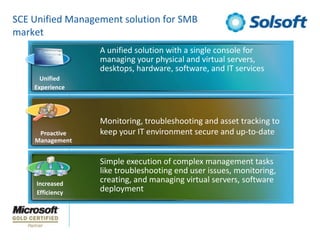
SCE Unified Management solution for SMB marketA unified solution with a single console for managing your physical and virtual servers, desktops, hardware, software, and IT servicesUnifiedExperienceMonitoring, troubleshooting and asset tracking to keep your IT environment secure and up-to-dateProactiveManagementSimple execution of complex management tasks like troubleshooting end user issues, monitoring, creating, and managing virtual servers, software deploymentIncreasedEfficiency
Unified ConsoleSingle view of the IT environmentOverviews with summaries and health statusIntegrated virtualization management that’s simple to useEasy to find workspaces with pertinent dataIn-line tasks, reporting, and helpNew in 2010Overview pages with contextual click-thruStreamlined group creation for common attributesNotification Banners for new Management PacksStreamlined management tasksCustom views with search support
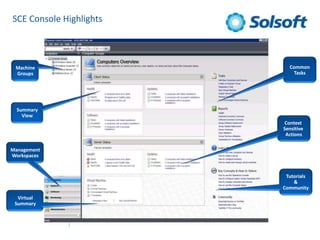
SCE Console HighlightsCommonTasksMachineGroupsSummaryViewContext Sensitive ActionsManagementWorkspacesTutorials&CommunityVirtualSummary
Inventory and ReportsKeep track of hardware and software assets 60+ HW & SW inventory attributes HW – WMI propertiesSW – Add/Remove ProgramsInventory is preset and reported every 22 hoursInventoried only if a change in is detectedVisibility through ready-to-use reportsDaily Health Report providing quick status180 reports out of the boxNew reports available with each imported Management PackCommon reports available from each overview pageNew in 2010Virtualization CandidatesHost Virtual Machine UtilizationSecurity and Critical Update Compliance Report
MonitoringMonitor your IT environment end-to-endRich knowledge out of the box to help diagnose and fix alertsSimple in-line tasks to click and “fix it now.” Remote control support for managed clients and serversAbility to customize monitoringNetwork devices with SNMPv1 or v2Notification of problems via e-mail, text or instant message2010 InvestmentsMonitoring import and maintenance via the Web portalInline Notification CreationService Level Wizards and Dashboard Reports
Software Deployment Quickly Administer and Distribute SoftwareDeploy software applications for clients and serversSimple 5-step application install wizardSupport for MSI and EXE applicationsParameters defaulted requiring minimal knowledge to deploy softwareDeployment status reportingInstall now supportEasily uninstall applications deployedNew in 2010Support for common targeting filtersModify properties of existing packagesLocalized title/description during package creation
Update ManagementEasily Configure and Track IT UpdatesUpdate management for Microsoft and third partiesMulti-member group support for flexible targetingCompliance and status reports across the IT environment“Big Red Button” for installation of pressing updatesBuilt upon WSUS technologyNew in 2010Auto-manage the software updates neededAuto-approval deadlines - “Set and Forget”Ability to sync with Microsoft Update multiple times dailySimple view for “Needed” updates updates”
Virtual Machine ManagementMaximize your resourcesVirtualization management completely incorporatedComprehensive monitoring of total physical and virtual server environments (OS, apps, and services)Rapid provisioning of new hosts and virtual machinesFast and reliable P2V and V2V conversionFlexibility for your environmentWindows 2008 Server and Hyper-V for new 64-bitWindows 2003 Server and Virtual Server for existing 32-bitVirtualization as a setup componentImport of existing virtual servers, including VMWareSnapshot and template management
Get up and running quickly!Simple 10-screen setup
Interactive prerequisite checker to analyze readiness

System Center Essentials

  • 1.
    Microsoft Virtualization TechnologiesSystemCentre Essentials 2010Sean Taylor– Microsoft Solutions Architect
  • 2.
    Agenda Essentials FeaturesUnified Console Admin Console Inventory and Reports Monitoring Software Distribution Update Management Virtual Machine Management Install and Configuration
  • 3.
    Common Small/Mid-size BusinessPain Points“E-mail is critical for my company, server downtime is bad for business”“Keeping OS and applications updated with the latest patches is time-consuming”“Software installation for desktops should be quick and easy – it’s not!”“My servers are getting old and it is harder to keep them running”“I’m expected to do more and save money without any more staff”“End-user troubleshooting is manual for us –telephone, e-mail, and remote desktop in Windows® XP”“Our hardware and software inventory is in spreadsheets. It’s hard to pull it all together”
  • 4.
    SCE FeaturesSystem CentreEssentials This is a specialist product for the SMB market supporting up to 50 servers and 500 clients Selected functionality from SCCM, SCOM, SCVMM and WSUS integration Unified management experience Virtualization machine creation and management Simple setup Comprehensive monitoring Update management Software and hardware inventory Software deployment Integrated reporting
  • 5.
    SCE Unified Managementsolution for SMB marketA unified solution with a single console for managing your physical and virtual servers, desktops, hardware, software, and IT servicesUnifiedExperienceMonitoring, troubleshooting and asset tracking to keep your IT environment secure and up-to-dateProactiveManagementSimple execution of complex management tasks like troubleshooting end user issues, monitoring, creating, and managing virtual servers, software deploymentIncreasedEfficiency
  • 6.
    Unified ConsoleSingle viewof the IT environmentOverviews with summaries and health statusIntegrated virtualization management that’s simple to useEasy to find workspaces with pertinent dataIn-line tasks, reporting, and helpNew in 2010Overview pages with contextual click-thruStreamlined group creation for common attributesNotification Banners for new Management PacksStreamlined management tasksCustom views with search support
  • 7.
    SCE Console HighlightsCommonTasksMachineGroupsSummaryViewContextSensitive ActionsManagementWorkspacesTutorials&CommunityVirtualSummary
  • 8.
    Inventory and ReportsKeeptrack of hardware and software assets 60+ HW & SW inventory attributes HW – WMI propertiesSW – Add/Remove ProgramsInventory is preset and reported every 22 hoursInventoried only if a change in is detectedVisibility through ready-to-use reportsDaily Health Report providing quick status180 reports out of the boxNew reports available with each imported Management PackCommon reports available from each overview pageNew in 2010Virtualization CandidatesHost Virtual Machine UtilizationSecurity and Critical Update Compliance Report
  • 9.
    MonitoringMonitor your ITenvironment end-to-endRich knowledge out of the box to help diagnose and fix alertsSimple in-line tasks to click and “fix it now.” Remote control support for managed clients and serversAbility to customize monitoringNetwork devices with SNMPv1 or v2Notification of problems via e-mail, text or instant message2010 InvestmentsMonitoring import and maintenance via the Web portalInline Notification CreationService Level Wizards and Dashboard Reports
  • 10.
    Software Deployment QuicklyAdminister and Distribute SoftwareDeploy software applications for clients and serversSimple 5-step application install wizardSupport for MSI and EXE applicationsParameters defaulted requiring minimal knowledge to deploy softwareDeployment status reportingInstall now supportEasily uninstall applications deployedNew in 2010Support for common targeting filtersModify properties of existing packagesLocalized title/description during package creation
  • 11.
    Update ManagementEasily Configureand Track IT UpdatesUpdate management for Microsoft and third partiesMulti-member group support for flexible targetingCompliance and status reports across the IT environment“Big Red Button” for installation of pressing updatesBuilt upon WSUS technologyNew in 2010Auto-manage the software updates neededAuto-approval deadlines - “Set and Forget”Ability to sync with Microsoft Update multiple times dailySimple view for “Needed” updates updates”
  • 12.
    Virtual Machine ManagementMaximizeyour resourcesVirtualization management completely incorporatedComprehensive monitoring of total physical and virtual server environments (OS, apps, and services)Rapid provisioning of new hosts and virtual machinesFast and reliable P2V and V2V conversionFlexibility for your environmentWindows 2008 Server and Hyper-V for new 64-bitWindows 2003 Server and Virtual Server for existing 32-bitVirtualization as a setup componentImport of existing virtual servers, including VMWareSnapshot and template management
  • 13.
    Get up andrunning quickly!Simple 10-screen setup
  • 14.