Agenda9:30 Introduction to Technology Management – Jon Archer 9:40 Technology Overview –Liam Walton10:00 Hyper V Demonstration – Nathan Sanders10:30 Break10:40 System Center Overview – Matt McSpirit11:20 Customer Case Studies – Liam Walton11:40 Conclusion – Jon Archer
INTRODUCING TECHNOLOGY MANAGEMENT
“Technology Management is an IT consultancy that helps manufacturers and distributors use integrated business systems to achieve operational excellence. Unlike other IT consultancies, Technology Management’s top-down technical expertise and industry focus combine to drive continual process improvements across your business.”
Trusted By Over 300 Customers
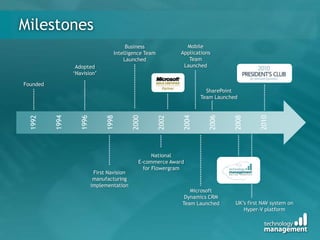
MilestonesMobile Applications Team LaunchedBusiness Intelligence Team LaunchedAdopted‘Navision’FoundedSharePoint Team Launched1992199419961998200020022004200620082010National E-commerce Award for FlowergramFirst Navision manufacturing implementationMicrosoft Dynamics CRMTeam LaunchedUK’s first NAV system on Hyper-V platform
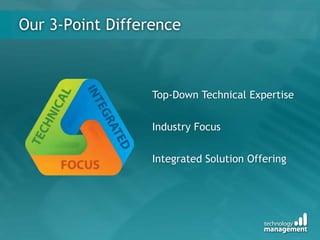
Our 3-Point DifferenceTop-Down Technical ExpertiseIndustry FocusIntegrated Solution Offering
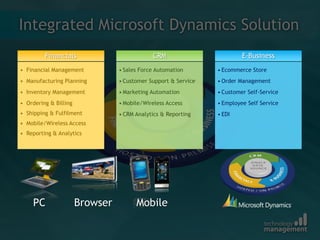
Integrated Microsoft Dynamics SolutionBrowserPCMobile
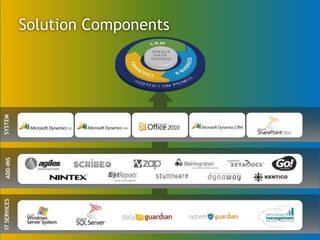
Solution ComponentsSYSTEMADD-INSIT SERVICES
Supporting Your InvestmentWolverhampton support desk
Remote and on-site support
Infrastructure and system support
Detailed Service Level Agreement
Knowledge Workshops & CustomerSource
System improvement reviewsLiam WaltonTechnology Overview
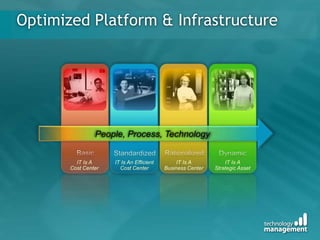
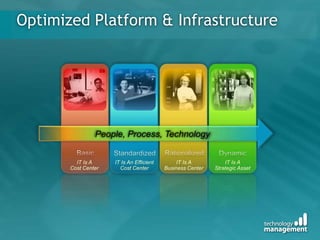
IT Is A Cost CenterIT Is An Efficient Cost CenterIT Is A Business CenterIT Is A Strategic AssetOptimized Platform & Infrastructure People, Process, TechnologyBasicRationalizedStandardizedDynamic
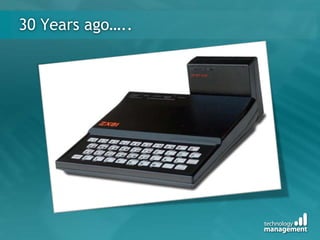
30 Years ago…..
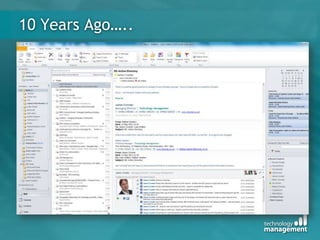
10 Years Ago…..
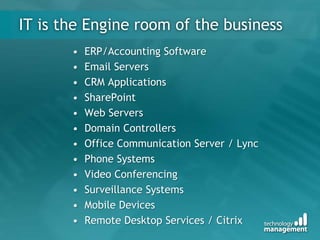
IT is the Engine room of the businessERP/Accounting SoftwareEmail ServersCRM ApplicationsSharePointWeb ServersDomain ControllersOffice Communication Server / LyncPhone SystemsVideo Conferencing Surveillance SystemsMobile DevicesRemote Desktop Services / Citrix
Video
Management Organization and coordination of the activities of an enterprise in accordance with certain policies and in achievement of clearly defined objectives.The act of handling or controlling something successfully.   Wikipedia
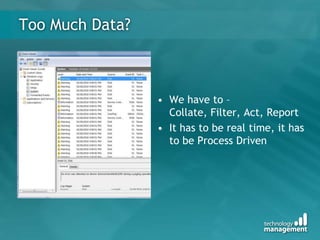
Too Much Data?We have to – Collate, Filter, Act, Report
It has to be real time, it has to be Process DrivenWhat is Virtualisation & how can it help?What is Virtualisation?Software that creates a Virtual machine  (VM) that emulates a physical computer.How does that help my business?Removes the tight link between hardware and software.Allowing us to drop the VM onto any server that is able to run itThe VM is a single file, making easier to move it around and manage, no set up time!Allows us to have multiple VM’s running on 1 server
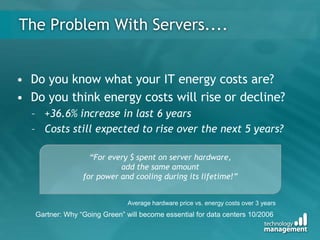
The Problem With Servers....Do you know what your IT energy costs are?
Do you think energy costs will rise or decline?
+36.6% increase in last 6 years
Costs still expected to rise over the next 5 years?“For every $ spent on server hardware, add the same amount for power and cooling during its lifetime!”Average hardware price vs. energy costs over 3 yearsGartner: Why “Going Green” will become essential for data centers 10/2006
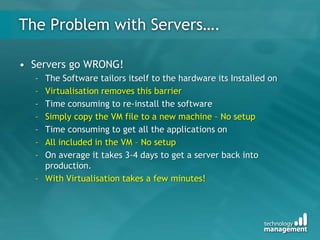
The Problem with Servers….Servers go WRONG! The Software tailors itself to the hardware its Installed onVirtualisation removes this barrierTime consuming to re-install the softwareSimply copy the VM file to a new machine – No setupTime consuming to get all the applications onAll included in the VM – No setupOn average it takes 3-4 days to get a server back into production.With Virtualisation takes a few minutes!
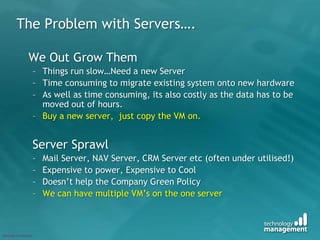
The Problem with Servers….	We Out Grow ThemThings run slow…Need a new ServerTime consuming to migrate existing system onto new hardwareAs well as time consuming, its also costly as the data has to be moved out of hours.Buy a new server,  just copy the VM on.Server SprawlMail Server, NAV Server, CRM Server etc (often under utilised!)Expensive to power, Expensive to CoolDoesn’t help the Company Green PolicyWe can have multiple VM’s on the one server
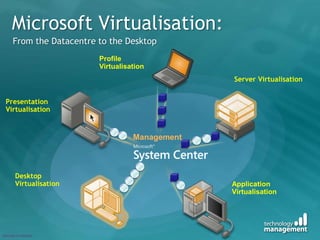
Microsoft Virtualisation:From the Datacentre to the DesktopProfileVirtualisationServer VirtualisationPresentation VirtualisationManagementDesktop VirtualisationApplication Virtualisation
IT Is A Cost CenterIT Is An Efficient Cost CenterIT Is A Business CenterIT Is A Strategic AssetOptimized Platform & Infrastructure People, Process, TechnologyBasicRationalizedStandardizedDynamic
Nathan SandersHyper-V and the Microsoft System Centre Suite
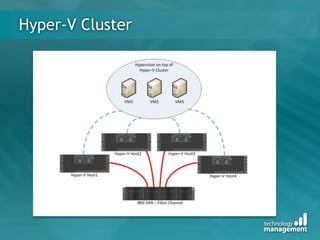
Hyper-V Cluster
System center overviewMatt McSpiritPartner Technology AdvisorMicrosoft UKhttp://www.mattmcspirit.co.uk | http://twitter.com/mattmcspirithttp://virtualboytv.com | matt.mcspirit@microsoft.com
Do we needmanagement tools?
The problem
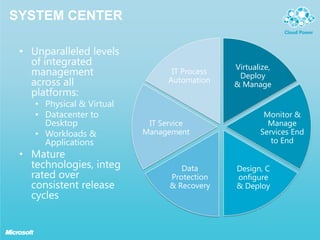
System centerUnparalleled levels of integrated management across all platforms:Physical & VirtualDatacenter to DesktopWorkloads & ApplicationsMature technologies, integrated over consistent release cyclesVirtualize, Deploy & ManageIT Process AutomationMonitor & Manage Services End to EndIT Service ManagementData Protection & RecoveryDesign, Configure  & Deploy
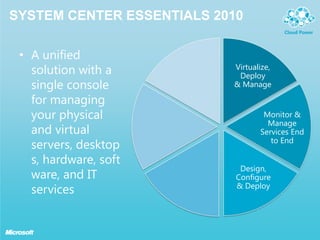
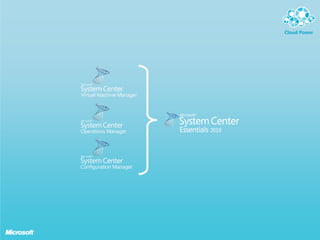
System center essentials 2010A unified solution with a single console for managing your physical and virtual servers, desktops, hardware, software, and IT servicesVirtualize, Deploy & ManageMonitor & Manage Services End to EndDesign, Configure  & Deploy
Demo:system center essentials 2010
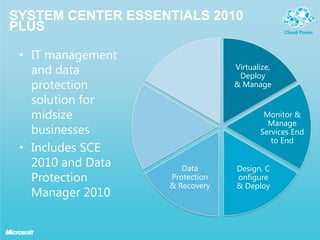
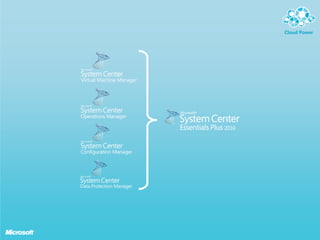
System center essentials 2010 plusIT management and data protection solution for midsize businessesIncludes SCE 2010 and Data Protection Manager 2010Virtualize, Deploy & ManageMonitor & Manage Services End to EndData Protection & RecoveryDesign, Configure  & Deploy
Demo:system center essentials 2010 plus (DPM 2010)
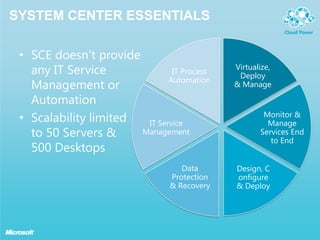
System center essentialsSCE doesn’t provide any IT Service Management or AutomationScalability limitedto 50 Servers &500 DesktopsVirtualize, Deploy & ManageIT Process AutomationMonitor & Manage Services End to EndIT Service ManagementData Protection & RecoveryDesign, Configure  & Deploy
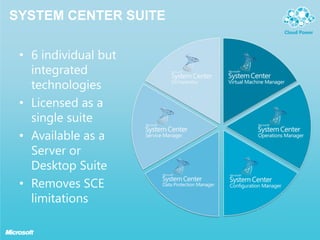
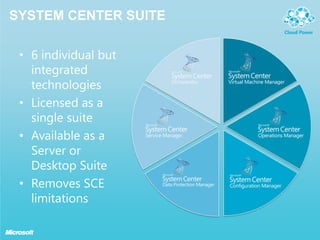
System center Suite6 individual but integrated technologiesLicensed as asingle suiteAvailable as a Server orDesktop SuiteRemoves SCE limitations
Demo:system center suite
summaryEfficient, well managed infrastructure can significantly contribute to the overall business.Proactive management helps to avoid fire-fighting, and provide a more reliable service to the businessMicrosoft is well placed to provide solutions for both SME & Enterprise through System CenterSystem Center is an integrated set of management tools that helps to protect the investments made in other technologies
LEARN MOREHYPER-Vhttp://www.microsoft.com/hypervPRIVATE CLOUDhttp://microsoft.com/privatecloudAPPLICATION VIRTUALISATIONhttp://microsoft.com/appvSYSTEM CENTERhttp://www.microsoft.com/systemcenter
© 2010 Microsoft Corporation. All rights reserved.   Microsoft, Windows and other product names are or may be registered trademarks and/or trademarks in the U.S. and/or other countries.  The information herein is for informational purposes only and represents the current view of Microsoft Corporation as of the date of this presentation.  Because Microsoft must respond to changing market conditions, it should not be interpreted to be a commitment on the part of Microsoft, and Microsoft cannot guarantee the accuracy of any information provided after the date of this presentation.  MICROSOFT MAKES NO WARRANTIES, EXPRESS, IMPLIED OR STATUTORY, AS TO THE INFORMATION IN THIS PRESENTATION.
Customer Focus
Fortress Interlocks Global Supplier of Total Access and Control Safety Systems90 EmployeesTechnologiesWindows Server 2008Microsoft Hyper VFrom 10 to 3 main serversMicrosoft Case Study
CarversWolverhampton based builders merchants90 UsersTechnologies IncludeWindows Server 2008Microsoft Hyper VSystem Centre Data Protection Manager 2010From 9 to 3 main servers

Technology Management Virtualisation and system center event

  • 1.
    Agenda9:30 Introduction toTechnology Management – Jon Archer 9:40 Technology Overview –Liam Walton10:00 Hyper V Demonstration – Nathan Sanders10:30 Break10:40 System Center Overview – Matt McSpirit11:20 Customer Case Studies – Liam Walton11:40 Conclusion – Jon Archer
  • 2.
  • 3.
    “Technology Management isan IT consultancy that helps manufacturers and distributors use integrated business systems to achieve operational excellence. Unlike other IT consultancies, Technology Management’s top-down technical expertise and industry focus combine to drive continual process improvements across your business.”
  • 4.
    Trusted By Over300 Customers
  • 5.
    MilestonesMobile Applications TeamLaunchedBusiness Intelligence Team LaunchedAdopted‘Navision’FoundedSharePoint Team Launched1992199419961998200020022004200620082010National E-commerce Award for FlowergramFirst Navision manufacturing implementationMicrosoft Dynamics CRMTeam LaunchedUK’s first NAV system on Hyper-V platform
  • 6.
    Our 3-Point DifferenceTop-DownTechnical ExpertiseIndustry FocusIntegrated Solution Offering
  • 7.
    Integrated Microsoft DynamicsSolutionBrowserPCMobile
  • 8.
  • 9.
  • 10.
  • 11.
  • 12.
  • 13.
    Knowledge Workshops &CustomerSource
  • 14.
    System improvement reviewsLiamWaltonTechnology Overview
  • 15.
    IT Is ACost CenterIT Is An Efficient Cost CenterIT Is A Business CenterIT Is A Strategic AssetOptimized Platform & Infrastructure People, Process, TechnologyBasicRationalizedStandardizedDynamic
  • 16.
  • 17.
  • 18.
    IT is theEngine room of the businessERP/Accounting SoftwareEmail ServersCRM ApplicationsSharePointWeb ServersDomain ControllersOffice Communication Server / LyncPhone SystemsVideo Conferencing Surveillance SystemsMobile DevicesRemote Desktop Services / Citrix
  • 20.
  • 21.
    Management Organization andcoordination of the activities of an enterprise in accordance with certain policies and in achievement of clearly defined objectives.The act of handling or controlling something successfully. Wikipedia
  • 22.
    Too Much Data?Wehave to – Collate, Filter, Act, Report
  • 23.
    It has tobe real time, it has to be Process DrivenWhat is Virtualisation & how can it help?What is Virtualisation?Software that creates a Virtual machine (VM) that emulates a physical computer.How does that help my business?Removes the tight link between hardware and software.Allowing us to drop the VM onto any server that is able to run itThe VM is a single file, making easier to move it around and manage, no set up time!Allows us to have multiple VM’s running on 1 server
  • 24.
    The Problem WithServers....Do you know what your IT energy costs are?
  • 25.
    Do you thinkenergy costs will rise or decline?
  • 26.
    +36.6% increase inlast 6 years
  • 27.
    Costs still expectedto rise over the next 5 years?“For every $ spent on server hardware, add the same amount for power and cooling during its lifetime!”Average hardware price vs. energy costs over 3 yearsGartner: Why “Going Green” will become essential for data centers 10/2006
  • 28.
    The Problem withServers….Servers go WRONG! The Software tailors itself to the hardware its Installed onVirtualisation removes this barrierTime consuming to re-install the softwareSimply copy the VM file to a new machine – No setupTime consuming to get all the applications onAll included in the VM – No setupOn average it takes 3-4 days to get a server back into production.With Virtualisation takes a few minutes!
  • 29.
    The Problem withServers…. We Out Grow ThemThings run slow…Need a new ServerTime consuming to migrate existing system onto new hardwareAs well as time consuming, its also costly as the data has to be moved out of hours.Buy a new server, just copy the VM on.Server SprawlMail Server, NAV Server, CRM Server etc (often under utilised!)Expensive to power, Expensive to CoolDoesn’t help the Company Green PolicyWe can have multiple VM’s on the one server
  • 30.
    Microsoft Virtualisation:From theDatacentre to the DesktopProfileVirtualisationServer VirtualisationPresentation VirtualisationManagementDesktop VirtualisationApplication Virtualisation
  • 31.
    IT Is ACost CenterIT Is An Efficient Cost CenterIT Is A Business CenterIT Is A Strategic AssetOptimized Platform & Infrastructure People, Process, TechnologyBasicRationalizedStandardizedDynamic
  • 32.
    Nathan SandersHyper-V andthe Microsoft System Centre Suite
  • 33.
  • 34.
    System center overviewMattMcSpiritPartner Technology AdvisorMicrosoft UKhttp://www.mattmcspirit.co.uk | http://twitter.com/mattmcspirithttp://virtualboytv.com | matt.mcspirit@microsoft.com
  • 35.
  • 36.
  • 37.
    System centerUnparalleled levelsof integrated management across all platforms:Physical & VirtualDatacenter to DesktopWorkloads & ApplicationsMature technologies, integrated over consistent release cyclesVirtualize, Deploy & ManageIT Process AutomationMonitor & Manage Services End to EndIT Service ManagementData Protection & RecoveryDesign, Configure & Deploy
  • 38.
    System center essentials2010A unified solution with a single console for managing your physical and virtual servers, desktops, hardware, software, and IT servicesVirtualize, Deploy & ManageMonitor & Manage Services End to EndDesign, Configure & Deploy
  • 39.
  • 40.
    System center essentials2010 plusIT management and data protection solution for midsize businessesIncludes SCE 2010 and Data Protection Manager 2010Virtualize, Deploy & ManageMonitor & Manage Services End to EndData Protection & RecoveryDesign, Configure & Deploy
  • 41.
    Demo:system center essentials2010 plus (DPM 2010)
  • 42.
    System center essentialsSCEdoesn’t provide any IT Service Management or AutomationScalability limitedto 50 Servers &500 DesktopsVirtualize, Deploy & ManageIT Process AutomationMonitor & Manage Services End to EndIT Service ManagementData Protection & RecoveryDesign, Configure & Deploy
  • 43.
    System center Suite6individual but integrated technologiesLicensed as asingle suiteAvailable as a Server orDesktop SuiteRemoves SCE limitations
  • 46.
    System center Suite6individual but integrated technologiesLicensed as asingle suiteAvailable as a Server orDesktop SuiteRemoves SCE limitations
  • 47.
  • 48.
    summaryEfficient, well managedinfrastructure can significantly contribute to the overall business.Proactive management helps to avoid fire-fighting, and provide a more reliable service to the businessMicrosoft is well placed to provide solutions for both SME & Enterprise through System CenterSystem Center is an integrated set of management tools that helps to protect the investments made in other technologies
  • 49.
    LEARN MOREHYPER-Vhttp://www.microsoft.com/hypervPRIVATE CLOUDhttp://microsoft.com/privatecloudAPPLICATIONVIRTUALISATIONhttp://microsoft.com/appvSYSTEM CENTERhttp://www.microsoft.com/systemcenter
  • 50.
    © 2010 MicrosoftCorporation. All rights reserved. Microsoft, Windows and other product names are or may be registered trademarks and/or trademarks in the U.S. and/or other countries. The information herein is for informational purposes only and represents the current view of Microsoft Corporation as of the date of this presentation. Because Microsoft must respond to changing market conditions, it should not be interpreted to be a commitment on the part of Microsoft, and Microsoft cannot guarantee the accuracy of any information provided after the date of this presentation. MICROSOFT MAKES NO WARRANTIES, EXPRESS, IMPLIED OR STATUTORY, AS TO THE INFORMATION IN THIS PRESENTATION.
  • 51.
  • 52.
    Fortress Interlocks GlobalSupplier of Total Access and Control Safety Systems90 EmployeesTechnologiesWindows Server 2008Microsoft Hyper VFrom 10 to 3 main serversMicrosoft Case Study
  • 53.
    CarversWolverhampton based buildersmerchants90 UsersTechnologies IncludeWindows Server 2008Microsoft Hyper VSystem Centre Data Protection Manager 2010From 9 to 3 main servers

Editor's Notes

  • #4 Wish to portray the way in which we view ourselves and our practices
  • #6 Founded by MD James CrowterMicrosoft Surestep Methodology for deployment of our projectsMicrosoft Gold Partners – highest level of accreditation available, 6 competencies across the companies. Accreditation achieved by staffPegasus Partner
  • #10 Free workshops
  • #12 Basic – Un coordinated, ad- hoc patching, multiple desktops , no back up policy, no Service level agreements or support process, no formalized incident response.Standadized – Passord Policy and directory services, desktop patching, standard desktop image, backup and recovery for critical servers, defined support, documented incident responseRationalized – virtualisation, automated OS deployment, Backup and recovery for all servers with SLA, Centralized Server and desktop patching, centraized mobile device management, defined security compliance and audit tools.Dynamic – Infrastucture capacity modeling, dynamic workload shifting for virtual enviroment, Business continuity and availabillity, automatic risk assesmentWHERE ARE YOU IN THE PROCESS…Management and monitoring with the tools we show today will accelerate the journey
  • #13 My first computer…in fact my beloved 1st computer as an eager 9 year old… my 7 seven year old asked me is that what computers were like in the olden days.. And when I thought about how much the power and complexity of computers have changed in the last 30 years, it never ceases to amaze me.
  • #14 And yet think how your IT infrastructure has changed in the last 5-10 years – email, Outlook is a classic exampleThen look at what else IT is dealing with today
  • #15 mobile devices, users demanding full remote access, anytime anywhere, communication goes through IT , Phone systems are integrated, Lync, OCS, Video conferencingOur applications like ERP – that run our business, CRM that run our sales and services organisations all fall under the banner of IT, these systems are now our responsibillity. And yet from what I see, IT teams arent growing as rapidily as the demands…neither are the budgets we are expected to do more with less and support them all.You are expected to be experts in many fields sometimes without the relevant training – these are Diverse technologies
  • #18 We have to organize and control the systems that are our responsibility – have we defined the objectives from what we want from IT ..HIGH AVAILABILLITY perhaps? I used to hate sitting in meetings where customers were talking about high availabillity – but now with Windows server 2008 R2 Hyper V and reduction in price of the SANS and hardwareWe fulfilled the defined objective – Then we start expanding that objective.. We want to be less reactive to issues. (MOVING ALONG TOWARDS A MORE DYNAMIC ORGANISATION)we have to using software that is maintaining and monitoring the systems, collecting data, checking disk space thres holds etc, and this throws up an issue.DATA OVERLOAD
  • #19 Event Viewer – Have you ever fired up event viewer to take a look and its full of warnings or Red Crosses and errors…. No one is moaning, there doesn’t appear to be any major problems. So you close it down and ignore it.But it comes back and bites later… We need to get the information that matters…the first trigger that has caused the domino effect resulting in the those later warnings. What if we could have been informed that a problem was iminent and been aware of it, how about we are led the cause of the problem rather than just the aftermath.We have to be able to filter out the less important information and get the critical stuff to the top.
  • #20 The core idea of hardware virtualization is simple: Use software to create a virtual machine that emulates a physical computer. We break the link between hardware and the Operating system ...we have a base OS that has a layer of software that translates the 2By providing multiple VMs at once, this approach allows running several operating systems simultaneously on a single physical machine. Many existing servers are underutilized...not running anywhere near their full capacityRather than paying for many under-utilized server machines, each dedicated to a specific workload, server virtualization allows consolidating those workloads onto a smaller number of more fully-used machines. This implies fewer people to manage those computers, less space to house them, and fewer kilowatt hours of power to run them, all of which saves money. Server virtualization also makes restoring failed systems easier. VMs are stored as files, and so restoring a failed system can be as simple as copying its file onto a new machine. Since VMs can have different hardware configurations from the physical machine on which they're running, this approach also allows restoring a failed system onto any available machine. There's no requirement to use a physically identical system.
  • #24 The hub of our IT system… People assume this will be very expensive – Not at all, for the cost of an alternative Virtualisation solution you can have Hyper V and a full system centresoloution.
  • #25 I started by talking about the ZX81 I had and said back then I couldn’t imagine where would be in 30 years…the pace of technology is amazing.Several years ago I laughed at the thought that we would be working with this level of system management…SMS as it was back then was seen as an enterprise only soloution. Now its happening. So why should be laughing now at the though of 99.99% uptime…automated resource provisioning, 360 view of our data and systems. Self repairing systems…. If we set the objectives if we set the goals, work out the processes we can see these goals will become closer with the software that we plan to show you today…Thanks again for coming and I hope you enjoy and find useful the demos we have lined up for you today.
  • #43 Lastly, to learn more about Microsoft’s cloud offerings, you can visit these websites. Within each, you will find a link to test drive the products.