

Ensuring Rock Solid
Unified Endpoint
Management
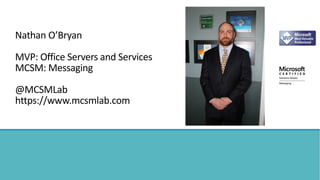
Nathan O’Bryan
MVP: Office Servers and Services
MCSM: Messaging
@MCSMLab
https://www.mcsmlab.com
The Importance of
Unified Endpoint
Management in
the Cloud Era
BYOD is the standard
There is no standard device
Administrators can’t be experts with all platforms
Threats to an Enterprise organization can come from BYOD
devices
Having some level of control over BYOD devices is necessary
Multiple panes of glass to manage devices is a cumbersome
experience
Endpoint
Management
with Native
Office 365 tools
Exchange MDM is very limited
Azure AD Premium adds some conditional access features
Works with Windows 10, new limited function with older OSs
Intune adds device management features
Endpoint
Management
with Exchange
Allows administrators to require password
Complex passwords
Require encryption
Enforce password age
Azure AD
Premium
Conditional
Access
Requires Azure AD premium (additional subscription to Office
365)
Allows administrators to set some conditions for sign-in to
Office 365
Conditions include
• Group membership
• Location
• Device platform
• Lost or stolen devices
Endpoint
Management
with Intune
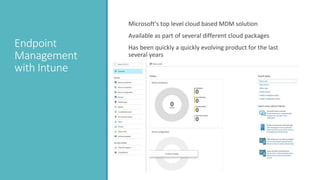
Microsoft’s top level cloud based MDM solution
Available as part of several different cloud packages
Has been quickly a quickly evolving product for the last
several years
Maturing
features
Many MDM features in the Microsoft cloud are still maturing
Multiple places where MDM features are controlled
Several “levels” of MDM features available depending on
subscription
Microsoft cloud portals are frequently updated
KACE Endpoint Systems
Management – Technical Overview
Confidential10
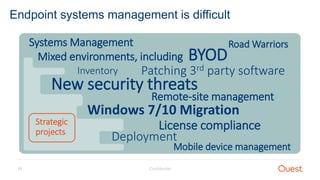
Endpoint systems management is difficult
Systems Management
Mixed environments, including BYOD
Inventory
New security threats
Remote-site management
Patching 3rd party software
License compliance
Deployment
Mobile device management
Windows 7/10 Migration
Strategic
projects
Road Warriors
Confidential11
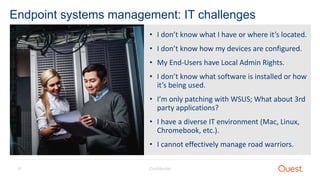
Endpoint systems management: IT challenges
• I don’t know what I have or where it’s located.
• I don’t know how my devices are configured.
• My End-Users have Local Admin Rights.
• I don’t know what software is installed or how
it’s being used.
• I’m only patching with WSUS; What about 3rd
party applications?
• I have a diverse IT environment (Mac, Linux,
Chromebook, etc.).
• I cannot effectively manage road warriors.
Confidential12
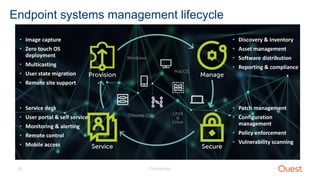
Endpoint systems management lifecycle
• Image capture
• Zero touch OS
deployment
• Multicasting
• User state migration
• Remote site support
• Service desk
• User portal & self service
• Monitoring & alerting
• Remote control
• Mobile access
• Patch management
• Configuration
management
• Policy enforcement
• Vulnerability scanning
• Discovery & inventory
• Asset management
• Software distribution
• Reporting & compliance
Why KACE Endpoint Systems
Management?
There is a difference.
Confidential14
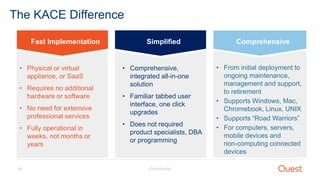
The KACE Difference
Fast Implementation Comprehensive
• From initial deployment to
ongoing maintenance,
management and support,
to retirement
• Supports Windows, Mac,
Chromebook, Linux, UNIX
• Supports “Road Warriors”
• For computers, servers,
mobile devices and
non-computing connected
devices
Simplified
• Comprehensive,
integrated all-in-one
solution
• Familiar tabbed user
interface, one click
upgrades
• Does not required
product specialists, DBA
or programming
• Physical or virtual
appliance, or SaaS
• Requires no additional
hardware or software
• No need for extensive
professional services
• Fully operational in
weeks, not months or
years
Confidential15
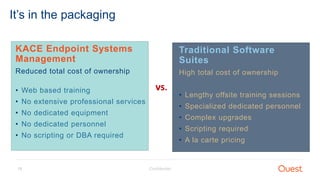
It’s in the packaging
KACE Endpoint Systems
Management
Reduced total cost of ownership
• Web based training
• No extensive professional services
• No dedicated equipment
• No dedicated personnel
• No scripting or DBA required
Traditional Software
Suites
High total cost of ownership
• Lengthy offsite training sessions
• Specialized dedicated personnel
• Complex upgrades
• Scripting required
• A la carte pricing
vs.
Confidential16
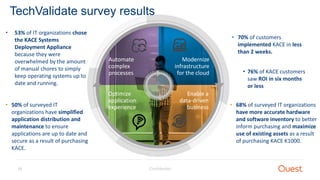
Optimize
application
experience
Modernize
infrastructure
for the cloud
Automate
complex
processes
Enable a
data-driven
business
TechValidate survey results
• 68% of surveyed IT organizations
have more accurate hardware
and software inventory to better
inform purchasing and maximize
use of existing assets as a result
of purchasing KACE K1000.
• 50% of surveyed IT
organizations have simplified
application distribution and
maintenance to ensure
applications are up to date and
secure as a result of purchasing
KACE.
• 53% of IT organizations chose
the KACE Systems
Deployment Appliance
because they were
overwhelmed by the amount
of manual chores to simply
keep operating systems up to
date and running.
• 70% of customers
implemented KACE in less
than 2 weeks.
• 76% of KACE customers
saw ROI in six months
or less
Solutions Architecture
Confidential18
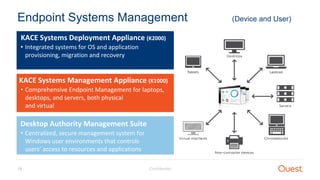
Endpoint Systems Management (Device and User)
KACE Systems Management Appliance (K1000)
• Comprehensive Endpoint Management for laptops,
desktops, and servers, both physical
and virtual
KACE Systems Deployment Appliance (K2000)
• Integrated systems for OS and application
provisioning, migration and recovery
Desktop Authority Management Suite
• Centralized, secure management system for
Windows user environments that controls
users’ access to resources and applications
Confidential19
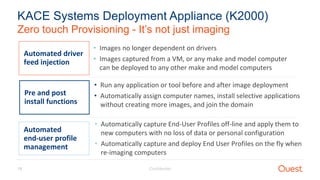
Zero touch Provisioning - It’s not just imaging
KACE Systems Deployment Appliance (K2000)
Automated driver
feed injection
• Images no longer dependent on drivers
• Images captured from a VM, or any make and model computer
can be deployed to any other make and model computers
Pre and post
install functions
• Run any application or tool before and after image deployment
• Automatically assign computer names, install selective applications
without creating more images, and join the domain
Automated
end-user profile
management
• Automatically capture End-User Profiles off-line and apply them to
new computers with no loss of data or personal configuration
• Automatically capture and deploy End User Profiles on the fly when
re-imaging computers
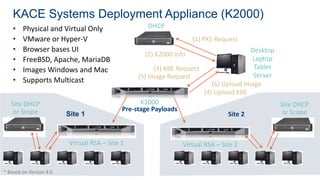
KACE Systems Deployment Appliance (K2000)
• Physical and Virtual Only
• VMware or Hyper-V
• Browser bases UI
• FreeBSD, Apache, MariaDB
• Images Windows and Mac
• Supports Multicast
Desktop
Laptop
Tablet
Server
K2000
(1) PXE Request
(2) K2000 info
(3) KBE Request
(6) Upload Image
(5) Image Request
Virtual RSA – Site 1
Site DHCP
or Scope Site 1
Site DHCP
or Scope
Virtual RSA – Site 2
Site 2
Pre-stage Payloads
* Based on Version 4.0
(4) Upload KBE
DHCP
KACE Systems Management Appliance (K1000)
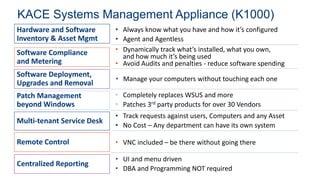
Software Compliance
and Metering
• Dynamically track what’s installed, what you own,
and how much it’s being used
• Avoid Audits and penalties - reduce software spending
Software Deployment,
Upgrades and Removal
• Manage your computers without touching each one
Patch Management
beyond Windows
Multi-tenant Service Desk
• Track requests against users, Computers and any Asset
• No Cost – Any department can have its own system
Remote Control • VNC included – be there without going there
Centralized Reporting
• UI and menu driven
• DBA and Programming NOT required
Hardware and Software
Inventory & Asset Mgmt
• Always know what you have and how it’s configured
• Agent and Agentless
• Completely replaces WSUS and more
• Patches 3rd party products for over 30 Vendors
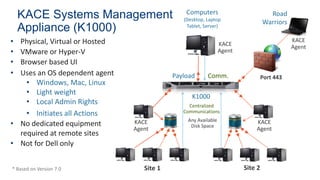
KACE Systems Management
Appliance (K1000)
• Physical, Virtual or Hosted
• VMware or Hyper-V
• Browser based UI
• Uses an OS dependent agent
• Windows, Mac, Linux
• Light weight
• Local Admin Rights
• Initiates all Actions
• No dedicated equipment
required at remote sites
• Not for Dell only
Computers
(Desktop, Laptop
Tablet, Server)
K1000
Site 1 Site 2
Payload Comm.
* Based on Version 7.0
Any Available
Disk Space
Centralized
Communications
KACE
Agent
KACE
Agent
KACE
Agent
Road
Warriors
Port 443
KACE
Agent
Confidential23
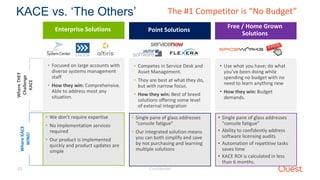
KACE vs. ‘The Others’WhereTHEY
Challenge
KACE
WhereKACE
WINS! Point Solutions
• Competes in Service Desk and
Asset Management.
• They are best at what they do,
but with narrow focus.
• How they win: Best of breed
solutions offering some level
of external integration
• Single pane of glass addresses
“console fatigue”
• Our integrated solution means
you can both simplify and save
by not purchasing and learning
multiple solutions
Free / Home Grown
Solutions
• Use what you have; do what
you’ve been doing while
spending no budget with no
need to learn anything new
• How they win: Budget
demands.
• Single pane of glass addresses
“console fatigue”
• Ability to confidently address
software licensing audits
• Automation of repetitive tasks
saves time
• KACE ROI is calculated in less
than 6 months.
The #1 Competitor is “No Budget”
Enterprise Solutions
• Focused on large accounts with
diverse systems management
staff
• How they win: Comprehensive.
Able to address most any
situation.
• We don’t require expertise
• No implementation services
required
• Our product is implemented
quickly and product updates are
simple
Visit us online
www.quest.com/KACE
• Videos, case studies, product specs, etc.
Try it out
• Free trials available for both KACE Systems Management
Appliance and KACE Systems Deployment Appliance.
Join the community
https://www.quest.com/community
• Product betas, how-to videos, discussions, blogs, tips and
tricks, etc.
Next Steps
Resources
• KACE Sandbox for those who just want to look
• https://sandbox.kace.com/admin
• ITNinja.com – KACE Community website
• On demand recording of this webcast: http://ow.ly/2Opg30eLNXF
Questions?

Ensuring Rock-Solid Unified Endpoint Management

  • 1.
    Ensuring Rock Solid UnifiedEndpoint Management
  • 2.
    Nathan O’Bryan MVP: OfficeServers and Services MCSM: Messaging @MCSMLab https://www.mcsmlab.com
  • 3.
    The Importance of UnifiedEndpoint Management in the Cloud Era BYOD is the standard There is no standard device Administrators can’t be experts with all platforms Threats to an Enterprise organization can come from BYOD devices Having some level of control over BYOD devices is necessary Multiple panes of glass to manage devices is a cumbersome experience
  • 4.
    Endpoint Management with Native Office 365tools Exchange MDM is very limited Azure AD Premium adds some conditional access features Works with Windows 10, new limited function with older OSs Intune adds device management features
  • 5.
    Endpoint Management with Exchange Allows administratorsto require password Complex passwords Require encryption Enforce password age
  • 6.
    Azure AD Premium Conditional Access Requires AzureAD premium (additional subscription to Office 365) Allows administrators to set some conditions for sign-in to Office 365 Conditions include • Group membership • Location • Device platform • Lost or stolen devices
  • 7.
    Endpoint Management with Intune Microsoft’s toplevel cloud based MDM solution Available as part of several different cloud packages Has been quickly a quickly evolving product for the last several years
  • 8.
    Maturing features Many MDM featuresin the Microsoft cloud are still maturing Multiple places where MDM features are controlled Several “levels” of MDM features available depending on subscription Microsoft cloud portals are frequently updated
  • 9.
    KACE Endpoint Systems Management– Technical Overview
  • 10.
    Confidential10 Endpoint systems managementis difficult Systems Management Mixed environments, including BYOD Inventory New security threats Remote-site management Patching 3rd party software License compliance Deployment Mobile device management Windows 7/10 Migration Strategic projects Road Warriors
  • 11.
    Confidential11 Endpoint systems management:IT challenges • I don’t know what I have or where it’s located. • I don’t know how my devices are configured. • My End-Users have Local Admin Rights. • I don’t know what software is installed or how it’s being used. • I’m only patching with WSUS; What about 3rd party applications? • I have a diverse IT environment (Mac, Linux, Chromebook, etc.). • I cannot effectively manage road warriors.
  • 12.
    Confidential12 Endpoint systems managementlifecycle • Image capture • Zero touch OS deployment • Multicasting • User state migration • Remote site support • Service desk • User portal & self service • Monitoring & alerting • Remote control • Mobile access • Patch management • Configuration management • Policy enforcement • Vulnerability scanning • Discovery & inventory • Asset management • Software distribution • Reporting & compliance
  • 13.
    Why KACE EndpointSystems Management? There is a difference.
  • 14.
    Confidential14 The KACE Difference FastImplementation Comprehensive • From initial deployment to ongoing maintenance, management and support, to retirement • Supports Windows, Mac, Chromebook, Linux, UNIX • Supports “Road Warriors” • For computers, servers, mobile devices and non-computing connected devices Simplified • Comprehensive, integrated all-in-one solution • Familiar tabbed user interface, one click upgrades • Does not required product specialists, DBA or programming • Physical or virtual appliance, or SaaS • Requires no additional hardware or software • No need for extensive professional services • Fully operational in weeks, not months or years
  • 15.
    Confidential15 It’s in thepackaging KACE Endpoint Systems Management Reduced total cost of ownership • Web based training • No extensive professional services • No dedicated equipment • No dedicated personnel • No scripting or DBA required Traditional Software Suites High total cost of ownership • Lengthy offsite training sessions • Specialized dedicated personnel • Complex upgrades • Scripting required • A la carte pricing vs.
  • 16.
    Confidential16 Optimize application experience Modernize infrastructure for the cloud Automate complex processes Enablea data-driven business TechValidate survey results • 68% of surveyed IT organizations have more accurate hardware and software inventory to better inform purchasing and maximize use of existing assets as a result of purchasing KACE K1000. • 50% of surveyed IT organizations have simplified application distribution and maintenance to ensure applications are up to date and secure as a result of purchasing KACE. • 53% of IT organizations chose the KACE Systems Deployment Appliance because they were overwhelmed by the amount of manual chores to simply keep operating systems up to date and running. • 70% of customers implemented KACE in less than 2 weeks. • 76% of KACE customers saw ROI in six months or less
  • 17.
  • 18.
    Confidential18 Endpoint Systems Management(Device and User) KACE Systems Management Appliance (K1000) • Comprehensive Endpoint Management for laptops, desktops, and servers, both physical and virtual KACE Systems Deployment Appliance (K2000) • Integrated systems for OS and application provisioning, migration and recovery Desktop Authority Management Suite • Centralized, secure management system for Windows user environments that controls users’ access to resources and applications
  • 19.
    Confidential19 Zero touch Provisioning- It’s not just imaging KACE Systems Deployment Appliance (K2000) Automated driver feed injection • Images no longer dependent on drivers • Images captured from a VM, or any make and model computer can be deployed to any other make and model computers Pre and post install functions • Run any application or tool before and after image deployment • Automatically assign computer names, install selective applications without creating more images, and join the domain Automated end-user profile management • Automatically capture End-User Profiles off-line and apply them to new computers with no loss of data or personal configuration • Automatically capture and deploy End User Profiles on the fly when re-imaging computers
  • 20.
    KACE Systems DeploymentAppliance (K2000) • Physical and Virtual Only • VMware or Hyper-V • Browser bases UI • FreeBSD, Apache, MariaDB • Images Windows and Mac • Supports Multicast Desktop Laptop Tablet Server K2000 (1) PXE Request (2) K2000 info (3) KBE Request (6) Upload Image (5) Image Request Virtual RSA – Site 1 Site DHCP or Scope Site 1 Site DHCP or Scope Virtual RSA – Site 2 Site 2 Pre-stage Payloads * Based on Version 4.0 (4) Upload KBE DHCP
  • 21.
    KACE Systems ManagementAppliance (K1000) Software Compliance and Metering • Dynamically track what’s installed, what you own, and how much it’s being used • Avoid Audits and penalties - reduce software spending Software Deployment, Upgrades and Removal • Manage your computers without touching each one Patch Management beyond Windows Multi-tenant Service Desk • Track requests against users, Computers and any Asset • No Cost – Any department can have its own system Remote Control • VNC included – be there without going there Centralized Reporting • UI and menu driven • DBA and Programming NOT required Hardware and Software Inventory & Asset Mgmt • Always know what you have and how it’s configured • Agent and Agentless • Completely replaces WSUS and more • Patches 3rd party products for over 30 Vendors
  • 22.
    KACE Systems Management Appliance(K1000) • Physical, Virtual or Hosted • VMware or Hyper-V • Browser based UI • Uses an OS dependent agent • Windows, Mac, Linux • Light weight • Local Admin Rights • Initiates all Actions • No dedicated equipment required at remote sites • Not for Dell only Computers (Desktop, Laptop Tablet, Server) K1000 Site 1 Site 2 Payload Comm. * Based on Version 7.0 Any Available Disk Space Centralized Communications KACE Agent KACE Agent KACE Agent Road Warriors Port 443 KACE Agent
  • 23.
    Confidential23 KACE vs. ‘TheOthers’WhereTHEY Challenge KACE WhereKACE WINS! Point Solutions • Competes in Service Desk and Asset Management. • They are best at what they do, but with narrow focus. • How they win: Best of breed solutions offering some level of external integration • Single pane of glass addresses “console fatigue” • Our integrated solution means you can both simplify and save by not purchasing and learning multiple solutions Free / Home Grown Solutions • Use what you have; do what you’ve been doing while spending no budget with no need to learn anything new • How they win: Budget demands. • Single pane of glass addresses “console fatigue” • Ability to confidently address software licensing audits • Automation of repetitive tasks saves time • KACE ROI is calculated in less than 6 months. The #1 Competitor is “No Budget” Enterprise Solutions • Focused on large accounts with diverse systems management staff • How they win: Comprehensive. Able to address most any situation. • We don’t require expertise • No implementation services required • Our product is implemented quickly and product updates are simple
  • 24.
    Visit us online www.quest.com/KACE •Videos, case studies, product specs, etc. Try it out • Free trials available for both KACE Systems Management Appliance and KACE Systems Deployment Appliance. Join the community https://www.quest.com/community • Product betas, how-to videos, discussions, blogs, tips and tricks, etc. Next Steps
  • 25.
    Resources • KACE Sandboxfor those who just want to look • https://sandbox.kace.com/admin • ITNinja.com – KACE Community website • On demand recording of this webcast: http://ow.ly/2Opg30eLNXF
  • 26.