
Microsoft
Virtual
Academy
Microsoft
Virtual
Academy
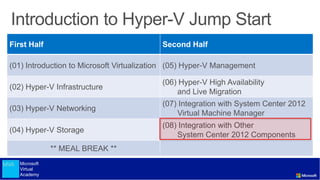
First Half Second Half
(01) Introduction to Microsoft Virtualization (05) Hyper-V Management
(02) Hyper-V Infrastructure
(06) Hyper-V High Availability
and Live Migration
(03) Hyper-V Networking
(07) Integration with System Center 2012
Virtual Machine Manager
(04) Hyper-V Storage
(08) Integration with Other
System Center 2012 Components
** MEAL BREAK **
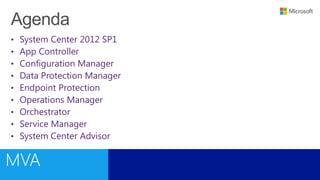
• System Center 2012 SP1
• App Controller
• Configuration Manager
• Data Protection Manager
• Endpoint Protection
• Operations Manager
• Orchestrator
• Service Manager
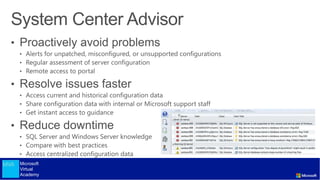
• System Center Advisor
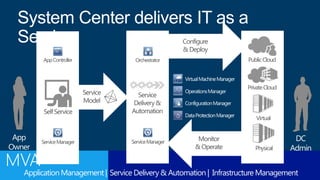
Configure
&Deploy
Monitor
&Operate
PublicCloud
PrivateCloud
Physical
Virtual
Service
Model
System Center delivers IT as a
Service
DC
Admin
SelfService
App
Owner
Service
Delivery&
Automation
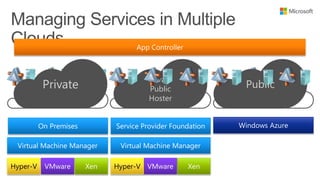
AppController
ServiceManager ServiceManager
Orchestrator
VirtualMachineManager
OperationsManager
ConfigurationManager
DataProtectionManager
ApplicationManagement | Service Delivery & Automation | Infrastructure Management
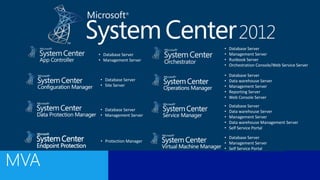
• Protection Manager
• Database Server
• Management Server
• Database Server
• Management Server
• Self Service Portal
• Database Server
• Site Server
• Database Server
• Management Server
• Database Server
• Management Server
• Runbook Server
• Orchestration Console/Web Service Server
• Database Server
• Data warehouse Server
• Management Server
• Reporting Server
• Web Console Server
• Database Server
• Data warehouse Server
• Management Server
• Data warehouse Management Server
• Self Service Portal
Microsoft
Virtual
Academy
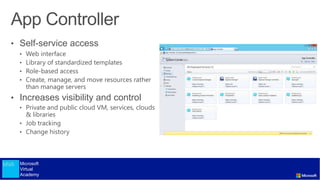
• Self-service access
• Web interface
• Library of standardized templates
• Role-based access
• Create, manage, and move resources rather
than manage servers
• Increases visibility and control
• Private and public cloud VM, services, clouds
& libraries
• Job tracking
• Change history
PublicPrivate
Private
Public
Hoster
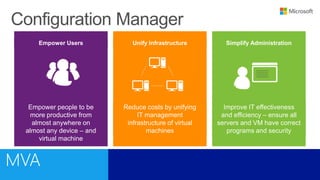
Unify Infrastructure
Reduce costs by unifying
IT management
infrastructure of virtual
machines
Empower Users
Empower people to be
more productive from
almost anywhere on
almost any device – and
virtual machine
Simplify Administration
Improve IT effectiveness
and efficiency – ensure all
servers and VM have correct
programs and security
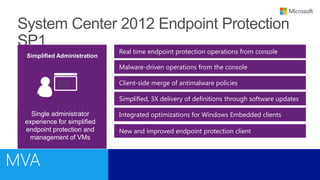
Real time endpoint protection operations from console
Simplified Administration
Single administrator
experience for simplified
endpoint protection and
management of VMs
Simplified, 3X delivery of definitions through software updates
Malware-driven operations from the console
Client-side merge of antimalware policies
Integrated optimizations for Windows Embedded clients
New and improved endpoint protection client
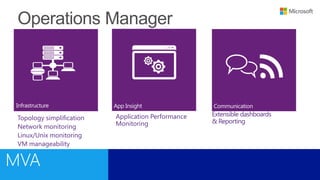
Topology simplification
Network monitoring
Linux/Unix monitoring
VM manageability
App InsightInfrastructure Communication
Extensible dashboards
& Reporting
Application Performance
Monitoring
LOWER COSTS AND IMPROVE
PREDICTABILITY
 Enable IT resources to focus on
work that adds business value
 Reduce error-prone manual
activities while lowering costs
Automation
DELIVER FLEXIBLE AND
RELIABLE SERVICES
 Accelerate time to value with
flexible process workflows
 Improve service reliability across
multiple tools, systems, and
department silos
Orchestration
OPTIMIZE AND EXTEND EXISTING
INVESTMENTS
 Optimize heterogeneous
environments with integration packs
 Easy-to-extend platform for building
custom integration packs with Quick
Integration Kit (QIK)
Integration
Microsoft
Virtual
Academy
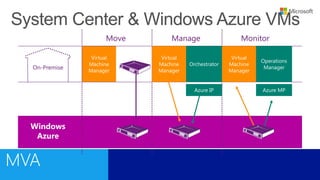
On-Premise
Windows
Azure
Virtual
Machine
Manager
Move Manage
Azure IP
Orchestrator
Virtual
Machine
Manager
Operations
Manager
Azure MP
Virtual
Machine
Manager
Monitor
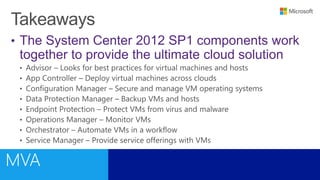
• The System Center 2012 SP1 components work
together to provide the ultimate cloud solution
Microsoft
Virtual
Academy
©2013 Microsoft Corporation. All rights reserved. Microsoft, Windows, Office, Azure, System Center, Dynamics and other product names are or may be registered trademarks and/or trademarks in the
U.S. and/or other countries. The information herein is for informational purposes only and represents the current view of Microsoft Corporation as of the date of this presentation. Because Microsoft
must respond to changing market conditions, it should not be interpreted to be a commitment on the part of Microsoft, and Microsoft cannot guarantee the accuracy of any information provided
after the date of this presentation. MICROSOFT MAKES NO WARRANTIES, EXPRESS, IMPLIED OR STATUTORY, AS TO THE INFORMATION IN THIS PRESENTATION.

Hyper-V Integration with other System Center 2012 Components

  • 1.
  • 2.
    Microsoft Virtual Academy First Half SecondHalf (01) Introduction to Microsoft Virtualization (05) Hyper-V Management (02) Hyper-V Infrastructure (06) Hyper-V High Availability and Live Migration (03) Hyper-V Networking (07) Integration with System Center 2012 Virtual Machine Manager (04) Hyper-V Storage (08) Integration with Other System Center 2012 Components ** MEAL BREAK **
  • 3.
    • System Center2012 SP1 • App Controller • Configuration Manager • Data Protection Manager • Endpoint Protection • Operations Manager • Orchestrator • Service Manager • System Center Advisor
  • 5.
    Configure &Deploy Monitor &Operate PublicCloud PrivateCloud Physical Virtual Service Model System Center deliversIT as a Service DC Admin SelfService App Owner Service Delivery& Automation AppController ServiceManager ServiceManager Orchestrator VirtualMachineManager OperationsManager ConfigurationManager DataProtectionManager ApplicationManagement | Service Delivery & Automation | Infrastructure Management
  • 6.
    • Protection Manager •Database Server • Management Server • Database Server • Management Server • Self Service Portal • Database Server • Site Server • Database Server • Management Server • Database Server • Management Server • Runbook Server • Orchestration Console/Web Service Server • Database Server • Data warehouse Server • Management Server • Reporting Server • Web Console Server • Database Server • Data warehouse Server • Management Server • Data warehouse Management Server • Self Service Portal
  • 8.
    Microsoft Virtual Academy • Self-service access •Web interface • Library of standardized templates • Role-based access • Create, manage, and move resources rather than manage servers • Increases visibility and control • Private and public cloud VM, services, clouds & libraries • Job tracking • Change history
  • 9.
  • 11.
    Unify Infrastructure Reduce costsby unifying IT management infrastructure of virtual machines Empower Users Empower people to be more productive from almost anywhere on almost any device – and virtual machine Simplify Administration Improve IT effectiveness and efficiency – ensure all servers and VM have correct programs and security
  • 17.
    Real time endpointprotection operations from console Simplified Administration Single administrator experience for simplified endpoint protection and management of VMs Simplified, 3X delivery of definitions through software updates Malware-driven operations from the console Client-side merge of antimalware policies Integrated optimizations for Windows Embedded clients New and improved endpoint protection client
  • 19.
    Topology simplification Network monitoring Linux/Unixmonitoring VM manageability App InsightInfrastructure Communication Extensible dashboards & Reporting Application Performance Monitoring
  • 22.
    LOWER COSTS ANDIMPROVE PREDICTABILITY  Enable IT resources to focus on work that adds business value  Reduce error-prone manual activities while lowering costs Automation DELIVER FLEXIBLE AND RELIABLE SERVICES  Accelerate time to value with flexible process workflows  Improve service reliability across multiple tools, systems, and department silos Orchestration OPTIMIZE AND EXTEND EXISTING INVESTMENTS  Optimize heterogeneous environments with integration packs  Easy-to-extend platform for building custom integration packs with Quick Integration Kit (QIK) Integration
  • 26.
  • 28.
  • 29.
    • The SystemCenter 2012 SP1 components work together to provide the ultimate cloud solution
  • 30.
  • 32.
    ©2013 Microsoft Corporation.All rights reserved. Microsoft, Windows, Office, Azure, System Center, Dynamics and other product names are or may be registered trademarks and/or trademarks in the U.S. and/or other countries. The information herein is for informational purposes only and represents the current view of Microsoft Corporation as of the date of this presentation. Because Microsoft must respond to changing market conditions, it should not be interpreted to be a commitment on the part of Microsoft, and Microsoft cannot guarantee the accuracy of any information provided after the date of this presentation. MICROSOFT MAKES NO WARRANTIES, EXPRESS, IMPLIED OR STATUTORY, AS TO THE INFORMATION IN THIS PRESENTATION.