System Center 2012
Virtual Machine Manager
Norman W. Mayes, CISSP MCSE MCITP-E ITIL-F
July 2013
Identity Management | Data Protection | Authentication Strategies
© 2013 Edgile, Inc. – All Rights Reserved
Table of Contents
System Center – VMM
Introductions
Overview of VMM
VMM Database
Clustering
1
2
3
4
Next Steps5
© 2013 Edgile, Inc. – All Rights Reserved
Introductions
Business-Aligned Security
3
Edgile aligns security with the strategy, goals and demands
of the business; allowing us to redefining security in terms
of Strategic Capabilities and transform the perception of
security from a risk reduction activity into a Strategic
Imperative for the company.
Aligning Security
with the Strategy,
Goals and Demands
of the Business
© 2013 Edgile, Inc. – All Rights Reserved
Established in 2001 by Partners and Senior Managers from Deloitte
to Deliver Security Solutions to Leading Companies:
 Microsoft Security Solutions from the boardroom to the network
 Addressing the most challenging
security issues confronting
our customers
 Long-term relations drive solutions
from strategy to deployment
Edgile Exceeds Big-4 in Quality
and Style:
 Senior resources with real
world experience
 Small, focused and capable teams
 Senior technologist
Introductions
Edgile Background
4
Professionalism
MS
Expertise
VARS
Big 4
High
Low
Competitors
Junior Resources,
High % of Clients Not
Reference-able
Low High
Boutiques
© 2013 Edgile, Inc. – All Rights Reserved
Virtual Machine Manager Overview
 Brief overview of System Center 2012, SP1 – Virtual Machine Manager
(VMM)
VMM Database
 Discuss the deployment options and placement of SQL Server to
support Virtual Machine Manager and future System Center products
Clustering
 Discuss High Availability (HA), Failover and Clustering
Introductions
Session Goals
© 2013 Edgile, Inc. – All Rights Reserved
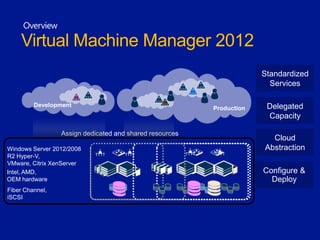
OVERVIEW
Development
Production
Configure &
Deploy
Cloud
Abstraction
Delegated
Capacity
Standardized
Services
Assign dedicated and shared resources
Windows Server 2012/2008
R2 Hyper-V,
VMware, Citrix XenServer
Intel, AMD,
OEM hardware
Fiber Channel,
iSCSI
Overview
Virtual Machine Manager 2012
© 2013 Edgile, Inc. – All Rights Reserved
Overview
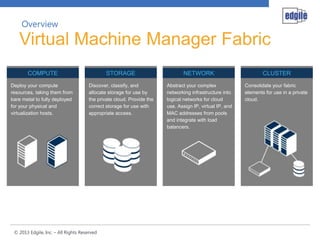
Virtual Machine Manager Fabric
STORAGE
Discover, classify, and
allocate storage for use by
the private cloud. Provide the
correct storage for use with
appropriate access.
COMPUTE
Deploy your compute
resources, taking them from
bare metal to fully deployed
for your physical and
virtualization hosts.
NETWORK
Abstract your complex
networking infrastructure into
logical networks for cloud
use. Assign IP, virtual IP, and
MAC addresses from pools
and integrate with load
balancers.
CLUSTER
Consolidate your fabric
elements for use in a private
cloud.
© 2013 Edgile, Inc. – All Rights Reserved
Overview – 2012 Feature
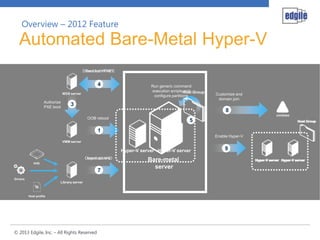
Automated Bare-Metal Hyper-V
Bare-metal
server
WDS server
VHD
Drivers
Host profile
contoso
Library server
Hyper-V server
1
3
24
5
67
8
9
OOB reboot
Boot from PXE
Download VHDInject drivers
Authorize
PXE boot
Run generic command
execution scripts and
configure partitions Customize and
domain join
Enable Hyper-V
Download WINPE
Hyper-V server
Host Group
Hyper-V serverHyper-V server
Host Group
VMM server
Hyper-V serverHyper-V server
Host Group
SMI-S
Provider
Virtual Machine Manager
Gold Silver
Assign existing LUNs to
hosts and clusters
Create new LUNs from
pool and assign to hosts
and clusters
Allocate storage to
specific host groups
Create storage
classification pools and
associate with storage
Discover storage
through SMI-S provider
Host Group
Industry Standard API
Overview – 2012 Feature
Storage Allocation & Management
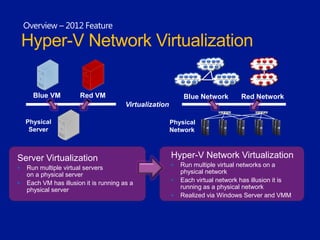
Server Virtualization
 Run multiple virtual servers
on a physical server
 Each VM has illusion it is running as a
physical server
Hyper-V Network Virtualization
 Run multiple virtual networks on a
physical network
 Each virtual network has illusion it is
running as a physical network
 Realized via Windows Server and VMM
Blue VM Red VM
Virtualization
Physical
Server
Blue Network Red Network
Physical
Network
Overview – 2012 Feature
Hyper-V Network Virtualization
© 2013 Edgile, Inc. – All Rights Reserved
Overview
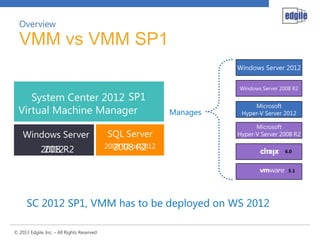
VMM vs VMM SP1
System Center 2012
Virtual Machine Manager
SQL ServerWindows Server
Manages
Microsoft
Hyper-V Server 2008 R2
Windows Server 2012
Windows Server 2008 R2
Microsoft
Hyper-V Server 2012
SP1
2008 R22012 2008 R22008 R2 or 2012
© 2013 Edgile, Inc. – All Rights Reserved
Reliability and Predictability: Applications are highly available and
fault-tolerant.
Highly Automated: Infrastructure is highly automated to complete
tasks for provisioning new systems and configuring
storage, networking, and applications on its own without any manual
intervention.
Agility of Speed: Applications are deployed faster, and changes are
made much easier.
Focus of Applications and Services: Applications and
services, uptime, and quality of the service (QoS) as a measure for
success of a private cloud.
Overview
Virtual Machine Manager Benefits
© 2013 Edgile, Inc. – All Rights Reserved
VMM DATABASE
© 2013 Edgile, Inc. – All Rights Reserved
Virtual Machine Manager Database
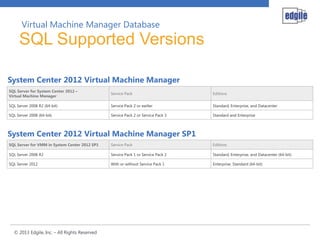
SQL Supported Versions
SQL Server for System Center 2012 –
Virtual Machine Manager
Service Pack Editions
SQL Server 2008 R2 (64-bit) Service Pack 2 or earlier Standard, Enterprise, and Datacenter
SQL Server 2008 (64-bit) Service Pack 2 or Service Pack 3 Standard and Enterprise
SQL Server for VMM in System Center 2012 SP1 Service Pack Editions
SQL Server 2008 R2 Service Pack 1 or Service Pack 2 Standard, Enterprise, and Datacenter (64-bit)
SQL Server 2012 With or without Service Pack 1 Enterprise, Standard (64-bit)
System Center 2012 Virtual Machine Manager
System Center 2012 Virtual Machine Manager SP1
© 2013 Edgile, Inc. – All Rights Reserved
Virtual Machine Manager Database
SQL Hardware Requirements
Hardware component Minimum Recommended
Processor Pentium 4, 2.8 GHz Dual-Core 64-bit, 2 GHz
RAM 2 GB 4 GB
Hard disk space 80 GB 150 GB
Hardware component Minimum Recommended
Processor Dual-Core 64-bit, 2 GHz Dual-Core 64-bit, 2.8 GHz
RAM 4 GB 8 GB
Hard disk space 150 GB 200 GB
Managing up to 150 Hosts
Managing more than 150 Hosts
Note: Recommend a dedicated SQL Server for environments hosting more than 10 VMs
© 2013 Edgile, Inc. – All Rights Reserved
VMM encrypts some data in the VMM database (for example Run As
account credentials and passwords in guest operating system profiles)
by using the Windows Data Protection API (DPAPI). The encryption of
this data is tied to the specific computer on which VMM is installed
and the service account used by VMM. Therefore, if you need to move
your VMM installation to another computer, the encrypted data will not
be retained.
Distributed key management, however, stores the encryption keys in
AD DS. Therefore, if you need to move your VMM installation to
another computer, the encrypted data will be retained, because the
other computer will have access to the encryption keys in AD DS.
Virtual Machine Manager Database
Distributed Key Management
© 2013 Edgile, Inc. – All Rights Reserved
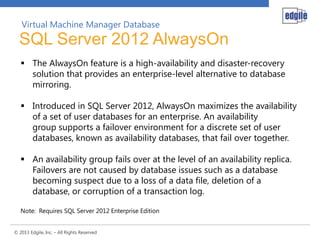
 The AlwaysOn feature is a high-availability and disaster-recovery
solution that provides an enterprise-level alternative to database
mirroring.
 Introduced in SQL Server 2012, AlwaysOn maximizes the availability
of a set of user databases for an enterprise. An availability
group supports a failover environment for a discrete set of user
databases, known as availability databases, that fail over together.
 An availability group fails over at the level of an availability replica.
Failovers are not caused by database issues such as a database
becoming suspect due to a loss of a data file, deletion of a
database, or corruption of a transaction log.
Note: Requires SQL Server 2012 Enterprise Edition
Virtual Machine Manager Database
SQL Server 2012 AlwaysOn
© 2013 Edgile, Inc. – All Rights Reserved
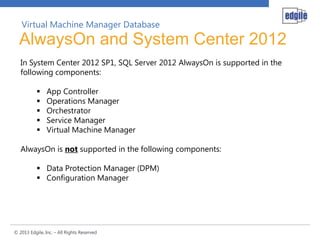
In System Center 2012 SP1, SQL Server 2012 AlwaysOn is supported in the
following components:
 App Controller
 Operations Manager
 Orchestrator
 Service Manager
 Virtual Machine Manager
AlwaysOn is not supported in the following components:
 Data Protection Manager (DPM)
 Configuration Manager
Virtual Machine Manager Database
AlwaysOn and System Center 2012
© 2013 Edgile, Inc. – All Rights Reserved
CLUSTERING
© 2013 Edgile, Inc. – All Rights Reserved
Clustering
Virtual Machine Manager - HA
© 2013 Edgile, Inc. – All Rights Reserved
NEXT STEPS
© 2013 Edgile, Inc. – All Rights Reserved
3-Day Planning Session
 Identification of systems management and/or virtualization goals and
assessment of organizational requirements
 A workshop covering Microsoft System Center 2012 Virtual Machine
Manager with an architecture design session including
recommendations.
5-Day Planning Session
 Analysis of existing infrastructure using the Microsoft Assessment and
Planning (MAP) Toolkit with an architecture design and technical drill
down sessions followed by a Proof-of-Concept.
Next Steps
Planning Design Sessions

System Center 2012 Virtual Machine Manager

  • 1.
    System Center 2012 VirtualMachine Manager Norman W. Mayes, CISSP MCSE MCITP-E ITIL-F July 2013 Identity Management | Data Protection | Authentication Strategies © 2013 Edgile, Inc. – All Rights Reserved
  • 2.
    Table of Contents SystemCenter – VMM Introductions Overview of VMM VMM Database Clustering 1 2 3 4 Next Steps5
  • 3.
    © 2013 Edgile,Inc. – All Rights Reserved Introductions Business-Aligned Security 3 Edgile aligns security with the strategy, goals and demands of the business; allowing us to redefining security in terms of Strategic Capabilities and transform the perception of security from a risk reduction activity into a Strategic Imperative for the company. Aligning Security with the Strategy, Goals and Demands of the Business
  • 4.
    © 2013 Edgile,Inc. – All Rights Reserved Established in 2001 by Partners and Senior Managers from Deloitte to Deliver Security Solutions to Leading Companies:  Microsoft Security Solutions from the boardroom to the network  Addressing the most challenging security issues confronting our customers  Long-term relations drive solutions from strategy to deployment Edgile Exceeds Big-4 in Quality and Style:  Senior resources with real world experience  Small, focused and capable teams  Senior technologist Introductions Edgile Background 4 Professionalism MS Expertise VARS Big 4 High Low Competitors Junior Resources, High % of Clients Not Reference-able Low High Boutiques
  • 5.
    © 2013 Edgile,Inc. – All Rights Reserved Virtual Machine Manager Overview  Brief overview of System Center 2012, SP1 – Virtual Machine Manager (VMM) VMM Database  Discuss the deployment options and placement of SQL Server to support Virtual Machine Manager and future System Center products Clustering  Discuss High Availability (HA), Failover and Clustering Introductions Session Goals
  • 6.
    © 2013 Edgile,Inc. – All Rights Reserved OVERVIEW
  • 7.
    Development Production Configure & Deploy Cloud Abstraction Delegated Capacity Standardized Services Assign dedicatedand shared resources Windows Server 2012/2008 R2 Hyper-V, VMware, Citrix XenServer Intel, AMD, OEM hardware Fiber Channel, iSCSI Overview Virtual Machine Manager 2012
  • 8.
    © 2013 Edgile,Inc. – All Rights Reserved Overview Virtual Machine Manager Fabric STORAGE Discover, classify, and allocate storage for use by the private cloud. Provide the correct storage for use with appropriate access. COMPUTE Deploy your compute resources, taking them from bare metal to fully deployed for your physical and virtualization hosts. NETWORK Abstract your complex networking infrastructure into logical networks for cloud use. Assign IP, virtual IP, and MAC addresses from pools and integrate with load balancers. CLUSTER Consolidate your fabric elements for use in a private cloud.
  • 9.
    © 2013 Edgile,Inc. – All Rights Reserved Overview – 2012 Feature Automated Bare-Metal Hyper-V Bare-metal server WDS server VHD Drivers Host profile contoso Library server Hyper-V server 1 3 24 5 67 8 9 OOB reboot Boot from PXE Download VHDInject drivers Authorize PXE boot Run generic command execution scripts and configure partitions Customize and domain join Enable Hyper-V Download WINPE Hyper-V server Host Group Hyper-V serverHyper-V server Host Group VMM server Hyper-V serverHyper-V server Host Group
  • 10.
    SMI-S Provider Virtual Machine Manager GoldSilver Assign existing LUNs to hosts and clusters Create new LUNs from pool and assign to hosts and clusters Allocate storage to specific host groups Create storage classification pools and associate with storage Discover storage through SMI-S provider Host Group Industry Standard API Overview – 2012 Feature Storage Allocation & Management
  • 11.
    Server Virtualization  Runmultiple virtual servers on a physical server  Each VM has illusion it is running as a physical server Hyper-V Network Virtualization  Run multiple virtual networks on a physical network  Each virtual network has illusion it is running as a physical network  Realized via Windows Server and VMM Blue VM Red VM Virtualization Physical Server Blue Network Red Network Physical Network Overview – 2012 Feature Hyper-V Network Virtualization
  • 12.
    © 2013 Edgile,Inc. – All Rights Reserved Overview VMM vs VMM SP1 System Center 2012 Virtual Machine Manager SQL ServerWindows Server Manages Microsoft Hyper-V Server 2008 R2 Windows Server 2012 Windows Server 2008 R2 Microsoft Hyper-V Server 2012 SP1 2008 R22012 2008 R22008 R2 or 2012
  • 13.
    © 2013 Edgile,Inc. – All Rights Reserved Reliability and Predictability: Applications are highly available and fault-tolerant. Highly Automated: Infrastructure is highly automated to complete tasks for provisioning new systems and configuring storage, networking, and applications on its own without any manual intervention. Agility of Speed: Applications are deployed faster, and changes are made much easier. Focus of Applications and Services: Applications and services, uptime, and quality of the service (QoS) as a measure for success of a private cloud. Overview Virtual Machine Manager Benefits
  • 14.
    © 2013 Edgile,Inc. – All Rights Reserved VMM DATABASE
  • 15.
    © 2013 Edgile,Inc. – All Rights Reserved Virtual Machine Manager Database SQL Supported Versions SQL Server for System Center 2012 – Virtual Machine Manager Service Pack Editions SQL Server 2008 R2 (64-bit) Service Pack 2 or earlier Standard, Enterprise, and Datacenter SQL Server 2008 (64-bit) Service Pack 2 or Service Pack 3 Standard and Enterprise SQL Server for VMM in System Center 2012 SP1 Service Pack Editions SQL Server 2008 R2 Service Pack 1 or Service Pack 2 Standard, Enterprise, and Datacenter (64-bit) SQL Server 2012 With or without Service Pack 1 Enterprise, Standard (64-bit) System Center 2012 Virtual Machine Manager System Center 2012 Virtual Machine Manager SP1
  • 16.
    © 2013 Edgile,Inc. – All Rights Reserved Virtual Machine Manager Database SQL Hardware Requirements Hardware component Minimum Recommended Processor Pentium 4, 2.8 GHz Dual-Core 64-bit, 2 GHz RAM 2 GB 4 GB Hard disk space 80 GB 150 GB Hardware component Minimum Recommended Processor Dual-Core 64-bit, 2 GHz Dual-Core 64-bit, 2.8 GHz RAM 4 GB 8 GB Hard disk space 150 GB 200 GB Managing up to 150 Hosts Managing more than 150 Hosts Note: Recommend a dedicated SQL Server for environments hosting more than 10 VMs
  • 17.
    © 2013 Edgile,Inc. – All Rights Reserved VMM encrypts some data in the VMM database (for example Run As account credentials and passwords in guest operating system profiles) by using the Windows Data Protection API (DPAPI). The encryption of this data is tied to the specific computer on which VMM is installed and the service account used by VMM. Therefore, if you need to move your VMM installation to another computer, the encrypted data will not be retained. Distributed key management, however, stores the encryption keys in AD DS. Therefore, if you need to move your VMM installation to another computer, the encrypted data will be retained, because the other computer will have access to the encryption keys in AD DS. Virtual Machine Manager Database Distributed Key Management
  • 18.
    © 2013 Edgile,Inc. – All Rights Reserved  The AlwaysOn feature is a high-availability and disaster-recovery solution that provides an enterprise-level alternative to database mirroring.  Introduced in SQL Server 2012, AlwaysOn maximizes the availability of a set of user databases for an enterprise. An availability group supports a failover environment for a discrete set of user databases, known as availability databases, that fail over together.  An availability group fails over at the level of an availability replica. Failovers are not caused by database issues such as a database becoming suspect due to a loss of a data file, deletion of a database, or corruption of a transaction log. Note: Requires SQL Server 2012 Enterprise Edition Virtual Machine Manager Database SQL Server 2012 AlwaysOn
  • 19.
    © 2013 Edgile,Inc. – All Rights Reserved In System Center 2012 SP1, SQL Server 2012 AlwaysOn is supported in the following components:  App Controller  Operations Manager  Orchestrator  Service Manager  Virtual Machine Manager AlwaysOn is not supported in the following components:  Data Protection Manager (DPM)  Configuration Manager Virtual Machine Manager Database AlwaysOn and System Center 2012
  • 20.
    © 2013 Edgile,Inc. – All Rights Reserved CLUSTERING
  • 21.
    © 2013 Edgile,Inc. – All Rights Reserved Clustering Virtual Machine Manager - HA
  • 22.
    © 2013 Edgile,Inc. – All Rights Reserved NEXT STEPS
  • 23.
    © 2013 Edgile,Inc. – All Rights Reserved 3-Day Planning Session  Identification of systems management and/or virtualization goals and assessment of organizational requirements  A workshop covering Microsoft System Center 2012 Virtual Machine Manager with an architecture design session including recommendations. 5-Day Planning Session  Analysis of existing infrastructure using the Microsoft Assessment and Planning (MAP) Toolkit with an architecture design and technical drill down sessions followed by a Proof-of-Concept. Next Steps Planning Design Sessions