VCS 5.0 for VMware ESX
© 2006 Symantec CorporationData Center Management Group – Symantec Confidential 2
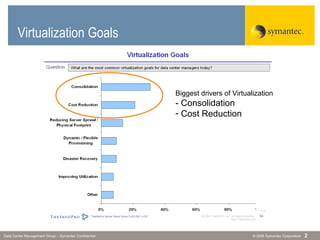
Virtualization Goals
Biggest drivers of Virtualization
- Consolidation
- Cost Reduction
© 2006 Symantec CorporationData Center Management Group – Symantec Confidential 3
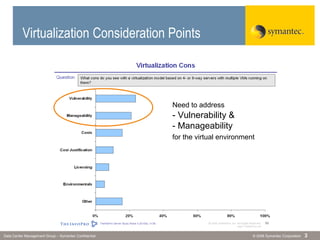
Virtualization Consideration Points
Need to address
- Vulnerability &
- Manageability
for the virtual environment
© 2006 Symantec CorporationData Center Management Group – Symantec Confidential 4
 Physical servers
 Virtual servers
 Applications
 Network components
 Storage components
 Virtual links
Vulnerability Issues
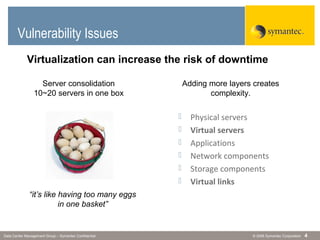
“it’s like having too many eggs
in one basket”
Virtualization can increase the risk of downtime
Server consolidation
10~20 servers in one box
Adding more layers creates
complexity.
© 2006 Symantec CorporationData Center Management Group – Symantec Confidential 5
Manageability Issues
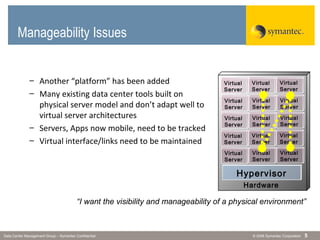
– Another “platform” has been added
– Many existing data center tools built on
physical server model and don’t adapt well to
virtual server architectures
– Servers, Apps now mobile, need to be tracked
– Virtual interface/links need to be maintained
Hardware
Hypervisor
Virtual
Server
Virtual
Server
Virtual
Server
Virtual
Server
Virtual
Server
Virtual
Server
Virtual
Server
Virtual
Server
Virtual
Server
Virtual
Server
Virtual
Server
Virtual
Server
Virtual
Server
Virtual
Server
Virtual
Server
“I want the visibility and manageability of a physical environment”
Solution?
© 2006 Symantec CorporationData Center Management Group – Symantec Confidential 7
Traditional Clustering
Hardware (x86)
Virtualization
Hypervisor
Hardware (x86)
Server A
Virtualization
Hypervisor
Server A’
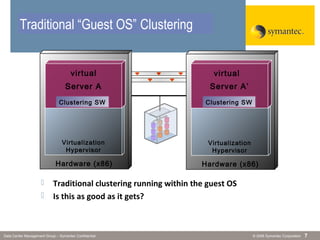
 Traditional clustering running within the guest OS
 Is this as good as it gets?
Clustering SW
virtual virtual
Traditional “Guest OS” Clustering
Clustering SW
© 2006 Symantec CorporationData Center Management Group – Symantec Confidential 8
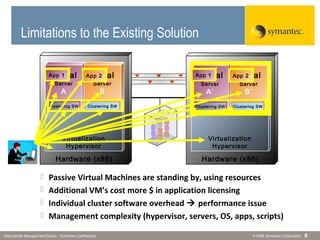
Limitations to the Existing Solution
 Passive Virtual Machines are standing by, using resources
 Additional VM’s cost more $ in application licensing
 Individual cluster software overhead  performance issue
 Management complexity (hypervisor, servers, OS, apps, scripts)
Hardware (x86)
Virtualization
Hypervisor
Hardware (x86)
Server
A
Server
B
Virtualization
Hypervisor
Server
A’
Server
B’
Clustering SW Clustering SWClustering SW Clustering SW
virtual virtual virtual virtualApp 1 App 2App 1App 2
© 2006 Symantec CorporationData Center Management Group – Symantec Confidential 9
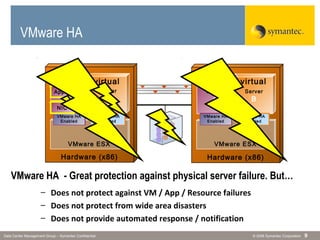
VMware HA - Great protection against physical server failure. But…
VMware HA
Hardware (x86)
VMware ESX
Hardware (x86)
Server
A
Server
B
VMware ESX
VMware HA
Enabled
VMware HA
Enabled
virtual virtual
Server
A
Server
B
VMware HA
Enabled
VMware HA
Enabled
virtual virtual
– Does not protect against VM / App / Resource failures
– Does not protect from wide area disasters
– Does not provide automated response / notification
App 1
NIC
VMware HA
© 2006 Symantec CorporationData Center Management Group – Symantec Confidential 10
Hardware (x86)
VMware ESX
Hardware (x86)
Server
A
VMware ESX
virtual
Server
B
virtual
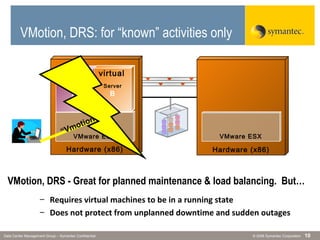
VMotion, DRS - Great for planned maintenance & load balancing. But…
– Requires virtual machines to be in a running state
– Does not protect from unplanned downtime and sudden outages
“Vmotion”
Server
B
virtual
VMotion, DRS: for “known” activities only
© 2006 Symantec CorporationData Center Management Group – Symantec Confidential 11
Veritas Cluster Server
(VCS)
 #1 Market Share in cross-platform server clustering
– Source: IDC 2006 IDC Clustering and Availability Software Survey
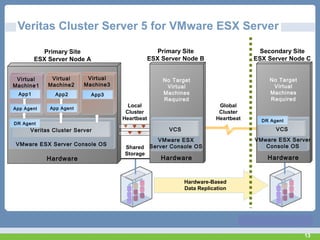
 Provides High Availability and
Disaster Recovery all in one package
 Supported Platforms:
• Windows NT, 2000, 2003
• Linux (RedHat, SUSE)
• Solaris, HP/UX, AIX
• VMware ESX Server
Veritas Cluster Server
© 2006 Symantec CorporationData Center Management Group – Symantec Confidential 12
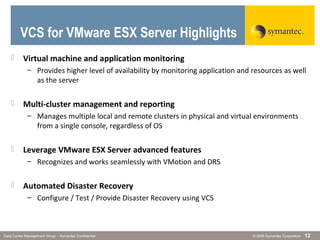
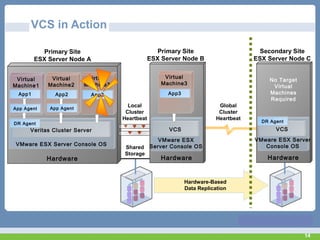
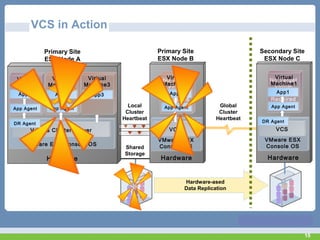
 Virtual machine and application monitoring
– Provides higher level of availability by monitoring application and resources as well
as the server
 Multi-cluster management and reporting
– Manages multiple local and remote clusters in physical and virtual environments
from a single console, regardless of OS
 Leverage VMware ESX Server advanced features
– Recognizes and works seamlessly with VMotion and DRS
 Automated Disaster Recovery
– Configure / Test / Provide Disaster Recovery using VCS
VCS for VMware ESX Server Highlights
13
Hardware
Local
Cluster
Heartbeat
Global
Cluster
Heartbeat
VMware ESX Server Console OS
Veritas Cluster Server
Veritas Cluster Server 5 for VMware ESX Server
App Agent
App1
Virtual
Machine1
App3
Virtual
Machine3
App Agent
App2
Virtual
Machine2
Hardware
VMware ESX
Server Console OS
VCS
No Target
Virtual
Machines
Required
Shared
Storage
Hardware-Based
Data Replication
Primary Site
ESX Server Node A
Secondary Site
ESX Server Node C
Hardware
VMware ESX Server
Console OS
VCS
No Target
Virtual
Machines
Required
Primary Site
ESX Server Node B
DR Agent
DR Agent
14
Hardware
VMware ESX Server Console OS
Veritas Cluster Server
VCS in Action
App Agent
App1
Virtual
Machine1
App3
Virtual
Machine3
App Agent
App2
Virtual
Machine2
Hardware
VMware ESX
Server Console OS
VCS
Local
Cluster
Heartbeat
Shared
Storage
Global
Cluster
Heartbeat
Primary Site
ESX Server Node A
Secondary Site
ESX Server Node C
Hardware
VMware ESX Server
Console OS
VCS
No Target
Virtual
Machines
Required
Primary Site
ESX Server Node B
DR Agent
App3
Virtual
Machine3
DR Agent
Hardware-Based
Data Replication
15
Hardware
VMware ESX Console OS
Veritas Cluster Server
App Agent
App1
Virtual
Machine1
App3
Virtual
Machine3
App Agent
App2
Virtual
Machine2
Hardware
VMware ESX
Console OS
VCS
No Target
Virtual
Machines
Required
Local
Cluster
Heartbeat
Shared
Storage
Global
Cluster
Heartbeat
Primary Site
ESX Node A
Secondary Site
ESX Node C
Hardware
VMware ESX
Console OS
VCS
No Target
Virtual
Machines
Required
Primary Site
ESX Node B
App Agent
App1
Virtual
Machine1
App Agent
App2
Virtual
Machine2
DR Agent DR Agent
Hardware-ased
Data Replication
VCS in Action
© 2006 Symantec CorporationData Center Management Group – Symantec Confidential 16
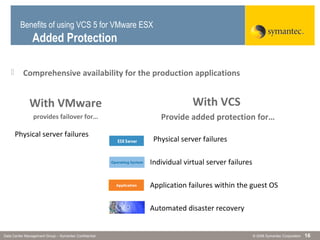
 Comprehensive availability for the production applications
With VMware
provides failover for…
With VCS
Provide added protection for…
Physical server failures
. Individual virtual server failures
. Application failures within the guest OS
. Automated disaster recovery
Benefits of using VCS 5 for VMware ESX
Added Protection
© 2006 Symantec CorporationData Center Management Group – Symantec Confidential 17
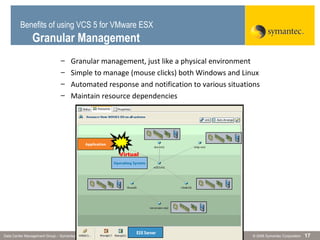
– Granular management, just like a physical environment
– Simple to manage (mouse clicks) both Windows and Linux
– Automated response and notification to various situations
– Maintain resource dependencies
Virtual
Virtual
Benefits of using VCS 5 for VMware ESX
Granular Management
© 2006 Symantec CorporationData Center Management Group – Symantec Confidential 18
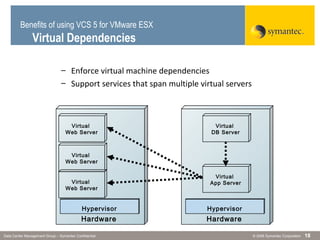
– Enforce virtual machine dependencies
– Support services that span multiple virtual servers
Hardware
Hypervisor
Virtual
Web Server
Hardware
Hypervisor
Virtual
Web Server
Virtual
Web Server
Virtual
App Server
Virtual
DB Server
Benefits of using VCS 5 for VMware ESX
Virtual Dependencies
© 2006 Symantec CorporationData Center Management Group – Symantec Confidential 19
Benefits of using VCS 5 for VMware ESX
Across Data Centers
– Maintain availability during a site-wide disaster
– Simplified automated disaster recovery process
– Have one view of all VCS clusters across the globe
– Use one framework to manage multiple data centers
One Management Console
VMware cluster
VMware cluster
VMware cluster
Solaris cluster
Windows cluster
HPUX cluster
Linux cluster
AIX cluster
© 2006 Symantec CorporationData Center Management Group – Symantec Confidential 20
 VCS allows for N+M clusters
– No need to have 2x the hardware
– Cluster according to performance, cost requirements
 VMotion, DRS compatible
– Utilize VMware features without complications
 No need to install duplicate stand-by failover instances
– Only one application to license
– Install VCS only once
 Fire Drill tool verifies the virtual disaster recovery plan
– No impact to the production environment
– DR plans should be tested whether it is physical or virtual
Benefits of using VCS 5 for VMware ESX
Virtual Environment Specific
© 2006 Symantec CorporationData Center Management Group – Symantec Confidential 21
What is VCS Fire Drill?
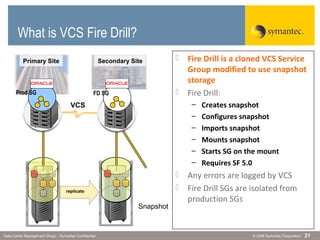
 Fire Drill is a cloned VCS Service
Group modified to use snapshot
storage
 Fire Drill:
– Creates snapshot
– Configures snapshot
– Imports snapshot
– Mounts snapshot
– Starts SG on the mount
– Requires SF 5.0
 Any errors are logged by VCS
 Fire Drill SGs are isolated from
production SGs
VCS
Snapshot
Primary Site Secondary Site
Prod SG FD SG
replicate
© 2006 Symantec CorporationData Center Management Group – Symantec Confidential 22
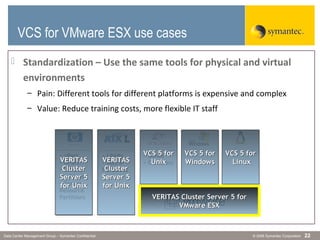
 Standardization – Use the same tools for physical and virtual
environments
– Pain: Different tools for different platforms is expensive and complex
– Value: Reduce training costs, more flexible IT staff
VCS for VMware ESX use cases
• ZonesZones
• CContainersontainers
• LPARsLPARs
• Micro-Micro-
PartitionsPartitions
• vParsvPars
• nParsnPars
• VirtualVirtual
MachinesMachines
• SecureSecure
ResourceResource
PartitionsPartitions VERITAS Cluster Server 5 forVERITAS Cluster Server 5 for
VMware ESXVMware ESX
VERITASVERITAS
ClusterCluster
Server 5Server 5
forfor UnixUnix
VERITASVERITAS
ClusterCluster
Server 5Server 5
forfor UnixUnix
VCSVCS 5 for5 for
UnixUnix
VCS 5 forVCS 5 for
WindowsWindows
VCS 5 forVCS 5 for
LinuxLinux
© 2006 Symantec CorporationData Center Management Group – Symantec Confidential 23
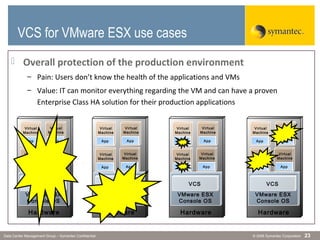
 Overall protection of the production environment
– Pain: Users don’t know the health of the applications and VMs
– Value: IT can monitor everything regarding the VM and can have a proven
Enterprise Class HA solution for their production applications
VCS for VMware ESX Use
Cases
Hardware
VMware ESX
Console OS
VCS
App
Virtual
Machine
App
Virtual
Machine
App
Virtual
Machine
App
Virtual
Machine
Hardware
VMware ESX
Console OS
VCS
App
Virtual
Machine
App
Virtual
Machine
App
Virtual
Machine
App
Virtual
Machine
Hardware
VMware ESX
Console OS
VCS
App
Virtual
Machine
App
Virtual
Machine
App
Virtual
Machine
App
Virtual
Machine
Hardware
VMware ESX
Console OS
VCS
App
Virtual
Machine
App
Virtual
Machine
App
Virtual
Machine
App
Virtual
Machine
VCS for VMware ESX use cases
© 2006 Symantec CorporationData Center Management Group – Symantec Confidential 24
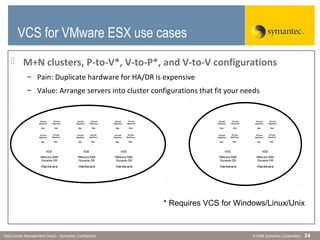
 M+N clusters, P-to-V*, V-to-P*, and V-to-V configurations
– Pain: Duplicate hardware for HA/DR is expensive
– Value: Arrange servers into cluster configurations that fit your needs
VCS for VMware ESX Use
Cases
Hardw are
VMw are ESX
Console OS
VCS
App
Virtual
Machine
App
Virt ual
Machine
App
Virtual
Machine
App
Virtual
Machine
Hardw are
VMw are ESX
Console OS
VCS
App
Virtual
Machine
App
Virtual
Machine
App
Virt ual
Machine
App
Virt ual
Machine
App
Virtual
Machine
App
Virtual
Machine
App
Virtual
Machine
App
Virtual
Machine
Hardw are
VMw are ESX
Console OS
VCS
App
Virtual
Machine
App
Virt ual
Machine
App
Virtual
Machine
App
Virt ual
Machine
Hardw are
VMw are ESX
Console OS
VCS
App
Virtual
Machine
App
Virtual
Machine
App
Virt ual
Machine
App
Virt ual
Machine
App
Virtual
Machine
App
Virtual
Machine
App
Virt ual
Machine
App
Virt ual
Machine
Hardw are
VMw are ESX
Console OS
VCS
App
Virt ual
Machine
App
Virt ual
Machine
App
Virtual
Machine
App
Virt ual
Machine
Hardw are
VMw are ESX
Console OS
VCS
App
Virt ual
Machine
App
Virt ual
Machine
App
Virt ual
Machine
App
Virt ual
Machine
App
Virtual
Machine
App
Virtual
Machine
App
Virt ual
Machine
App
Virt ual
Machine
Hardw are
VMw are ESX
Console OS
VCS
App
Virt ual
Machine
App
Virtual
Machine
App
Virtual
Machine
App
Virt ual
Machine
Hardw are
VMw are ESX
Console OS
VCS
App
Virt ual
Machine
App
Virt ual
Machine
App
Virtual
Machine
App
Virtual
Machine
App
Virtual
Machine
App
Virtual
Machine
App
Virt ual
Machine
App
Virt ual
Machine
Hardw are
VMw are ESX
Console OS
VCS
App
Virt ual
Machine
App
Virt ual
Machine
App
Virtual
Machine
App
Virtual
Machine
Hardw are
VMw are ESX
Console OS
VCS
App
Virt ual
Machine
App
Virt ual
Machine
App
Virt ual
Machine
App
Virt ual
Machine
App
Virtual
Machine
App
Virtual
Machine
App
Virtual
Machine
App
Virtual
Machine
* Requires VCS for Windows/Linux/Unix
VCS for VMware ESX use cases
© 2006 Symantec CorporationData Center Management Group – Symantec Confidential 25
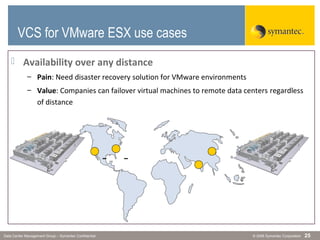
 Availability over any distance
– Pain: Need disaster recovery solution for VMware environments
– Value: Companies can failover virtual machines to remote data centers regardless
of distance
VCS for VMware ESX Use
CasesVCS for VMware ESX use cases
© 2006 Symantec CorporationData Center Management Group – Symantec Confidential 26
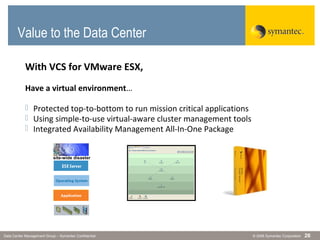
Value to the Data Center
With VCS for VMware ESX,
Have a virtual environment…
 Protected top-to-bottom to run mission critical applications
 Using simple-to-use virtual-aware cluster management tools
 Integrated Availability Management All-In-One Package
site-wide disaster
© 2006 Symantec CorporationData Center Management Group – Symantec Confidential 27
Q&A
For further information:
Jiwon Youm, Sr. Product Manager, Virtualization
jiwon_youm @ symantec.com
Kyle Gleed, Group Technical Product Manager
kyle_gleed @ symantec.com
© 2006 Symantec CorporationData Center Management Group – Symantec Confidential 28
Mastering Complexity: How to Get Started

VMWARE ESX

  • 1.
    VCS 5.0 forVMware ESX
  • 2.
    © 2006 SymantecCorporationData Center Management Group – Symantec Confidential 2 Virtualization Goals Biggest drivers of Virtualization - Consolidation - Cost Reduction
  • 3.
    © 2006 SymantecCorporationData Center Management Group – Symantec Confidential 3 Virtualization Consideration Points Need to address - Vulnerability & - Manageability for the virtual environment
  • 4.
    © 2006 SymantecCorporationData Center Management Group – Symantec Confidential 4  Physical servers  Virtual servers  Applications  Network components  Storage components  Virtual links Vulnerability Issues “it’s like having too many eggs in one basket” Virtualization can increase the risk of downtime Server consolidation 10~20 servers in one box Adding more layers creates complexity.
  • 5.
    © 2006 SymantecCorporationData Center Management Group – Symantec Confidential 5 Manageability Issues – Another “platform” has been added – Many existing data center tools built on physical server model and don’t adapt well to virtual server architectures – Servers, Apps now mobile, need to be tracked – Virtual interface/links need to be maintained Hardware Hypervisor Virtual Server Virtual Server Virtual Server Virtual Server Virtual Server Virtual Server Virtual Server Virtual Server Virtual Server Virtual Server Virtual Server Virtual Server Virtual Server Virtual Server Virtual Server “I want the visibility and manageability of a physical environment”
  • 6.
  • 7.
    © 2006 SymantecCorporationData Center Management Group – Symantec Confidential 7 Traditional Clustering Hardware (x86) Virtualization Hypervisor Hardware (x86) Server A Virtualization Hypervisor Server A’  Traditional clustering running within the guest OS  Is this as good as it gets? Clustering SW virtual virtual Traditional “Guest OS” Clustering Clustering SW
  • 8.
    © 2006 SymantecCorporationData Center Management Group – Symantec Confidential 8 Limitations to the Existing Solution  Passive Virtual Machines are standing by, using resources  Additional VM’s cost more $ in application licensing  Individual cluster software overhead  performance issue  Management complexity (hypervisor, servers, OS, apps, scripts) Hardware (x86) Virtualization Hypervisor Hardware (x86) Server A Server B Virtualization Hypervisor Server A’ Server B’ Clustering SW Clustering SWClustering SW Clustering SW virtual virtual virtual virtualApp 1 App 2App 1App 2
  • 9.
    © 2006 SymantecCorporationData Center Management Group – Symantec Confidential 9 VMware HA - Great protection against physical server failure. But… VMware HA Hardware (x86) VMware ESX Hardware (x86) Server A Server B VMware ESX VMware HA Enabled VMware HA Enabled virtual virtual Server A Server B VMware HA Enabled VMware HA Enabled virtual virtual – Does not protect against VM / App / Resource failures – Does not protect from wide area disasters – Does not provide automated response / notification App 1 NIC VMware HA
  • 10.
    © 2006 SymantecCorporationData Center Management Group – Symantec Confidential 10 Hardware (x86) VMware ESX Hardware (x86) Server A VMware ESX virtual Server B virtual VMotion, DRS - Great for planned maintenance & load balancing. But… – Requires virtual machines to be in a running state – Does not protect from unplanned downtime and sudden outages “Vmotion” Server B virtual VMotion, DRS: for “known” activities only
  • 11.
    © 2006 SymantecCorporationData Center Management Group – Symantec Confidential 11 Veritas Cluster Server (VCS)  #1 Market Share in cross-platform server clustering – Source: IDC 2006 IDC Clustering and Availability Software Survey  Provides High Availability and Disaster Recovery all in one package  Supported Platforms: • Windows NT, 2000, 2003 • Linux (RedHat, SUSE) • Solaris, HP/UX, AIX • VMware ESX Server Veritas Cluster Server
  • 12.
    © 2006 SymantecCorporationData Center Management Group – Symantec Confidential 12  Virtual machine and application monitoring – Provides higher level of availability by monitoring application and resources as well as the server  Multi-cluster management and reporting – Manages multiple local and remote clusters in physical and virtual environments from a single console, regardless of OS  Leverage VMware ESX Server advanced features – Recognizes and works seamlessly with VMotion and DRS  Automated Disaster Recovery – Configure / Test / Provide Disaster Recovery using VCS VCS for VMware ESX Server Highlights
  • 13.
    13 Hardware Local Cluster Heartbeat Global Cluster Heartbeat VMware ESX ServerConsole OS Veritas Cluster Server Veritas Cluster Server 5 for VMware ESX Server App Agent App1 Virtual Machine1 App3 Virtual Machine3 App Agent App2 Virtual Machine2 Hardware VMware ESX Server Console OS VCS No Target Virtual Machines Required Shared Storage Hardware-Based Data Replication Primary Site ESX Server Node A Secondary Site ESX Server Node C Hardware VMware ESX Server Console OS VCS No Target Virtual Machines Required Primary Site ESX Server Node B DR Agent DR Agent
  • 14.
    14 Hardware VMware ESX ServerConsole OS Veritas Cluster Server VCS in Action App Agent App1 Virtual Machine1 App3 Virtual Machine3 App Agent App2 Virtual Machine2 Hardware VMware ESX Server Console OS VCS Local Cluster Heartbeat Shared Storage Global Cluster Heartbeat Primary Site ESX Server Node A Secondary Site ESX Server Node C Hardware VMware ESX Server Console OS VCS No Target Virtual Machines Required Primary Site ESX Server Node B DR Agent App3 Virtual Machine3 DR Agent Hardware-Based Data Replication
  • 15.
    15 Hardware VMware ESX ConsoleOS Veritas Cluster Server App Agent App1 Virtual Machine1 App3 Virtual Machine3 App Agent App2 Virtual Machine2 Hardware VMware ESX Console OS VCS No Target Virtual Machines Required Local Cluster Heartbeat Shared Storage Global Cluster Heartbeat Primary Site ESX Node A Secondary Site ESX Node C Hardware VMware ESX Console OS VCS No Target Virtual Machines Required Primary Site ESX Node B App Agent App1 Virtual Machine1 App Agent App2 Virtual Machine2 DR Agent DR Agent Hardware-ased Data Replication VCS in Action
  • 16.
    © 2006 SymantecCorporationData Center Management Group – Symantec Confidential 16  Comprehensive availability for the production applications With VMware provides failover for… With VCS Provide added protection for… Physical server failures Physical server failures . Individual virtual server failures . Application failures within the guest OS . Automated disaster recovery Benefits of using VCS 5 for VMware ESX Added Protection
  • 17.
    © 2006 SymantecCorporationData Center Management Group – Symantec Confidential 17 – Granular management, just like a physical environment – Simple to manage (mouse clicks) both Windows and Linux – Automated response and notification to various situations – Maintain resource dependencies Virtual Virtual Benefits of using VCS 5 for VMware ESX Granular Management
  • 18.
    © 2006 SymantecCorporationData Center Management Group – Symantec Confidential 18 – Enforce virtual machine dependencies – Support services that span multiple virtual servers Hardware Hypervisor Virtual Web Server Hardware Hypervisor Virtual Web Server Virtual Web Server Virtual App Server Virtual DB Server Benefits of using VCS 5 for VMware ESX Virtual Dependencies
  • 19.
    © 2006 SymantecCorporationData Center Management Group – Symantec Confidential 19 Benefits of using VCS 5 for VMware ESX Across Data Centers – Maintain availability during a site-wide disaster – Simplified automated disaster recovery process – Have one view of all VCS clusters across the globe – Use one framework to manage multiple data centers One Management Console VMware cluster VMware cluster VMware cluster Solaris cluster Windows cluster HPUX cluster Linux cluster AIX cluster
  • 20.
    © 2006 SymantecCorporationData Center Management Group – Symantec Confidential 20  VCS allows for N+M clusters – No need to have 2x the hardware – Cluster according to performance, cost requirements  VMotion, DRS compatible – Utilize VMware features without complications  No need to install duplicate stand-by failover instances – Only one application to license – Install VCS only once  Fire Drill tool verifies the virtual disaster recovery plan – No impact to the production environment – DR plans should be tested whether it is physical or virtual Benefits of using VCS 5 for VMware ESX Virtual Environment Specific
  • 21.
    © 2006 SymantecCorporationData Center Management Group – Symantec Confidential 21 What is VCS Fire Drill?  Fire Drill is a cloned VCS Service Group modified to use snapshot storage  Fire Drill: – Creates snapshot – Configures snapshot – Imports snapshot – Mounts snapshot – Starts SG on the mount – Requires SF 5.0  Any errors are logged by VCS  Fire Drill SGs are isolated from production SGs VCS Snapshot Primary Site Secondary Site Prod SG FD SG replicate
  • 22.
    © 2006 SymantecCorporationData Center Management Group – Symantec Confidential 22  Standardization – Use the same tools for physical and virtual environments – Pain: Different tools for different platforms is expensive and complex – Value: Reduce training costs, more flexible IT staff VCS for VMware ESX use cases • ZonesZones • CContainersontainers • LPARsLPARs • Micro-Micro- PartitionsPartitions • vParsvPars • nParsnPars • VirtualVirtual MachinesMachines • SecureSecure ResourceResource PartitionsPartitions VERITAS Cluster Server 5 forVERITAS Cluster Server 5 for VMware ESXVMware ESX VERITASVERITAS ClusterCluster Server 5Server 5 forfor UnixUnix VERITASVERITAS ClusterCluster Server 5Server 5 forfor UnixUnix VCSVCS 5 for5 for UnixUnix VCS 5 forVCS 5 for WindowsWindows VCS 5 forVCS 5 for LinuxLinux
  • 23.
    © 2006 SymantecCorporationData Center Management Group – Symantec Confidential 23  Overall protection of the production environment – Pain: Users don’t know the health of the applications and VMs – Value: IT can monitor everything regarding the VM and can have a proven Enterprise Class HA solution for their production applications VCS for VMware ESX Use Cases Hardware VMware ESX Console OS VCS App Virtual Machine App Virtual Machine App Virtual Machine App Virtual Machine Hardware VMware ESX Console OS VCS App Virtual Machine App Virtual Machine App Virtual Machine App Virtual Machine Hardware VMware ESX Console OS VCS App Virtual Machine App Virtual Machine App Virtual Machine App Virtual Machine Hardware VMware ESX Console OS VCS App Virtual Machine App Virtual Machine App Virtual Machine App Virtual Machine VCS for VMware ESX use cases
  • 24.
    © 2006 SymantecCorporationData Center Management Group – Symantec Confidential 24  M+N clusters, P-to-V*, V-to-P*, and V-to-V configurations – Pain: Duplicate hardware for HA/DR is expensive – Value: Arrange servers into cluster configurations that fit your needs VCS for VMware ESX Use Cases Hardw are VMw are ESX Console OS VCS App Virtual Machine App Virt ual Machine App Virtual Machine App Virtual Machine Hardw are VMw are ESX Console OS VCS App Virtual Machine App Virtual Machine App Virt ual Machine App Virt ual Machine App Virtual Machine App Virtual Machine App Virtual Machine App Virtual Machine Hardw are VMw are ESX Console OS VCS App Virtual Machine App Virt ual Machine App Virtual Machine App Virt ual Machine Hardw are VMw are ESX Console OS VCS App Virtual Machine App Virtual Machine App Virt ual Machine App Virt ual Machine App Virtual Machine App Virtual Machine App Virt ual Machine App Virt ual Machine Hardw are VMw are ESX Console OS VCS App Virt ual Machine App Virt ual Machine App Virtual Machine App Virt ual Machine Hardw are VMw are ESX Console OS VCS App Virt ual Machine App Virt ual Machine App Virt ual Machine App Virt ual Machine App Virtual Machine App Virtual Machine App Virt ual Machine App Virt ual Machine Hardw are VMw are ESX Console OS VCS App Virt ual Machine App Virtual Machine App Virtual Machine App Virt ual Machine Hardw are VMw are ESX Console OS VCS App Virt ual Machine App Virt ual Machine App Virtual Machine App Virtual Machine App Virtual Machine App Virtual Machine App Virt ual Machine App Virt ual Machine Hardw are VMw are ESX Console OS VCS App Virt ual Machine App Virt ual Machine App Virtual Machine App Virtual Machine Hardw are VMw are ESX Console OS VCS App Virt ual Machine App Virt ual Machine App Virt ual Machine App Virt ual Machine App Virtual Machine App Virtual Machine App Virtual Machine App Virtual Machine * Requires VCS for Windows/Linux/Unix VCS for VMware ESX use cases
  • 25.
    © 2006 SymantecCorporationData Center Management Group – Symantec Confidential 25  Availability over any distance – Pain: Need disaster recovery solution for VMware environments – Value: Companies can failover virtual machines to remote data centers regardless of distance VCS for VMware ESX Use CasesVCS for VMware ESX use cases
  • 26.
    © 2006 SymantecCorporationData Center Management Group – Symantec Confidential 26 Value to the Data Center With VCS for VMware ESX, Have a virtual environment…  Protected top-to-bottom to run mission critical applications  Using simple-to-use virtual-aware cluster management tools  Integrated Availability Management All-In-One Package site-wide disaster
  • 27.
    © 2006 SymantecCorporationData Center Management Group – Symantec Confidential 27 Q&A For further information: Jiwon Youm, Sr. Product Manager, Virtualization jiwon_youm @ symantec.com Kyle Gleed, Group Technical Product Manager kyle_gleed @ symantec.com
  • 28.
    © 2006 SymantecCorporationData Center Management Group – Symantec Confidential 28 Mastering Complexity: How to Get Started

Editor's Notes

  • #5 First, vulnerability. How can we resolve this concern?
  • #22 Fire Drill splits BCV snaps at remote site, mounts the BCV, then starts the SG on the mount Requires SF 5.0: BCV of a VM diskgroup will create 2 identical diskgroups; SF 5.0 renames the DG on the BCV’s so VM can import them Fire Drill SGs are isolated from production SGs, ensuring no production impact Prevents concurrency violation Walkthrough Setup: VCS HA/DR running as normal Click 1: Initiate Fire Drill. The Fire Drill Agent takes a snapshot of the replicated data (Business Continuity Volume). Click 2: Mount Snapshot. Fire Drill modifies the snapshot volume metadata (via Storage Foundation 5.0) so that the snapshot can be re-imported back on the original host. Fire Drill imports the BCV and mounts the necessary filesystems. Click 3: Test App. Fire Drill starts up the target Service Group and all its required resources. The test SG is a clone of the production SG and does not impact production. The Service Group starts successfully and we know that we are fully protected at this point in time. Click 4: Reset. Fire Drill shuts down the target SG, unmounts the snapshot and returns the snapshot storage to the array.