System Boot.
Booting
• Booting is basically the process of starting the computer. When the CPU
is first switched on it has nothing inside the Memory. In order to start the
Computer, load the Operating System into the Main Memory and then
Computer is ready to take commands from the User. Learn the types of
booting.
• Once the hardware inspection is complete, the booting in the operating system process begins. The operating system
is loaded, allowing the computer to function properly and accept user commands. It is important to note that the
booting process in OS is essential for adequately operating the computer and the execution of various software
applications.
Types of Booting in Operating System
In the world of computers, there are two main types of booting: cold booting and warm booting. Let's take a closer look
at each of them.
Cold Booting
• Cold booting refers to starting up a computer for the first time or after it has been shut down completely. When we
press the power button to initiate a cold boot, the computer reads the Basic Input/Output System (BIOS) instructions
stored in the ROM. These instructions guide the system in loading the operating system into the main memory.
Compared to warm booting, cold booting takes longer as it involves a complete system startup.
Warm Booting
• Warm booting, or rebooting, occurs when a computer restarts while it is powered on. This type of booting is usually
performed when the system hangs or becomes unresponsive. Warm booting can be initiated through hardware, such
as pressing a reset button, or software commands, like Ctrl+Alt+Del. It is often necessary to perform a warm boot after
installing new software or hardware to apply configuration changes and ensure proper system functionality.
Booting Process in Operating System
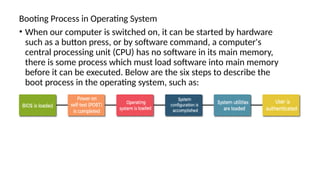
• When our computer is switched on, it can be started by hardware
such as a button press, or by software command, a computer's
central processing unit (CPU) has no software in its main memory,
there is some process which must load software into main memory
before it can be executed. Below are the six steps to describe the
boot process in the operating system, such as:
• Step 1: Once the computer system is turned on, BIOS (Basic Input /Output
System) performs a series of activities or functionality tests on programs
stored in ROM, called on POST (Power-on Self Test) that checks to see
whether peripherals in the system are in perfect order or not.
• Step 2: After the BIOS is done with pre-boot activities or functionality test, it
read bootable sequence from CMOS (Common Metal Oxide Semiconductor)
and looks for master boot record in the first physical sector of the bootable
disk as per boot device sequence specified in CMOS. For example, if the boot
device sequence is:
• Floppy Disk
• Hard Disk
• CDROM
• Step 3: After this, the master boot record will search first in a floppy disk
drive. If not found, then the hard disk drive will search for the master
boot record. But if the master boot record is not even present on the
hard disk, then the CDROM drive will search. If the system cannot read
the master boot record from any of these sources, ROM displays "No
Boot device found" and halted the system. On finding the master boot
record from a particular bootable disk drive, the operating system loader,
also called Bootstrap loader, is loaded from the boot sector of that
bootable drive· into memory. A bootstrap loader is a special program that
is present in the boot sector of a bootable drive.
• Step 4: The bootstrap loader first loads the IO.SYS file. After this,
MSDOS.SYS file is loaded, which is the core file of the DOS operating
system.
• Step 5: After this, MSDOS.SYS file searches to find Command Interpreter
in CONFIG.SYS file, and when it finds, it loads into memory. If no
Command Interpreter is specified in the CONFIG.SYS file, the
COMMAND.COM file is loaded as the default Command Interpreter of
the DOS operating system.
• Step 6: The last file is to be loaded and executed is the AUTOEXEC.BAT
file that contains a sequence of DOS commands. After this, the prompt is
displayed. We can see the drive letter of bootable drive displayed on the
computer system, which indicates that the operating system has been
successfully on the system from that drive.
What is Dual Booting
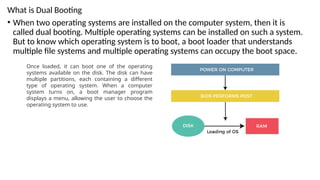
• When two operating systems are installed on the computer system, then it is
called dual booting. Multiple operating systems can be installed on such a system.
But to know which operating system is to boot, a boot loader that understands
multiple file systems and multiple operating systems can occupy the boot space.
Once loaded, it can boot one of the operating
systems available on the disk. The disk can have
multiple partitions, each containing a different
type of operating system. When a computer
system turns on, a boot manager program
displays a menu, allowing the user to choose the
operating system to use.

System Boot how it works in the operating system

  • 1.
  • 2.
    Booting • Booting isbasically the process of starting the computer. When the CPU is first switched on it has nothing inside the Memory. In order to start the Computer, load the Operating System into the Main Memory and then Computer is ready to take commands from the User. Learn the types of booting.
  • 3.
    • Once thehardware inspection is complete, the booting in the operating system process begins. The operating system is loaded, allowing the computer to function properly and accept user commands. It is important to note that the booting process in OS is essential for adequately operating the computer and the execution of various software applications. Types of Booting in Operating System In the world of computers, there are two main types of booting: cold booting and warm booting. Let's take a closer look at each of them. Cold Booting • Cold booting refers to starting up a computer for the first time or after it has been shut down completely. When we press the power button to initiate a cold boot, the computer reads the Basic Input/Output System (BIOS) instructions stored in the ROM. These instructions guide the system in loading the operating system into the main memory. Compared to warm booting, cold booting takes longer as it involves a complete system startup. Warm Booting • Warm booting, or rebooting, occurs when a computer restarts while it is powered on. This type of booting is usually performed when the system hangs or becomes unresponsive. Warm booting can be initiated through hardware, such as pressing a reset button, or software commands, like Ctrl+Alt+Del. It is often necessary to perform a warm boot after installing new software or hardware to apply configuration changes and ensure proper system functionality.
  • 4.
    Booting Process inOperating System • When our computer is switched on, it can be started by hardware such as a button press, or by software command, a computer's central processing unit (CPU) has no software in its main memory, there is some process which must load software into main memory before it can be executed. Below are the six steps to describe the boot process in the operating system, such as:
  • 5.
    • Step 1:Once the computer system is turned on, BIOS (Basic Input /Output System) performs a series of activities or functionality tests on programs stored in ROM, called on POST (Power-on Self Test) that checks to see whether peripherals in the system are in perfect order or not. • Step 2: After the BIOS is done with pre-boot activities or functionality test, it read bootable sequence from CMOS (Common Metal Oxide Semiconductor) and looks for master boot record in the first physical sector of the bootable disk as per boot device sequence specified in CMOS. For example, if the boot device sequence is: • Floppy Disk • Hard Disk • CDROM
  • 6.
    • Step 3:After this, the master boot record will search first in a floppy disk drive. If not found, then the hard disk drive will search for the master boot record. But if the master boot record is not even present on the hard disk, then the CDROM drive will search. If the system cannot read the master boot record from any of these sources, ROM displays "No Boot device found" and halted the system. On finding the master boot record from a particular bootable disk drive, the operating system loader, also called Bootstrap loader, is loaded from the boot sector of that bootable drive· into memory. A bootstrap loader is a special program that is present in the boot sector of a bootable drive. • Step 4: The bootstrap loader first loads the IO.SYS file. After this, MSDOS.SYS file is loaded, which is the core file of the DOS operating system.
  • 7.
    • Step 5:After this, MSDOS.SYS file searches to find Command Interpreter in CONFIG.SYS file, and when it finds, it loads into memory. If no Command Interpreter is specified in the CONFIG.SYS file, the COMMAND.COM file is loaded as the default Command Interpreter of the DOS operating system. • Step 6: The last file is to be loaded and executed is the AUTOEXEC.BAT file that contains a sequence of DOS commands. After this, the prompt is displayed. We can see the drive letter of bootable drive displayed on the computer system, which indicates that the operating system has been successfully on the system from that drive.
  • 8.
    What is DualBooting • When two operating systems are installed on the computer system, then it is called dual booting. Multiple operating systems can be installed on such a system. But to know which operating system is to boot, a boot loader that understands multiple file systems and multiple operating systems can occupy the boot space. Once loaded, it can boot one of the operating systems available on the disk. The disk can have multiple partitions, each containing a different type of operating system. When a computer system turns on, a boot manager program displays a menu, allowing the user to choose the operating system to use.