Welcome
Good Morning
Students
Booting of a
Computer System
Parwat kumar Shrestha
Adarsha Information Technology
Biratnagar-09
Objectives
By the end of the session, the Junior Computer
Technician (JCT) will be able to
 Define “Booting”
 Discuss the types of Booting
 List the steps of Booting
 Define warm booting and cold booting
 Recall the system files.
Definition
Booting is the process of loading
the system files (Io.sys, Msdos.sys,
command.com) in computer
memory.
Why is Booting Required ?
 Hardware doesn’t know where the operating
system resides and how to load it.
 Need a special program to do this job –
Bootstrap loader.
 E.g. BIOS – Basic Input Output System.
 Bootstrap loader locates the kernel, loads it into
main memory and starts its execution.
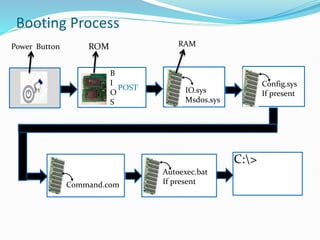
Booting Process
POST
B
I
O
S
IO.sys
Msdos.sys
Config.sys
If present
Command.com
Autoexec.bat
If present
C:>
ROM RAM
Power Button
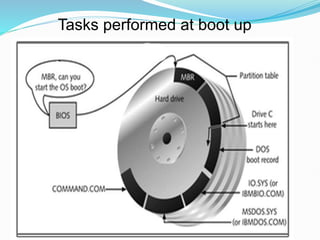
Tasks performed at boot up
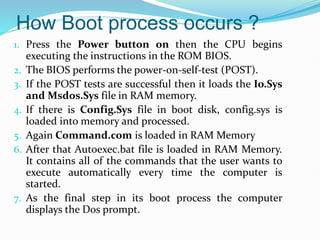
How Boot process occurs ?
1. Press the Power button on then the CPU begins
executing the instructions in the ROM BIOS.
2. The BIOS performs the power-on-self-test (POST).
3. If the POST tests are successful then it loads the Io.Sys
and Msdos.Sys file in RAM memory.
4. If there is Config.Sys file in boot disk, config.sys is
loaded into memory and processed.
5. Again Command.com is loaded in RAM Memory
6. After that Autoexec.bat file is loaded in RAM Memory.
It contains all of the commands that the user wants to
execute automatically every time the computer is
started.
7. As the final step in its boot process the computer
displays the Dos prompt.
Types of Booting
Warm Booting
 Cold Booting
Warm booting
 The booting which is performed from the
power on stage by pressing Ctrl + Alt+ Del
keys simultaneously
or
pressing reset button of the computer
is called warm booting.
Cold Booting
Booting is performed by switching on
the power from the power off stage, the
computer searches the system files and
loads them to the computer’s memory
is called cold booting.
Examples
 WIN95/98/ME BOOT PROCESS
 WIN2000/NT/XP BOOT PROCESS
 WINDOWS VISTA / 7 BOOT PROCESS
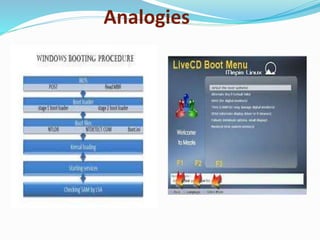
Analogies
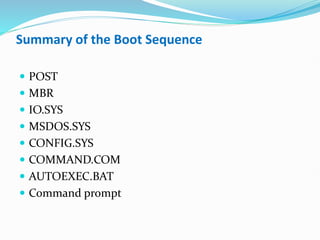
Summary of the Boot Sequence
 POST
 MBR
 IO.SYS
 MSDOS.SYS
 CONFIG.SYS
 COMMAND.COM
 AUTOEXEC.BAT
 Command prompt
Any questions …
Review
 What is Booting?
 Name the system files?
 List the types of booting
 Define warm booting and cold booting.
 What is the full form of BIOS.
 What does the POST mean.
Assessment: Short-Answer
 What is Booting?
 List the System files of computer
 Name the types of Booting
Thank You

Booting a computer, cold boot, warm boot

  • 1.
  • 2.
    Booting of a ComputerSystem Parwat kumar Shrestha Adarsha Information Technology Biratnagar-09
  • 3.
    Objectives By the endof the session, the Junior Computer Technician (JCT) will be able to  Define “Booting”  Discuss the types of Booting  List the steps of Booting  Define warm booting and cold booting  Recall the system files.
  • 4.
    Definition Booting is theprocess of loading the system files (Io.sys, Msdos.sys, command.com) in computer memory.
  • 5.
    Why is BootingRequired ?  Hardware doesn’t know where the operating system resides and how to load it.  Need a special program to do this job – Bootstrap loader.  E.g. BIOS – Basic Input Output System.  Bootstrap loader locates the kernel, loads it into main memory and starts its execution.
  • 6.
  • 7.
  • 8.
    How Boot processoccurs ? 1. Press the Power button on then the CPU begins executing the instructions in the ROM BIOS. 2. The BIOS performs the power-on-self-test (POST). 3. If the POST tests are successful then it loads the Io.Sys and Msdos.Sys file in RAM memory. 4. If there is Config.Sys file in boot disk, config.sys is loaded into memory and processed. 5. Again Command.com is loaded in RAM Memory 6. After that Autoexec.bat file is loaded in RAM Memory. It contains all of the commands that the user wants to execute automatically every time the computer is started. 7. As the final step in its boot process the computer displays the Dos prompt.
  • 9.
    Types of Booting WarmBooting  Cold Booting
  • 10.
    Warm booting  Thebooting which is performed from the power on stage by pressing Ctrl + Alt+ Del keys simultaneously or pressing reset button of the computer is called warm booting.
  • 11.
    Cold Booting Booting isperformed by switching on the power from the power off stage, the computer searches the system files and loads them to the computer’s memory is called cold booting.
  • 12.
    Examples  WIN95/98/ME BOOTPROCESS  WIN2000/NT/XP BOOT PROCESS  WINDOWS VISTA / 7 BOOT PROCESS
  • 13.
  • 14.
    Summary of theBoot Sequence  POST  MBR  IO.SYS  MSDOS.SYS  CONFIG.SYS  COMMAND.COM  AUTOEXEC.BAT  Command prompt
  • 15.
  • 16.
    Review  What isBooting?  Name the system files?  List the types of booting  Define warm booting and cold booting.  What is the full form of BIOS.  What does the POST mean.
  • 17.
    Assessment: Short-Answer  Whatis Booting?  List the System files of computer  Name the types of Booting
  • 18.