27 Objectives On completion of this  chapter , you will be able to perform the following tasks: Start up the Catalyst switch and Cisco router and observe the  boot up processes Provide an initial configuration for the switch and  perform the router ‘ s initial setup configuration Enable and identify the commands modes in each  network device Use the various help and command line-editing features of each device’s user interface Show and recognize fundamental technical details about each network device
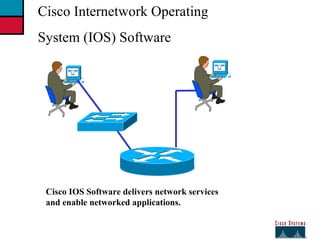
27 Cisco Internetwork Operating  System (IOS) Software Cisco IOS Software delivers network services and enable networked applications.
27 Network Device Configuration Configuration Sets the device with: --Network policy of the functions required --Protocol addressing and  parameter settings --Options for administration and management Catalyst Switch  memory has initial  configuration with default settings Cisco router will prompt for initial  configuration if there is no configuration in memory
27 An Overview of Cisco  Device  Startup Find and check device hardware Find and local Cisco IOS software image Find and apply device configurations
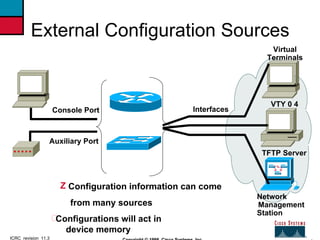
4 ICRC_revision_11.3 Copyright © 1998, Cisco Systems, Inc. External Configuration Sources Virtual Terminals VTY 0 4 TFTP Server Management  Configuration information can come from many sources Console Port Auxiliary Port Interfaces Network  Station Configurations will act in  device memory
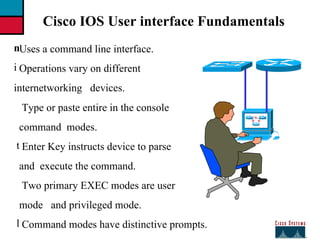
27 Cisco IOS User interface Fundamentals Uses a command line interface. Operations vary on different  internetworking  devices. Type or paste entire in the console command  modes. Enter Key instructs device to parse and  execute the command. Two primary EXEC modes are user mode  and privileged mode. Command modes have distinctive prompts.
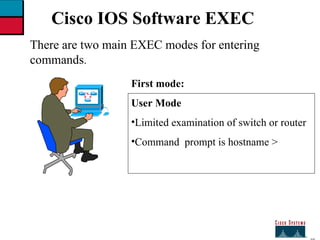
27 Cisco IOS Software EXEC There are two main EXEC modes for entering  commands . First mode: User Mode Limited examination of switch or router Command  prompt is hostname >
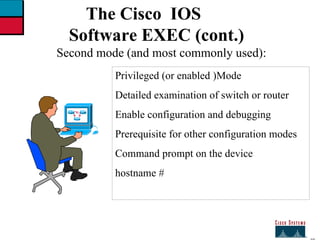
27 The Cisco  IOS Software EXEC (cont.) Second mode (and most commonly used): Privileged (or enabled )Mode Detailed examination of switch or router Enable configuration and debugging  Prerequisite for other configuration modes Command prompt on the device  hostname #
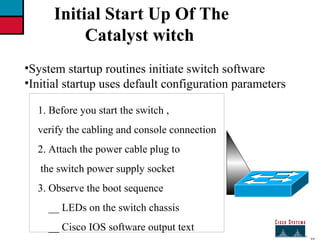
27 Initial Start Up Of The  Catalyst witch System startup routines initiate switch software Initial startup uses default configuration parameters 1. Before you start the switch , verify the cabling and console connection 2. Attach the power cable plug to the switch power supply socket 3. Observe the boot sequence __ LEDs on the switch chassis __ Cisco IOS software output text
27 Initial Bootup Output  from the Switch Catalyst 1900 Management  Console Copyright © Cisco Systems ,Inc. 1993_1998 All rights reserved. Enterprise Edition Software Ethernet Address :  00-50-BD-73-E2-c0 PCA  Number :  73-3121-01 PCA Serial Number :  FAA0252A0QX Model Number:  WS-C1924-EN System Serial Number  :  FAA0304s003 Power Supply  S/N :  PHI025101F3 ----------------------------------------------------------------- 1 User (s)  now active on Management  Console. User  Interface  Menu  [ H ]  Menus [ K ]  Command  Line [ I  ]  IP  Configuration Enter  Selection : Console connection
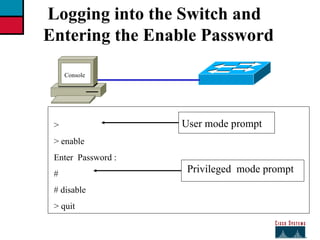
27 > > enable  Enter  Password : # # disable > quit User mode prompt Privileged  mode prompt Logging into the Switch and  Entering the Enable Password Console
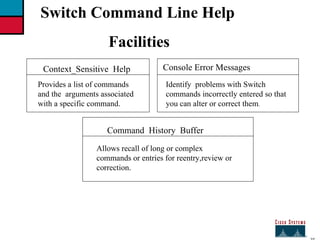
27 Switch Command Line Help  Facilities Context_Sensitive  Help Provides a list of commands and the  arguments associated with a specific command. Console Error Messages Identify  problems with Switch commands incorrectly entered so that you can alter or correct them . Command  History  Buffer Allows recall of long or complex commands or entries for reentry,review or correction.
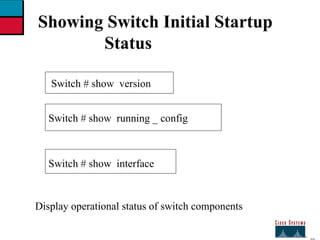
27 Showing Switch Initial Startup  Status Switch # show  running _ config  Switch # show  interface Display operational status of switch components Switch # show  version
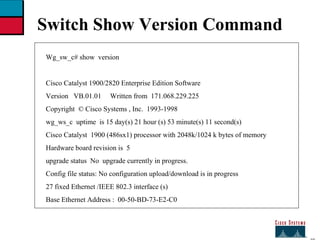
27 Switch Show Version Command Wg_sw_c# show  version Cisco Catalyst 1900/2820 Enterprise Edition Software  Version  VB.01.01  Written from  171.068.229.225 Copyright  © Cisco Systems , Inc.  1993-1998 wg_ws_c  uptime  is 15 day(s) 21 hour (s) 53 minute(s) 11 second(s) Cisco Catalyst  1900 (486sx1) processor with 2048k/1024 k bytes of memory Hardware board revision is  5 upgrade status  No  upgrade currently in progress. Config file status: No configuration upload/download is in progress 27 fixed Ethernet /IEEE 802.3 interface (s) Base Ethernet Address :  00-50-BD-73-E2-C0
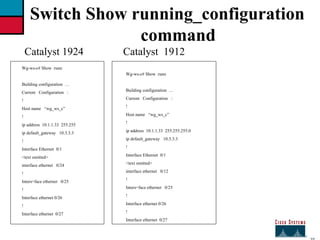
27 Switch Show running_configuration command Catalyst 1924 Wg-ws-c# Show  runn Building configuration  …  Current  Configuration  : ! Host name  “wg_ws_c” ! ip address  10.1.1.33  255.255 ip default_gateway  10.3.3.3  ! Interface Ethernet  0/1 <text omitted> interface ethernet  0/24  ! Inters=face ethernet  0/25 ! Interface ethernet 0/26  ! Interface ethernet  0/27 Catalyst  1912 Wg-ws-c# Show  runn Building configuration  …  Current  Configuration  : ! Host name  “wg_ws_c” ! ip address  10.1.1.33  255.255.255.0 ip default_gateway  10.3.3.3  ! Interface Ethernet  0/1 <text omitted> interface ethernet  0/12 ! Inters=face ethernet  0/25 ! Interface ethernet 0/26  ! Interface ethernet  0/27
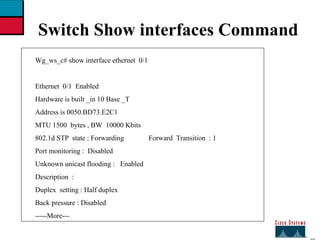
27 Switch Show interfaces Command Wg_ws_c# show interface ethernet  0/1 Ethernet  0/1  Enabled Hardware is built _in 10 Base _T Address is 0050.BD73.E2C1  MTU 1500  bytes , BW  10000 Kbits  802.1d STP  state : Forwarding  Forward  Transition  : 1 Port monitoring :  Disabled Unknown unicast flooding :  Enabled Description  :  Duplex  setting : Half duplex Back pressure : Disabled -----More---
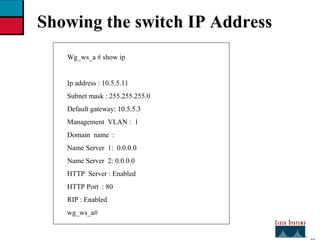
27 Showing the switch IP Address Wg_ws_a # show ip Ip address : 10.5.5.11 Subnet mask : 255.255.255.0 Default gateway: 10.5.5.3 Management  VLAN :  1 Domain  name  : Name Server  1:  0.0.0.0 Name Server  2: 0.0.0.0 HTTP  Server : Enabled  HTTP Port  : 80  RIP : Enabled  wg_ws_a#
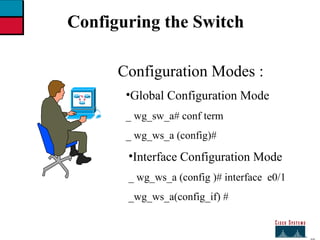
27 Configuring the Switch Configuration Modes : Global Configuration Mode _ wg_sw_a# conf term _ wg_ws_a (config)# Interface Configuration Mode  _ wg_ws_a (config )# interface  e0/1 _wg_ws_a(config_if) #
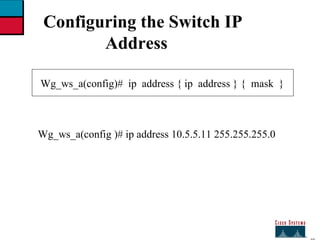
27 Configuring the Switch IP  Address Wg_ws_a(config)#  ip  address { ip  address } {  mask  } Wg_ws_a(config )# ip address 10.5.5.11 255.255.255.0
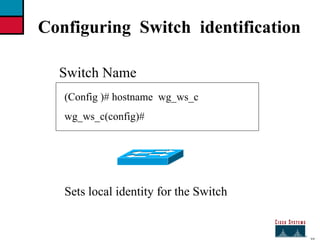
27 Configuring  Switch  identification Switch Name   Sets local identity for the Switch  (Config )# hostname  wg_ws_c wg_ws_c(config)#
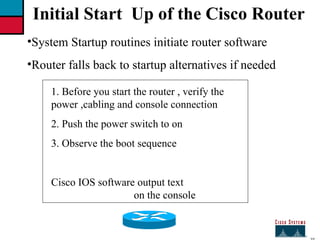
27 Initial Start  Up of the Cisco Router System Startup routines initiate router software Router falls back to startup alternatives if needed 1. Before you start the router , verify the power ,cabling and console connection 2. Push the power switch to on  3. Observe the boot sequence  Cisco IOS software output text  on the console
27 ---- system  configuration  dialog ----- continue with configuration dialog ?  [ yes/no] : yes at  any point you may enter a question mark ‘ ?‘ for help. Use ctrl_c to abort configuration dialog at any prompt default setting are in square bra Wg_ ro_ c  con0 is now available  press return to get started. Wg_ ro_c> User - mode prompt Setup mode Bootup Output from the Router Unconfigured versus configured router Console
27 Setup : The initial configuration  Dialog Router # setup  ----- system  configuration dialog ----- continue with configuration dialog ?  [ yes/no] :  y at any point you may enter a question mark ‘?’ for help . Basic management setup configures only enough connectivity  for management of the system , extended setup  will ask you  to configure each interface on the systems  Would you like to enter basic management setup ? [ yes/no ] : n
27 Setup  Global Parameters Configuration  global  parameters: Enter host name  [router ] : wg_ro_c  The enable secret is a password used to protect access to  privileged EXEC and configuration modes. This password  after  entered ,  because encrypted  in the configuration . Enter enable secret : cisco The enable password is used when you do not specify an enable secret password , with some older software versions , and  some boot images. Enter  enable password : sanfran  the virtual  terminal password is used to protect access to the router over a network interface. Enter virtual terminal password  : san jose  Configure SNMP  network  Management  ? [no] : Initial global parameters
27 Setup  Global Parameters (cont.) Configure LAT ? [yes ] : n configure  AppleTalk? [no] : configure DECnet ?  [no ]  :  configure  IP ? [yes] : configure  IGRP  routing ?  [ yes] :n configure RIP  routing ? [no] : configure  CLNS ? [ no ] :  configure  IPX ? [ no ] : configure Vines ? [no] : configure  XNS ?  [ no ] : configure Apollo ? [ no ] : Initial Protocol configurations
27 Setup  Interface Parameters BRI interfaces  needs isdn switch _type to be configured  valid switch types are : [ 0 ]  none ……………. Only  if you don,t want to configure  BRI  [ 1 ]  basic _ltr ………... ltr 6 switch type for Germany  [ 2 ]  basic_5ess………...ATRT  5ESS switch  type for the us / Canada. [ 3 ]  basic_ dms 100 …. Northern  DMS_100  switch type for us/ Canada [ 4 ] basic_ net 3  ………NET  3 switch type  for UK  and Europe [ 5 ]  basic_ ni  …………National  ISDN switch  type  [ 6 ]  basic ts 013……… TS013 switch type for Australia  [ 7 ] ntt ………………... NTT  switch type for Japan  [ 8 ]  vn3 …………….. Vn3 and vn4  switch  types for  France Choose  ISDN  BRI  switch  type  [ 2 ]  : Configuring  interface parameters :  Do you want to configure  BRI0  ( BRI  d_channel )  interface ? [ no ] :  Do you want to configure Ethernet 0  interface ? [no ] :y Configure ip on this interface  [ no ] :y IP  address for this interface  : 10.1.1.33 Subnet mask for this interface  [255.0.0.0 ] : 255.255.255.0 Class A  network is 10.0.0.0 , 24 subnet bits ;  mask is /24 Do you want to configure serial 0 interface ? [ no ] :
27 Setup  Script Review and Use The following configuration command script was created: Hostname Rout enable  secret  enable password  line vty 0 4 password sanjose no snmp_server: ! No appletalk no decnet rou ip routing  no clns routing no ipx routing no vines rout no xns  routing  no apollo rout isdn switch _ty Interface  BRI0 shutdown no ip address ! Interface Ethernet 0 no shutdown ip address 10.1.1.31 255.255.255.0 no map enabled ! Interface serial 0 shutdown no ip address  <text omitted> end [0]  Go to the IOS command prompt without saving this config. [1]  Return back to the setup without saving this config. [2]  Save this configuration to nvram  and exit.  Enter  your selection [2] :
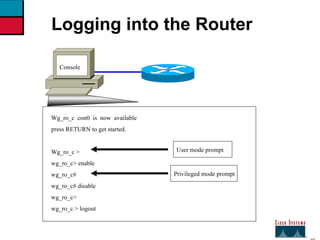
27 Wg_ro_c  con0  is  now  available press RETURN to get started. Wg_ro_c >  wg_ro_c> enable wg_ro_c# wg_ro_c# disable wg_ro_c> wg_ro_c > logout User mode prompt Privileged mode prompt Logging into the Router Console
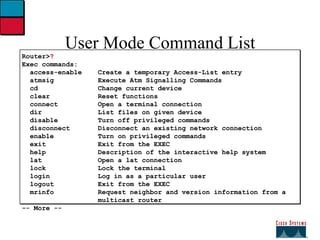
User Mode Command List Router> ? Exec commands: access-enable  Create a temporary Access-List entry   atmsig  Execute Atm Signalling Commands   cd  Change current device   clear  Reset functions   connect  Open a terminal connection   dir  List files on given device   disable  Turn off privileged commands   disconnect  Disconnect an existing network connection   enable  Turn on privileged commands   exit  Exit from the EXEC   help  Description of the interactive help system   lat  Open a lat connection   lock  Lock the terminal   login  Log in as a particular user   logout  Exit from the EXEC   mrinfo  Request neighbor and version information from a   multicast router  -- More --
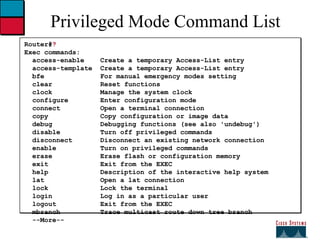
Privileged Mode Command List Router# ? Exec commands:  access-enable  Create a temporary Access-List entry access-template  Create a temporary Access-List entry bfe  For manual emergency modes setting clear  Reset functions clock  Manage the system clock configure  Enter configuration mode connect  Open a terminal connection copy  Copy configuration or image data debug  Debugging functions (see also 'undebug') disable  Turn off privileged commands disconnect  Disconnect an existing network connection enable  Turn on privileged commands erase  Erase flash or configuration memory exit  Exit from the EXEC help  Description of the interactive help system lat  Open a lat connection lock  Lock the terminal login  Log in as a particular user logout  Exit from the EXEC mbranch  Trace multicast route down tree branch --More--
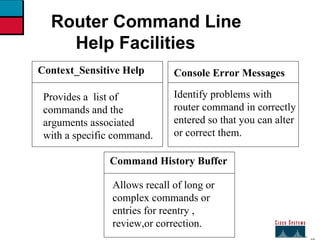
27 Context_Sensitive Help Provides a  list of commands and the arguments associated with a specific command. Console Error Messages Identify problems with router command in correctly entered so that you can alter or correct them. Command History Buffer Allows recall of long or complex commands or entries for reentry , review,or correction. Router Command Line  Help Facilities
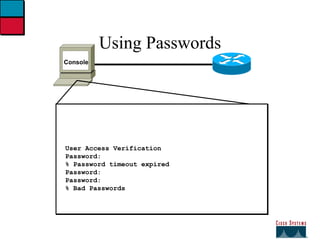
Using Passwords Console User Access Verification Password: % Password timeout expired Password: Password: % Bad Passwords
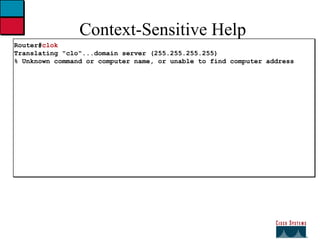
Context-Sensitive Help Router# clok Translating &quot;clo&quot;...domain server (255.255.255.255) % Unknown command or computer name, or unable to find computer address
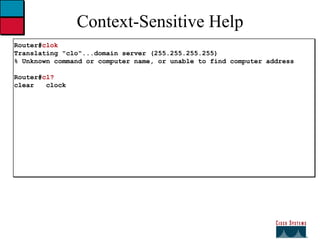
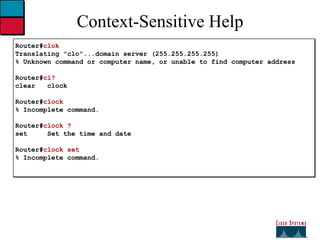
Context-Sensitive Help Router# clok Translating &quot;clo&quot;...domain server (255.255.255.255) % Unknown command or computer name, or unable to find computer address Router# cl? clear  clock
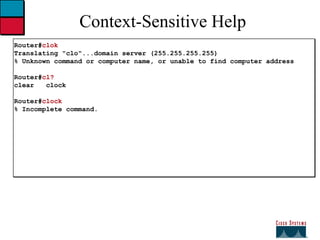
Context-Sensitive Help Router# clok Translating &quot;clo&quot;...domain server (255.255.255.255) % Unknown command or computer name, or unable to find computer address Router# cl? clear  clock Router# clock % Incomplete command.
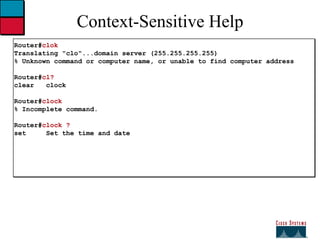
Context-Sensitive Help Router# clok Translating &quot;clo&quot;...domain server (255.255.255.255) % Unknown command or computer name, or unable to find computer address Router# cl? clear  clock Router# clock % Incomplete command. Router# clock ? set  Set the time and date
Context-Sensitive Help Router# clok Translating &quot;clo&quot;...domain server (255.255.255.255) % Unknown command or computer name, or unable to find computer address Router# cl? clear  clock Router# clock % Incomplete command. Router# clock ? set  Set the time and date Router# clock set % Incomplete command.
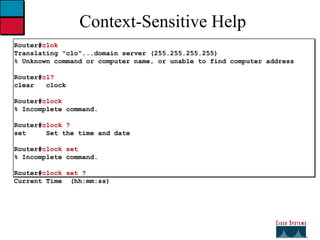
Context-Sensitive Help Router# clok Translating &quot;clo&quot;...domain server (255.255.255.255) % Unknown command or computer name, or unable to find computer address Router# cl? clear  clock Router# clock % Incomplete command. Router# clock ? set  Set the time and date Router# clock set % Incomplete command. Router# clock set ? Current Time  (hh:mm:ss)
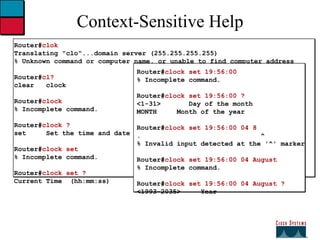
Context-Sensitive Help Router# clok Translating &quot;clo&quot;...domain server (255.255.255.255) % Unknown command or computer name, or unable to find computer address Router# cl? clear  clock Router# clock % Incomplete command. Router# clock ? set  Set the time and date Router# clock set % Incomplete command. Router# clock set ? Current Time  (hh:mm:ss) Router# clock set 19:56:00 % Incomplete command. Router# clock set 19:56:00 ? <1-31>  Day of the month MONTH  Month of the year Router# clock set 19:56:00 04 8 .  ^ % Invalid input detected at the '^' marker Router# clock set 19:56:00 04 August % Incomplete command. Router# clock set 19:56:00 04 August ? <1993-2035>  Year
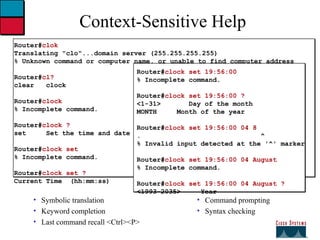
Context-Sensitive Help Symbolic translation  Keyword completion Last command recall <Ctrl><P> Command prompting Syntax checking Router# clok Translating &quot;clo&quot;...domain server (255.255.255.255) % Unknown command or computer name, or unable to find computer address Router# cl? clear  clock Router# clock % Incomplete command. Router# clock ? set  Set the time and date Router# clock set % Incomplete command. Router# clock set ? Current Time  (hh:mm:ss) Router# clock set 19:56:00 % Incomplete command. Router# clock set 19:56:00 ? <1-31>  Day of the month MONTH  Month of the year Router# clock set 19:56:00 04 8 .  ^ % Invalid input detected at the '^' marker Router# clock set 19:56:00 04 August % Incomplete command. Router# clock set 19:56:00 04 August ? <1993-2035>  Year
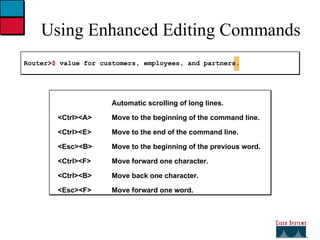
Using Enhanced Editing Commands Router> $  value for customers, employees, and partners. Automatic scrolling of long lines. <Ctrl><A> Move to the beginning of the command line. <Ctrl><E> Move to the end of the command line. <Esc><B> Move to the beginning of the previous word. <Ctrl><F> Move forward one character. <Ctrl><B> Move back one character. <Esc><F> Move forward one word.
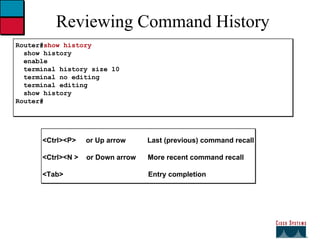
Reviewing Command History Router# show history show history enable terminal history size 10 terminal no editing terminal editing show history Router# <Ctrl><P>  or Up arrow  Last (previous) command recall <Ctrl><N >  or Down arrow  More recent command recall <Tab>  Entry completion
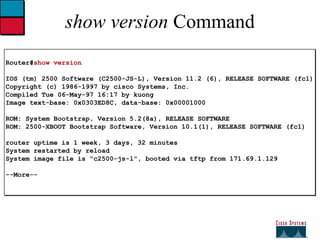
show version  Command Router# show version IOS (tm) 2500 Software (C2500-JS-L), Version 11.2 (6), RELEASE SOFTWARE (fc1) Copyright (c) 1986-1997 by cisco Systems, Inc. Compiled Tue 06-May-97 16:17 by kuong Image text-base: 0x0303ED8C, data-base: 0x00001000 ROM: System Bootstrap, Version 5.2(8a), RELEASE SOFTWARE ROM: 2500-XBOOT Bootstrap Software, Version 10.1(1), RELEASE SOFTWARE (fc1)  router uptime is 1 week, 3 days, 32 minutes System restarted by reload System image file is &quot;c2500-js-l&quot;, booted via tftp from 171.69.1.129 --More--
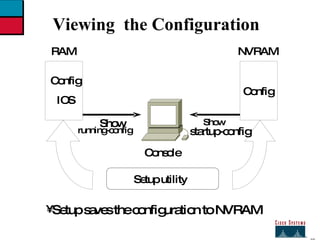
27 Viewing  the Configuration Config IOS RAM Config NVRAM Setup utility Show  running-config startup-config Show  Setup saves the configuration to NVRAM Console
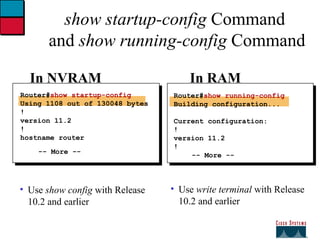
show startup-config  Command  and  show running-config  Command Use  write terminal  with Release 10.2 and earlier Use  show config  with Release 10.2 and earlier Router# show startup-config Using 1108 out of 130048 bytes ! version 11.2 ! hostname router -- More -- Router# show running-config Building configuration... Current configuration: ! version 11.2 ! -- More -- In NVRAM In RAM
Router Modes   ICRC_revision_11.3 Copyright © 1998, Cisco Systems, Inc.
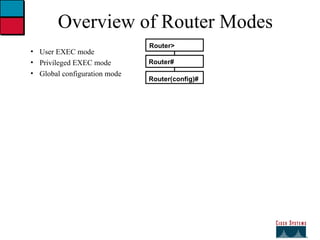
Overview of Router Modes User EXEC mode Privileged EXEC mode Global configuration mode Router(config)# Router> Router#
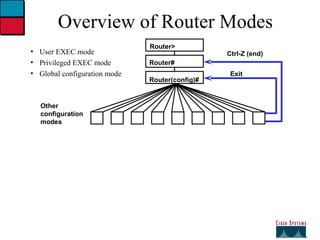
Overview of Router Modes User EXEC mode Privileged EXEC mode Global configuration mode Router(config)# Router> Router# Other  configuration  modes Exit Ctrl-Z (end)
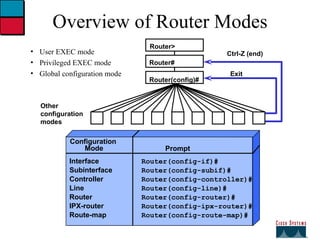
Overview of Router Modes User EXEC mode Privileged EXEC mode Global configuration mode Configuration  Mode Prompt Interface Router(config-if)# Subinterface Router(config-subif)# Controller Router(config-controller)# Line Router(config-line)# Router Router(config-router)# IPX-router Router(config-ipx-router)# Route-map Router(config-route-map)# Router(config)# Router> Router# Other  configuration  modes Exit Ctrl-Z (end)
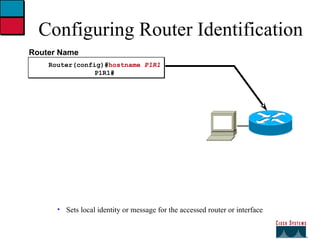
Configuring Router Identification Sets local identity or message for the accessed router or interface Router Name Router(config)# hostname  P1R1 P1R1#
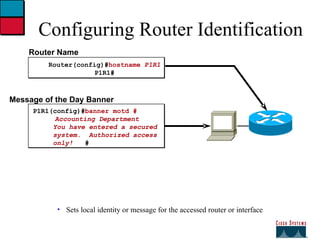
Configuring Router Identification Sets local identity or message for the accessed router or interface Router Name Router(config)# hostname  P1R1 P1R1# Message of the Day Banner P1R1(config)# banner motd #   Accounting Department You have entered a secured  system.  Authorized access only!  #
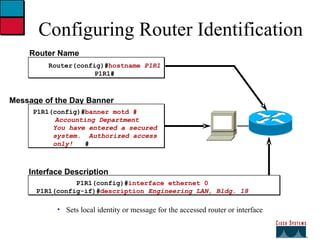
Configuring Router Identification Sets local identity or message for the accessed router or interface Router Name Router(config)# hostname  P1R1 P1R1# Message of the Day Banner P1R1(config)# banner motd #   Accounting Department You have entered a secured  system.  Authorized access only!  # Interface Description P1R1(config)# interface ethernet 0 P1R1(config-if)# description  Engineering LAN, Bldg. 18
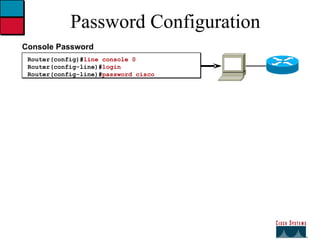
Password Configuration Router(config)# line console 0 Router(config-line)# login Router(config-line)# password cisco Console Password
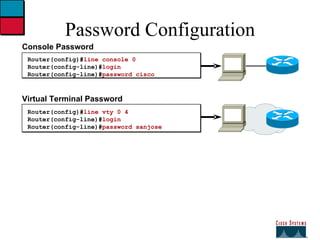
Password Configuration Router(config)# line console 0 Router(config-line)# login Router(config-line)# password cisco Console Password  Virtual Terminal Password  Router(config)# line vty 0 4 Router(config-line)# login  Router(config-line)# password sanjose
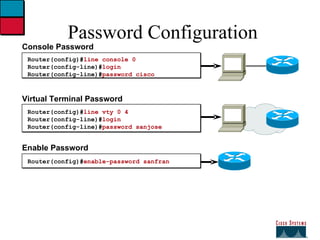
Password Configuration Router(config)# line console 0 Router(config-line)# login Router(config-line)# password cisco Console Password  Virtual Terminal Password  Router(config)# line vty 0 4 Router(config-line)# login  Router(config-line)# password sanjose Enable Password  Router(config)# enable-password sanfran
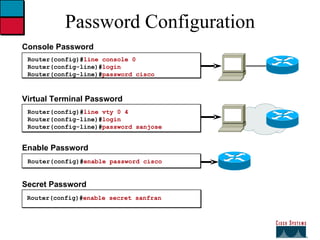
Password Configuration Router(config)# line console 0 Router(config-line)# login Router(config-line)# password cisco Console Password  Virtual Terminal Password  Router(config)# line vty 0 4 Router(config-line)# login  Router(config-line)# password sanjose Enable Password  Router(config)# enable password cisco Secret Password Router(config)# enable secret sanfran
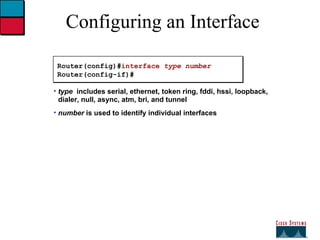
Configuring an Interface Router(config)# interface  type number Router(config-if)# type   includes serial, ethernet, token ring, fddi, hssi, loopback, dialer, null, async, atm, bri, and tunnel number  is used to identify individual interfaces
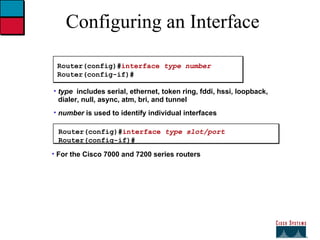
Configuring an Interface Router(config)# interface  type number Router(config-if)# type   includes serial, ethernet, token ring, fddi, hssi, loopback, dialer, null, async, atm, bri, and tunnel number  is used to identify individual interfaces Router(config)# interface  type slot/port Router(config-if)# For the Cisco 7000 and 7200 series routers
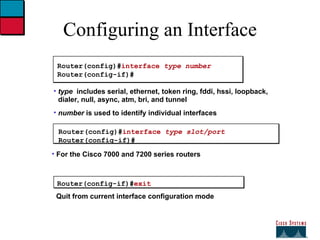
Configuring an Interface Router(config)# interface  type number Router(config-if)# type   includes serial, ethernet, token ring, fddi, hssi, loopback, dialer, null, async, atm, bri, and tunnel number  is used to identify individual interfaces Router(config-if)# exit Quit from current interface configuration mode Router(config)# interface  type slot/port Router(config-if)# For the Cisco 7000 and 7200 series routers
 
 
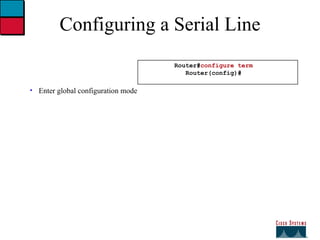
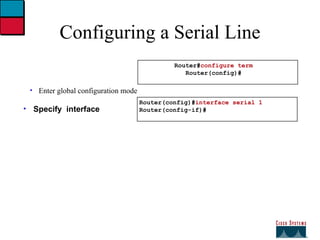
Configuring a Serial Line Enter global configuration mode Router# configure term Router(config)#
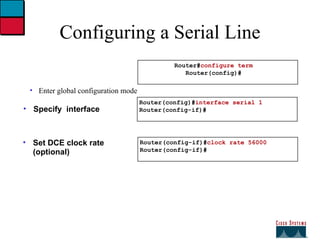
Configuring a Serial Line Enter global configuration mode Specify  interface Router(config)# interface serial 1 Router(config-if)# Router# configure term Router(config)#
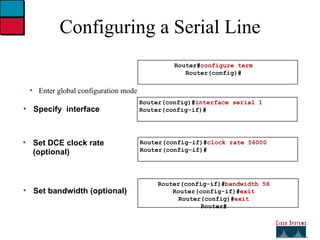
Configuring a Serial Line Enter global configuration mode Specify  interface Set DCE clock rate (optional) Router(config-if)# clock rate 56000 Router(config-if)# Router(config)# interface serial 1 Router(config-if)# Router# configure term Router(config)#
Configuring a Serial Line Enter global configuration mode Specify  interface Set DCE clock rate (optional) Set bandwidth (optional) Router(config-if)# clock rate 56000 Router(config-if)# Router(config)# interface serial 1 Router(config-if)# Router# configure term Router(config)# Router(config-if)# bandwidth 56 Router(config-if)# exit Router(config)# exit Router#
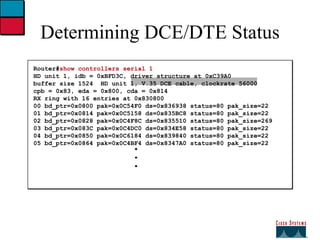
Determining DCE/DTE Status Router# show controllers serial 1 HD unit 1, idb = 0xBFD3C, driver structure at 0xC39A0 buffer size 1524  HD unit 1, V.35 DCE cable, clockrate 56000 cpb = 0x83, eda = 0x800, cda = 0x814 RX ring with 16 entries at 0x830800 00 bd_ptr=0x0800 pak=0x0C54F0 ds=0x836938 status=80 pak_size=22 01 bd_ptr=0x0814 pak=0x0C5158 ds=0x835BC8 status=80 pak_size=22 02 bd_ptr=0x0828 pak=0x0C4F8C ds=0x835510 status=80 pak_size=269 03 bd_ptr=0x083C pak=0x0C4DC0 ds=0x834E58 status=80 pak_size=22 04 bd_ptr=0x0850 pak=0x0C6184 ds=0x839840 status=80 pak_size=22 05 bd_ptr=0x0864 pak=0x0C4BF4 ds=0x8347A0 status=80 pak_size=22 . . .
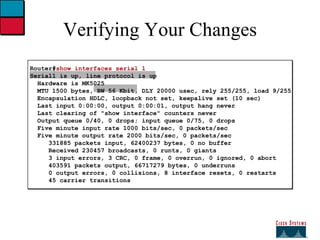
Verifying Your Changes Router# show interfaces serial 1 Serial1 is up, line protocol is up   Hardware is MK5025 MTU 1500 bytes, BW 56 Kbit, DLY 20000 usec, rely 255/255, load 9/255   Encapsulation HDLC, loopback not set, keepalive set (10 sec)   Last input 0:00:00, output 0:00:01, output hang never   Last clearing of &quot;show interface&quot; counters never   Output queue 0/40, 0 drops; input queue 0/75, 0 drops   Five minute input rate 1000 bits/sec, 0 packets/sec   Five minute output rate 2000 bits/sec, 0 packets/sec   331885 packets input, 62400237 bytes, 0 no buffer   Received 230457 broadcasts, 0 runts, 0 giants   3 input errors, 3 CRC, 0 frame, 0 overrun, 0 ignored, 0 abort   403591 packets output, 66717279 bytes, 0 underruns   0 output errors, 0 collisions, 8 interface resets, 0 restarts   45 carrier transitions
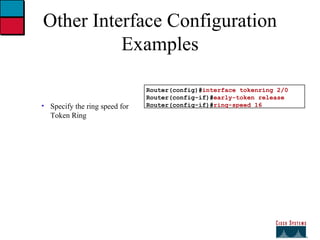
Other Interface Configuration Examples Specify the ring speed for Token Ring Router(config)# interface tokenring 2/0 Router(config-if)# early-token release Router(config-if)# ring-speed 16
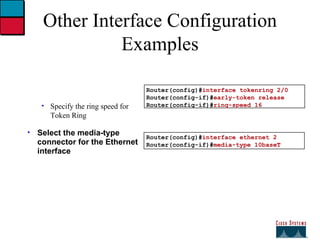
Other Interface Configuration Examples Specify the ring speed for Token Ring Select the media-type connector for the Ethernet interface Router(config)# interface tokenring 2/0 Router(config-if)# early-token release Router(config-if)# ring-speed 16 Router(config)# interface ethernet 2 Router(config-if)# media-type 10baseT
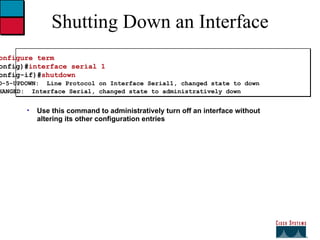
Shutting Down an Interface Router# configure term Router(config)# interface serial 1 Router(config-if)# shutdown %LINEPROTO-5-UPDOWN:  Line Protocol on Interface Serial1, changed state to down %LINK-5-CHANGED:  Interface Serial, changed state to administratively down Use this command to administratively turn off an interface without altering its other configuration entries
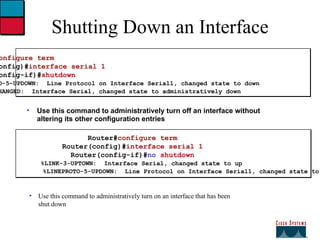
Use this command to administratively turn on an interface that has been shut down Shutting Down an Interface Router# configure term Router(config)# interface serial 1 Router(config-if)# shutdown %LINEPROTO-5-UPDOWN:  Line Protocol on Interface Serial1, changed state to down %LINK-5-CHANGED:  Interface Serial, changed state to administratively down Use this command to administratively turn off an interface without altering its other configuration entries Router# configure term Router(config)# interface serial 1 Router(config-if)# no  shutdown %LINK-3-UPTOWN:  Interface Serial, changed state to up %LINEPROTO-5-UPDOWN:  Line Protocol on Interface Serial1, changed state to up
27

04 module operating & configuring ios

  • 1.
    27 Objectives Oncompletion of this chapter , you will be able to perform the following tasks: Start up the Catalyst switch and Cisco router and observe the boot up processes Provide an initial configuration for the switch and perform the router ‘ s initial setup configuration Enable and identify the commands modes in each network device Use the various help and command line-editing features of each device’s user interface Show and recognize fundamental technical details about each network device
  • 2.
    27 Cisco InternetworkOperating System (IOS) Software Cisco IOS Software delivers network services and enable networked applications.
  • 3.
    27 Network DeviceConfiguration Configuration Sets the device with: --Network policy of the functions required --Protocol addressing and parameter settings --Options for administration and management Catalyst Switch memory has initial configuration with default settings Cisco router will prompt for initial configuration if there is no configuration in memory
  • 4.
    27 An Overviewof Cisco Device Startup Find and check device hardware Find and local Cisco IOS software image Find and apply device configurations
  • 5.
    4 ICRC_revision_11.3 Copyright© 1998, Cisco Systems, Inc. External Configuration Sources Virtual Terminals VTY 0 4 TFTP Server Management  Configuration information can come from many sources Console Port Auxiliary Port Interfaces Network Station Configurations will act in device memory
  • 6.
    27 Cisco IOSUser interface Fundamentals Uses a command line interface. Operations vary on different internetworking devices. Type or paste entire in the console command modes. Enter Key instructs device to parse and execute the command. Two primary EXEC modes are user mode and privileged mode. Command modes have distinctive prompts.
  • 7.
    27 Cisco IOSSoftware EXEC There are two main EXEC modes for entering commands . First mode: User Mode Limited examination of switch or router Command prompt is hostname >
  • 8.
    27 The Cisco IOS Software EXEC (cont.) Second mode (and most commonly used): Privileged (or enabled )Mode Detailed examination of switch or router Enable configuration and debugging Prerequisite for other configuration modes Command prompt on the device hostname #
  • 9.
    27 Initial StartUp Of The Catalyst witch System startup routines initiate switch software Initial startup uses default configuration parameters 1. Before you start the switch , verify the cabling and console connection 2. Attach the power cable plug to the switch power supply socket 3. Observe the boot sequence __ LEDs on the switch chassis __ Cisco IOS software output text
  • 10.
    27 Initial BootupOutput from the Switch Catalyst 1900 Management Console Copyright © Cisco Systems ,Inc. 1993_1998 All rights reserved. Enterprise Edition Software Ethernet Address : 00-50-BD-73-E2-c0 PCA Number : 73-3121-01 PCA Serial Number : FAA0252A0QX Model Number: WS-C1924-EN System Serial Number : FAA0304s003 Power Supply S/N : PHI025101F3 ----------------------------------------------------------------- 1 User (s) now active on Management Console. User Interface Menu [ H ] Menus [ K ] Command Line [ I ] IP Configuration Enter Selection : Console connection
  • 11.
    27 > >enable Enter Password : # # disable > quit User mode prompt Privileged mode prompt Logging into the Switch and Entering the Enable Password Console
  • 12.
    27 Switch CommandLine Help Facilities Context_Sensitive Help Provides a list of commands and the arguments associated with a specific command. Console Error Messages Identify problems with Switch commands incorrectly entered so that you can alter or correct them . Command History Buffer Allows recall of long or complex commands or entries for reentry,review or correction.
  • 13.
    27 Showing SwitchInitial Startup Status Switch # show running _ config Switch # show interface Display operational status of switch components Switch # show version
  • 14.
    27 Switch ShowVersion Command Wg_sw_c# show version Cisco Catalyst 1900/2820 Enterprise Edition Software Version VB.01.01 Written from 171.068.229.225 Copyright © Cisco Systems , Inc. 1993-1998 wg_ws_c uptime is 15 day(s) 21 hour (s) 53 minute(s) 11 second(s) Cisco Catalyst 1900 (486sx1) processor with 2048k/1024 k bytes of memory Hardware board revision is 5 upgrade status No upgrade currently in progress. Config file status: No configuration upload/download is in progress 27 fixed Ethernet /IEEE 802.3 interface (s) Base Ethernet Address : 00-50-BD-73-E2-C0
  • 15.
    27 Switch Showrunning_configuration command Catalyst 1924 Wg-ws-c# Show runn Building configuration … Current Configuration : ! Host name “wg_ws_c” ! ip address 10.1.1.33 255.255 ip default_gateway 10.3.3.3 ! Interface Ethernet 0/1 <text omitted> interface ethernet 0/24 ! Inters=face ethernet 0/25 ! Interface ethernet 0/26 ! Interface ethernet 0/27 Catalyst 1912 Wg-ws-c# Show runn Building configuration … Current Configuration : ! Host name “wg_ws_c” ! ip address 10.1.1.33 255.255.255.0 ip default_gateway 10.3.3.3 ! Interface Ethernet 0/1 <text omitted> interface ethernet 0/12 ! Inters=face ethernet 0/25 ! Interface ethernet 0/26 ! Interface ethernet 0/27
  • 16.
    27 Switch Showinterfaces Command Wg_ws_c# show interface ethernet 0/1 Ethernet 0/1 Enabled Hardware is built _in 10 Base _T Address is 0050.BD73.E2C1 MTU 1500 bytes , BW 10000 Kbits 802.1d STP state : Forwarding Forward Transition : 1 Port monitoring : Disabled Unknown unicast flooding : Enabled Description : Duplex setting : Half duplex Back pressure : Disabled -----More---
  • 17.
    27 Showing theswitch IP Address Wg_ws_a # show ip Ip address : 10.5.5.11 Subnet mask : 255.255.255.0 Default gateway: 10.5.5.3 Management VLAN : 1 Domain name : Name Server 1: 0.0.0.0 Name Server 2: 0.0.0.0 HTTP Server : Enabled HTTP Port : 80 RIP : Enabled wg_ws_a#
  • 18.
    27 Configuring theSwitch Configuration Modes : Global Configuration Mode _ wg_sw_a# conf term _ wg_ws_a (config)# Interface Configuration Mode _ wg_ws_a (config )# interface e0/1 _wg_ws_a(config_if) #
  • 19.
    27 Configuring theSwitch IP Address Wg_ws_a(config)# ip address { ip address } { mask } Wg_ws_a(config )# ip address 10.5.5.11 255.255.255.0
  • 20.
    27 Configuring Switch identification Switch Name Sets local identity for the Switch (Config )# hostname wg_ws_c wg_ws_c(config)#
  • 21.
    27 Initial Start Up of the Cisco Router System Startup routines initiate router software Router falls back to startup alternatives if needed 1. Before you start the router , verify the power ,cabling and console connection 2. Push the power switch to on 3. Observe the boot sequence Cisco IOS software output text on the console
  • 22.
    27 ---- system configuration dialog ----- continue with configuration dialog ? [ yes/no] : yes at any point you may enter a question mark ‘ ?‘ for help. Use ctrl_c to abort configuration dialog at any prompt default setting are in square bra Wg_ ro_ c con0 is now available press return to get started. Wg_ ro_c> User - mode prompt Setup mode Bootup Output from the Router Unconfigured versus configured router Console
  • 23.
    27 Setup :The initial configuration Dialog Router # setup ----- system configuration dialog ----- continue with configuration dialog ? [ yes/no] : y at any point you may enter a question mark ‘?’ for help . Basic management setup configures only enough connectivity for management of the system , extended setup will ask you to configure each interface on the systems Would you like to enter basic management setup ? [ yes/no ] : n
  • 24.
    27 Setup Global Parameters Configuration global parameters: Enter host name [router ] : wg_ro_c The enable secret is a password used to protect access to privileged EXEC and configuration modes. This password after entered , because encrypted in the configuration . Enter enable secret : cisco The enable password is used when you do not specify an enable secret password , with some older software versions , and some boot images. Enter enable password : sanfran the virtual terminal password is used to protect access to the router over a network interface. Enter virtual terminal password : san jose Configure SNMP network Management ? [no] : Initial global parameters
  • 25.
    27 Setup Global Parameters (cont.) Configure LAT ? [yes ] : n configure AppleTalk? [no] : configure DECnet ? [no ] : configure IP ? [yes] : configure IGRP routing ? [ yes] :n configure RIP routing ? [no] : configure CLNS ? [ no ] : configure IPX ? [ no ] : configure Vines ? [no] : configure XNS ? [ no ] : configure Apollo ? [ no ] : Initial Protocol configurations
  • 26.
    27 Setup Interface Parameters BRI interfaces needs isdn switch _type to be configured valid switch types are : [ 0 ] none ……………. Only if you don,t want to configure BRI [ 1 ] basic _ltr ………... ltr 6 switch type for Germany [ 2 ] basic_5ess………...ATRT 5ESS switch type for the us / Canada. [ 3 ] basic_ dms 100 …. Northern DMS_100 switch type for us/ Canada [ 4 ] basic_ net 3 ………NET 3 switch type for UK and Europe [ 5 ] basic_ ni …………National ISDN switch type [ 6 ] basic ts 013……… TS013 switch type for Australia [ 7 ] ntt ………………... NTT switch type for Japan [ 8 ] vn3 …………….. Vn3 and vn4 switch types for France Choose ISDN BRI switch type [ 2 ] : Configuring interface parameters : Do you want to configure BRI0 ( BRI d_channel ) interface ? [ no ] : Do you want to configure Ethernet 0 interface ? [no ] :y Configure ip on this interface [ no ] :y IP address for this interface : 10.1.1.33 Subnet mask for this interface [255.0.0.0 ] : 255.255.255.0 Class A network is 10.0.0.0 , 24 subnet bits ; mask is /24 Do you want to configure serial 0 interface ? [ no ] :
  • 27.
    27 Setup Script Review and Use The following configuration command script was created: Hostname Rout enable secret enable password line vty 0 4 password sanjose no snmp_server: ! No appletalk no decnet rou ip routing no clns routing no ipx routing no vines rout no xns routing no apollo rout isdn switch _ty Interface BRI0 shutdown no ip address ! Interface Ethernet 0 no shutdown ip address 10.1.1.31 255.255.255.0 no map enabled ! Interface serial 0 shutdown no ip address <text omitted> end [0] Go to the IOS command prompt without saving this config. [1] Return back to the setup without saving this config. [2] Save this configuration to nvram and exit. Enter your selection [2] :
  • 28.
    27 Wg_ro_c con0 is now available press RETURN to get started. Wg_ro_c > wg_ro_c> enable wg_ro_c# wg_ro_c# disable wg_ro_c> wg_ro_c > logout User mode prompt Privileged mode prompt Logging into the Router Console
  • 29.
    User Mode CommandList Router> ? Exec commands: access-enable Create a temporary Access-List entry atmsig Execute Atm Signalling Commands cd Change current device clear Reset functions connect Open a terminal connection dir List files on given device disable Turn off privileged commands disconnect Disconnect an existing network connection enable Turn on privileged commands exit Exit from the EXEC help Description of the interactive help system lat Open a lat connection lock Lock the terminal login Log in as a particular user logout Exit from the EXEC mrinfo Request neighbor and version information from a multicast router -- More --
  • 30.
    Privileged Mode CommandList Router# ? Exec commands: access-enable Create a temporary Access-List entry access-template Create a temporary Access-List entry bfe For manual emergency modes setting clear Reset functions clock Manage the system clock configure Enter configuration mode connect Open a terminal connection copy Copy configuration or image data debug Debugging functions (see also 'undebug') disable Turn off privileged commands disconnect Disconnect an existing network connection enable Turn on privileged commands erase Erase flash or configuration memory exit Exit from the EXEC help Description of the interactive help system lat Open a lat connection lock Lock the terminal login Log in as a particular user logout Exit from the EXEC mbranch Trace multicast route down tree branch --More--
  • 31.
    27 Context_Sensitive HelpProvides a list of commands and the arguments associated with a specific command. Console Error Messages Identify problems with router command in correctly entered so that you can alter or correct them. Command History Buffer Allows recall of long or complex commands or entries for reentry , review,or correction. Router Command Line Help Facilities
  • 32.
    Using Passwords ConsoleUser Access Verification Password: % Password timeout expired Password: Password: % Bad Passwords
  • 33.
    Context-Sensitive Help Router#clok Translating &quot;clo&quot;...domain server (255.255.255.255) % Unknown command or computer name, or unable to find computer address
  • 34.
    Context-Sensitive Help Router#clok Translating &quot;clo&quot;...domain server (255.255.255.255) % Unknown command or computer name, or unable to find computer address Router# cl? clear clock
  • 35.
    Context-Sensitive Help Router#clok Translating &quot;clo&quot;...domain server (255.255.255.255) % Unknown command or computer name, or unable to find computer address Router# cl? clear clock Router# clock % Incomplete command.
  • 36.
    Context-Sensitive Help Router#clok Translating &quot;clo&quot;...domain server (255.255.255.255) % Unknown command or computer name, or unable to find computer address Router# cl? clear clock Router# clock % Incomplete command. Router# clock ? set Set the time and date
  • 37.
    Context-Sensitive Help Router#clok Translating &quot;clo&quot;...domain server (255.255.255.255) % Unknown command or computer name, or unable to find computer address Router# cl? clear clock Router# clock % Incomplete command. Router# clock ? set Set the time and date Router# clock set % Incomplete command.
  • 38.
    Context-Sensitive Help Router#clok Translating &quot;clo&quot;...domain server (255.255.255.255) % Unknown command or computer name, or unable to find computer address Router# cl? clear clock Router# clock % Incomplete command. Router# clock ? set Set the time and date Router# clock set % Incomplete command. Router# clock set ? Current Time (hh:mm:ss)
  • 39.
    Context-Sensitive Help Router#clok Translating &quot;clo&quot;...domain server (255.255.255.255) % Unknown command or computer name, or unable to find computer address Router# cl? clear clock Router# clock % Incomplete command. Router# clock ? set Set the time and date Router# clock set % Incomplete command. Router# clock set ? Current Time (hh:mm:ss) Router# clock set 19:56:00 % Incomplete command. Router# clock set 19:56:00 ? <1-31> Day of the month MONTH Month of the year Router# clock set 19:56:00 04 8 . ^ % Invalid input detected at the '^' marker Router# clock set 19:56:00 04 August % Incomplete command. Router# clock set 19:56:00 04 August ? <1993-2035> Year
  • 40.
    Context-Sensitive Help Symbolictranslation Keyword completion Last command recall <Ctrl><P> Command prompting Syntax checking Router# clok Translating &quot;clo&quot;...domain server (255.255.255.255) % Unknown command or computer name, or unable to find computer address Router# cl? clear clock Router# clock % Incomplete command. Router# clock ? set Set the time and date Router# clock set % Incomplete command. Router# clock set ? Current Time (hh:mm:ss) Router# clock set 19:56:00 % Incomplete command. Router# clock set 19:56:00 ? <1-31> Day of the month MONTH Month of the year Router# clock set 19:56:00 04 8 . ^ % Invalid input detected at the '^' marker Router# clock set 19:56:00 04 August % Incomplete command. Router# clock set 19:56:00 04 August ? <1993-2035> Year
  • 41.
    Using Enhanced EditingCommands Router> $ value for customers, employees, and partners. Automatic scrolling of long lines. <Ctrl><A> Move to the beginning of the command line. <Ctrl><E> Move to the end of the command line. <Esc><B> Move to the beginning of the previous word. <Ctrl><F> Move forward one character. <Ctrl><B> Move back one character. <Esc><F> Move forward one word.
  • 42.
    Reviewing Command HistoryRouter# show history show history enable terminal history size 10 terminal no editing terminal editing show history Router# <Ctrl><P> or Up arrow Last (previous) command recall <Ctrl><N > or Down arrow More recent command recall <Tab> Entry completion
  • 43.
    show version Command Router# show version IOS (tm) 2500 Software (C2500-JS-L), Version 11.2 (6), RELEASE SOFTWARE (fc1) Copyright (c) 1986-1997 by cisco Systems, Inc. Compiled Tue 06-May-97 16:17 by kuong Image text-base: 0x0303ED8C, data-base: 0x00001000 ROM: System Bootstrap, Version 5.2(8a), RELEASE SOFTWARE ROM: 2500-XBOOT Bootstrap Software, Version 10.1(1), RELEASE SOFTWARE (fc1) router uptime is 1 week, 3 days, 32 minutes System restarted by reload System image file is &quot;c2500-js-l&quot;, booted via tftp from 171.69.1.129 --More--
  • 44.
    27 Viewing the Configuration Config IOS RAM Config NVRAM Setup utility Show running-config startup-config Show Setup saves the configuration to NVRAM Console
  • 45.
    show startup-config Command and show running-config Command Use write terminal with Release 10.2 and earlier Use show config with Release 10.2 and earlier Router# show startup-config Using 1108 out of 130048 bytes ! version 11.2 ! hostname router -- More -- Router# show running-config Building configuration... Current configuration: ! version 11.2 ! -- More -- In NVRAM In RAM
  • 46.
    Router Modes ICRC_revision_11.3 Copyright © 1998, Cisco Systems, Inc.
  • 47.
    Overview of RouterModes User EXEC mode Privileged EXEC mode Global configuration mode Router(config)# Router> Router#
  • 48.
    Overview of RouterModes User EXEC mode Privileged EXEC mode Global configuration mode Router(config)# Router> Router# Other configuration modes Exit Ctrl-Z (end)
  • 49.
    Overview of RouterModes User EXEC mode Privileged EXEC mode Global configuration mode Configuration Mode Prompt Interface Router(config-if)# Subinterface Router(config-subif)# Controller Router(config-controller)# Line Router(config-line)# Router Router(config-router)# IPX-router Router(config-ipx-router)# Route-map Router(config-route-map)# Router(config)# Router> Router# Other configuration modes Exit Ctrl-Z (end)
  • 50.
    Configuring Router IdentificationSets local identity or message for the accessed router or interface Router Name Router(config)# hostname P1R1 P1R1#
  • 51.
    Configuring Router IdentificationSets local identity or message for the accessed router or interface Router Name Router(config)# hostname P1R1 P1R1# Message of the Day Banner P1R1(config)# banner motd # Accounting Department You have entered a secured system. Authorized access only! #
  • 52.
    Configuring Router IdentificationSets local identity or message for the accessed router or interface Router Name Router(config)# hostname P1R1 P1R1# Message of the Day Banner P1R1(config)# banner motd # Accounting Department You have entered a secured system. Authorized access only! # Interface Description P1R1(config)# interface ethernet 0 P1R1(config-if)# description Engineering LAN, Bldg. 18
  • 53.
    Password Configuration Router(config)#line console 0 Router(config-line)# login Router(config-line)# password cisco Console Password
  • 54.
    Password Configuration Router(config)#line console 0 Router(config-line)# login Router(config-line)# password cisco Console Password Virtual Terminal Password Router(config)# line vty 0 4 Router(config-line)# login Router(config-line)# password sanjose
  • 55.
    Password Configuration Router(config)#line console 0 Router(config-line)# login Router(config-line)# password cisco Console Password Virtual Terminal Password Router(config)# line vty 0 4 Router(config-line)# login Router(config-line)# password sanjose Enable Password Router(config)# enable-password sanfran
  • 56.
    Password Configuration Router(config)#line console 0 Router(config-line)# login Router(config-line)# password cisco Console Password Virtual Terminal Password Router(config)# line vty 0 4 Router(config-line)# login Router(config-line)# password sanjose Enable Password Router(config)# enable password cisco Secret Password Router(config)# enable secret sanfran
  • 57.
    Configuring an InterfaceRouter(config)# interface type number Router(config-if)# type includes serial, ethernet, token ring, fddi, hssi, loopback, dialer, null, async, atm, bri, and tunnel number is used to identify individual interfaces
  • 58.
    Configuring an InterfaceRouter(config)# interface type number Router(config-if)# type includes serial, ethernet, token ring, fddi, hssi, loopback, dialer, null, async, atm, bri, and tunnel number is used to identify individual interfaces Router(config)# interface type slot/port Router(config-if)# For the Cisco 7000 and 7200 series routers
  • 59.
    Configuring an InterfaceRouter(config)# interface type number Router(config-if)# type includes serial, ethernet, token ring, fddi, hssi, loopback, dialer, null, async, atm, bri, and tunnel number is used to identify individual interfaces Router(config-if)# exit Quit from current interface configuration mode Router(config)# interface type slot/port Router(config-if)# For the Cisco 7000 and 7200 series routers
  • 60.
  • 61.
  • 62.
    Configuring a SerialLine Enter global configuration mode Router# configure term Router(config)#
  • 63.
    Configuring a SerialLine Enter global configuration mode Specify interface Router(config)# interface serial 1 Router(config-if)# Router# configure term Router(config)#
  • 64.
    Configuring a SerialLine Enter global configuration mode Specify interface Set DCE clock rate (optional) Router(config-if)# clock rate 56000 Router(config-if)# Router(config)# interface serial 1 Router(config-if)# Router# configure term Router(config)#
  • 65.
    Configuring a SerialLine Enter global configuration mode Specify interface Set DCE clock rate (optional) Set bandwidth (optional) Router(config-if)# clock rate 56000 Router(config-if)# Router(config)# interface serial 1 Router(config-if)# Router# configure term Router(config)# Router(config-if)# bandwidth 56 Router(config-if)# exit Router(config)# exit Router#
  • 66.
    Determining DCE/DTE StatusRouter# show controllers serial 1 HD unit 1, idb = 0xBFD3C, driver structure at 0xC39A0 buffer size 1524 HD unit 1, V.35 DCE cable, clockrate 56000 cpb = 0x83, eda = 0x800, cda = 0x814 RX ring with 16 entries at 0x830800 00 bd_ptr=0x0800 pak=0x0C54F0 ds=0x836938 status=80 pak_size=22 01 bd_ptr=0x0814 pak=0x0C5158 ds=0x835BC8 status=80 pak_size=22 02 bd_ptr=0x0828 pak=0x0C4F8C ds=0x835510 status=80 pak_size=269 03 bd_ptr=0x083C pak=0x0C4DC0 ds=0x834E58 status=80 pak_size=22 04 bd_ptr=0x0850 pak=0x0C6184 ds=0x839840 status=80 pak_size=22 05 bd_ptr=0x0864 pak=0x0C4BF4 ds=0x8347A0 status=80 pak_size=22 . . .
  • 67.
    Verifying Your ChangesRouter# show interfaces serial 1 Serial1 is up, line protocol is up Hardware is MK5025 MTU 1500 bytes, BW 56 Kbit, DLY 20000 usec, rely 255/255, load 9/255 Encapsulation HDLC, loopback not set, keepalive set (10 sec) Last input 0:00:00, output 0:00:01, output hang never Last clearing of &quot;show interface&quot; counters never Output queue 0/40, 0 drops; input queue 0/75, 0 drops Five minute input rate 1000 bits/sec, 0 packets/sec Five minute output rate 2000 bits/sec, 0 packets/sec 331885 packets input, 62400237 bytes, 0 no buffer Received 230457 broadcasts, 0 runts, 0 giants 3 input errors, 3 CRC, 0 frame, 0 overrun, 0 ignored, 0 abort 403591 packets output, 66717279 bytes, 0 underruns 0 output errors, 0 collisions, 8 interface resets, 0 restarts 45 carrier transitions
  • 68.
    Other Interface ConfigurationExamples Specify the ring speed for Token Ring Router(config)# interface tokenring 2/0 Router(config-if)# early-token release Router(config-if)# ring-speed 16
  • 69.
    Other Interface ConfigurationExamples Specify the ring speed for Token Ring Select the media-type connector for the Ethernet interface Router(config)# interface tokenring 2/0 Router(config-if)# early-token release Router(config-if)# ring-speed 16 Router(config)# interface ethernet 2 Router(config-if)# media-type 10baseT
  • 70.
    Shutting Down anInterface Router# configure term Router(config)# interface serial 1 Router(config-if)# shutdown %LINEPROTO-5-UPDOWN: Line Protocol on Interface Serial1, changed state to down %LINK-5-CHANGED: Interface Serial, changed state to administratively down Use this command to administratively turn off an interface without altering its other configuration entries
  • 71.
    Use this commandto administratively turn on an interface that has been shut down Shutting Down an Interface Router# configure term Router(config)# interface serial 1 Router(config-if)# shutdown %LINEPROTO-5-UPDOWN: Line Protocol on Interface Serial1, changed state to down %LINK-5-CHANGED: Interface Serial, changed state to administratively down Use this command to administratively turn off an interface without altering its other configuration entries Router# configure term Router(config)# interface serial 1 Router(config-if)# no shutdown %LINK-3-UPTOWN: Interface Serial, changed state to up %LINEPROTO-5-UPDOWN: Line Protocol on Interface Serial1, changed state to up
  • 72.