Configuring a Router
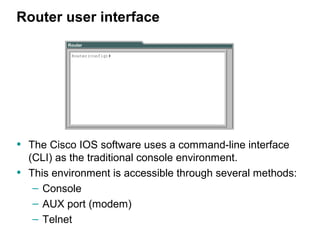
Router user interface


• The Cisco IOS software uses a command-line interface
    (CLI) as the traditional console environment.
•   This environment is accessible through several methods:
     – Console
     – AUX port (modem)
     – Telnet
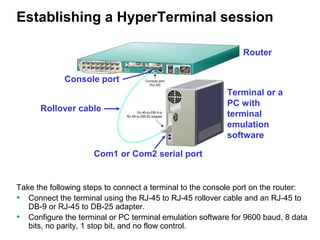
Establishing a HyperTerminal session

                                                               Router


             Console port
                                                          Terminal or a
                                                          PC with
      Rollover cable
                                                          terminal
                                                          emulation
                                                          software

                     Com1 or Com2 serial port


Take the following steps to connect a terminal to the console port on the router:
• Connect the terminal using the RJ-45 to RJ-45 rollover cable and an RJ-45 to
   DB-9 or RJ-45 to DB-25 adapter.
• Configure the terminal or PC terminal emulation software for 9600 baud, 8 data
   bits, no parity, 1 stop bit, and no flow control.
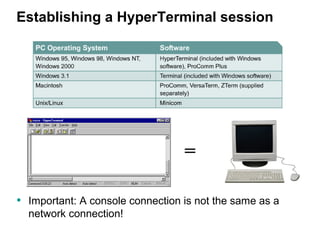
Establishing a HyperTerminal session


                                  =

• Important: A console connection is not the same as a
  network connection!
Logging into the router


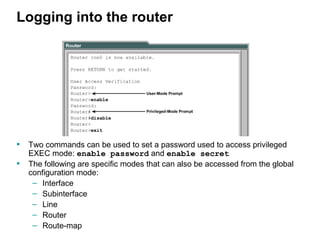
• Two commands can be used to set a password used to access privileged
    EXEC mode: enable password and enable secret
•   The following are specific modes that can also be accessed from the global
    configuration mode:
     – Interface
     – Subinterface
     – Line
     – Router
     – Route-map
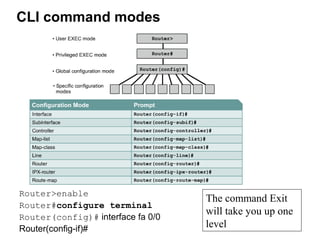
CLI command modes


Router>enable
                                   The command Exit
Router#configure terminal
                                   will take you up one
Router(config)# interface fa 0/0
Router(config-if)#                 level
Configuring a router name


 Router#config t
 Router(config)#hostname Tokyo
 Tokyo(config)#
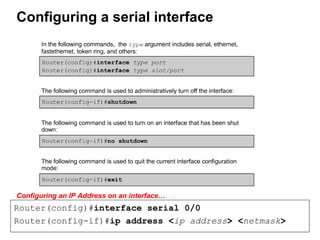
Configuring a serial interface


Configuring an IP Address on an interface…
Router(config)#interface serial 0/0
Router(config-if)#ip address <ip address> <netmask>
show ip interface command

Router# show ip interface brief

Interface    IP-Address       OK?   Method     Status                   Protocol
Ethernet0    131.108.1.11     YES   manual     up                       up
Serial0      198.135.2.49     YES   manual     administratively down    down


      What is wrong here? The administrator has either done a
      “shutdown” on the interface or has forgotten to do a “no shutdown”.


• A serial interface will not show “up” and “up” unless both
    ends are properly configured (mostly) and the no shutdown
    command is used.
•   If one router’s configuration looks okay, check the other
    router’s configuration.
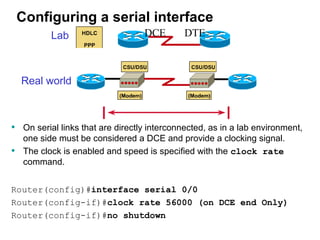
Configuring a serial interface
           Lab                    DCE        DTE


    Real world


• On serial links that are directly interconnected, as in a lab environment,
     one side must be considered a DCE and provide a clocking signal.
•    The clock is enabled and speed is specified with the clock rate
     command.


Router(config)#interface serial 0/0
Router(config-if)#clock rate 56000 (on DCE end Only)
Router(config-if)#no shutdown
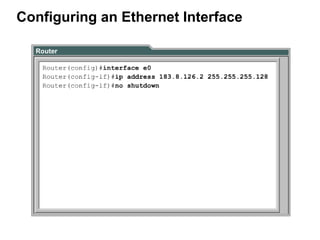
Configuring an Ethernet Interface
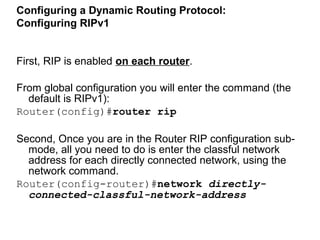
Configuring a Dynamic Routing Protocol:
Configuring RIPv1


First, RIP is enabled on each router.

From global configuration you will enter the command (the
  default is RIPv1):
Router(config)#router rip

Second, Once you are in the Router RIP configuration sub-
  mode, all you need to do is enter the classful network
  address for each directly connected network, using the
  network command.
Router(config-router)#network directly-
  connected-classful-network-address
Example
                            First, we Configure the interfaces on
                               each router

                            SanJose2
                            hostname SanJose2
                            interface ethernet 0
                               ip add 192.168.1.1 255.255.255.0
                            interface serial 0
                               ip add 192.168.2.1 255.255.255.0

                            SanJose1
                            hostname SanJose1
                            interface ethernet 0
                               ip add 192.168.3.1 255.255.255.0
                            interface serial 0
                               ip add 192.168.2.2 255.255.255.0
                                clockrate 64000
                            interface serial 1
                               ip add 192.168.4.2 255.255.255.0
                                clockrate 64000


When done configuring the   Baypointe
                            hostname Baypointe
interfaces use the          interface ethernet 0
                               ip add 192.168.5.1 255.255.255.0
command: show ip            interface serial 0

interface brief                ip add 192.168.4.1 255.255.255.0
Second, we configure RIPv1

Here are the commands for each router:

SanJose2#configure terminal
Enter configuration commands, one per line.   End with CNTL/Z.
SanJose2(config)#router rip
SanJose2(config-router)#network 192.168.1.0
SanJose2(config-router)#network 192.168.2.0

Baypointe#configure terminal
Enter configuration commands, one per line. End with CNTL/Z.
Baypointe(config)#router rip
Baypointe(config-router)#network 192.168.4.0
Baypointe(config-router)#network 192.168.5.0

SanJose1#configure terminal
Enter configuration commands, one per line.   End with CNTL/Z.
SanJose1(config)#router rip
SanJose1(config-router)#network 192.168.2.0
SanJose1(config-router)#network 192.168.3.0
SanJose1(config-router)#network 192.168.4.0
Third, We check on the routing table for each
router

SanJose2#show ip route
Codes: C - connected, S - static, I - IGRP, R - RIP, M -
   mobile, B - BGP
        <omitted>
        i - IS-IS, L1 - IS-IS level-1, L2 - IS-IS level-2, *
   - candidate default
        U - per-user static route, o - ODR
Gateway of last resort is not set

R    192.168.4.0/24   [120/1] via 192.168.2.2, 00:00:10,
   Serial0
R    192.168.5.0/24   [120/2] via 192.168.2.2, 00:00:10,
   Serial0
C    192.168.1.0/24   is directly connected, Ethernet0
C    192.168.2.0/24   is directly connected, Serial0
R    192.168.3.0/24   [120/1] via 192.168.2.2, 00:00:10,
   Serial0
SanJose2#
Third, We check on the routing table for each
  router

SanJose1#show ip route
Codes: C - connected, S - static, I - IGRP, R - RIP, M
    - mobile, B - BGP
       <omitted>
Gateway of last resort is not set
C    192.168.4.0/24 is directly connected, Serial1
R    192.168.5.0/24 [120/1] via 192.168.4.1, 00:00:12,
    Serial1
R    192.168.1.0/24 [120/1] via 192.168.2.1, 00:00:10,
    Serial0
C    192.168.2.0/24 is directly connected, Serial0
C    192.168.3.0/24 is directly connected, Ethernet0
Third, We check on the routing table for each
    router

Baypointe#show ip route
Codes: C - connected, S - static, I - IGRP, R - RIP, M -
   mobile, B - BGP
        D - EIGRP, EX - EIGRP external, O - OSPF, IA - OSPF
   inter area
        N1 - OSPF NSSA external type 1, N2 - OSPF NSSA external
   type 2
        E1 - OSPF external type 1, E2 - OSPF external type 2, E
   - EGP
        i - IS-IS, L1 - IS-IS level-1, L2 - IS-IS level-2, * -
   candidate default
        U - per-user static route, o - ODR
Gateway of last resort is not set

C     192.168.4.0/24   is directly   connected, Serial0
C     192.168.5.0/24   is directly   connected, Ethernet0
R     192.168.1.0/24   [120/2] via   192.168.4.2, 00:00:23, Serial0
R     192.168.2.0/24   [120/1] via   192.168.4.2, 00:00:23, Serial0
R     192.168.3.0/24   [120/1] via   192.168.4.2, 00:00:23, Serial0
copy running-config startup-config


                       During bootup


         running-config
                             RAM
                                                     startup-config
Router# copy running-config startup-config


 • Changes to the router are automatically put in the running-config file.
 • If the router loses power or reboots, everything in RAM is lost including the running-
     config file.
 •   To make sure the changes to the router’s configuration remain saved, you must copy
     the running-config from RAM into the startup-config into NVRAM:

 Router# copy         running-config           startup-config
copy running-config startup-config
Router# copy running-config startup-config
 Or
Router# copy running startup
 OR
Router# copy run start
 OR
Any usage of the command or parameters, so that they are still uniquely recognizable .

WARNING
• Using an incorrect configuration file name could overwrite the router’s IOS in flash, as the router believes
   you are trying to copy a blank file into flash.

Router#copy running-config start-up
                         **** NOTICE ****       Incorrect file name!
Flash load helper v1.0
This process will accept the copy options and then terminate
the current system image to use the ROM based image for the copy.
Routing functionality will not be available during that time.
If you are logged in via telnet, this connection will terminate.
Users with console access can see the results of the copy operation.
                         ---- ******** ----
Proceed? [confirm]^C
%Copy cancelled by user request.
Router#
                                  Press <control> C
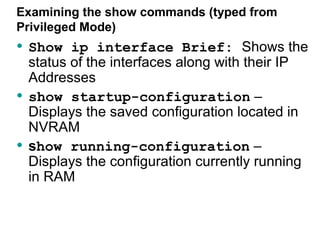
Examining the show commands (typed from
Privileged Mode)
• Show ip interface Brief: Shows the
    status of the interfaces along with their IP
    Addresses
•   show startup-configuration –
    Displays the saved configuration located in
    NVRAM
•   show running-configuration –
    Displays the configuration currently running
    in RAM
How to Reset The Router

1. Router> enable
2. Router# erase start (Press enter to confirm): This step
     erases the configuration file
3.   Router# Reload : This step soft-boots the router
4.   After the router reloads, the following question will show:
     “Would you like to enter the setup mode”, Please answer
     “no” to that question.
5.   The router should now take you to user mode: Router>


Note: If asked for a password, use the password system in
   the next slide
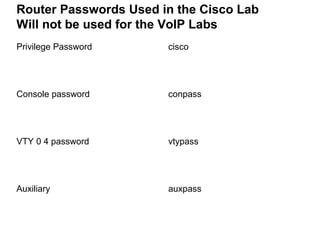
Router Passwords Used in the Cisco Lab
Will not be used for the VoIP Labs
Privilege Password     cisco


Console password       conpass


VTY 0 4 password       vtypass


Auxiliary              auxpass

Intro to router_config

  • 1.
  • 2.
    Router user interface •The Cisco IOS software uses a command-line interface (CLI) as the traditional console environment. • This environment is accessible through several methods: – Console – AUX port (modem) – Telnet
  • 3.
    Establishing a HyperTerminalsession Router Console port Terminal or a PC with Rollover cable terminal emulation software Com1 or Com2 serial port Take the following steps to connect a terminal to the console port on the router: • Connect the terminal using the RJ-45 to RJ-45 rollover cable and an RJ-45 to DB-9 or RJ-45 to DB-25 adapter. • Configure the terminal or PC terminal emulation software for 9600 baud, 8 data bits, no parity, 1 stop bit, and no flow control.
  • 4.
    Establishing a HyperTerminalsession = • Important: A console connection is not the same as a network connection!
  • 5.
    Logging into therouter • Two commands can be used to set a password used to access privileged EXEC mode: enable password and enable secret • The following are specific modes that can also be accessed from the global configuration mode: – Interface – Subinterface – Line – Router – Route-map
  • 6.
    CLI command modes Router>enable The command Exit Router#configure terminal will take you up one Router(config)# interface fa 0/0 Router(config-if)# level
  • 7.
    Configuring a routername Router#config t Router(config)#hostname Tokyo Tokyo(config)#
  • 8.
    Configuring a serialinterface Configuring an IP Address on an interface… Router(config)#interface serial 0/0 Router(config-if)#ip address <ip address> <netmask>
  • 9.
    show ip interfacecommand Router# show ip interface brief Interface IP-Address OK? Method Status Protocol Ethernet0 131.108.1.11 YES manual up up Serial0 198.135.2.49 YES manual administratively down down What is wrong here? The administrator has either done a “shutdown” on the interface or has forgotten to do a “no shutdown”. • A serial interface will not show “up” and “up” unless both ends are properly configured (mostly) and the no shutdown command is used. • If one router’s configuration looks okay, check the other router’s configuration.
  • 10.
    Configuring a serialinterface Lab DCE DTE Real world • On serial links that are directly interconnected, as in a lab environment, one side must be considered a DCE and provide a clocking signal. • The clock is enabled and speed is specified with the clock rate command. Router(config)#interface serial 0/0 Router(config-if)#clock rate 56000 (on DCE end Only) Router(config-if)#no shutdown
  • 11.
  • 12.
    Configuring a DynamicRouting Protocol: Configuring RIPv1 First, RIP is enabled on each router. From global configuration you will enter the command (the default is RIPv1): Router(config)#router rip Second, Once you are in the Router RIP configuration sub- mode, all you need to do is enter the classful network address for each directly connected network, using the network command. Router(config-router)#network directly- connected-classful-network-address
  • 13.
    Example First, we Configure the interfaces on each router SanJose2 hostname SanJose2 interface ethernet 0 ip add 192.168.1.1 255.255.255.0 interface serial 0 ip add 192.168.2.1 255.255.255.0 SanJose1 hostname SanJose1 interface ethernet 0 ip add 192.168.3.1 255.255.255.0 interface serial 0 ip add 192.168.2.2 255.255.255.0 clockrate 64000 interface serial 1 ip add 192.168.4.2 255.255.255.0 clockrate 64000 When done configuring the Baypointe hostname Baypointe interfaces use the interface ethernet 0 ip add 192.168.5.1 255.255.255.0 command: show ip interface serial 0 interface brief ip add 192.168.4.1 255.255.255.0
  • 14.
    Second, we configureRIPv1 Here are the commands for each router: SanJose2#configure terminal Enter configuration commands, one per line. End with CNTL/Z. SanJose2(config)#router rip SanJose2(config-router)#network 192.168.1.0 SanJose2(config-router)#network 192.168.2.0 Baypointe#configure terminal Enter configuration commands, one per line. End with CNTL/Z. Baypointe(config)#router rip Baypointe(config-router)#network 192.168.4.0 Baypointe(config-router)#network 192.168.5.0 SanJose1#configure terminal Enter configuration commands, one per line. End with CNTL/Z. SanJose1(config)#router rip SanJose1(config-router)#network 192.168.2.0 SanJose1(config-router)#network 192.168.3.0 SanJose1(config-router)#network 192.168.4.0
  • 15.
    Third, We checkon the routing table for each router SanJose2#show ip route Codes: C - connected, S - static, I - IGRP, R - RIP, M - mobile, B - BGP <omitted> i - IS-IS, L1 - IS-IS level-1, L2 - IS-IS level-2, * - candidate default U - per-user static route, o - ODR Gateway of last resort is not set R 192.168.4.0/24 [120/1] via 192.168.2.2, 00:00:10, Serial0 R 192.168.5.0/24 [120/2] via 192.168.2.2, 00:00:10, Serial0 C 192.168.1.0/24 is directly connected, Ethernet0 C 192.168.2.0/24 is directly connected, Serial0 R 192.168.3.0/24 [120/1] via 192.168.2.2, 00:00:10, Serial0 SanJose2#
  • 16.
    Third, We checkon the routing table for each router SanJose1#show ip route Codes: C - connected, S - static, I - IGRP, R - RIP, M - mobile, B - BGP <omitted> Gateway of last resort is not set C 192.168.4.0/24 is directly connected, Serial1 R 192.168.5.0/24 [120/1] via 192.168.4.1, 00:00:12, Serial1 R 192.168.1.0/24 [120/1] via 192.168.2.1, 00:00:10, Serial0 C 192.168.2.0/24 is directly connected, Serial0 C 192.168.3.0/24 is directly connected, Ethernet0
  • 17.
    Third, We checkon the routing table for each router Baypointe#show ip route Codes: C - connected, S - static, I - IGRP, R - RIP, M - mobile, B - BGP D - EIGRP, EX - EIGRP external, O - OSPF, IA - OSPF inter area N1 - OSPF NSSA external type 1, N2 - OSPF NSSA external type 2 E1 - OSPF external type 1, E2 - OSPF external type 2, E - EGP i - IS-IS, L1 - IS-IS level-1, L2 - IS-IS level-2, * - candidate default U - per-user static route, o - ODR Gateway of last resort is not set C 192.168.4.0/24 is directly connected, Serial0 C 192.168.5.0/24 is directly connected, Ethernet0 R 192.168.1.0/24 [120/2] via 192.168.4.2, 00:00:23, Serial0 R 192.168.2.0/24 [120/1] via 192.168.4.2, 00:00:23, Serial0 R 192.168.3.0/24 [120/1] via 192.168.4.2, 00:00:23, Serial0
  • 18.
    copy running-config startup-config During bootup running-config RAM startup-config Router# copy running-config startup-config • Changes to the router are automatically put in the running-config file. • If the router loses power or reboots, everything in RAM is lost including the running- config file. • To make sure the changes to the router’s configuration remain saved, you must copy the running-config from RAM into the startup-config into NVRAM: Router# copy running-config startup-config
  • 19.
    copy running-config startup-config Router#copy running-config startup-config Or Router# copy running startup OR Router# copy run start OR Any usage of the command or parameters, so that they are still uniquely recognizable . WARNING • Using an incorrect configuration file name could overwrite the router’s IOS in flash, as the router believes you are trying to copy a blank file into flash. Router#copy running-config start-up **** NOTICE **** Incorrect file name! Flash load helper v1.0 This process will accept the copy options and then terminate the current system image to use the ROM based image for the copy. Routing functionality will not be available during that time. If you are logged in via telnet, this connection will terminate. Users with console access can see the results of the copy operation. ---- ******** ---- Proceed? [confirm]^C %Copy cancelled by user request. Router# Press <control> C
  • 20.
    Examining the showcommands (typed from Privileged Mode) • Show ip interface Brief: Shows the status of the interfaces along with their IP Addresses • show startup-configuration – Displays the saved configuration located in NVRAM • show running-configuration – Displays the configuration currently running in RAM
  • 21.
    How to ResetThe Router 1. Router> enable 2. Router# erase start (Press enter to confirm): This step erases the configuration file 3. Router# Reload : This step soft-boots the router 4. After the router reloads, the following question will show: “Would you like to enter the setup mode”, Please answer “no” to that question. 5. The router should now take you to user mode: Router> Note: If asked for a password, use the password system in the next slide
  • 22.
    Router Passwords Usedin the Cisco Lab Will not be used for the VoIP Labs Privilege Password cisco Console password conpass VTY 0 4 password vtypass Auxiliary auxpass