TEST (MODULE:- 1 and 2)
 What are command line arguments? Write a program in JAVA to print

  Fibonacci series using command line arguments?      [10]

 Create a class employee with data members empid, empname, designation

  and salary. Write methods for:-                     [10]

  get_employee()- To take user input.

  show_grade()- To display grade of employee based on salary.

  show_employee()- To show employee details.

 Write a note on:-                                   [10]
   Java Virtual Machine.

   Nesting of Methods with example
STRINGS
   IN
 JAVA
          - Ankita Karia
STRINGS
 Strings represent a sequence of characters.
 The easiest way to represent a sequence of characters in
  JAVA is by using a character array.
 char Array[ ] = new char [5];             Character arrays are
                                              not good enough to
                                             support the range of
                                             operations we want to
                                              perform on strings.


    In JAVA strings are class objects and implemented using
    two classes:-
        String
        StringBuffer.
    In JAVA strings are not a character array and is not NULL
    terminated.
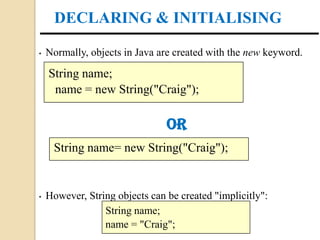
DECLARING & INITIALISING

•   Normally, objects in Java are created with the new keyword.

    String name;
     name = new String("Craig");

                                OR
     String name= new String("Craig");


•   However, String objects can be created "implicitly":
                 String name;
                 name = "Craig";
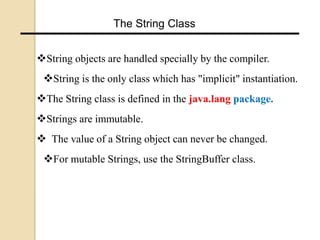
The String Class


String objects are handled specially by the compiler.
 String is the only class which has "implicit" instantiation.
The String class is defined in the java.lang package.
Strings are immutable.
 The value of a String object can never be changed.
 For mutable Strings, use the StringBuffer class.
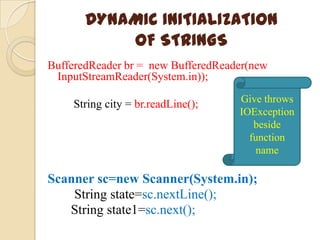
DYNAMIC INITIALIZATION
           OF STRINGS
BufferedReader br = new BufferedReader(new
 InputStreamReader(System.in));

    String city = br.readLine();    Give throws
                                    IOException
                                       beside
                                      function
                                        name

Scanner sc=new Scanner(System.in);
    String state=sc.nextLine();
   String state1=sc.next();
STRING CONCATENATION
    JAVA string can be concatenated
     using + operator.
 String name="Ankita";
 String surname="Karia";
 System.out.println(name+" "+surname);

STRING Arrays
•An array of strings can also be created
        String cities [ ] = new String[5];
• Will create an array of CITIES of size 5 to
hold string constants
String Methods
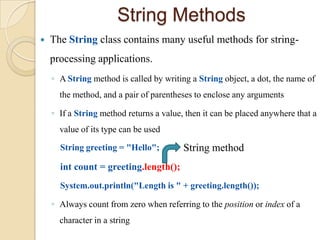
   The String class contains many useful methods for string-
    processing applications.
    ◦ A String method is called by writing a String object, a dot, the name of
      the method, and a pair of parentheses to enclose any arguments

    ◦ If a String method returns a value, then it can be placed anywhere that a
      value of its type can be used

      String greeting = "Hello";         String method
      int count = greeting.length();
      System.out.println("Length is " + greeting.length());

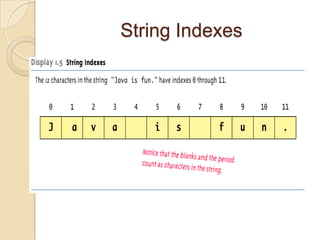
    ◦ Always count from zero when referring to the position or index of a
      character in a string
String Indexes
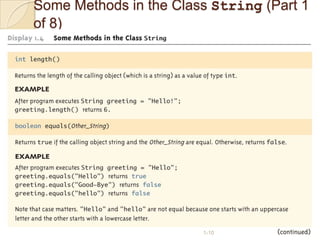
Some Methods in the Class String (Part 1
of 8)


                        1-10
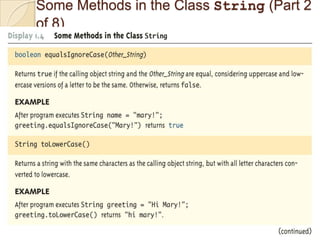
Some Methods in the Class String (Part 2
of 8)
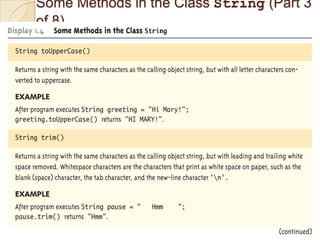
Some Methods in the Class String (Part 3
of 8)
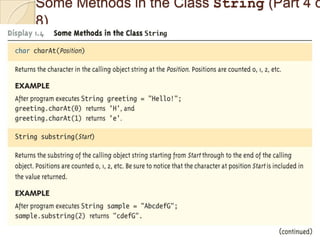
Some Methods in the Class String (Part 4 o
8)
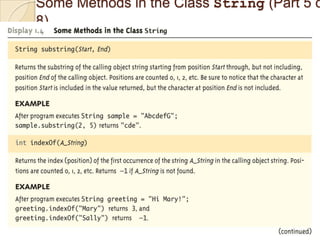
Some Methods in the Class String (Part 5 o
8)
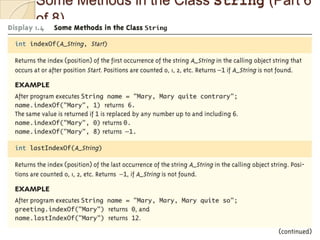
Some Methods in the Class String (Part 6
of 8)
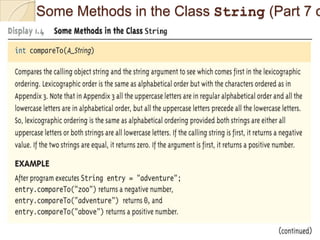
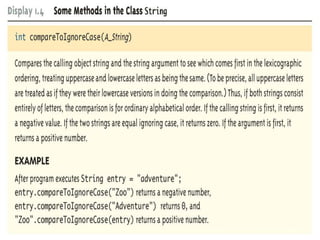
Some Methods in the Class String (Part 7 o
STRING BUFFER

               CLASS
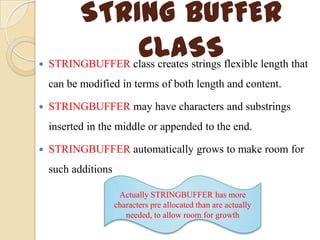
    STRINGBUFFER class creates strings flexible length that
    can be modified in terms of both length and content.

   STRINGBUFFER may have characters and substrings
    inserted in the middle or appended to the end.

   STRINGBUFFER automatically grows to make room for
    such additions

                      Actually STRINGBUFFER has more
                     characters pre allocated than are actually
                        needed, to allow room for growth
STRING BUFFER
              CONSTRUCTORS
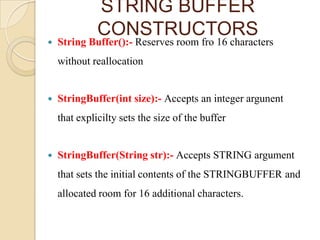
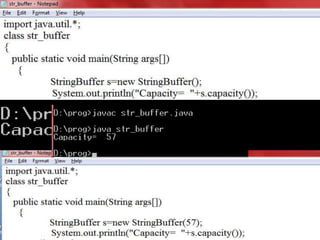
   String Buffer():- Reserves room fro 16 characters
    without reallocation


   StringBuffer(int size):- Accepts an integer argunent
    that explicilty sets the size of the buffer


   StringBuffer(String str):- Accepts STRING argument
    that sets the initial contents of the STRINGBUFFER and
    allocated room for 16 additional characters.
STRING BUFFER FUNCTIONS
   length():-Returns the current length of the string.

   capacity():- Returns the total allocated capacity.

   void ensureCapacity():- Preallocates room for a certain

                    number of characters.
   void setLength(int len):- Sets the length of the string s1
                              to len.
               If len<s1.length(), s1 is truncated.
               If len>s1.length(), zeros are added to s1.
   charAt(int where):- Extracts value of a single character.

   setCharAt(int where, char ch):- Sets the value of character

                     at specified position.
STRING BUFFER FUNCTIONS
   append(s2):- Appends string s2 to s1 at the end.

   insert(n,s2 ):- Inserts the string s2 at the position n of the
    string s1

   reverse():- Returns the reversed object on when it is called.

   delete(int n1,int n2):- Deletes a sequence of characters
    from the invoking object.

                 n1      Specifies index of first character to remove

                          Specifies index one past the lastcharacter to
                  n2      remove

   deleteCharAt(int loc):- Deletes the character at the index
    specified by loc.
STRING BUFFER FUNCTIONS
   replace(int n1,int n2,String s1):- Replaces one set of
    characters with another set.

   substring(int startIndex):- Returns the substring that starts
    at starts at startIndex and runs to the end.

   substring(int startIndex, int endIndex):- Returns the
    substring that starts at starts at startIndex and runs to the
    endIndex-1


VECTOR

Strings in Java

  • 1.
    TEST (MODULE:- 1and 2)  What are command line arguments? Write a program in JAVA to print Fibonacci series using command line arguments? [10]  Create a class employee with data members empid, empname, designation and salary. Write methods for:- [10] get_employee()- To take user input. show_grade()- To display grade of employee based on salary. show_employee()- To show employee details.  Write a note on:- [10]  Java Virtual Machine.  Nesting of Methods with example
  • 2.
    STRINGS IN JAVA - Ankita Karia
  • 3.
    STRINGS  Strings representa sequence of characters.  The easiest way to represent a sequence of characters in JAVA is by using a character array. char Array[ ] = new char [5]; Character arrays are not good enough to support the range of operations we want to perform on strings. In JAVA strings are class objects and implemented using two classes:- String StringBuffer. In JAVA strings are not a character array and is not NULL terminated.
  • 4.
    DECLARING & INITIALISING • Normally, objects in Java are created with the new keyword. String name; name = new String("Craig"); OR String name= new String("Craig"); • However, String objects can be created "implicitly": String name; name = "Craig";
  • 5.
    The String Class Stringobjects are handled specially by the compiler. String is the only class which has "implicit" instantiation. The String class is defined in the java.lang package. Strings are immutable.  The value of a String object can never be changed. For mutable Strings, use the StringBuffer class.
  • 6.
    DYNAMIC INITIALIZATION OF STRINGS BufferedReader br = new BufferedReader(new InputStreamReader(System.in)); String city = br.readLine(); Give throws IOException beside function name Scanner sc=new Scanner(System.in); String state=sc.nextLine(); String state1=sc.next();
  • 7.
    STRING CONCATENATION  JAVA string can be concatenated using + operator. String name="Ankita"; String surname="Karia"; System.out.println(name+" "+surname); STRING Arrays •An array of strings can also be created String cities [ ] = new String[5]; • Will create an array of CITIES of size 5 to hold string constants
  • 8.
    String Methods  The String class contains many useful methods for string- processing applications. ◦ A String method is called by writing a String object, a dot, the name of the method, and a pair of parentheses to enclose any arguments ◦ If a String method returns a value, then it can be placed anywhere that a value of its type can be used String greeting = "Hello"; String method int count = greeting.length(); System.out.println("Length is " + greeting.length()); ◦ Always count from zero when referring to the position or index of a character in a string
  • 9.
  • 10.
    Some Methods inthe Class String (Part 1 of 8) 1-10
  • 11.
    Some Methods inthe Class String (Part 2 of 8)
  • 12.
    Some Methods inthe Class String (Part 3 of 8)
  • 13.
    Some Methods inthe Class String (Part 4 o 8)
  • 14.
    Some Methods inthe Class String (Part 5 o 8)
  • 15.
    Some Methods inthe Class String (Part 6 of 8)
  • 16.
    Some Methods inthe Class String (Part 7 o
  • 18.
    STRING BUFFER  CLASS STRINGBUFFER class creates strings flexible length that can be modified in terms of both length and content.  STRINGBUFFER may have characters and substrings inserted in the middle or appended to the end.  STRINGBUFFER automatically grows to make room for such additions Actually STRINGBUFFER has more characters pre allocated than are actually needed, to allow room for growth
  • 19.
    STRING BUFFER CONSTRUCTORS  String Buffer():- Reserves room fro 16 characters without reallocation  StringBuffer(int size):- Accepts an integer argunent that explicilty sets the size of the buffer  StringBuffer(String str):- Accepts STRING argument that sets the initial contents of the STRINGBUFFER and allocated room for 16 additional characters.
  • 20.
    STRING BUFFER FUNCTIONS  length():-Returns the current length of the string.  capacity():- Returns the total allocated capacity.  void ensureCapacity():- Preallocates room for a certain number of characters.  void setLength(int len):- Sets the length of the string s1 to len. If len<s1.length(), s1 is truncated. If len>s1.length(), zeros are added to s1.  charAt(int where):- Extracts value of a single character.  setCharAt(int where, char ch):- Sets the value of character at specified position.
  • 22.
    STRING BUFFER FUNCTIONS  append(s2):- Appends string s2 to s1 at the end.  insert(n,s2 ):- Inserts the string s2 at the position n of the string s1  reverse():- Returns the reversed object on when it is called.  delete(int n1,int n2):- Deletes a sequence of characters from the invoking object. n1 Specifies index of first character to remove Specifies index one past the lastcharacter to n2 remove  deleteCharAt(int loc):- Deletes the character at the index specified by loc.
  • 23.
    STRING BUFFER FUNCTIONS  replace(int n1,int n2,String s1):- Replaces one set of characters with another set.  substring(int startIndex):- Returns the substring that starts at starts at startIndex and runs to the end.  substring(int startIndex, int endIndex):- Returns the substring that starts at starts at startIndex and runs to the endIndex-1 VECTOR