Wrapper Classes And String 
Satyam Shrivastav
Wrapper Classes
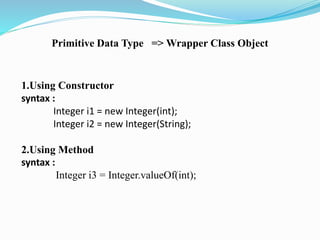
Primitive Data Type => Wrapper Class Object 
1.Using Constructor 
syntax : 
Integer i1 = new Integer(int); 
Integer i2 = new Integer(String); 
2.Using Method 
syntax : 
Integer i3 = Integer.valueOf(int);
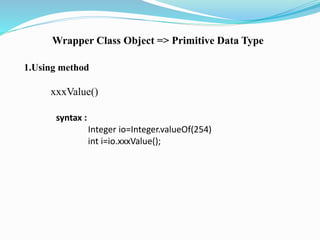
Wrapper Class Object => Primitive Data Type 
1.Using method 
xxxValue() 
syntax : 
Integer io=Integer.valueOf(254) 
int i=io.xxxValue();
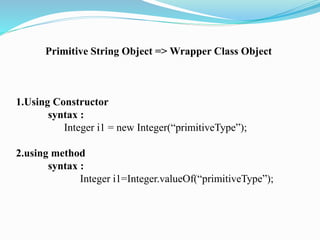
Primitive String Object => Wrapper Class Object 
1.Using Constructor 
syntax : 
Integer i1 = new Integer(“primitiveType”); 
2.using method 
syntax : 
Integer i1=Integer.valueOf(“primitiveType”);
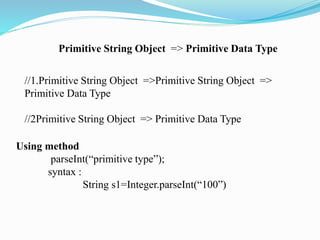
Primitive String Object => Primitive Data Type 
//1.Primitive String Object =>Primitive String Object => 
Primitive Data Type 
//2Primitive String Object => Primitive Data Type 
Using method 
parseInt(“primitive type”); 
syntax : 
String s1=Integer.parseInt(“100”)
Wrapper Class Object => String Object 
1.using method 
toString() 
syntax : 
Integer io=new Integer(254); 
String s=io.toString()
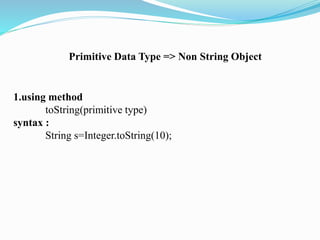
Primitive Data Type => Non String Object 
1.using method 
toString(primitive type) 
syntax : 
String s=Integer.toString(10);
String
String 
 String is a sequence of characters placed in double quote(“ ”). 
 Strings are constant , their values cannot be changed in the 
same memory after they are created.
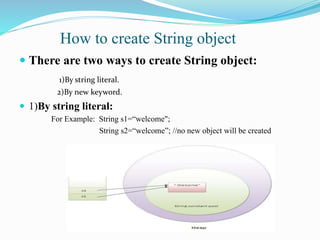
How to create String object 
 There are two ways to create String object: 
1)By string literal. 
2)By new keyword. 
 1)By string literal: 
For Example: String s1=“welcome"; 
String s2=“welcome”; //no new object will be created
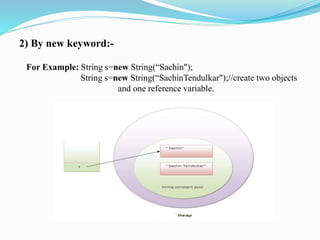
2) By new keyword:- 
For Example: String s=new String(“Sachin"); 
String s=new String(“SachinTendulkar");//create two objects 
and one reference variable.
Immutability 
• In java, string objects are immutable. Immutable simply means 
unmodifiable or unchangeable. 
• Once string object is created its data or state can't be changed 
but a new string object is created.
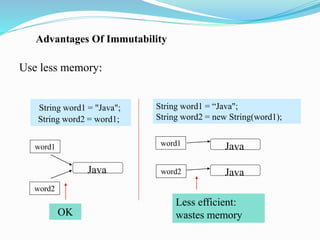
Advantages Of Immutability 
Use less memory: 
String word1 = "Java"; 
String word2 = word1; 
String word1 = “Java"; 
String word2 = new String(word1); 
word1 
OK 
Less efficient: 
wastes memory 
Java 
Java 
Java 
word2 
word1 
word2
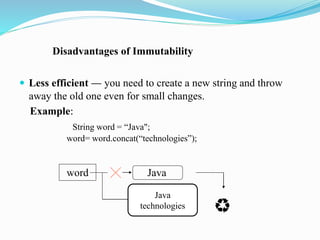
Disadvantages of Immutability 
 Less efficient — you need to create a new string and throw 
away the old one even for small changes. 
Example: 
String word = “Java"; 
word= word.concat(“technologies”); 
word Java 
Java 
technologies
Constructors 
 No Argument Constructors: 
No-argument constructor creates an empty String. Rarely used. 
Example: String empty=new String(); 
 Copy Constructors: 
Copy constructor creates a copy of an existing String . Also rarely used. 
Example: String word = new String(“Java”); 
String word2 = new String(word); 
 Other Constructors: 
Most other constructors take an array as a parameter to create a String. 
Example: char[] letters = {‘J’, ‘a’, ‘v’, ‘a’}; 
String word = new String(letters);//”Java”
String Methods 
 substring(int begin): 
 Returns substring from begin index to end of the String. 
 Example: String s=“nacre”; 
System.out.println(s.substring(2));//cre 
 equals(): 
 To perform content comparision where case is important. 
Example: String s=“java”; 
System.out.println(s.equals(“java”));//true 
 concat(): Adding two strings we use this method 
Example: String s=“nacre”; 
s= s.concat(“software”); 
System.out.println(s);// nacresoftware
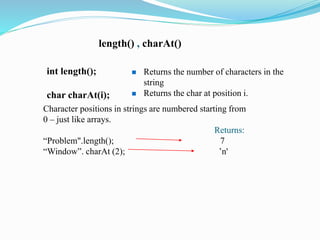
length() , charAt() 
int length(); 
char charAt(i); 
 Returns the number of characters in the 
string 
 Returns the char at position i. 
Character positions in strings are numbered starting from 
0 – just like arrays. 
Returns: 
“Problem".length(); 7 
“Window”. charAt (2); ’n'
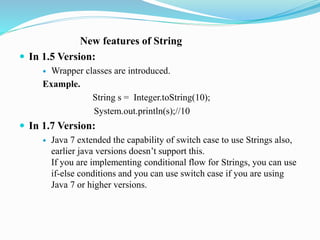
New features of String 
 In 1.5 Version: 
 Wrapper classes are introduced. 
Example. 
String s = Integer.toString(10); 
System.out.println(s);//10 
 In 1.7 Version: 
 Java 7 extended the capability of switch case to use Strings also, 
earlier java versions doesn’t support this. 
If you are implementing conditional flow for Strings, you can use 
if-else conditions and you can use switch case if you are using 
Java 7 or higher versions.
StringBuffer, StringBuilder 
StringTokenizer
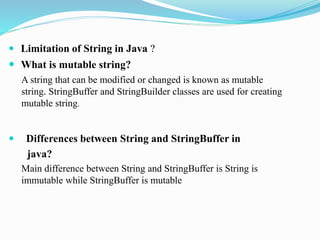
 Limitation of String in Java ? 
 What is mutable string? 
A string that can be modified or changed is known as mutable 
string. StringBuffer and StringBuilder classes are used for creating 
mutable string. 
 Differences between String and StringBuffer in 
java? 
Main difference between String and StringBuffer is String is 
immutable while StringBuffer is mutable
Relations between StringBuffer, StringBuilder and 
StringToknizer: 
All These classes are final and subclass of Serializable.
StringBuffer 
 StringBuffer is a synchronized and allows us to mutate the 
string. 
 StringBuffer has many utility methods to manipulate the string. 
 This is more useful when using in a multithreaded 
environment. 
 Always modified in same memory location.
 StringBuffer Constructor: 
 1. public StringBuffer() 
 2. public StringBuffer(int capacity) 
 3. public StringBuffer(String s) 
 4. public StringBuffer(CharSequence cs)
Method Use In StringBuffer 
 1. Append 
 2. Insert 
 3.Delete 
 4.Reverse 
 5.Replacing Character at given index
StringBuilder 
 StringBuilder is the same as the StringBuffer class 
 The StringBuilder class is not synchronized and hence in a 
single threaded environment, the overhead is less than using a 
StringBuffer.
StringTokenizer 
 A token is a portion of a string that is separated from another 
portion of that string by one or more chosen characters (called 
delimiters). 
 The StringTokenizer class contained in the java.util package 
can be used to break a string into separate tokens. This is 
particularly useful in those situations in which we want to read 
and process one token at a time; the BufferedReader class does 
not have a method to read one token at a time
Thank you…

Java String

  • 1.
    Wrapper Classes AndString Satyam Shrivastav
  • 2.
  • 3.
    Primitive Data Type=> Wrapper Class Object 1.Using Constructor syntax : Integer i1 = new Integer(int); Integer i2 = new Integer(String); 2.Using Method syntax : Integer i3 = Integer.valueOf(int);
  • 4.
    Wrapper Class Object=> Primitive Data Type 1.Using method xxxValue() syntax : Integer io=Integer.valueOf(254) int i=io.xxxValue();
  • 5.
    Primitive String Object=> Wrapper Class Object 1.Using Constructor syntax : Integer i1 = new Integer(“primitiveType”); 2.using method syntax : Integer i1=Integer.valueOf(“primitiveType”);
  • 6.
    Primitive String Object=> Primitive Data Type //1.Primitive String Object =>Primitive String Object => Primitive Data Type //2Primitive String Object => Primitive Data Type Using method parseInt(“primitive type”); syntax : String s1=Integer.parseInt(“100”)
  • 7.
    Wrapper Class Object=> String Object 1.using method toString() syntax : Integer io=new Integer(254); String s=io.toString()
  • 8.
    Primitive Data Type=> Non String Object 1.using method toString(primitive type) syntax : String s=Integer.toString(10);
  • 9.
  • 10.
    String  Stringis a sequence of characters placed in double quote(“ ”).  Strings are constant , their values cannot be changed in the same memory after they are created.
  • 11.
    How to createString object  There are two ways to create String object: 1)By string literal. 2)By new keyword.  1)By string literal: For Example: String s1=“welcome"; String s2=“welcome”; //no new object will be created
  • 12.
    2) By newkeyword:- For Example: String s=new String(“Sachin"); String s=new String(“SachinTendulkar");//create two objects and one reference variable.
  • 13.
    Immutability • Injava, string objects are immutable. Immutable simply means unmodifiable or unchangeable. • Once string object is created its data or state can't be changed but a new string object is created.
  • 14.
    Advantages Of Immutability Use less memory: String word1 = "Java"; String word2 = word1; String word1 = “Java"; String word2 = new String(word1); word1 OK Less efficient: wastes memory Java Java Java word2 word1 word2
  • 15.
    Disadvantages of Immutability  Less efficient — you need to create a new string and throw away the old one even for small changes. Example: String word = “Java"; word= word.concat(“technologies”); word Java Java technologies
  • 16.
    Constructors  NoArgument Constructors: No-argument constructor creates an empty String. Rarely used. Example: String empty=new String();  Copy Constructors: Copy constructor creates a copy of an existing String . Also rarely used. Example: String word = new String(“Java”); String word2 = new String(word);  Other Constructors: Most other constructors take an array as a parameter to create a String. Example: char[] letters = {‘J’, ‘a’, ‘v’, ‘a’}; String word = new String(letters);//”Java”
  • 17.
    String Methods substring(int begin):  Returns substring from begin index to end of the String.  Example: String s=“nacre”; System.out.println(s.substring(2));//cre  equals():  To perform content comparision where case is important. Example: String s=“java”; System.out.println(s.equals(“java”));//true  concat(): Adding two strings we use this method Example: String s=“nacre”; s= s.concat(“software”); System.out.println(s);// nacresoftware
  • 18.
    length() , charAt() int length(); char charAt(i);  Returns the number of characters in the string  Returns the char at position i. Character positions in strings are numbered starting from 0 – just like arrays. Returns: “Problem".length(); 7 “Window”. charAt (2); ’n'
  • 19.
    New features ofString  In 1.5 Version:  Wrapper classes are introduced. Example. String s = Integer.toString(10); System.out.println(s);//10  In 1.7 Version:  Java 7 extended the capability of switch case to use Strings also, earlier java versions doesn’t support this. If you are implementing conditional flow for Strings, you can use if-else conditions and you can use switch case if you are using Java 7 or higher versions.
  • 20.
  • 21.
     Limitation ofString in Java ?  What is mutable string? A string that can be modified or changed is known as mutable string. StringBuffer and StringBuilder classes are used for creating mutable string.  Differences between String and StringBuffer in java? Main difference between String and StringBuffer is String is immutable while StringBuffer is mutable
  • 22.
    Relations between StringBuffer,StringBuilder and StringToknizer: All These classes are final and subclass of Serializable.
  • 23.
    StringBuffer  StringBufferis a synchronized and allows us to mutate the string.  StringBuffer has many utility methods to manipulate the string.  This is more useful when using in a multithreaded environment.  Always modified in same memory location.
  • 24.
     StringBuffer Constructor:  1. public StringBuffer()  2. public StringBuffer(int capacity)  3. public StringBuffer(String s)  4. public StringBuffer(CharSequence cs)
  • 25.
    Method Use InStringBuffer  1. Append  2. Insert  3.Delete  4.Reverse  5.Replacing Character at given index
  • 26.
    StringBuilder  StringBuilderis the same as the StringBuffer class  The StringBuilder class is not synchronized and hence in a single threaded environment, the overhead is less than using a StringBuffer.
  • 27.
    StringTokenizer  Atoken is a portion of a string that is separated from another portion of that string by one or more chosen characters (called delimiters).  The StringTokenizer class contained in the java.util package can be used to break a string into separate tokens. This is particularly useful in those situations in which we want to read and process one token at a time; the BufferedReader class does not have a method to read one token at a time
  • 28.