Chapter 11


String & StringBuffer


                    http://www.java2all.com
String Handling


                  http://www.java2all.com
String Handling :
    In Java, a string is defined as a sequence of
 characters.
    But, unlike many other languages that
 implement strings as character arrays, java
 implements strings as objects of type String.

    Java handles String by two classes StringBuffer
 and String. The String and StringBuffer classes are
 defined in java.lang.
    Thus, they are available to all programs
 automatically.
                                            http://www.java2all.com
1. String Concatenation (+)
  EX :            Output :
import java.util.*;
class str3                                 S1 = Java
{
  public static void main(String args[])
                                           S2 = 2all
  {                                        Concatenation Operator = Java2all
     String s1 = new String ("Java");
     String s2 = "2all";
                                           S3 = Java2all
     String s3 = s1+s2;                    S4 = ABCD
     System.out.println("S1 = " + s1);
     System.out.println("S2 = " + s2);
     System.out.println("Concatenation Operator = " + s1+s2);
     System.out.println("S3 = " + s3);

      byte num [] = {65,66,67,68};
      String s4 = new String(num);
      System.out.println("S4 = " + s4);
  }

                                                                   http://www.java2all.com
2. Character Extraction :
     The String class provides ways in which
characters can be extracted from a String object.
Method                               Description
                                     charAt() function is used to extract a single character
char charAt(int indexnum)            from a String. indexnum is the index number of the
                                     character that we want to extract.

                                     Used to extract more than one character at a time,
void getChars(int sourceStart, int   sourceStart specifies beginning of the string, and
sourceEnd, char target[], int        sourceEnd specifies end of the string. The array that will
targetStart)                         receive the characters is specified by target. The index
                                     within target at which the substring will be copied.

                                     This is an alternative to getChars( ) that stores the
                                     characters in an array of bytes. It uses the default
Byte[ ] getBytes( )
                                     character-to-byte conversions provided by the
                                     platform.

Char[ ] toCharArray( )               Same as getChars
                                                                              http://www.java2all.com
3. String Comparison :

    The String class provides several methods that
compare strings or substrings within strings.

        equals( ) – used to compare two strings General
form:
        Boolean equals(Object str)

        Here, str is a String object.

     It returns true if the strings contain the same
character otherwise it returns false
.                                               http://www.java2all.com
The comparison is case-sensitive.

     equalsIgnoreCase( ) – Same as equals but this
ignores case. General form:

   Boolean equalsIgnoreCase(String str)

Here, str is the String object.

It returns true if the strings contain the same
character otherwise it returns false.

                                              http://www.java2all.com
This is case in – sensitive.

    regionMatches( )

      This method compares a specific region inside a
string with another specific region in another string.
There is an overloaded form that allows you to ignore
case in such comparisons.

General form:

    Boolean regionMatches(int startIndex, String
str2, int str2StartIndes, int numChars)
                                             http://www.java2all.com
Boolean regionMatches(Boolean ignoreCase, int
startIndex, String str2, int str2StartIndex, int
numChars)

startsWith( ) and endsWith()

      The startsWith( ) method determines whether a
given String begins with a specified string. endsWith(
) determines whether the String ends with a specified
string.
General Form
    Boolean startsWith(String str)
    Boolean endsWith(String str)
equals( ) Versus = =                          http://www.java2all.com
Equals( ) method and the = = operator
perform two different operations. The equals ( )
method compares the characters inside a String
object. The = = operator compares two object
references to see whether they refer to the same
instance.

     compareTo( )

      It is not enough to know that two strings just
for equal or not. For sorting applications, we need
to know which is less than, equal to, or greater
than the other string.
                                              http://www.java2all.com
The String method compareTo( ) serves this
purpose.

     General Form:

        int compareTo(String str)


                                          http://www.java2all.com
4 Modifying a string :
      If we want to modify a String, we must either
copy it into a StringBufer or we can use following
String methods:


                                            http://www.java2all.com
Method                           Description

String substring(int n)          Gives substring starting from nth character.


                                 Gives substring starting from nth char up to
String substring(int n, int m)
                                 mth


S1.concat(s2)                    Concatenates s1 and s2

                                 The replace() method replaces all occurrences
String replace(char original,
                                 of one character in the invoking string with
char replacement)
                                 another character.
                                 Remove white space at the beginning and end
String trim( )
                                 of the string.


                                                                 http://www.java2all.com
5 valueOf() :
      The valueOf() method converts data from
internal format into a human-readable form. It has
several forms:

     String valueOf(double num)
     String valueOf(long num)
     String valueOf(Object ob)
     String valueOf(char chars[ ] )
     String valueOf(char chars[], int startIndex, int
     numChars)

                                             http://www.java2all.com
Method & Example
Method Call              Description

S2=s1.toLowerCase;       Converts the string s1 to lowercase

S2=s1.toUpperCase;       Converts the string s1 to uppercase

S2=s1.replace(‘x’,’y’)   Replace all appearances of x with y.

                         Remove white spaces at the beginning and of the
S2=s1.trim()
                         string s1

S1.equals(s2)            Returns true if s1 and s2 are equal

S1.equalsIgnoreCase(s
                         Returns true if s1=s2, ignoring the case of characters
2)

S1.length()              Gives the length of s1
                                                                 http://www.java2all.com
S1.CharAt(n)            Gives the nth character of s1
S1.compareTo(s2)        Returns –ve if s1<s2 +ve.if s1>s2, and 0 if s1=s2
S1.concat(s2)           Concatenates s1 and s2
S1.substring(n)         Gives substring starting from nth character.
S1.substring(n, m)      Gives substring starting from nth char up to mth
                        Returns the string representation of the specified
String.valueOf(p)
                        type argument.
                        This object (which is already a string!) is itself
toString()
                        returned.
                        Gives the position of the first occurrence of ‘x’ in the
S1.indexOf(‘x’)
                        string s1
                        Gives the position of ‘x’ that occurs after nth position
S1.indexOf(‘x’, n)
                        in the string s1
String.ValueOf(variable
                        Converts the parameter value of string representation
)
                                                                   http://www.java2all.com
import java.util.*;
class str1
{
   public static void main(String args[])
   {
      String s1 = "Bhagirath";
      System.out.println("S1 = " + s1);
      int length = s1.length();
      System.out.println("S1 lenth = " + length);
      System.out.println("S1 lowercase = " + s1.toLowerCase());
      System.out.println("S1 uppercase = " + s1.toUpperCase());
      System.out.println("S1 replace a with z = " + s1.replace('a','z'));
      System.out.println("S1 indexOf('e')= " + s1.indexOf('e'));
      System.out.println("S1 lastindexof('e') = " + s1.lastIndexOf('e'));
      String s2 = "ViewSonic";
      System.out.println("S2 = " + s2);
      System.out.println("S1 and S2 trim = " + s1.trim() + s2.trim());
      System.out.println("S1 and S2 equals = " + s1.equals(s2));
      System.out.println("S1 and S2 equals ignoring case = " + s1.equalsIgnoreCase(s2));
      System.out.println("S1 and S2 compareTo = " + s1.compareTo(s2));
      System.out.println("S1 and S2 concate = " + s1.concat(s2));
      System.out.println("S1 substring(n) = " + s1.substring(5));
      System.out.println("S1 substring(n,m) = " + s1.substring(5,8));
      System.out.println("S1 toString() = " + s1.toString());
      int i = 100;
      System.out.println("S1.valueOf(variable) = " + (s1.valueOf(i)).length()); // converts the parameter
to string
                                                                                      http://www.java2all.com
System.out.println("Start with " + s1.startsWith("P"));
        System.out.println("Start with " + s1.endsWith("y"));

    }
}


                                                                  http://www.java2all.com
Output :
S1 = Bhagirath
S1 lenth = 9
S1 lowercase = bhagirath
S1 uppercase = BHAGIRATH
S1 replace a with z = Bhzgirzth
S1 indexOf('e')= -1
S1 lastindexof('e') = -1
S2 = ViewSonic
S1 and S2 trim = BhagirathViewSonic
S1 and S2 equals = false
S1 and S2 equals ignoring case = false
S1 and S2 compareTo = -20
S1 and S2 concate = BhagirathViewSonic
S1 substring(n) = rath
S1 substring(n,m) = rat
S1 toString() = Bhagirath
S1.valueOf(variable) = 3
Start with false
Start with false                         http://www.java2all.com
import java.util.*;
class str4
{
   public static void main(String args[])
   {
     String s = "This is a dAmo of the getChars method.";
     int start = 10;
     int end = 14;
     char buf[] = new char[10];
     //System.out.println("Character at 10 = " + s.charAt(10));
     s.getChars(start, end, buf,0);                           Output :
     System.out.println(buf);
     s.getChars(start, end, buf,5);
                                                               jav
     System.out.println(buf);                                  jav jav
        byte bt [] = new byte[10];                            32
        s.getBytes(start, end, bt,0);
        System.out.println(bt[0]);                            74
        System.out.println(bt[1]);
        System.out.println(bt[2]);
                                                              97
        System.out.println(bt[3]);                            118
        char buf1[] = s.toCharArray();                        Welcome to Java2all
        System.out.println(buf1);

    }
}
                                                                          http://www.java2all.com
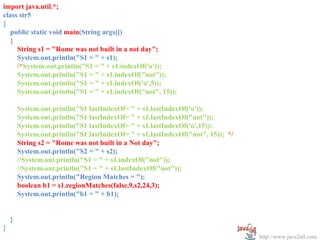
import java.util.*;
class str5
{
   public static void main(String args[])
   {
     String s1 = "Rome was not built in a not day";
     System.out.println("S1 = " + s1);
     /*System.out.println("S1 = " + s1.indexOf('o'));
     System.out.println("S1 = " + s1.indexOf("not"));
     System.out.println("S1 = " + s1.indexOf('o',5));
     System.out.println("S1 = " + s1.indexOf("not", 15));

        System.out.println("S1 lastIndexOf= " + s1.lastIndexOf('o'));
        System.out.println("S1 lastIndexOf= " + s1.lastIndexOf("not"));
        System.out.println("S1 lastIndexOf= " + s1.lastIndexOf('o',15));
        System.out.println("S1 lastIndexOf= " + s1.lastIndexOf("not", 15)); */
        String s2 = "Rome was not built in a Not day";
        System.out.println("S2 = " + s2);
        //System.out.println("S1 = " + s1.indexOf("not"));
        //System.out.println("S1 = " + s1.lastIndexOf("not"));
        System.out.println("Region Matches = ");
        boolean b1 = s1.regionMatches(false,9,s2,24,3);
        System.out.println("b1 = " + b1);


    }
}
                                                                                 http://www.java2all.com
Output :

S1 = Rome was not built in a not day
S2 = Rome was not built in a Not day
Region Matches =
b1 = false


                                       http://www.java2all.com
import java.util.*;
class str6
{
   public static void main(String args[])
   {
     String s1 = "Hello";
     String s2 = new String(s1);
     System.out.println(s1 + " equals " + s2 + " -> " + s1.equals(s2));
     System.out.println(s1 + " == " + s2 + " -> " + (s1 == s2));


    }
}


        Output :

        Hello equals Hello -> true
        Hello == Hello -> false


                                                                          http://www.java2all.com
StringBuffer Class


                 http://www.java2all.com
StringBuffer class :

      StringBuffer is a peer class of String. String
creates strings of fixed length, while StringBuffer
creates strings of flexible length that can be modified
in terms of both length and content.

      So Strings that need modification are handled by
StringBuffer class.

     We can insert characters and substrings in the
middle of a string, or append another string to the end.
                                              http://www.java2all.com
StringBufer defines these Constructor:


       StringBuffer()
       StringBuffer(int size)
       StringBuffer(String str)


                                         http://www.java2all.com
Method Call                   Task Performed
                              Gives the current length of a
Sb.length()
                              StringBuffer.
                              Gives the total allocated capacity
Sb.capacity()
                              (default 16)
                              Set the length of the buffer within
setLength(int len)
                              a String Buffer object.

charAt(int where)             Gives the value of character

                              Set the value of a character within
setCharAt(int where, char ch)
                              a StringBuffer.

                                                      http://www.java2all.com
Appends the string s2 to s1 at
S1.append(s2)
                                the end

                                Inserts the string s2 at the
S1.insert(n,s2)
                                position n of the string s1

S1.reverse()                    Reverse the string of s1

                                Delete the nth character of
S1.deleteCharAt(nth)
                                string s1

                                Delete characters from start to
S1.delete(StartIndex, endIndex)
                                end.


                                                     http://www.java2all.com
import java.util.*;

class strbuf1                                                   Output :
{
     public static void main(String args[])
     {
        StringBuffer s1 = new StringBuffer();
                                                                s1 =
        StringBuffer s2 = new StringBuffer("Bhagirath");        s2 = Bhagirath
        StringBuffer s3 = new StringBuffer(s2);
        StringBuffer s4 = new StringBuffer(100);                s3 = Bhagirath
        System.out.println("s1 = " + s1);
        System.out.println("s2 = " + s2);                       s1.length = 0
        System.out.println("s3 = " + s3);                       s2.length = 9
        System.out.println("s1.length = " + s1.length());       s3.length = 9
        System.out.println("s2.length = " + s2.length());
        System.out.println("s3.length = " + s3.length());       s4.length = 0
        System.out.println("s4.length = " + s4.length());
                                                                s1.capacity = 16
        System.out.println("s1.capacity = " + s1.capacity());
        System.out.println("s2.capacity = " + s2.capacity());
                                                                s2.capacity = 25
        System.out.println("s3.capacity = " + s3.capacity());   s3.capacity = 25
        System.out.println("s4.capacity = " + s4.capacity());
                                                                s4.capacity = 100
    }
}
                                                                            http://www.java2all.com
import java.util.*;
class strbuf2
{
     public static void main(String args[])
     {
        StringBuffer s1 = new StringBuffer("Java2all");
        StringBuffer s2 = new StringBuffer("Hello");
        System.out.println("s1 = " + s1);
        //System.out.println("s1.charAt(5) = " + s1.charAt(5));
        //s1.setCharAt(5,'z');
        //System.out.println("s1 = " + s1);
        //System.out.println("Inserting String = " + s1.insert(5,s2));
        //System.out.println("s1 = " + s1);
        //System.out.println("Appending String = " + s1.append(s2));
        //System.out.println("s1 = " + s1);
        //System.out.println("Reversing String = " + s1.reverse());
        //System.out.println("Deleting 5th character = " + s1.deleteCharAt(5));
        System.out.println("Deleting 5 to 8 character = " + s1.delete(5,8));
     }
}
          Output :

          s1 = Java2all
          Deleting 5 to 8 character =
          Java2                                                                   http://www.java2all.com
import java.util.*;

public class strbuf3
{                                                             Output :
  public static void main(String[] args)
  {

        StringBuffer s = new StringBuffer("Hello world!");
                                                              s = Hello world!
                                                              s.length() = 12
        System.out.println("s = " + s);
        System.out.println("s.length() = " + s.length());     s.length() = 28
        System.out.println("s.length() = " + s.capacity());
        // Change the length of buffer to 5 characters:       Hello
        s.setLength(5);                                       s.length() = 5
        System.out.println(s);                                s.length() = 28
        System.out.println("s.length() = " + s.length());
        System.out.println("s.length() = " + s.capacity());

    }
}


                                                                                 http://www.java2all.com