Step to create a network connection
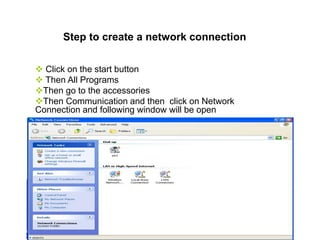
 Click on the start button
 Then All Programs
Then go to the accessories
Then Communication and then click on Network
Connection and following window will be open
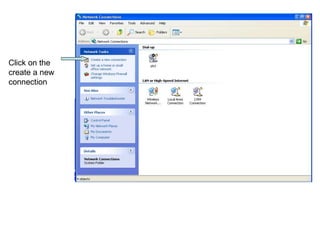
Click on the
create a new
connection
After click on the create a new connection
the following window will be open
Click on the next button
• There will be four option
• Select the connect to the internet option and click on the
next button
• There will be three option
• Select the option set up my connection
manually and click on next
• If you want to connect with internet using modem then
select 1st option and click on next button
• If you want to connect with internet using broadband
then select 2nd option and click on next button
• Write the name of the your ISP and click
on the next button
• Write the phone number of your ISP
• From pervious if you select the option connect
with internet using broadband then this option
will not display on the screen because phone
number not required for broadband.
• Write the user name, password and retype
the password and then click on the next
button
• Click on the finish button

Step to create a network connection

  • 1.
    Step to createa network connection  Click on the start button  Then All Programs Then go to the accessories Then Communication and then click on Network Connection and following window will be open
  • 2.
    Click on the createa new connection
  • 3.
    After click onthe create a new connection the following window will be open Click on the next button
  • 4.
    • There willbe four option • Select the connect to the internet option and click on the next button
  • 5.
    • There willbe three option • Select the option set up my connection manually and click on next
  • 6.
    • If youwant to connect with internet using modem then select 1st option and click on next button • If you want to connect with internet using broadband then select 2nd option and click on next button
  • 7.
    • Write thename of the your ISP and click on the next button
  • 8.
    • Write thephone number of your ISP • From pervious if you select the option connect with internet using broadband then this option will not display on the screen because phone number not required for broadband.
  • 9.
    • Write theuser name, password and retype the password and then click on the next button
  • 10.
    • Click onthe finish button