CCNA Guide to Cisco Networking Fundamentals  Chapter 9 Network Services
Objectives Understand the purpose and operation of network address translation (NAT) Understand and configure static NAT, dynamic NAT, and PAT Understand and configure Dynamic Host Configuration Protocol (DHCP) Understand and configure Domain Name Services (DNS) Configure network services using Cisco’s Security Device Manager (SDM) CCNA Guide to Cisco Networking Fundamentals
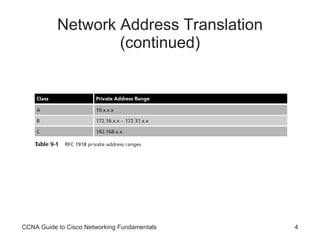
Network Address Translation Network address translation (NAT)   Defined in RFC 3022 Describes methods for connecting private (internal) IP addresses to the Internet NAT uses a one-to-one mapping or one-to-many mapping method To allow one or more private IP clients to gain access to the Internet by mapping the private IP addresses to public IP addresses CCNA Guide to Cisco Networking Fundamentals
Network Address Translation (continued) CCNA Guide to Cisco Networking Fundamentals
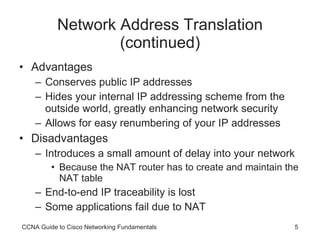
Network Address Translation (continued) Advantages Conserves public IP addresses Hides your internal IP addressing scheme from the outside world, greatly enhancing network security Allows for easy renumbering of your IP addresses Disadvantages Introduces a small amount of delay into your network  Because the NAT router has to create and maintain the NAT table End-to-end IP traceability is lost Some applications fail due to NAT CCNA Guide to Cisco Networking Fundamentals
Network Address Translation (continued) NAT is available in three forms: Static NAT Dynamic NAT Port address translation (PAT) CCNA Guide to Cisco Networking Fundamentals
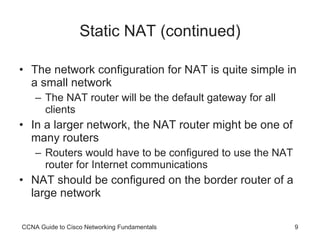
Static NAT Static NAT The simplest form of NAT A single private IP address is mapped to a single public IP address NAT router must maintain a table in memory Table maps internal IP addresses to addresses presented to the Internet CCNA Guide to Cisco Networking Fundamentals
CCNA Guide to Cisco Networking Fundamentals
Static NAT (continued) The network configuration for NAT is quite simple in a small network The NAT router will be the default gateway for all clients In a larger network, the NAT router might be one of many routers Routers would have to be configured to use the NAT router for Internet communications NAT should be configured on the border router of a large network CCNA Guide to Cisco Networking Fundamentals
Dynamic NAT Dynamic NAT   The NAT router automatically maps a group of valid local IP addresses to a group of Internet IP addresses, as needed The network administrator is not concerned about which IP address the internal clients use Any private IP address will automatically be translated to one of the available Internet IP addresses by the NAT router Addresses for dynamic NAT are pulled out of a predefined pool of public addresses CCNA Guide to Cisco Networking Fundamentals
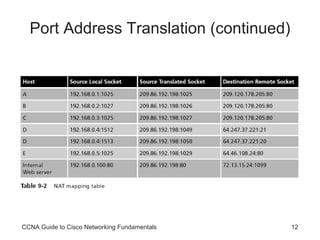
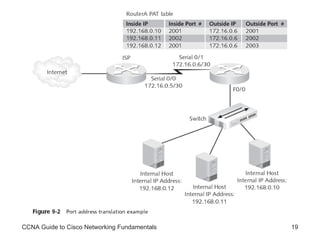
Port Address Translation Port address translation (PAT) Also known as  overloading Is a special form of dynamic NAT Allows multiple internal, private IP addresses to use a single external registered address To differentiate between the connections, PAT uses multiple public TCP and UDP ports To create unique sockets that map to internal IP addresses CCNA Guide to Cisco Networking Fundamentals
Port Address Translation (continued) CCNA Guide to Cisco Networking Fundamentals
Port Address Translation (continued) The NAT server uses  port forwarding To send connections from external clients to the Web server on the internal network Overlapping Occurs when:  The internal network has been incorrectly configured for an IP range that actually exists on the Internet  or Two companies merge and each company was using the same private IP address range Can be solved using NAT because NAT hides the incorrectly configured internal IP scheme CCNA Guide to Cisco Networking Fundamentals
Configuring Network Address Translation You can configure NAT as static NAT, dynamic NAT, or PAT CCNA Guide to Cisco Networking Fundamentals
Configuring Static NAT Configuring static NAT is a two-step process: Define the static mapping between the inside address and the outside address Define the NAT router’s interfaces as inside or outside The static mapping is defined with the following command: ip nat inside source static [ inside ip] [outside ip] CCNA Guide to Cisco Networking Fundamentals
Configuring Dynamic NAT Steps: Configure a standard access control list to define what internal traffic will be translated Define a pool of addresses to be used for dynamic NAT allocation Link the access list to the NAT pool Define interfaces as either inside or outside To define the standard access list, you must use the following syntax: RouterA(config)#access-list [1-99] permit [inside IP network(s)] [wildcard mask] CCNA Guide to Cisco Networking Fundamentals
Configuring Dynamic NAT (continued) The syntax for defining the NAT pool is: ip nat pool  [ pool name] [start ip] [end ip]  netmask  [netmask] The pool must then be linked to the access list with the following command: ip nat inside source list  [ access list number]  pool  [pool name] Finally, you must define the interfaces as either inside or outside CCNA Guide to Cisco Networking Fundamentals
Configuring Dynamic NAT (continued) Steps for configuring PAT: Configure a standard access list to define what internal traffic will be translated Link the access list to the interface to be used for PAT Define interfaces as either inside or outside CCNA Guide to Cisco Networking Fundamentals
CCNA Guide to Cisco Networking Fundamentals
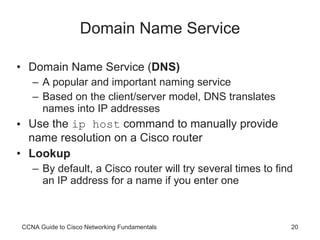
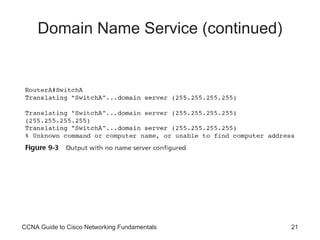
Domain Name Service Domain Name Service ( DNS) A popular and important naming service Based on the client/server model, DNS translates names into IP addresses Use the  ip host  command to manually provide name resolution on a Cisco router Lookup By default, a Cisco router will try several times to find an IP address for a name if you enter one CCNA Guide to Cisco Networking Fundamentals
Domain Name Service (continued) CCNA Guide to Cisco Networking Fundamentals
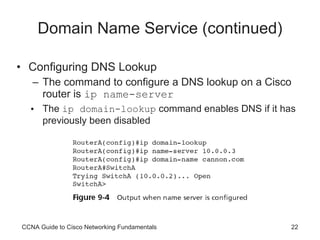
Domain Name Service (continued) Configuring DNS Lookup The command to configure a DNS lookup on a Cisco router is  ip name-server The  ip domain-lookup  command enables DNS if it has previously been disabled CCNA Guide to Cisco Networking Fundamentals
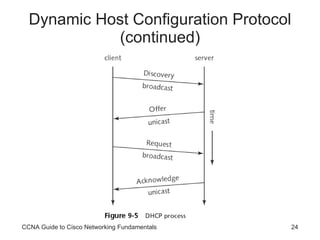
Dynamic Host Configuration Protocol Dynamic Host Configuration Protocol ( DHCP ) Provides IP configuration information to hosts on bootup This functionality is much like that provided by older protocols RARP and BOOTP DHCP manages addressing by leasing the IP information to the hosts This leasing allows the information to be recovered when not in use and reallocated when needed CCNA Guide to Cisco Networking Fundamentals
Dynamic Host Configuration Protocol (continued) CCNA Guide to Cisco Networking Fundamentals
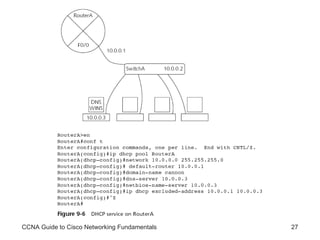
Dynamic Host Configuration Protocol (continued) You can configure your Cisco router to be a DHCP server DHCP relay The router can forward the request to other DHCP servers if it cannot satisfy a DHCP request Configuring the router to be a DHCP server Enable the service using the  service dhcp  command at the global configuration mode prompt Configure DHCP bindings and decide where to store the DHCP bindings database CCNA Guide to Cisco Networking Fundamentals
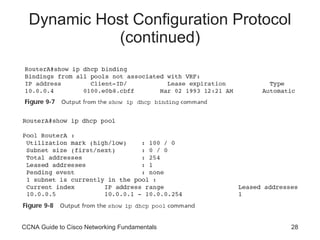
Dynamic Host Configuration Protocol (continued) Configuring the router to be a DHCP server (continued) Define the pool of addresses Configure any optional IP configuration parameters Exclude any statically configured addresses Monitoring DHCP The best way to check the bindings is to execute the  show ip dhcp binding  command on the router For information on the specific DHCP address pool, use the  show ip dhcp pool  command CCNA Guide to Cisco Networking Fundamentals
CCNA Guide to Cisco Networking Fundamentals
Dynamic Host Configuration Protocol (continued) CCNA Guide to Cisco Networking Fundamentals
Security Device Manager Cisco’s new Security Device Manager (SDM) Web-based tool for advanced configuration on Cisco routers SDM can be used to configure the NAT, DNS, and DHCP services These services are relatively easy to configure using the command-line interface CCNA Guide to Cisco Networking Fundamentals
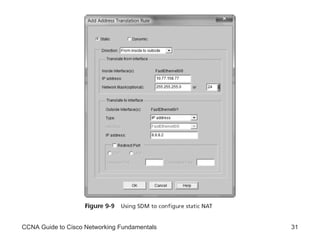
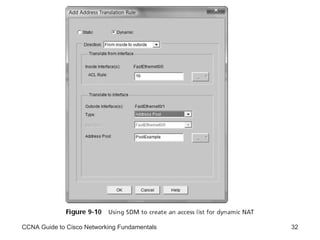
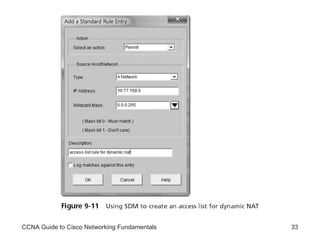
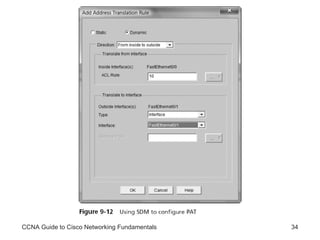
Security Device Manager (continued) Using SDM to Configure NAT Using SDM to configure static NAT See Figure 9-9 Using SDM to configure dynamic NAT See Figures 9-10 and 9-11 Using SDM to configure PAT See Figure 9-12 CCNA Guide to Cisco Networking Fundamentals
CCNA Guide to Cisco Networking Fundamentals
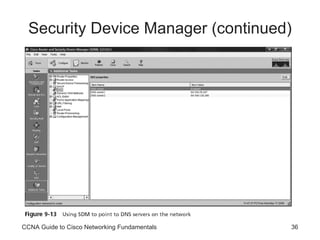
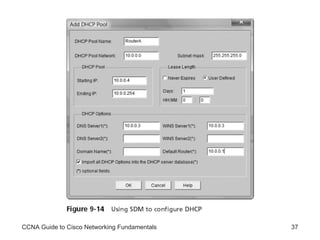
Security Device Manager (continued) Using SDM to configure DNS See Figure 9-13 Using SDM to configure DHCP See Figure 9-14 CCNA Guide to Cisco Networking Fundamentals
Security Device Manager (continued) CCNA Guide to Cisco Networking Fundamentals
CCNA Guide to Cisco Networking Fundamentals
Summary NAT is a technology that allows organizations to map valid external addresses to private or unregistered internal addresses Organizations can use NAT to allow many more people to access the Internet by sharing one or more valid public addresses Static NAT involves mapping each internal IP address to a separately defined outside IP address Dynamic NAT involves the mapping of inside addresses to a smaller pool of outside addresses CCNA Guide to Cisco Networking Fundamentals
Summary (continued) PAT allows an organization to map more than one internal private IP address to a single outside IP address by using port numbers to identify the separate connections The Domain Name Service (DNS) is used to provide an IP address-to-name mapping so that users can refer to hosts by name rather than address CCNA Guide to Cisco Networking Fundamentals
Summary (continued) The Dynamic Host Configuration Protocol provides IP configuration information such as address, subnet mask, default-gateway, DNS and WINS server location, and domain name to hosts on the network SDM is a Web-enabled Cisco product that allows advanced router configuration without using the command-line interface CCNA Guide to Cisco Networking Fundamentals

CCNA Network Services

  • 1.
    CCNA Guide toCisco Networking Fundamentals Chapter 9 Network Services
  • 2.
    Objectives Understand thepurpose and operation of network address translation (NAT) Understand and configure static NAT, dynamic NAT, and PAT Understand and configure Dynamic Host Configuration Protocol (DHCP) Understand and configure Domain Name Services (DNS) Configure network services using Cisco’s Security Device Manager (SDM) CCNA Guide to Cisco Networking Fundamentals
  • 3.
    Network Address TranslationNetwork address translation (NAT) Defined in RFC 3022 Describes methods for connecting private (internal) IP addresses to the Internet NAT uses a one-to-one mapping or one-to-many mapping method To allow one or more private IP clients to gain access to the Internet by mapping the private IP addresses to public IP addresses CCNA Guide to Cisco Networking Fundamentals
  • 4.
    Network Address Translation(continued) CCNA Guide to Cisco Networking Fundamentals
  • 5.
    Network Address Translation(continued) Advantages Conserves public IP addresses Hides your internal IP addressing scheme from the outside world, greatly enhancing network security Allows for easy renumbering of your IP addresses Disadvantages Introduces a small amount of delay into your network Because the NAT router has to create and maintain the NAT table End-to-end IP traceability is lost Some applications fail due to NAT CCNA Guide to Cisco Networking Fundamentals
  • 6.
    Network Address Translation(continued) NAT is available in three forms: Static NAT Dynamic NAT Port address translation (PAT) CCNA Guide to Cisco Networking Fundamentals
  • 7.
    Static NAT StaticNAT The simplest form of NAT A single private IP address is mapped to a single public IP address NAT router must maintain a table in memory Table maps internal IP addresses to addresses presented to the Internet CCNA Guide to Cisco Networking Fundamentals
  • 8.
    CCNA Guide toCisco Networking Fundamentals
  • 9.
    Static NAT (continued)The network configuration for NAT is quite simple in a small network The NAT router will be the default gateway for all clients In a larger network, the NAT router might be one of many routers Routers would have to be configured to use the NAT router for Internet communications NAT should be configured on the border router of a large network CCNA Guide to Cisco Networking Fundamentals
  • 10.
    Dynamic NAT DynamicNAT The NAT router automatically maps a group of valid local IP addresses to a group of Internet IP addresses, as needed The network administrator is not concerned about which IP address the internal clients use Any private IP address will automatically be translated to one of the available Internet IP addresses by the NAT router Addresses for dynamic NAT are pulled out of a predefined pool of public addresses CCNA Guide to Cisco Networking Fundamentals
  • 11.
    Port Address TranslationPort address translation (PAT) Also known as overloading Is a special form of dynamic NAT Allows multiple internal, private IP addresses to use a single external registered address To differentiate between the connections, PAT uses multiple public TCP and UDP ports To create unique sockets that map to internal IP addresses CCNA Guide to Cisco Networking Fundamentals
  • 12.
    Port Address Translation(continued) CCNA Guide to Cisco Networking Fundamentals
  • 13.
    Port Address Translation(continued) The NAT server uses port forwarding To send connections from external clients to the Web server on the internal network Overlapping Occurs when: The internal network has been incorrectly configured for an IP range that actually exists on the Internet or Two companies merge and each company was using the same private IP address range Can be solved using NAT because NAT hides the incorrectly configured internal IP scheme CCNA Guide to Cisco Networking Fundamentals
  • 14.
    Configuring Network AddressTranslation You can configure NAT as static NAT, dynamic NAT, or PAT CCNA Guide to Cisco Networking Fundamentals
  • 15.
    Configuring Static NATConfiguring static NAT is a two-step process: Define the static mapping between the inside address and the outside address Define the NAT router’s interfaces as inside or outside The static mapping is defined with the following command: ip nat inside source static [ inside ip] [outside ip] CCNA Guide to Cisco Networking Fundamentals
  • 16.
    Configuring Dynamic NATSteps: Configure a standard access control list to define what internal traffic will be translated Define a pool of addresses to be used for dynamic NAT allocation Link the access list to the NAT pool Define interfaces as either inside or outside To define the standard access list, you must use the following syntax: RouterA(config)#access-list [1-99] permit [inside IP network(s)] [wildcard mask] CCNA Guide to Cisco Networking Fundamentals
  • 17.
    Configuring Dynamic NAT(continued) The syntax for defining the NAT pool is: ip nat pool [ pool name] [start ip] [end ip] netmask [netmask] The pool must then be linked to the access list with the following command: ip nat inside source list [ access list number] pool [pool name] Finally, you must define the interfaces as either inside or outside CCNA Guide to Cisco Networking Fundamentals
  • 18.
    Configuring Dynamic NAT(continued) Steps for configuring PAT: Configure a standard access list to define what internal traffic will be translated Link the access list to the interface to be used for PAT Define interfaces as either inside or outside CCNA Guide to Cisco Networking Fundamentals
  • 19.
    CCNA Guide toCisco Networking Fundamentals
  • 20.
    Domain Name ServiceDomain Name Service ( DNS) A popular and important naming service Based on the client/server model, DNS translates names into IP addresses Use the ip host command to manually provide name resolution on a Cisco router Lookup By default, a Cisco router will try several times to find an IP address for a name if you enter one CCNA Guide to Cisco Networking Fundamentals
  • 21.
    Domain Name Service(continued) CCNA Guide to Cisco Networking Fundamentals
  • 22.
    Domain Name Service(continued) Configuring DNS Lookup The command to configure a DNS lookup on a Cisco router is ip name-server The ip domain-lookup command enables DNS if it has previously been disabled CCNA Guide to Cisco Networking Fundamentals
  • 23.
    Dynamic Host ConfigurationProtocol Dynamic Host Configuration Protocol ( DHCP ) Provides IP configuration information to hosts on bootup This functionality is much like that provided by older protocols RARP and BOOTP DHCP manages addressing by leasing the IP information to the hosts This leasing allows the information to be recovered when not in use and reallocated when needed CCNA Guide to Cisco Networking Fundamentals
  • 24.
    Dynamic Host ConfigurationProtocol (continued) CCNA Guide to Cisco Networking Fundamentals
  • 25.
    Dynamic Host ConfigurationProtocol (continued) You can configure your Cisco router to be a DHCP server DHCP relay The router can forward the request to other DHCP servers if it cannot satisfy a DHCP request Configuring the router to be a DHCP server Enable the service using the service dhcp command at the global configuration mode prompt Configure DHCP bindings and decide where to store the DHCP bindings database CCNA Guide to Cisco Networking Fundamentals
  • 26.
    Dynamic Host ConfigurationProtocol (continued) Configuring the router to be a DHCP server (continued) Define the pool of addresses Configure any optional IP configuration parameters Exclude any statically configured addresses Monitoring DHCP The best way to check the bindings is to execute the show ip dhcp binding command on the router For information on the specific DHCP address pool, use the show ip dhcp pool command CCNA Guide to Cisco Networking Fundamentals
  • 27.
    CCNA Guide toCisco Networking Fundamentals
  • 28.
    Dynamic Host ConfigurationProtocol (continued) CCNA Guide to Cisco Networking Fundamentals
  • 29.
    Security Device ManagerCisco’s new Security Device Manager (SDM) Web-based tool for advanced configuration on Cisco routers SDM can be used to configure the NAT, DNS, and DHCP services These services are relatively easy to configure using the command-line interface CCNA Guide to Cisco Networking Fundamentals
  • 30.
    Security Device Manager(continued) Using SDM to Configure NAT Using SDM to configure static NAT See Figure 9-9 Using SDM to configure dynamic NAT See Figures 9-10 and 9-11 Using SDM to configure PAT See Figure 9-12 CCNA Guide to Cisco Networking Fundamentals
  • 31.
    CCNA Guide toCisco Networking Fundamentals
  • 32.
    CCNA Guide toCisco Networking Fundamentals
  • 33.
    CCNA Guide toCisco Networking Fundamentals
  • 34.
    CCNA Guide toCisco Networking Fundamentals
  • 35.
    Security Device Manager(continued) Using SDM to configure DNS See Figure 9-13 Using SDM to configure DHCP See Figure 9-14 CCNA Guide to Cisco Networking Fundamentals
  • 36.
    Security Device Manager(continued) CCNA Guide to Cisco Networking Fundamentals
  • 37.
    CCNA Guide toCisco Networking Fundamentals
  • 38.
    Summary NAT isa technology that allows organizations to map valid external addresses to private or unregistered internal addresses Organizations can use NAT to allow many more people to access the Internet by sharing one or more valid public addresses Static NAT involves mapping each internal IP address to a separately defined outside IP address Dynamic NAT involves the mapping of inside addresses to a smaller pool of outside addresses CCNA Guide to Cisco Networking Fundamentals
  • 39.
    Summary (continued) PATallows an organization to map more than one internal private IP address to a single outside IP address by using port numbers to identify the separate connections The Domain Name Service (DNS) is used to provide an IP address-to-name mapping so that users can refer to hosts by name rather than address CCNA Guide to Cisco Networking Fundamentals
  • 40.
    Summary (continued) TheDynamic Host Configuration Protocol provides IP configuration information such as address, subnet mask, default-gateway, DNS and WINS server location, and domain name to hosts on the network SDM is a Web-enabled Cisco product that allows advanced router configuration without using the command-line interface CCNA Guide to Cisco Networking Fundamentals