
How to use the ‘IF’ function  in Excelbyfamilycomputerclub.comhttp://www.familycomputerclub.com
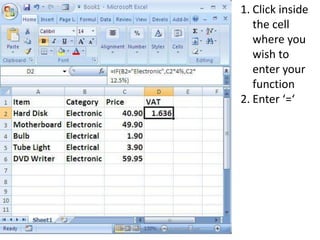
Click inside the cell where you wish to enter your functionEnter ‘=‘http://www.familycomputerclub.com
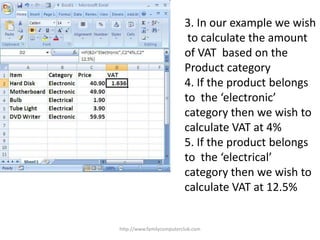
3. In our example we wish to calculate the amount of VAT  based on theProduct category4. If the product belongs to  the ‘electronic’category then we wish to calculate VAT at 4%5. If the product belongs to  the ‘electrical’category then we wish to calculate VAT at 12.5%http://www.familycomputerclub.com
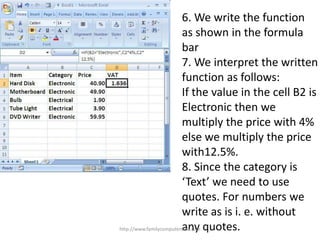
6. We write the function as shown in the formulabar7. We interpret the writtenfunction as follows:If the value in the cell B2 is Electronic then we multiply the price with 4%else we multiply the pricewith12.5%.8. Since the category is‘Text’ we need to use quotes. For numbers wewrite as is i. e. without any quotes.http://www.familycomputerclub.com
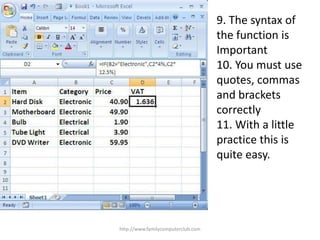
http://www.familycomputerclub.com9. The syntax of the function isImportant10. You must use quotes, commas and brackets correctly 11. With a littlepractice this is quite easy.
http://www.familycomputerclub.comThanks for watching!If you need more details log onto familycomputerclub.com

If Function In Excel

  • 1.
    How to usethe ‘IF’ function in Excelbyfamilycomputerclub.comhttp://www.familycomputerclub.com
  • 2.
    Click inside thecell where you wish to enter your functionEnter ‘=‘http://www.familycomputerclub.com
  • 3.
    3. In ourexample we wish to calculate the amount of VAT based on theProduct category4. If the product belongs to the ‘electronic’category then we wish to calculate VAT at 4%5. If the product belongs to the ‘electrical’category then we wish to calculate VAT at 12.5%http://www.familycomputerclub.com
  • 4.
    6. We writethe function as shown in the formulabar7. We interpret the writtenfunction as follows:If the value in the cell B2 is Electronic then we multiply the price with 4%else we multiply the pricewith12.5%.8. Since the category is‘Text’ we need to use quotes. For numbers wewrite as is i. e. without any quotes.http://www.familycomputerclub.com
  • 5.
    http://www.familycomputerclub.com9. The syntaxof the function isImportant10. You must use quotes, commas and brackets correctly 11. With a littlepractice this is quite easy.
  • 6.
    http://www.familycomputerclub.comThanks for watching!Ifyou need more details log onto familycomputerclub.com